
How an HR Application for Microsoft Teams Transforms Workplace Efficiency

- An HR application for Microsoft Teams brings everyday HR tasks into one familiar workspace.
- Microsoft 365 integration connects HR data with Teams, SharePoint, Outlook, and other Microsoft services.
- Organizations can manage onboarding, leave, attendance, employee records, performance, and more without relying on disconnected systems.
- Choosing a native HR platform for Microsoft Teams helps create a more connected HR experience for managers and team members.
If your organization already uses Microsoft Teams for meetings, messaging, file sharing, and collaboration, it makes sense to ask another question: Why should HR happen somewhere else? An HR application for Microsoft Teams brings everyday HR tasks into the platform where managers and team members already work. Rather than switching between multiple systems, users can access important HR information, submit requests, and complete routine tasks without leaving Teams.
According to Microsoft, more than 320 million people use Microsoft Teams every month, making it one of the world’s most widely used workplace collaboration platforms.
As organizations spend more of their workday inside Teams, many are also moving HR activities into the same workspace instead of relying on separate applications.
This guide explains what an HR application for Microsoft Teams is, why organizations are adopting it, and how it supports day-to-day HR operations. You’ll also learn what features to look for when choosing an HR app for Microsoft Teams and how solutions like HR365 HRMS fit naturally into organizations already using Microsoft 365.
What Is an HR Application for Microsoft Teams?
An HR application for Microsoft Teams is HR software that works directly inside Microsoft Teams. Instead of opening a separate HR portal, users can complete common HR activities from the Teams interface they already use throughout the day.
Depending on the solution, an HR management app for Teams can provide access to employee information, leave requests, attendance, onboarding, announcements, performance reviews, learning resources, and other HR services. Unlike traditional HR software that operates as a separate application, a Microsoft Teams-based HR solution becomes part of the daily workflow, so team members do not have to remember another website, another password, or another place for HR information.
For example, someone can request vacation, submit leave, or check approval updates directly within Teams, while managers can review requests, attendance records, employee profiles, and onboarding progress without switching applications. Many organizations using Microsoft 365 prefer this approach because Teams already serves as their communication hub, and solutions such as HR365 HRMS extend that environment by bringing core HR functions into Microsoft Teams, SharePoint, and Microsoft 365.
Why Are Organizations Managing HR Inside Microsoft Teams?
One question appears repeatedly across Microsoft Teams communities and HR discussions:
“We’re already using Teams every day. Why should HR be in another application?”
That question reflects a growing trend.
Many organizations have already invested in Microsoft 365 for communication, document management, meetings, and collaboration. Adding HR capabilities inside Microsoft Teams reduces the need to move between multiple systems during the workday. Community discussions from Microsoft users also show growing interest in HR tools that integrate directly with Teams and Outlook rather than requiring separate logins.
Common themes include:
- Too many systems for simple HR requests
- Difficulty tracking employee information across different tools
- Managers wanting approvals inside Microsoft Teams
- New team members asking where HR documents are stored
- HR teams looking for solutions that fit naturally into Microsoft 365 instead of introducing another platform
These conversations show that organizations are no longer looking only for feature-rich HR software. They also want software that fits the way people already work.
An HR application for Microsoft Teams addresses this need by making HR part of the daily collaboration experience.
For example:
- Leave requests can begin inside Teams.
- Managers receive approval notifications in Teams.
- HR announcements reach people where conversations already happen.
- Employee directories become easier to access.
- New hires know exactly where to find onboarding resources.
This approach also supports hybrid work.
Many organizations now work across multiple locations, and Microsoft Teams already brings meetings, chat, documents, and collaboration into one place. Adding an HR app for Microsoft Teams keeps HR tasks in the same familiar workspace.
Organizations also prefer HR tools that integrate with Microsoft 365 instead of using disconnected systems. Solutions like HR365 HRMS follow this approach by bringing employee records, onboarding, attendance, leave, performance, tasks, learning, and dashboards into Microsoft Teams.
What Are the Benefits of Using an HR Application in Microsoft Teams?
An HR application for Microsoft Teams is more than another business application. It brings HR services into the platform where communication, meetings, files, and daily work already happen. Instead of asking people to visit a separate HR portal, the experience becomes part of their normal workday.
Research from Gartner shows that organizations continue to increase their investment in digital HR technology to improve the employee experience and support modern ways of working.
As hybrid work becomes the norm, organizations are looking for HR solutions that fit naturally into their digital workplace.
1. Access HR Services Without Leaving Teams
One of the biggest advantages of an HR app for Microsoft Teams is convenience because employees can apply for leave, view company policies, update personal information, and check an upcoming holiday calendar directly inside Teams, saving time and creating a more connected workplace experience.
2. Improve Communication Between HR and Team Members
HR communication is often scattered across emails, chat messages, shared folders, and intranet pages, but with an HR platform for Microsoft Teams, announcements, policy updates, holiday notifications, and important reminders can reach team members in the same place where they already collaborate, while also making it easier for managers to receive approval requests and HR notifications without relying on multiple communication channels.
3. Support Better Employee Onboarding
A structured onboarding experience helps new hires understand company policies, complete required documents, meet their teams, and begin training more quickly, and an HR management app for Teams can keep onboarding resources, welcome guides, training materials, organizational charts, and important contacts inside Microsoft Teams.
4. Make Leave and Attendance Easier to Manage
Leave requests are one of the most common HR activities, and an HR application for Microsoft Teams makes the process easier by allowing team members to submit requests directly in Teams while managers review approvals, and HR teams monitor leave balances, calendars, approval history, attendance, and timesheets from one place.
5. Better Visibility for Managers
Managers often need quick access to HR information.
An HR app for Microsoft Teams gives them visibility into:
- Team leave schedules
- Employee profiles
- Attendance records
- Onboarding progress
- Performance activities
- Assigned HR tasks
Instead of requesting information from HR, managers can access relevant data when they need it.
Solutions like HR365 HRMS also provide dashboards that give managers a better view of ongoing HR activities.
6. Support AI-Powered HR Experiences
AI is becoming an important part of HR technology.
Modern HR applications can use AI to answer common HR questions, guide team members through HR processes, recommend learning resources, and reduce repetitive administrative work.
HR365 HRMS includes AI-powered capabilities that help organizations automate routine HR activities while keeping HR services available inside Microsoft Teams.
According to Deloitte’s Global Human Capital Trends research, organizations continue to invest in AI to support HR operations and improve workplace productivity.
Which HR Tasks Can Be Managed Directly in Microsoft Teams?
One of the reasons organizations choose an HR application for Microsoft Teams is the ability to complete everyday HR work without changing applications.
Here are some of the most common HR activities that can be managed directly inside Teams.
HR Dashboards and Reports
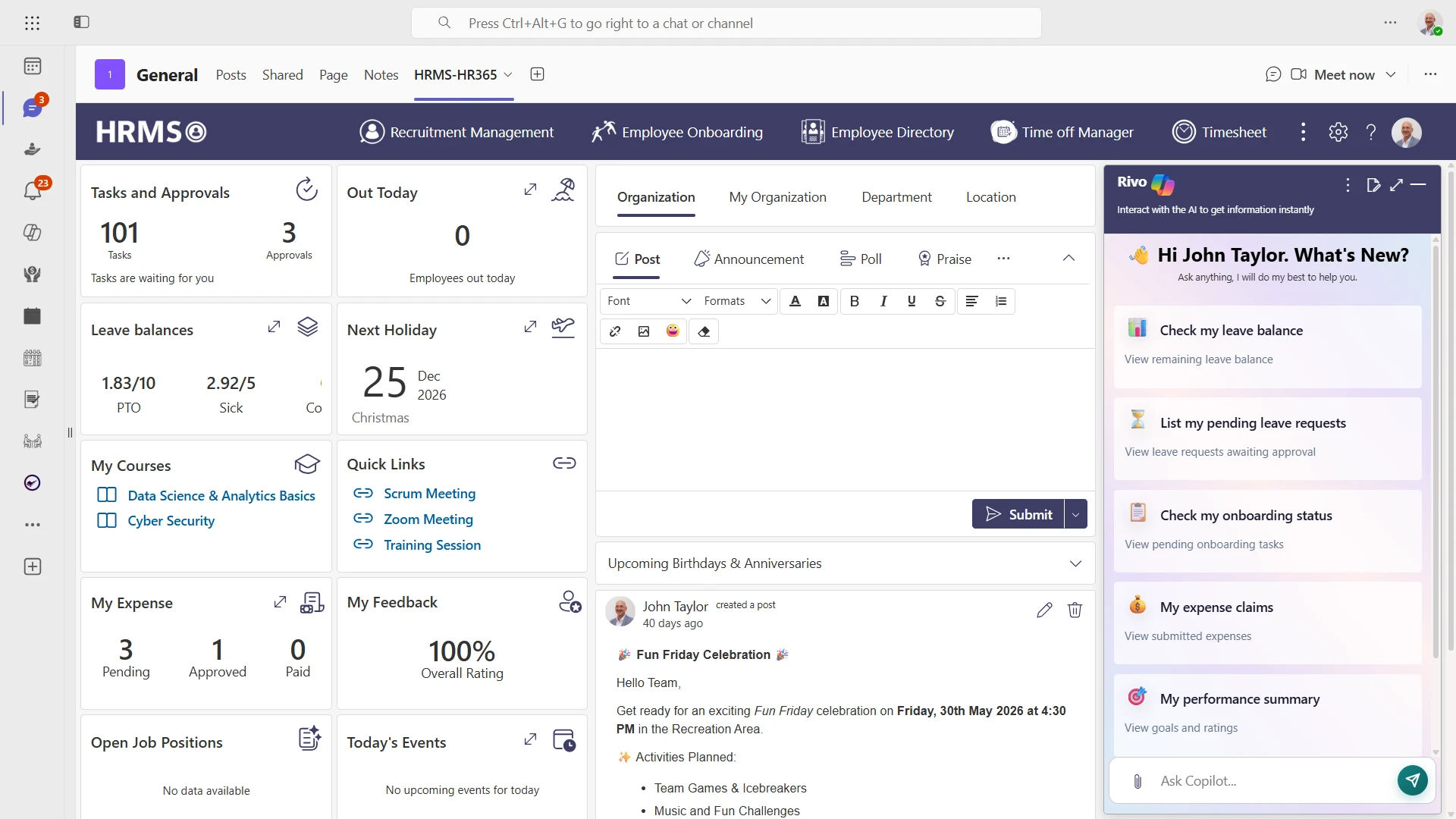
HR leaders need visibility into workforce trends.
HR365 HRMS provides dashboards that help HR teams monitor onboarding, attendance, leave, performance, recruitment, task management, and other HR activities through Microsoft Teams and Microsoft 365.
Employee Directory
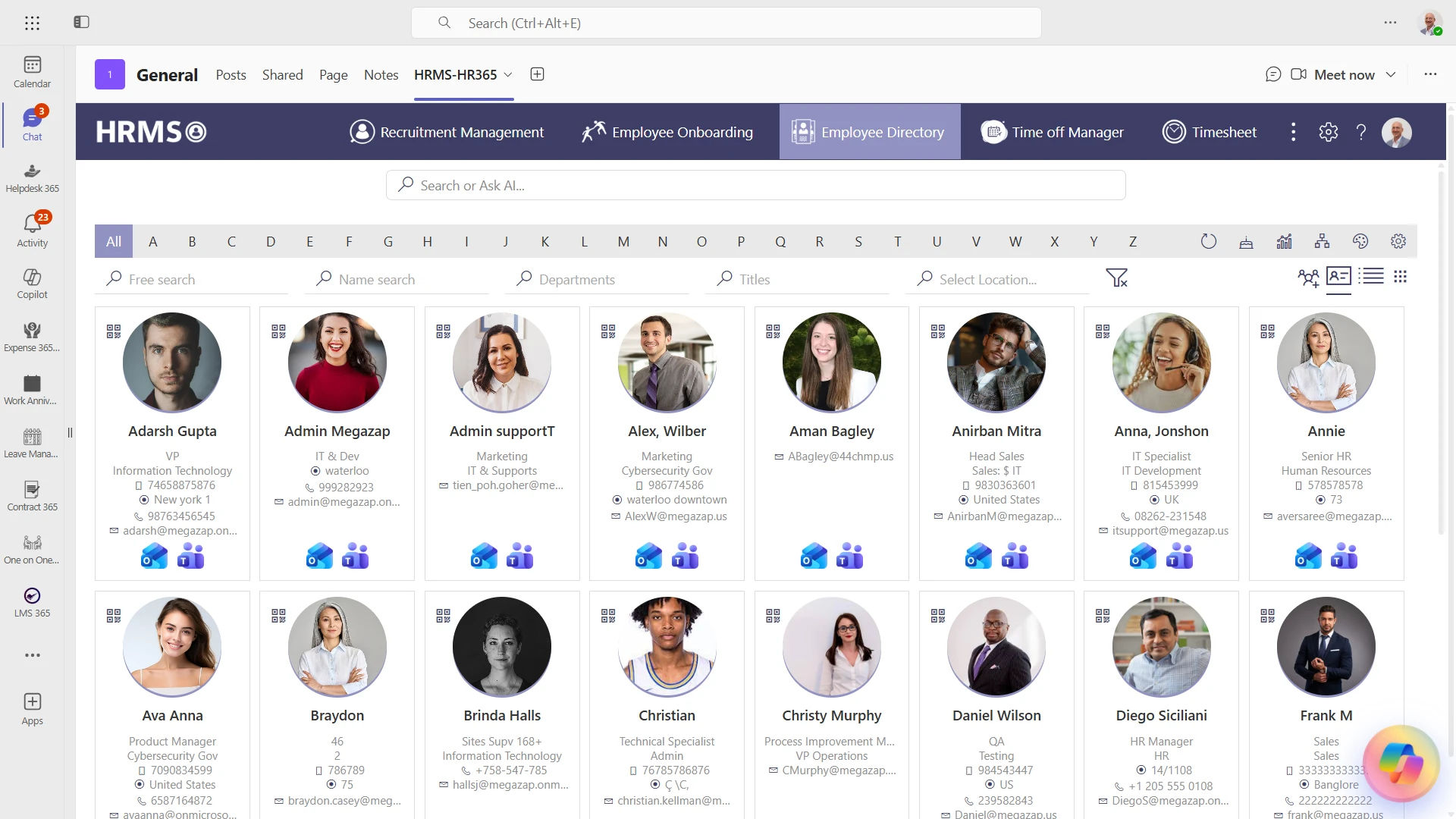
Finding the right person should not require searching across multiple systems.
A modern HR platform for Microsoft Teams gives managers and team members access to employee profiles, reporting structures, contact details, departments, locations, and organizational charts from one place.
With HR365 HRMS, the employee directory stays connected with Microsoft 365, helping organizations maintain accurate employee information.
Leave Management
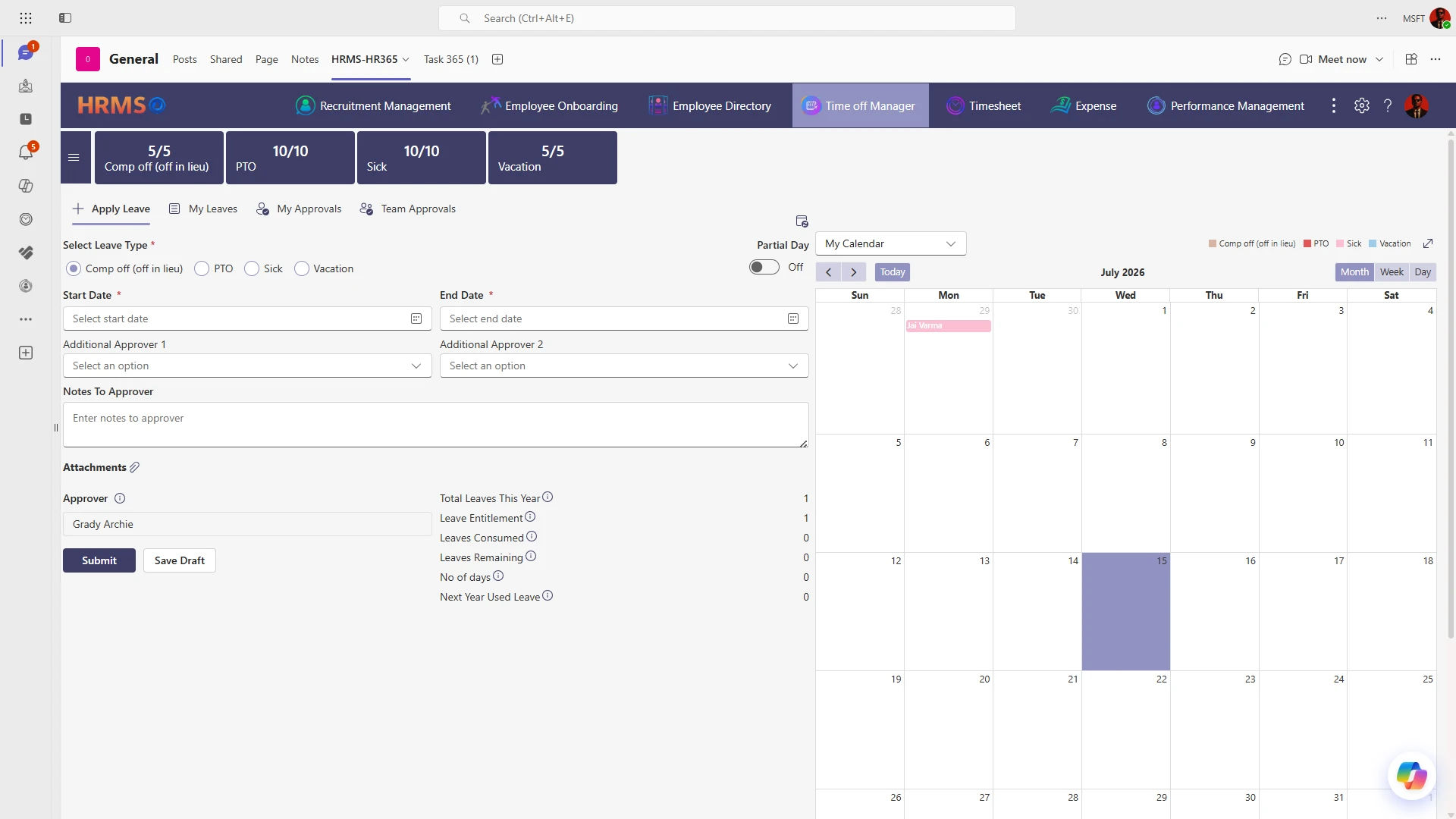
Submitting leave should be simple.
Leave management app for Teams lets team members:
- Apply for leave
- View leave balances
- Check holiday calendars
- Track approval status
- Receive approval notifications
Managers can review requests and approve them directly inside Microsoft Teams.
Attendance and Timesheets
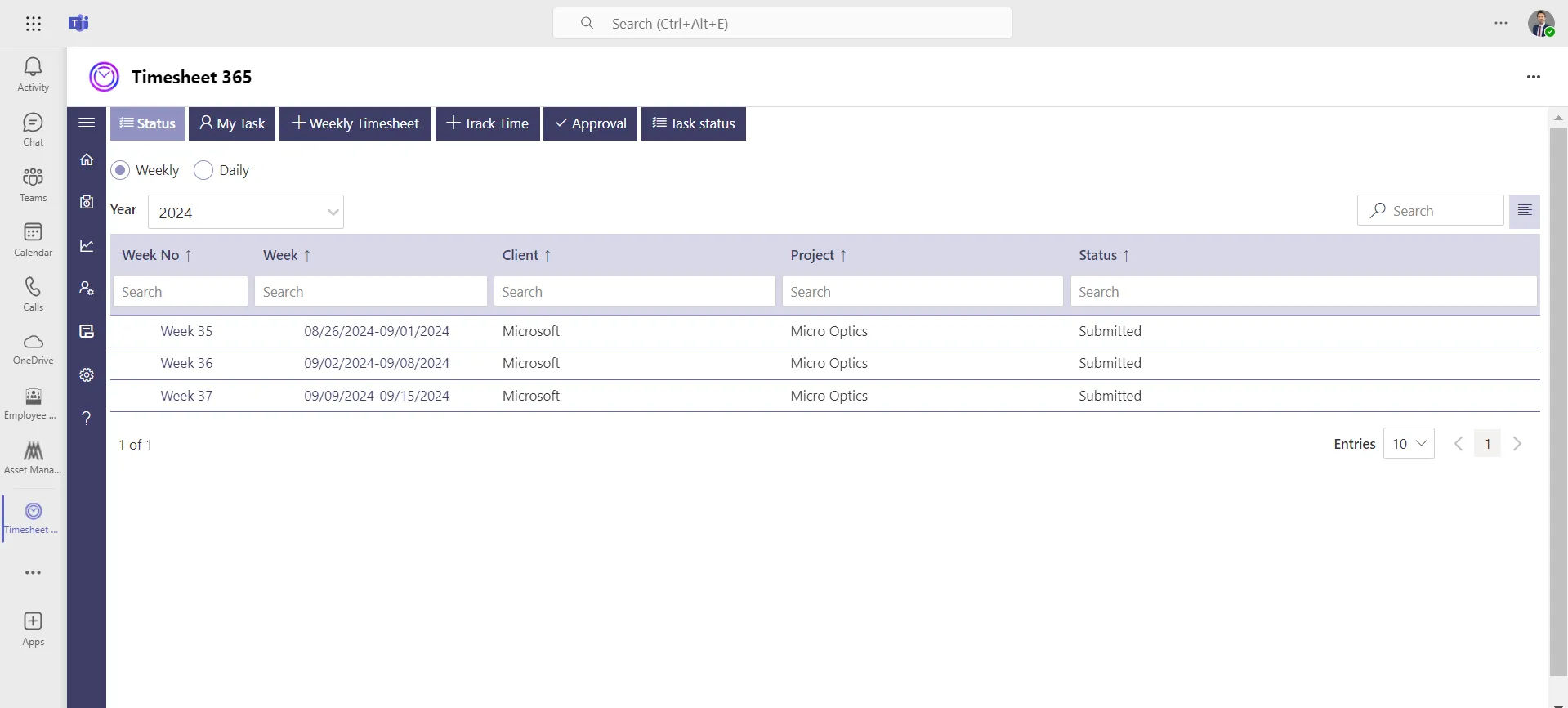
Attendance tracking and timesheet management are important for many organizations.
An HR application for Microsoft Teams can help managers review attendance records, identify missing timesheets, and monitor working hours from a single interface.
HR365 HRMS includes attendance recording and timesheet management designed for Microsoft 365 users.
Employee Onboarding
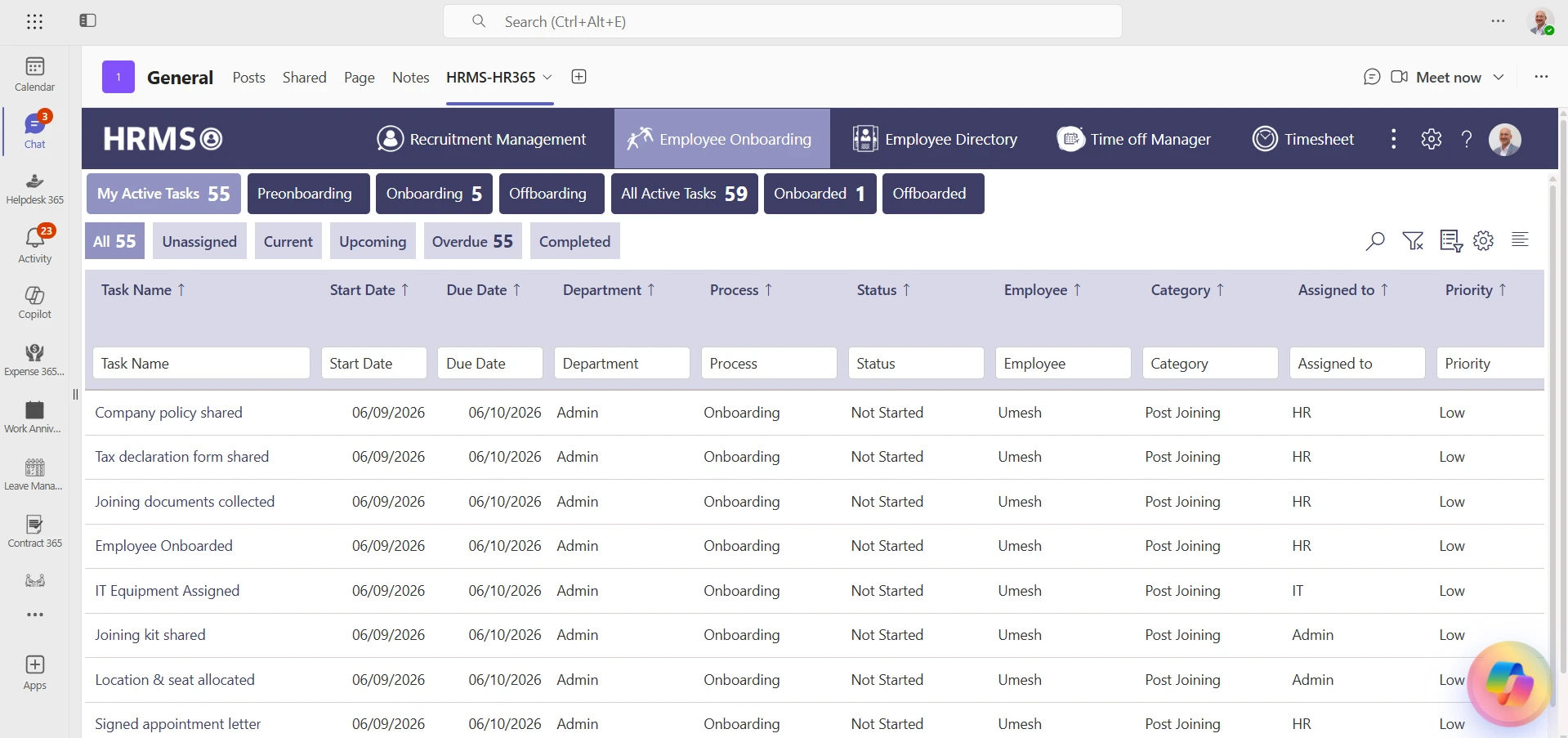
New hires often need access to documents, policies, training, introductions, and onboarding tasks.
Instead of sending multiple emails, an HR app for Microsoft Teams keeps onboarding activities organized within Teams.
Managers can assign onboarding tasks, while new hires can complete them step by step.
Recruitment
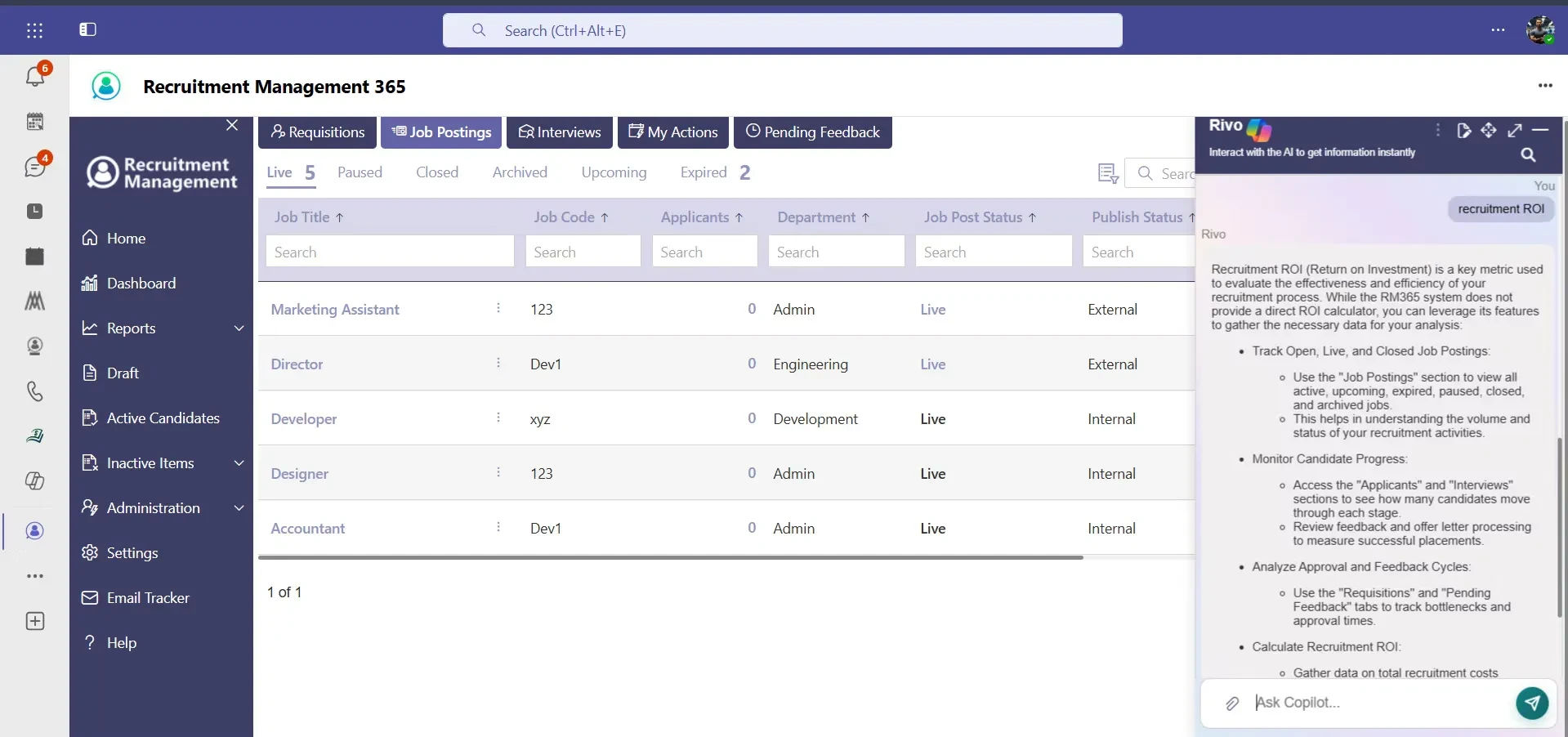
Hiring managers can collaborate more effectively when recruitment activities are available inside Microsoft Teams.
An HR platform for Microsoft Teams can support job openings, candidate tracking, interview coordination, and hiring workflows while keeping everyone connected during the hiring process.
Performance Management
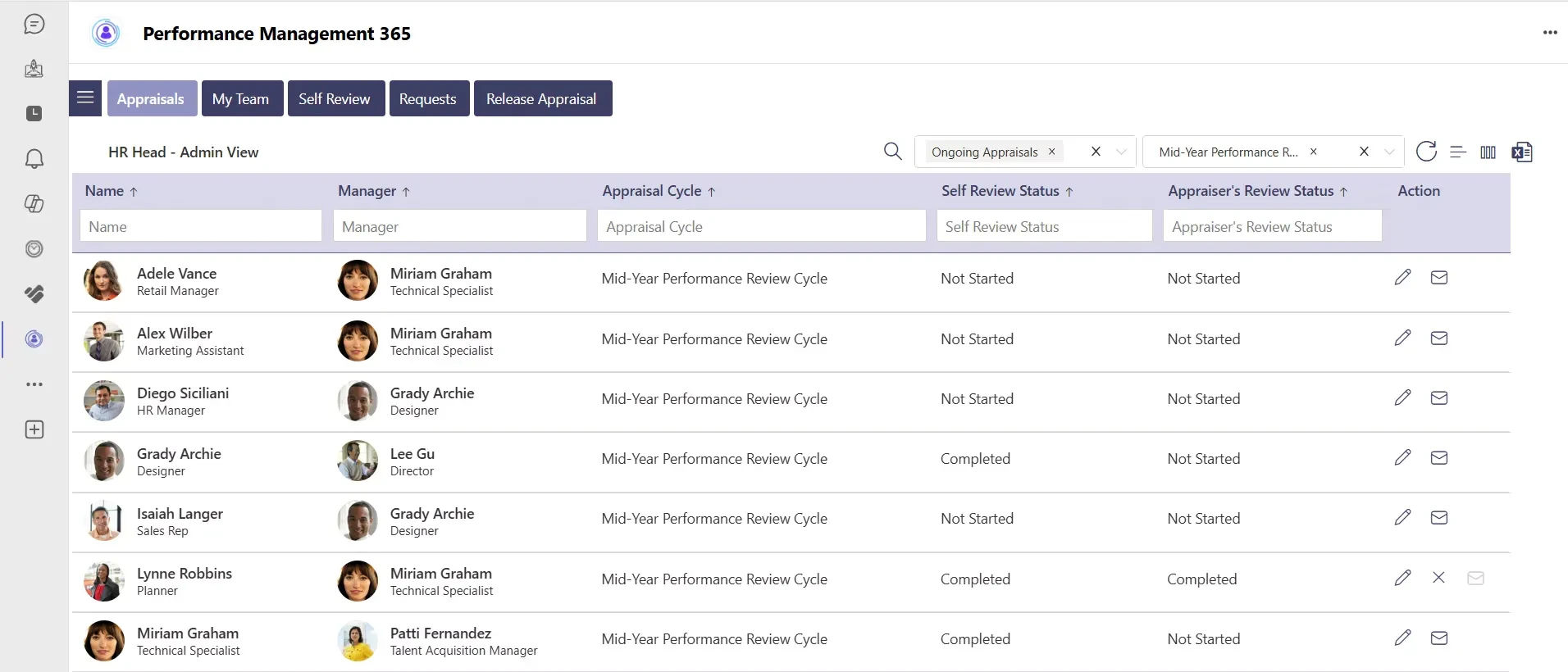
Performance reviews become easier when managers can record goals, conduct evaluations, provide feedback, and monitor progress within Microsoft Teams.
HR365 HRMS includes performance management capabilities that support regular reviews and ongoing development conversations.
Learning and Training
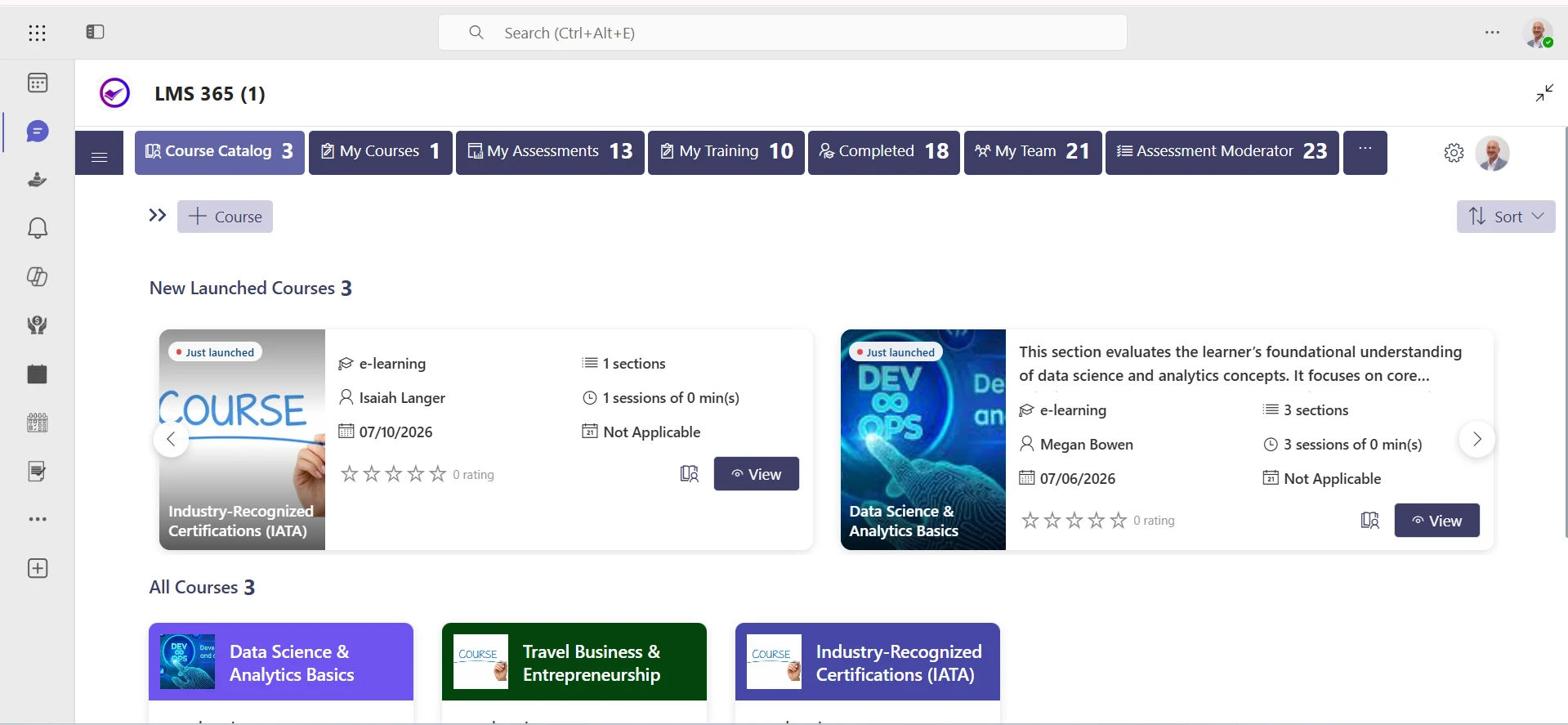
Organizations continue investing in learning and professional development.
Learning management app for Teams can assign learning programs, monitor training completion, and provide easy access to educational resources.
Everything remains available inside the Microsoft Teams environment.
Expense Management
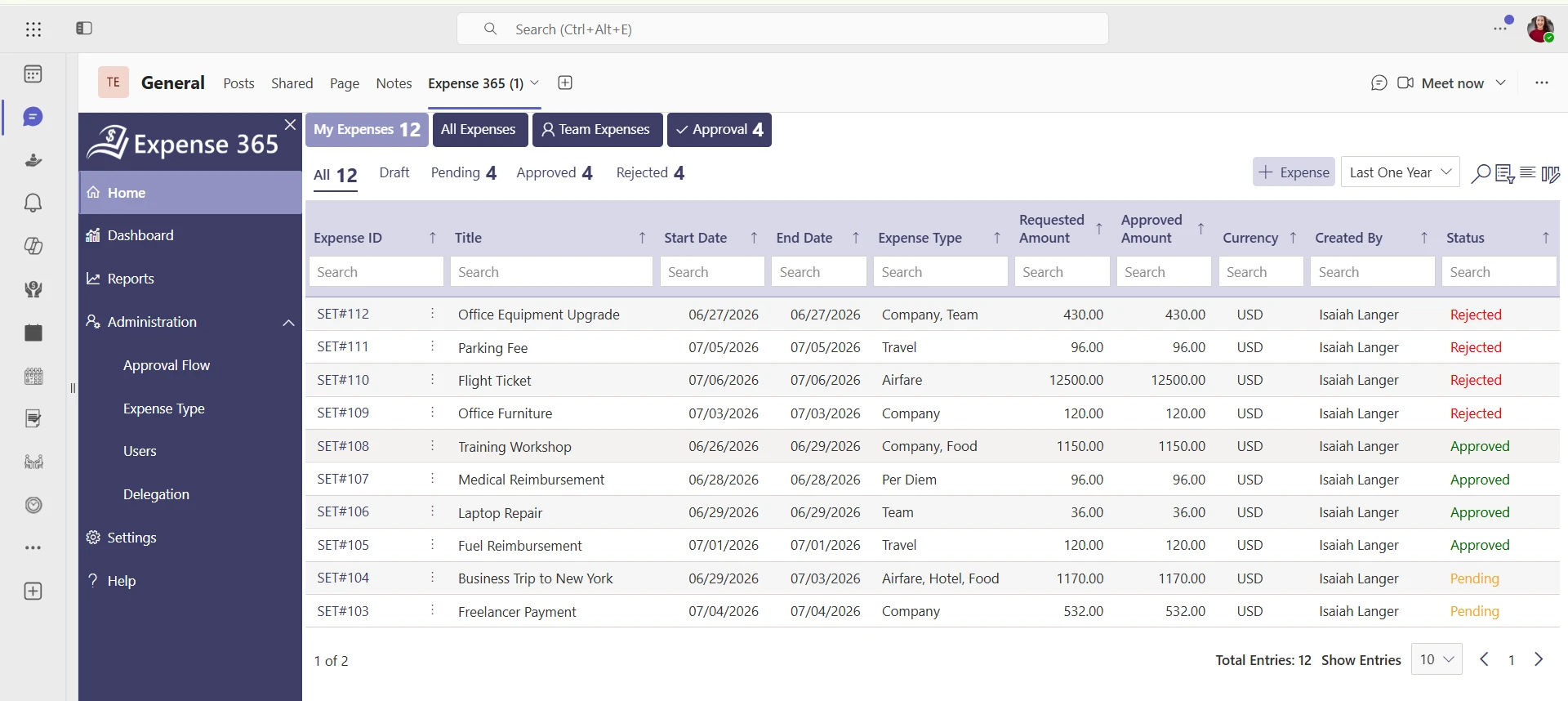
Business expenses can also become part of daily HR activities.
Employees can submit expense claims, upload receipts, and monitor approval status through the same HR application for Microsoft Teams, reducing the need for separate expense applications.
Task Management
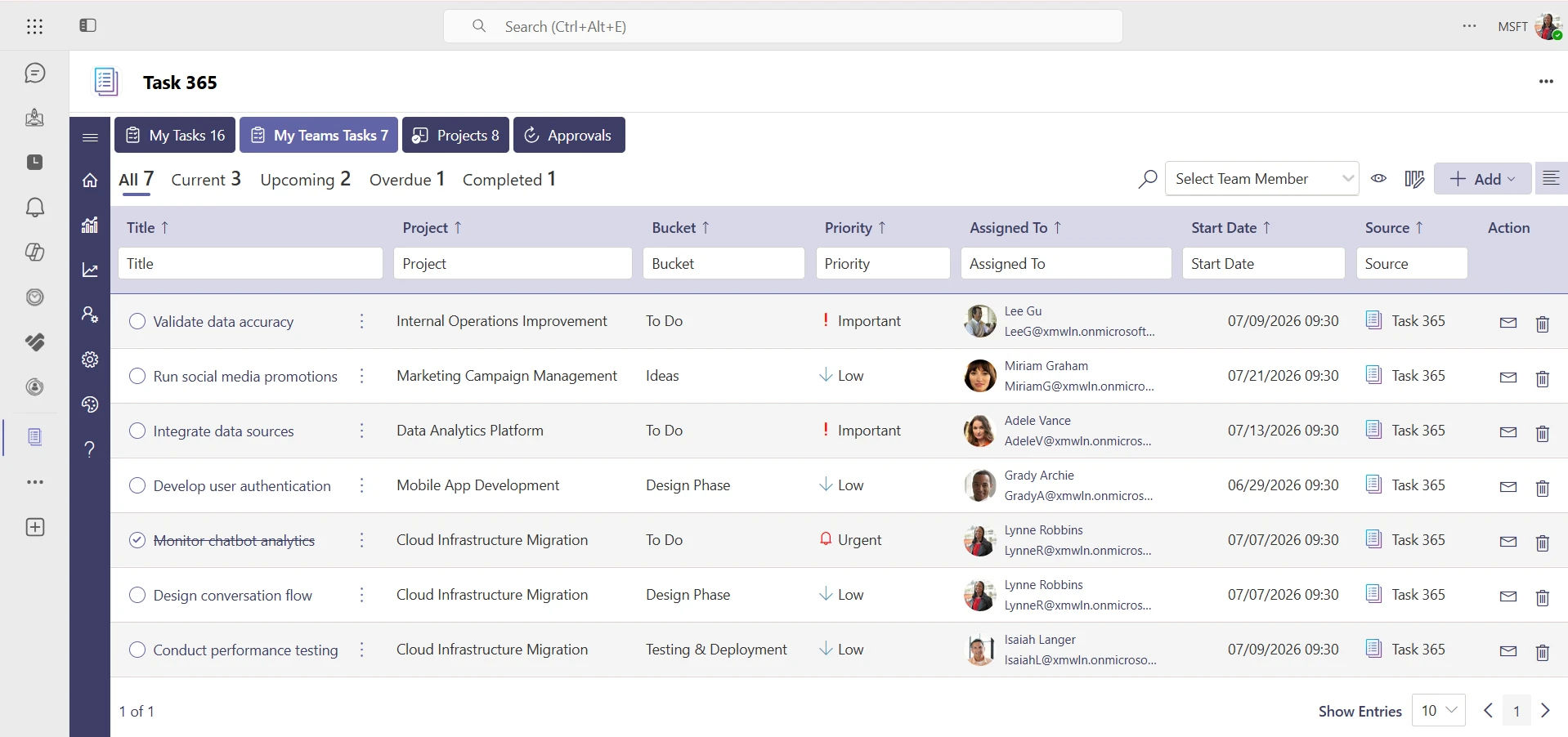
An HR application for Microsoft Teams can support task assignment, progress tracking, reminders, and completion monitoring for HR-related work. This is especially useful for onboarding checklists, policy acknowledgments, compliance follow-ups, employee requests, and manager approvals.
With task management inside Teams, HR teams can:
- Assign tasks to employees, managers, or HR staff
- Set deadlines and priorities
- Track pending and completed actions
- Send reminders for overdue tasks
- Keep all HR work visible in one place
This improves accountability and helps ensure that important HR processes move forward without delays.
Looking for an HR application built specifically for Microsoft Teams?
See How HR365 HRMS helps you manage HR processes directly inside Microsoft Teams with a simple, connected experience.
Why Does Microsoft 365 Integration Matter for HR Applications?
When choosing an HR application for Microsoft Teams, integration with Microsoft 365 is one of the most important factors to consider. Organizations that already use Microsoft Teams, SharePoint, Outlook, and Microsoft Entra ID often prefer an HR solution that works with these services instead of operating as a separate platform.
An HR platform for Microsoft that integrates with Microsoft 365 keeps HR activities connected with the tools teams already use every day.
Microsoft Teams
Microsoft Teams becomes the central place for communication, approvals, meetings, and HR activities. Team members can submit leave requests, receive HR announcements, complete onboarding tasks, and access employee information without leaving Teams.
SharePoint
Many organizations use SharePoint to store company documents and internal information. An HR management app for Teams connected to SharePoint can securely manage employee records, policies, forms, and HR documents from a centralized location.
HR365 HRMS is built on SharePoint, allowing organizations to use their existing Microsoft 365 environment for HR management while maintaining familiar document management practices.
Outlook
Calendar events, interview invitations, leave notifications, and HR reminders can work alongside Outlook, giving managers and team members better visibility into upcoming activities.
Power Automate
Many HR processes involve approvals and notifications. Microsoft Power Automate helps organizations build workflows for leave requests, onboarding activities, document approvals, and other routine HR tasks.
Power BI
HR leaders often rely on reports to understand trends across attendance, leave, onboarding, recruitment, and performance. Integration with Power BI provides interactive dashboards that help decision-makers monitor HR metrics more effectively.
Solutions like HR365 HRMS combine these Microsoft 365 capabilities into one connected HR experience, making it a practical choice for organizations already invested in the Microsoft ecosystem.
What Challenges Do Traditional HR Systems Create?
Many organizations adopted HR software years before Microsoft Teams became the center of workplace collaboration. As a result, HR processes often remain spread across multiple applications.
This creates several common challenges.
1. HR Information Is Stored in Different Places
Employee records, leave information, onboarding documents, and performance reviews may all exist in separate systems. Finding the right information can take longer than expected.
2. Multiple Applications for Everyday Tasks
People may use one application for leave, another for attendance, another for onboarding, and Microsoft Teams for communication.
An HR application for Microsoft Teams brings many of these activities into one familiar workspace.
3. Manual HR Processes
Traditional HR systems often depend on emails, spreadsheets, or paper-based approvals for routine activities. This increases administrative work for HR teams and managers.
4. Limited Visibility
Managers need quick access to attendance, leave, onboarding progress, and employee information. When data exists across different systems, obtaining a complete picture becomes more difficult.
5. A Different Experience for Employees
One of the most common topics in online HR communities is that employees are often unsure where to find HR forms, policies, or request processes.
An HR app for Microsoft Teams helps solve this by making HR available within the same platform people already use every day.
Organizations using HR365 HRMS can centralize employee records, leave management, onboarding, attendance, performance, learning, recruitment, and dashboards inside Microsoft Teams, reducing reliance on disconnected HR tools.
How Do You Choose the Right HR Application for Microsoft Teams?
Not every HR solution offers the same level of Microsoft integration. Before selecting an HR application for Microsoft Teams, evaluate the platform against your organization’s current and future requirements.
- Native Microsoft 365 Integration: Look for an HR platform for Microsoft Teams that works naturally with Microsoft Teams, SharePoint, Outlook, Microsoft Entra ID, Power Automate, and Power BI.
- Comprehensive HR Features: A complete solution should support employee directory, employee onboarding, leave management, attendance and timesheets, performance management, recruitment, learning and training, expense management, dashboards, and AI-powered automation. HR365 HRMS combines all these capabilities in one Microsoft 365-based platform.
- Easy Adoption: People are more likely to use HR software when it works inside the applications they already know. An HR management app for Teams reduces the learning curve because the interface is familiar.
- Automation: Choose software that automates repetitive HR activities such as leave approvals, onboarding checklists, notifications, reminders, and document workflows.
- Reporting: Reporting helps HR leaders understand attendance trends, recruitment progress, onboarding completion, leave usage, and overall HR activity.
- Scalability: Your HR software should support organizational growth without requiring a complete system replacement in the future.
- Security: Microsoft 365 provides enterprise-grade security features, making native Microsoft-integrated HR applications an attractive option for organizations that prioritize secure access and centralized identity management.
If your organization already uses Microsoft Teams throughout the workday, selecting a solution like HR365 HRMS helps extend that investment by bringing HR operations into the same Microsoft environment.
Conclusion
Microsoft Teams has become much more than a collaboration platform. For many organizations, it is now the place where daily work happens. Bringing HR into the same environment creates a more connected experience for team members, managers, and HR professionals while reducing the need to move between different applications.
An HR application for Microsoft Teams helps organizations manage employee information, onboarding, leave, attendance, recruitment, performance, learning, and other HR activities from one familiar workspace. If your organization already relies on Microsoft 365, HR365 HRMS provides a comprehensive HR platform for Microsoft Teams that brings together the tools needed to support the entire employee lifecycle.
Ready to Bring HR into Microsoft Teams?
Book a personalized demo today and discover how HR365 HRMS can help your organization make the most of Microsoft Teams.
Frequently Asked Questions
What is an HR application for Microsoft Teams?
An HR application for Microsoft Teams is software that allows organizations to manage HR activities such as leave, attendance, onboarding, employee records, and performance directly within Microsoft Teams. It helps bring everyday HR tasks into the same workspace employees already use for communication and collaboration.
What are the benefits of using an HR app for Microsoft Teams?
An HR app for Microsoft Teams keeps HR services in one familiar workspace, making it easier for team members and managers to complete everyday HR tasks without relying on multiple applications. It can also improve adoption, reduce manual work, and make HR processes faster and more convenient for everyone involved.
Can HR365 HRMS integrate with SharePoint?
Yes. HR365 HRMS is built for Microsoft 365 and integrates with SharePoint to help organizations manage HR information within their existing Microsoft environment. This makes it easier to store, organize, and access HR documents and employee data securely.
Can Microsoft Teams be used for HR management?
Yes. Microsoft Teams can support many HR activities when combined with an integrated HR solution such as HR365 HRMS. This allows organizations to manage HR processes inside a platform employees already know, instead of switching between separate tools.
What features should an HR platform for Microsoft Teams include?
Look for employee records, onboarding, leave management, attendance, performance management, recruitment, learning, expense management, reporting, dashboards, AI capabilities, and Microsoft 365 integration. A complete solution should support both daily HR operations and long-term workforce management needs.
Why is Microsoft 365 integration important for HR software?
Integration connects Microsoft Teams with SharePoint, Outlook, Microsoft Entra ID, Power Automate, and Power BI, creating a more connected HR environment. This helps organizations streamline workflows, improve data consistency, and manage HR tasks more efficiently across Microsoft 365.
How does HR365 HRMS support Microsoft Teams users?
HR365 HRMS provides employee directory, onboarding, leave management, attendance, performance management, recruitment, learning, expense management, dashboards, and AI-powered automation inside Microsoft Teams and Microsoft 365. It gives users a connected HR experience without leaving the Microsoft environment.


_JiluXJRGNl.svg)























