
The Ultimate Guide to Cloud HR Software: Why Modern Businesses Are Switching

- Cloud HR software centralizes employee data and HR processes in one secure online platform.
- Businesses choose cloud HR software for flexibility, automatic updates, and easier growth.
- The right solution reduces manual HR work through automation and self-service features.
- HR365 HRMS brings HR management into Microsoft 365, SharePoint, and Microsoft Teams.
Managing HR with spreadsheets, paper forms, and disconnected systems takes time away from work that matters. HR teams often spend hours tracking leave requests, updating employee records, searching for documents, and following up on routine approvals. As organizations grow, these manual processes become harder to manage and increase the risk of errors.
The shift to cloud HR software is accelerating. According to Gartner, more than 70% of organizations continue to increase their investment in digital HR technology as they modernize HR operations and improve the experience for managers and team members. Cloud-based platforms provide secure access to HR information from anywhere, support distributed teams, and keep employee data centralized in one system.
This guide explains what cloud HR software is, how it works, and why businesses are replacing traditional HR systems with cloud-based solutions. You’ll also learn which features matter most when choosing a platform and discover why HR365 HRMS is a strong choice for organizations using Microsoft 365, SharePoint, and Microsoft Teams.
What Is Cloud HR Software and How Does It Work?
Cloud HR software is an online platform that stores employee records and manages HR processes through the cloud instead of on local office servers. HR teams can securely access information from any device with an internet connection, while the software provider takes care of system updates, maintenance, backups, and security. This gives organizations a centralized place to manage employee data, onboarding, leave requests, attendance, performance, recruitment, and other HR activities.
Unlike traditional on-premise HR software, which requires dedicated servers, manual upgrades, and ongoing IT support, cloud HR software is available through a subscription model and is ready to use with minimal setup. As team members submit leave requests, complete onboarding tasks, or update their information, everything is recorded in one connected system, making HR processes faster, more organized, and easier to manage.
Here’s how a typical cloud HR software platform works:
- Centralized employee records: Employee profiles, documents, and HR history are stored securely in one cloud-based location.
- Access from anywhere: HR teams, managers, and team members can securely log in from a desktop, tablet, or mobile device.
- Workflow automation: Onboarding tasks, leave approvals, notifications, and reminders follow predefined workflows with minimal manual effort.
- Self-service: Team members can update personal information, submit leave requests, and track HR requests without contacting HR for every change.
- Real-time reporting: Dashboards provide instant visibility into leave, attendance, onboarding progress, and other HR metrics.
- Automatic updates: New features, performance improvements, and security updates are delivered by the provider without requiring internal IT support.
HR365 HRMS follows this cloud-first approach while integrating directly with Microsoft 365, SharePoint, and Microsoft Teams. Instead of switching between multiple applications, HR teams and personnel can manage everyday HR tasks within the Microsoft tools they already use.
Why Are Businesses Switching from Traditional HR Systems to Cloud HR Software?
Old HR systems were built for a different time. They worked fine when everyone sat in one office and HR handled a few hundred paper files. That world is mostly gone now.
Today, teams work from home, from other cities, and sometimes from other countries. A traditional HR system cannot keep pace with that spread. This is the main reason businesses now move to cloud HR software in growing numbers. Around 65% of HR professionals say they now prefer cloud-based solutions for their scalability and easy access, and the global HR cloud market is on track to reach $30 billion by 2026.
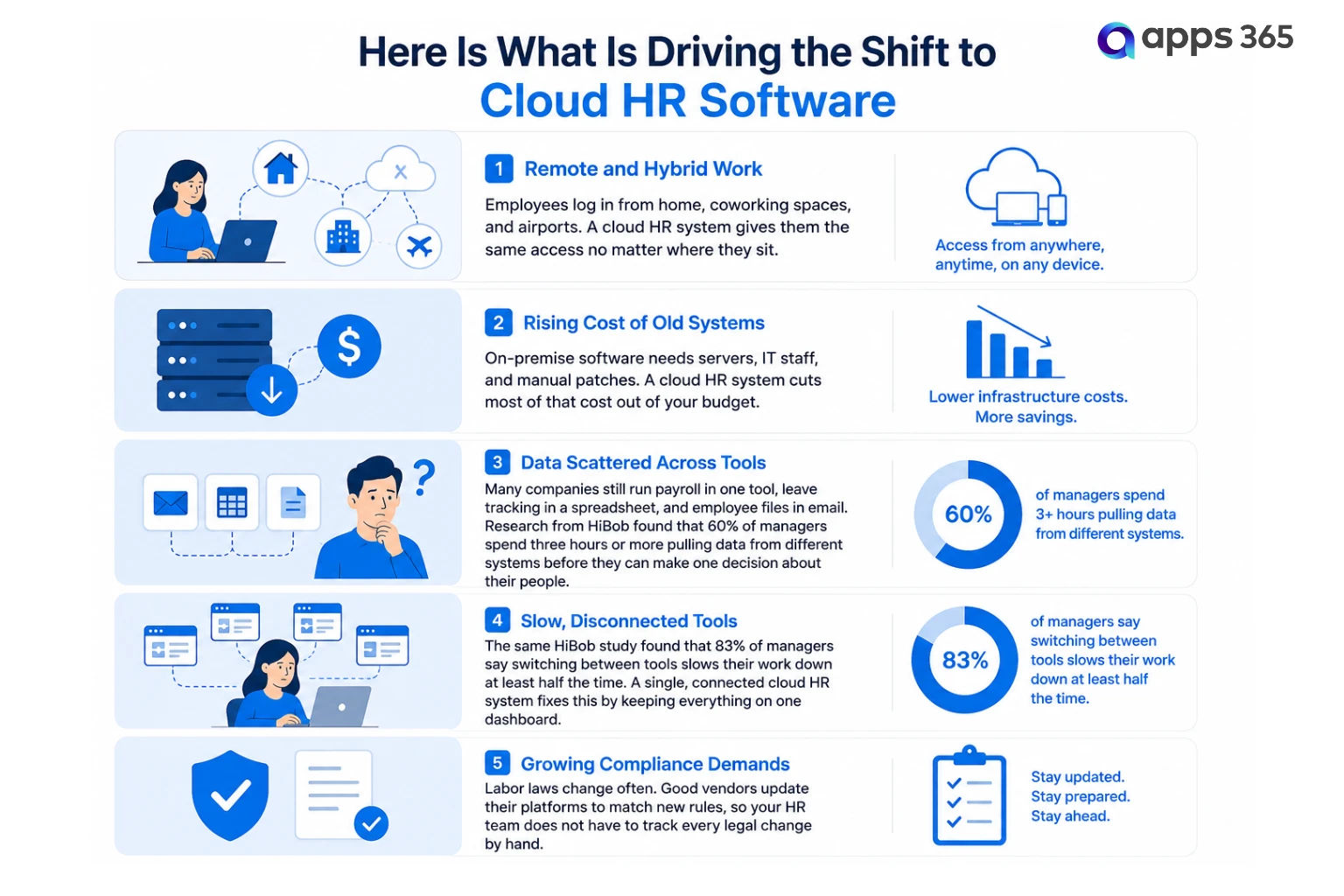
More than 61% of organizations worldwide are now moving away from on-premise HR systems toward cloud options, and that trend shows no sign of slowing down. Businesses that wait too long risk falling behind competitors already running leaner HR teams on modern platforms like HR365 HRMS.
Benefits of Cloud HR Software for Growing Businesses
Growing companies feel HR pain the fastest. What works for 10 employees breaks at 50. A solid cloud HR system grows with your business instead of holding it back.
1. Lower costs over time
You skip the cost of servers, IT maintenance, and manual software installs. Most platforms run on a monthly subscription, so your budget stays easy to plan.
2. Access from anywhere
Your HR team, managers, and staff can log in from any device. This matters most for companies with remote workers or more than one office location.
3. Faster onboarding
New hires complete forms, sign documents, and finish training online before their first day. HR365 HRMS builds this directly into Microsoft Teams, so new employees get productive faster.
4. Real-time reporting
It pulls live data on attendance, turnover, and leave trends. Instead of building reports by hand, your HR team opens a dashboard and sees the full picture in seconds.
5. Automatic updates and security patches
Your vendor handles updates in the background. You always run the newest version, with no downtime and no IT tickets to file.
6. Built-in scalability
Adding 5 employees or 500 does not mean buying new hardware. A cloud HR system scales with a few clicks, not a new server order.
7. A better employee experience
Self-service portals let employees check pay stubs, request leave, and update their own details. This cuts down on repeat questions to HR and gives staff more control over their own information.
Small businesses are catching on fast. Around 62% of small and mid-size businesses now say they prefer cloud-native platforms over on-premise tools, and that number keeps rising as more founders see how quickly the savings add up.
What Features Should You Look for in the Best Cloud HR Software?
The best cloud HR software should support your organization’s current needs while giving you room to grow. Before choosing a platform, make sure it includes the features that help your HR team work more efficiently and provide a better experience for managers and team members.
- Employee directory and org charts – Keep employee profiles, reporting structures, and contact information in one searchable location.
- Employee onboarding – Manage digital forms, task checklists, document collection, and onboarding activities from a single workspace.
- Leave and attendance management – Automate leave requests, approvals, attendance tracking, and leave balance updates.
- Performance management – Set goals, conduct performance reviews, and monitor progress throughout the review cycle.
- Recruitment and hiring – Track candidates, manage job openings, and organize the hiring process in one system.
- Workflow automation – Automate approvals, notifications, reminders, and recurring HR tasks to reduce manual work.
- Dashboards and reporting – View real-time insights into attendance, onboarding, leave trends, recruitment, and other key HR metrics.
- Role-based access – Protect sensitive employee information by giving users access only to the data relevant to their responsibilities.
- Mobile accessibility – Access HR information and complete everyday tasks from any device.
- Microsoft 365 integration – Connect HR processes with Microsoft Teams, SharePoint, Outlook, and other Microsoft applications to reduce context switching.
For organizations already using Microsoft 365, native integration can make a significant difference. HR365 HRMS is built directly on the Microsoft ecosystem, allowing HR teams and personnel to manage leave, onboarding, employee records, performance, and other HR activities within Microsoft Teams, SharePoint, and Outlook. This eliminates the need for separate logins, duplicate data entry, and disconnected systems while helping organizations get more value from their existing Microsoft 365 investment.
Is Cloud HR Software Secure for Employee Data?
Security is one of the biggest concerns when choosing cloud HR software, and for good reason. Employee records contain sensitive information that should only be accessible to authorized users. Reputable cloud HR software providers invest heavily in security technologies and monitoring, making cloud platforms as secure as—if not more secure than—many traditional on-premise systems.
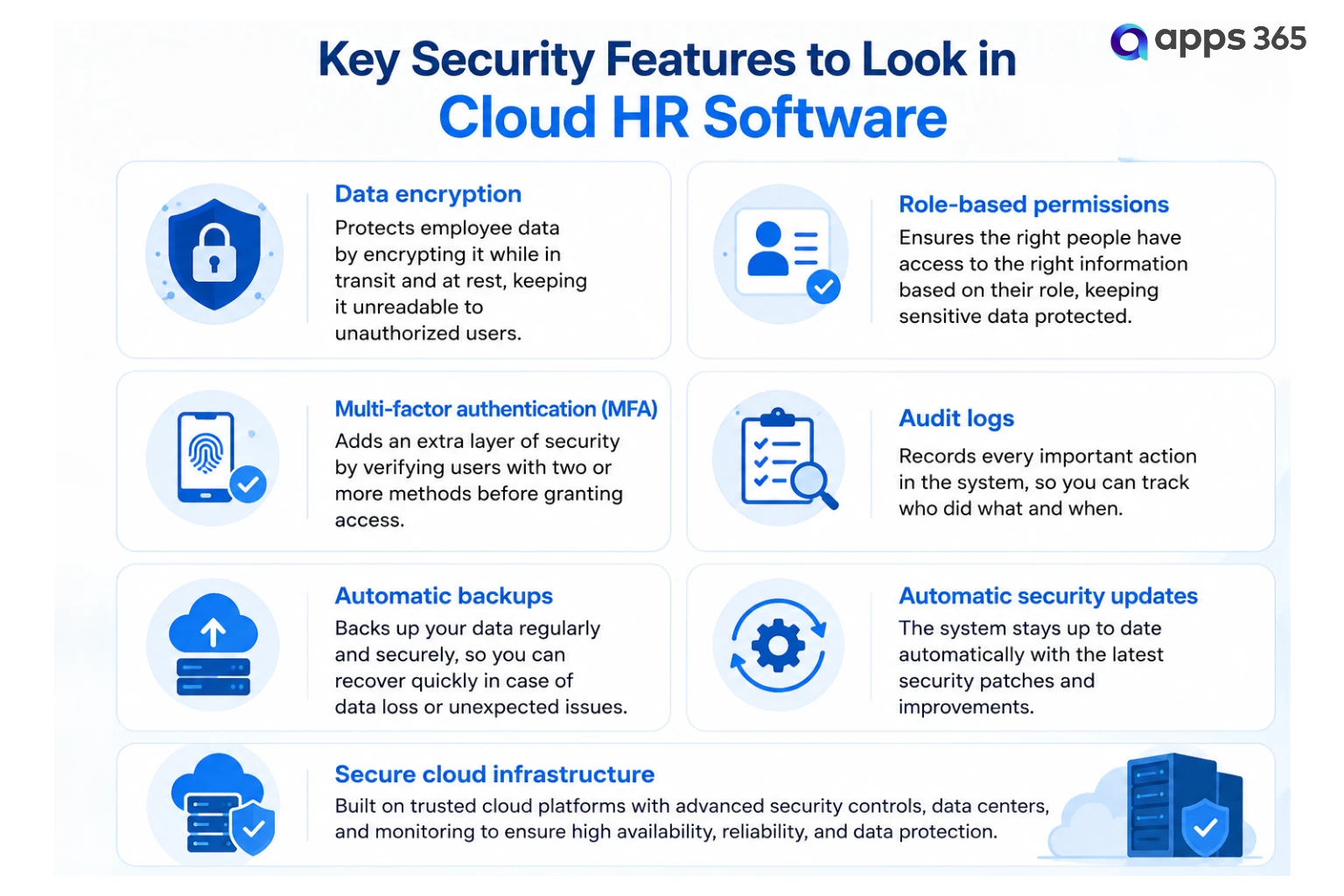
Here are the key security features to look for:
- Data encryption: Employee information is encrypted while it is being transferred and while it is stored, helping protect it from unauthorized access.
- Role-based permissions: HR administrators, managers, and team members only see the information relevant to their role, reducing unnecessary exposure to sensitive data.
- Multi-factor authentication (MFA): An extra layer of login verification helps prevent unauthorized access, even if passwords are compromised.
- Audit logs: Every important action, such as updating employee records or approving leave requests, is recorded, making it easier to review account activity when needed.
- Automatic backups: Regular backups protect employee data against accidental deletion, hardware failures, or unexpected outages.
- Automatic security updates: Cloud providers regularly deliver security patches and software improvements without requiring manual intervention from your IT team.
- Secure cloud infrastructure: Leading cloud HR platforms run on enterprise-grade cloud environments with built-in security, reliability, and high availability.
For organizations using Microsoft 365, HR365 HRMS keeps HR data within your existing Microsoft environment instead of storing it in a separate platform. With role-based permissions, audit logs, encryption, and Microsoft’s enterprise-grade security infrastructure, organizations can manage sensitive HR information with confidence while using the tools they already rely on, including Microsoft Teams and SharePoint.
In most cases, the biggest security risk is not the cloud itself—it is outdated, on-premise HR systems that rely on manual updates, aging infrastructure, and inconsistent backup practices. Choosing a modern cloud HR solution helps organizations keep employee data protected while reducing the burden on internal IT teams.
Why HR365 HRMS Is a Smart Choice for Microsoft 365 Organizations
If your company already runs on Microsoft 365, HR365 HRMS is built for exactly that setup. It is not a generic cloud HR system with a Microsoft add-on placed on top. It is built natively inside the Microsoft ecosystem, from Teams and SharePoint to Outlook and Power BI.
Here is what makes HR365 HRMS stand out from other cloud HR software options:
- Works where your team already works: Employees request leave, view their directory profile, and complete onboarding tasks directly inside Microsoft Teams. No separate app, no new login screen to remember.
- A full HR suite in one platform: HR365 HRMS covers Employee Directory, Time Off Manager, Employee Onboarding, Timesheet Management, Expense Tracker, Recruitment, and Performance Management, all inside one cloud HR software suite.
- Power BI reporting: Get live dashboards on attendance, turnover, and recruitment straight through Power BI, with no spreadsheet exports needed.
- AI-assisted HR support: HR365 HRMS’s Copilot integration answers employee HR questions directly inside Teams, using your own company policies.
- Enterprise-grade security: Built on Microsoft’s trusted infrastructure, with GCC and GCC High compliance for government and regulated organizations.
- Fast setup: Because it runs inside tools your team already knows, adoption happens faster than with an outside cloud HR system that needs separate training.
Companies that pick HR365 HRMS are not just buying software. They are extending an investment they already made in Microsoft 365, instead of paying twice for a disconnected tool.
Conclusion
HR should not feel like a daily fight against spreadsheets, lost files, and slow approvals. Cloud HR software fixes that by putting every employee record, leave request, and payroll number in one secure place your team can reach from anywhere.
The businesses that switch early are not just saving time. They are building HR teams that respond faster, report better, and give employees a better experience from their first day to their last. With the global HR software market on pace to top $40 billion by 2026, the move to the cloud is no longer optional. It is becoming the standard.
For companies already running on Microsoft 365, HR365 HRMS makes the decision simple. You get a full cloud HR system built inside the tools your team already uses every day, backed by strong security and real-time reporting. There is no separate platform to learn and no extra login to remember.
See Cloud HR Software in Action
Discover how HR365 HRMS helps organizations manage the entire employee lifecycle from a single platform built for Microsoft 365.
Frequently Asked Questions
What is cloud HR software?
Cloud HR software is an online platform that stores employee records and manages HR activities such as onboarding, leave, attendance, performance, and reporting. Because it runs in the cloud, authorized users can securely access it from anywhere with an internet connection.
Is cloud HR software better than traditional HR software?
For most organizations, yes. Cloud HR software offers automatic updates, remote access, easier scalability, lower infrastructure costs, and faster deployment compared to traditional on-premise systems.
Does cloud HR software work with Microsoft 365?
Some platforms integrate with Microsoft 365, while others are built specifically for it. HR365 HRMS works natively with Microsoft Teams, SharePoint, Outlook, and the wider Microsoft 365 ecosystem.
Why do Microsoft 365 organizations choose HR365 HRMS?
HR365 HRMS is built specifically for Microsoft 365. It brings HR processes into Microsoft Teams, SharePoint, and Outlook, helping organizations manage onboarding, leave, attendance, performance, recruitment, learning, expenses, and employee records without introducing another disconnected platform.
Is employee information safe in cloud HR software?
Reputable cloud HR software providers protect employee information using encryption, role-based permissions, audit logs, regular backups, and enterprise-grade security practices.
Is cloud HR software suitable for small businesses?
Yes. Small businesses often benefit the most because cloud HR software reduces manual administration, eliminates the need for expensive servers, and grows as the business expands.
How long does it take to implement cloud HR software?
Implementation depends on the size of the organization and the amount of employee data being migrated. Many cloud HR platforms can be configured within a few days or weeks, while larger deployments may take longer.


_JiluXJRGNl.svg)























