





































AI-powered Helpdesk that Resolves Tickets 60% Faster
SharePoint Helpdesk 365 cares as much as you do

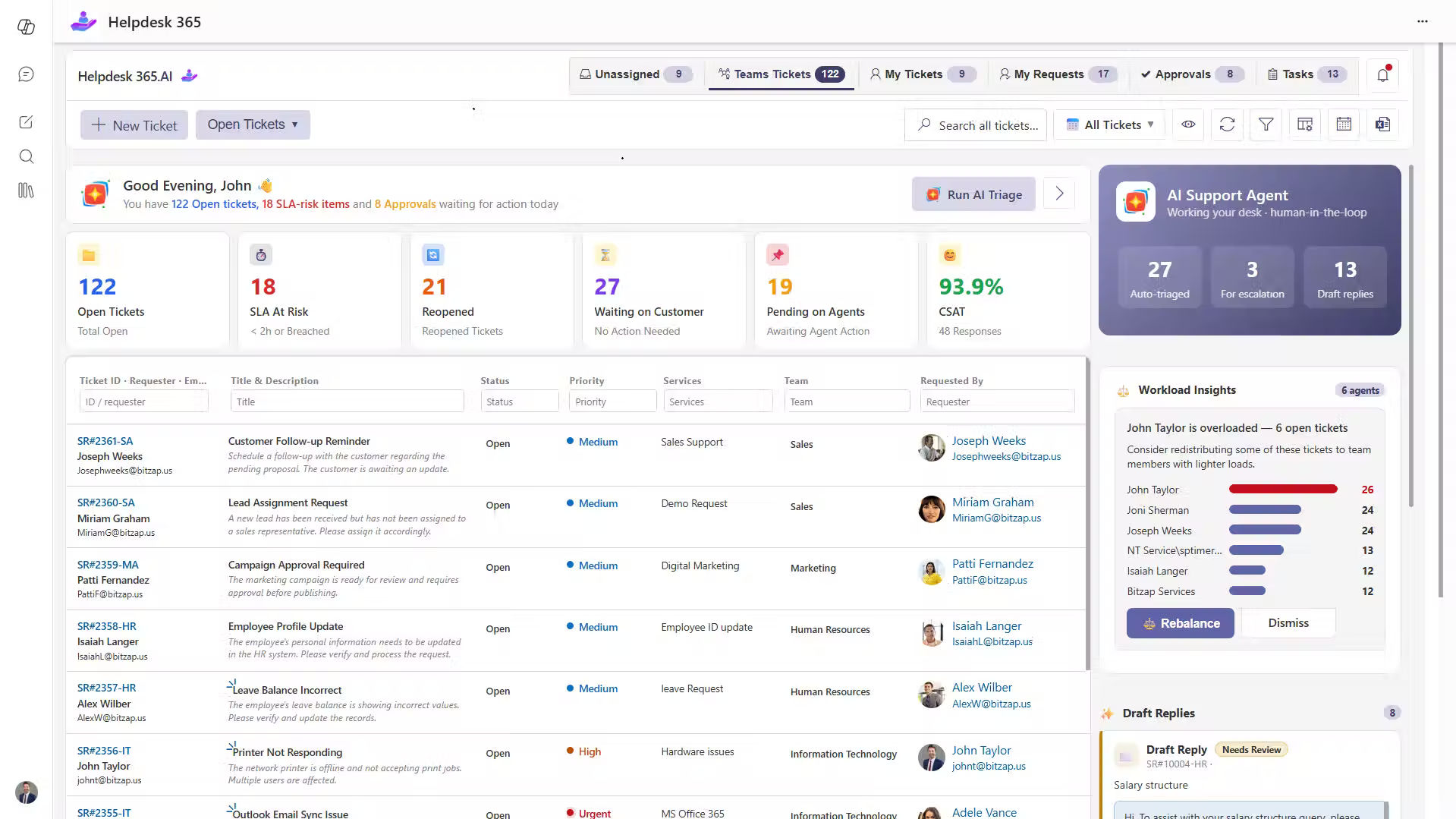
A SharePoint Helpdesk AI system that spots urgent issues, prioritizes critical requests, and resolves routine problems. The SharePoint Ticketing System keeps your team productive and stress-free.

SharePoint helpdesk

Trusted by 12,100+ deployments from 172 countries

Helpdesk 365 Blends Intelligent Automation with Real Human Care

Deliver faster responses, thoughtful support, and genuine satisfaction right from day one. Our Microsoft ticketing system gets you going fast with simplified workflows that let your employees glide through tasks effortlessly. As well as you can use our best Helpdesk software easily within Microsoft 365 apps like Teams, Outlook, and SharePoint. 

Helpdesk 365 is now available on Microsoft Teams with

AI
AI &
Copilot
Helpdesk

AI Agent at Work - Turning Requests into Resolutions Faster

With intelligent automation and real-time insights, AI turns every request into a quick, seamless resolution keeping your support team one step ahead. 

Smart Ticket Intelligence

Smart Ticket Intelligence streamlines the way your team manages support requests. It automatically categorizes and routes tickets to the right team, ensuring nothing slips through the cracks. Urgent issues are prioritized, while routine tasks are organized in order. Learning from past interactions suggests relevant solutions and improves response times. It also automates repetitive tasks, allowing your team to focus on the complex cases that truly need human expertise. 

sharepoint ticketing system

AI Agentic Tickets

AI Agentic Tickets helps your team respond faster and more accurately. It looks at each ticket, understands what it’s about, and suggests the best way to reply. This means less typing and guesswork for your agents. It also handles common, routine requests on its own, so your team can spend more time on tricky issues that need personal attention. The more it’s used, the better it gets at spotting problems early and helping fix them before they grow bigger. 

Microsoft ticketing system

Intelligent Summaries

Intelligent Summaries gives your team a quick, clear view of every support ticket. It pulls together the main details from past messages and related info, so agents can understand the issue at a glance. This saves time and helps avoid mistakes. As it keeps learning from old tickets, it becomes smarter and more helpful, making daily work smoother and faster. 

ai ticketing

AI Copilot

AI Copilot makes your team’s day a little easier. It jumps in to help with everyday questions, offers quick tips, and points agents in the right direction when handling tickets. Over time, it picks up on how your team works and takes care of simple, repetitive jobs on its own. That means your team can spend more time solving the bigger stuff that really needs a person’s touch. It fits right into the tools you already use, helping everyone stay on top of their work and keeping customers happy. 

ai helpdesk

Built to Work with Microsoft 365 & Beyond

Designed to integrate with Microsoft 365, it connects with Teams, Outlook, SharePoint, and other tools creating a unified ecosystem that delivers smooth, efficient, and intelligent support. 

helpdesk Integrations

Connection that Works

Connect your helpdesk with the tools you already use, from Teams to DevOps and beyond,  bringing conversations, tasks, and data together in one intelligent workspace where everything stays in sync.

Smart Features, Real Impact

Everything your team needs to reply, solve issues, and grow together. 

power automate

AI Helpdesk

Empower your team with intelligent support that boosts speed and accuracy. AI ensures customers get the right answers instantly while helping your team work more efficiently and confidently.

helpdesk

Ticket Management

See every request clearly and deal with it quickly. Organized tracking keeps things simple and helps your team stay on top of their work.
sla

SLAs

Set clear timelines and never miss a promise. Get alerts that remind your team when a ticket needs attention.

Knowledge Base

Keep all your helpful information in one place. Users can find answers easily and fix things on their own with confidence.

Helpdesk

Rules & Automation

Let the system take care of boring, repeated work. It helps your team stay focused while keeping everything accurate and consistent.

Helpdeks

Ticket Auto-Assign

Send each ticket to the right person automatically. It looks at what type of issue it is and who can handle it best, so nothing gets stuck waiting.

Helpdesk

Automation & Workflow

Work smarter with automation that removes manual steps. Tasks flow smoothly, processes stay organized, and your team always knows what’s next.
Helpdesk

Reporting & Analysis

See what’s working and what’s not. Easy-to-read reports help you spot patterns, track progress, and make better choices.

Helpdesk

Data Privacy

Your data stays safe with built-in protection, permission-based roles, and strong compliance standards you can count on.
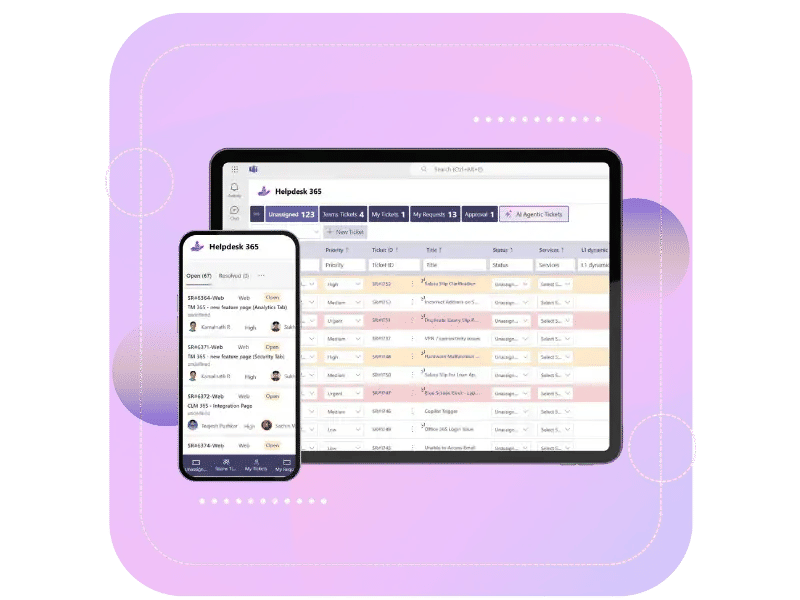
Helpdesk 365 On-the-Go

Work from anywhere without missing a thing. You can check your tickets, tasks, and updates right from your phone or laptop. Everything stays within reach, you can keep things moving no matter where you are. 

helpdesk software

Why Helpdesk 365?

Let the best Helpdesk tool take care of all the repetitive, routine tasks, so your team can focus on what they actually signed up for supporting and helping people resolve issues at work. Helpdesk 365, SharePoint ticketing system helps you automate, organize, and complete tasks easily. No matter how big or small your business is, it helps you work smarter, solve problems faster, and boost productivity without any hassle. 

Helpdesk

Built for Microsoft 365

It works inside the tools you already use, like Teams, SharePoint, and Outlook. No setup headaches, it just fits in.

Everything in One Place

All your tickets and messages stay together. You can see what’s going on, who’s handling what, and what needs attention.
AI-Powered Efficiency

It sends tickets to the right person on its own and gives quick tips to help solve things faster.
Secure & Scalable

Your data stays inside Microsoft 365, so it’s secure. And if your team grows, it grows with you.
Live on Azure

Buy directly from Azure Marketplace or via your enterprise agreement.

Special Pricing for NPOs

Non-profits and government-funded educational institutes can avail exclusive rates.

Enterprise Pricing for 50+ Users

Organizations with more than 50 users can avail special pricing.

Apps 365 Advantage

Apps 365 delivers smart, cloud-powered solutions that simplify operations and fuel growth. With seamless integrations and top-tier security, it helps businesses stay agile, efficient, and ahead of the curve.

SOC
SOC 2
ISO
Microsoft
Best ROI
Momentum
Best SUpport
Best SUpport
Microsoft Azure
Great Place to Work

Cyber Security

Cyber Security in GCC & GCC High within the Microsoft environment places high importance on stringent measures to protect sensitive government data, ensuring security with robust defenses and Microsoft applications.

GCC & GCC High

Our apps are built for GCC & GCC high tenants of US Federal clouds.

SOC2 Type II Certified

Our apps ensure security, compliance, and data protection

MS Azure Marketplace

Our apps are tested by Microsoft and available on MS Azure Marketplace

Microsoft Appstore​

Our innovative applications are available on the Microsoft Appstore.

Customer Support​

Your Support Team merges technical prowess with sincere care, fostering trust through expertise and empathy. They build lasting relationships, transcending mere service to create meaningful connections.

AI Enabled Apps

Our innovative apps are built with the options of Azure AI, Copilot, and custom AI solutions.

Swift Deployment​

Choose any deployment method—Teams, Outlook, or SharePoint—that suits your preferences.

Modern UI/UX

Every app is crafted using the latest Fluent UI, ensuring seamless functionality across all devices.

Free Updates

Our valued subscribers enjoy unlimited support, enhancements, features, and updates.

Customer Testimonials

Hear from satisfied organizations that have transformed their IT and internal support with Helpdesk 365. 

Andreas C<br><span class="testimonials">ICT Manager <br>California</span>
Andreas C
ICT Manager
California

Helpdesk 365 integrates effortlessly with Microsoft Teams and SharePoint. With their excellent support, we customized it to fit our needs, greatly improving our internal IT helpdesk ticket management.

Ted Brister<br><span class="testimonials">IT Director, Frontier Waste Solutions<br> Texas, US</span>
Ted Brister
IT Director, Frontier Waste Solutions
Texas, US

Helpdesk 365 has completely changed our support process by centralizing requests and improving efficiency. With integration into Teams, SharePoint and Azure AD, we have full control over our data & customization. Now, assigning tickets, escalating issues, enforcing SLAs, and staying organized is easier than ever.

Ahmed A<br><span class="testimonials">IT Officer, HanmiGlobal Saudi<br>Saudi Arabia</span>
Ahmed A
IT Officer, HanmiGlobal Saudi
Saudi Arabia

Helpdesk 365 has been a great fit for our support operations. Its interface is easy to use, and automation features help manage tickets efficiently. The reporting tools give clear insights into performance. The support team has been responsive & reliable.
Alesha S<br><span class="testimonials">Director of Marketing, HanmKlein & Hoffman<br>Chicago, US</span>
Alesha S
Director of Marketing, HanmKlein & Hoffman
Chicago, US

My first experience with Helpdesk 365 was excellent. The team made setting up our new employee directory easy, providing clear and patient guidance. Their friendly support helped me learn the platform quickly, saving time and reducing stress.
Alicia Ally <br><span class="testimonials">Educator,  Department of Education<br>New York</span>
Alicia Ally
Educator, Department of Education
New York

The no-obligation free trial gave us the confidence to get started. Helpdesk 365 is simple, customizable, & makes resolving IT & HR issues quick & easy. Our team loves how user-friendly it is & the cost fits perfectly within the budget of our growing small business.
Luis De Ande<br><span class="testimonials">System Administrator, San Antonio<br/> Texas</span>
Luis De Ande
System Administrator, San Antonio
Texas

What I really like about Helpdesk 365 is how well it fits into our SharePoint setup. It works with what we already use. It’s straightforward, easy for the team to learn & has made ticket tracking so much easier. We’re more organized now & it definitely saves us time every day.
Raquan Lindsey<br><span class="testimonials">IT Manager<br/> Indiana</span>
Raquan Lindsey
IT Manager
Indiana

Helpdesk 365 was super easy to set up, and I could start using it with very little prior experience. The solution helps me track issues and also gather data to understand what’s causing them.

One Platform for Every Request

Helpdesk 365 unites tickets, teams, and tools inside Microsoft 365,  giving you visibility, control, and collaboration in one place.

hepldesk customer

Book a Personalized Helpdesk 365 Demo!

Frequently Asked Questions

Helpdesk 365 is an AI-powered internal ticketing system built natively on SharePoint and Microsoft 365. It helps organizations manage employee IT support requests efficiently by automatically categorizing tickets, prioritizing urgent issues, and resolving routine problems without human intervention. The platform reduces support response times by up to 60% and auto-resolves approximately 40% of routine tickets. 

Helpdesk 365 captures support requests from multiple channels including email and Microsoft Teams. The AI engine analyzes each ticket for urgency and business impact, then automatically routes requests to the appropriate team members. The system continuously learns from every interaction to improve accuracy and can independently resolve common requests such as password resets, access permissions, and software installations. 

Helpdesk 365 requires licenses only for Admins, Supervisors, and Agents who manage and operate the ticketing system.

Helpdesk 365 works with your existing Microsoft 365 Business or Enterprise licenses. No additional Microsoft licensing is required. You only need Helpdesk 365 subscriptions based on your agent count and feature requirements. 

No, Helpdesk 365 is 100% cloud-based, running on Microsoft 365 and Azure infrastructure. There’s no hardware to buy, maintain, or upgrade. Everything is managed and automatically scaled in the cloud. 

User licenses are calculated based on individuals who work on tickets, respond to requests, manage tickets, or administer the helpdesk. This includes agents, supervisors, and administrators. All plans come with five user licenses included, and you can purchase additional licenses by contacting the sales team or support team. 

Requesters who raise tickets for themselves are not counted toward user licenses. The number of requesters varies by plan, with unlimited requesters available in Premium and Enterprise plans. 

A SharePoint helpdesk is a ticketing system built using SharePoint that helps teams manage support requests, track issues, and assign tasks within Microsoft 365.

A helpdesk in SharePoint can be created using lists, forms, and workflows through Power Automate.
This setup allows teams to log tickets, assign them, and track progress.

SharePoint can be used for basic ticketing needs within Microsoft 365 environments.
However, it may require customization to match the functionality of dedicated helpdesk tools.

A SharePoint helpdesk typically includes ticket tracking, task assignment, and status monitoring.
Additional features depend on customization or third-party solutions.

Setting up a helpdesk in SharePoint can require technical effort and ongoing maintenance.
It may also lack built-in features like SLA tracking and advanced reporting.

Yes, SharePoint can automate ticket workflows using Power Automate.
This helps in assigning tickets, sending notifications, and updating statuses.

A SharePoint ticketing system is a structured way to log, manage, and resolve support requests using SharePoint.
It acts as a centralized platform for handling internal or external service issues.

A pre-built SharePoint helpdesk solution offers advanced features without manual setup.
It provides automation, reporting, and structured workflows for better efficiency.

Native SharePoint does not include built-in SLA management features.
These need to be configured manually or added through external solutions.

Most organizations have Helpdesk 365 fully operational within 1-2 weeks. Implementation includes SharePoint configuration, AI model training on your existing ticket data, workflow customization, user onboarding, and agent training. Smaller teams can be up and running in as little as 3-5 days. 

Schedule a free personalized 1:1 demo

By proceeding, you accept Cubic Logics’s terms and conditions and privacy policy

"Outstanding product that combines ease of use, robust security, and cut Expenses."
NPO Price Request

By proceeding, you accept Cubic Logics Terms and Conditions and Privacy Policy

Let’s Customize a Plan for You

By proceeding, you accept Cubic Logics Terms and Conditions and Privacy Policy

Try It Free, No Obligation
By proceeding, you accept Cubic Logics’s terms and conditions and privacy policy
"Exceptional tool that delivers seamless integration, powerful features, and unmatched reliability."

Don't leave yet,
get up to 35% special offer until 30th of June, 2026

Enter your business email ID and we will send a personalized coupon code straight to your inbox.

Please provide your contact details, we will connect with you soon!

Please provide your contact details, we will connect with you soon!

Request for the custom price​

By proceeding, you accept Cubic Logics Terms and Conditions and Privacy Policy

Schedule a free personalized 1:1 demo

By proceeding, you accept Cubic Logics’s terms and conditions and privacy policy

"Outstanding product that combines ease of use, robust security, and cut Expenses."
License Request Form

By proceeding, you accept Cubic Logics Terms and Conditions and Privacy Policy