




















AI Task Management for
75% More ProductivityMore focus, smooth workflows & more work finished without the stress
SharePoint task management makes the people responsible, work prioritized automatically and keeps everyone on the same track. This will make your team remain focused, tension free, and productive every day.
Trusted by 11700+ businesses from 167 countries


Make Tasks Simpler with Microsoft Task Management
Microsoft Task Management assists in breaking down projects into clear tasks, priorities, and tracking their progress as it is being made. Keep on track of deadlines and keep your team running without stress.
Task Management 365 is now available on Microsoft Teams with
AI &
Copilot
Task Management Made Simple
With smart task organization and real-time tracking, Microsoft Task Management turns every assignment into action quickly and keeps your team on track.
Smart Task Management
Intelligent Summaries
The SharePoint Task Management offers an immediate overview of all the work. It takes important information, dates and any other important information, hence allowing everybody to know what must be done immediately. Based on experience in previous projects it has the benefit of keeping your team organized, minimizing errors, and accelerating work.
AI Copilot
The intelligent assistant provided by Microsoft Task Management makes work easier every day, as it gives fast tips and sorts the work, and even automates some of the repetitive tasks. It will ensure everyone is kept in line and you can work on the work that requires human hands as it studies the workflow of your team. It also blends well with the existing tools and keeps projects moving and deadlines met.
Works Smoothly with Microsoft 365 and More
It can be installed to work with Microsoft 365, which is interconnected with Teams, Outlook, SharePoint and other applications, providing a single ecosystem of smooth, efficient, and intelligent support.
Connection that Works
Microsoft Task Management integrates with the tools your team already uses – Teams, outlook, SharePoint and many more. Keep work, news, and discussions in a single location so that everyone can know what to do and nothing is left out.
Smart Features, Real Impact
From planning to completion, everything becomes simpler – helping your team work together with more ease, speed, and clarity.

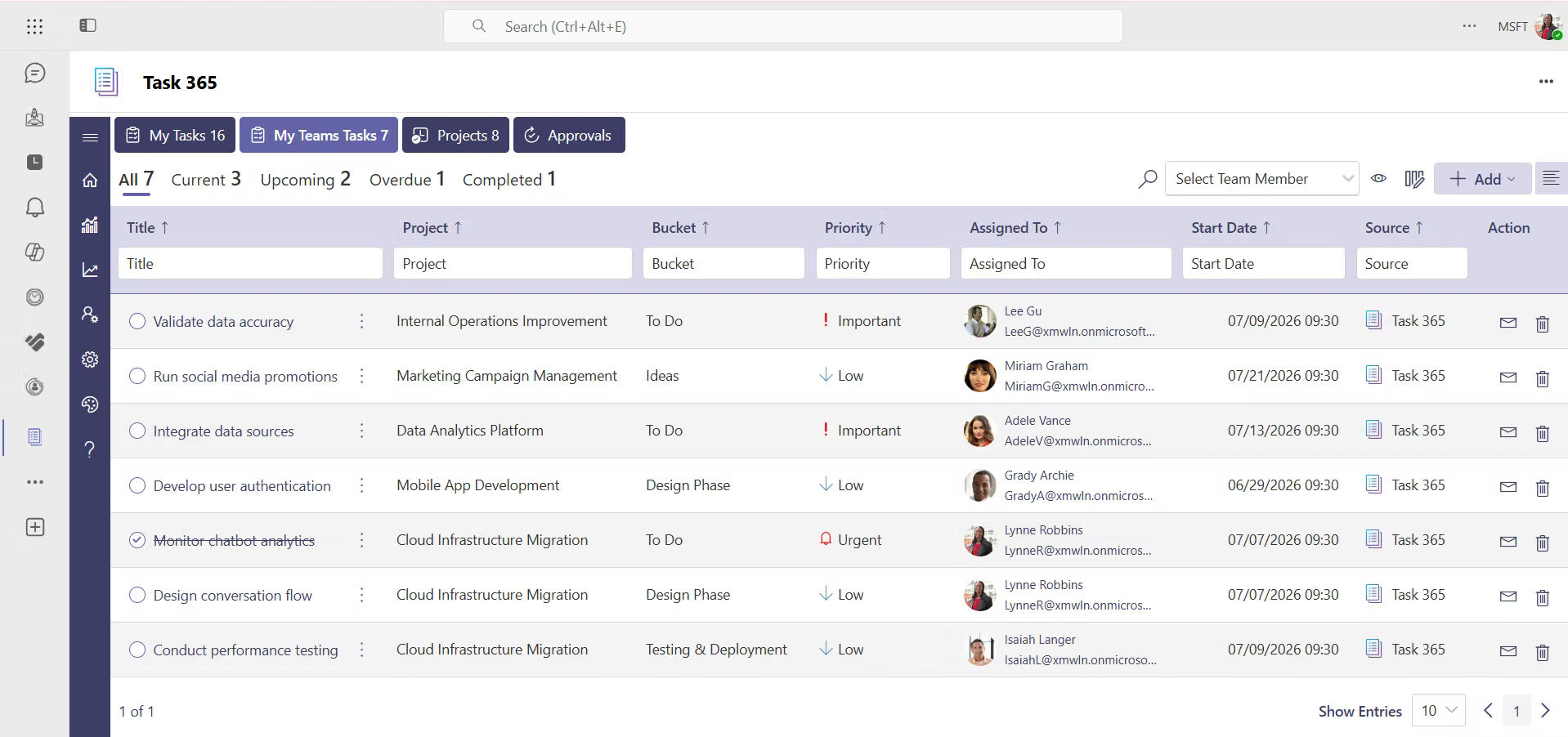
My Tasks
Always keep everything to keep up with work. Easy to prioritize, focused and without stress in meeting deadlines.

Multi-Project Tracking
You can see all your projects on a single screen in real time, where nothing is missed and everyone can be seen to be up to date.
Custom Fields
Assign tags based on priority, status or category to locate the things that are a priority and maintain the organization of work.

Flexible Views
Toggle between List, Board or Calendar or Timeline to plan and allocate your tasks in the manner that best fits your team.
Smart Scheduling
Keep everything in a transparent calendar in order to plan ahead, stay on track and be able to meet deadlines comfortably.

Team Collaboration
Microsoft Teams and Planner allow effortless sharing updates, collaborating, and delegating tasks to everyone in the right direction.

Performance Insights
Monitor the progress using transparent reports and dashboards, which allows to make smarter decisions and achieve improved results.
Data Protection
Secure your information using the trusted Microsoft 365 security system to ensure that your staff remains in line and safe.
Task Management 365 On-the-Go
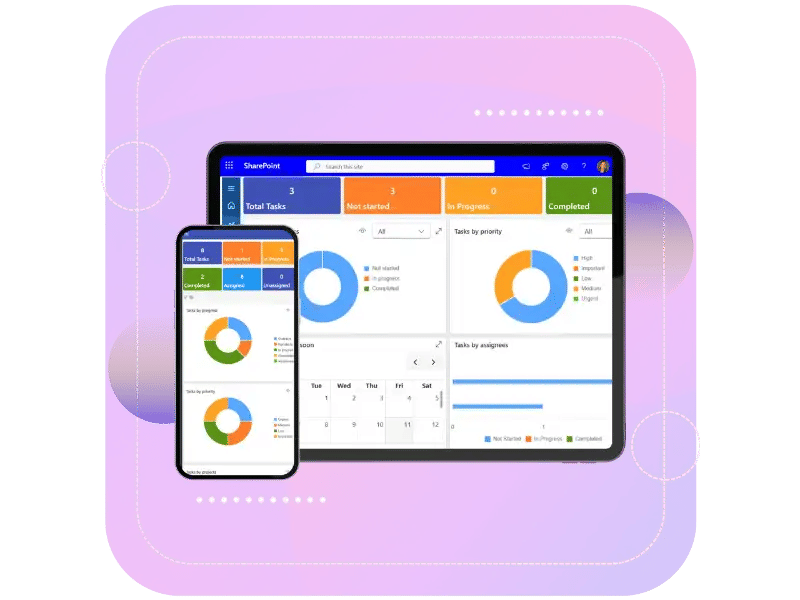
Stay on top of your work from anywhere. Check tasks, updates, and progress right from your phone or laptop, so nothing slows you down and your team keeps moving forward.
Why Choose Task Management 365?
Store all your work under one roof and accomplish tasks at a faster rate. Priorities, easy collaboration on shared lists and notes, time savings by processing repetitive actions and templates and repeating actions, are key features of the platform.

Built for Microsoft 365
Works easily with the tools your team already uses Teams, SharePoint, Outlook so you can get started without any setup stress.

Stay on Track
Keep track of deadlines and tasks so nothing gets missed and your team stays on top of tasks.

Controlled Access
Choose who can view or edit tasks to keep your work safe, secure, and organized at all times.

Work from Anywhere
Manage and keep track of your team by checking and updating your phone or laptop at any location.

Clear Communication
Keep all updates, notes, and files in one place, making it easy for everyone to stay informed and work together smoothly.
Work from Anywhere
Manage and keep track of your team by checking and updating your phone or laptop at any location.
Live on Azure
Buy directly from Azure Marketplace or via your enterprise agreement.
Special Pricing for NPOs
Non-profits and government-funded educational institutes can avail exclusive rates.
Enterprise Pricing for 50+ Users
Organizations with more than 50 users can avail special pricing.
Apps 365 Advantage
Our cloud-powered tools help your team stay organized, get more done, and grow faster. With easy integrations and strong security, your business can stay efficient and ahead of the game.
Cyber Security
Cyber Security in GCC & GCC High within the Microsoft environment places high importance on stringent measures to protect sensitive government data, ensuring security with robust defenses and Microsoft applications.
GCC & GCC High
Our apps are built for GCC & GCC high tenants of US Federal clouds.
SOC2 Type II Certified
Our apps ensure security, compliance, and data protection
MS Azure Marketplace
Our apps are tested by Microsoft and available on MS Azure Marketplace
Microsoft Appstore
Our innovative applications are available on the Microsoft Appstore.
Customer Support
Your Support Team merges technical prowess with sincere care, fostering trust through expertise and empathy. They build lasting relationships, transcending mere service to create meaningful connections.
AI Enabled Apps
Our innovative apps are built with the options of Azure AI, Copilot, and custom AI solutions.
Swift Deployment
Choose any deployment method—Teams, Outlook, or SharePoint—that suits your preferences.
Modern UI/UX
Every app is crafted using the latest Fluent UI, ensuring seamless functionality across all devices.
Free Updates
Our valued subscribers enjoy unlimited support, enhancements, features, and updates.
SharePoint Consultant, Raymond West
California
Finance Manager, Exeevo
New York
IT Director, Frontier Waste Solutions
Texas, US
Sharepoint Developer, Recor Medical
Washington, US
Business Manager, Cerilon
Canada
Director of IT, JConnelly
New York
System Admin
Oregon, US
IT Manager, Pallas LLP
England, UK
IT Officer, HanmiGlobal Saudi
Saudi Arabia
ICT Manager, SMT Shipping
Europe
Barton Associates
Cofounder
Vice President of Operations
Head Of Information & Technology
Director of Infrastructure
Customer Testimonials
Hear from satisfied organizations that have transformed their IT and internal support with Task Management 365.
Clients Speak
One Place for Every Task
SharePoint Task Management brings all your tasks, teams, and tools together in Microsoft 365. Stay organized, collaborate easily, and keep everything under control in one place.
Book a Personalized Task Management 365 Demo!
Frequently Asked Questions
Task Management 365 is a smart task-management tool, which is part of Microsoft 365. It helps the team to organize work, set priorities and speed up task completion. It links up with the applications that you use already such as Teams, SharePoint, Outlook, and Planner, so that you can have a view of your tasks, schedules, and conversations all at one place. It highlights the urgent work, creates a simple to understand summary, and handles the repetitive tasks so the team can focus on the crucial ones.
Perfect for basic task lists. Task Management 365 includes AI Copilot assistance, intelligent summaries, multi-project tracking, and automation. It gets to know your workflow to prioritize it, enables you to add any custom fields, change to List, Board, Calendar, Timeline views, and provides extensive performance insight, all in a single system. It is made to power teams that require greater power than mere lists can provide.
Indeed! The Task Management 365 is a software application that functions within the Microsoft 365 ecosystem. Moreover, it is closely integrated with Microsoft Teams, SharePoint, Outlook, and Planner with straightforward settings.
There is security at every level. Task Management 365 is backed by the Microsoft 365 enterprise level security that safeguards data such as Fortune 500 businesses. You can choose who sees or edits tasks, meet industry compliance standards, keep data encrypted, and get regular security updates. Your team’s work stays protected, secure, and always compliant.
AI Copilot is the AI that supports your work like a human and solves everyday problems with tasks. It gives instant tips that are useful, databases and organizes tasks depending on their urgency, handles repetitive tasks to save you hours every week, gets familiar with your team performance and gives intelligent follow-up suggestions, and ensures that no one misses out on the information without having to give status updates.
There will be no need to scroll through all the updates. The AI highlights all the required deadlines, crucial tasks, and changes, is able to display progress immediately. It analyzes your work and displays only the relevant parts for the current time, therefore you have shorter meetings, handle your emails more effectively and are able to come up with solutions much quicker.
Intelligent Summaries take all the project information and breaks it down into quick summaries, actionable summaries. They will not have to go through a lot of updates but will be able to see their entire project immediately with all the important deadlines, tasks, and changes highlighted and their progress indicated. The AI evaluates your projects and presents you with only what is important at the moment, thus reducing your time in meetings, keeping your inbox manageable, and accelerating your decision making.
The cost is different and it will be based on the team size, needs and your Microsoft 365 subscription. Get in touch with us for a personalized quote. Many companies will get the return on investment from the automation and productivity functions in a month. In addition, we offer demos and trials to demonstrate the value.
Setup is incredibly fast. The majority of the teams will be operational within minutes, as opposed to days. Task Management 365 does not require complex installations or data migrations because it fully integrates with your current system at Microsoft 365. All one needs to do is to connect the app, invite fellow members of the team and begin forming tasks instantly. Your team will be up and running instantly with our simple interface, no heavy training required.
Yes. The best feature is multi-project tracking. Watch every project on a single dashboard, monitor live progress on all teams, switch between views instantly, spot resource problems early and maintain a clear view of all initiatives. You can handle 3 projects or 30 projects and it does not go to waste.
Task Management 365 provides robust performance data in an easy-to-use dashboards and reports. Monitor data on productivity, track the rate at which tasks are completed, identify slowdowns, time by project type, generate report templates to be used by stakeholders, and make decisions based on data. The analytics not only show what is happening but also why, which will enable you to keep on improving performance.
Task Management 365 is not size sensitive. It is utilized by small businesses to maintain teams without the presence of a project manager. It also has scalability because its people and projects increase in size. The benefits of enterprise security, sophisticated reporting, and control of intricate workflows are appreciated by large enterprises. Task Management 365 can adapt and make you work smarter regardless of the number of employees 5 or 5,000.
Schedule a free personalized 1:1 demo
By proceeding, you accept Cubic Logics’s terms and conditions and privacy policy


By proceeding, you accept Cubic Logics Terms and Conditions and Privacy Policy
Offer is expiring soon!
Fill in your details below to receive your personalized coupon code.
Try It Free, No Obligation


Please provide your contact details, we will connect with you soon!
Request for the custom price
By proceeding, you accept Cubic Logics Terms and Conditions and Privacy Policy
Schedule a free personalized 1:1 demo
By proceeding, you accept Cubic Logics’s terms and conditions and privacy policy


Request of the Free License
By proceeding, you accept Cubic Logics Terms and Conditions and Privacy Policy