

- Leave request tracking provides complete visibility from submission to final approval.
- Clear request statuses reduce follow-up emails and approval delays.
- HR software keeps managers, HR teams, and team members updated in real time.
- SharePoint-based HR software centralizes leave requests, approvals, and records within Microsoft 365.
Managing leave requests is more than approving time off. HR teams need to track leave requests by knowing who has applied, where each request is in the approval process, who is responsible for the next action, and how approved leave affects team availability. Without clear leave request tracking, even a few pending requests can lead to missed approvals, scheduling conflicts, and repeated follow-ups.
HR software gives every leave request a clear journey from submission to final decision. Instead of searching through emails or updating spreadsheets, HR teams and managers can monitor request statuses, approval history, leave balances, and team calendars from one place. This creates better visibility while helping everyone stay informed throughout the process.
What Is Leave Request Tracking in HR Software?
Leave request tracking is the process of monitoring every stage of a leave application after it has been submitted. Rather than simply recording time off, HR software follows each request as it moves through review, approval, updates, and final documentation. This gives everyone involved a clear view of its current status without relying on emails or manual follow-ups.
A modern HR system creates a complete record of every request, making it easy to identify who submitted it, who needs to review it, when decisions were made, and how the approved leave affects schedules and leave balances. As organizations grow, this level of visibility becomes essential for maintaining accurate records and avoiding missed approvals.
What information is tracked in a leave request?
A well-designed HR software solution records more than just leave dates. It tracks the complete history of the request, including:
- Leave type selected by the team member
- Start and end dates of the leave
- Number of leave days requested
- Current approval status
- Manager and HR approval history
- Comments or supporting documents
- Updated leave balance
- Date and time of every action
- Final approval or rejection record
Each update is recorded automatically, creating a clear timeline that HR teams and managers can review whenever needed.
How leave request tracking differs from leave management
Although these terms are often used together, they serve different purposes.
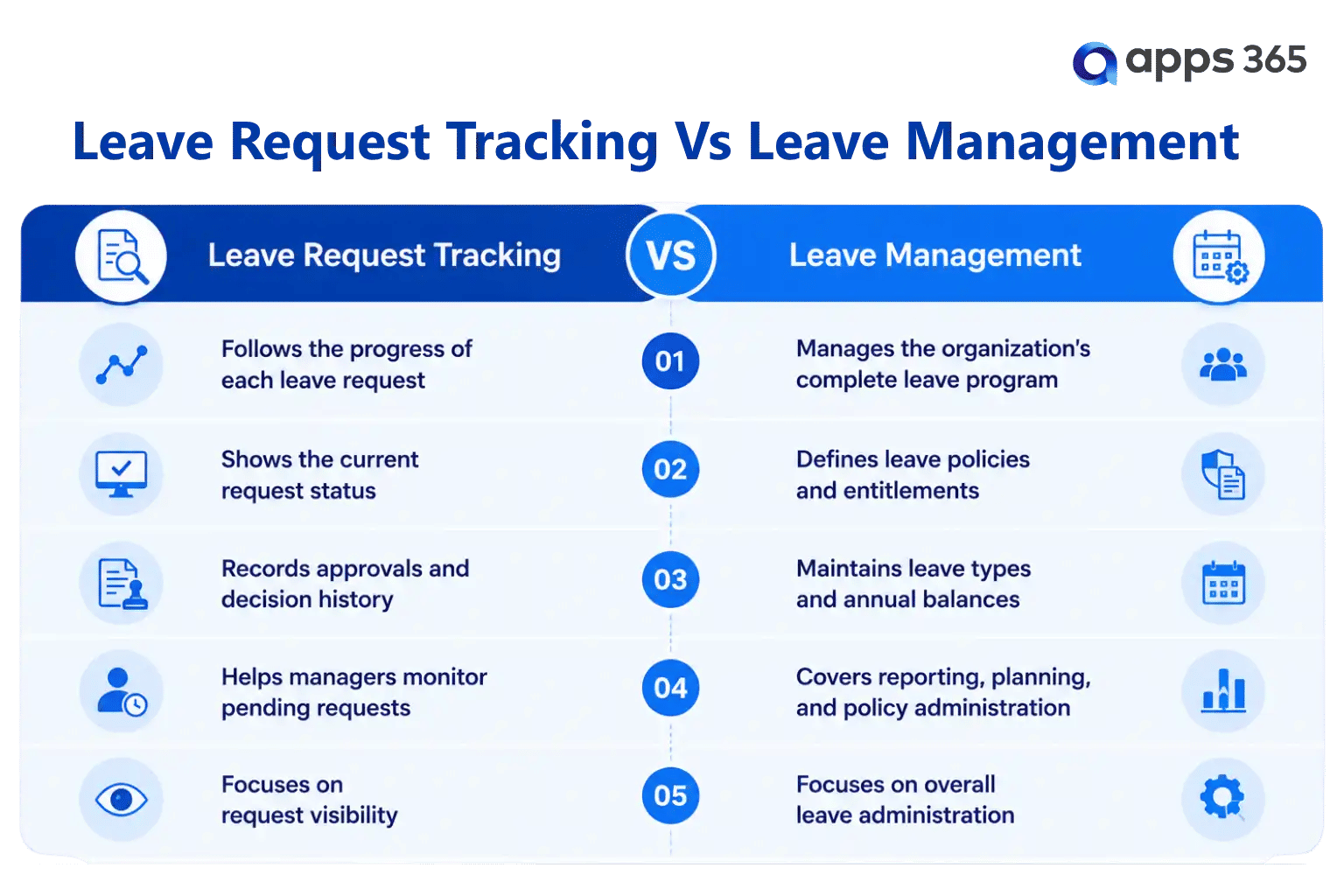
Leave request tracking is one part of a broader leave management strategy. By providing real-time visibility into every request, HR software helps HR teams respond faster, managers make timely decisions, and team members stay informed throughout the approval process.
Why Is Tracking Leave Requests Important for HR Teams?
As organizations grow, leave requests can come from multiple departments, locations, and reporting managers every day. Without a centralized way to track them, it becomes difficult to know which requests are waiting for approval, which have been completed, and whether approved leave affects project schedules or team availability. HR teams need visibility into the entire process—not just the final decision.
The ability to track leave requests in HR software provides complete visibility by recording every action from submission to completion. Instead of relying on reminders or checking multiple communication channels, HR professionals and managers can see the current status of every request from a single dashboard.
- Faster response to pending requests
When requests remain unnoticed, approvals are delayed and team members often need to follow up. A tracking system highlights pending requests, helping managers review applications on time and reducing unnecessary delays.
- Better visibility across departments
HR teams can monitor leave requests across different departments without collecting updates manually. This makes it easier to identify overlapping leave, monitor workload distribution, and understand overall team availability before approving additional requests.
- Clear approval history
Every action is recorded with a timestamp, creating a transparent approval history. HR can quickly identify who approved, rejected, or returned a request, making future reviews and internal discussions much easier.
- Accurate leave records
Once a request is approved, the system updates leave records automatically. This reduces the risk of duplicate entries, outdated balances, or inconsistent information that often occurs with manual recordkeeping.
- Improved planning for managers
Managers gain a real-time view of approved and upcoming leave within their teams. Before approving a new request, they can check existing absences and make informed scheduling decisions without switching between multiple tools.
- Reduced administrative follow-ups
One of the biggest advantages of leave request tracking is fewer status inquiries. Since team members can view the progress of their own requests, HR teams spend less time responding to questions such as:
- Has my leave request been reviewed?
- Who is currently approving it?
- Was my leave approved?
- How many leave days do I have remaining?
With HR software, these answers are available instantly, giving both HR teams and personnel greater transparency while keeping the leave approval process organized.
How Does the Leave Request Approval Workflow Work?
A leave request follows a series of predefined steps before it reaches its final status. Instead of relying on emails or verbal approvals, HR software routes each request through the appropriate reviewers and records every action along the way. This creates a consistent approval process while giving HR teams complete visibility into where each request stands.
Although workflows can vary between organizations, the overall journey remains similar. Each stage is designed to keep the request moving while maintaining accurate records and clear communication.
Step 1: Team Member Submits a Leave Request
The process begins when a team member submits a leave request through the HR software. The request typically includes:
- Leave type
- Start and end dates
- Number of leave days
- Reason for leave (if required)
- Supporting documents (optional)
Once submitted, the request enters the approval workflow and receives a status such as Submitted or Pending Review.
Step 2: Leave Balance Is Verified
Before the request moves forward, the system checks the available leave balance based on the organization’s leave policies. This helps managers review requests with the most up-to-date information and reduces the need for manual calculations.
Step 3: The Request Is Sent to the Approver
The request is automatically routed to the designated reporting manager or approver. Depending on company policies, the workflow may include:
- Single-level approval
- Multi-level approval
- Department-specific approvers
- HR review after manager approval
Each approver receives a notification so they can review the request without delay.
Step 4: Manager Reviews the Request
The manager evaluates the request by considering factors such as:
- Team availability
- Existing approved leave
- Project schedules
- Department workload
- Leave eligibility
Based on the review, the manager can approve, reject, or return the request for additional information.
Step 5: HR Records Are Updated
After the final approval, the HR software automatically updates the leave records. Depending on the organization’s setup, the system can also:
- Deduct the approved leave from the available balance
- Update the leave calendar
- Record the approval history
- Notify relevant stakeholders
- Maintain a complete audit trail
This removes the need for HR teams to update multiple records manually.
Step 6: The Final Status Is Shared
Once the workflow is complete, the team member receives the final decision. Both the requester and HR can view the complete request history, including submission time, approval actions, comments, and the current leave balance.
By following a structured approval workflow, HR software keeps every leave request organized, transparent, and easy to track from the moment it is submitted until the process is complete.
Leave Request Statuses Explained
Every leave request moves through different stages before it is completed. These statuses help HR teams, managers, and team members understand exactly where a request is in the approval process. Instead of asking for updates through emails or chat messages, users can simply check the current status in the HR software.
Each status represents a specific action, making it easier to monitor pending requests, identify delays, and maintain a complete history of every leave application.
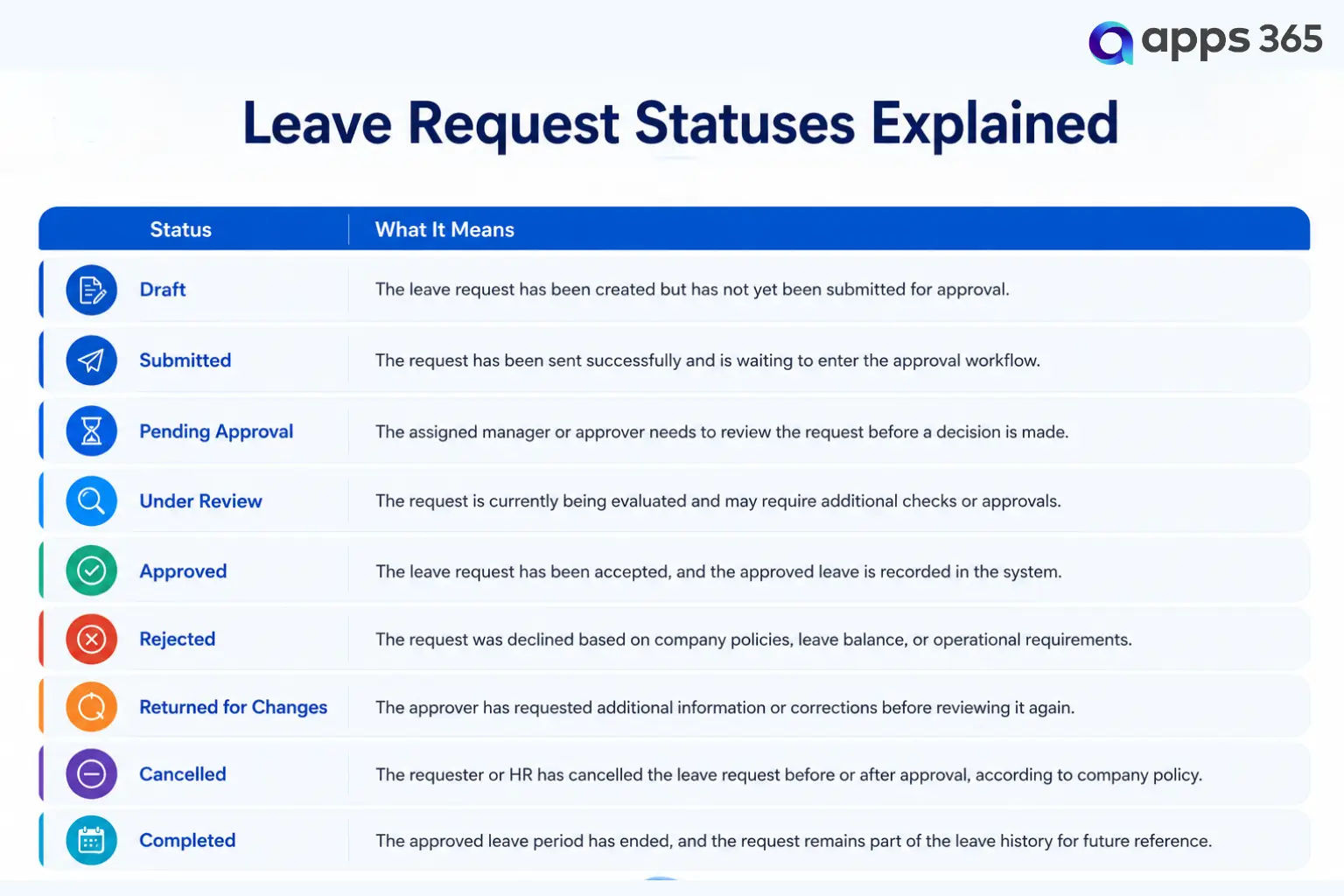
Why do leave request statuses matter?
Clearly defined statuses help everyone involved understand what happens next without guessing or waiting for updates. HR teams can quickly identify requests that need attention, managers can prioritize pending approvals, and team members always know the progress of their applications.
Using standardized statuses also makes reporting more meaningful. HR can easily measure approval turnaround times, identify requests that remain pending for too long, and review historical trends to improve the overall leave approval process.
Who Can Access and Manage Leave Requests?
Time-off request software is not limited to the HR department. Different users interact with the same request at different stages of the approval process. HR software uses role-based access so that each person sees only the information they need to perform their responsibilities while protecting sensitive leave information.
This structured access keeps the approval workflow organized and prevents unauthorized changes to leave records.
Team Members
Team members can create and monitor their own leave requests without contacting HR for updates. They can typically:
- Submit new leave requests
- View the current request status
- Check available leave balances
- Review previous leave history
- Cancel or withdraw requests based on company policy
- Receive approval or rejection notifications
This self-service experience reduces routine inquiries and gives team members better visibility into their leave records.
Reporting Managers
Managers are responsible for reviewing requests from their direct reports. Depending on organizational policies, they can:
- View pending leave requests
- Review team leave calendars
- Check overlapping leave within the team
- Approve or reject requests
- Request additional information
- Add comments during the approval process
Having access to team availability helps managers make informed decisions while maintaining business continuity.
HR Teams
HR professionals oversee the complete leave request process across the organization. Their responsibilities may include:
- Monitoring all leave requests
- Configuring leave policies
- Managing approval workflows
- Reviewing leave balances
- Resolving leave-related issues
- Generating leave reports
- Maintaining historical records
HR also has visibility into approval timelines, helping identify requests that require follow-up.
Department Heads
In organizations with multi-level approval processes, department heads may review requests after the reporting manager. They can evaluate leave requests based on departmental priorities, resource availability, or business requirements before providing the final approval.
System Administrators
Administrators manage the overall configuration of the leave tracking system. Their responsibilities typically include:
- Setting user permissions
- Configuring approval workflows
- Managing leave categories
- Updating holiday calendars
- Maintaining organizational settings
- Supporting system administration
Role-Based Access Keeps Leave Tracking Organized
When each user has access to the right information, the leave approval process becomes more structured and transparent. Team members can monitor their requests, managers can review approvals efficiently, and HR can oversee the complete process without maintaining separate records. This role-based approach also helps organizations protect sensitive information while keeping leave requests accessible to the people responsible for managing them.
Essential Features of HR Software for Leave Request Tracking
Not every HR software solution provides the same level of visibility into leave requests. While basic systems record leave applications, a comprehensive leave tracking solution helps HR teams monitor request progress, approval timelines, leave balances, and team availability from one place.
When evaluating HR software, look for features that support the complete leave request lifecycle rather than just recording approved leave.
- Real-Time Leave Request Dashboard: A centralized dashboard displays all leave requests in one view, making it easy to monitor pending, approved, rejected, and completed requests. HR teams and managers can quickly identify items that require attention without reviewing multiple records.
- Configurable Approval Workflows: Every organization has its own approval process. HR software should support flexible workflows, including single-level and multi-level approvals, department-specific routing, and approval rules that match internal policies.
- Leave Balance Tracking: Approvers should be able to view available leave balances before making a decision. Automatic balance updates after approval help maintain accurate records and reduce manual calculations.
- Request History and Audit Trail: Each leave request should include a complete history of actions, including submission time, approvals, comments, status changes, and timestamps. This creates a transparent record for future reference.
- Team Leave Calendar: A shared leave calendar helps managers understand who is available on specific dates. Before approving a request, they can identify overlapping absences and plan workloads more effectively.
- Notifications and Status Updates: Automatic notifications keep everyone informed throughout the approval process. Team members receive updates when their request changes status, while managers are notified when new requests require review.
- Reports and Leave Analytics: Built-in reporting provides insights into leave patterns across departments. HR teams can review approval turnaround times, leave trends, request volumes, and absenteeism data to support planning and decision-making.
- SharePoint and Microsoft 365 Integration: For organizations using Microsoft 365, HR software that integrates with SharePoint brings leave requests, employee records, and approvals into a familiar environment. This creates a connected experience where HR teams can manage leave information alongside their existing Microsoft tools.
- Mobile Access for Approvals: Managers are not always at their desks when leave requests arrive. Mobile-friendly access allows them to review and respond to requests from anywhere, helping prevent unnecessary approval delays.
The right combination of features helps HR teams move beyond simply recording leave requests. With real-time visibility, structured approval workflows, reporting, and Microsoft 365 integration, organizations can monitor every request from submission to completion while keeping leave records accurate and accessible.
How to Track Leave Requests Step by Step in SharePoint
Organizations using Microsoft 365 often prefer to manage leave requests within SharePoint because it provides a centralized and secure environment for storing HR information. When combined with HR software like HR365 HRMS, SharePoint becomes more than a document repository—it supports the complete leave request tracking process, from submission to final approval.
The following steps show how a typical leave request is tracked in a SharePoint-based HR system.
Step 1: Submit a Leave Request
A team member logs into the HR portal or Microsoft Teams and submits a leave request by selecting the leave type, dates, and any required details. Once submitted, the request is stored in SharePoint and assigned an initial status such as Submitted.
Step 2: Route the Request for Approval
Based on the organization’s approval rules, the request is automatically sent to the appropriate manager or approver. Notifications help reviewers know that a new request is waiting for their action.
Step 3: Review the Request
The approver reviews the leave details along with useful information such as:
- Available leave balance
- Existing approved leave
- Team availability
- Leave history (if permitted)
This information supports quicker and more informed approval decisions.
Step 4: Update the Request Status
After reviewing the request, the approver can approve, reject, or return it for changes. The request status is updated immediately, allowing both HR and the requester to see the latest progress without additional follow-up.
Step 5: Record the Approved Leave
When a request is approved, the system updates the leave balance, records the approval history, and adds the leave to the organization’s calendar where applicable. Every action is stored as part of the request history for future reference.
Step 6: Monitor and Report
HR teams can monitor all leave requests from a centralized dashboard, filter requests by status or department, and generate reports to review approval timelines, leave trends, and pending requests. This ongoing visibility helps organizations keep leave records organized throughout the year.
For Microsoft 365 organizations, SharePoint provides a familiar platform that works alongside everyday business tools. With HR365 HRMS, leave requests can be tracked from submission to completion while keeping approvals, records, notifications, and reporting connected within the Microsoft ecosystem. This gives HR teams and managers a consistent way to monitor every request without switching between multiple applications.
Best Practices to Improve Leave Request Tracking
A well-defined leave tracking process is not just about using HR software—it also depends on consistent policies, timely approvals, and accurate records. Following a few practical best practices helps HR teams maintain visibility over every leave request while reducing delays and administrative effort.
1. Define Clear Leave Policies — Leave policies should clearly explain the available leave types, eligibility, approval requirements, notice periods, and documentation guidelines. When everyone follows the same policy, requests are processed more consistently and with fewer questions.
2. Standardize the Approval Workflow — Using a consistent approval workflow helps every leave request follow the same review process. Whether your organization uses a single approver or multiple approval levels, predefined workflows make it easier to track requests from submission to completion.
3. Encourage Self-Service — Allow team members to submit and monitor their own leave requests through the HR portal. Self-service access gives them visibility into request statuses and leave balances, reducing routine inquiries to HR.
4. Review Pending Requests Regularly — Managers and HR teams should review pending requests frequently to prevent unnecessary approval delays. A dashboard showing requests by status makes it easier to identify applications that require immediate attention.
5. Maintain an Updated Team Leave Calendar — An up-to-date leave calendar helps managers identify overlapping absences before approving new requests. This supports better scheduling and helps departments plan workloads more effectively.
6. Keep Leave Records Accurate — Leave balances, approval history, and request details should be updated automatically after every decision. Maintaining accurate records simplifies reporting and provides reliable information whenever historical leave data is needed.
7. Use Reports to Identify Trends — Regularly reviewing leave reports helps HR teams understand patterns such as seasonal leave peaks, approval turnaround times, frequently used leave types, and departments with higher leave volumes. These insights support better planning throughout the year.
Conclusion
Tracking leave requests is about more than recording time off. It gives HR teams, managers, and team members a clear view of every request from submission to completion. With defined approval workflows, real-time status updates, and centralized records, organizations can reduce approval delays, maintain accurate leave information, and make better scheduling decisions.
For businesses using Microsoft 365, HR365 HRMS provides a practical way to track leave requests within SharePoint and Microsoft Teams. From self-service leave applications and configurable approval workflows to dashboards and reporting, the platform keeps the entire leave request process connected in one place, making it easier to manage leave across the organization.
Ready to Track Leave Requests More Efficiently?
Book a personalized demo today and see how HR365 HRMS simplifies leave request tracking in SharePoint and Microsoft Teams.
Frequently Asked Questions
What is leave request tracking in HR software?
Leave request tracking is the process of monitoring a leave application from the time it is submitted until it reaches its final status. HR software records every stage of the request, including approvals, status updates, leave balance changes, and request history.
How does HR software track leave requests?
HR software tracks leave requests by recording each action within the approval workflow. Once a request is submitted, the system updates its status, routes it to the appropriate approver, records approval decisions, updates leave balances, and stores the complete history for future reference.
Why is leave request tracking important?
Tracking leave requests helps HR teams monitor pending approvals, maintain accurate leave records, avoid overlapping absences, and provide greater transparency throughout the approval process. It also reduces the need for manual follow-ups and status inquiries.
Can managers approve leave requests from Microsoft Teams?
Yes. HR365 HRMS integrates with Microsoft Teams, allowing managers to review and approve leave requests without leaving their Microsoft 365 environment. This helps speed up approvals and keeps request updates accessible in one place.
What details are included in a leave request?
A leave request typically includes the leave type, requested dates, number of leave days, current status, approval history, available leave balance, comments, and any supporting documents required by the organization.
How does SharePoint help track leave requests?
SharePoint provides a centralized platform for storing leave requests and related records. When used with HR365 HRMS, it supports request submission, approval workflows, status tracking, reporting, and secure record management within Microsoft 365.
What features should I look for in HR software for leave request tracking?
Look for features such as configurable approval workflows, real-time request statuses, leave balance tracking, team calendars, dashboards, notifications, reporting, audit trails, and integration with Microsoft 365 tools like SharePoint and Microsoft Teams.


_JiluXJRGNl.svg)























