
Employee Leave Tracking Software: 2027 Complete Guide for HR Teams
_mVFFaHUZhS.webp)
Managing employee leave manually is no longer sustainable for hybrid and remote teams. In 2027, cloud-based leave tracking platforms have become essential HR infrastructure — eliminating spreadsheet challenges, reducing compliance risk, and giving employees self-service control over their time off. Organizations that still rely on email threads, shared calendars, and Excel sheets are paying for it in lost productivity, payroll errors, and unhappy employees.
✓ Automate employee leave requests, approval workflows, and notifications to reduce manual HR tasks.
✓ Track employee leave balances, accruals, and carryover rules with greater accuracy.
✓ Improve team visibility with shared leave calendars and advance planning for employee absences.
✓ Manage customized leave policies, maintain compliance, and reduce errors in manual leave tracking.
Gartner predicts that the unified HCM market will grow to $15 billion by 2028, and mobile-first UX and AI-enabled automation will be the most popular investment options. With the increasing workforce models that are more distributed in time zones and geographies, a centralized, rules-based leave management system is no longer a choice, but a competitive requirement.
This guide is a breakdown of all that you should select, deploy, and maximize the ROI of employee leave tracking software in 2027. This guide will provide you with the instruments to make the correct choice regardless of whether you are an HR director at a 50-person startup or a people operations leader at a 5,000-person enterprise.
What Is Employee Leave Tracking Software?
Employee leave tracking software is a centralized online platform that tracks all forms of employee absences – vacation, sick days, parental leave, wellness time, bereavement and any other form of leave unique to your organization or region. Instead of using manual HR input, these platforms automate the whole lifecycle of a leave request: submission and approval, accrual calculation, payroll sync and compliance reporting.
In essence, the modern leave management systems are designed to serve three audiences at the same time: employees seeking transparency and easy access, managers seeking visibility and control without micromanagement, and HR teams seeking audit-ready data and scaleable policy enforcement. The most appropriate platforms will leave all the three groups happier without increasing administrative overhead.
The following are some of the key capabilities that make up a full-featured leave tracking system. Employee self-service portals where employees can request leave at any time and place. Automated notifications and escalation rules of one-click manager approvals. Calculation of accruals through automated daily, monthly or tenure-based accrual calculations. Live team schedules that indicate scheduling issues in advance. FMLA, ADA, and regional labor compliance tracking in various jurisdictions.
Why Your Business Needs It in 2027
Manual leave management has become almost impossible to scale with the transition to hybrid and distributed work. When one HR person has to handle leave requests in three time zones, four countries and six different variations of leave policies, something is bound to go wrong. The newest leave tracking software allows removing that risk altogether by automating the most error-prone processes of the process.
1. Massive Time Savings for HR Teams
By removing manual tracking, email chains, and spreadsheet updates, HR teams save 15 or more hours per week. Automated workflows do the heavy lifting – routing requests to the appropriate approver to notifying payroll when a leave request is completed. The time saved can be diverted to more valuable HR activities like talent development, culture programs and strategic planning.
In addition to the time saved weekly, open enrollment periods, fiscal year resets, and policy changes are made infinitely easier. Using a leave management system, it is possible to update accrual policies or rollover limits in minutes, rather than days. Accuracy and Removal of errors.
2. Error Elimination and Data Accuracy
SHRM reports that 78 percent of HR professionals mention the reduction of errors as the most significant advantage of leave tracking software. There is a high margin of error when the accrual balances, rollover caps, and pro-rata calculations of new hires are calculated by hand. One wrong calculation may lead to the overpayment of an employee, breach of compliance, or a court case. Automated accrual engines remove human error by using the same logic each time, on each employee.
Data accuracy also flows downstream into payroll, benefits administration, and workforce planning. When leave data is clean and current, every connected system benefits. Payroll runs faster, headcount reports are more reliable, and managers make better scheduling decisions.
3. Compliance Protection Across Jurisdictions
Modern leave tracking platforms auto-apply FMLA, ADA, and regional labor rules, with immutable audit logs to defend every decision. For organizations operating across multiple US states or internationally, compliance is one of the highest-risk areas in HR. A missed FMLA certification deadline or an incorrectly denied leave request can trigger legal action that costs far more than any software subscription.
Beyond federal law, leave tracking software helps organizations stay current with evolving state and local regulations — mandatory sick leave laws, paid family leave programs, and jurisdiction-specific accrual requirements. Platforms with geo-specific policy engines update automatically when regulations change, reducing the burden on HR to stay ahead of legislative shifts.
4. Improved Employee Experience and Morale
Transparent, self-service leave management reduces unplanned absences by 25% and delivers a 65% morale boost, according to SHRM research. When employees can check their leave balance, submit a request, and receive approval all within 60 seconds on a mobile app, the psychological benefit is significant. There is no ambiguity, no waiting for an email reply, and no concern that their request got lost.
Employees who feel they have fair, transparent access to their benefits are more engaged and less likely to take unplanned or unapproved absences. Leave management software creates that transparency by giving every employee real-time visibility into their own leave history, upcoming approvals, and remaining balances.
5. Real Cost Savings at Scale
Companies usually save 15,000 or more annually per 100 employees when they change to automated leave management. Add in a decreased payroll error rate, compliance penalties avoided, saved HR time, and decreased employee turnover due to increased benefits transparency, the ROI is strong in the first few months of implementation.
There are also hidden costs associated with manual leave management that do not always show up on a budget line: the cost of time spent by an HR professional in resolving conflicts, the cost of a compliance audit, and the cost of productivity due to scheduling conflicts created by overlapping absences. Automated leave tracking removes all three types of hidden costs at the same time.
Comparison Table
The leave management software market in 2027 offers more options than ever, but not all platforms are created equal. Understanding exactly what each competitor delivers — and where they leave gaps — is essential for making the right decision for your organization. Below is an honest assessment of the top five platforms in the market today.
Software | Price/User/Mo | Free Trial | M365 Sync | G2 Score |
Time Off Manager 365 | $1 | 14 days | Native ✓ | 4.8 ⭐ |
Buddy Punch | $3.99+ | 14 days | No | 4.8⭐ |
Vacation Tracker | $6+ | 14 days | Partial | 4.5 ⭐ |
Zoho People | $1.50+ | 15 days | Partial | 4.4 ⭐ |
Replicon | $10+ | Demo only | Yes | 4.3 ⭐ |
Time Off Manager 365 — Best Leave Management for Overall Business
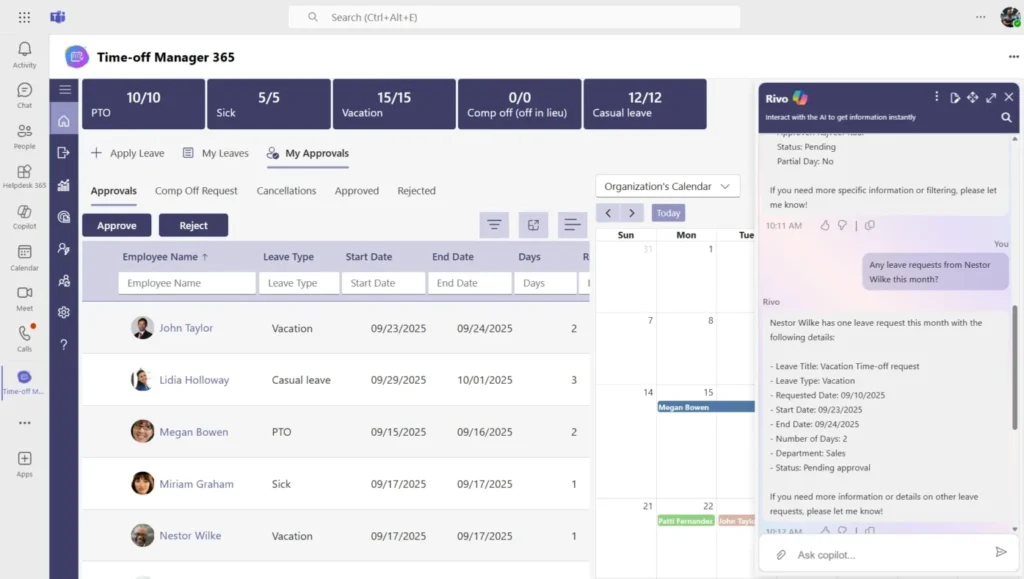
Time Off Manager 365 earns its number one ranking through a combination of pricing leadership, native Microsoft 365 integration, AI-powered accrual predictions, and geo-customized leave policies that competitors simply do not offer at this price point. At $1 per user per month with a 14-day free trial and no credit card required, the barrier to evaluation is effectively zero.
G2 users consistently rate it 4.8 — the highest in its category — with particular praise for the onboarding experience, the quality of the Microsoft Teams integration, and the responsiveness of the customer support team. It is the only platform in this comparison that addresses every gap users report in Buddy Punch, Vacation Tracker, and Replicon simultaneously.
For Microsoft-centric organizations in the 10 to 500 employee range, Time Off Manager 365 delivers enterprise-grade leave management without the enterprise price tag or the enterprise implementation timeline. It is the most complete value proposition in the 2027 market.
Buddy Punch — Strong on Time Tracking, Weak on Global Policy
Buddy Punch earns its 4.8 G2 score through an intuitive interface and reliable punch-in/punch-out time tracking that integrates reasonably well with payroll systems. For small businesses managing hourly workers domestically, it covers the basics competently. The onboarding experience is smooth and the mobile app is responsive.
However, Buddy Punch has no location-specific leave policies — a dealbreaker for multi-region or international teams. Organizations with employees across different US states, let alone different countries, cannot apply jurisdiction-specific accrual rules or statutory leave entitlements. This means HR teams at growing or distributed companies will quickly outgrow Buddy Punch and face the painful process of migrating to a more capable platform.
At $3.99 per user per month, it is also significantly more expensive than the market leader without offering the advanced features that would justify the premium. Teams that need geo-specific compliance, AI-powered insights, or deep Microsoft 365 integration will find Buddy Punch underwhelming.
Vacation Tracker — Simple and Affordable, But Analytically Limited
Vacation Tracker positions itself as the simplest leave management tool on the market, and for small teams that need basic PTO tracking, it delivers on that promise. The Slack integration is genuinely useful for remote-first teams, and the interface is clean enough that most employees can adopt it without training.
The significant limitation is that Vacation Tracker skips AI accrual forecasting entirely, leaving HR teams guessing during peak seasons. There is no predictive engine to flag employees approaching burnout thresholds, no automated alerts for high leave-debt accumulation, and no trend analysis to help HR teams plan coverage proactively. At $6 per user per month, organizations are paying more than competitors for a tool that does less analytical work.
Vacation Tracker’s Microsoft 365 integration is also only partial, which creates calendar sync gaps that HR teams have to patch manually. For any organization that has standardized on Microsoft Teams and Outlook, this is a meaningful friction point that compounds over time.
Zoho People — Feature-Rich Ecosystem, But Integration Gaps Remain
Zoho People is the most feature-complete platform on this list for organizations already embedded in the Zoho ecosystem. It covers leave management, time and attendance, performance management, and onboarding within a single suite, which reduces the number of vendor relationships an HR team needs to manage.
The challenge is that Zoho People offers only partial Microsoft 365 sync, creating manual calendar gaps that HR teams have to patch themselves. For Microsoft-centric organizations — which represent the majority of the enterprise market — this is a serious limitation. Outlook calendars and Microsoft Teams notifications are where most scheduling conversations happen, and incomplete sync means leave data never fully surfaces where managers need it.
Zoho People is also more complex to configure than simpler competitors, which means implementation timelines are longer and ongoing administration requires more HR bandwidth. For organizations that want a simple, fast-deploying leave tool, Zoho People introduces unnecessary complexity.
Replicon — Enterprise Power, Enterprise Complexity
Replicon is the most powerful platform on this list in terms of raw configurability and reporting depth. Large enterprises with complex workforce models — project-based billing, contractor management, multi-entity structures — will find capabilities in Replicon that no other platform matches. Its compliance reporting is particularly strong for organizations in regulated industries.
The critical tradeoff is implementation complexity. Replicon requires weeks of complex setup that most SMBs simply cannot afford in time or resources. There is no self-service free trial — only a sales-led demo — which means organizations cannot evaluate the product independently before committing significant time to an implementation process. At $10 per user per month, it is also the most expensive platform in this comparison, making it difficult to justify for organizations that do not need enterprise-grade complexity.
For the vast majority of HR teams in the 10 to 500 employee range, Replicon is overbuilt for their needs and underdelivers on the speed and simplicity that modern HR teams prioritize.
What Employees Actually Experience: The Self-Service Leave Journey
Understanding what employees experience day-to-day is just as important as evaluating features on a spec sheet. A leave management platform is only effective if employees actually use it — and adoption depends entirely on how intuitive and frictionless the experience is.
With a well-designed platform, employees open the mobile app, pick dates, select their leave type, add an optional note, and submit — the manager receives an instant push notification for one-click approval. Balance updates are updated in real time to ensure that there is no confusion regarding the number of days left or the amount of entitlements earned. Team calendar overlaps are automatically identified prior to the request being submitted and before scheduling conflicts occur.
The request-to-approval process lasts less than 60 seconds and zero emails are needed. To employees who used to have to email, wait to be responded to, and then manually add an event to a shared calendar, this is a qualitative change in their engagement with their benefits. The result of that frictionless experience is directly reflected in the increases in morale and satisfaction that SHRM data continuously records.
PTO Accrual, Rollovers, and Payroll: How It All Connects
One of the most technically complex aspects of leave management is the relationship between accrual calculations, rollover rules, and payroll processing. In manual systems, these three functions are typically managed by different people using different tools, which creates reconciliation problems that cost HR teams significant time every pay period.
Every accrual calculation daily, monthly, or tenure-based runs automatically so HR never touches a spreadsheet again. Rollover caps, pro-rata calculations for new hires, and FMLA overlap detection are configured once during implementation and enforced automatically without manual work. When an employee crosses a tenure threshold that unlocks additional leave entitlements, the system applies the new rate immediately and retroactively corrects any balances if needed.
Native QuickBooks and payroll API integrations push leave data directly into payroll with zero re-entry, eliminating the reconciliation step entirely. Burnout alerts fire automatically when employees approach high leave-debt thresholds — flagging situations where employees have accumulated leave they are not taking, which research consistently links to elevated turnover risk.
Leave Tracking for Remote and Hybrid Teams: What You Need
Remote and hybrid teams have a special category of leave management issues that were never intended to be addressed by traditional office-based systems. Time zone issues, overlapping absences in distributed teams, uneven leave entitlements by country, and the lack of informal visibility of who is in the office on a particular day all of these issues are magnified when your employees are located in more than one place.
The leave tracking software solves these issues in a systematic way by implementing geo-specific policy regulations automatically and maintaining shared global calendars in all departments and time zones. London managers and Singapore employees work with the same real-time information, and leave requests, approvals, and balance changes can be seen by all interested parties no matter where they are working.
The integrations of Microsoft Teams and Slack surface leave requests within the tools that are already distributed among managers and used daily. Instead of requesting managers to visit a different HR system, leave requests are displayed as actionable items in the collaboration tools already open on their screens. Time Off Manager 365 enables unlimited custom leave types, including statutory requirements in many countries with no manual policy management or country-specific configuration by the HR team.
How to Implement Leave Tracking Software: A 6-Step Roadmap
Choosing the right platform is only half the challenge — successful implementation requires a structured approach that accounts for data migration, policy configuration, manager training, and employee communication. Organizations that rush implementation typically face low adoption rates and a return to manual workarounds within the first 90 days.
Step 1: Audit Your Current Leave Policies
Before configuring any system, document every leave type your organization offers, the accrual rules that govern each type, and any location-specific variations. This audit typically surfaces policy inconsistencies that have accumulated over years of manual management. Resolving those inconsistencies before implementation prevents them from being codified into the new system.
Step 2: Define Your System Configuration
Work with your vendor’s implementation team to translate your policy documentation into system configuration. This includes accrual schedules, rollover caps, approval workflows, notification rules, and integration settings for payroll and calendar systems. Most SMBs can complete configuration within three to five business days with vendor support.
Step 3: Migrate Historical Data
Import current leave balances, accrual histories, and pending requests from your existing system. Data quality at this stage is critical — errors in opening balances will cascade through the system and create employee disputes. Most vendors provide import templates and validation tools to simplify this process.
Step 4: Train Managers First
Manager adoption is the single most important driver of overall system adoption. If managers are not using the approval workflow, employees will revert to email requests and the system will be bypassed. Prioritize manager training before the employee rollout, focusing on the approval flow, calendar visibility, and reporting tools.
Step 5: Roll Out to Employees
Communicate the new system to employees at least two weeks before go-live, explaining the benefits clearly and providing self-service tutorials or quick-start guides. A phased rollout by department or location reduces the volume of support questions and allows the HR team to address issues before they affect the full workforce.
Step 6: Monitor and Optimize
Use the platform’s analytics dashboard to monitor adoption rates, approval turnaround times, and leave utilization patterns in the first 90 days. Early indicators of under-adoption — such as a high rate of manager-initiated requests rather than employee-initiated ones — signal that additional training or communication is needed.
Most SMBs can go fully live within two weeks following this roadmap. Complex enterprise deployments with custom workflows may take four to six weeks. Time Off Manager 365 provides a dedicated implementation specialist for all accounts at no additional cost, which significantly reduces time-to-value compared to competitors that charge separately for professional services.
Key Features to Look For When Evaluating Leave Tracking Software
Not all leave tracking platforms are built to the same standard. When evaluating options for your organization, the following capabilities represent the difference between a tool that simply records leave requests and a platform that actively improves your HR operations.
- Custom Leave Policies — Tenure-based and location-specific accrual rules that apply automatically based on employee profile data, without manual HR intervention for each case.
- Mobile Apps — Full-featured iOS and Android apps with push notifications that enable employees to submit requests and managers to approve them from anywhere, at any time.
- Integrations — Native connectors for Microsoft 365, Google Workspace, Slack, and payroll systems that eliminate data re-entry and keep all connected systems current in real time.
- AI Insights — Predictive usage forecasts and burnout alerts that flag at-risk employees before leave debt becomes a retention problem.
- Advanced Reporting — CSV and PDF export, compliance audit trails, and trend dashboards that give HR leadership the data they need for workforce planning and executive reporting.
- Security and Compliance — GDPR and SOC2 certification with enterprise encryption that protects sensitive employee data and satisfies the requirements of regulated industries.
- Unlimited Leave Types — Support for custom leave categories beyond standard PTO, including jurisdiction-specific statutory leave types, wellness days, volunteer time, and bereavement variations.
Conclusion
Employee leave tracking software is no longer just an HR convenience—it’s a core system that directly impacts productivity, compliance, and employee satisfaction. The right platform eliminates manual errors, improves transparency, and helps teams operate smoothly across locations and time zones.
If you’re looking to simplify leave management while gaining full control and visibility, now is the time to upgrade. Book a demo today and see how the right solution can transform your HR operations in just a few clicks.
Join Our Creative Community
Frequently Asked Questions
What is employee leave tracking software?
Employee leave tracking software is a tool that digitally records, approves, and manages employee leaves such as PTO, sick leave, and holidays.
Why use employee leave tracking software instead of Excel?
It reduces errors, automates approvals, and gives realtime visibility into leave balances and upcoming absences.
Can employee leave tracking software handle multiple leave types?
Yes, it can manage different leave types (casual, sick, maternity, etc.) and set custom rules for each team or policy.
How does employee leave tracking software help managers?
It shows team calendars and leave trends, helping managers plan coverage and avoid understaffing.
Does employee leave tracking software connect with payroll?
Yes, it often integrates with attendance and payroll systems to autocalculate Loss of Pay (LOP) and leave encashment.


_JiluXJRGNl.svg)























