

_mVFFaHUZhS.webp)
Managing employee leave requests sounds simple — until it isn’t. Everything HR teams and managers need: a clear process, proven tips, and the right tools to handle leave without the chaos.
- A structured leave request process with clear policies, approvals, and balance tracking reduces errors and delays.
- Centralizing requests and automating workflows helps eliminate lost requests, approval bottlenecks, and compliance risks.
- Self-service access and real-time leave balances improve transparency while reducing HR administrative workload.
Modern tools like Time Off Manager 365 streamline leave management with AI-powered approvals, Teams integration, and Outlook sync.
Why Managing Leave Requests Is Harder Than It Looks
Lost emails, overlapping absences, confused balances, and delayed approvals pile up fast — especially as your team grows. If your current process relies on spreadsheets, shared calendars, or paper forms, you already know the pain.
Most HR teams are dealing with:
- Multiple leave types — annual, sick, parental, unpaid each with different rules
- No single source of truth — requests arriving via email, chat, phone, and paper forms
- Manual balance tracking — spreadsheets that fall out of sync and cause disputes
- Approval bottlenecks — managers forgetting to respond or responding inconsistently
- Compliance risk — missing statutory requirements or not following your own policy
The bigger your team, the messier it gets. What worked for a 10-person company breaks completely at
Common Leave Request Challenges HR Teams Face
Before fixing the process, it helps to name the specific problems holding teams back:
- Lost or delayed requests that fall through the cracks of email and chat
- Overlapping absences — two key team members approved for the same week
- Inaccurate leave balances — employees and managers working from different numbers
- No audit trail — no record of who approved what, or when
- Inconsistent decisions — similar requests getting different outcomes by manager
How to Build a Leave Request Process That Works
Step 1: Define a Clear Leave Policy
Before you can manage requests, you need clear rules. Your leave policy should cover the types of leave available, how much leave employees are entitled to, notice periods, blackout dates, and who approves requests. Document this clearly and make sure every employee can access it. Ambiguity is the root cause of most leave disputes.
Step 2: Standardise the Request Format
Every leave request should capture the same information every time — employee name, leave type, start and end dates, total days, and cover arrangements. Whether you use a form, an app, or a dedicated system, consistency removes the back-and-forth that wastes everyone’s time.
Step 3: Set Up an Approval Workflow
Define who approves at each level, how long managers have to respond, escalation rules if there is no response, and how overlapping requests are handled. Automated workflows — where requests are routed to the right person with reminders built in — eliminate the most common failure points.
Step 4: Track Leave Balances in Real Time
Employees and managers need to see accurate leave balances at any time, without asking HR. Your tracking system should handle accrual calculations, deductions when leave is approved, carryover rules, and give both employees and managers full visibility.
Tips to Manage Leave Requests More Efficiently
Once your process is in place, these tips will help you run it better day to day:
- Centralise all requests in one place. One channel means nothing gets lost.
- Set response SLAs for managers. Define how quickly managers must respond — 48 hours is a good benchmark — and build in automatic reminders.
- Give employees self-service access. When employees can check their own balances and request status without contacting HR, your team saves hours every week.
- Use a team calendar view. Helps managers make approval decisions in context — not in isolation.
- Automate the routine. Set rules that auto-approve straightforward requests within policy limits.
- Keep records of every decision. Every request, approval, or rejection logged with a timestamp is your audit
Best Tools for Managing Employee Leave Requests
Spreadsheets might be free, but the hidden costs — time spent updating them, errors that cause disputes, and the complete lack of automation — add up quickly. Here is what to look for in a leave management tool that actually works.
What to Look for in a Leave Management Tool
- Handles multiple leave types with different rules and balances
- Automates the approval workflow from request to notification
- Gives employees real-time visibility of their own balances
- Integrates with your existing HR or calendar systems
- Provides managers with a team absence view
- Generates reports for compliance and payroll
- Scales with your team without needing IT support
Why Time Off Manager 365 Is Built for This
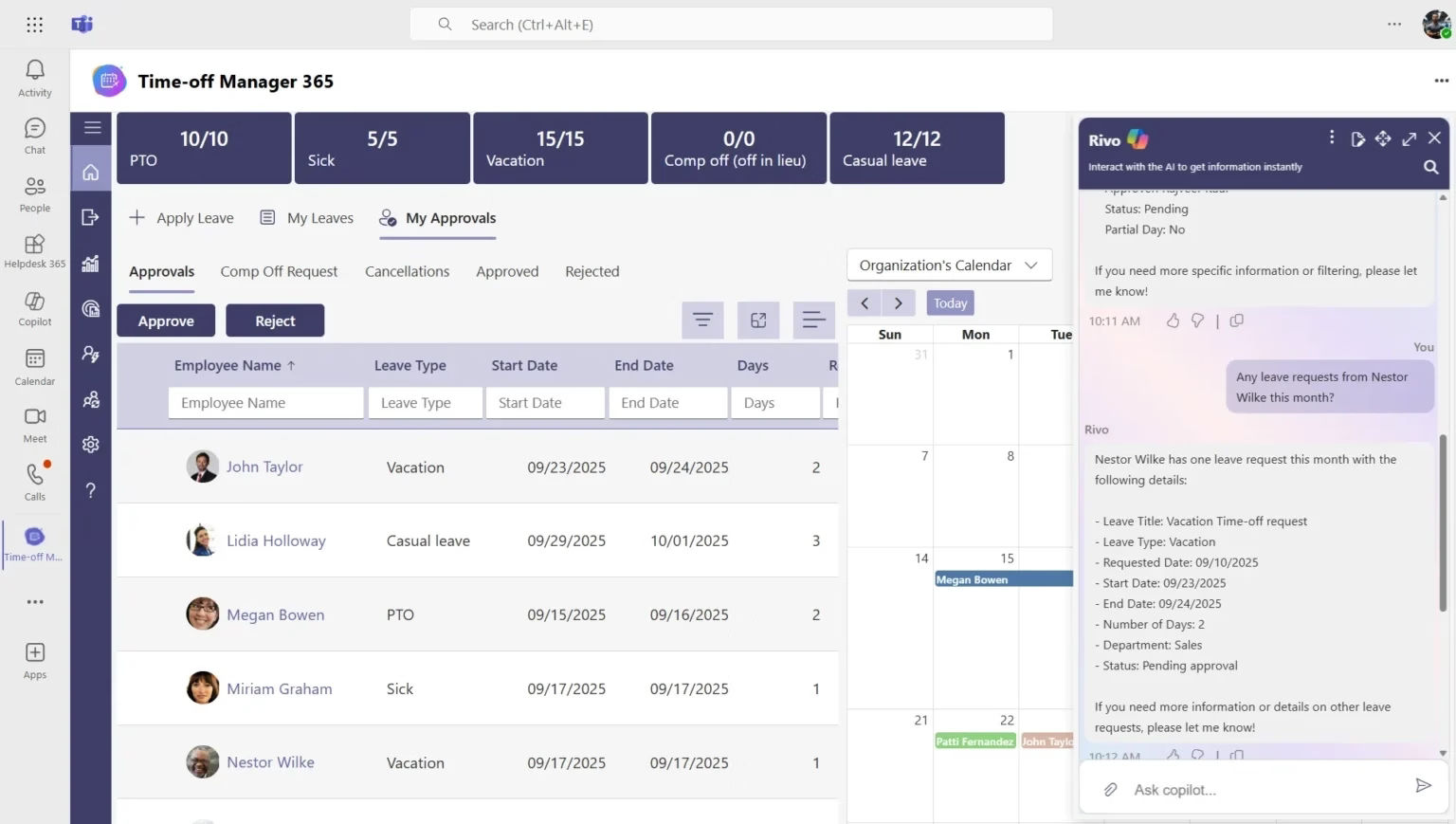
| AI-Powered | Microsoft Copilot AI suggests approvals, predicts peak leave periods, flags policy conflicts, and generates reports automatically. |
| SharePoint | Leave records, policies, and reports stored directly in SharePoint — accessible from anywhere, with no duplication. |
| Microsoft Teams | Submit and approve leave requests without leaving Teams. Instant in-channel notifications for employees and managers. |
| Outlook Sync | Approved leave auto-populates to Outlook calendars across the entire team — visible the moment a request is approved. |
Leave Management Best Practices for HR Teams
Beyond tools and process, the best HR teams treat leave management as a people practice, not just an admin task. These principles make a real difference:
- Apply policy consistently — the fastest way to lose employee trust is approving the same request for one person and denying it for another.
- Communicate proactively — automatic notifications at every stage remove anxiety and reduce follow-up emails to HR.
- Plan for peak periods — work with managers to set leave limits during high-demand windows at the start of the year, not in the middle of it.
- Respect statutory entitlements — your policy should meet or exceed legal minimums, and your system should make compliance effortless.
- Train your managers — ensure they understand the policy, know how to use the approval system, and know what to do with unusual or sensitive requests.
- Use data to improve — track leave trends over time to plan your workforce more effectively and update policy before problems arise.
Conclusion
Ready to manage leave requests without the chaos?
Book a free demo of Time Off Manager 365. No setup fees, no long contracts — just leave management that works from day one, inside Microsoft 365.
Join Our Creative Community
Frequently Asked Questions
How do you manage employee leave requests efficiently?
Use a centralised system with automated approvals, real-time balance tracking, and self-service access to eliminate manual back-and-forth.
What is the best way to handle overlapping leave requests?
Set a team calendar view and approval rules that flag conflicts before they’re approved.
How do you track leave balances without spreadsheets?
Use a tool like Time Off Manager 365 that auto-updates balances the moment a request is approved.
How does Microsoft Teams help with leave management?
Employees can submit and approve leave requests directly inside Teams without switching to another platform.
How do you ensure leave approvals are fair and consistent?
Apply a documented policy with logged decisions and an audit trail so every request is judged on the same objective criteria.


_JiluXJRGNl.svg)























