
How to Assign Tasks to Multiple Team Members in HR Software

- Assigning HR tasks to multiple team members keeps projects organized and improves visibility across departments.
- HR software replaces manual task tracking with centralized assignment, progress monitoring, notifications, and reporting.
- HR365 HRMS Task Management supports multiple assignees, priorities, due dates, checklists, attachments, and real-time status updates.
- HR teams can manage onboarding, recruitment, training, performance reviews, leave-related activities, and many other HR processes from one platform.
Assigning HR tasks across different departments can quickly become difficult when teams rely on emails, spreadsheets, or chat messages. According to Gallup, only 12% of employees strongly agree their organization does a great job onboarding new team members, highlighting how missed or delayed tasks can affect the overall experience. Well-organized task management helps HR teams assign responsibilities, track progress, and complete important activities on time.
Whether you’re coordinating onboarding, recruitment, document collection, training, or performance reviews, assigning the right tasks to the right people is essential. Modern HR software makes this process much easier by giving HR teams one place to create tasks, assign multiple team members, monitor progress, and receive updates. HR365 HRMS includes a dedicated Task Management feature that helps organizations manage daily HR work without switching between multiple tools. Built for Microsoft 365, SharePoint, and Microsoft Teams, HR365 HRMS keeps HR activities connected in one centralized platform.
What Is Task Assignment in HR Software?
Task assignment in HR software is the process of creating work items and assigning them to one or more team members responsible for completing them. Each task includes important details such as the task name, description, due date, priority, attachments, status, and assigned users.
For example, when a new employee joins an organization, several departments may need to complete different activities before the employee’s first day.
These tasks may include:
- Preparing the employee profile
- Creating Microsoft 365 accounts
- Collecting required documents
- Assigning training courses
- Preparing equipment
- Scheduling orientation sessions
- Sharing company policies
Instead of tracking these activities separately, HR software assigns every task to the appropriate team member while keeping the entire onboarding process visible in one dashboard.
With HR365 HRMS Task Management, HR administrators can assign one task to multiple team members, organize work by priority, add due dates, include supporting documents, and monitor completion from a single interface.
Why Assigning Tasks to Multiple Team Members Matters
HR rarely works in isolation. Almost every HR process involves coordination between managers, HR professionals, department heads, IT teams, and sometimes finance or administration. When responsibilities are divided across different people, assigning tasks clearly becomes one of the most important parts of daily HR operations.
According to the 2024 Microsoft Work Trend Index, employees face hundreds of interruptions during the workweek from emails, meetings, and chat notifications. Having one centralized place to manage assigned work reduces the need to search through multiple communication channels and helps teams stay focused on completing their responsibilities.
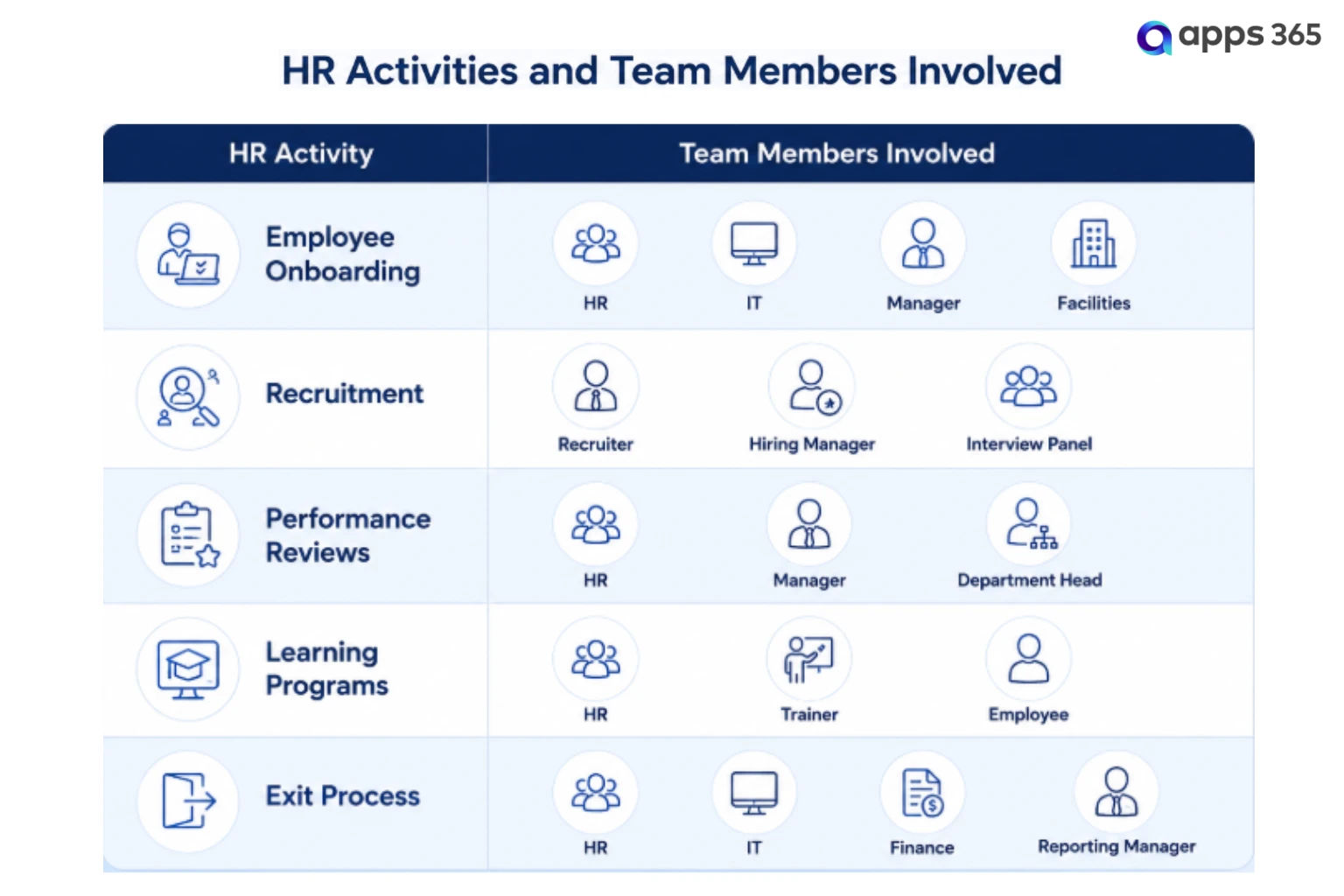
Here are some common HR activities where multiple task assignments make a significant difference.
Recruitment Activities
Hiring often involves recruiters, interviewers, department managers, and HR business partners.
Typical recruitment tasks include:
- Candidate evaluations
- Reference verification
- Offer preparation
With HR365 HRMS, these activities can be assigned simultaneously to different stakeholders, reducing delays during the hiring process.
Employee Onboarding
A successful onboarding process depends on several people completing their work before the employee starts.
- HR collects employment documents.
- IT prepares user accounts and devices.
- The reporting manager schedules introductions.
- Learning teams assign mandatory training.
- Administration prepares workspace access.
Instead of following up individually, HR can assign every activity through HR365 HRMS, making it easy to track completion in one place.
Performance Review Cycles
Performance reviews involve managers, HR teams, reviewers, and employees.
Task assignment helps organizations coordinate activities such as:
- Manager reviews
- Goal discussions
- Feedback collection
- Final review meetings
Each participant receives assigned responsibilities with clear deadlines.
Learning and Training
Training programs often require collaboration between HR, trainers, and learners.
Learning & Training Tasks may include:
- Assigning learning materials
- Completing mandatory courses
- Tracking certifications
- Reviewing assessments
- Recording completion
Using HR365 HRMS Task Management, HR can assign training-related activities to multiple participants while monitoring overall progress.
Employee Exit Process
Employee offboarding requires coordination between multiple departments to complete every step before an employee leaves the organization.
Tasks can include:
- Schedule the exit interview
- Collect company assets
- Revoke system and email access
- Complete clearance approvals
- Archive employee records
- Share exit documentation
Assigning exit-related tasks through HR365 HRMS Task Management helps HR, IT, managers, and other departments track responsibilities, monitor progress, and complete the offboarding process in an organized manner.
Looking for an HR application built specifically for Microsoft Teams?
See how HR365 HRMS Task Management helps HR teams assign work, monitor progress, and keep every task visible from one centralized dashboard.
Challenges of Managing Team Tasks Without HR Software
Managing HR tasks through emails, spreadsheets, chat messages, or handwritten notes may work for a small number of activities. However, as organizations grow, these methods become difficult to manage. Multiple departments often work on the same HR process, making it harder to track who is responsible for what and whether tasks are completed on time.
According to McKinsey & Company, many organizations can automate a significant share of administrative activities, giving HR teams more time to focus on strategic work instead of manual coordination.
This is one of the reasons many businesses are moving from traditional task tracking methods to HR software.
Here are some of the most common challenges HR teams face without a dedicated task management solution.
- No Clear Task Ownership – It can be difficult to know who is responsible for each task, leading to delays.
- Limited Task Visibility – Managers lack a central place to track task progress and completion.
- Missed Deadlines – Important HR activities may be delayed without due dates and reminders.
- Frequent Follow-Ups – HR teams spend extra time asking for task updates and status.
- Complex Project Coordination – Managing onboarding, hiring, or review cycles across departments becomes difficult.
- Scattered Documents – Task-related files are stored in different places, making them harder to find.
- Limited Reporting – Manual tracking makes it difficult to monitor workloads, overdue tasks, and project progress.
Steps to Assign Tasks with HR365 HRMS Task Management
Assigning tasks becomes much easier when everything is managed from one centralized workspace. Instead of creating separate emails, maintaining spreadsheets, or sending reminders through chat, HR365 HRMS Task Management lets HR teams create, assign, and monitor tasks throughout their lifecycle.
Here is how you can assign tasks to multiple team members using HR365 HRMS Task Management.
Step 1: Open the Task Management Dashboard
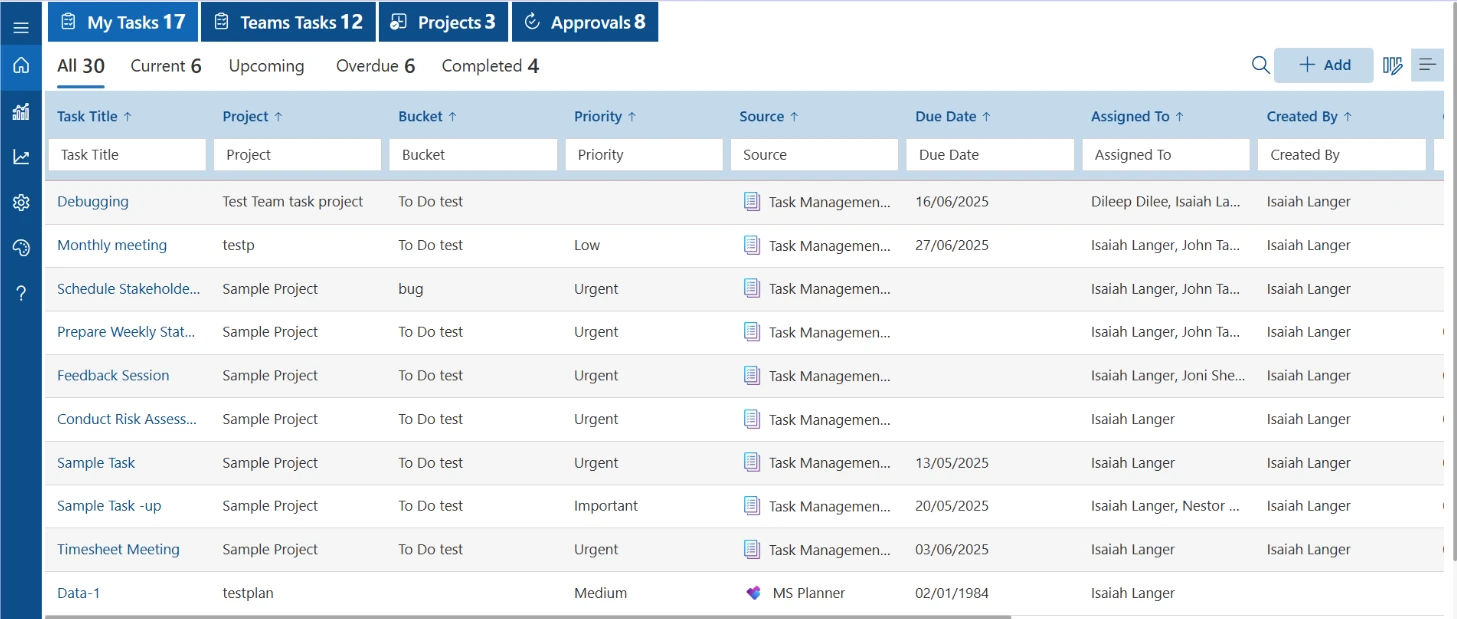
Open the Task Management module from the HR365 HRMS dashboard.
Here you can view:
- My Tasks
- Teams Tasks
- Projects
- Approvals
- Current Tasks
- Upcoming Tasks
- Overdue Tasks
- Completed Tasks
The dashboard provides a centralized view of all HR activities, making it easy to monitor work across different projects and departments.
Step 2: Click the Add Button
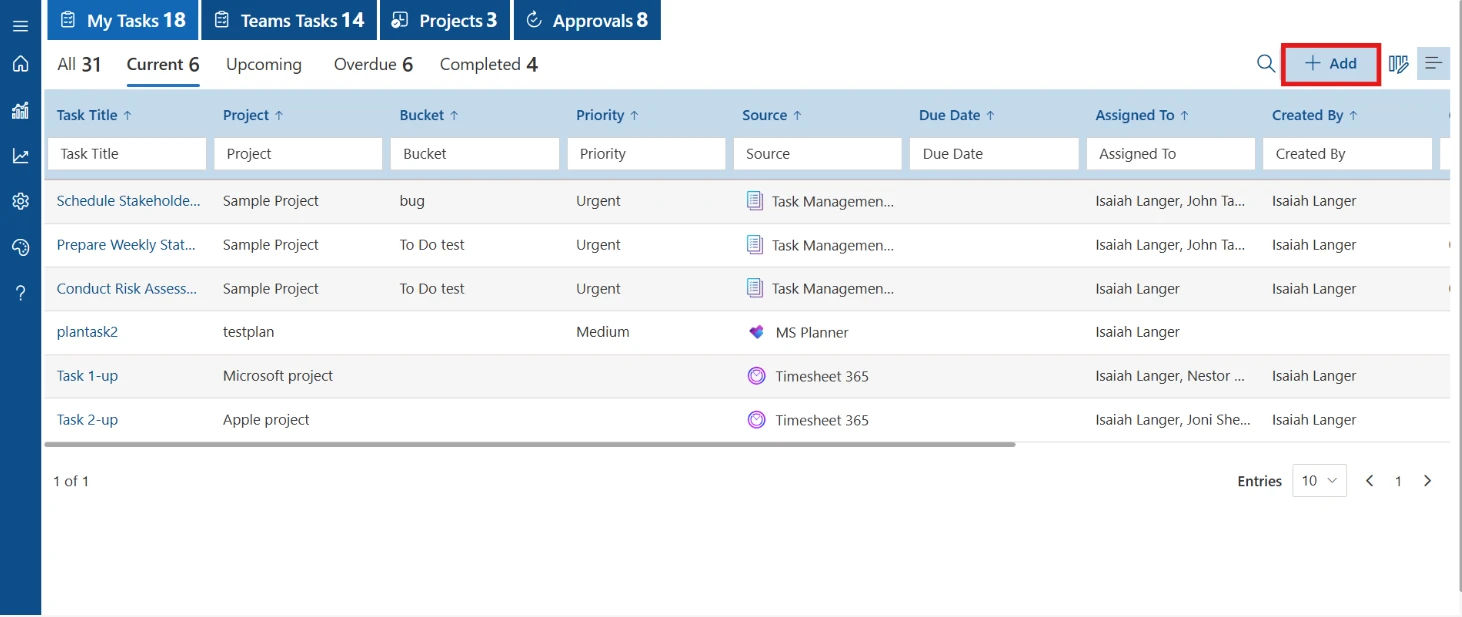
To create a new task, click the Add button in the top-right corner of the dashboard.
This opens the Add New Task window where you can enter all task details.
Step 3: Enter Task Details and Assign Team Members
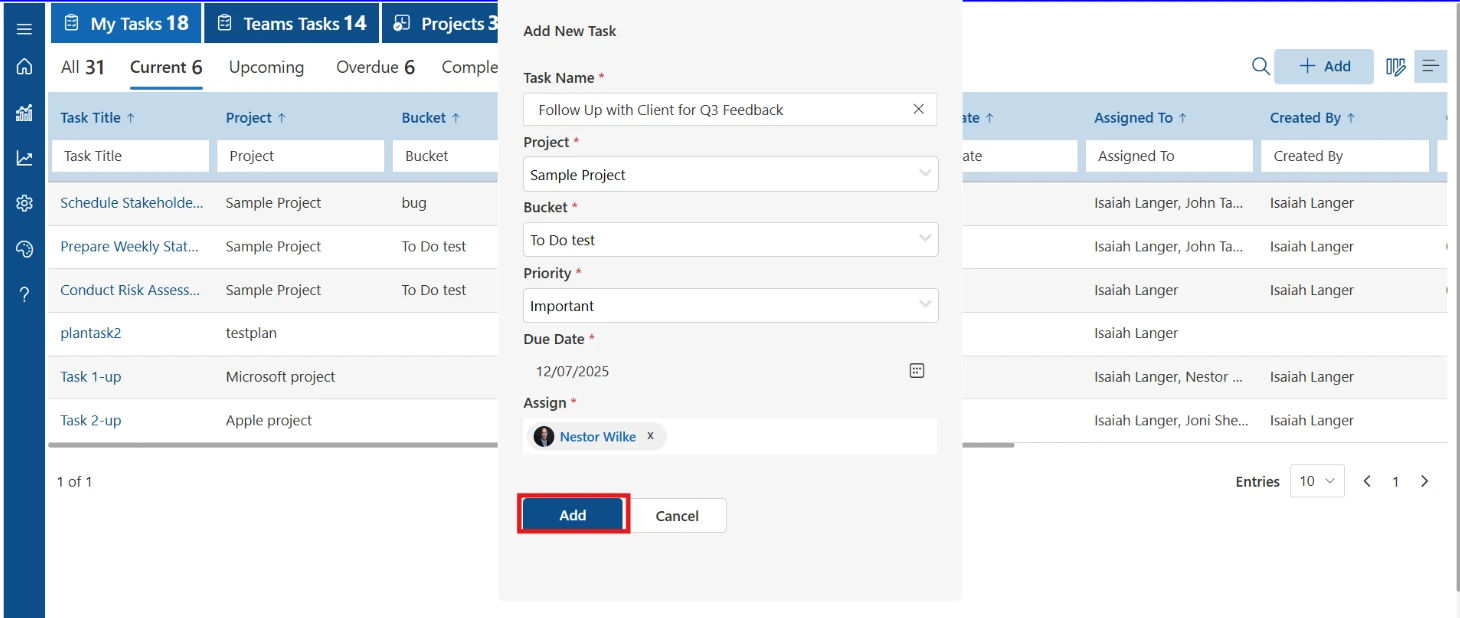
Complete the required task information, including:
- Task Name
- Project
- Bucket
- Priority
- Due Date
- Assigned Team Member(s)
After entering all details, click Add to create the task.
Step 4: View Assigned Tasks
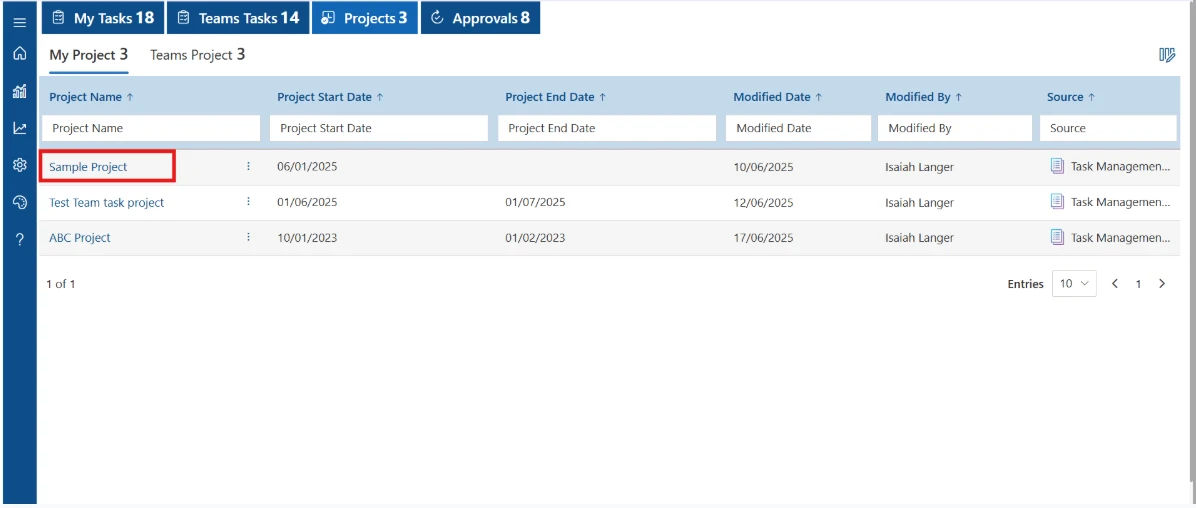
After the task is created, it immediately appears in the My Tasks dashboard.
Managers can monitor:
- Active tasks
- Due dates
- Priority levels
- Assigned users
- Project name
- Task status
This provides complete visibility into ongoing HR work without switching between multiple tools.
Step 5: Track Team Tasks
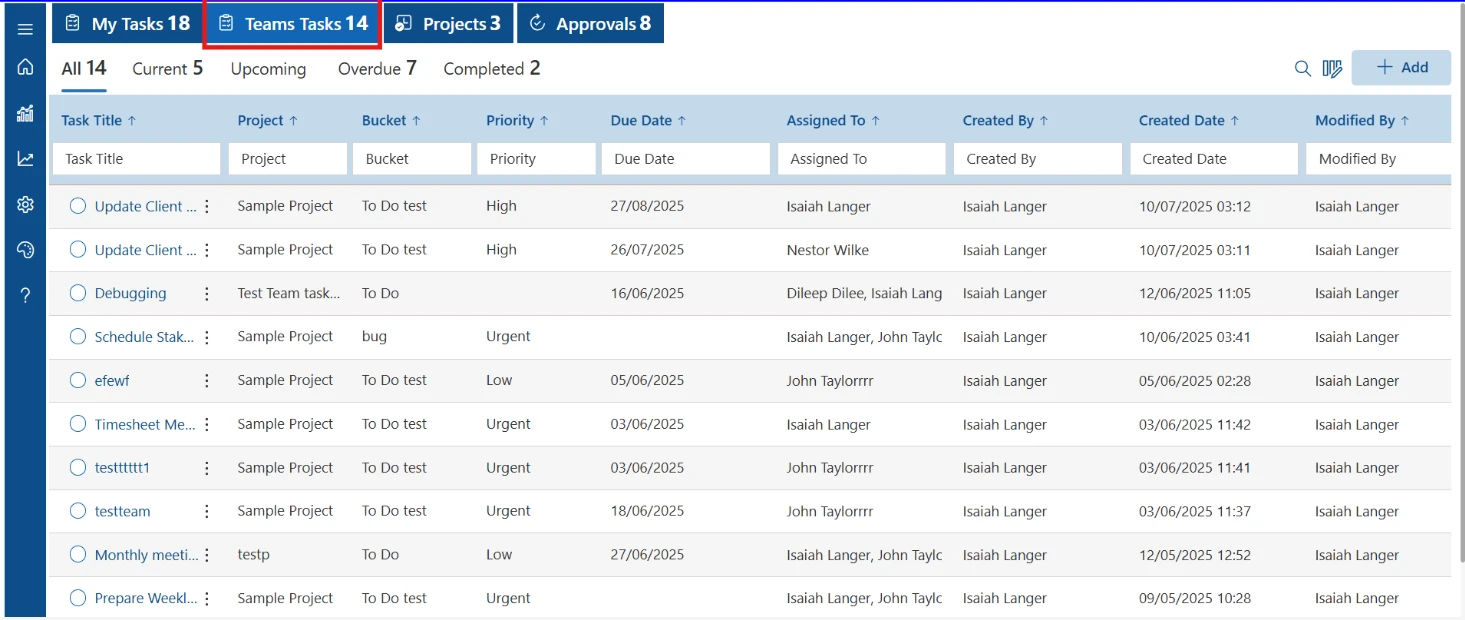
Select the Teams Tasks tab to view tasks assigned across the entire team.
Managers can quickly review:
- Team workload
- Assigned users
- Due dates
- Project information
- Task priorities
This helps managers balance work and identify pending activities across departments.
Step 6: Receive Task Approval Requests
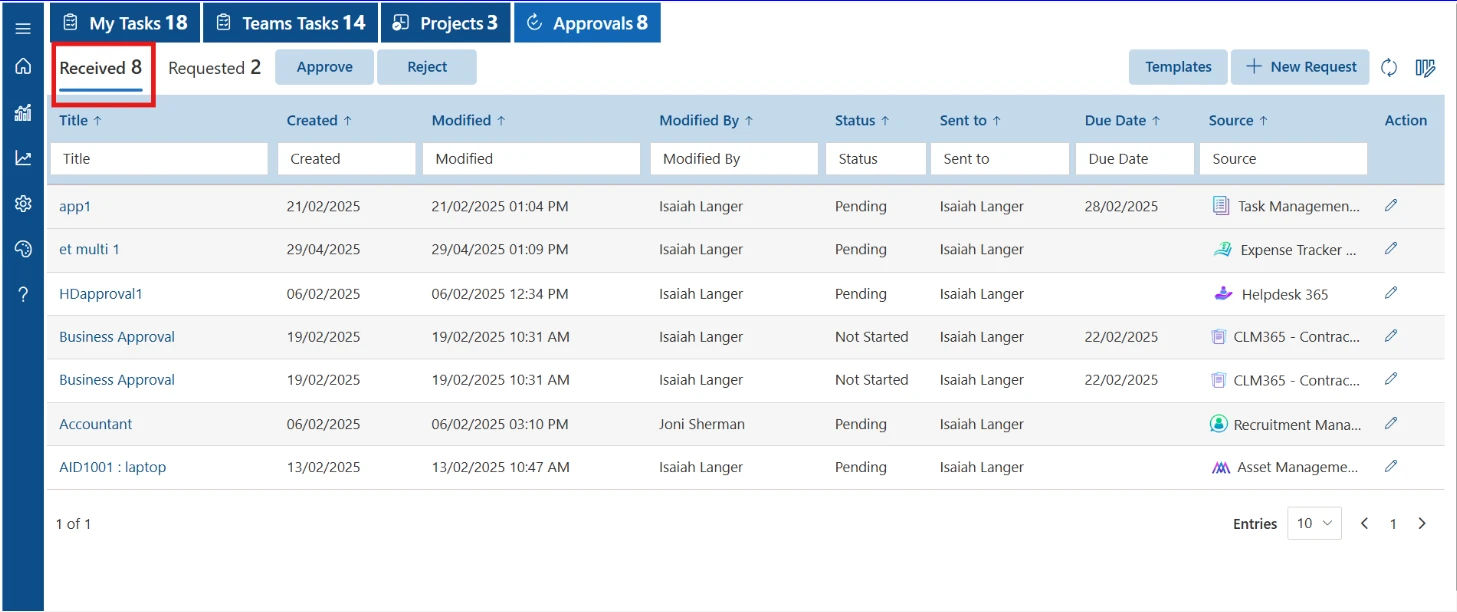
If a task requires approval, assigned users receive a notification in the Approvals section.
Open the Received tab to review pending approval requests.
From one location, users can see:
- New approval requests
- Request status
- Due dates
- Source application
- Assigned person
This ensures important approvals are not missed.
Step 7: Review and Respond to the Request
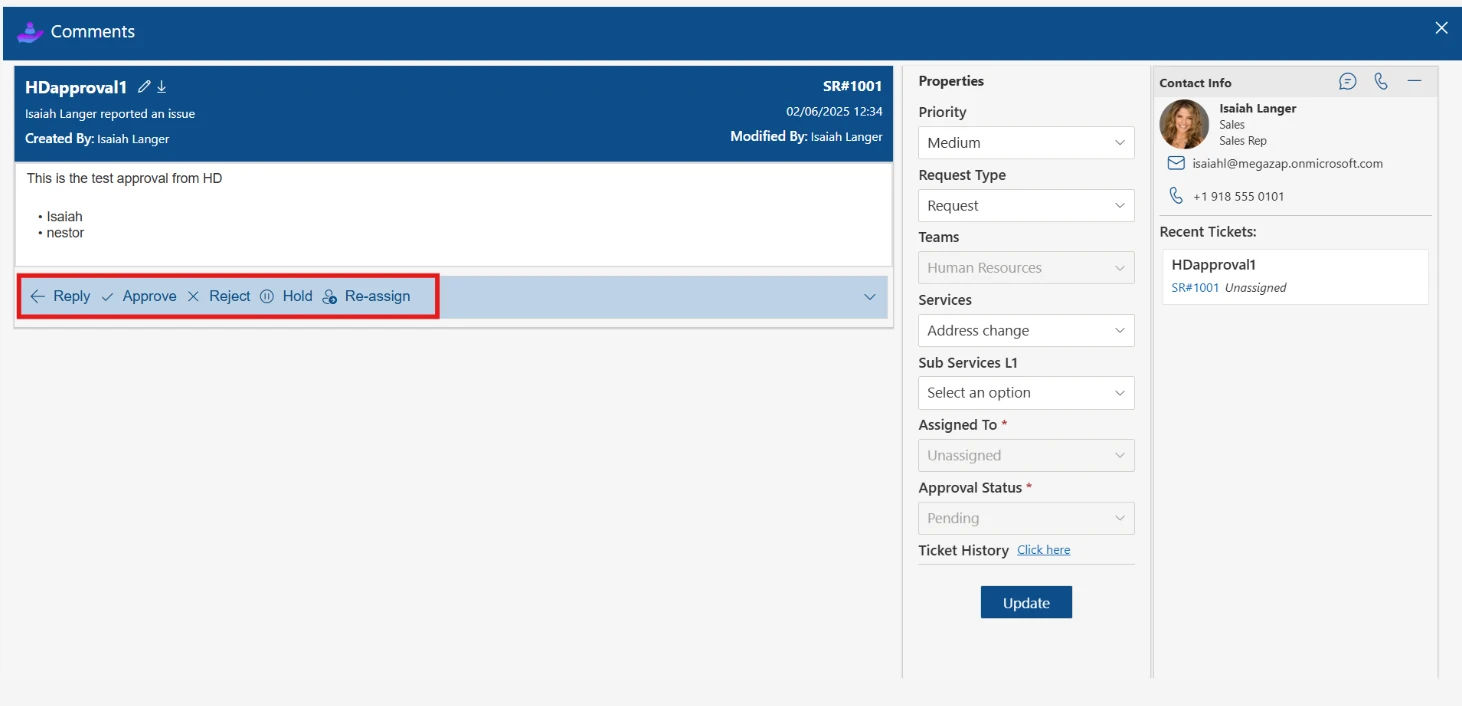
Open the approval request to view the complete task details and comments.
Depending on the situation, the approver can:
- Reply
- Approve
- Reject
- Place the task on Hold
- Reassign the task
This keeps communication and decision-making within the task itself, providing a complete activity history for everyone involved.
According to Deloitte’s Global Human Capital Trends, organizations continue to increase investment in digital HR technologies to improve visibility into HR operations and support better decision-making.
A centralized task dashboard plays an important role by giving HR teams a clear view of ongoing work across departments.
Key Features That Make Task Assignment Easier in HR365 HRMS
Assigning tasks is only one part of managing HR work. Teams also need visibility into progress, deadlines, priorities, and workloads. HR365 HRMS Task Management brings these capabilities together in one place, making it easier to coordinate activities across HR, managers, IT, and other departments.
Here are the key features that support efficient task assignment and tracking.
- Assign Tasks to Multiple Team Members – Assign a single task to multiple users for collaborative HR activities.
- Categories and Projects – Organize tasks by project or category for easier tracking.
- Priorities and Due Dates – Set priority levels and deadlines to keep tasks on schedule.
- Task Checklists – Break larger HR activities into smaller, trackable checklist items.
- File Attachments – Attach documents, forms, policies, and other files directly to tasks.
- Real-Time Task Status – Track tasks through stages like Not Started, In Progress, On Hold, and Completed.
- Notifications and Alerts – Notify team members about new tasks, updates, comments, and upcoming deadlines.
- Dashboard View – Monitor active, pending, completed, overdue, and priority-based tasks from one dashboard.
- Role-Based Access – Give HR, managers, and team members access based on their roles and responsibilities.
According to Gartner, over 70% of organizations continue to increase their investment in HR technology, reflecting the growing demand for connected HR platforms that bring multiple processes together.
Why HR365 HRMS Is the Right Choice for Task Management
Choosing the right HR software is about more than assigning tasks. Organizations need a platform that connects task management with the rest of their HR processes, provides visibility into ongoing work, and supports collaboration across departments. That is where HR365 HRMS stands out.
Built for organizations using Microsoft 365, SharePoint, and Microsoft Teams, HR365 HRMS combines task management with a complete HR suite, helping teams manage the entire employee lifecycle from one platform.
A Complete HR Platform, Not Just a Task Manager
Unlike standalone task management tools, HR365 HRMS connects tasks with everyday HR activities.
For example, when a new employee joins, HR can manage the entire onboarding journey without switching between different systems. Tasks can be assigned, documents can be shared, training can be allocated, and progress can be tracked—all within the same HR platform.
In addition to Task Management, HR365 HRMS includes:
- Employee Directory
- Employee Onboarding
- Recruitment Management
- Leave Management
- Attendance and Timesheets
- Performance Management
- Learning and Training
- Expense Management
- HR Dashboards and Reports
This connected approach helps HR teams manage related activities from a single workspace.
Built for Microsoft 365 Organizations
Many businesses already rely on Microsoft 365 for communication and collaboration. HR365 HRMS extends that familiar environment by bringing HR processes into the Microsoft ecosystem.
With integration across Microsoft Teams and SharePoint, users can access HR information and task updates without changing the way they work. This creates a familiar experience for managers, HR professionals, and team members while keeping HR activities connected.
Better Visibility Across Every Task
As the number of HR activities grows, visibility becomes increasingly important.
HR365 HRMS provides dashboards that help managers quickly review:
- Active tasks
- Pending activities
- Completed work
- Overdue tasks
- Priority-based assignments
- Team workload
Instead of requesting updates from different departments, managers can review task progress in real time and identify where attention is needed.
Supports Collaboration Across Departments
Many HR processes involve more than one department. Recruitment, onboarding, performance reviews, and learning programs all require multiple people to work toward the same goal.
With HR365 HRMS Task Management, one task can be assigned to multiple team members, making collaboration easier while keeping all related updates, comments, attachments, and progress in one place.
Easy to Adapt to Different HR Processes
Every organization follows its own HR workflows. HR365 HRMS gives HR teams the flexibility to create tasks for different scenarios, whether they are simple daily activities or large organization-wide projects.
You can use Task Management for:
- New hire onboarding
- Recruitment activities
- Employee training
- Performance review cycles
- Leave-related follow-ups
- Policy acknowledgments
- Employee engagement initiatives
- Exit processes
- Internal projects
This flexibility makes the feature valuable for organizations of different sizes and industries.
Actionable Insights with Dashboards and Reports
Tracking completed work is only part of effective task management. Managers also need insights that help them plan resources and identify areas that need attention.
HR365 HRMS Task Management offers dashboards and reports that provide visibility into:
- Task completion trends
- Pending assignments
- Overdue activities
- Team workloads
- Project progress
These insights help HR leaders monitor ongoing work and make informed decisions based on real-time data.
Designed to Grow with Your Organization
As organizations expand, HR responsibilities increase across departments and locations. HR365 HRMS is designed to support growing teams by providing a centralized platform where tasks, employee records, onboarding, leave, attendance, and performance management work together.
Whether your HR team supports 50 people or several thousand, Task Management helps organize work without relying on disconnected tools.
According to PwC’s Global Digital Trends Survey, 77% of business leaders consider digital transformation a key business priority. Investing in connected HR technology helps organizations manage everyday operations more effectively while providing greater visibility across HR processes.
Conclusion
Assigning tasks to multiple team members is an important part of keeping HR activities organized. Whether you’re managing onboarding, recruitment, training, performance reviews, or employee engagement programs, having one place to assign responsibilities and monitor progress helps teams stay aligned. Instead of relying on scattered emails or spreadsheets, a centralized HR task management solution provides clear ownership, due dates, status updates, and visibility across every stage of the process.
HR365 HRMS brings all of these capabilities together in one Microsoft 365-based HR platform. Along with Task Management, it includes Employee Onboarding, Leave Management, Attendance, Recruitment, Performance Management, Learning & Training, Expense Management, and Employee Directory. If you’re looking for HR software that helps your organization manage tasks alongside the entire employee lifecycle, HR365 HRMS provides a practical and scalable solution.
See HR365 HRMS Task Management in Action!
Book a personalized demo of HR365 HRMS and discover how your HR team can manage daily activities from one centralized platform.
Frequently Asked Questions
How do you assign tasks to multiple team members in HR software?
Most HR software lets you create a task, select multiple assignees, add a due date, set a priority, and track progress from a centralized dashboard. In HR365 HRMS, you can also add checklists, attachments, comments, and notifications to keep everyone informed throughout the task lifecycle.
What are the benefits of assigning HR tasks through software?
Using HR software for task assignment provides better visibility into ongoing work, clear task ownership, due dates, real-time progress tracking, and centralized reporting. It also helps HR teams coordinate activities across multiple departments from one platform.
Can one HR task be assigned to multiple team members?
Yes. Many HR processes require collaboration between HR, managers, IT, and other departments. HR365 HRMS Task Management allows a single task to be assigned to multiple team members, making it easier to manage collaborative activities such as onboarding, recruitment, training, and performance reviews.
What HR tasks can be assigned using HR365 HRMS?
HR365 HRMS supports task assignment for employee onboarding, recruitment, document collection, leave and attendance follow-ups, learning and training, performance reviews, employee engagement activities, policy acknowledgments, and employee offboarding.
How does HR365 HRMS help track assigned tasks?
HR365 HRMS provides a centralized Task Management dashboard where managers can view task status, priorities, due dates, pending activities, completed work, and team workloads. Users also receive notifications when tasks are assigned or updated.
Why should businesses use HR software for task management?
HR software helps businesses organize HR activities, assign responsibilities, monitor progress, and manage recurring processes more efficiently. A solution like HR365 HRMS combines Task Management with Employee Onboarding, Leave Management, Attendance, Recruitment, Performance Management, Learning & Training, Expense Management, and Employee Directory, giving organizations a complete HR platform.


_JiluXJRGNl.svg)























