

AI Resume Screening Software: Automate Resume Review and Find Better Candidates Faster

A single job posting today can pull in 250 or more applications within a week. For a recruiter working four or five open roles at once, that means thousands of resumes to read, compare, and rank, often with a hiring manager waiting on a shortlist by Friday. This is the exact problem AI resume screening software was built to solve. Instead of a recruiter manually opening each file, cross-checking it against a job description, and typing notes into a spreadsheet, the software reads every resume in seconds, scores it against the role, and hands back a ranked shortlist.
This guide breaks down what resume screening technology actually does, how automated resume screening works under the hood, what separates a good tool from a gimmick, and how a Microsoft 365-native platform like Recruitment Management 365 fits into a recruiting team that already lives in Outlook, Teams, and SharePoint. Whether you are a talent acquisition leader evaluating vendors or a recruiter tired of losing an entire afternoon to resume review, this article gives you a clear, practical picture of where the technology stands in 2026.
- AI-powered screening tools read, parse, and score resumes against a job description in seconds, cutting the average screening window from around 10 days to 2 days.
- Automated resume screening does not replace recruiter judgment; the best implementations pair AI scoring with a human making the final call, which is also what most current hiring regulation requires.
- Core capabilities to look for include resume parsing, job description matching, candidate scoring, skills gap analysis, AI-written candidate summaries, ATS integration, bias controls, and recruitment analytics.
- A Microsoft 365-native tool like Recruitment Management 365 lets a recruiting team screen and shortlist candidates inside Outlook, Teams, and SharePoint, without a new login or a separate system to maintain.
What Is AI Resume Screening Software?
This type of software is a category of recruiting technology that uses machine learning and natural language processing to read resumes, compare them against a job description, and rank candidates by fit. Where a traditional applicant tracking system mostly stores resumes and lets a recruiter search by keyword, an AI-driven tool actually interprets the content: it recognizes that “led a team of 12 engineers” and “managed an engineering department” describe similar experience, even though the words don’t match.
At its core, automated resume screening is pattern recognition applied at scale. The software has typically been trained on large volumes of resumes and hiring outcomes, so it can identify signals a person would look for anyway: years of relevant experience, specific technical or soft skills, career progression, and how closely a candidate’s background lines up with the requirements in a job posting. The output is usually a ranked list, a fit score, and a short summary explaining why a candidate scored the way they did.
This is different from a basic keyword filter, which many older ATS platforms still use. A keyword filter looks for exact matches and misses strong candidates who phrase their experience differently. this type of software is built to close that gap through contextual, skills-based matching rather than word-for-word comparison.
Why Traditional Resume Screening Is No Longer Enough
Manual resume review made sense when a job posting pulled in 30 or 40 applications. It does not hold up against today’s volumes. Application numbers have climbed steadily, with recent hiring benchmark data putting the average job posting at over 250 applications, up sharply from just a couple of years earlier. A recruiter reviewing that many resumes by hand, while also scheduling interviews, coordinating with hiring managers, and managing several open roles, is working against the clock from the first day a requisition opens.
There’s also a consistency problem. Two recruiters reviewing the same stack of resumes rarely reach identical shortlists, because attention, mood, and time pressure all affect judgment. A resume read at 9 a.m. gets more attention than the fortieth resume read at 4 p.m. on a Friday. Traditional screening also leans heavily on keyword search, which rewards candidates who happen to phrase their resume the way the recruiter typed the search query, not necessarily the candidates with the strongest actual background.
Cost adds another layer. Industry data shows recruiters can spend close to 23 hours screening resumes for a single hire when the process is fully manual. Multiply that across dozens of open roles in a year and the time cost alone justifies looking at automated resume screening as a serious operational fix, not just a nice-to-have.
How AI Resume Screening Software Works
Most of these tools follow a similar four-step process, regardless of vendor.
1. Resume parsing
The software extracts structured data from each resume, whatever the format, including contact details, work history, education, certifications, and skills. This step turns a PDF or Word document into usable data the system can compare against other candidates.
2. Job description matching
The tool compares the parsed resume data against the requirements listed in the job description, looking at required skills, years of experience, education level, and sometimes softer signals like career trajectory or industry background.
3. Candidate scoring and ranking
Based on that comparison, each candidate receives a fit score, and the full applicant pool is ranked from strongest to weakest match. Many platforms also flag specific strengths and gaps for each person rather than returning a single number with no context.
4. Recruiter review and shortlist
The system hands the ranked list, along with summaries and scores, back to the recruiter or hiring manager, who reviews the top candidates and decides who moves forward to an interview. This last step matters: the tools that perform best in practice keep a person making the final call, not the algorithm.
For a role that draws 500 applications, this process can turn what used to take a full day of reading into a ranked shortlist ready in minutes, freeing the recruiter to focus on actually talking to candidates instead of sorting through paperwork.
Key Features of AI Resume Screening Software
Not every tool on the market includes every feature below, so it helps to know what each one actually does before comparing vendors.
AI Resume Parsing
Resume parsing is the foundation of any AI screening tool. It pulls structured information, such as job titles, employment dates, skills, and education, out of resumes in almost any format, including scanned PDFs and images with OCR support. Good parsing accuracy matters more than any other feature, because every downstream step, from matching to scoring, depends on the data being read correctly the first time.
Job Description Matching
This feature compares parsed resume data against a specific job description and calculates how well a candidate’s background lines up with the stated requirements. Strong matching engines go beyond exact keyword overlap and recognize related skills, adjacent job titles, and equivalent experience described in different words.
Candidate Scoring & Ranking
Once matching is complete, the software assigns each candidate a fit score and orders the applicant pool accordingly. Some platforms weight experience, skills, and career progression differently depending on the role, which produces more relevant rankings than a flat keyword count.
Skills Gap Analysis
Skills gap analysis flags where a candidate falls short of the role’s requirements, whether that’s a missing certification, a skill listed in the job description but absent from the resume, or a level of experience below what the posting calls for. This gives recruiters and hiring managers a faster read on whether a gap is a dealbreaker or something that training could close.
AI Candidate Summaries
Rather than handing back a raw score, many tools generate a short written summary of each candidate: relevant experience, standout qualifications, and any notable gaps. This saves a recruiter from reading the full resume just to explain to a hiring manager why someone made the shortlist.
ATS Integration
AI resume screening software works best when it connects directly to the applicant tracking system a team already uses, rather than existing as a separate destination that requires manual export and import. Integration with your ATS, and ideally your existing email and calendar tools, keeps candidate data in one place and keeps the recruiter working from a single screen.
Bias Reduction
Because AI hiring tools learn from historical data, they can inherit the same biases present in past hiring decisions if left unchecked. Reputable resume screening technology includes safeguards such as removing names, photos, and other identifying details before scoring, along with regular audits of how the model treats different demographic groups. This is a feature to scrutinize closely rather than take on a vendor’s word alone.
Recruitment Analytics
Analytics dashboards show recruiters and hiring managers how the funnel is performing: time to shortlist, source of hire, screening-to-interview ratios, and where candidates drop out of the pipeline. This turns resume screening from a one-off task into a source of ongoing insight the team can act on.
Benefits of AI Resume Screening Software
- Faster time to shortlist: Automated resume screening can cut the initial review window from roughly 10 days to 2 days, according to recent recruitment automation research, giving recruiters more runway to engage strong candidates before a competitor does.
- Lower cost per hire: Organizations using AI recruitment tools report meaningful reductions in hiring costs, largely from the recruiter hours no longer spent on manual review.
- More consistent evaluation: Every resume is measured against the same criteria, so candidate 3 and candidate 300 are judged on the same basis, regardless of what time of day a recruiter reached their file.
- Better candidate experience: Faster response times and quicker movement through the pipeline are consistently linked to higher candidate satisfaction scores in recent hiring surveys.
- Room for recruiters to focus on people: With initial review handled by software, recruiters can spend more of their day on interviews, candidate relationships, and closing offers rather than data entry.
- Data-backed hiring decisions: Recruitment analytics built into most resume screening tools like this give leadership a clear view of what’s working in the pipeline and what isn’t, instead of relying on anecdote.
AI Resume Screening Software vs. Manual Resume Screening
Factor | Manual Resume Screening | AI Resume Screening Software |
Time per 100 resumes | Several hours to a full day | A few minutes |
Consistency | Varies by recruiter, time of day, fatigue | Same criteria applied to every resume |
Matching logic | Keyword scan, recruiter judgment | Contextual and skills-based matching |
Scalability | Breaks down past a few hundred applications | Handles thousands without added headcount |
Bias risk | Present, often invisible, hard to audit | Present but auditable and reducible with the right controls |
Candidate feedback speed | Often delayed by days or weeks | Can support faster response cycles |
Cost at scale | Rises directly with recruiter hours | Rises far more slowly with volume |
The honest picture is that neither approach is perfect on its own. Manual review brings human judgment that software still cannot fully replace, particularly for nuanced roles or non-traditional career paths. Automated resume screening brings speed and consistency that manual review cannot match at scale. The strongest hiring processes combine both: AI handles the first pass across a large applicant pool, and a person makes the judgment calls that matter most.
Common Resume Screening Challenges and How AI Solves Them
Too many applications, too little time: Manual review simply cannot keep pace with 250-plus applications per posting. AI-driven screening processes the full applicant pool in minutes and surfaces the candidates most worth a recruiter’s time.
Strong candidates get missed over resume formatting: A candidate with the right experience but an unusual resume layout or non-standard job titles can slip through keyword-only filters. Contextual matching in modern screening systems reads for skills and experience rather than exact phrasing, so qualified candidates are less likely to be overlooked for surface-level Reas
No visibility into why a candidate was ranked where they were: Older filtering tools return a pass or fail with no explanation. Current AI candidate summaries show the reasoning behind a score, so a recruiter or hiring manager can see exactly which qualifications drove the ranking.
Screening criteria change from recruiter to recruiter: When different team members apply slightly different standards, shortlists become inconsistent. Automated resume screening applies the same scoring logic across every application for a given role, which keeps evaluation criteria aligned across the team.
Bias creeping into hiring decisions: Unconscious bias affects manual review in ways that are hard to catch after the fact. Smart screening software with built-in bias controls, such as blind screening options and regular fairness audits, gives teams a way to actively manage this risk rather than hope it isn’t happening.
Recruiting data lives in too many disconnected tools: Switching between an ATS, a spreadsheet, email, and a calendar app slows everything down. A platform that works inside tools recruiters already use, such as Outlook, Teams, and SharePoint, keeps candidate data and communication in one place.
Recognize these challenges in your own pipeline?
Recruitment Management 365 brings resume parsing, scoring, and candidate data into one place, built natively on SharePoint, Teams, and Outlook, so nothing gets lost between systems.
How Recruitment Management 365 Enhances AI Resume Screening
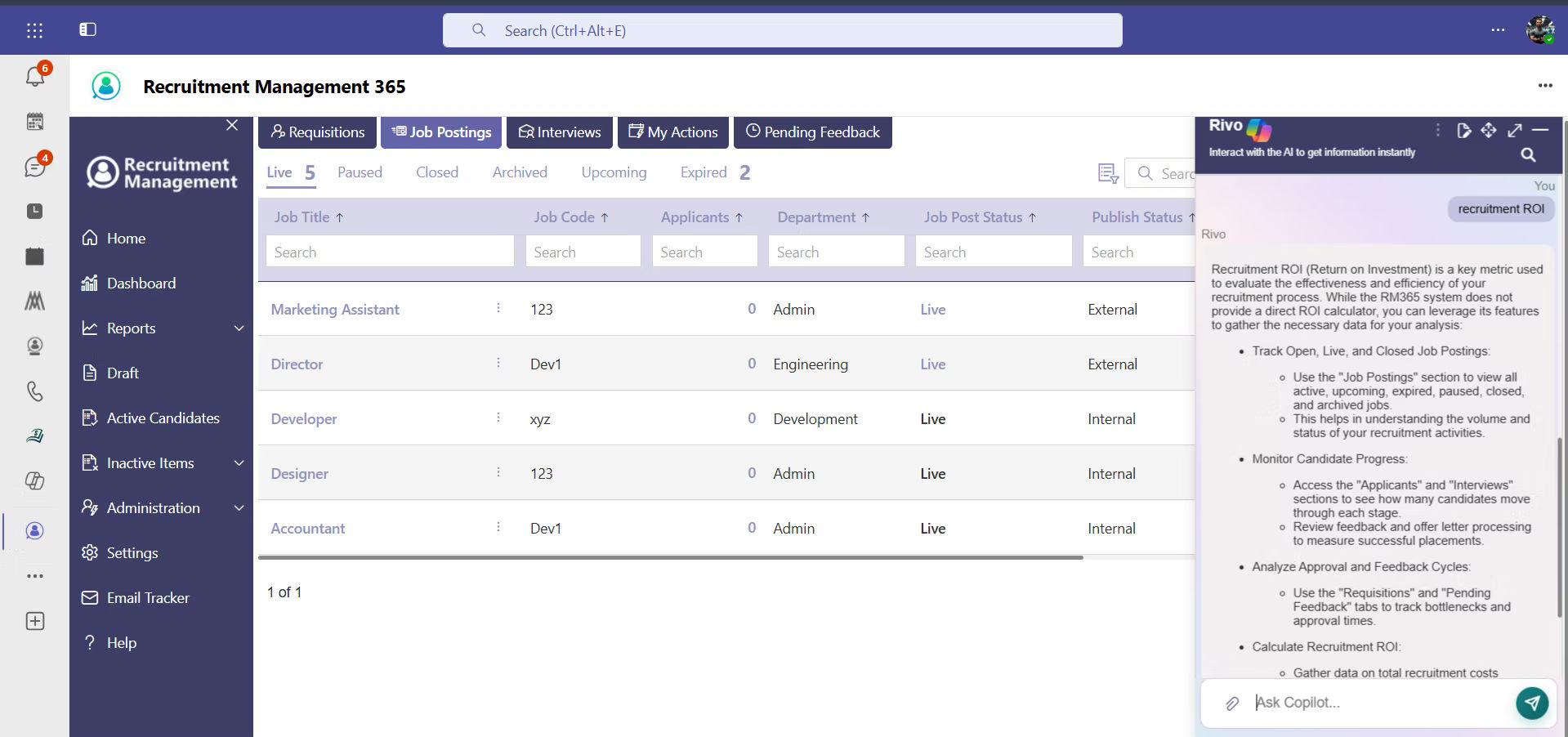
Recruitment Management 365 is built directly on Microsoft 365, which means AI resume screening happens inside the same environment where recruiters already manage email, calendars, and documents, rather than in a separate system that needs its own login and its own habits.
When a candidate applies, Recruitment Management 365’s parsing engine reads the resume and extracts skills, work history, and qualifications automatically. The platform then matches that data against the job description and produces a fit score and ranked shortlist, the same core workflow described earlier in this guide, but running natively inside SharePoint document libraries and surfaced directly in Teams and Outlook.
A few things stand out about how Recruitment Management 365 approaches automated resume screening specifically:
- No data leaving the Microsoft ecosystem :Resumes, candidate records, and hiring data stay inside the organization’s existing Microsoft 365 tenant, which matters for IT teams managing data governance and for recruiters who don’t want another vendor holding sensitive candidate information.
- Screening results inside Teams and Outlook: Instead of logging into a separate portal to check rankings, recruiters and hiring managers see shortlists and candidate summaries directly where they already work, cutting down the number of tabs and tools involved in a single hiring decision.
- SharePoint as the system of record: Resumes, scorecards, and interview notes are stored in SharePoint, so a hiring manager can review candidate history without requesting access to a separate recruiting system.
- Analytics built for Microsoft 365 admins: Reporting sits on top of tools many IT and HR teams already know, which shortens the learning curve for teams adopting AI resume screening software for the first time.
For a mid-sized recruiting team already running on Microsoft 365, this native approach removes a category of setup and maintenance work that comes with a third-party AI screening tool bolted onto existing systems. If your team is evaluating how to bring automated resume screening into a Microsoft-based workflow, a short call with the Recruitment Management 365 team can walk through how the parsing, scoring, and analytics would map onto your current hiring process.
Already running on Microsoft 365?
That’s the fastest path to automated resume screening. Talk to the Recruitment Management 365 team about mapping your current hiring process onto native Outlook, Teams, and SharePoint screening.
How to Choose the Best AI Resume Screening Software
- Start with your ATS and email stack: Confirm the tool integrates cleanly with the systems your team already relies on. A tool that requires exporting spreadsheets between platforms adds work instead of removing it.
- Ask for accuracy data, not just marketing claims: Request real numbers on parsing accuracy and matching precision, ideally from an existing customer in a similar industry, rather than a single headline statistic on a website.
- Look closely at bias controls: Ask the vendor directly how the model was trained, what steps exist to catch demographic bias, and how often the system is audited. Given current and upcoming AI hiring regulation in the EU and several U.S. states, this is not optional due diligence.
- Check how much control recruiters keep: The strongest tools let a human review and override AI-generated rankings rather than auto-rejecting candidates without any review.
- Test it on real requisitions before buying: A trial run against a handful of open roles will show you far more than a demo built around a vendor’s best-case example.
- Factor in total cost, not just the license fee: Include setup time, training, and any integration work required, especially if the tool sits outside your existing Microsoft or Google environment.
- Review the analytics: Good recruitment analytics should tell you where candidates drop out of your pipeline and how screening time has changed since adoption, not just show a dashboard for its own sake.
Best Practices for Implementing AI Resume Screening
- Keep a human in the loop for every rejection: Use AI hiring software to rank and prioritize, not to auto-reject candidates without any review. This protects against both bias risk and missed candidates.
- Audit the model’s output regularly: Pull a sample of scored resumes each quarter and check whether the rankings hold up against what a recruiter would have concluded manually. Adjust criteria if patterns look off.
- Write clearer job descriptions: Automated resume screening is only as good as the job description it’s matching against. Vague or bloated requirement lists produce vague, unreliable matches.
- Train your team on how scoring works: Recruiters and hiring managers who understand what drives a fit score make better decisions with the output, instead of treating it as a mystery.
- Start with one or two roles before rolling out company-wide: A phased rollout surfaces integration issues and scoring quirks while the stakes are still low.
- Combine AI screening with structured interviews: A high resume score should lead into a consistent interview process, not replace it. The two work together, not as substitutes for each other.
- Revisit your bias settings as regulations evolve: With AI hiring rules tightening globally, plan for periodic reviews of your screening criteria and vendor compliance documentation rather than a one-time setup.
The Future of AI in Resume Screening and Recruitment
AI-powered resume screening is rapidly evolving from a standalone tool into a core part of the recruitment process. As organizations move through the second half of 2026, hiring is becoming increasingly skills-focused, with employers prioritizing candidates’ competencies over traditional qualifications such as degrees and job titles. At the same time, agentic AI is gaining wider adoption, enabling recruiting teams to automate tasks such as resume screening, interview scheduling, and initial candidate communication.
Regulatory oversight is also increasing. The EU AI Act classifies resume-screening systems as high-risk, requiring bias testing, human oversight, and transparency as full enforcement approaches in August 2026. Several U.S. states have introduced similar regulations requiring employers to disclose the use of AI in hiring decisions, making compliance an essential feature for recruitment technology providers.
Despite these advancements, AI is expected to complement rather than replace recruiters. The most effective hiring outcomes come from combining AI’s efficiency in screening large applicant pools with human judgment in final hiring decisions. As a result, AI-powered screening is becoming a standard component of modern recruitment rather than a specialized tool.
Conclusion
Application volumes are not going back down, and manual review was already stretched thin before they climbed. This type of software gives recruiting teams a practical way to keep pace: parsing resumes accurately, matching them against real job requirements, scoring and ranking candidates consistently, and surfacing the people worth a recruiter’s time, all while keeping a person in charge of the final decision. Automated resume screening isn’t about removing recruiters from the process; it’s about giving them back the hours that used to disappear into resume piles, so that time goes toward interviews, candidate relationships, and closing the right hire faster.
For recruiting teams already running on Microsoft 365, Recruitment Management 365 brings this entire workflow into Outlook, Teams, and SharePoint, without asking anyone to learn a new system or move candidate data outside tools your organization already trusts. If you’re weighing how these platforms would fit into your current hiring process, book a walkthrough with the Recruitment Management 365 team and see how the parsing, scoring, and shortlist would look against one of your open roles.
Ready to see it on your own job requisitions?
Book a walkthrough and Recruitment Management 365 will run a real open role through resume parsing, scoring, and shortlisting so you can see the output before you decide on anything.
Frequently Asked Questions
Is AI resume screening software worth it for a small recruiting team, or is it only useful at enterprise scale?
It depends on your application volume more than your headcount. A team of two recruiters handling 300 applications a week gets the same time-back from automated resume screening as a 20-person talent acquisition department, since the software scales with resume volume, not team size. Several vendors, including Recruitment Management 365, offer pricing suited to smaller teams rather than enterprise-only contracts.
Will AI resume screening software auto-reject qualified candidates without anyone seeing them?
Most reputable AI screening tools do not auto-reject anyone by default; it ranks and scores candidates for a recruiter to review. Auto-rejection is a configurable setting in some platforms, and it’s one worth turning off, or setting a very conservative threshold on, given how often edge-case candidates turn out to be strong hires.
How do I know if the technology I'm evaluating is actually biased?
Ask the vendor for their most recent bias audit results, broken down by demographic category, and ask what training data the model was built on. If a vendor can’t produce this or gets vague, treat that as a warning sign rather than assuming the product is neutral by default.
Do resume screening tools like this work with resumes that don't follow a standard format, like career-change resumes or non-traditional backgrounds?
Good parsing engines handle non-linear career paths reasonably well because they’re matching on skills and experience rather than job titles alone, but results vary by vendor. This is worth testing directly with a handful of real resumes from your own applicant pool before signing a contract.
Can candidates tell if their resume was screened by AI, and does it hurt their chances if they used AI to write it?
Some employers now disclose when AI plays a role in screening, and more will be required to as regulations take effect. On the candidate side, using AI to draft or polish a resume generally isn’t a problem as long as the content stays accurate. Most hiring concerns center on generic, unpersonalized AI-written resumes rather than AI-assisted ones that still reflect a real background.
How long does it take to set up the platform with an existing ATS?
This depends heavily on integration depth. A tool built to plug directly into your ATS and email system, like Recruitment Management 365 inside Microsoft 365, typically takes days rather than months, since there’s no separate login or data migration involved. Standalone tools that require custom integration work can take considerably longer.
What happens to resumes and candidate data once they're processed by AI-driven screening?
This varies by vendor and is worth asking directly before signing anything. Look for clear answers on data retention periods, where data is stored, and whether it leaves your existing systems. Platforms built natively on Microsoft 365, such as Recruitment Management 365, keep candidate data inside your organization’s own tenant rather than exporting it to a third-party cloud.
Do I still need a full ATS if I have these systems, or does the screening tool replace it?
Some smart screening software is standalone and expects to work alongside your existing ATS; others, like Recruitment Management 365, combine screening with full applicant tracking in one platform. If you’re choosing between the two setups, factor in how much time your team currently loses moving data between systems, since that’s usually the deciding factor.


_JiluXJRGNl.svg)























