
Employee Training Tracking Software: How HR Teams Track Learning, Compliance, and Certifications

Most organizations spend time and money on employee training. The real challenge starts after the training is assigned.
- Employee training tracking software helps HR teams centralize training records, automate certification tracking, and monitor compliance in real time, reducing manual work and improving accuracy.
- Replacing spreadsheets with a dedicated tracking system makes it easier to generate audit-ready reports, identify learning gaps, and keep mandatory training on schedule.
- The right solution should support automated reminders, role-based training assignments, reporting dashboards, and integrations that fit your existing workplace tools.
- If your organization uses Microsoft 365, choosing a platform that works directly with Teams, SharePoint, and Outlook can improve adoption while keeping learning records and compliance data in one connected environment.
HR teams often need quick answers to questions like:
- Who completed mandatory training?
- Which certifications expire next month?
- Which departments have overdue courses?
- Are new employees finishing onboarding on time?
- Can we produce training records during an audit?
When training information lives in spreadsheets, emails, paper certificates, and different learning platforms, finding accurate answers becomes hard.
Employee training tracking software solves this problem. It automatically records training activity, monitors employee progress, manages certifications, and generates reports all from one central system. Instead of manually updating records, HR teams can see training status in real time and act before compliance or performance issues appear.
This guide explains how employee training tracking software works, the features to look for, and the best solutions available for organizations in 2026.
Why Tracking Employee Training Is More Difficult Than Delivering It
Delivering training is only half the job. Keeping track of it is where most HR teams struggle. Common challenges include:
- Multiple training platforms — courses are spread across different tools, so records never sit in one place.
- Manual spreadsheets — someone has to update them by hand, and mistakes creep in.
- Expired certifications — nobody notices until it’s too late.
- Compliance deadlines — missed dates can mean real legal or financial risk.
- Hybrid work — remote and in-office employees make consistent tracking harder.
- Lack of manager visibility — managers can’t easily see who’s behind on training.
- Time-consuming reporting — building a report can take hours or days.
- Audit preparation — scrambling to pull records together at the last minute.
As organizations grow, tracking employee learning manually becomes increasingly difficult. A dedicated employee training tracking system helps centralize records, automate reminders, and give real-time visibility into every employee’s learning journey.
What Is Employee Training Tracking Software?
Employee training tracking software helps organizations record, monitor, and report employee training activities from one centralized platform.
Instead of manually updating spreadsheets or searching through emails, HR teams can automatically track course completions, certifications, compliance training, onboarding progress, learning history, and employee development.
Many modern solutions combine training delivery and tracking into one Learning Management System (LMS), so organizations can manage the entire learning lifecycle from a single platform.
What Does Employee Training Tracking Software Track?
Here’s exactly what this type of software keeps an eye on, and why it matters to your organization.
| What It Tracks | Why It Matters |
| Course completion | Confirms employees actually finished assigned training |
| Mandatory training | Ensures required courses aren’t skipped |
| Certification status | Shows who is currently certified |
| Certification expiry dates | Prevents lapses in required credentials |
| Learning history | Gives a full record of everything an employee has completed |
| Skills development | Shows growth in specific skill areas over time |
| Compliance training | Confirms legal and regulatory requirements are met |
| Onboarding progress | Tracks how new hires are moving through onboarding |
| Learning hours | Measures time invested in training |
| Department progress | Compares training completion across teams |
| Employee transcripts | Provides a complete, exportable training record per person |
| Assessment scores | Shows how well employees understood the material |
| Continuing education credits | Tracks credits needed for licenses or professional standing |
Signs Your Organization Has Outgrown Excel for Training Records
Excel works fine at a small scale. But most teams eventually hit a wall. Familiar signs include:
- HR spends hours updating spreadsheets.
- Managers request training reports every week.
- Employees forget mandatory training.
- Certification expiry dates get missed.
- Compliance audits become stressful events.
- Multiple versions of training records exist across different files.
- Different departments keep their own separate spreadsheets.
- Reporting takes days instead of minutes.
If several of these sound familiar, employee training tracking software can automate many of these manual processes and improve visibility across your organization.
How Employee Training Tracking Software Works
Understanding the mechanics behind the software helps HR teams set it up correctly and get real value from it, rather than just digitizing the same manual process. Here’s what typically happens from start to finish:
Step 1: Assign training based on role, department, or compliance requirements.
Instead of manually emailing course links, HR or managers set rules once — for example, “all warehouse staff complete safety training within 30 days of hire” — and the system automatically assigns the right courses to the right people going forward. New hires and role changes trigger assignments without anyone having to remember to do it.
Step 2: Employees receive notifications and access their courses.
Employees get an alert by email, mobile app, or through a platform like Microsoft Teams — telling them what’s assigned and by when. Most systems let employees start, pause, and resume training from any device, so a missed deadline is far less likely to be a technology problem.
Step 3: The system automatically records course completion and assessment results.
As soon as someone finishes a module or passes a quiz, the result is logged instantly no HR admin has to manually update a spreadsheet or chase a paper sign-off sheet. This is the step that eliminates the majority of manual HR work.
Step 4: Managers monitor learning progress through dashboards.
Managers get a live view of their team’s status: who’s on track, who’s overdue, and who hasn’t started. This visibility means problems get caught in week one, not discovered during an audit six months later.
Step 5: Certificates are generated and stored automatically.
Once a course or assessment is completed, the system generates a certificate and files it against the employee’s record no printing, scanning, or filing required. This becomes the single source of truth for that employee’s credentials.
Step 6: Renewal reminders are sent before certifications expire.
Certifications with expiry dates (safety certifications, licenses, compliance training) trigger automatic reminders well before the deadline, giving employees time to renew without lapsing out of compliance.
Step 7: HR generates reports for compliance, audits, and leadership.
Instead of building a report from scratch, HR pulls pre-built or custom reports in minutes showing completion rates, compliance status, and certification gaps across the whole organization, ready to hand to auditors or leadership on demand.
Together, these seven steps replace what used to be a chain of manual emails, spreadsheets, and follow-ups with a system that runs largely on its own, only surfacing information to HR and managers when a decision or action is actually needed.
See Employee Training Tracking in Action
Want to see how automated training assignments, progress tracking, certification management, and reporting work in a real system? Book a free LMS 365 demo and explore how you can manage the entire training lifecycle inside Microsoft Teams and SharePoint.
Key Features Every HR Team Should Look For
Not every platform needs every feature on this list — the right mix depends on your organization’s size, industry, and compliance requirements. Here’s what to prioritize and why each one matters:
- Automated training records — Removes the need for anyone to manually log completions, so records are always accurate and up to date without extra admin work.
- Certification management — Tracks issue dates, expiry dates, and renewal status for every certification in one place, instead of relying on individual employees or managers to keep track.
- Compliance tracking — Maps required training to specific roles, regions, or regulations, and flags gaps automatically so nothing falls through the cracks before an audit.
- Training dashboards — Gives HR and managers a real-time visual snapshot of completion rates, overdue training, and compliance status, rather than requiring a report request every time someone needs an update.
- Role-based assignments — Automatically assigns the right training to the right people based on job role, department, or location, so onboarding and compliance training don’t depend on someone remembering to assign it manually.
- Learning history — Maintains a complete, permanent record of every course, assessment, and certification an employee has completed — useful for performance reviews, promotions, and audits.
- Skills tracking — Connects training completions to actual skill development, helping HR identify where employees are growing and where gaps still exist across teams.
- Audit-ready reporting — Produces reports formatted and detailed enough to hand directly to an auditor or regulator, cutting audit prep time from days to minutes.
- Automated reminders — Sends notifications for upcoming deadlines and expiring certifications automatically, reducing the number of missed renewals and overdue courses.
- Mobile learning — Lets employees complete training from a phone or tablet, which matters for remote, hybrid, frontline, and field-based workers who don’t sit at a desk all day.
- Microsoft Teams integration — Brings training notifications and access directly into a tool employees already use daily, increasing completion rates simply by reducing friction.
- SharePoint integration — Keeps training records and documentation alongside other HR and compliance files, so everything lives in one familiar environment instead of a separate system.
- Power BI dashboards — Allows HR to build custom, organization-specific compliance and training reports rather than being limited to the vendor’s default report templates.
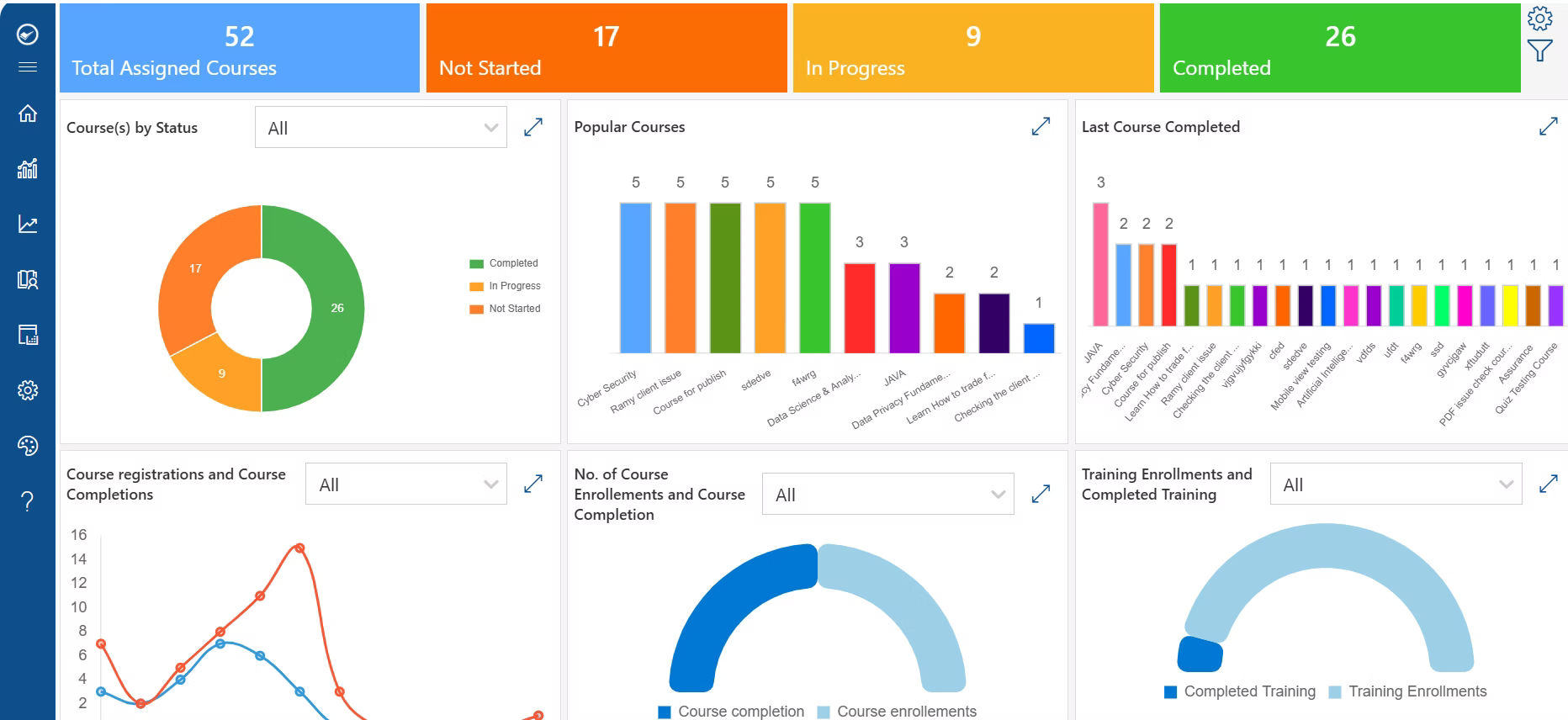
- AI-powered reporting and learning insights — Surfaces patterns HR might otherwise miss, such as departments falling behind or employees likely to need additional support, before they become bigger problems.
Benefits of Employee Training Tracking Software
- Save HR administrative time — Automating record-keeping and reporting frees HR from hours of manual spreadsheet updates each week, time that can go toward higher-value work instead.
- Improve compliance — Automatic tracking of required training and certifications reduces the risk of regulatory violations, fines, or legal exposure caused by missed deadlines.
- Reduce missed certifications — Automated renewal reminders catch expiring certifications before they lapse, instead of discovering the gap during an audit or incident review.
- Increase manager visibility — Managers can see exactly where their team stands on training at any moment, allowing them to follow up with individual employees before small delays become bigger compliance problems.
- Simplify audits — Pre-built, exportable reports mean HR can respond to an audit request in minutes instead of spending days pulling records together from multiple sources.
- Improve employee accountability — When employees can see their own training status and deadlines clearly, they’re more likely to complete courses on time without needing constant reminders from HR.
- Better reporting for leadership — Executive dashboards give leadership a clear, data-backed view of organizational training health, supporting better decisions around budget, staffing, and risk.
- Identify learning gaps — Reporting on skills and completion data reveals where teams or individuals are falling behind, so training investment can be targeted where it’s actually needed.
- Support career development — A complete learning history helps employees and managers identify growth opportunities, supporting internal promotions and succession planning.
- Improve onboarding tracking — Automated onboarding checklists ensure new hires complete every required course on schedule, reducing ramp-up time and early compliance risk.
Employee Training Tracking Software vs Excel
Excel | Training Tracking Software |
Manual updates | Automatic tracking |
No reminders | |
Limited reporting | |
Version control issues | Centralized records |
Difficult audits | Audit-ready reports |
No learning analytics | |
High administrative effort | Automated workflows |
Training Tracking Software vs Learning Management System
These two terms often get confused, but they focus on different things.
Training Tracking Software focuses on:
- Monitoring progress
- Maintaining records
- Reporting
- Compliance
- Certifications
Learning Management Systems focus on:
- Creating learning paths
- Assigning training
- Learning experiences
Modern platforms like LMS 365 combine both learning management and employee training tracking, allowing organizations to deliver training while automatically maintaining accurate learning records.
Reports Every HR Team Should Generate
- Training completion report
- Department training report
- Compliance status report
- Certification expiry report
- Learning hours report
- Employee learning history
- Skills development report
- Audit report
- Executive dashboard
How to Choose the Right Employee Training Tracking Software
Choosing the right platform isn’t about finding the one with the most features it’s about finding the one that fits how your organization actually works. Here are the practical questions to work through before you buy:
Does it automate training records?
If the software still requires manual entry to mark courses complete or update certification status, it isn’t solving the core problem — it’s just moving the spreadsheet somewhere else.
Can it track certifications and renewals?
Look for automatic expiry tracking and renewal reminders, not just a static field where someone has to remember to check the date manually.
Does it provide compliance reporting?
Confirm the platform can generate audit-ready reports specific to your industry’s requirements a generic completion report isn’t the same as a compliance report a regulator will accept.
Can managers monitor employee progress?
Managers should be able to see their own team’s status without needing to request a report from HR every time — this is what actually drives accountability day to day.
Does it integrate with Microsoft 365?
If your organization already runs on Teams, SharePoint, and Outlook, an integrated platform reduces friction and increases the odds employees actually complete their training on time.
Can employees access training from mobile devices?
This matters more than it seems, especially for frontline, remote, and field-based employees who don’t have regular access to a desktop computer.
Does it provide dashboards and analytics?
Real-time dashboards should be standard, not an add-on — you shouldn’t need a separate business intelligence tool just to see your own training data clearly.
Can it scale as the organization grows?
Consider not just your current headcount, but where the organization will be in two or three years. Switching platforms later is disruptive, so it’s worth choosing one that can grow with you.
Beyond these questions, it also helps to run a short pilot with a small group before rolling a new platform out company-wide this surfaces usability issues and adoption friction while the stakes are still low.
Best Employee Training Tracking Software in 2026
Every platform below can technically “track training.” The differences that actually matter are in how they track it, who they’re built for, and where they fit into your existing tech stack. Here’s a closer look at each one.
LMS 365
Description: LMS 365 is a training and tracking platform built directly on top of Microsoft 365, so training lives inside Microsoft Teams and SharePoint instead of a separate portal employees have to remember to visit.
Key Features:
- Power BI-based custom compliance dashboards
- Certification expiry reminders delivered through Outlook
- Single sign-on via Microsoft Entra ID
- AI-assisted course creation and automated learning assignments
Rating: Generally well-regarded among Microsoft 365-based organizations, with reviewers frequently highlighting ease of adoption since employees don’t need to learn a new platform.
Pricing: Priced per active user, typically on a monthly or annual subscription — confirm current tiers directly with the vendor, since pricing structures are updated periodically.
Keep in mind that most of these advantages come specifically from the Microsoft 365 integration, so organizations outside that ecosystem won’t see the same value.
TalentLMS
Description: TalentLMS is built for speed of deployment rather than compliance depth. Admins can get courses assigned and tracking running within a day, with a lightweight interface that requires minimal training to use.
Key Features:
- Automatic completion and progress tracking
- Basic certification tracking with expiry alerts
- Gamification (badges, points, leaderboards) to boost completion rates
- Pre-built course library and templates
- Mobile app for on-the-go learning
Rating: Commonly praised in reviews for its simplicity and short learning curve, making it a popular choice for teams without a dedicated LMS administrator.
Pricing: Tiered, per-active-user monthly pricing, with a limited free plan for very small teams — check current tiers on their site, as thresholds change.
Compliance and audit reporting are more basic than what you’ll find on enterprise-focused platforms, so it tends to suit small and mid-sized teams better than organizations with heavy regulatory requirements.
Docebo
Description: Docebo’s differentiator is its AI engine, which goes beyond tracking completions — it analyzes learning patterns to flag skills gaps and recommend content, aiming to answer “is the training actually working” rather than just “did they finish it.”
Key Features:
- AI-powered content recommendations and skills-gap analysis
- Advanced analytics and custom reporting dashboards
- Social and collaborative learning tools
- Multi-language support for global organizations
- Extensive third-party integrations (HRIS, CRM, video conferencing)
Rating: Frequently recognized in analyst reports for its AI capabilities, with reviewers noting a steeper learning curve for administrators compared to simpler platforms.
Pricing: Typically quote-based and scales with active users and feature tier — enterprise pricing, so expect a sales conversation rather than published rates.
That depth comes at a higher price point and steeper setup, which makes it overbuilt for organizations that just need simple compliance tracking.
Cornerstone OnDemand
Description: Cornerstone is one of the more established platforms in this space, and it shows in its compliance depth. It’s commonly used in industries with heavy regulatory requirements — healthcare, finance, manufacturing — because of its robust certification and recertification workflows.
Key Features:
- Automated recertification and renewal workflows
- Detailed audit trails for compliance reporting
- Role-based and location-based compliance assignment
- Succession planning and career development tools
- Enterprise-grade security and data governance
Rating: Well-established reputation among large enterprises, though reviewers often note that the platform’s depth comes with added administrative complexity.
Pricing: Enterprise, quote-based pricing tied to employee count and modules selected — not typically published, so budgeting requires a direct vendor quote.
It’s also a heavier, more complex system — implementation typically takes longer and requires more admin overhead than the other tools on this list, which makes it a poor fit for smaller organizations.
LearnUpon
Description: LearnUpon stands out for organizations that need to track training across genuinely different audiences from one account — for example, internal employees, external partners, and paying customers — each with separate portals but centralized reporting.
Key Features:
- Multiple, separately branded learning portals from one account
- Centralized reporting across all audiences
- Certification and compliance tracking per portal
- E-commerce support for selling courses externally
- API access for custom integrations
Rating: Reviewers consistently highlight its multi-audience management as a standout feature, particularly for organizations serving both employees and external customers or partners.
Pricing: Tiered plans based on active users and number of portals — mid-market pricing overall, generally positioned above TalentLMS and below Cornerstone.
If you only need internal employee tracking, this multi-audience strength won’t come into play, and simpler tools will feel less overbuilt for your needs.
Absorb LMS
Description: Absorb’s reporting engine is built to grow with an organization — from a few hundred to tens of thousands of learners — without a major re-platform. It’s a common choice for mid-market companies planning for future growth.
Key Features:
- Absorb Analyze reporting engine with customizable dashboards
- Automation rules for reassigning training and flagging non-compliance
- AI-assisted content tagging and search
- E-commerce and external training capabilities
- Mobile learning app with offline access
Rating: Often noted in reviews for strong customer support and a reporting engine that holds up well as user counts grow.
Pricing: Per-active-user pricing with tiered plans; advanced automation and AI features are generally reserved for higher tiers.
Its AI and automation features are typically gated behind higher pricing tiers, so smaller teams may not get full access without upgrading.
Moodle Workplace
Description: Moodle Workplace is the commercial, compliance-focused version of the open-source Moodle platform. Its key advantage is flexibility — organizations with in-house technical resources can customize tracking and reporting workflows extensively.
Key Features:
- Fully customizable tracking and reporting workflows
- Dynamic rules engine for automated compliance actions
- Multi-tenancy for managing multiple departments or subsidiaries
- Open-source core with a large plugin ecosystem
- Certification and competency tracking
Rating: Well-regarded among organizations with technical or IT resources, though reviewers note it requires more hands-on configuration than out-of-the-box competitors.
Pricing: Licensing costs are generally lower than most competitors due to the open-source core, though implementation and hosting costs should be factored in separately.
Litmos
Description: Litmos is positioned around fast time-to-value, with pre-built compliance course content and certification tracking that requires minimal configuration. It’s commonly used by organizations that need standard compliance training running quickly.
Key Features:
- Pre-built compliance course library (safety, harassment prevention, etc.)
- Automated certification tracking and expiry alerts
- Simple, clean admin interface
- Video-based course authoring tools
- Salesforce and other CRM integrations
Rating: Generally rated favorably for ease of use and quick deployment, with reviewers noting fewer advanced customization options than larger enterprise platforms.
Pricing: Per-user, subscription-based pricing with tiered plans — positioned as a mid-range option, generally more affordable than Docebo or Cornerstone.
Customization and deep analytics are more limited compared to Docebo or Cornerstone, so growing organizations may eventually outgrow it.
Why Microsoft 365 Organizations Choose LMS 365
Organizations that already run on Microsoft 365 face a specific problem when adopting a standalone LMS: it becomes just one more system employees have to log into, and one more set of records HR has to reconcile with everything else. LMS 365 was built specifically to avoid that problem by working inside the Microsoft 365 environment rather than alongside it.
Microsoft Teams integration — Employees can access, complete, and get notified about training directly inside Teams, the app they likely already have open all day, rather than being redirected to a separate portal they have to remember to visit.
SharePoint integration — Training content, records, and completion data live within SharePoint, so learning records sit alongside other HR and compliance documentation instead of in an isolated system.
Microsoft Entra ID single sign-on — Employees log in with the same credentials they already use for email and other work applications, removing a common source of friction — and support tickets — around forgotten passwords for a separate learning platform.
Outlook notifications — Reminders about assigned training and expiring certifications arrive in the inbox employees check constantly, rather than in a notification center they might not open for days.
Power BI reporting — HR and compliance teams can build fully custom dashboards using the same reporting tool many organizations already rely on for other business data, instead of learning a new, vendor-specific reporting interface.
AI-powered course creation — Course content can be generated and updated faster, reducing the time it takes to stand up new compliance or onboarding training when requirements change.
Automated learning assignments — Training is assigned automatically based on role, department, or location, keeping onboarding and compliance training consistent without manual intervention.
Certification tracking — Certification status and expiry dates are monitored automatically, with renewal reminders sent well ahead of deadlines.
Compliance reporting — Pre-built and customizable reports give HR and leadership what they need for audits without extra manual preparation.
Learning paths — Structured, sequential course tracks support onboarding, role-based development, and long-term skills growth.
Skills development — Learning data connects to skill growth, helping identify where employees are progressing and where additional training may be needed.
Learning records stored within the Microsoft 365 environment — All training data stays within an organization’s existing Microsoft 365 tenant, which can simplify data governance and security review compared to storing records in a separate third-party system.
Put together, the appeal isn’t any single feature — it’s that LMS 365 removes an entire category of friction that comes from asking employees and HR teams to work across multiple disconnected systems.
Conclusion
Keeping employee training records accurate is just as important as delivering the training itself. As organizations grow, managing training completion, certifications, compliance requirements, and learning progress manually becomes time-consuming and prone to errors. Employee training tracking software helps HR teams centralize training records, automate reminders, generate reports, and gain real-time visibility into employee learning across the organization.
When choosing a solution, look for software that not only tracks training but also supports compliance, reporting, and long-term employee development. If your organization already uses Microsoft 365, LMS 365 provides a unified platform to deliver training, track employee progress, manage certifications, and access learning insights directly within Microsoft Teams and SharePoint. By investing in the right training tracking solution, you can reduce administrative work, stay audit-ready, and build a workforce that continues to learn and grow.
Ready to bring training tracking into your Microsoft 365 environment?
LMS 365 lets you assign, deliver, and track employee training plus manage certifications and compliance reporting directly inside Microsoft Teams and SharePoint, with no separate platform for employees to learn.
Join Our Creative Community
Frequently Asked Questions
What is employee training tracking software?
It’s software that records, monitors, and reports on employee training activity — including course completions, certifications, and compliance status — from one central platform.
Why is tracking employee training important?
Without tracking, it’s easy to miss expired certifications, overdue mandatory training, and compliance deadlines. Tracking gives HR teams accurate, real-time visibility so they can act before problems happen.
What is the difference between employee training software and training tracking software?
Training software (like an LMS) focuses on delivering courses and learning content. Training tracking software focuses on monitoring progress, maintaining records, and reporting. Many modern platforms do both.
How does employee training tracking software help with compliance?
It automatically records completions, tracks certification expiry dates, sends renewal reminders, and generates audit-ready reports — reducing the risk of missed compliance deadlines.
Can I track employee certifications automatically?
Yes. Most training tracking software monitors certification status, sends expiry alerts, and stores renewal records automatically.
Does employee training tracking software integrate with Microsoft Teams?
Many solutions do, including LMS 365, which was built specifically for Microsoft 365 environments.
What reports should HR generate from employee training data?
Common reports include training completion, department progress, compliance status, certification expiry, learning hours, and executive dashboards.
How often should track employee learning progress be reviewed?
Organizations should track employee learning progress regularly monthly or quarterly to identify learning gaps, measure training effectiveness, and keep employees on track with development goals.


_JiluXJRGNl.svg)























