

25 Best Expense Tracker App for Business (2027)
Lost receipts, late reports, and slow payouts cost your business time and money, and the right expense tracker app fixes all three.


Overview
Most teams still chase paper receipts and fill in long spreadsheets. Finance waits days for approvals. Staff wait weeks to get their money back. An expense tracker app solves this. You snap a photo of a receipt. The app reads it, sends it for approval, and adds it to your books.
But you have hundreds of options. Some suit freelancers. Some suit large companies. Some work best only if you already use tools like Microsoft 365 or Zoho.
We reviewed and compared 25 apps to help you find the best expense tracker app for your business in 2027. Each review shows what the app does, what it costs, and who should use it.
What Is an Expense Tracker App?
An expense tracker app is a tool that records, checks, and reports the money your team spends on business costs. It replaces paper receipts, spreadsheets, and long email chains with one simple app.
Here is how it works:
- Capture: An employee takes a photo of a receipt with their phone. The app reads the amount, date, and store name on its own.
- Submit: The app turns the receipt into an expense claim in seconds.
- Approve: The app sends the claim to the right manager. The manager approves or rejects it with one tap.
- Pay back: Finance repays the employee, often straight to their bank account.
- Sync: The app sends the data to your accounting tool, such as QuickBooks or Xero.
Many apps also track mileage, set spending limits, issue company cards, and handle foreign currencies. Some people call this type of tool Expense Management software.
A good app to tracking expense saves time for everyone. Staff stop chasing refunds. Managers stop checking long forms. Finance gets clean, real-time data and spots errors or fraud early.
What Challenges Do Businesses Face Without an Expense Tracker App?
Many businesses still track spending with paper, spreadsheets, and email. This old way creates real problems.
- Lost receipts. Staff lose paper receipts all the time. Without a receipt, finance cannot approve the claim, and the employee may never get paid back.
- Slow approvals. Managers get claims by email and forget them. Claims sit for days or weeks. Staff grow frustrated while they wait for their money.
- Manual errors. People type numbers by hand into spreadsheets. One wrong digit throws off your books. Finance then spends hours finding and fixing the mistake.
- Fraud and policy breaks. Without clear rules, staff can claim the same receipt twice or spend over the limit. Nobody notices until it is too late.
- No real-time view. Leaders cannot see how much the team spends until the month ends. By then, it is too late to stop overspending.
- Wasted time. Finance teams spend days each month chasing receipts, checking forms, and entering data. That time could go to more useful work.
- Tax and audit stress. Missing records make tax season hard. If an auditor asks for proof, you may not have it.
An expense tracker app fixes these problems. It captures receipts, routes approvals, flags policy breaks, and gives you a live view of spending.
Comparison Table: 30 Best Expense Tracker App for Business (2027)
# | App | Best Feature | Free Trial |
1 | Works inside Microsoft Teams and SharePoint | Free demo + 14-day free trial | |
2 | Fyle (Sage Expense Management) | AI reads receipts from text, email, and Slack | Yes |
3 | Expensify | SmartScan receipt capture | Free for individuals |
4 | Zoho Expense | Deep links with Zoho Books and Zoho apps | Free plan for up to 3 users |
5 | Rydoo | Per diem rules for many countries | Yes |
6 | Happay | Ready for Indian GST rules | Demo only |
7 | Finly | Simple, clean design | Check website |
8 | Airwallex | Low-cost foreign exchange | Free plan |
9 | Volopay | Cards, bills, and claims in one place | Demo only |
10 | Ramp | Free corporate cards with smart automation | Free plan |
11 | Brex | Global corporate cards with high limits | Free plan |
12 | BILL Spend & Expense | Bill pay and spending in one tool | Free plan |
13 | Airbase (Paylocity) | Strong spending controls | Demo only |
14 | SAP Concur | Global tax and policy rules | Demo only |
15 | Navan | Travel booking and expenses in one app | Demo only |
16 | Payhawk | Live view of all company spending | Demo only |
17 | Emburse | Handles complex company rules | Demo only |
18 | Rippling Spend | Uses HR data to set spending limits | Demo only |
19 | Moss | Links to European accounting tools | Demo only |
20 | Pleo | Smart cards for every employee | Free plan |
21 | Webexpenses | Built for UK VAT rules | Yes |
22 | Spendesk | Purchase request approvals | Demo only |
23 | Declaree (Yokoy) | AI checks every claim | Demo only |
24 | ExpensePoint | Quick and easy setup | Yes |
25 | Abacus (Emburse) | Real-time payouts | Demo only |
1. Expense Tracker 365 – Best Overall Expense Tracker App
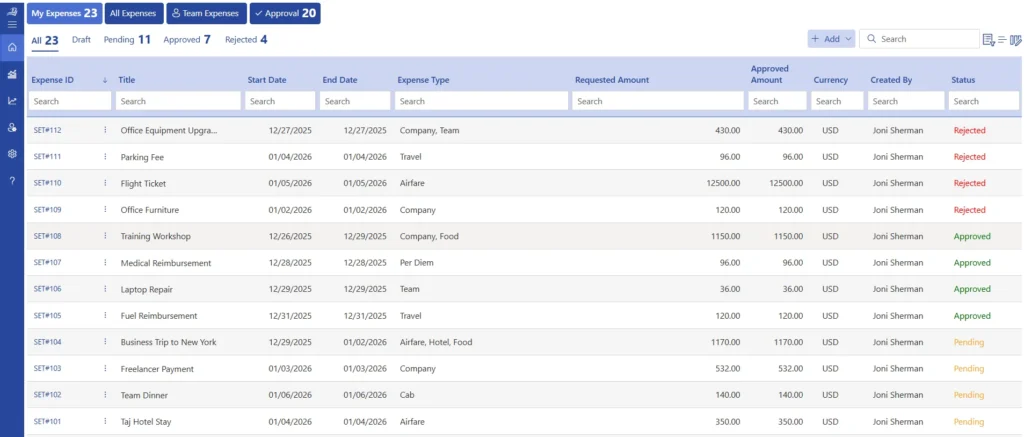
Expense Tracker 365 is an expense trackeing software built to run inside Microsoft 365. Your team submits, approves, and tracks expenses right in Microsoft Teams, with no new tool to learn. All your data stays in your own Microsoft 365 environment, not on an outside server. That makes it a safe, simple choice for any business that already works in Microsoft 365.
Best for: Small, mid-sized, and large businesses that use Microsoft 365 and Teams every day.
Key Features
- AI receipt scanning: Snap a photo of a receipt, and the app reads the date, amount, and store name for you. No more typing numbers by hand.
- Mileage tracking: Staff log trips, and the app works out the distance and the amount to pay back.
- Multi-level approvals: Claims go to the right managers in the right order. You set the approval steps once, and the app follows them every time.
- Approvals in Microsoft Teams: Managers approve or reject claims inside Teams with one click. They don’t need to open another app.
- Policy rules: You set spending limits and rules. The app flags any claim that breaks them before it reaches finance.
- Multi-currency claims: Staff can submit expenses in any currency, which helps teams that travel abroad.
- Expense categories: Sort spending into groups like travel, meals, and supplies so reports stay clean.
- Dashboards and reports: See who spent what, when, and where, all in real time.
- Export options: Export data to Excel or CSV for your accounting team.
- Mobile access: Submit and approve expenses on the go from a phone.
- Data in your own tenant: All records stay in your Microsoft 365 and SharePoint, so your data stays under your control.
Integrations
Expense 365 connects with the tools your business already uses:
- Microsoft 365 apps: Microsoft Teams, SharePoint, Microsoft Entra ID (single sign-on), Power BI, and Power Automate.
- Accounting software: QuickBooks, Xero, and Zoho books. Approved expenses move straight into your books, so finance doesn’t type them in again.
- Banks: Connect your bank or card accounts to bring in transactions on their own and match them with receipts. This makes repaying staff faster and keeps your records accurate.
- Credit Cards: Visa, Mastercard and American Express
Pros
- Easy to start, since your team already knows Microsoft 365
- Data stays inside your own Microsoft 365 environment
- Fast approvals right inside Teams
- No extra logins or passwords
- Little training needed
Cons
- Works best only for businesses that use Microsoft 365
- No built-in company cards
Ready to simplify expenses in Microsoft Teams?
2. Fyle (Sage Expense Management) – Best AI Receipt Scanning Expense Tracker App
Fyle is an expense tracker app that uses AI to read receipts fast and accurately. Staff can send receipts by text, email, Slack, or Microsoft Teams, and Fyle fills in the details on its own. Sage bought Fyle, and it now sells under the Sage Expense Management name. It works with the credit cards your business already uses, so you don’t need to switch banks.
Best for: Small and mid-sized businesses that want hands-free receipt capture.
Key Features
- AI receipt scanning: Fyle reads the amount, date, and store name from any receipt in seconds.
- Receipts by text or chat: Staff text a photo, forward an email, or post in Slack or Teams. Fyle turns it into a claim.
- Live card feeds: Fyle links to your existing Visa, Mastercard, or Amex cards and tracks each purchase as it happens.
- GPS mileage tracking: The app logs trips and works out the amount to pay back.
Integrations
- Accounting software: QuickBooks, Xero, NetSuite, and Sage Intacct
- Chat apps: Slack and Microsoft Teams
- Cards: Visa, Mastercard, and American Express
Pros
- Very accurate AI receipt capture
- Works with the cards you already have
- Many easy ways to submit receipts
Cons
- Pricing and features may change under Sage
- Few travel booking features
3. Expensify – Best App to Tracking Expense for Small Business
Expensify is one of the most popular expense tracker apps in the world. Its SmartScan tool reads receipts in seconds. Staff can submit claims through a simple chat-style screen. The Expensify Card also gives cash back on company spending.
Best for: Small businesses that want a fast, easy setup.
Key Features
- SmartScan: Snap a receipt, and the app fills in the details for you.
- Expensify Card: A company card that matches receipts on its own and offers cash back.
- Mileage tracking: GPS logs trips and works out the payback amount.
- Auto approvals: Claims that follow your rules get approved without anyone checking them.
Integrations
QuickBooks, Xero, NetSuite, Sage Intacct, and Gusto
Pros
- Very easy for staff to use
- Strong mobile app
- Free for individual use
Cons
- Price depends on how much you use the Expensify Card
- Some users report slow support
4. Zoho Expense – Best Expense Tracker App for Zoho Users
Zoho Expense is a low-cost expense tracker app from the Zoho family. It links tightly with Zoho Books, Zoho People, and Zoho CRM. It also offers a free plan for up to three users, which makes it a great start for small teams.
Best for: Businesses that already use Zoho apps.
Key Features
- Autoscan: Reads receipts and fills in claim details on its own.
- Mileage tracking: Works out distance with GPS or maps.
- Multi-level approvals: Sends claims to the right managers in order.
- Travel requests: Staff request trips and get approval before they book.
Integrations
Zoho Books, Zoho People, Zoho CRM, QuickBooks, Xero, and NetSuite
Pros
- Free plan for up to three users
- Low monthly price
- Works smoothly with other Zoho apps
Cons
- Best value only inside the Zoho world
- Reports are less detailed than enterprise tools
5. Rydoo – Best App to Tracking Expense for Travel
Rydoo is a Belgian expense tracker app built for teams that travel. It handles per diem rules for many countries. It also lets staff book trips and log costs in one place.
Best for: Teams that travel often, especially in Europe.
Key Features
- Receipt scanning: Reads receipts in many languages and currencies.
- Per diem rules: Applies daily allowance rates for different countries.
- Travel booking: Staff book flights and hotels inside the app.
- Mileage tracking: Logs trips and works out payback amounts.
Integrations
SAP, Oracle, Microsoft Dynamics, Xero, and QuickBooks
Pros
- Strong travel and per diem features
- Simple mobile app
- Good support for Europe
Cons
- Can cost more for small teams
- Travel features may cost extra
Make travel expenses simple with mileage and multi-currency claims in Teams.
6. Happay – Best Expense Tracker App for Indian Businesses
Happay is an Indian expense tracker app for travel and business spending. It follows Indian GST rules and works with Indian banks and cards. Larger companies in India use it to control spending at scale.
Best for: Mid-sized and large businesses in India.
Key Features
- GST-ready claims: Captures the tax details you need for GST filing.
- Corporate cards: Issues cards with set spending limits.
- Travel booking: Staff book trips that follow company policy.
- Policy checks: Flags claims that break your rules.
Integrations
SAP, Oracle, and Tally
Pros
- Built for Indian tax rules
- Handles travel and expenses together
- Good for large teams
Cons
- Less useful for businesses outside India
- No public pricing
7. Finly – Best Lightweight Expense Tracker App
Finly is a simple expense tracker app for teams that only need the basics. It skips complex features and focuses on quick receipt upload and clear reports. That keeps it easy for anyone to learn.
Best for: Very small teams that want a light, simple tool.
Key Features
- Quick receipt upload: Add receipts from your phone in seconds.
- Expense categories: Sort spending into clear groups.
- Simple reports: See where your money goes at a glance.
Integrations
Check the Finly website for current integrations.
Pros
- Easy to learn
- Clean, simple design
Cons
- Fewer features than larger apps
- Limited public information
8. Airwallex – Best Multi-Currency Expense Tracker App
Airwallex is a global business account first, with expense features built in. It lets you hold, spend, and send money in many currencies at low exchange rates. Teams can use Airwallex cards and submit receipts in the same app.
Best for: Businesses that spend and pay in many currencies.
Key Features
- Multi-currency accounts: Hold money in many currencies in one account.
- Low-cost foreign exchange: Swap currencies at rates close to the market rate.
- Company cards: Issue virtual and physical cards with spending limits.
- Receipt capture: Staff add receipts to each card purchase.
Integrations
Xero, QuickBooks, and NetSuite
Pros
- Great rates for foreign exchange
- Strong global payments
- Free entry plan
Cons
- Not a full expense tracker app
- Few mileage and per diem features
9. Volopay – Best All-in-One Expense Tracker App
Volopay brings company cards, bill payments, and expense claims together in one app. Finance teams can control all spending from one screen. It is popular across Asia-Pacific and is growing in other markets.
Best for: Small and mid-sized businesses that want one tool for all spending.
Key Features
- Corporate cards: Issue virtual and physical cards with set limits.
- Reimbursements: Pay staff back quickly for out-of-pocket costs.
- Bill payments: Pay vendors from the same app.
- Budgets: Set and track budgets by team or project.
Integrations
Xero, QuickBooks, and NetSuite
Pros
- Many tools in one place
- Strong in Asia-Pacific
- Good spending controls
Cons
- Less known in the US
- Features vary by country
10. Ramp – Best Expense Tracker App for Startups
Ramp gives US businesses free corporate cards and a smart expense tracker app at no cost. It uses AI to match receipts and flag odd spending. Ramp ships new features fast, which fits fast-growing startups.
Best for: US startups and growing companies.
Key Features
- Free corporate cards: Unlimited cards with set spending limits.
- AI receipt matching: Staff text or email receipts, and Ramp matches them to card purchases.
- Spending limits: Set rules by person, team, or vendor.
- Bill pay: Pay vendors from the same platform.
Integrations
QuickBooks, NetSuite, Xero, Sage Intacct, Gusto, and Rippling
Pros
- Free core plan
- Strong automation
- Fast new features
Cons
- Only for US businesses
- You need enough cash in the bank to qualify
11. Brex – Best Corporate Card + Expense Tracker App for Tech Companies
Brex offers high-limit corporate cards with built-in expense tools. It is popular with funded tech companies that grow fast and spend across many countries. Brex also includes travel booking and bill pay.
Best for: Venture-backed tech companies.
Key Features
- High-limit cards: Limits based on your cash, not your personal credit.
- Global cards: Spend in many countries in local currency.
- AI receipt matching: Matches receipts to card purchases on its own.
- Travel booking: Book trips that follow company policy.
Integrations
QuickBooks, NetSuite, Xero, Sage Intacct, and Slack
Pros
- Built for tech companies
- Strong global reach
- Free entry plan
Cons
- Stricter rules to qualify
- More than most small businesses need
12. BILL Spend & Expense (Divvy) – Best Expense Tracker App for SMBs with Heavy AP
BILL Spend & Expense, once called Divvy, is a free expense tracker app with company cards. It sits beside BILL’s bill payment tools. Businesses can pay vendors and control staff spending in one place.
Best for: Small and mid-sized businesses that pay many vendor bills.
Key Features
- Free corporate cards: Issue cards with set limits at no cost.
- Real-time tracking: See every purchase as it happens.
- Reimbursements: Pay staff back for out-of-pocket costs.
- Accounts payable: Manage vendor bills next to staff spending.
Integrations
QuickBooks, Xero, NetSuite, and Sage Intacct
Pros
- Free spend and expense tools
- Bills and spending together
- Easy to use
Cons
- Credit approval needed
- Bill pay features cost extra
13. Airbase (now Paylocity) – Best Expense Tracker App for Mid-Market
Airbase is a spend platform for mid-sized companies. Paylocity bought Airbase in 2024 and now links it with its HR and payroll tools. It brings cards, bills, and claims under one set of controls.
Best for: Mid-sized companies, especially Paylocity users.
Key Features
- Corporate cards: Virtual and physical cards with spending rules.
- Bill pay: Pay vendors with approvals built in.
- Reimbursements: Pay staff back quickly.
- Purchase requests: Staff ask for approval before they buy.
Integrations
Paylocity, NetSuite, QuickBooks, Xero, and Sage Intacct
Pros
- Strong spending controls
- One platform for all spending
- Links with Paylocity HR
Cons
- Hard to buy on its own now
- Custom pricing only
14. SAP Concur – Best Enterprise Expense Tracker App
SAP Concur is one of the most complete expense tracker apps for large companies. It handles expenses, travel, and invoices across many countries. It also follows local tax and audit rules worldwide.
Best for: Large and global enterprises.
Key Features
- ExpenseIt: Reads receipts and builds expense claims for you.
- Concur Travel: Book trips that follow company policy.
- Audit tools: Checks claims for errors and fraud.
- Global tax support: Helps with VAT and local tax rules.
Integrations
SAP, Oracle, Workday, Microsoft Dynamics, and hundreds of partner apps
Pros
- Very complete feature set
- Strong global compliance
- Scales to huge teams
Cons
- Complex and slow to set up
- Many users find it hard to use
Get enterprise-level expense control without the complex setup.
15. Navan – Best App to Tracking Expense for Remote Teams
Navan, once called TripActions, combines travel booking and expenses in one app. When staff book and pay through Navan, the app logs the expense for them. That cuts down on receipts for remote teams that meet up often.
Best for: Remote and hybrid teams that travel to meet.
Key Features
- Travel booking: Book flights, hotels, and cars in one place.
- Navan cards: Company cards that log expenses on their own.
- Auto receipt matching: Links receipts to card purchases.
- Policy controls: Keeps bookings within company rules.
Integrations
NetSuite, QuickBooks, Xero, Sage Intacct, Workday, and BambooHR
Pros
- Excellent travel experience
- Fewer receipts to chase
- Easy for staff
Cons
- Best value only if you book travel through it
- Custom pricing
16. Payhawk – Best Visible Spend Management Expense Tracker App
Payhawk gives finance teams a live view of every company expense. It combines cards, claims, bills, and per diems across many countries. Companies with several branches find it useful.
Best for: Mid-sized companies with teams in several countries.
Key Features
- Live spending view: See every purchase the moment it happens.
- Multi-currency cards: Spend in local currency around the world.
- Per diem and mileage: Handles daily allowances and trips.
- Approval flows: Sends claims to the right people.
Integrations
NetSuite, SAP, Microsoft Dynamics, Xero, and QuickBooks
Pros
- Clear, real-time visibility
- Strong ERP links
- Works across many countries
Cons
- No public pricing
- More than small teams need
17. Emburse (Certify/Chrome River) – Best Expense Tracker App for Large Organizations
Emburse owns several expense brands, including Certify and Chrome River. Its enterprise product handles complex rules for large, global groups. Hospitals, universities, and law firms often use it.
Best for: Large organizations with complex rules.
Key Features
- Flexible rules: Build policies for different teams and countries.
- Audit tools: Spot errors and fraud before payout.
- Travel and expenses: Manage both in one system.
- Global support: Handles many currencies and tax rules.
Integrations
Oracle, SAP, Workday, NetSuite, and Microsoft Dynamics
Pros
- Handles complex needs well
- Strong for healthcare, education, and law
- Scales to large teams
Cons
- Many brand names can confuse buyers
- Custom pricing only
18. Rippling Spend – Best HR + Finance Integrated Expense Tracker App
Rippling Spend ties expenses to your HR data. When you hire or promote someone, Rippling sets their card limits and approval rules for you. It works best for businesses that already use Rippling for HR and payroll.
Best for: Businesses that use Rippling HR and payroll.
Key Features
- Role-based limits: Spending rules update when someone changes roles.
- Payroll payback: Repay staff through their next paycheck.
- Corporate cards: Issue cards linked to each employee.
- Bill pay: Pay vendors from the same platform.
Integrations
Rippling HR and payroll, QuickBooks, NetSuite, Xero, and Sage Intacct
Pros
- HR data sets spending rules automatically
- Fewer manual updates
- One system for HR and spending
Cons
- Best only if you use Rippling
- Custom pricing for spend tools
19. Moss – Best Expense Tracker App for European Businesses
Moss is a German expense tracker app built for European businesses. It manages cards, invoices, and claims in one place. It also links with popular European accounting tools like DATEV.
Best for: Small and mid-sized businesses in Europe, especially Germany.
Key Features
- Company cards: Virtual and physical cards with set limits.
- Invoice management: Collect and pay supplier invoices.
- Reimbursements: Pay staff back for out-of-pocket costs.
- Multi-entity support: Manage several companies in one account.
Integrations
DATEV, Xero, and NetSuite
Pros
- Built for European rules
- Strong DATEV link
- Easy to use
Cons
- Less useful outside Europe
- Pricing not fully public
20. Pleo – Best Smart Corporate Card + Expense Tracker App
Pleo gives every employee a smart company card. Staff snap a receipt right after they pay, and Pleo logs it for them. Its friendly design makes it a favorite with teams in Europe and the UK.
Best for: European and UK small businesses that want cards for every employee.
Key Features
- Smart cards: Give each employee their own company card.
- Instant receipt capture: Snap a receipt right after you pay.
- Reimbursements: Pay staff back for personal card spending.
- Invoice handling: Manage supplier bills in the same app.
Integrations
Xero, QuickBooks, DATEV, and NetSuite
Pros
- Very easy for staff
- Free starter plan
- Fast receipt capture
Cons
- Mainly for Europe and the UK
- Limits on lower plans
21. Webexpenses – Best Cloud Expense Tracker App for SMEs
Webexpenses is a UK-based cloud expense tracker app. It follows UK tax rules, including VAT and HMRC mileage rates. Staff submit claims on their phone, and finance checks them online.
Best for: Small and mid-sized businesses in the UK.
Key Features
- Receipt capture: Snap receipts with your phone.
- HMRC mileage rates: Works out mileage pay using UK rates.
- VAT tracking: Captures VAT so you can claim it back.
- Policy checks: Flags claims that break company rules.
Integrations
Xero, Sage, QuickBooks, NetSuite, and Microsoft Dynamics
Pros
- Built for UK tax rules
- Simple cloud access
- Good support
Cons
- Less useful outside the UK
- Custom pricing
22. Spendesk – Best Procurement + Expense Tracker App
Spendesk combines purchase approvals with expense tracking. Staff request a purchase, get approval, and then pay with a Spendesk card. This keeps spending under control before money leaves the business.
Best for: Mid-sized companies in Europe that need purchase approvals.
Key Features
- Purchase requests: Staff ask for approval before they buy.
- Company cards: Virtual and physical cards with set limits.
- Invoice management: Collect and pay supplier bills.
- Budgets: Track spending against team budgets.
Integrations
Xero, NetSuite, DATEV, and QuickBooks
Pros
- Controls spending before it happens
- Clear budget tracking
- Strong in Europe
Cons
- Custom pricing only
- More than very small teams need
Keep every receipt and claim safe inside your own Microsoft 365.
23. Declaree (now Yokoy) – Best Automated Expense Tracker App for UK/EU
Declaree was a Dutch expense tracker app that Yokoy bought in 2022. Yokoy now uses AI to check every claim on its own. It finds errors and policy breaks before finance even looks.
Best for: UK and European businesses that want automated checks.
Key Features
- AI claim checks: Reviews every claim for errors and fraud.
- Receipt scanning: Reads receipts in many languages.
- Mileage and per diem: Handles trips and daily allowances.
- Invoice processing: Manages supplier bills too.
Integrations
SAP, Microsoft Dynamics, NetSuite, and Xero
Pros
- Strong automation
- Saves finance time
- Good for Europe
Cons
- Users moving from Declaree to Yokoy
- Custom pricing
24. ExpensePoint – Best Simple Expense Tracker App
ExpensePoint is a simple expense tracker app with no extra clutter. It covers receipts, mileage, and approvals. Teams can set it up and start using it quickly.
Best for: Small teams that want a basic, easy tool.
Key Features
- Receipt capture: Add receipts from your phone.
- Mileage tracking: Log trips and work out payback amounts.
- Approvals: Send claims to managers for sign-off.
- Mobile app: Submit expenses on the go.
Integrations
QuickBooks
Pros
- Very easy to use
- Quick setup
- Low price
Cons
- Few advanced features
- Limited integrations
25. Abacus – Best Real-Time Expense Tracker App
Abacus is known for real-time expense tracker and fast payouts. Staff submit claims as they spend, and the app pays them back quickly. Abacus is now part of Emburse.
Best for: Small businesses that want fast, real-time payouts.
Key Features
- Real-time claims: Submit expenses the moment you spend.
- Fast payouts: Pay staff back quickly.
- Auto approvals: Approve claims that follow your rules on their own.
- Card feeds: Pull in company card purchases.
Integrations
QuickBooks, Xero, and NetSuite
Pros
- Fast payback for staff
- Real-time view of spending
- Simple to use
Cons
- Now part of Emburse, so the product may change
- Less standalone support
How to Choose the Best Expense Tracker App for your business
With 25 options available, choosing the right expense tracker can be difficult. Use these 10 checks to find the best fit for your business.
- Check your current tools: Choose an app that works with the tools your team already uses, such as Microsoft 365, Zoho, or Rippling.
- Test receipt scanning: Make sure it can accurately capture key details like the amount, date, and merchant.
- Review approval workflows: Check whether the app can automate your existing approval process.
- Check corporate card support.
See if it supports your existing cards or provides built-in corporate cards.
- Check multi-currency support: If your team works across countries, look for currency and international expense support.
- Review integrations: Make sure it connects with your accounting, banking, payroll, and other essential tools.
- Check security: Review data protection, user permissions, and access controls before choosing a platform.
- Compare the total cost: Consider subscription fees, card fees, integrations, and premium features—not just the starting price.
- Test the mobile app: Employees should be able to capture receipts and submit expenses quickly from their phones.
- Try before you buy: Use a free trial or demo with a small team to see whether the software fits your workflow.
Final Recommendation: Best Expense Tracker App for Your Business
The best expense tracker app depends on your team size and the tools you use. Expensify and Zoho Expense suit small businesses. Ramp and Brex work well for startups. SAP Concur and Emburse fit large enterprises, while FreshBooks is ideal for freelancers.
If your business runs on Microsoft 365, Expense Tracker 365 is the clear choice. It works inside Microsoft Teams, scans receipts with AI, and keeps your data in your own Microsoft 365 environment. That’s why it’s our best overall app to tracking expense in 2026.
Still chasing receipts and typing claims into spreadsheets?
Let Expense Tracker 365 do the work for you in Microsoft 365.
Frequently Asked Questions
What is an expense tracker app?
An expense tracker app records, checks, and reports the money your team spends on business costs. It replaces paper receipts and spreadsheets with one simple tool that captures receipts, routes approvals, and syncs data to your accounting software.
Which is the best expense tracker app for business in 2027?
It depends on your needs. Expense Tracking 365 is the best overall choice for Microsoft 365 users. Expensify suits small businesses, Ramp suits startups, and SAP Concur suits large enterprises.
Is there a free expense tracker app?
Yes. Zoho Expense is free for up to three users. Ramp, Brex, and BILL Spend & Expense offer free plans because they earn money from card fees. Many other apps, including Expense Tracking 365, offer free trials.
Can an expense tracker app scan receipts?
Yes. Most apps use AI to read receipts. You snap a photo, and the app fills in the date, amount, and store name for you.
Does an expense tracker app work with accounting software?
Most do. Popular apps link with QuickBooks, Xero, NetSuite, Sage, and Microsoft Dynamics. Approved expenses move straight into your books.
Is my data safe in an expense tracker app?
Good apps use strong security, but you should always check. Ask where the app stores your data and who can see it. Expense Tracking 365 keeps your data inside your own Microsoft 365 environment.
Can an expense tracker app track mileage?
Yes. Most apps log trips with GPS or maps and work out how much to pay staff back.
Try It Free, No Obligation










Schedule a free personalized 1:1 demo
By proceeding, you accept Cubic Logics’s terms and conditions and privacy policy





Don't Miss Out! Halloween Offer
Avail up to Flat 30% Discount until
November 06th, 2026.
Enter your business email ID and we will send a personalized coupon code straight to your inbox.
Please provide your contact details, we will connect with you soon!
Please provide your contact details, we will connect with you soon!
By proceeding, you accept Cubic Logics Terms and Conditions and Privacy Policy
Schedule a free personalized 1:1 demo
By proceeding, you accept Cubic Logics’s terms and conditions and privacy policy







