

Receipt Scanning Software: The Complete Guide for Finance Teams in 2027

- Receipt scanning software uses OCR and AI to pull data from paper and digital receipts automatically, cutting down on manual entry.
- A strong receipt scanning system reduces approval delays, catches duplicate claims, and gives finance teams real-time visibility into spend.
- Quick reimbursements directly affect employee morale and reduce the odds of expense fraud.
- Expense 365 brings receipt scanning, approvals, and reporting into one platform that works inside Microsoft 365.
One trip, one client lunch, one office supply run, and an employee is holding a fistful of receipts that needs to turn into an expense claim. Multiply that by every employee in a company, and finance teams end up buried under manual data entry, missing receipts, and slow approvals.
This is exactly the problem receipt scanning software was built to solve. It takes a photo of a receipt and turns it into usable expense data in seconds. No typing, no filing cabinets, no lost paper trails.
In this guide, we break down what receipt scanning software is, how it works, what to look for in one, and how a platform like Expense 365 fits into a bigger expense management strategy.
Whether you run finance for a 500-person SMB company or a global enterprise, this guide will help you build a smarter, faster receipt management process.
What is Receipt Scanning Software?
Receipt scanning software is a tool that reads receipts, whether paper or digital, and converts the information on them into structured data. This includes the vendor name, date, amount, tax, and payment method. Instead of an employee typing every line item by hand, the software captures it directly from a photo or a scanned image.
- Most receipt scanning software includes a mobile app that allows employees to capture a receipt immediately after making a purchase.
- The software automatically captures the receipt information and converts it into an expense record, eliminating manual data entry.
- Receipt scanning software replaces paper receipts, spreadsheets, and manual expense reporting with a centralized digital record that is easy to search, organize, and retrieve.
- By automating receipt capture and data extraction, organizations can accelerate expense approvals.
How Receipt Scanning Software Works?
The technology behind receipt scanning system is built on a mix of image processing, Optical Character Recognition (OCR), and increasingly, artificial intelligence. Here’s a simple breakdown of the receipt management process.
- Capture: The employee takes a photo of the receipt using a mobile app or uploads a digital receipt or PDF.
- Image processing: The software cleans up the image and creases, so the text is readable.
- Data extraction: It scans the image and pulls out text: merchant name, date, amount, currency, and tax details.
- Categorization: AI models match the data to expense categories like travel, meals, or office supplies, based on merchant type and past patterns.
- Validation: The system checks the data against company policy, flags duplicates, and verifies amounts against card or bank transactions.
- Submission and approval: The finished expense entry moves into the approval workflow, ready for a manager or finance team to review.
This entire cycle, from photo to approval-ready entry, usually takes seconds rather than the minutes or hours a manual process demands.
Key Elements of Receipt Scanning Software
Not every tool labeled as receipt scanning software offers the same depth of function. Here are the elements that matter most.
- Accuracy – The ability to read receipts in different formats, fonts, and languages without heavy manual correction.
- Mobile capture – A simple, fast mobile app that lets employees scan receipts on the go.
- Policy engine – Built-in rules that flag expenses outside company policy before they reach an approver.
- Duplicate detection – Logic that catches the same receipt submitted twice, whether by accident or intent.
- Integration – Connections to accounting software, ERPs, and corporate card feeds so data doesn’t need to be entered twice.
- Reporting – Dashboards and reports that give finance leaders a clear view of spend by department, project, or category.
A receipt scanning tool that covers all these elements moves beyond simple receipt scanning and becomes a full receipt management platform.
Common Challenges Finance Teams Face During Receipt Approvals
Even with digital tools, receipt approvals can be a rough patch in the expense cycle. Some of the recurring problems finance teams run into include.
Paper receipts are one of the challenging process in the expense reporting. Thermal paper fades over time, making important details such as the merchant name, transaction date, tax amount, or total cost impossible to verify. Missing or unreadable receipts often delay claim approvals, increase back-and-forth communication, and create compliance risks during financial reviews.
Duplicate expense claims are more common than many organizations realize. Employees may accidentally submit the same receipt twice, upload both a scanned copy and a photo of the same transaction. In some cases, duplicate submissions may even be intentional. Without automated duplicate detection, finance teams must manually compare receipts, making the review process slower.
Wondering if you’re paying the same invoice twice? Let AI check
Every organization has expense policies that define approved spending limits, eligible expense categories, and reimbursement rules. However, when expense reports are reviewed manually, policy violations can easily go unnoticed. Employees may exceed meal allowances, book premium travel when only economy is permitted, or claim personal expenses alongside business purchases.
Manual approval workflows often rely on email threads, spreadsheets, or paper-based processes. An expense claim may wait several days simply because the approving manager is traveling, busy with other priorities, or overlooks an email notification. These challenges reduce productivity and create issues across the organization.
For businesses operating across multiple countries, expense management becomes significantly more complex. Employees submit expenses in different currencies while finance teams need reports in a single base currency. Incorrect exchange rates, manual currency conversions, or inconsistent tax calculations can result in inaccurate reimbursements and reconciliation errors.
When expense data is spread across spreadsheets, email attachments, and disconnected systems. They often must wait until the end of the month to understand where money was spent, which departments exceeded budgets, or whether unusual spending patterns. This delayed visibility makes it difficult to control costs proactively, forecast cash flow accurately, identify policy violations early, or make informed financial decisions.
Still switching between apps just to scan and submit receipts?
Expense 365 keeps everything connected by automatically capturing, extracting, and routing receipt data without disrupting your workflow.
Why Quick Expense Reimbursements Matter for Employees?
Reimbursement speed is not just a finance metric. It has a direct impact on employee trust and financial wellbeing.
When an employee pays out of their account for a business expense, they are effectively lending money to their employer. If that money takes weeks to come back, it creates real financial strain, especially for employees managing tight monthly budgets.
Research from Emburse found that a large share of employees have had to delay their own personal purchases or payments while waiting on a business reimbursement, and many have paid credit card interest as a direct result of late payouts.
This kind of financial pressure can push employees toward questionable behavior.
Quick staff expense reimbursement isn’t only about fairness. It also protects data accuracy. When reimbursements are slow, employees tend to hold onto receipts and batch them into a single, large expense report weeks later. A fast, automated payout cycle keeps financial data current and keeps trust between employees and the finance department intact.
Stats: According to a survey by SoFi at Work in partnership with CITE Research, “86% of employees say they feel increasingly stressed about their finances.
Benefits of Receipt Scanning Software
Adopting receipt scanning software brings measurable gains across the finance function and the broader employee base.
Receipt scanning software turns a paper receipt into a digital expense within minutes. Employees simply capture a photo, and the software automatically extracts the important details, creating an expense report much faster than manual entry. This speeds up reviews, approvals, and reimbursements while reducing the workload for everyone involved.
Manually entering receipt details often leads to typing errors, missing information, or incorrect amounts. The automated expense management process captures details such as the merchant’s name, transaction date, total amount, and tax accurately. This helps finance teams process expenses with greater confidence and consistency.
Expense policies become easier to follow when the software automatically checks every claim against company rules. Spending limits, approved expense categories, and required receipts are verified before the expense moves forward. This benefits employees submit expense claims and reducing the need for corrections later.
Manual expense processing takes valuable time from both employees and finance teams. Receipt scanning software reduces repetitive tasks such as data entry, document verification, and receipt matching. This allows finance professionals to focus on higher-value work.
Instead of waiting until the end of the month, businesses can view expense data as it is submitted. Interactive expense dashboards provide a clear picture of spending across departments, projects, and teams, helping finance leaders monitor budgets, identify trends, and make informed decisions throughout the month.
Submitting expenses becomes faster and easier when employees only need to scan a receipt instead of filling out lengthy forms. Quicker expense approvals and faster reimbursements create a smoother experience, helping employees spend less time on paperwork and more time on their work.
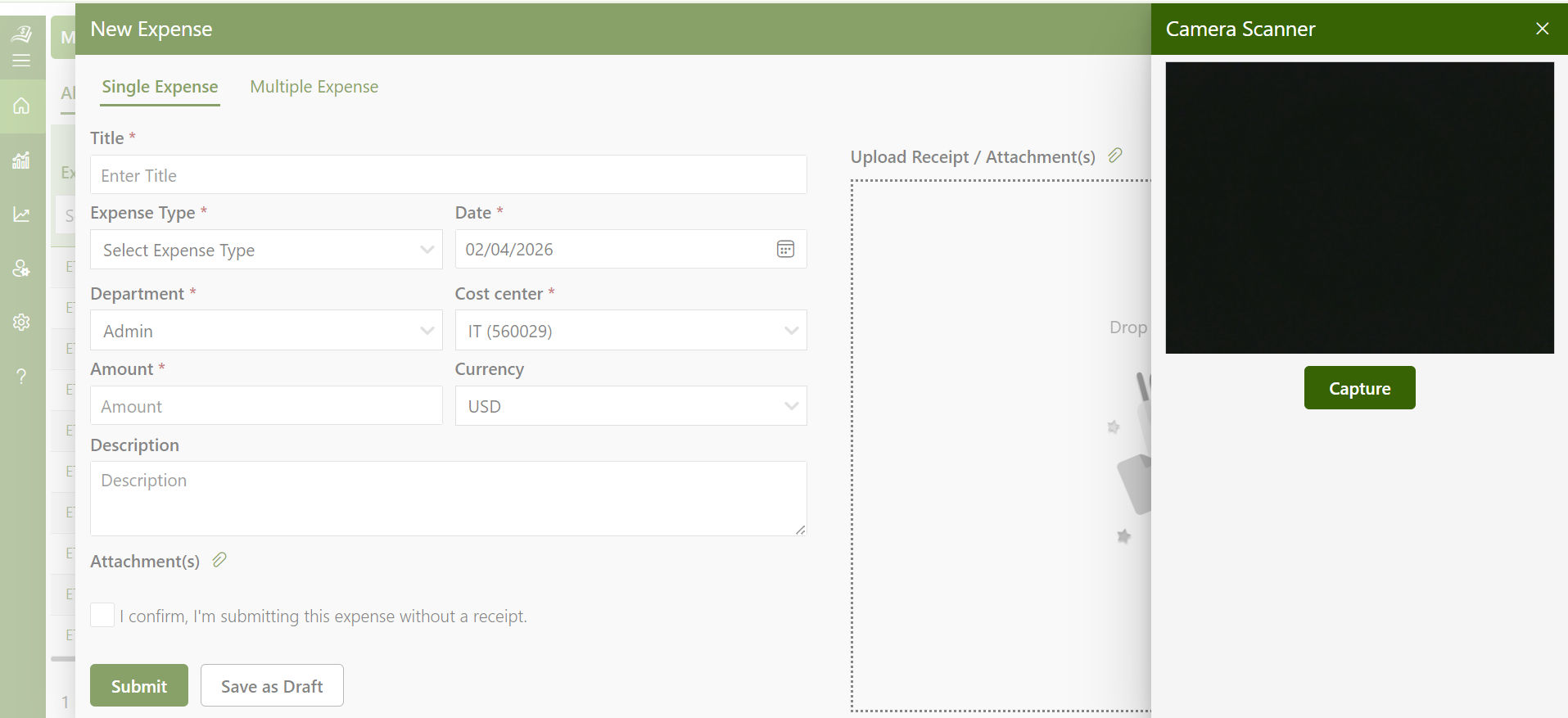
Scan, capture, and submit receipts in a snap with Expense 365
Whether you’re returning from a business trip or grabbing lunch with a client, your receipts are ready for reimbursement in seconds.
Features of Receipt Scanning Software
A modern receipt scanning system does far more than just read a receipt. Below are the features that matter most when evaluating receipt scanning software for your organization.
AI has moved from an experimental add-on to a standard part of how finance teams operate. According to McKinsey’s survey of 102 CFOs, 44 percent of respondents said they used generative AI for over five use cases, up from just 7 percent the year before. AI expense management is changing how businesses capture receipts, process claims, and control spending with less manual work.
Duplicate claims, whether accidental or intentional, are one of the most common leaks in an expense budget. A good receipt scanning system checks new submissions against past records, matching vendor names, amounts, and dates to catch repeat entries before they’re approved. This protects the company from double payouts and gives finance teams one less thing to check manually.
Manual approval chains slow everything down. Automated approval routing sends each expense to the right approver based on amount, department, or category, and can auto-approve low-risk claims that fall within policy. This cuts days off the average approval cycle and keeps claims from sitting untouched in someone’s inbox.
As per an HSBC report, 77% of surveyed businesses plan to expand into new overseas markets in the next two years. Global teams need a receipt scanning system that handles more than one currency without extra manual work. This means automatic currency conversion, region-specific tax rules, and reporting that rolls up cleanly across countries.
The traditional reimbursement cycle, where an employee pays out of pocket and waits weeks to get paid back, is increasingly seen as outdated. Industry data shows that manual, paper-based reimbursement programs often take 30 days or more. An instant reimbursement process, built on automated approval and direct deposit.
Corporate cards remove the reimbursement step entirely, since the company pays the vendor directly instead of the employee fronting the cost. American Express, one of the largest corporate card networks, reported full-year 2025 billed business of $1,669.8 billion, up 8% from the previous year, with 153.9 million cards in force globally by early 2026. That scale reflects how central corporate cards have become to business spend.
For employees traveling on business, per diem management sets fixed daily allowances for meals, lodging, and incidentals based on destination and company policy. Good receipt scanning software applies the right per diem rate automatically, based on the traveler’s location and dates, instead of requiring finance to look up rates manually for every trip.
At the end of the cycle, everything rolls up into an expense report. Automated report generation pulls scanned receipts, approvals, and card data into one clean document, ready for accounting, tax filing, or audit. This removes the need to manually assemble reports from scattered receipts and spreadsheets.
Blurry Receipt? AI Still Extracts the Invoice Details
No perfect receipt? No problem. Just snap a photo and let AI extract the important details for you.
Best Practices to Implement Before Scanning Receipts
Before rolling out a new receipt scanning system, a bit of groundwork goes a long way:
- Define a clear expense policy with categories, limits, and required documentation.
- Set rules for what counts as a valid receipt (minimum amount, image quality, required fields).
- Map out your approval hierarchy so the software can route claims correctly.
- Decide which accounting or ERP systems need to connect with the new tool.
- Train employees on how to capture clean, well-lit photos of receipts.
- Set expectations for submission deadlines so claims don’t pile up at month-end.
Optimizing Receipt Scanning After Implementation
Once the system is live, ongoing tuning keeps it running well.
- Review flagged and rejected receipts monthly to spot patterns in employee errors.
- Adjust auto-categorization rules as new vendors or expense types appear.
- Track average approval time and look for challenges in the workflow.
- Audit duplicate detection settings periodically to reduce false positives.
- Gather employee feedback on the mobile app experience and act on it.
- Revisit currency and tax settings as the company expands into new regions.
How Expense 365 Helps Organizations Automate Receipt Scanning?
Expense 365 was built to bring all these pieces together in one place. Rather than treating receipt scanning as a standalone tool, it connects directly to the rest of an organization’s expense workflow, from approval routing to reporting to reconciliation.
What sets this platform apart is its integration with Microsoft 365 apps. Many finance and operations teams already live inside Outlook, Teams, and SharePoint every day. It works within that environment instead of asking employees to learn a separate system. An employee can submit a receipt, get it approved, and see it reflected in company reporting, all without leaving the Microsoft tools they already use daily.
Expense 365 integrates seamlessly with leading accounting software like QuickBooks, Xero, and Zoho Books, making it easy to sync approved expenses and keep your financial records up to date.
It is backed by SOC 2 compliance, Microsoft certification, and Microsoft Solutions Partner status, giving organizations a trusted and secure receipt scanning system to rely on.
Expense 365 also fully supports GCC and GCC High environments, delivering government-level security and advanced data protection for highly regulated industries.

Hear from Our Delighted Clients
“Expense Tracker 365 is a great app with excellent support. The advanced features make it a complete tool & has really improved our expense tracking and reporting workflow”
Ensuring Data Security in AI-Powered Receipt Scanning
Receipts contain sensitive financial data: vendor names, amounts, payment methods, and sometimes personal card details. As receipt scanning software leans more on AI to read and categorize this data, security must be built into every layer of the system.
Security matters just as much as automation when managing business expenses. Your receipts and expense data are never used to train public AI models. Instead, your organization’s financial data remains under your control and ownership, giving finance teams the confidence to automate receipt scanning without compromising security.
A platform that combines AI-powered automation with strong security practices gives finance teams the best of both: speed and protection, without exposing sensitive company data to unnecessary risk.
Conclusion
Receipt scanning software has moved from a convenience to a core part of how modern finance teams operate. It removes the manual work of typing receipt data, speeds up approvals, and gives finance leaders real-time visibility into company spend. By automating receipt capture and data extraction, businesses can reduce errors, improve compliance, and reimburse employees faster.
Book a demo today and see how Expense 365 can simplify every expense from receipt to reimbursement.
Frequently Asked Questions
Can receipt scanning software read handwritten receipts?
Yes. AI scans handwritten and printed receipts, extracts key details such as the merchant, date, amount, and tax, then automatically creates an expense and sends it for approval.
How does receipt scanning software handle multiple currencies?
It automatically detects the currency on a receipt, applies the correct exchange rate, and converts totals into the company’s base currency for reporting.
How long does it take to implement a receipt scanning system?
With Expense 365, you can get started in minutes. Simply configure your settings, invite your team, and begin scanning receipts and automating expense reports without a lengthy implementation process.
Can the software tell if someone uploads the same receipt twice?
Yes. AI compares receipt details such as the merchant, transaction date, amount, and other identifying information to detect potential duplicates before expenses are approved, helping finance teams avoid duplicate reimbursements.
Can employees submit receipts from anywhere?
Yes. Employees can scan and submit receipts from their mobile phone or desktop, whether they’re in the office, working remotely, or traveling for business. Expenses can be submitted as soon as the purchase is made.


_JiluXJRGNl.svg)























