


- Receipt management is the process of collecting, organizing, storing, and tracking business expense receipts digitally or on paper.
- Paper receipts fade within 3–6 months, putting your tax records and audit readiness at serious risk.
- AI-powered receipt scanning uses OCR technology to extract data from receipts in seconds, cutting expense processing time by up to 80%.
- The IRS requires receipts for all business expenses of $75 or more, and records of amount, date, place, and purpose even below that threshold.
If you have ever tried to claim expense and realized the receipt was missing or worse, faded beyond reading you already know why receipt management matters.
For most small businesses and finance teams, receipts are an afterthought. They pile up in wallets, glove compartments, email inboxes, and the bottom of laptop bags. Then tax season or an audit arrives, and the panic sets in.
Here is the reality: 25% of businesses face issues during audits because of poor receipt records. That is not a small problem. That is a problem that costs money, time, and credibility.
Whether you are a solo freelancer, a finance manager handling a team’s expenses, or a business owner trying to stay IRS-ready, this guide is built for you.
What Is Receipt Management?
Receipt management is the practice of collecting, storing, organizing, and tracking receipts for business expenses so that every dollar your business spends is documented, retrievable, and audit-ready.
It covers everything from a $12 coffee receipt from a client meeting to a $4,000 hotel invoice from a business trip. The goal is simple: when someone asks for proof of a business expense your accountant, your tax preparer, or the IRS you can produce it immediatel
Receipt management includes:
- Capturing receipts at the point of purchase (paper, digital, or email)
- Storing them in a searchable, organized system
- Categorizing them by expense type (travel, meals, office supplies, etc.)
- Matching them to transactions in your accounting or expense software
- Retaining them for the legally required period (the IRS recommends three years)
Traditionally, this was done manually — filing paper receipts in folders, entering data into spreadsheets, and hoping nothing got lost. Today, receipt management software handles most of this automatically.
The global digital receipts market was valued at $2.1 billion in 2023 and is projected to grow at a CAGR of 11.5%, reaching $5.1 billion by 2033. That kind of growth signals one thing clearly: businesses are moving away from paper, and fast.
How AI-Powered Receipt Scanning Works
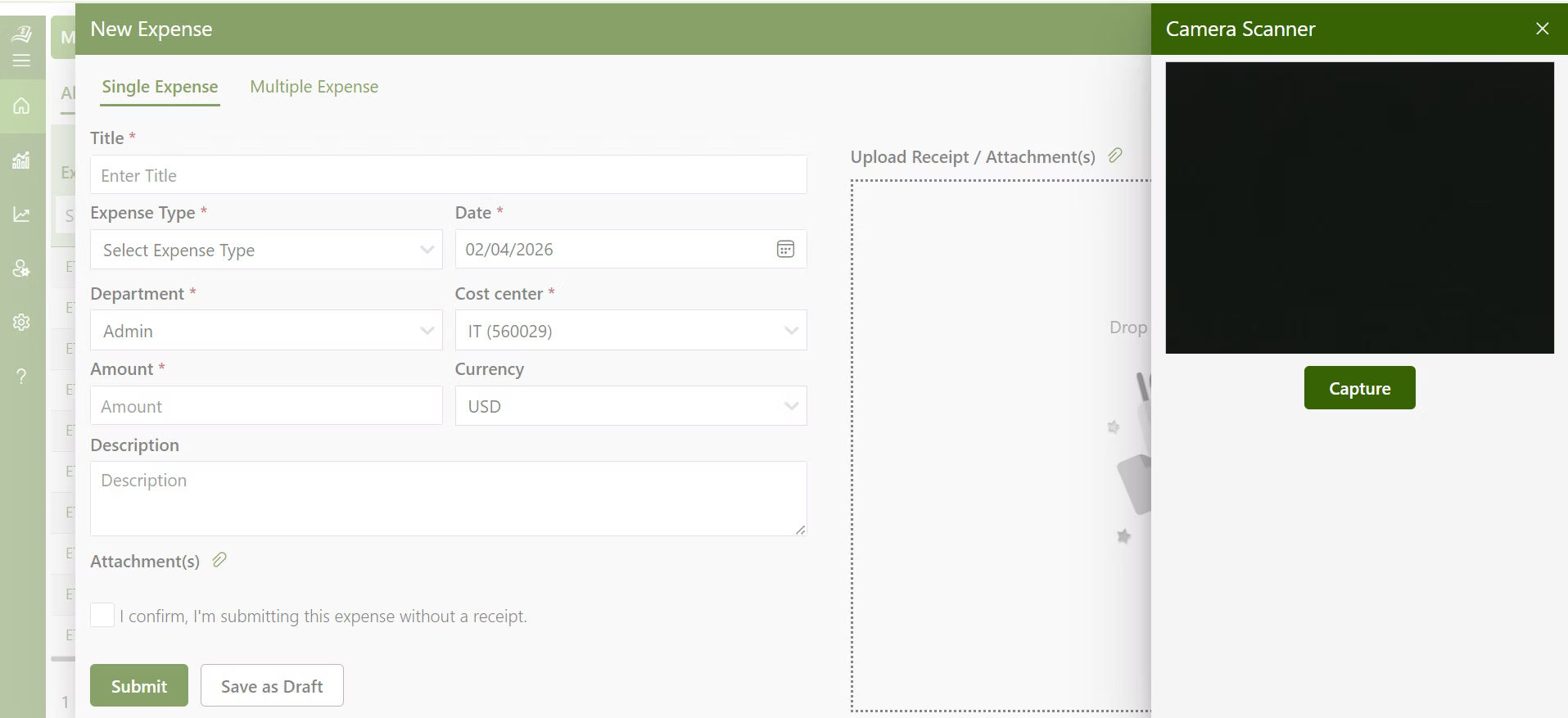
If you have ever taken a photo of a receipt and had an app pull out the vendor name, date, and amount automatically that is AI-powered receipt scanning at work.
Here is how the receipt scanning software works, step by step:
Step 1: Capture the Receipt You take a photo of a physical receipt using your phone camera, forward an email receipt, or upload a PDF. The app accepts multiple input formats printed receipts, handwritten receipts, digital PDFs, and even business card receipt management where contact details and expense context are captured together.
Step 2: OCR Reads the Receipt Optical Character Recognition (OCR) technology scans the image and identifies text vendor name, date, total amount, tax, line items, and currency. This happens in seconds, even with slightly blurry or angled photos.
Step 3: AI Extracts and Structures the Data Once the text is identified, AI models interpret the billing information and structure it into fields: merchant, category, amount, date, payment method. This is where smart systems go beyond simple OCR — they understand context. A receipt from “Delta Air Lines” gets tagged as travel. A receipt from “Grubhub” gets tagged as meals.
Step 4: Auto-Categorization The receipt management software assigns the expense to a category based on the merchant type, past patterns, or your custom rules. You can review and edit these categorizations before they are finalized.
Step 5: Match to a Transaction The scanned receipt gets matched against your credit card or bank transaction feed. If a receipt matches an existing transaction, they are linked automatically no manual entry needed.
Step 6: Store and Sync The receipt image and its extracted data are stored in the cloud, tagged, and made searchable. They sync with your accounting software (QuickBooks, Xero, Sage, etc.) so your books stay updated without any double entry.
Step 7: Ready for Review or Audit When your accountant needs records or an audit comes up, every receipt is searchable by date, category, amount, or vendor — and downloadable in seconds.
Organizations that automate receipt capture report up to 80% reduction in time spent on expense processing compared to manual methods.
Manual Receipt Handling vs. AI Receipt Scanning: A Side-by-Side Comparison
This is where most businesses realize they have been doing things the hard way.
Aspect | Manual Receipt Handling | AI-Powered Receipt Scanning |
Data Entry | Typed in by hand — slow and prone to typos | Extracted automatically via OCR in seconds |
Storage | Physical folders or basic spreadsheets | Cloud-based, searchable, backed up automatically |
Receipt Fading | Paper receipts fade in 3–6 months | Digital copies retained permanently |
Categorization | Done manually by the user every time | AI assigns categories based on merchant and patterns |
Duplicate Detection | No built-in check — easy to submit twice | Software flags duplicates based on amount, date, and vendor |
Audit Readiness | Requires digging through files and folders | All receipts searchable and exportable instantly |
Expense Fraud Risk | Harder to detect, easier to miss | Automated rules and matching reduce fraud risk significantly |
The fading problem alone is worth taking seriously. If you get audited two years after a trip and your hotel receipt is blank, you have no defense.
And the fraud angle is not hypothetical either. Expense fraud can cost companies up to 5% of their annual revenue. In a $2 million business, that is $100,000 walking out the door through duplicate submissions, inflated amounts, and personal expenses filed as business ones.
Why Organizing Receipts Protects Your Business (More Than You Think)
Most people think of receipt management as a tax-time chore. But it is actually a year-round business protection tool. Here is what proper receipt management does for you.
1. It Keeps You IRS-Ready Without the Last-Minute Rush
The IRS requires receipts for all business expenses of $75 or more, and for all lodging expenses regardless of the amount. Even below the $75 threshold, you must record the amount, date, place, and business purpose.
When receipts management is handled by category and stored digitally, you are never scrambling to reconstruct three years of expenses from memory.
2. It Speeds Up Employee Reimbursements
3. It Catches Overspending Before It Becomes a Budget Problem
When every expense categorized and visible in real time, you can see spending patterns as they happen not after the quarter ends. If your team’s travel spend is 40% over budget in March, you know in March, not in June.
4. It Makes Tax Filing Significantly Less Painful
At tax time, your accountant needs categorized expense data not a box of mixed receipts. A good receipt management mean your tax preparer spends less time sorting and more time finding deductions. And their hourly rate is not cheap.
5. It Protects You When Audits Happen
25% of businesses face audit issues because of poor receipt records. If you are selected for an IRS audit and cannot produce documentation for claimed deductions, those deductions get disallowed — and you owe back taxes, plus interest, plus potential penalties.
How to Categorize Business Expense Receipts (By Expense Type)
This is the question that comes up constantly on Reddit finance forums and small business communities: “How do I actually organize all these receipts?”
The answer is to categorize by expense type and here is how to handle the most common ones:
Travel Expenses
This includes flights, hotels, trains, rental cars, and ride-shares for travel expense.
How to handle it: Capture the receipt immediately after booking or check-out. Tag it with the trip name or destination (e.g., “NYC Client Visit – March”). Store the hotel receipt separately from the flight they often have different tax treatments. The IRS requires receipts for all lodging regardless of amount, so do not let hotel invoices slip through.
Client Meals and Entertainment
Business lunches, dinners, client coffees, and team meals.
How to handle it: Photograph the receipt before you leave the restaurant paper meal receipts are notorious for fading fast. Add a short note: who was there and what was discussed. The IRS limits meal deductions to 50%, so proper documentation matters here.
Office Supplies and Equipment
Printer paper, toner, keyboards, monitors, desks, software subscriptions.
How to handle it: Keep digital copies of all purchase emails and invoices. For large equipment purchases (over $2,500 in most cases), the tax treatment differs; these may need to be depreciated rather than expensed. Flag these for your accountant.
Subscription and Software Costs
SaaS tools, cloud storage, communication platforms, design tools, accounting software.
How to handle it: These are often billed monthly and hit your card automatically which means receipts show up in your email. Set up a dedicated folder or rule in your email client to capture these, then sync them to your receipt management software regularly. Business card receipt management tools can also link subscriptions to specific cost centers or team members.
Mileage and Vehicle Expenses
Driving to client sites, running business errands, attending conferences.
How to handle it: Log mileage at the time of the trip date, starting point, destination, and business purpose. The IRS standard mileage rate for 2025 is 70 cents per mile. Apps that track GPS-based mileage make this significantly easier than manual logs.
Professional Services and Contractor Fees
Freelancers, consultants, legal fees, accounting fees.
How to handle it: Always collect invoices — not just credit card receipts. Invoices include itemized service descriptions, which you will need for both tax filing and any future audit. Store these in a “Professional Services” category and note the project or purpose.
Training, Education, and Conferences
Courses, certifications, industry conferences, books, and learning platforms.
How to handle it: These are deductible when they are directly related to your current work. Save the receipt along with a brief note about how the training relates to your business. Conference registration, travel, and lodging should be stored together under a single event tag.
Want to skip the manual categorization entirely?
Expense 365 auto-categorizes your receipts the moment they are scanned
Best Practices to Avoid Duplicate Receipts and Expense Errors
Duplicate expense submissions are one of the most common and preventable problems in business expense management. Here are seven practices that keep your receipt management clean:
- Scan receipts the same day they are created.
The longer you wait, the more likely a receipt gets lost, faded, or accidentally submitted twice. Build a habit of scanning immediately after a purchase. - Use a single receipt management software for your whole team.
When different people use different tools or methods, duplicates multiply. Centralizing everything into one platform gives finance teams visibility over all submissions at once.
- Enable duplicate detection in your software.
Most modern receipt management software flags submissions that share the same amount, date, and vendor — alerting the reviewer before approval. Turn this on and keep it on.
- Match every receipt to a bank or card transaction.
If a receipt has no matching transaction, it is either a duplicate or a personal expense. This matching step is your strongest filter against fraudulent or accidental double-submissions.
- Archive receipts immediately after reimbursement.
Once an expense is approved and reimbursed, mark it as closed in your system. Open, unresolved receipts are the most common source of accidental re-submissions.
- Set a clear submission window for employees.
If receipts can be submitted anytime — including months after the fact — it becomes very hard to cross-reference them with transactions. A 30-day submission policy keeps everything within a verifiable window.
- Audit your expense categories monthly.
A quick monthly review of categorized receipts catches misclassifications, missing receipts for recurring vendors, and any pattern that looks unusual. Fifteen minutes a month saves hours at tax time.
Expense 365: A Smarter Way to Handle Receipts
Most businesses do not have a receipt problem they have a receipt system problem. The receipts exist. The data is there. What is missing is a reliable way to capture, organize, and use it without manual effort.
That is what Expense 365 is built to solve.
With Expense 365, you can:
- Scan any receipt instantly : Paper, PDF, or email and have the data extracted and categorized automatically using AI and OCR
- Handle business card receipt management: Link receipts to specific contacts, vendors, or projects, so every expense has a clear business context
- Catch duplicates automatically: The system flags identical submissions before they are approved, so your finance team is not chasing down errors after the fact
- Stay audit-ready year-round : Every receipt is stored in the cloud, searchable by vendor, date, category, or amount, and exportable for your accountant in one click
- Integrate with your accounting software : Expense 365 syncs with QuickBooks, Xero, and other major platforms, so your expense data flows into your books without re-entry
- Give your team a mobile-first experience: Employees scan and submit receipts from their phones the moment a purchase happens, not three weeks later from a pile on their desk
Given that organizations automating receipt capture see up to an 80% reduction in expense processing time, the question is not whether a tool like Expense 365 is worth it; it is how much the current manual process is costing you right now.
Conclusion
Receipt management is not the most appealing task. But it is the kind of work that determines whether your business survives an audit, claims every deduction it is entitled to, and avoids paying expenses it already paid for.
The shift from paper folders to AI-powered receipt scanning is not just a convenience upgrade — it is a structural improvement in how businesses handle financial accountability.
Start with one change: scan your next receipt the moment you get it. Book a demo with Expense 365.
Frequently Asked Questions
How long should I keep business receipts?
The IRS recommends keeping business records for at least three years from the date you filed the return. For cases involving underreported income (more than 25%), the period extends to six years. Digital storage makes keeping records for six or more years straightforward and space-free.
Do I really need receipts for small purchases under $75?
The IRS does not require a receipt for expenses under $75 (except lodging), but you are still required to record the amount, date, location, and business purpose. Receipt management software lets you log these details even for small cash purchases, keeping you compliant either way.
What is the best way to organize receipts for taxes?
Organize by expense category travel, meals, office supplies, subscriptions, professional services, and so on. Within each category, sort by date. Digital receipt management software does this automatically and makes the export to your accountant or tax preparer clean and fast.
Can I use my phone to manage receipts for my business?
Yes, and most finance teams now prefer it. Mobile receipt management apps use your phone camera and OCR technology to capture receipt data instantly. Expense 365, for example, is built mobile-first so employees can scan and submit from anywhere without waiting until they are back at a desk.
What happens if I lose a receipt for a business expense?
You can sometimes reconstruct documentation using bank or credit card statements, vendor invoices, calendar entries, or email confirmations. However, these are secondary sources an original receipt is always stronger. This is why scanning receipts immediately at the point of purchase is a better habit than hoping a statement will be enough later.
Is receipt management software worth it for small businesses?
If your business has more than a handful of expenses per month, yes. The cost of receipt management software is almost always less than the cost of one missed deduction, one duplicate reimbursement, or one hour of your accountant’s time sorting through a shoebox of paper. The ROI tends to show up within the first month.


_JiluXJRGNl.svg)























