

Business Expense Category: 21 Categories to Organize Spending.

An expense category is the simple label that tells you where your money went. Most business owners ignore it until tax season and that’s when the stress starts.
Picture this. It’s the end of the month. You have a pile of receipts and a card statement full of strange merchant names. Your accountant wants everything sorted by Friday. So you guess. You put half of it under “Miscellaneous” and hope for the best.
Sound familiar? You’re not alone. A 2015 GBTA Foundation study found that processing a single expense report costs $58 and 19% of reports contain errors. Each error takes 18 minutes and $52 to fix. Those small mistakes add up fast.
The good news? You can fix this with a clear system. In this guide, you’ll get a list of 20 business expense categories and a simple tracker you can set up today. You’ll also see how Expense Tracker software takes the manual work off your plate for good.
- An expense category is a label that groups similar business costs, like rent, travel, or software.
- Matching your categories to IRS Schedule C lines makes tax time much easier.
- Most small businesses need only 15 to 25 categories.
- Expense Tracker 365 assigns categories automatically and syncs them to Xero, QuickBooks and Zoho Books.
What Is an Expense Category?
An expense category is a label that groups similar costs together. Rent goes in one group. Software goes in another. Travel goes in a third. When you add up each group, you see exactly where your money goes.
In accounting software, each expense category is usually an account in your chart of accounts. A chart of accounts is simply the master list of every account your business uses. Your accountant relies on it to build your reports and tax return.
Expense Category vs. Spending Category
People often mix up these two terms. A spending category is a budgeting term. You might use it at home for groceries, fuel, or eating out. Banking apps use it too when they sort your purchases.
An expense category is the bookkeeping version. It follows accounting and tax rules, so your accountant and the tax office can read your records without confusion. In short, a spending category helps you budget and an expense category helps you report.
Why Expense Categories Matter
- They help you save on taxes. The IRS lets you deduct costs that are “ordinary and necessary.” Ordinary means common in your industry and necessary means helpful for your business. Clear categories make these costs easy to find and claim.
- They show your cash flow. You can spot where money leaks out. For example, you might find you’re paying for three software tools that do the same job.
- They keep you audit-ready. If anyone asks questions, you can answer in minutes instead of days.
Business Expense Category List: 20 Common Categories for Business
Here’s an expense category list most businesses can use today. It follows IRS Schedule C, the form US sole proprietors use to report business income and costs. When your categories match the form, tax time gets much easier. If you’re outside the US, the names may differ slightly, but the groups stay about the same.
- Advertising and marketing: This covers any money you spend to find and win customers. Online ads, your website, flyers, social media promotions and printed business cards all belong here. If a cost helps people learn about your business, record it in this category.
- Car and truck: This covers the cost of using a vehicle for business. You can claim the IRS standard mileage rate or your actual costs, like fuel, repairs and insurance. Keep a simple log of your business trips, because the IRS wants proof. Driving from home to your regular workplace counts as commuting, so it doesn’t qualify.
- Commissions and fees: This covers the fees you pay to people or platforms that help you make sales. Examples include sales commissions, payment processing fees from Stripe or PayPal and marketplace fees from Amazon or Etsy. These costs are easy to miss, so check your payout reports each month.
- Contract labor: This covers payments to freelancers and independent contractors who aren’t on your payroll. Designers, developers, writers and virtual assistants often fall here. Collect a W-9 form from each contractor before you pay them. You may need to send them a 1099-NEC form at year-end.
- Depreciation: This covers big purchases that last more than a year, like computers, machinery and furniture. Instead of claiming the full cost at once, you usually spread it over the item’s useful life. Some rules, like Section 179, may let you deduct more in the first year. Your accountant can help you pick the best method.
- Employee benefits : This covers the programs you offer to your employees beyond their pay. Health insurance plans, group life insurance and education help are common examples. Good benefits help you attract and keep great people. Retirement plan contributions go in their own category (Line 19).
- Insurance: This covers the policies that protect your business. General liability, professional liability, property and commercial auto insurance all go here. Health insurance for yourself as a self-employed owner doesn’t belong in this category. It’s claimed separately on your personal tax return.
- Interest: This covers the interest you pay on money you borrow for your business. Business loans, lines of credit and business credit card interest all belong here. Only interest on business debt qualifies, so keep personal and business loans separate. The loan repayment itself isn’t an expense; only the interest is.
- Legal and professional services: This covers fees you pay to experts who help run your business. Accountants, bookkeepers, lawyers and business consultants all fit here. Tax preparation fees for your business also count. Keep the invoices, since they show what service you received.
- Office expenses: This covers the small, everyday costs of running your office. Postage, printer ink, paper and small desk items are common examples. These costs seem tiny on their own, but they add up over a year. Bigger purchases like computers usually go under depreciation instead.
- Retirement plans: This covers the money you contribute to your employees’ retirement plans. Examples include SEP-IRAs, SIMPLE IRAs and profit-sharing plans. These contributions help your team save for the future and can lower your business taxes. Contributions for yourself as the owner are handled on your personal return.
- Rent or lease: This covers what you pay to use property or equipment you don’t own. Office or shop rent, leased vehicles and rented machinery all belong here. Line 20a is for vehicles and equipment and Line 20b is for property. Keep your lease agreements as proof.
- Repairs and maintenance: This covers the cost of keeping your equipment and workspace in good shape. Fixing a broken laptop, servicing a machine, or repainting your office are common examples. A repair keeps something working as it was. An upgrade that adds lasting value is usually treated as depreciation instead.
- Supplies: This covers materials you use up while doing your work. Examples include cleaning supplies, packaging, tools under a small cost and materials for your service. The key test is simple: you use them up within a year. Items that last longer usually belong under depreciation.
- Taxes and licenses: This covers the taxes and fees you pay to operate your business legally. Business licenses, permits, sales tax you pay on business purchases and the employer’s share of payroll taxes belong here. Your own federal income tax doesn’t count. Renew your licenses on time to avoid late fees.
- Travel: This covers the cost of business trips away from your home area, usually overnight. Flights, hotels, rental cars and taxis all belong here. The main purpose of the trip must be business. Keep your receipts and note who you met or what event you attended.
- Meals: This covers food and drinks during business meetings or work travel. Lunch with a client or dinner on a business trip are common examples. These meals are usually only 50% deductible. Write down who you ate with and what you discussed.
- Utilities: This covers the basic services that keep your business running. Electricity, water, gas, internet and phone bills all fit here. If you work from home, only the business share of these bills counts. Your accountant can help you work out the right split.
- Wages: This covers the salaries, hourly pay and bonuses you pay your employees. Only employees on your payroll belong here; freelancers go under contract labor. Money you take out as a sole owner isn’t a wage. Keep payroll records for every pay period.
- Other expenses: This covers business costs that don’t fit anywhere else. Software subscriptions, bank fees, training courses and professional memberships are common examples. If you spend on something often, give it its own category so you can track it clearly. Avoid using this group as a dumping ground.
- Business credit card fees and charges: This covers the costs of having and using a business credit card. Annual fees, late fees and foreign transaction fees belong here, while card interest goes under interest (Line 16b). Record each purchase on your card by what you bought, not by the card itself. Paying off your card bill isn’t an expense. If you record it as one, you count the same spending twice.
One quick tip on business credit cards: Categorize each card charge by what you bought, not by the card you used. Paying off your card bill is not an expense. If you record it as one, you count the same spending twice.
How Expense Tracker 365 Makes It Easy: Auto-Assigns Every Expense Category
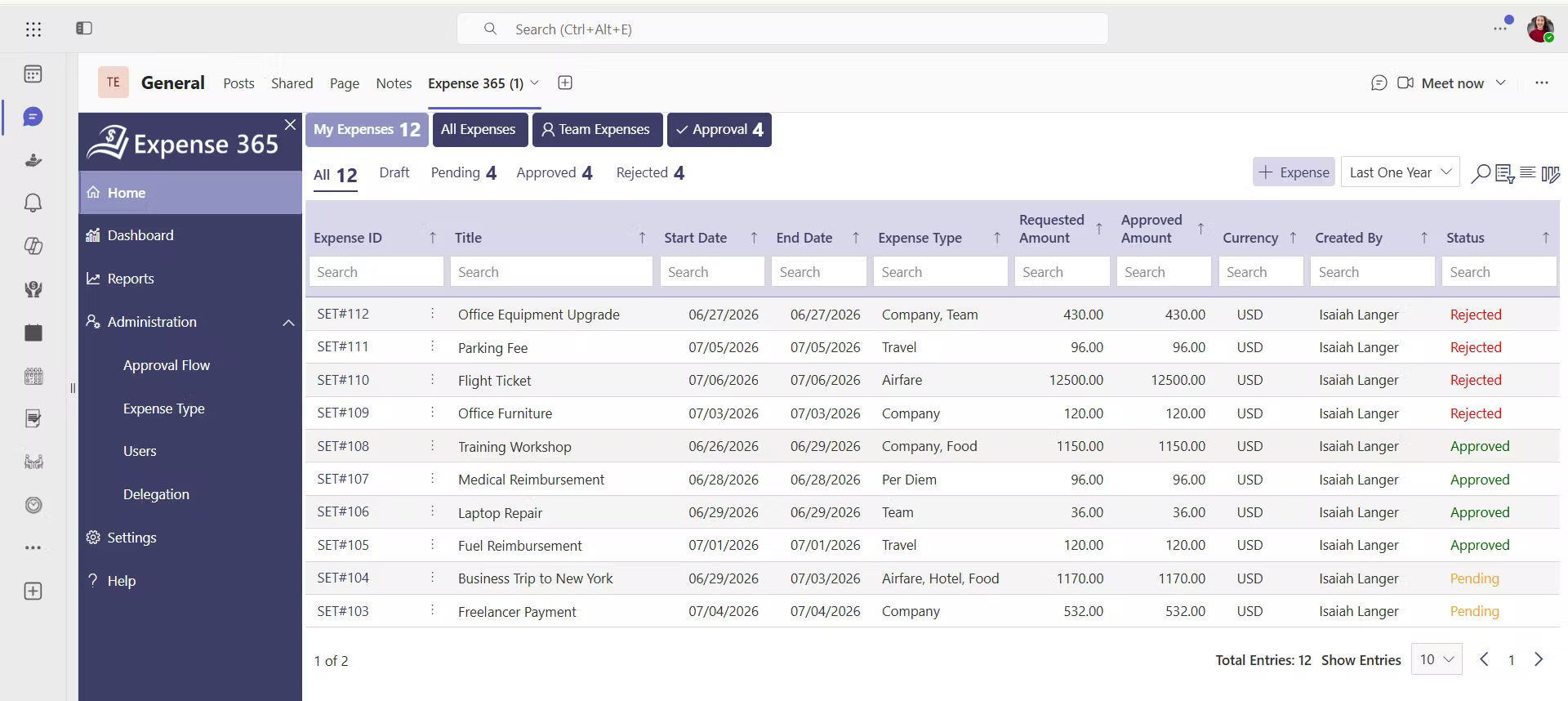
Now you know which categories to use. The next challenge is using them correctly, every time, for every transaction. That’s where Expense Tracker 365 comes in.
Expense Tracker 365 is an all-in-one expense management platform. It handles the busy work, so you can focus on running your business. Here’s how it helps:
- It picks the category for you. You set a rule once, like “every Adobe charge goes to Software.” After that, Expense Tracker 365 assigns the expense category automatically. No more guessing and no more “Miscellaneous.”
- It captures receipts in seconds. Snap a photo or forward an email. Expense Tracker 365 reads the vendor, date and amount, then links the receipt to the right charge. You’ll never dig through a shoebox again.
- It matches card charges. Your company card transactions flow straight into the platform and match to their receipts. That means nothing gets counted twice and nothing slips through.
- It keeps your team consistent. Everyone picks from the same approved list of categories. Your books stay clean, even when ten people submit expenses.
- It syncs with your accounting software. Expense Tracker 365 connects to Xero, QuickBooks and Zoho Books. It maps each category to your chart of accounts, so your books stay up to date without retyping.
- It speeds up month-end. Your expenses arrive in your accounting software already sorted. Month-end close takes less time and your accountant stops chasing you for missing details.
The result? Fewer errors, less manual work and books that are ready for tax time all year long.
Three Best Practices for Optimizing Your Business Expense Categories
Your business expense categories should line up with the accounts in your accounting software, like Xero, QuickBooks, or Zoho Books. They should also match the lines on your tax form, such as IRS Schedule C. When your categories match, your accountant can prepare your taxes quickly without re-sorting anything. That saves you time and cuts your accounting fees.
2. Keep business and personal spending fully separate.
Open a dedicated business bank account and use a business credit card for every company purchase. Mixing personal and business costs makes your records messy and can put your tax deductions at risk. With separate accounts, every expense category shows only real business costs. You also get a clean paper trail if the IRS ever asks questions.
3. Set a clear expense policy for your team.
When several employees spend company money, everyone needs to follow the same rules. Write a short expense policy that lists your approved categories, spending limits, and receipt rules.
For example: “All meals over $25 need a receipt and the client’s name.” A clear policy stops coding mistakes, prevents overspending, and makes approvals faster.
Expense Categories in Different Contexts
It is worth noting that the word “expense category” means slightly different things depending on who is using it.
1. For individuals and personal finance
This type of expense categories typically include housing, food, transportation, healthcare, entertainment, and savings.
2. For small business owners
Expense categories serve two important purposes internal financial organization and tax preparation. Financial regulations and accounting guidelines often define which expense categories qualify as deductible business expenses.
3. For enterprise finance teams
Expense categories are more complex. They tie into procurement workflows, approval chains, ERP systems, and regulatory reporting. A large company might have hundreds of cost codes organized across multiple dimensions department, project, region, and type.
Conclusion
A clear expense category system helps you see where your money goes, claim every tax deduction, and stay ready for tax time. Start with the 21 categories in this guide and review them every month. As your business grows, manual tracking gets harder, so let automation do the work.
Ready to save hours every month?
Start your free trial of Expense Tracker 365 and connect Xero, QuickBooks, or Zoho Books in minutes.
Frequently Asked Questions
What is the meaning of an expense category?
An expense category is a label that groups similar business costs, such as rent, travel, or software. It helps you track spending, plan budgets and claim tax deductions. In accounting software, each expense category is usually an account in your chart of accounts.
What should a small business expense category list include?
A small business expense category list should include 15 to 25 categories that match IRS Schedule C. Common ones are advertising, car and truck, contract labor, insurance, office expenses, rent, supplies, travel, meals, utilities and wages.
What expense category do business card charges go under?
Categorize each business card charge by what you bought, not by the card. A flight goes under Travel and software goes under Software. Card interest goes under Interest. Paying off the card bill is not an expense.
What is the difference between a spending category and a business expense category?
A spending category is a budgeting label, often used for personal money. A business expense category is an accounting label that follows tax rules. Your accountant uses business expense categories to prepare your tax return.
How do I handle new types of expenses without disrupting existing categories?
Map them to the closest existing category or add a sub-category. Create a new category only when the expense becomes frequent and relevant.
How do I create an expense category tracker?
Create a spreadsheet with columns for date, vendor, amount, category, payment method, business purpose and receipt link. Use dropdown lists to keep categories consistent. For growing teams, Expense Tracker 365 tracks and categorizes spending automatically.


_JiluXJRGNl.svg)























