

Complete Guide to Expense Tracking Software
Take control of your business spending with smarter tools. Learn how effective expense tracking can simplify finances, reduce errors, and support better growth.


Every finance leader has experienced it: month-end arrives, and the team is buried in receipts, chasing approvals, and trying to reconcile figures that refuse to match. The root cause is rarely a lack of effort it is a lack of the right expense tracking software.
This guide is written for the decision-makers, finance managers, and operations leads who are actively looking for a best expense tracking software.
Whether you run a 20-person startup or a 2,000-person enterprise, you will find answers to every question a serious buyer should be asking from core features and integration requirements to pricing models, fraud risk, and compliance readiness.
What Is Expense Tracking Software and Why Does It Matter Now?
Expense tracking software records, categorizes, approves, and reports business spending replacing manual work with automated workflows and real-time visibility.
- Goes beyond basic tracking by managing the full expense lifecycle, not just recording transactions
- Enforces spending policies at the time of purchase to prevent out-of-policy expenses
- Automatically flags policy violations before reimbursement, reducing rework and delays
- Integrates with accounting and ERP systems for seamless data flow
- Generates audit-ready reports, making it easier for finance teams and audits
- Improves control, accuracy, and compliance across all business expenses
The market validates the urgency. According to Fortune Business Insights, the global expense management software market was valued at $7.64 billion in 2024 and is projected to reach $16.48 billion by 2032 a CAGR of over 10%. Businesses are not adopting these tools because it is fashionable; they are adopting them because manual expense processes are costing more than the software ever would.
Challenges in Manual Expense Management
Manual expense management may seem manageable at first, but as the business grows, it often leads to delays and making it harder to maintain control over spending.
1. High Cost of Manual Processing
Manual expense handling often comes with hidden costs that are easy to overlook. A study shows On average, processing a single expense report costs $35.02. For a business managing around 200 reports a month, this results in nearly $7,000 in monthly overhead even before considering errors, delays, or rework. Over time, this becomes a significant operational expense that does not directly contribute to growth.
2. Time Lost on Administrative Work
Employees spend a meaningful portion of their time preparing and submitting expense reports. Research shows that 76% of business travellers spend at least 30 minutes every month on expense reporting. For a 50-member team, this translates to 25+ hours of productive time lost each month time that could otherwise be used for client work.
3. Frequent Errors and Rework
Manual processes often lead to missing receipts, incorrect entries, or incomplete submissions. These errors may seem small individually, but they create repeated back-and-forth between employees and finance teams. This not only delays reimbursements but also increases the workload for finance teams trying to verify and correct data.
4. Delayed Submissions
Expense reporting is often viewed as a frustrating task. In fact, 6 out of 10 employees rank it as the most frustrating part of business travel, even more than delays. As a result, employees may postpone submissions or rush through them, which affects both accuracy and timeliness.
5. Limited Visibility and Risk of Misuse
Without proper expense tracking software, it becomes difficult to detect duplicate claims, inflated expenses, or policy violations early. Studies show that expense-related fraud cases lead to an average loss of $251,000 and often go undetected for 18 months. With 20% of small businesses affected, relying only on manual review increases financial risk.
How Does Expense Tracking Software Work?
Expense management app works by automating the entire expense process from capturing receipts to approvals and reporting making it easier to manage and control business spending.
Step 1: Capture Expenses
Employees record expenses as they happen by uploading receipts or entering details into the system. With expense management platform, this can be done instantly through mobile or web apps, ensuring nothing is missed.
Step 2: Automatic Data Extraction
The system scans receipts and captures key details like date, amount, and vendor. This reduces manual data entry, improves accuracy, and saves time for both employees and finance teams.
Step 3: Categorization
Expenses are automatically assigned based on the prior rules set to categories such as travel, meals, or office costs. Expense tracking software keeps records well-organized and makes it easier to track spending across different areas.
Step 4: Submission for Approval
Employees submit their expenses along with receipts and required details. Expense tracking software ensures all necessary information is filled in, reducing incomplete or incorrect submissions.
Step 5: Approval Workflow
Expenses are routed to the right managers or finance team based on predefined rules. This structured flow speeds up approvals and avoids unnecessary delays or follow-ups.
Step 6: Policy Check
The expense tracking software automatically checks whether each expense follows company policies, such as spending limits or allowed categories. This helps prevent overspending and ensures compliance.
Step 7: Processing and Reimbursement
Once approved, the spend is processed for employee expense reimbursement. Expense tracking software helps ensure payments are handled quickly and accurately, improving the overall employee experience.
Step 8: Reporting and Insights
All expense data is stored and analysed to generate detailed reports. This gives businesses better visibility into spending patterns and helps in making informed financial decisions.
Types of Expenses Managed with Expense Tracking Software
Expense tracking software helps businesses manage different types of expenses in a structured and organized way. It covers both employee-related spending and day-to-day operational costs, giving better visibility and control over where money is being used.
1. Employee Reimbursable Expenses
Employee expense reimbursement are expenses employees pay from their own pocket while performing work duties, such as client visits or small purchases. With expense tracking software, employees can easily submit claims with receipts, and finance teams can review and process them faster.
Scan, submit, and route expenses automatically for faster reimbursement
2. Office Supplies and Equipment
This includes essential items like stationery, laptops, monitors, and other work tools required for daily operations. Tracking these expenses helps avoid unnecessary purchases and ensures better budget control.
3. Subscriptions and Memberships
Recurring costs such as software tools, cloud services, and professional memberships fall into this category. Expense tracking software helps track renewal dates, monitor usage, and avoid paying for tools that are no longer needed.
4. Business Meals and Entertainment
Expenses related to client meetings, team lunches, or business discussions are recorded here. Captring details like purpose and participants helps maintain transparency and ensures compliance with company policies.
5. Travel and Transportation
This includes all business mileage expenses such as flights, hotels, taxis, and local transport. Using expense tracking software, firms can keep all travel-related costs in one place and ensure smooth reimbursement and policy adherence.
6. Communication Expenses
Costs related to business communication like mobile bills, internet usage, and communication tools are tracked under this category. This helps businesses clearly separate work-related usage from personal expenses.
7. Vendor and Service Payments
Payments made to external vendors, consultants, or service providers are included here. Proper tracking helps maintain accurate financial records and improves visibility into external spending.
8. Mileage and Fuel Costs
Expenses for business travel using personal or company vehicles are captured here. Expense tracking software can automatically calculate distance or fuel usage, ensuring accurate and fair reimbursements.
By bringing all these expense types into one system, expense tracking software helps businesses reduce confusion, improve accuracy, and maintain better financial control across all operations.
Features That Matter, and Features That Sound Good in Demos
Not every feature in an expense tracking software demo solves a real problem. Here is an honest breakdown.
1. AI-powered features
AI-powered receipt capture is very useful when your business handles many expenses. It can quickly read receipts and pull details like date, amount, and vendor without manual work. Around 73% of companies are using AI for expense tracking and fraud detection, and accuracy has improved over time. However, if employees still need to fix many entries like 20–30% of receipts it adds extra work instead of saving time.
2. Multi-level approval workflows
Automated approval workflows are essential for organizations with multiple approval layers or cost centers. Expenses are automatically routed based on rules like amount, department, category, or project without manual intervention. Finance teams can easily set and update these rules themselves, without relying on support, ensuring faster expense approval workflow and better control.
3. Policy Enforcement at Submission
Policy enforcement should be built into the submission stage, not treated as an afterthought. If the system only flags violations post-approval or allows them to be easily bypassed, it does not provide real control it simply adds unnecessary alerts. A robust approach ensures that non-compliant expenses are identified and addressed at the point of entry.
4. ERP and accounting integration
Approximately 68% of businesses have integrated their expense management systems with accounting and ERP platforms, per Business Research Insights and those that have not are paying for it in manual reconciliation hours. Validate that the integration is native, bidirectional, and does not require a manual export step.
5. Multi-currency support
Multi-currency support is essential the moment your team travels internationally. Automatic exchange rate application and local tax handling should be built in, not an add-on. With expense tracking software, this ensures accurate reporting and removes manual conversion work.
Track global expenses across multiple currencies
6. Corporate Card Management
Managing corporate card expenses within the system gives finance teams real-time visibility into company spending. According to industry research, over 70% of mid-to-large businesses now use corporate cards for employee spending, and companies that integrate card data into their expense systems reduce reconciliation time by up to 50%. Without proper tracking, card usage can quickly lead to unverified or delayed expense reporting.
7. Mileage Tracking
Mileage tracking automates distance calculation and applies predefined reimbursement rates, removing the need for manual logs or guesswork. Employees can track trips in real time or log them easily after travel, ensuring accurate claims. For teams that frequently travel, automated mileage tracking can reduce reporting errors significantly and improve consistency in reimbursements.
8. Spend analytics dashboards
They are are valuable, but only if the data feeding them is clean. Prioritize getting the data quality right receipt capture, categorization, before optimizing for reporting aesthetics. Expense tracking software works best when insights are based on reliable and structured data.
How Expense Tracking Software Benefits Your Business
Expense tracking software helps businesses manage spending in a structured and efficient way. It improves accuracy, ensures consistency, and gives better control over financial activities across the organization.
1. Clear Visibility into Spending
Expense tracking software provides a complete view of how money is being spent across departments, categories, and projects. This level of visibility helps finance teams monitor trends, compare spending with budgets, and analyse spend patterns to make informed decisions. As financial control becomes more important, many organizations are focusing on improving finance operations.
2. Faster Reimbursement Process
With digital submissions and automated approvals, expenses move quickly from entry to reimbursement. Employees can submit expenses as soon as they occur, and managers can review them without delays. Studies show that a large number of employees find expense reporting time-consuming, so simplifying this process improves efficiency.
3. Consistent Policy Enforcement
Expense tracking software ensures that company expense policies are applied uniformly across all submissions. Rules for categories, limits, and approvals are built into the system, reducing inconsistencies and helping maintain better spending discipline. This also minimizes policy violations before they reach the approval stage.
4. Accurate Financial Records
All expense data is captured and stored in a structured format from the start. This improves accuracy in accounting, reduces mismatches, and ensures that financial records remain consistent and reliable for reporting and audits. It also makes reconciliation faster and more reliable.
5. Reduced Administrative Work
Routine tasks like categorization, approvals, and record management are automated. This reduces the workload on finance teams and allows them to focus more on analysis, planning, and financial oversight instead of manual processes. It also speeds up the overall expense lifecycle.
6. Improved Employee Experience
Employees can easily submit expenses, track approval status, and view past records in one place. This reduces confusion, avoids repeated follow-ups, and makes the entire process smoother and more transparent. A simpler process also encourages timely and accurate submissions.
7. Better Audit Readiness
Every step submission, receipt upload, approval, and policy check is recorded and stored securely. Expense tracking software provides a clear audit trail, making it easier to access records during audits or internal reviews. This helps organizations stay prepared for compliance checks at any time.
Integrations That Make or Break the ROI
The right integrations ensure your expense tracking software works smoothly with the tools your team already uses. This reduces manual work, improves accuracy, and helps you get more value from every expense recorded.
Microsoft 365 Apps Integration
Seamless integration with Microsoft 365 tools like Teams, Outlook, and SharePoint brings expense management into your daily workflow. Employees can submit expenses, receive notifications, and approve requests without switching between multiple platforms. This improves adoption, saves time, and keeps everything connected in one ecosystem.
Simplify expense monitoring with SharePoint and route approvals effortlessly
Accounting System Integration (QuickBooks, Xero)
Expense tracker integrates with accounting systems like QuickBooks and Xero ensures expense data flows automatically into your financial records. This removes the need for manual data entry, reduces errors, and keeps your books updated in real time. It also makes reconciliation faster and helps finance teams maintain accurate and consistent reporting.
Corporate Card Integration (American Express, Visa, MasterCard)
Corporate card integration with providers like American Express, Visa, and MasterCard automatically captures transactions as they occur. Expenses can be matched with receipts instantly, giving finance teams real-time visibility into spending. This improves control, simplifies tracking, and reduces the effort required to manage card-based expenses.
What to Evaluate Before Choosing Expense Tracking Software
Before selecting an expense tracking software, it’s important to understand where your current process is falling short. Evaluating these areas helps you choose the right solution that solves your problems.
1. Where Are Delays Happening in Your Process?
Identify where time is being lost whether it’s late submissions, slow approvals, or delayed reimbursements. If your current workflow depends on follow-ups and reminders, the right expense tracking software should help remove these bottlenecks and speed up the entire process.
2. How Much Manual Work Is Involved?
If your team is still managing receipts through emails, spreadsheets, or manual entry, it increases the chances of errors and wasted time. A good expense tracking software should automate these steps and reduce dependency on repetitive tasks.
3. Do You Have Clear Visibility on Spending?
Ask yourself if you can easily track business expense across teams, departments, or projects. Without real-time visibility, it becomes difficult to control budgets or identify spending patterns. The right expense tracking software should provide clear and timely insights.
4. Are Expense Policies Being Followed Consistently?
If policy checks happen manually or after submission, inconsistencies are likely. Evaluate whether your current process prevents policy violations or simply flags them later. Strong policy enforcement is a key feature to look for.
5. How Much Time Does Finance Spend on Follow-Ups?
Frequent follow-ups for approvals, missing receipts, or corrections indicate inefficiencies. The right system should reduce back-and-forth communication and allow finance teams to focus on higher-value tasks.
Best Practices for Managing Business Expenses
Managing expenses effectively is not just about tools it’s about building the right habits, processes, and discipline across the organization. Here are some best practices to implement.
1. Set Clear Expense Policies
Define clear guidelines on what employees can spend on, along with limits, approval rules, and required documentation. When expectations are clearly communicated, it reduces confusion, prevents misuse, and ensures consistency across teams. Using expense tracking software can further help enforce these policies automatically.
2. Track Expenses Regularly
Avoid reviewing expenses only at the end of the month. Regular tracking weekly or even daily helps identify unusual spending early, prevents budget overruns, and keeps financial data up to date. With expense tracking software, businesses can monitor expenses in real time.
3. Categorize Expenses Properly
Organize expenses into clear categories such as travel, operations, or office costs. Proper expense categorization makes it easier to analyse spending patterns, prepare reports, and understand where the business is investing its money.
4. Review and Approve on Time
Timely approvals are important to keep the process moving smoothly. Delays in approvals can slow down reimbursements, create backlogs, and affect employee satisfaction. A structured workflow ensures faster decision-making and fewer bottlenecks.
5. Maintain Proper Documentation
Keep all receipts, invoices, and expense details well organized. Proper documentation ensures transparency, makes verification easier, and helps during audits or financial reviews.
6. Monitor Budgets Closely
Regularly compare actual expenses with planned budgets. This helps identify overspending early and allows teams to take corrective action before costs go out of control. Expense tracking software can provide clear insights to support this process.
7. Encourage Responsible Spending
Educate employees about company policies and the importance of mindful spending. When employees understand the impact of their expenses, they are more likely to make responsible decisions. A disciplined approach, supported by expense tracking software, ensures better control and consistency.
Why Choose Expense 365 for Managing Expenses?
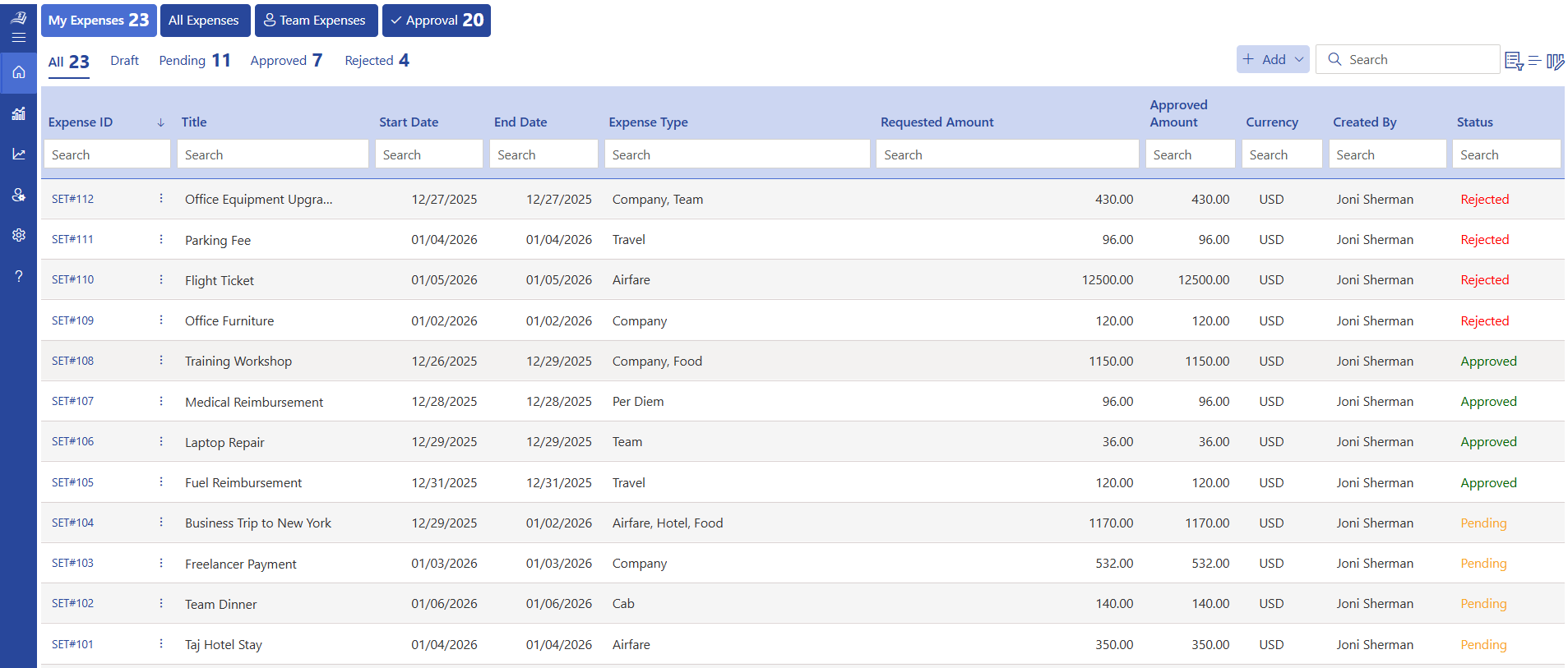
Expense 365, also known as Expense Tracker 365, is built to simplify how organizations handle employee expenses with a structured and reliable approach. It enables employees to capture receipts and submit expenses directly from their mobile devices, making the entire process faster, more accurate, and easier to manage.
Designed to work seamlessly within the Microsoft ecosystem, Expense 365 integrates smoothly with tools like SharePoint, Microsoft Teams, Outlook, Power BI, and Power Automate. This allows teams to manage expenses within the platforms they already use, improving efficiency and reducing the need to switch between multiple systems.
Security is a key focus, with the platform aligned to strong standards such as SOC 2 compliance and Microsoft Certification. This ensures that all expense data is handled securely and meets enterprise-level requirements.
Additionally, Expense 365 supports GCC and GCC High environments, providing advanced data protection and compliance capabilities for organizations.
How to Deploy an Expense Tracker 365 in Your Existing Workflow
Review your current expense process submission, approval, and reimbursement to identify delays and inefficiencies
- Align existing expense categories, policies, and approval responsibilities before setup to maintain consistency
- Assign user roles and access based on your finance and reporting structure to ensure proper control and visibility
- Configure expense fields to capture required details without adding complexity for employees
- Set up approval workflows that reflect current reporting lines and cost ownership
- Retain historical expense records where needed for reporting, audits, and reference
- Communicate the updated process clearly to employees and approvers for smooth adoption
- Monitor initial usage and refine workflows to improve accuracy, consistency, and long-term adoption
Conclusion
An expense management platform provides a structured and transparent way to manage business expenses from submission to final reporting. By bringing every step of the expense process into one system, it helps organizations maintain better visibility, control, and accurate financial records.
Discover how a smarter approach to expense management can improve clarity and control across your finances.
Start your 14-day free trial with Expense 365 today.
Frequently Asked Questions
Why do we need expense tracking software when we already use spreadsheets?
Spreadsheets don’t provide real-time visibility, automation, or control expense tracking software reduces manual work and errors.
What business problems does expense tracking software solve?
It solves delays, lack of visibility, policy violations, and manual effort in managing expenses.
How does expense tracking software improve financial control?
It provides real-time tracking, structured approvals, and better reporting across teams.
Is expense tracking software worth the investment for small teams?
Yes, even small teams benefit from reduced errors and faster processes.
How does expense tracking software improve budgeting?
It provides spending insights and reporting tools that help businesses monitor budgets and control unnecessary expenses.
Try It Free, No Obligation










Schedule a free personalized 1:1 demo
By proceeding, you accept Cubic Logics’s terms and conditions and privacy policy





Please provide your contact details, we will connect with you soon!
Please provide your contact details, we will connect with you soon!
By proceeding, you accept Cubic Logics Terms and Conditions and Privacy Policy
Schedule a free personalized 1:1 demo
By proceeding, you accept Cubic Logics’s terms and conditions and privacy policy







