

20 Best Expense Tracking Software for 2026:to Simplify Expense Management
Take control of your business spending with smarter tools. Learn how effective expense tracking can simplify finances, reduce errors, and support better growth.


What Is Expense Tracking Software?
Expense tracking software records and organizes business spending automatically, replacing spreadsheets and paper receipts with a digital system. An employee snaps a photo of a receipt, and the software reads the amount, date, and vendor, then files it under the right category — no typing required.
You’ll also see this called expense management software. Tracking usually means capturing spend; management covers the full cycle, including approval, reimbursement, and reporting. Most tools worth using do both.
Why Do Businesses Need Expense Management Tools
- Save time — Automates manual entry and receipt matching, freeing hours for actual finance work
- Stops spending leaks — Real-time limits and policy checks catch overspending before it happens
- Speeds up reimbursement — One-tap approvals get employees paid back in days, not weeks
- Gives real visibility — Shows exactly where money goes, department by department, in real time
- Keeps spending accountable — Ties every card charge to a person, category, and policy
- Reduces errors and fraud risk — Catches duplicate or inflated claims before they slip through
How We Evaluated These Tools
We researched 35 expense tracking platforms and tested 25 through free trials, demos, or hands-on walkthroughs. We selected the final 20 based on:
- Receipt scanning and capture accuracy
- Approval workflows and reimbursement speed
- Corporate card and accounting integrations
- Ease of use for employees and managers
- Multi-currency and multi-entity support
- Security and compliance certifications
- Pricing and suitability for different company sizes
20 Best Expense Tracking Software and Solutions in 2026
Before we go tool-by-tool, here’s a side-by-side look at all 20 platforms. Use this table to quickly compare what each one is best for, its standout feature, and where pricing starts — then jump to the full breakdown below for details on features, pros, cons, and fit.
# | Tool | Best For | Standout Feature | Free Plan |
1 | Microsoft 365 organizations of any size | All-in-one: receipts, mileage, cards, approvals, multi-currency, AP, GST reimbursement | 14-day free trial | |
2 | Expensify | Freelancers & small businesses | Smart Scan instant receipt reading | Yes |
3 | Zoho Expense | Zoho ecosystem users | Deep Zoho Books/CRM integration | Yes |
4 | Fyle | Real-time card control | Direct real-time Visa/Mastercard/Amex feeds | No |
5 | Rydoo | Travel-heavy teams | Automated per diem & GPS mileage | No |
6 | Happay | Indian businesses | GST-ready reports with prepaid cards | No |
7 | Finly | Procurement-heavy enterprises | Procure-to-pay automation | No |
8. | Airwallex | Global, multi-currency businesses | Multi-currency wallets in 20+ currencies | No |
9 | Volopay | APAC-based companies | Multi-currency cards for APAC ops | No |
10 | Ramp | Cost-conscious finance teams | Free core platform + cashback | Yes |
11 | Brex | High-growth startups | Flexible credit limits | Yes |
12 | BILL Spend & Expense | Free budget controls | Real-time department budgets, no software fee | Yes |
13 | Airbase | Mid-market procurement | Procurement + AP + cards combined | No |
14 | SAP Concur | Large enterprises | Deep ERP/SAP integration at scale | No |
15 | Navan | Combined travel & expense | Travel booking flows into expense reports | No |
16 | Payhawk | Multi-entity European companies | Multi-entity, multi-currency spend control | No |
17 | Emburse | Enterprise suites needing flexibility | Multiple product tiers under one vendor | No |
18 | Rippling Spend | HR-integrated teams | Expense data flows into payroll | No |
19 | Moss | European SMBs | Combined invoice + expense management | No |
20 | Pleo | Simple company cards | Easy employee card setup | No |
1. Expense Tracker 365 (Best Overall Expense Management Software & Microsoft Ecosystem)
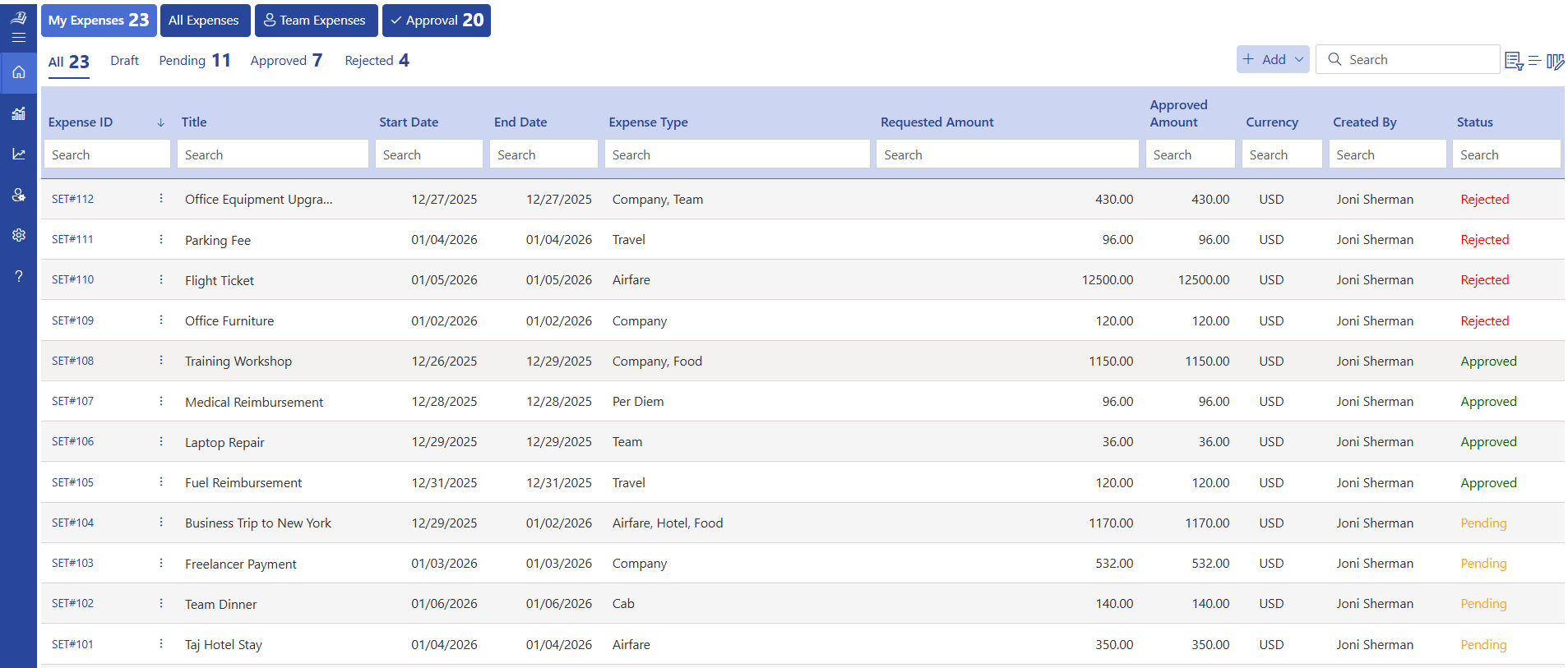
Expense Tracker 365 is a Microsoft 365-native expense management platform built for companies of any size, from a single team to a multi-department enterprise. It handles the full spend lifecycle — scanning, approval, reimbursement and reporting — in one connected system, which is why it tops this list.
Key Features
- Mobile receipt scanning for instant, paperless expense capture
- Automated mileage tracking with no manual logs
- Corporate card management from one central dashboard
- Automated approval workflows that route to the right manager
- Multi-currency, multi-department, and multi-location support
- GST-focused reimbursement built in
Integrations
- Microsoft 365
- Outlook
- Teams
- SharePoint
- QuickBooks
- Xero
- Zoho Books
Pros
- All-in-one system, receipts, mileage, cards, and approvals together
- Fits naturally into workflows teams already use every day
- Scales across departments, locations, and currencies without add-ons
Cons
- Most valuable for teams already working inside the Microsoft 365 ecosystem
Best For
Companies of any size from small teams to multi-department, multi-location enterprises that want one tool for receipts, cards, mileage, and approvals together, especially teams already running on Microsoft 365.
Pricing
Competitive, scalable plans for teams of all sizes, with a free trial available.
Why It Wins the Top Spot
Most spend management software on this list do one or two things well. Expense Tracking 365 covers the entire spend cycle — scanning, approval, mileage, cards, and multi-currency reimbursement on a single platform, so you don’t need extra software as your team grows. Its accounting sync with QuickBooks, Xero, and Zoho Books also means expense data flows straight into your books, no matter which one your finance team already runs on.
Already leaning toward a Microsoft 365-native expense management solution?
Expense 365 works directly within your Microsoft 365 environment, integrating with SharePoint, Teams, Outlook, and Power Automate, no new logins, no data leaving your Microsoft tenant. See how it can simplify expense tracking, approvals, and reimbursements for your team.
2. Expensify (Best for Fast, Simple Receipt Capture)
Expensify is one of the most recognized names in expense tracking, built primarily for speed and simplicity. It’s known for Smart Scan, which reads and files receipts in seconds, making it a strong fit for teams that want something quick to set up without a long onboarding process.
Key Features
- Smart Scan technology for instant receipt capture and data extraction
- Automatic GPS-based mileage tracking
- Built-in corporate card with real-time spend controls
- Next-day reimbursement option for approved expenses
Integrations
- QuickBooks
- Xero
- NetSuite
Pros
- Fast, accurate receipt scanning that needs little manual correction
- Simple interface most employees pick up without training
Cons
- Advanced approval workflows are limited on lower-tier plans
- Support response times get mixed feedback in reviews
Best For
Small to mid-sized businesses that want fast receipt capture without a complex setup.
Pricing
Starts around $5/user/month on the Collect plan.
3. Zoho Expense (Best for Zoho Ecosystem Users)
Zoho Expense is part of the larger Zoho ecosystem, making it a natural fit for businesses already using Zoho Books, Zoho CRM, or Zoho People. It’s known for being affordable relative to its feature set, which makes it popular with cost-conscious small and mid-sized businesses.
Key Features
- Auto-scan receipts with OCR-based data extraction
- Multi-currency expense and reimbursement support
- Per diem and travel expense tracking
- Custom approval workflows by role or department
Integrations
- Zoho Books
- Zoho CRM
- Zoho People
Pros
- Strong value for the price, especially inside the Zoho ecosystem
- Flexible approval workflows without enterprise pricing
Cons
- Best integrations stay within Zoho’s own tools
- Reporting customization is limited compared to higher-end platforms
Best For
Small to mid-sized businesses, especially those already using Zoho software.
Pricing
Starts around $4/user/month; a free plan is available for very small teams.
4. Fyle (Best for Real-Time Card Feeds)
Fyle works directly with the credit cards employees already have — Visa, Mastercard, and American Express — instead of requiring a proprietary card. Real-time transaction feeds mean expenses show up the moment a card is swiped, and employees can submit receipts by simply texting a photo.
Key Features
- Real-time feeds from existing business credit cards
- Receipt submission via text message, Gmail, or Outlook
- Automated policy checks and duplicate detection
- Mileage tracking with Google Maps integration
Integrations
- QuickBooks
- Sage Intacct
- NetSuite
Pros
- Works with existing corporate cards — no need to switch providers
- Fast, low-friction receipt submission via text
Cons
- Smaller company than some competitors, so support is more limited
- Fewer built-in travel booking features than Navan or Rydoo
Best For
Mid-sized businesses that want to keep their current credit cards while automating expense capture.
Pricing
Starts around $6.99/user/month.
5. Rydoo (Best for Travel-Heavy Teams)
Rydoo is a European-founded expense management platform built with global and travel-heavy teams in mind. It combines expense tracking with travel booking and approval, so trip costs and everyday spending live in the same system.
Key Features
- Combined expense and travel booking in one platform
- GDPR-compliant data handling, built for EU operations
- Real-time policy checks with automatic flagging
- Mobile-first receipt scanning and approval
Integrations
- Major accounting platforms
- HR and travel booking systems
Pros
- Strong fit for international teams needing multi-currency support
- Combines travel and expense management in one place
Cons
- Pricing sits higher than SMB-focused competitors like Zoho Expense
- Advanced travel features add complexity if you only need simple tracking
Best For
Global or travel-heavy teams operating across multiple countries.
Pricing
Starts around $8/user/month.
6. Happay (Best for Indian and APAC Businesses)
Happay is a spend management platform built primarily for the Indian and broader APAC market, with a strong focus on prepaid corporate cards and travel expense management. It’s widely used by large enterprises that need to manage cash advances and corporate card spend under one roof.
Key Features
- Prepaid corporate cards with real-time spend controls
- GST-compliant expense and reimbursement tracking
- Cash advance management for travel and field employees
- Analytics dashboard for department-level spend visibility
Integrations
- Indian accounting and ERP systems
Pros
- Strong prepaid card controls for managing field and travel spend
- Built-in GST compliance, a clear advantage for India-based operations
Cons
- Less well known outside the APAC region
- No public pricing makes upfront comparison harder
Best For
Large enterprises in India and APAC managing high volumes of travel and field expenses.
Pricing
Custom quote based on company size.
7. Finly (Best for Procurement-Heavy Finance Teams)
Finly positions itself less as a pure expense tracking tool and more as a broader spend and procurement platform, covering accounts payable automation alongside employee expense management. It’s aimed at finance teams that want to control spend before it happens, not just track it afterward.
Key Features
- Combined expense management and AP automation
- Vendor payment and purchase order workflows
- Budget-based approval controls before spend happens
- Real-time spend dashboards by department
Integrations
- ERP and accounting systems
Pros
- Combines procurement, AP, and expense management in one platform
- Strong budget controls that prevent overspending before it happens
Cons
- Less brand recognition and fewer public reviews than most on this list
Best For
Finance teams that want procurement and expense management combined.
Pricing
Custom quote; pricing not publicly listed.
8. Airwallex (Best for Global, Multi-Currency Businesses)
Airwallex is a global financial platform built around multi-currency business accounts, with expense management and corporate cards layered on top. It’s designed for companies that pay and get paid in multiple currencies, giving finance teams a single place to manage cards, spend, and cross-border payments together.
Key Features
- Virtual and physical corporate cards with real-time spend controls
- Multi-currency wallets, holding and spending in 20+ currencies without conversion fees
- Automated receipt capture and expense categorization
- Real-time spend visibility across teams and entities
Integrations
- Xero
- QuickBooks
- NetSuite
Pros
- Strong multi-currency support with low FX fees, useful for global teams
- Combines banking, cards, and expense tracking in one platform
Cons
- Best suited to companies with real cross-border or multi-currency needs — more than a typical SMB needs for simple domestic tracking
Best For
Global or multi-currency businesses that want banking, corporate cards, and expense tracking unified in one platform.
Pricing
Free to start on core accounts; card and FX fees apply based on usage. Custom pricing for higher volumes.
9. Volopay (Best for Fast-Scaling APAC Startups)
Volopay is a spend management platform built for fast-growing companies in Asia-Pacific, combining corporate cards, bill payments, and expense tracking into one platform. Physical and virtual cards can be issued instantly with built-in limits as headcount grows.
Key Features
- Instant virtual and physical corporate cards with spend limits
- Combined bill payment and vendor payment workflows
- Real-time expense tracking with automatic categorization
- Multi-entity support for companies operating across countries
Integrations
- Regional banking and accounting platforms
Pros
- Combines corporate cards, bill pay, and expense tracking together
- Strong fit for fast-scaling startups across APAC markets
Cons
- Less established outside APAC compared to Ramp or Brex
Best For
Fast-growing startups in APAC needing cards, bill pay, and expense tracking together.
Pricing
Free to start, with custom pricing on higher tiers.
10. Ramp (Best for Free, Automation-Heavy Spend Management)
Ramp is a US-based spend management platform built around its corporate card, with expense tracking and automation layered on top. Receipt matching happens automatically for most card transactions, cutting down manual work significantly.
Key Features
- Corporate card with automatic receipt matching
- Built-in savings insights and duplicate subscription detection
- Real-time spend controls and card limits by team
- Direct accounting sync with QuickBooks, NetSuite, and Xero
Integrations
- QuickBooks
- NetSuite
- Xero
Pros
- Free core platform with no per-user software fee
- Strong automation reduces manual receipt matching
Cons
- Requires switching to Ramp’s corporate card for full functionality
- Primarily built for US-based companies
Best For
US-based startups and mid-market companies wanting a free, automation-heavy platform.
Pricing
Free core platform; revenue comes from card interchange.
11. Brex (Best for Venture-Backed Startups)
Brex is a corporate card-first spend management platform, historically popular with venture-backed startups. It’s known for high card limits based on company cash flow rather than personal credit, making it attractive to newer companies.
Key Features
- Corporate card with cash-flow-based limits
- Built-in travel booking alongside expense tracking
- Automated receipt matching and policy enforcement
- Bill pay and vendor payment tools
Integrations
- Major accounting platforms
Pros
- High card limits accessible to newer companies without long credit history
- Combines card, travel, and bill pay in one platform
Cons
- Best suited to companies willing to centralize spend around Brex
- Smaller businesses may find more functionality than they need
Best For
Venture-backed startups and scaling companies wanting card, travel, and expense in one place.
Pricing
Free core platform (Brex Empower); pricing scales with add-ons.
12. BILL Spend & Expense (Best for Free Corporate Cards)
BILL Spend & Expense (formerly Divvy) is a free corporate card and expense management tool aimed at small and mid-sized businesses. Physical and virtual cards come with real-time budgeting, so limits are enforced automatically.
Key Features
- Free corporate cards with real-time budget enforcement
- Automated receipt capture tied to card transactions
- Custom approval workflows by department or budget
Integrations
- BILL’s accounts payable platform
Pros
- No software cost, making it accessible for smaller businesses
- Real-time budget controls prevent overspending before it happens
Cons
- Fewer advanced features than enterprise platforms like SAP Concur
Best For
Small and mid-sized US businesses wanting free corporate cards with built-in budgeting.
Pricing
Free; revenue comes from card interchange.
13. Airbase (Best for Mid-Market Procurement and AP)
Airbase is a spend management platform built for mid-market companies that want procurement, accounts payable, corporate cards, and expense management unified in one system, with pre-approval workflows that control spend before it happens.
Key Features
- Combined procurement, AP, cards, and expense management
- Pre-approval workflows that control spend upfront
- Deep general ledger sync with detailed transaction coding
Integrations
- Major ERP and accounting systems
Pros
- Unifies procurement, AP, and expense management, reducing tool sprawl
- Strong accounting automation with minimal manual reconciliation
Cons
- More complexity and setup time than a standalone expense tool
Best For
Small and mid-sized US businesses wanting free corporate cards with built-in budgeting.
Pricing
Custom quote, typically positioned for mid-market and above.
14. SAP Concur (Best for Large Global Enterprises)
SAP Concur is one of the oldest and most established names in expense management software, widely used by large enterprises with complex, global operations. It handles travel booking, expense tracking, and invoice management at a scale few competitors can match.
Key Features
- Enterprise-grade travel booking integrated with expense management
- Deep audit trails and compliance controls for regulated industries
- Global multi-currency and multi-language support at scale
Integrations
- Major global ERP systems
Pros
- Handles enterprise-scale complexity better than most competitors
- Deep compliance and audit capabilities
Cons
- Longer implementation time and steeper learning curve
- Interface feels dated compared to newer platforms
Best For
Large multinational enterprises with complex compliance and travel needs.
Pricing
Custom quote; enterprise pricing, not publicly listed.
15. Navan (Best for Combined Travel and Expense)
Navan combines travel booking with expense tracking, so trip costs flow straight into expense reports without manual entry. It also offers its own corporate card, tying real-time spend data to the same system.
Key Features
- Integrated travel booking with automatic expense sync
- Corporate card with real-time transaction feeds
- Automated policy enforcement for travel and everyday spend
- 24/7 travel support built into the platform
Integrations
- Accounting and HR platforms
Pros
- Genuinely useful travel-to-expense integration
- Free core platform with built-in 24/7 travel support
Cons
- Most valuable for companies with meaningful travel spend
Best For
Companies with significant travel spend wanting booking and expense management combined.
Pricing
Free core platform; revenue from card interchange and travel booking.
16. Payhawk (Best for Multi-Entity European Companies)
Payhawk is a European spend management platform combining corporate cards, expense tracking, and accounts payable automation, built with multi-entity, multi-country businesses in mind.
Key Features
- Corporate cards supporting dozens of countries and currencies
- Multi-entity accounting sync for complex international structures
- Real-time spend controls on physical and virtual cards
Integrations
- European accounting platforms
Pros
- Strong multi-entity, multi-country support built for European expansion
- Combines cards, expense tracking, and AP in one system
Cons
- Pricing isn’t publicly listed, making upfront comparison harder
Best For
European mid-market to enterprise companies operating across multiple countries.
Pricing
Custom quote, typically positioned for mid-market to enterprise.
17. Emburse (Best for Regulated Industries)
Emburse is an umbrella brand covering several expense management products, including Certify and Chrome River, aimed at mid-market and enterprise companies with complex approval and compliance needs.
Key Features
- Multiple product lines tailored to company size and industry
- Configurable, multi-step approval chains
- Strong compliance and audit trail features
Integrations
- Major ERP and accounting systems
Pros
- Strong compliance and audit features suited to regulated industries
- Product options tailored to different company sizes
Cons
- Multiple product lines under one brand can complicate evaluation
- Less streamlined onboarding than single-product competitors
Best For
Mid-market to enterprise companies in regulated industries needing strong compliance controls.
Pricing
Custom quote; varies by product line and company size.
18. Rippling Spend (Best for Existing Rippling Customers)
Rippling Spend is part of the broader Rippling HR and IT platform, which means its biggest advantage is how tightly it connects corporate card expense tracking to employee data that’s already in the system.
Key Features
- Corporate cards tied directly to Rippling’s HR and payroll data
- Automatic policy assignment based on employee role or department
- Real-time expense tracking with receipt matching
Integrations
- Rippling HR and payroll
Pros
- Deep integration with HR and payroll data most competitors can’t match
- Automatic, role-based policy assignment reduces manual setup
Cons
- Mainly valuable as an add-on for existing Rippling customers
Best For
Companies already using Rippling for HR and payroll.
Pricing
Add-on pricing for existing Rippling customers, custom quote.
19. Moss (Best for European SMBs)
Moss is a European spend management platform focused on small and mid-sized businesses in Germany, the UK, and broader EU markets, combining corporate cards, invoice management, and expense tracking with a clean interface.
Key Features
- Physical and virtual corporate cards with adjustable limits
- Combined invoice management and expense tracking
- Multi-entity support for companies operating across EU markets
Integrations
- European accounting platforms
Pros
- Simple, fast onboarding compared to heavier enterprise platforms
- Combines invoice management and expense tracking in one tool
Cons
- Primarily focused on the EU market, with less presence elsewhere
Best For
Small to mid-sized European businesses wanting a simple, fast-to-set-up platform.
Pricing
Starts around €0 for a basic plan; paid tiers scale with company size.
20. Pleo (Best for UK and Nordic SMBs)
Pleo is a widely used European expense management platform, popular in the UK and Nordic markets, built around smart company cards paired with automated expense tracking and a polished, employee-friendly app.
Key Features
- Smart company cards with per-employee, adjustable spend rules
- Automatic receipt-to-transaction matching
- Out-of-pocket reimbursement alongside card spend
Integrations
- Major accounting platforms
Pros
- Polished, employee-friendly app that reduces reporting friction
- Combines card spend and out-of-pocket reimbursement in one platform
Cons
- Base fee plus per-card pricing can add up for larger teams
Best For
UK and Nordic small to mid-sized businesses wanting an employee-friendly card and expense app.
Pricing
Starts around €39/month base fee, plus per-card pricing.
What Features Define a Modern Expense Management Software?
A modern tool needs to do more than store receipts.
- Automated receipt scanning — Reads the amount, date, and vendor without manual typing
- Real-time tracking — Spend shows up the moment it happens, not days later
- Custom approval workflows — Routes expenses to the right manager automatically
- Corporate card integration — Ties every charge to a person and policy
- Mileage tracking — GPS-based logging removes manual mileage logs
- Policy enforcement — Flags spending that breaks the rules in real time
- Multi-currency support — Handles operations across countries and departments
- Accounting integrations — Syncs directly with QuickBooks, Xero, or NetSuite
- Mobile-first design — Submitting an expense should take seconds, not minutes
What to Look for in Expense Tracking Software Based on Your Use Case
Small business owners — Easy, low-cost setup with no finance team required; budget tracking at a glance
Finance managers — Automatic approval routing and real-time spend visibility, not month-end reports
Accountants/bookkeepers — Clean accounting sync and accurate categorization, with no manual cleanup
Employees — Fast mobile receipt scanning and clear reimbursement status
Managers/approvers — One-tap approvals and automatic policy flags
CFOs/finance leaders — Company-wide spend analytics and controls enforced before spend happens
Freelancers — Clean separation of business vs. personal expenses and tax-ready reports
Procurement/operations — Automatic policy enforcement and cross-department spend visibility
Benefits of Expense Management Solution
- Saves real time — Automates manual entry and receipt matching every month
- Cuts down errors — Pulls data straight from the receipt instead of manual typing
- Catches problems early — Flags duplicate charges and policy violations in real time
- Speeds up reimbursement — Approvals happen in a tap; money moves in days, not weeks
- Gives real visibility — Shows exactly where money goes by employee, department, or project
- Controls spend before it happens — Policy limits set boundaries upfront
- Scales without more admin work — Handles more employees and departments as you grow
- Keeps you audit-ready — Every receipt and approval is logged automatically
- Reduces fraud risk — Automated checks make inflated or duplicate claims harder to slip through
Conclusion
Choosing the right expense tracking software comes down to fit, not feature count. A small team needs something simple. A growing company needs deeper controls, compliance, and multi-department visibility. If you want one platform that covers most of this without bolting on extra software later, Expense Tracker 365 stands out — receipt scanning, mileage, corporate cards, and automated approvals, all built natively for Microsoft 365 teams. Start with a free trial and see how it holds up against your real, everyday spending.
Frequently Asked Questions
Is expense tracking software worth it for a small business?
Yes, if manual tracking takes more than an hour a month. Most plans are affordable, and the time saved usually pays for the cost within a few months.
What's the difference between expense tracking and expense management?
Tracking means capturing and recording spend. Management covers the full cycle — tracking, approval, reimbursement, and reporting. Most modern tools, including Expense Tracking 365, do both.
Can I use expense tracking software without a corporate card?
Yes. Employees can submit expenses from personal cards or cash and get reimbursed afterward. A corporate card is a bonus feature, not a requirement.
How long does it take to set up expense tracking software?
Simple tools take a day or two. Larger platforms with custom workflows and multi-department structures can take a few weeks.
Does expense tracking software work for freelancers?
Yes. Many freelancers use it to separate business and personal spending, which makes tax season easier. Most tools offer lower-cost solo plans.
Is my financial data safe with expense tracking software?
Reputable tools use encryption and offer compliance certifications like SOC 2. Check the vendor’s security page directly before choosing.
Can expense tracking software integrate with QuickBooks or Xero?
Most established tools do, including Expense Tracking 365. This is worth confirming early, since it saves manual re-entry into your accounting software.
Try It Free, No Obligation










Schedule a free personalized 1:1 demo
By proceeding, you accept Cubic Logics’s terms and conditions and privacy policy





Please provide your contact details, we will connect with you soon!
Please provide your contact details, we will connect with you soon!
By proceeding, you accept Cubic Logics Terms and Conditions and Privacy Policy
Schedule a free personalized 1:1 demo
By proceeding, you accept Cubic Logics’s terms and conditions and privacy policy







