


Modern business expense reports are a fundamental financial process that promotes transparency, accountability and expenditure control in an organization.
It connects the employee purchases to the approval of workflows and financial records.
Yet, many businesses underestimate how much time and effort of expense reporting requires, according to Concur, 19% of expense reports contain errors, and fixing a single report takes an average of 18 minutes.
- Save receipts and record expense details to make reporting and reimbursements easier.
- Timely expense reports help finance teams review and process reimbursements faster.
- Use the correct expense categories and include the required documents to avoid approval delays.
- Automating expense reporting improves accuracy, speeds up approvals, and gives better visibility into business spending.
In this blog, we will define what business expense report is, its main advantages, and the best practices that the organizations may adopt to control expense reporting.
What Is Business Expense Report? A Clear Overview
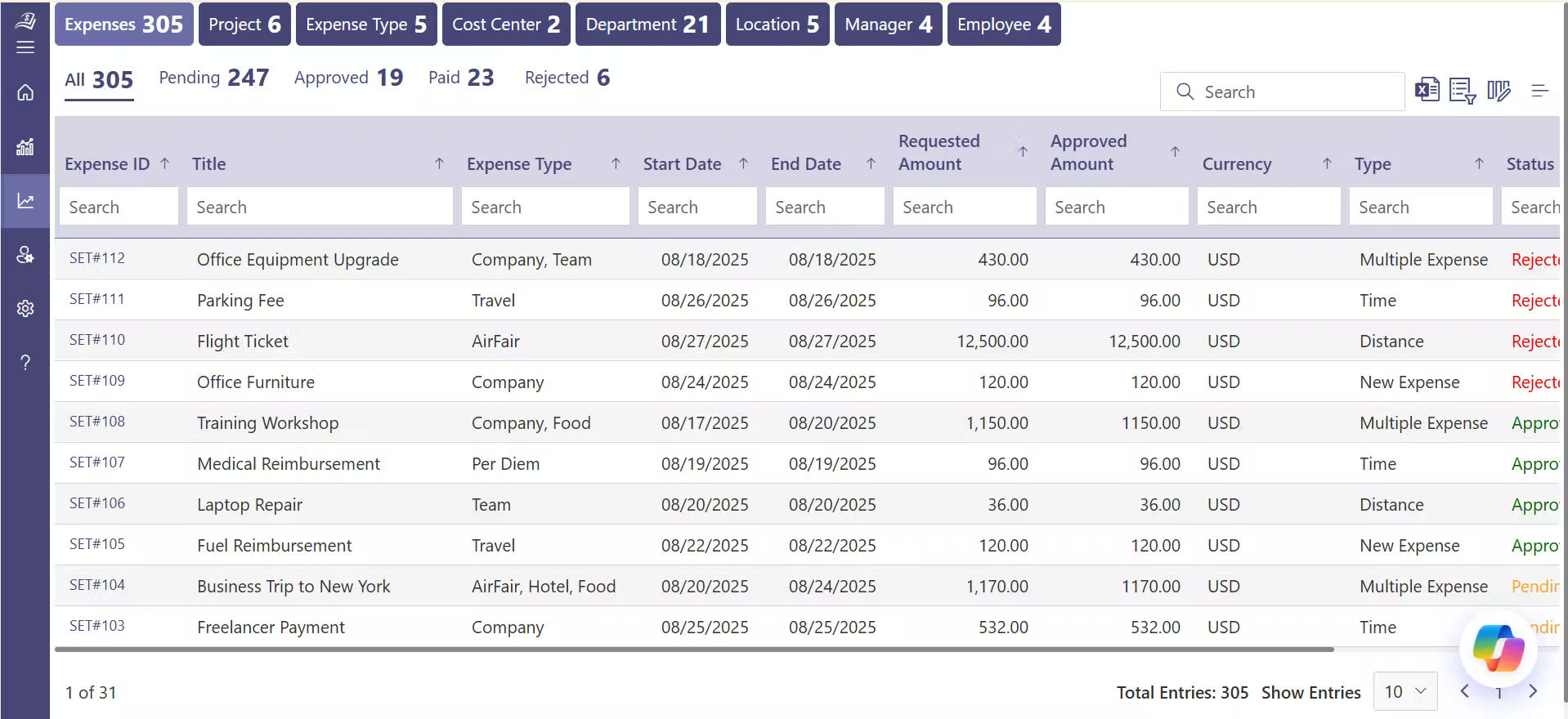
A business expense report is a formal document used to record business-related expenditure by employees or non-employees. These costs are audited, sanctioned, documented and compensated as per the company policies.
In growing organizations, especially those using digital systems, business expense reports play an important role in analyzing spending. They assist finance teams to know the trends of cost, policy adherence, and have an insight into the cost of operations in a well-organized data.
In simple terms, an expense report answers three key questions
- What was spent?
- Why was it spent?
- Who approved it?
Organizations cannot easily maintain proper financial records, budget effectively and make sound business decisions without the expense reports being properly documented.
Why Do Organizations Use Expense Reports?
Expense reports help organizations to keep financial discipline and transparency in the day-to-day operations.
A GBTA survey indicates that 49% of workers indicate that establishing expense reports is a pain point, and 54% of workers find it challenging to enter expense data. This indicates the reason why organizations pay attention to clear expense reporting procedures to minimize employee issues and control financial information.
Business expense report also supports to provide structured input data to dashboards, summaries, and financial reviews. Expense entries help businesses clearly track where money is spent across teams and departments, enabling better visibility and smarter financial decisions.
Key reasons organizations rely on expense reports include
- Real-time Business Spending Tracking
Expense reports enable finance departments to view the expenditure in real-time. This assists the management to track the cost and act promptly in case the expenditure is higher than the approved amounts. - Accounting and Tax Purposes Recording Expenses
Correct bookkeeping is supported by proper documentation and facilitates easy preparation of financial statements, tax filings and regulatory reports. - Fair Management of Reimbursements
A uniform business expense reporting procedure assists in implementing uniform guidelines to approvals and payouts. This minimizes conflicts and promotes fair treatment among the employees and departments. - Favoring Internal and External Audits
Business expense reports offer written evidence on the business expenditure such as receipts, approvals, and dates. This simplifies the process of audit reviews and makes them more organized. - Developing Proper Expense Reporting
The structured expense data feeds the management reports that show the cost pattern, recurring costs and departmental spending patterns. Such reports facilitate budgeting and planning.
With the implementation of digital systems in organizations, business expense report software is no longer done manually through paperwork but it is done through structured data collection. Such a change will assist the businesses to control expenses better and overcome frequent employee issues concerning data entry and report submission.
Common Types of Business Expense Reports
A business expense report is not a standardized report. Various types of budgets need different kinds of reports to help in the accurate capturing and classification of spending. The knowledge of the typical reports assists the organizations to be transparent and make sound financial decisions.
- Professional Expenses
Professional expenses are the fees paid to services that are directly linked to the job of the employee, e.g. consulting fees, professional memberships, or certification fees. Recording them in a business expense report will mean that the organization will be able to monitor the professional development expenditure and will be able to include it in the budget. - Travel Expense Reports
One of the most typical entries in a business expense report is travel-related costs such as flights, hotels, meals, and transportation. Proper reporting of travel and expenses enables the companies to track the travel budgets, the areas that are at high costs, and the reimbursement requests to be handled effectively. - Local Business Mileage
When employees use personal cars to conduct business, they need to track the expense of mileage. A business expense report records the distance covered, the reason for the trip, and the amount of reimbursement, which is the amount the company pays back to employees for approved business expenses, based on company rates. - Incidentals: Office Supplies
Everyday office supplies, such as stationery, printer ink, or other minor purchases, are often logged in a business expense report. Categorizing these incidentals helps finance teams understand operational costs and maintain a clear record of spending across departments.
- Non-Employee Expenses
Business expense report may include every day office supplies, including stationery, printer ink, or other minor purchases. The classification of these incidentals assists finance teams to comprehend the operational expenses and have a clear account of capital expenditure in departments. - Training and Continuing Education
Expenses on employee training programs, workshops, and courses are listed under a business expense report. Monitoring such employee expense and reimbursement assists the organization to quantify the worth of learning programs and budget on future skill development. - Marketing and Advertising Campaigns
Marketing teams often incur costs related to campaigns, digital ads, promotional events, or print materials. A business expense report allows the finance team to track campaign spending, evaluate return on investment, and compare costs across initiatives. - Telecommunications
Telephone, internet and mobile costs incurred in business activities are also included in business expense report. These recurrent expense are properly categorized and as such they are properly allocated on the company books. - Insurance
Business expense reports are also used to track insurance premiums on business operations, employee health, or liability coverage. Maintaining a comprehensive record assists in budgeting and makes the organization ready to be audited. - Conference Fees
Conference, seminar or trade show fees are included in a business expense report. These entries assist the businesses to evaluate the cost of the networking and knowledge-sharing events against the benefits accrued.
How Business Expense Reporting Works Step by Step?
A business expense report software is a document that requires several steps to be created and tracked to maintain records and make them visible to all interested parties. There are seven important steps to a detailed guide that is presented below.
Step 1: Incur an Expense
The process starts when an employee, contractor or an admin makes a purchase on behalf of the business. This may be travelling, discretionary expenses, stationery, software fees or other business-related costs. It is always important to keep receipts, invoices, or any other supporting documentation since they are the basis of the expense report.
Step 2: Record Expense Details
Prior to submitting, document all the necessary information of the expense, which includes.
- Date of purchase
- Description of the expenses
- Categorical expenses (travel, professional, office supplies, etc.)
- Amount spent
- Details of vendors or sellers.
The proper upkeep of the details is a guarantee that the business expense report software gives a clear picture of expenditure.
Step 3: Generate the Expense Report
Summarize all the expenses at the end of the reporting period into a formal report in accordance with the expense policy of the company. This report is a full documentation to review and audit.
Step 4: Attach Supporting Documents
Include receipts, invoices or any evidence of purchase against each expense in the report. By having these documents connected, there is transparency and easier validation of the entries by approvers.
Step 5: Submit the Expense Report
After preparing the report, attaching all the documents, submit it to be reviewed. Submission causes visibility to the approvers involved and they can monitor the status of the expense report.
Step 6: Review and Approval
Once submitted, managers or admins as approvers can look at the report and confirm every expense. The system normally gives the report to all users with relevant roles to make expense approvals or comments. This keeps everybody updated and responsible.
Step 7: Track Status and Pending Approvals
After submission, the status of an expense report is updated on expense dashboards and summary reports. Quick checks that can be made by finance teams are:
- What are the pending reports that are awaiting approval.
- Which have been approved
- What need additional explanation.
Monitoring this data would be transparent and would assist organizations to control reimbursements effectively.
Key Benefits of Using Business Expense Reports
An effective business expense report has a number of benefits to both the organization and the employees. In addition to capturing the expenditure, it provides information that assists in enhancing financial management and operational effectiveness.
Clear Budgeting and Planning
Expense reports give a detailed picture of where money is spent across teams, departments, and projects. With this information, finance teams can plan budgets more accurately, set realistic limits, and allocate funds where they are most needed. It also helps identify areas where costs can be reduced or resources used more wisely, supporting long-term financial planning.
Faster Reimbursement
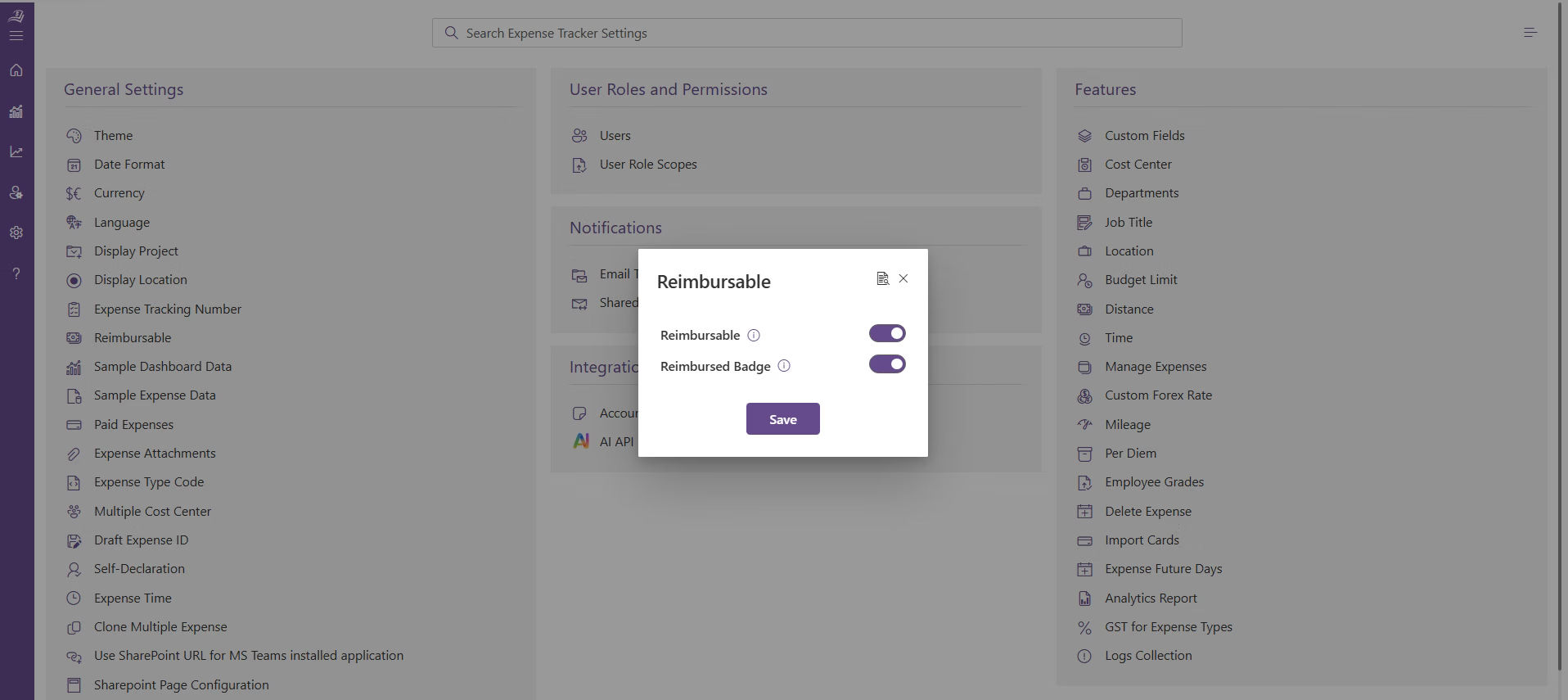
All the expense can be reimbursed promptly when the expenses are recorded appropriately. An understandable report with receipts and details enables the finance team to make payments in time. This will save the employees issues and ensure that business continues as normal since employees are not out of pocket when spending on business matters.
- Audit Trail
Each business expense report makes a record that may be consulted in case of internal or external audits. It indicates the person who authorized every purchase, the time when the purchase was made and the purpose of the purchase. This safeguards the organization and the employees as it keeps a written record of all expenditure thus making auditing easier and more precise. - Improved Financial Analysis
Periodically gathering expense information enables companies to determine trends as time goes by. Businesses are able to compare the expenses in each department, team or project to determine where money is being efficiently used and where changes might be necessary. - Policy Compliance Tracking
Expense reports enable organizations to check whether expenditure is in line with company policies. Purchases that are not in line with the guidelines can be easily flagged to be reviewed. This assists in minimizing unapproved or unauthorized expenditure and maintains the organization’s finances in line with the internal regulations and procedures. - Better Resource Management
Through the review of expense reports, organizations are able to know which areas need more resources and which areas can cut costs. The knowledge enables making more intelligent decisions and allows the business to work on the areas that drive the greatest value. - Enhanced Transparency
Expense reports give the management and the employees a clear picture of the expenses incurred by the company. Transparency fosters trust in the organization and simplifies the process of discussing and justifying expenses where necessary. It also assists new employees on how to spend and company policies.
Essential Components of a Business Expense Report
A business expense report consists of a number of important components that can easily be reviewed, approved and tracked spending. This is because including all the required information will make all the expenses transparent and easy to analyze.
- Purchase Cost – The amount paid on each separate expense. This assists the finance department to view the actual price of each item or service.
- Purchase Date – The date of occurrence of the expense. The date will enable the proper tracking and enable the matching of the expenses with the appropriate reporting period.
- Purchase Description – A brief description of what was purchased, e.g. flight to client meeting or printer ink cartridges. Clear descriptions ease the process of approvers to know the purpose of each expense.
- Expense Category – The expense is classified as travel, office supplies, marketing, training, or other applicable groups. Categorization can be used to determine the areas in which the organization is incurring the highest spending and can also be used in financial analysis.
- Seller Details – This contains the name and contact of the vendor or service provider and in some cases the invoice number. This assists in confirming the purchase in case it is required.
- Account – The accounting code or project code of the expense. The right allocation of costs is achieved by allocating the correct account to the right department or project.
- Subtotal by Category – A subtotal of all costs in each category. This enables the managers to easily view the amount that has been spent on travel, marketing or any other field without having to add up the individual costs.
- Grand Total – The sum of all the expenses that are mentioned in the report. This gives a clear picture of total expenditure during the period of reporting.
By including these components, a business expense report becomes a complete and organized record that helps employees, managers, and finance teams manage and track company spending effectively.
Best Practices for Accurate Expense Reporting
Proper expense reporting assists organizations to maintain transparency of spending, track costs, and reimbursements in a just manner. These best practices can simplify the process of both employees and finance teams.
- Keep receipts or invoices for every business expense and record the date, amount, and purpose to maintain accurate records.
- Categorize each expense correctly, such as travel, meals, software, or office supplies, to improve reporting and spending analysis.
- Follow your company’s expense policy by submitting only approved expenses and attaching all required supporting documents.
- Submit expense reports before the deadline so finance teams can review them quickly and process reimbursements without delays.
- Review your report before submitting to check for missing receipts, incorrect amounts, duplicate entries, or incorrect categories.
- Track the approval status of your expense reports and follow up on pending approvals to avoid unnecessary delays.
- Use expense reporting software to capture receipts, automate approvals, organize expenses, and generate accurate reports.
How Expense Tracker 365 Simplifies Expense Reporting
Expense 365 is a Microsoft-native expense management solution that helps organizations record, manage, and monitor business expenses from a centralized platform. Employees can submit expense claims, upload receipts, and track reimbursement progress, while finance teams gain complete visibility into company spending.
Powered by intelligent automation, Expense 365 automatically captures expense details, categorizes transactions, and organizes financial records to reduce manual data entry and improve reporting accuracy.
Key capabilities include
- Centralized expense reporting with receipt and document attachments.
- Real-time visibility into submitted, pending, approved, and reimbursed expense claims.
- Automatic expense categorization and spending summaries for faster financial analysis.
- Interactive dashboards and reports that highlight department-wise spending, approval bottlenecks, and overall expense trends.
Using a tool like Expense Tracker 365 reduces manual work and provides a clear overview of business spending.
Conclusion
A well-managed business expense reporting process helps organizations maintain accurate financial records, improve spending visibility, and simplify reimbursement management.
By combining consistent reporting practices with an automated solution like Expense 365, businesses can reduce manual work, monitor expenses more effectively, and gain valuable insights into spending across departments.
Start using Expense 365 to simplify expense reporting, automate approvals, and gain better control over business expenses.
Join Our Creative Community
Frequently Asked Questions
What should I include in a business expense report?
A business expense report should include the expense date, amount, category, purpose, vendor name, payment method, and supporting receipts or invoices. Complete information helps finance teams review and approve expenses faster.
What expenses can I claim in a business expense report?
Common business expenses include travel, meals, accommodation, mileage, office supplies, software subscriptions, client meetings, and training costs, depending on company policy.
Can managers see pending expense reports?
Yes. Most expense management systems allow managers to track submitted, pending, approved, and rejected reports in real time.
Can I submit expenses from my phone?
Yes. Many expense management solutions let users capture receipts and submit expense reports using a mobile device.


_JiluXJRGNl.svg)























