
Track Every Mile Travelled with Mileage Tracking Software
Track every business mile with confidence using an intelligent mileage tracking solution that simplifies expense reporting, improves accuracy, supports compliance, and automates reimbursement.


Overview
Every business that sends people to travel has the same question: how do we track miles, pay people fairly, and keep clean records for tax time? For years, the answer was a paper log or a spreadsheet. Today, most companies use mileage tracking software instead.
The shift is not small. Business travel spending grew 1.1% to $317 billion in 2025 and is forecast to grow another 0.7% in 2026, reaching close to $319 billion. With numbers like these, it makes sense that companies want a better way to log, review, and pay for travel.
This guide walks through what a mileage tracking software is, how it works, what it should include, and how to build a travel expense policy that works for your team. We will also look at real stats, common features, and the benefits that go beyond simple distance math.
What is Mileage Tracking Software?
Mileage tracking software is a digital tool that records the distance an employee drives for work and turns that distance into a reimbursable amount. Instead of writing down odometer readings on paper, employees can use an app to track mileage that logs trips automatically or with one tap.
At its core, a mileage tracking system usually does three core jobs:
- Records the start and end point of a trip, along with the distance.
- Applies the correct mileage rate (set by the company or a tax authority like the IRS).
- Sends the trip data to finance or HR for approval and payment.
The best mileage tracking solution usually offers both options, so employees can pick what suits them and their driving pattern.
How Does Mileage Tracking Software Work? Step-by-Step
Here is a simple breakdown of how most mileage tracking software works, from the first drive to the final payment.
Step 1: Record the Business Trip
Employees record their business trip using a mileage tracking application by entering details such as the travel purpose, start and end locations, vehicle information, and any other required information.
Step 2: Calculate the Distance
Once the trip is completed, the software automatically calculates the total distance travelled based on the recorded journey.
Step 3: Classify the Trip
The trip is categorized according to the organization’s travel policy. Employees can assign the mileage claim to a client, project, department, or cost center, making it easier to allocate expenses.
Step 4: Apply the Reimbursement Rate
The mileage tracking software automatically applies the appropriate reimbursement rate based on the organization’s mileage policy. Whether the business follows standard mileage rates, custom reimbursement rules, or vehicle-specific rates.
Step 5: Submit the Expense Claim
The calculated mileage is added to an expense report, where employees can include related travel expenses such as parking fees, toll charges, or accommodation costs before submitting.
Step 6: Review and Approve the Claim
The mileage expense claim is routed through the organization’s approval workflow. Managers or finance teams review the trip details, verify compliance with company policies, and approve or reject the claim without relying on manual email exchanges.
Step 7: Process the Reimbursement
Once approved, the reimbursement amount is processed through the organization’s finance or payroll system. Automated workflows help reduce processing time while ensuring approved claims are reimbursed accurately.
Step 8: Generate Reports and Maintain Audit Records
Every mileage claim, approval, and supporting document is securely stored in a centralized repository. Finance teams can generate reports, monitor travel expenses, support audits, and access historical records whenever needed.
Types of Travel Expenses Managed in Mileage Expense Software
A mileage expense tool rarely handles distance alone. Most modern platforms manage several related travel costs under one roof, since a single business trip usually involves more than just driving. Here are the main categories
- Mileage costs cover distance-based reimbursement for business travel completed using an approved vehicle.
- Fuel expenses include fuel purchased during authorized business travel, where reimbursement is permitted under the organization’s travel policy.
- Tolls and parking fees are reimbursable expenses incurred while travelling for business and can be included as part of the travel expense claim.
- Public transportation expenses include train, bus, metro, or other transit fares incurred during approved business travel.
- Rideshare and taxi expenses cover business-related travel using services such as Uber, Lyft, or local taxi providers.
- Flight expenses include airfare booked for client meetings, conferences, training sessions, or other approved business travel.
- Hotel and accommodation costs cover overnight stays required during business trips away from the employee’s primary work location.
- Meal expenses during business travel include per diem allowances or receipt-based meal reimbursements, subject to the organization’s travel policy.
- Car rental expenses cover the cost of renting a vehicle when required for approved business travel.
Accommodation typically takes up the largest share of a corporate travel budget at 34%, followed by meals at 20%, and flights ranging between 17% and 27%. This is why a good mileage tracking solution should connect with a wider travel expense system, not just track distance in isolation.
Why More Businesses Are Replacing Manual Mileage Logs
Paper logs and spreadsheets were the norm for decades, but they come with real costs. Here’s why companies are moving away from them:
Manual entry takes time
Employees often forget to record business trips immediately, so they end up estimating distances days or even weeks later. This not only increases the time spent on expense reporting but also results in inaccurate mileage claims and inconsistent reimbursements.
Approval takes longer
Paper forms and spreadsheets require managers to manually review every entry before finance verifies calculations and reimbursement amounts. This back-and-forth slows down approvals, delays employee reimbursements, and increases administrative workload.
Records get lost
Physical mileage logs, email attachments, or scattered spreadsheet files are easy to misplace or accidentally delete. Missing records can create unnecessary stress during internal reviews, tax audits, or compliance checks when accurate documentation is required.
Rates change but logs don't
The IRS standard mileage rate is updated periodically, but manual tracking systems often continue using outdated reimbursement rates. This can lead to employees being underpaid or overpaid, creating financial discrepancies and additional correction work.
Fraud is harder to monitor
Without GPS tracking, timestamps, or route verification, it’s much easier to exaggerate distances, duplicate trips, or submit mileage for journeys that never occurred. Detecting these issues manually is time-consuming and often unreliable.
Reporting becomes more difficult
Consolidating mileage data from multiple employees, departments, or locations is a tedious process with spreadsheets. Generating accurate reports for budgeting, audits, or expense analysis requires significant manual effort and increases the risk of errors.
Limited visibility into travel expenses
Manual logs make it difficult for finance teams to identify spending patterns, monitor reimbursement trends, or forecast travel costs. Without centralized data, businesses miss valuable insights that could help reduce unnecessary expenses and improve decision-making.
Company size adds pressure
Larger companies spend more on average per trip ($2,095) compared to small ($1,783) and medium-sized businesses ($1,549), so the paperwork load only grows as a company scales. A digital mileage tracking system removes most of these manual steps and keeps every trip on record automatically.
Here’s a quick side-by-side look at how the two approaches compare
Task | Manual Log | Mileage Tracking Software |
Recording a trip | Written by hand, often after the fact | Logged automatically via GPS |
Distance accuracy | Based on memory or odometer reading | Based on actual GPS route |
Rate updates | Updated manually when rates change | Applied automatically |
Approval time | Days, due to physical review | Hours, with digital review |
Storage | Paper files or spreadsheets | Cloud-based, searchable records |
Tax audit readiness | Slow, records may be incomplete | Fast, complete trip history |
The table shows why so many finance teams are moving away from spreadsheets and paper. It isn’t just about saving time on data entry it’s about having a complete, reliable record the moment it’s needed.
Features of Mileage Tracking Software
Here are core features worth looking for when you choose a mileage tracking solution for your business.
Mobile App Access
Log mileage, capture receipts, and submit expense claims from anywhere using the mileage tracking software mobile app. Employees can complete expense reporting immediately after a trip, whether they’re at a client site, airport, or working remotely. This reduces delays and improves reporting accuracy.
AI-Powered Receipt Capture
Capture or upload receipts for tolls, parking, fuel, and other travel expenses directly into the mileage tracking software. AI automatically extracts key receipt details and links each receipt to the corresponding trip, eliminating manual data entry. This speeds up expense submissions, improves accuracy, and creates audit-ready records with minimal effort.
Real-Time Reporting
Monitor mileage expenses with real-time dashboards that provide insights by employee, department, or project. The software gives finance teams instant visibility into travel spending without waiting for month-end reports. This helps identify cost trends early and supports better budget control.
Grade-Based Mileage Reimbursement
Assign mileage reimbursement rates based on employee grades and let the mileage tracking automatically apply the correct rate. This eliminates manual rate selection and reduces reimbursement errors. Every claim stays consistent with your company’s travel policy.
Vehicle-Specific Mileage Rates
Set different reimbursement rates for cars, motorcycles, bicycles, or other approved vehicles. The mileage tracking software automatically applies the correct rate based on the selected vehicle mode. This ensures fair, accurate, and policy-compliant reimbursements for every trip.
Automatic Distance-Based Calculations
The mileage tracking software automatically calculates reimbursement amounts using the configured mileage rate and the distance traveled. Employees no longer need to perform manual calculations or estimate claim values. This improves accuracy, saves time, and speeds up expense processing.
Centralized Mileage Rate Management
Manage all mileage grades, vehicle modes, and reimbursement rates from a single administration panel. The mileage tracking solution makes it easy to update expense policies without changing individual employee records. This keeps reimbursement rules consistent across the organization.
Smart Trip Capture
Record the trip purpose, start location, destination, vehicle type, and travel distance in one simple workflow. The mileage tracking system automatically calculates the reimbursement amount while creating complete mileage records. This simplifies expense reporting and improves audit readiness.
What Mileage Tracking Software Actually Solves Beyond Distance Calculation?
Distance tracking is only the starting point. Here are seven benefits that go further.
Tax Compliance
A vehicle log tracking software maintains complete digital records of every business trip, including travel dates, distances, reimbursement rates, and supporting receipts. This helps businesses comply with IRS or local tax regulations while ensuring eligible mileage deductions. During audits or financial reviews, finance teams can quickly access organized.
Fair and Accurate Reimbursement
Employees are reimbursed based on the actual distance traveled instead of manual estimates or rounded figures. It automatically applies the correct reimbursement rate, ensuring every claim is calculated consistently and fairly. This improves employee trust, reduces reimbursement disputes, and eliminates errors caused by manual calculations.
Faster Expense Reimbursement
Manual approval processes often delay employee reimbursements and increase administrative work. The system automates expense submissions, policy validation, and approval workflows, allowing claims to move through the process much faster. Employees receive their reimbursements sooner, while managers and finance teams spend less time reviewing.
Corporate Card Management
Business travel often includes expenses beyond mileage, such as fuel, parking, tolls, hotels, and client meals. By combining corporate card management, organizations can capture card transactions alongside mileage claims in one platform. This simplifies expense reconciliation, improves spending visibility, and helps finance teams detect duplicate.
Per Diem Management
Managing daily travel allowances manually can be time-consuming and inconsistent across departments. Per diem management automatically applies company policies for meals, lodging, and daily allowances based on the employee’s trip. This reduces manual calculations, ensures policy compliance, and provides employees with accurate reimbursements.
Multi-Currency Expense Management
As per HSBC report, 77% of surveyed businesses plan to expand into new overseas markets in the next two years. For businesses operating across multiple countries, travel expenses are often incurred in different currencies. This eliminates manual currency conversions and simplifies international expense management.
Better Budget Planning
Travel expenses become easier to forecast when businesses have access to accurate historical data instead of manual estimates. It provides real-time visibility into travel spending by employee, department, project, or location. These insights help finance teams create more accurate budgets and allocate travel resources more effectively.
Lower Administrative Workload
Finance teams no longer need to verify mileage calculations, update reimbursement rates manually, or chase employees for missing trip details. It automates repetitive administrative tasks while maintaining consistent reimbursement policies. This allows finance professionals to focus on strategic financial planning instead of routine expense processing.
Data-Driven Travel Decisions
Every mileage claim generates valuable business data that can be used to improve travel policies and reduce unnecessary expenses. It provides detailed reports on travel patterns, department-wise spending, frequently traveled routes, and project-related costs. These insights help organizations optimize business travel while improving operational efficiency.
What Travel Expenses Can Employees Claim?
Most companies allow employees to claim the following travel-related costs, though the exact list depends on the company’s travel expense policy:
- Mileage for personal vehicle use on business trips
- Flight tickets for approved business travel
- Hotel stays during multi-day trips
- Meals while traveling, often based on a per diem rate
- Parking fees and toll charges
- Public transport or rideshare costs to and from meetings
- Car rental costs when a personal vehicle isn’t used
- Internet or phone charges incurred specifically for work while traveling
The IRS per diem rate for high-cost areas in the U.S. currently stands at $319, while non-high-cost areas sit at $225. These numbers are useful benchmarks when a company sets its own meal and lodging limits for a travel expense policy.
How to Create an Effective Travel Expense Policy
A clear travel expense policy protects both the company and the employee. Here’s how to build one that works:
Define what counts as a business trip: Set a clear rule for what qualifies client visits, conferences, site inspections. So, employees know when mileage tracking applies. Without this, employees may either under-claim valid trips or submit personal drives by mistake.
Set mileage and per diem rates: Use the IRS standard mileage rate or your own rate, and set per diem limits based on location, like the $319 and $225 benchmarks used for high-cost and standard areas. Publishing these numbers in the policy document removes any guessing on the employee’s part.
List approved expense categories: Spell out which costs are claimable flights, hotels, meals, tolls, and which are not. A simple table in the policy document, listing category and limit side by side, works well here.
Set a submission deadline: Require employees to submit mileage and expense claims within a set number of days after the trip, so records stay fresh and accurate. A common window is 15 to 30 days after the trip ends.
Build an approval chain: Decide who reviews and approves claims, and set a maximum time for that review to happen. For larger claims, add a second reviewer, such as a finance manager, before payment goes out.
Add a receipt requirement: State a minimum amount above which receipts are mandatory, to keep records complete. Many companies set this at $25 or $50 per expense line.
Review the policy year: Rates, tax rules, and travel costs change, so the policy should be checked and updated at least once a year. This is also a good time to review how well the mileage tracking software is working for the team and adjust settings if needed.
Best Practices to Implement After Tracking Travel Expense
Once a mileage tracking system is in place, these practices help keep the process running well over time.
- Audit a sample of trips monthly to catch unusual patterns early, such as repeated trips to the same address that don’t match a known client.
- Compare actual travel spend against budget every quarter to spot overspending before it becomes a bigger issue at year-end.
- Train new employees on the policy during onboarding, not after their first trip, so they understand rates, deadlines, and required documentation from day one.
- Set automatic alerts for claims above a certain limit, so managers review them before payment goes out.
- Review mileage rates yearly to match IRS or local government updates, and communicate any rate change to the whole team.
- Keep a digital archive of all trip data for at least the number of years required by local tax law, usually between three and seven years.
- Ask employees for feedback on the tracking app, since usability affects how accurately people log trips. A tool that is hard to use often leads to missed or late entries.
- Check integration health regularly between the mileage tracking software and payroll or accounting tools, so a technical glitch doesn’t delay reimbursement for the whole team.
10 Best Mileage Tracker App for Businesses in 2026
1.🏆 Expense 365 — Best Overall Expense Management Software for Microsoft 365
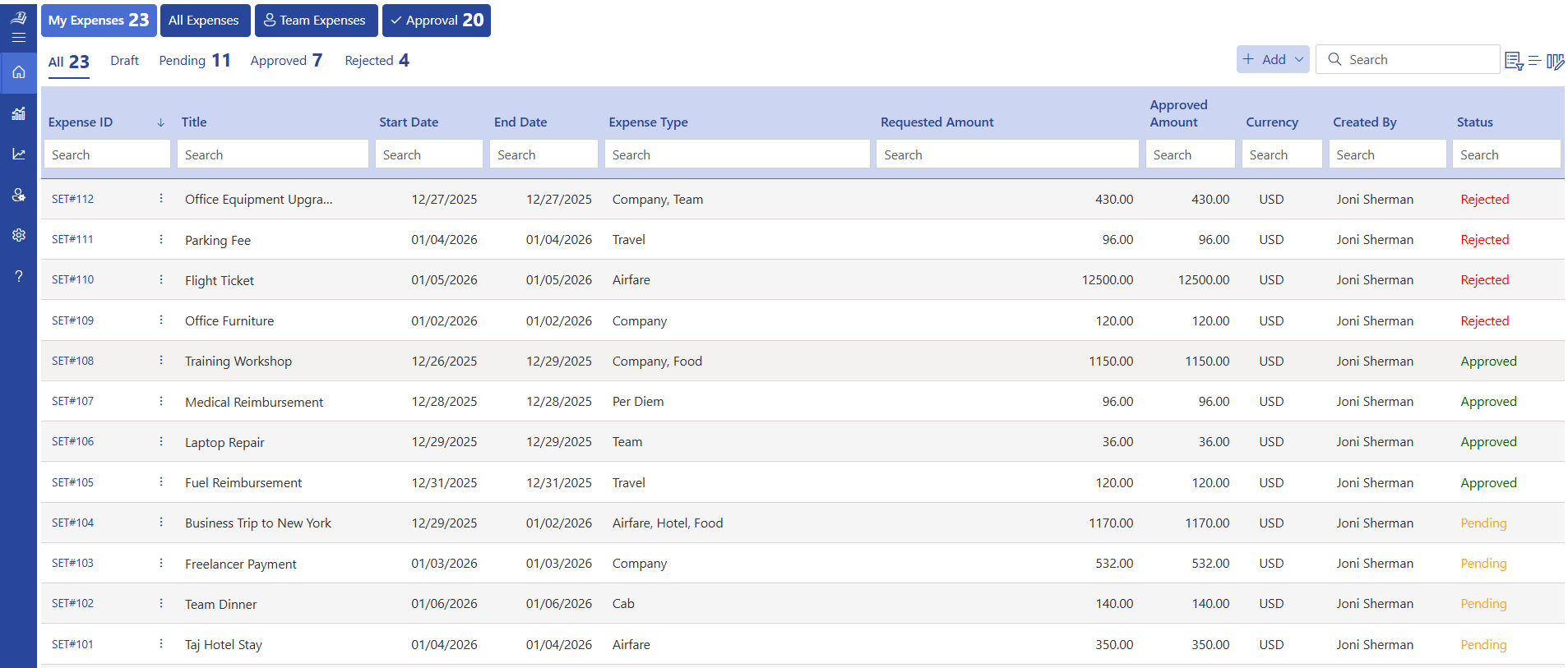
Expense 365 tops this list because it helps businesses manage the complete expense lifecycle, from receipt capture and expense submission to approvals, reimbursements, and reporting, within the Microsoft 365 ecosystem. Instead of managing expenses through spreadsheets or disconnected tools, organizations can streamline their expense processes with a structured solution built for modern finance teams.
Expense 365 enables employees to submit expenses easily while giving managers and finance teams better visibility and control over business spending.
Key Features
- AI-powered receipt scanning to capture expense details automatically
- Mileage tracker for employee travel and reimbursement management
- Automated approval workflows based on company policies
- Expense categorization and validation for accurate reporting
- Employee self-service expense submission and tracking
- Real-time dashboards and expense reports for better visibility
- Custom fields and approval rules to match business requirements
- Policy compliance checks to identify incorrect or unauthorized expenses
- Centralized expense records for easier auditing and management
- Role-based access control for employees, managers, and finance teams
- Track mileage automatically through GPS, with manual entry as a backup option
- Apply custom or standard mileage rates by country or region
- Capture receipts for flights, hotels, meals, and transport in one app
- Set spending limits and policy rules that flag claims automatically
Integrations
- Microsoft 365
- Microsoft Teams
- SharePoint Online
- Power Automate
- Power BI
- Xero
- Zoho Books
Pros
- Built specifically for organizations using Microsoft 365
- Reduces manual expense tracking and spreadsheet-based processes
- Supports flexible approval workflows for different business needs
- Improves visibility into employee spending and reimbursements
- Helps finance teams maintain accurate and organized expense records
Cons
- Requires Microsoft 365 environment
Best For
Organizations looking for a structured expense management solution to simplify employee expense tracking, mileage claims, approvals, reimbursements, and financial reporting while working within their existing Microsoft 365 environment.
Pricing
Flexible plans designed for businesses of different sizes, with a free trial available.
Why It Wins The Top Spot
Unlike standalone expense tracking applications, Expense 365 connects expense reporting, receipt management, approval workflows, and reimbursement processes within Microsoft 365. This helps businesses reduce administrative effort, improve expense accuracy, and gain better control over company spending through a centralized platform
Editor’s Pick: Expense 365
- Built for Microsoft 365 — manage mileage, expenses, approvals, and reimbursements without switching between disconnected tools.
- One platform for complete expense visibility — track mileage claims, receipts, employee expenses, and approvals from a centralized dashboard.
- Better expense control help finance teams reduce manual work, improve reimbursement accuracy, and gain clearer visibility into business spending.
2. Expensify — Best Expense Management Software for Automated Expense Reporting
Expensify is a popular expense management platform designed to simplify expense reporting, receipt capture, and reimbursement processes. It helps businesses automate manual expense tasks by allowing employees to scan receipts, track expenses, and submit reports from one platform.
Expensify also supports mileage tracking, making it suitable for businesses looking for a mileage tracker app for business needs along with broader expense management capabilities.
Key Features
- Smart receipt scanning with automatic expense data extraction
- Automated expense report creation
- Mileage tracking for business travel expenses
- Corporate card transaction management
- Expense approval workflows
- Reimbursement management
- Accounting integrations
- Mobile expense tracking
Integrations
- QuickBooks
- Xero
- NetSuite
- Sage Intacct
- Microsoft Dynamics
Pros
- Easy receipt capture and expense reporting
- Strong automation for repetitive expense tasks
- Supports mileage and travel expense tracking
- Suitable for small and mid-sized businesses
Cons
- Advanced features may require higher-tier plans
Best For
Businesses looking for an automated expense management platform with mileage tracking capabilities to manage employee expenses, reimbursements, and mileage tracking for business travel.
Pricing
Offers multiple pricing plans based on business requirements, with options available for individuals and organizations.
Why It Stands Out
Expensify simplifies expense reporting by combining receipt scanning, mileage tracking, and reimbursement management in one platform. It is a good choice for businesses that need a straightforward way to manage employee spending without complex configuration.
3. Airbase — Best Spend Management Platform for Growing Businesses
Airbase is a spend management platform that helps organisations control employee spending through corporate cards, expense management, approvals, and financial workflows. It helps finance teams improve visibility and control over business expenses.
While Airbase supports expense tracking, businesses looking specifically for a dedicated mileage tracker for work may need additional mileage-focused capabilities.
Key Features
- Corporate card management
- Automated expense approvals
- Receipt collection and matching
- Spend controls and policies
- Budget management
- Accounting integrations
- Real-time spend visibility
Integrations
- NetSuite
- QuickBooks
- Sage Intacct
- Xero
- Oracle
Pros
- Strong spend control capabilities
- Helps finance teams manage company spending
- Automated approval processes
- Good reporting and visibility
Cons
- Primarily focused on spend management rather than mileage tracking
Best For
Companies looking for better control over employee spending, approvals, and financial workflows rather than a dedicated mileage tracker app for business travel.
Pricing
Pricing is customised based on business requirements and platform usage.
Why It Stands Out
Airbase helps finance teams manage spending through automation and better visibility. It is especially useful for organisations that want stronger control over employee purchases and expense approvals.
4. Emburse — Best Enterprise Travel and Expense Management Solution
Emburse provides travel and expense management solutions designed for organizations managing employee expenses at scale. It helps businesses automate expense reporting, reimbursement processes, and compliance management.
The platform supports mileage tracking for business travel along with broader travel and expense operations.
Key Features
- Expense reporting automation
- Receipt capture and verification
- Mileage tracking
- Travel expense management
- Policy enforcement
- Approval workflows
- Reporting and analytics
Integrations
- ERP systems
- Accounting platforms
- HR systems
- Corporate card providers
Pros
- Designed for enterprise expense management
- Supports complex approval workflows
- Strong compliance capabilities
- Suitable for global organizations
Cons
- May require more setup for smaller teams
Best For
Large organizations looking for enterprise expense management with mileage tracking for business travel, reimbursement processes, and compliance controls.
Pricing
Custom pricing based on organization size and requirements.
Why It Stands Out
Emburse provides a comprehensive approach to travel and expense management, helping enterprises automate expense processes while maintaining better financial control.
7. Everlance — Best Mileage Tracking App for Small Businesses
Everlance is a mileage tracking application designed to help individuals and small businesses automatically track trips, classify business drives, and manage mileage-related expenses.
It is especially useful for professionals who need a simple mileage tracker app for business travel and reimbursement purposes.
Key Features
- Automatic mileage tracking
- GPS-based trip detection
- Business and personal trip classification
- Mileage reports
- Expense tracking
- Tax deduction tracking
- Receipt storage
- Mobile app access
Integrations
- Accounting platforms
- Expense management tools
- Tax reporting systems
Pros
- Easy-to-use mileage tracking
- Automatic trip detection
- Suitable for freelancers and small teams
- Helpful for tax and reimbursement tracking
Cons
- Limited enterprise workflow capabilities
Best For
Freelancers, small businesses, and employees who need a simple mileage tracker for work to record business trips and calculate mileage reimbursements.
Pricing
Offers free and paid plans with additional features available in premium versions.
Why It Stands Out
Everlance makes mileage tracking simple by automatically recording trips and helping users separate business and personal mileage. It is a practical choice for individuals and small teams that need basic mileage tracking.
8. TripLog — Best Mileage Tracking Software for Business Travel
TripLog is a mileage tracking platform designed for businesses that need accurate mileage records, employee reimbursement tracking, and fleet mileage management.
It focuses heavily on mileage automation, making it a strong option for companies looking for dedicated mileage tracking for corporate travel.
Key Features
- Automatic GPS mileage tracking
- Employee mileage reimbursement
- Fleet mileage management
- IRS-compliant mileage reports
- Route tracking
- Fuel and expense tracking
- Driver management
- Mileage analytics
Integrations
- QuickBooks
- Xero
- FreshBooks
- Accounting platforms
Pros
- Strong mileage tracking capabilities
- Designed for business travel management
- Accurate GPS-based tracking
- Supports fleet operations
Cons
- Focuses mainly on mileage and fleet tracking
Best For
Businesses that require detailed mileage tracking, employee reimbursement management, and reliable records for business travel.
Pricing
Multiple plans available based on individual, business, and fleet requirements.
Why It Stands Out
TripLog provides specialised mileage tracking features for organisations that need accurate business travel records. It is a suitable option for companies where mileage management is a major operational requirement.
9. Hurdlr — Best Mileage Tracking App for Self-Employed Professionals
Hurdlr is a mileage and expense tracking application designed for freelancers, independent professionals, and small businesses. It helps users automatically track business trips, monitor expenses, and simplify tax reporting.
Hurdlr is a useful option for individuals looking for a simple mileage tracker for work to manage business travel expenses and deductions.
Key Features
- Automatic mileage tracking
- GPS-based trip detection
- Business and personal trip classification
- Expense tracking
- Income and expense monitoring
- Tax deduction calculations
- Receipt tracking
- Mobile app access
Integrations
- Accounting platforms
- Banking integrations
- Tax reporting tools
Pros
- Simple and easy-to-use mileage tracking
- Automatic trip recording
- Helps track business expenses and deductions
- Suitable for freelancers and small teams
Cons
- Limited features for enterprise-level approval workflows
Best For
Self-employed professionals, freelancers, and small businesses that need a simple mileage tracker app for business travel, expense tracking, and tax management.
Pricing
Offers free and paid plans with additional automation and reporting features available in premium versions.
Why It Stands Out
Hurdlr combines mileage tracking, expense management, and tax tracking in one platform. It is a practical choice for individuals who need an easy way to manage business mileage and expenses without complex setup.
10. MileIQ — Best Automatic Mileage Tracking Solution
Key Features
- Automatic drive detection
- Business and personal mileage classification
- Mileage reports
- Reimbursement tracking
- IRS-compliant mileage logs
- Mobile mileage tracking
- Cloud-based reporting
- Drive history management
Integrations
- Microsoft 365
- Accounting platforms
- Expense management systems
Pros
- Simple automatic mileage tracking
- Reduces manual mileage entry
- Easy trip classification
- Reliable mileage reporting
Cons
- Limited expense management and approval workflow capabilities
Best For
Professionals and businesses that need an easy-to-use mileage tracker for work to record trips, classify mileage, and generate reimbursement reports.Pricing
Offers subscription-based plans with options for individuals and businesses.Why It Stands Out
MileIQ focuses on making mileage tracking simple through automatic drive detection and easy trip classification. It is a good fit for users who primarily need accurate mileage records rather than a complete expense management platform.Conclusion
Business travel is a major cost center for most companies, and manual logs are no longer a practical way to manage it. A modern mileage tracking software gives businesses accurate distance records, faster reimbursement, and cleaner data for tax and budget planning.
Whether you run a small team or manage travel for hundreds of employees, a reliable mileage tracking system pays for itself through better records, fair pay, and time saved on admin work.
Looking for a smarter way to manage mileage and travel expenses?
Start your 14-day free trial with Expense 365. It’s time to make your travel expense process easier.
Frequently Asked Questions
Can mileage tracking software reimburse employees using different rates based on their job grade?
Yes, Expense 365 allows businesses to assign different reimbursement rates based on employee grades, job roles, or departments.
Can mileage tracking software automatically calculate reimbursement when mileage rates change?
Yes. Instead of manually updating spreadsheets, administrators can simply update the reimbursement rate within the mileage tracking software.
How do businesses manage mileage reimbursement across multiple countries?
Global organizations often have different reimbursement rates and travel policies for each region. A mileage tracking software supports country-specific mileage rates, multiple currencies, and localized reimbursement rules, allowing finance teams to manage international travel expenses from a single platform.
What's the best way to prevent employees from claiming the same trip twice?
Duplicate mileage claims can increase travel costs and are often difficult to identify through manual reviews. It automatically checks for duplicate trips by comparing travel dates, routes, distances, timestamps, and supporting receipts.
How do small businesses set and manage expense policies within the software?
Policies can be configured for spending limits, categories, and approval rules based on business needs.






















