

Expense Submission: A Complete Guide for Finance Teams and Employees

Still spending hours collecting receipts, chasing approvals, and fixing expense errors?
In this blog, we’ll explore how a well-structured expense submission process can simplify tracking, speed up approvals, and help teams manage expenses with greater accuracy and control. It also highlights practical ways businesses can create a smoother, more consistent workflow for handling expenses across teams.
As businesses grow, handling expenses manually can quickly become time-consuming and difficult to manage.
A clear and efficient submission process ensures that every expense is recorded properly, approved on time, and aligned with company expense policies. It also helps reduce delays, improve visibility, and maintain consistency across teams.
What Is Expense Submission?
Expense submission is the process by which an employee reports a business expense to their company for reimbursement or accounting purposes. It typically involves scanning receipts, applying for an expense claim, attaching supporting documents, and sending it to a manager or finance team for review and approval.
Every time an employee books travel, pays for a team lunch, or purchases software, it needs to be recorded, reviewed, and reimbursed or reconciled. Multiply that across a team of 50 or 500 employees, and the volume adds up quickly.
A well-structured expense submission process helps track spending clearly, keep it aligned with company policies, and maintain accurate records for audits and financial planning.
Why Expense Submission Matters for Businesses?
It is more than a reimbursement workflow. It operates at the intersection of employee experience, financial control, and compliance.
For employees: A smooth and efficient spend submission process makes a big difference in their overall experience. When employee expense reimbursements are handled quickly, it supports financial ease especially for those who travel frequently for work. A clear and fast process helps build trust and reduces everyday friction.
For Finance Teams: Well-organized expense data plays an important role in budgeting, forecasting, and expense reporting. When submissions are timely and consistent, it enables accurate reporting, faster book closure, and better visibility for decision-making.
For the Business: An effective expense management process supports policy alignment, ensures accurate payments, and helps capture eligible tax benefits. It also strengthens documentation practices, making audits more structured and manageable.
According to data from the Global Business Travel Association, the average cost of processing a single expense report manually is around $58. For organizations still running spreadsheet-heavy workflows, that number adds up fast.
A properly managed expense lifecycle, supported by the right travel and expense policies, keeps costs down and gives everyone involved from the field employee to the CFO a clear and reliable view of business spending.
The Typical Expense Submission Process (Step by Step)
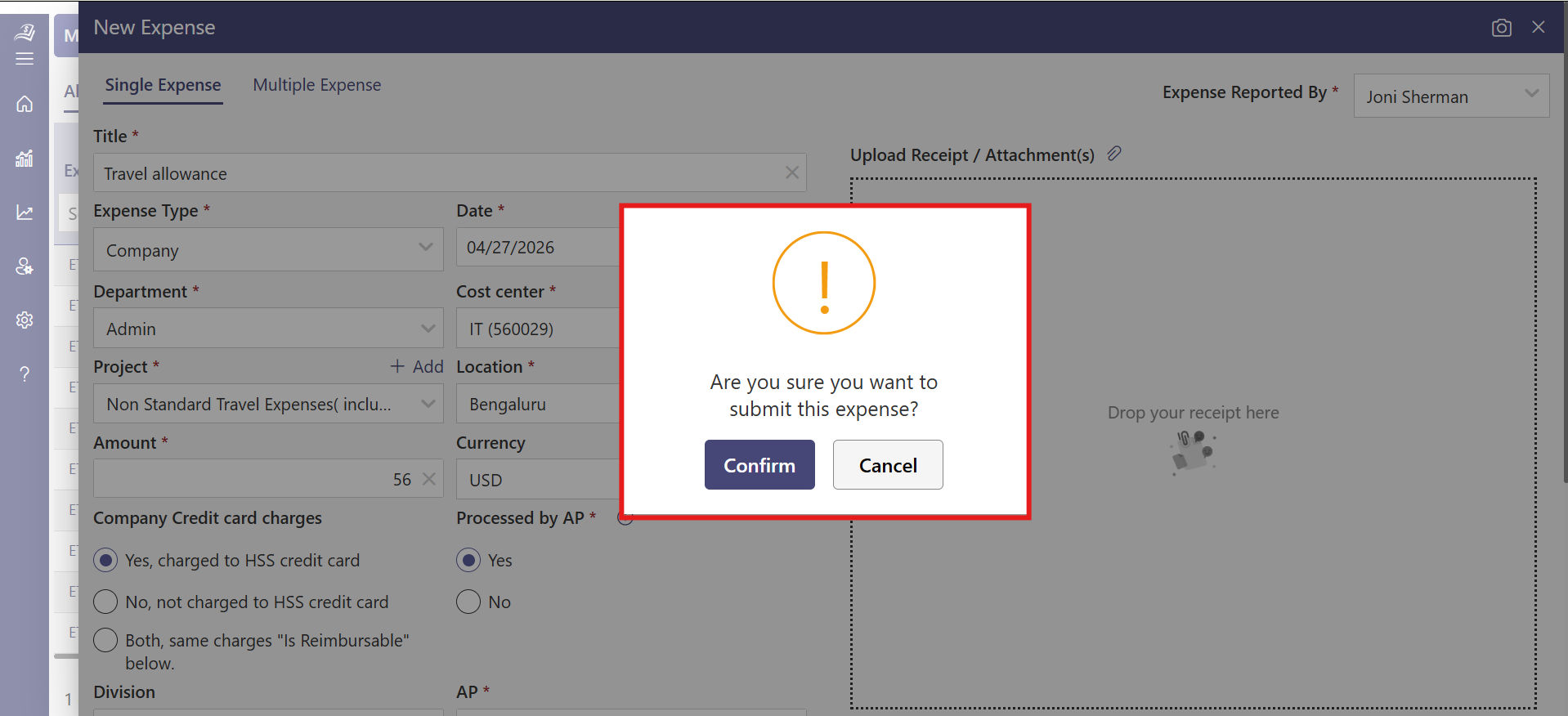
While every organization has slightly different workflows, most submission processes follow a similar structure.
Step 1: Employee Incurs a Business Expense
An employee spends money on something work-related a flight, hotel, client dinner or a office supplies. At this point, they need to hold on to a receipt or any other proof of payment.
Step 2: Employee Creates an Expense Report
The employee records the expense by logging it in the expense submission software. They typically need to include the amount, date, vendor name, category (travel, meals, equipment, etc.), and a brief description of the business purpose.
Step 3: Receipt Attachment
The employee attaches a digital receipt to support the claim. In many organizations, this is a required step expenses without receipts are often flagged.
Step 4: Submission for Approval
The completed expense report is submitted to a line manager or department head for review. The manager checks whether the expenses align with company policy and whether the amounts look reasonable.
Step 5: Finance Team Review
After manager approval, the report typically goes to the finance or accounts payable team. They verify the details, check coding (which budget or cost centre the expense belongs to), and confirm the report is complete before processing payment.
Step 6: Reimbursement
Once approved, the employee is reimbursed usually through payroll or a direct bank transfer within a set number of business days.
Step 7: Record-Keeping and Reconciliation
The finance team records the expense in the accounting system, reconciles it against corporate card statements if applicable, and archives the documentation for audit purposes.
Common Challenges with Manual Expense Submission
Many organizations still rely on spreadsheets, email chains, or paper forms to manage. This approach gets the job done at small scale, but it breaks down quickly as a company grows.
1. Lost or Missing Receipts
When employees must hold on to paper receipts for days or weeks before submitting them, there is a higher chance of receipts getting lost, damaged, or simply forgotten. This not only creates delays during submission but can also lead to back-and-forth communication during verification. Making the overall process less efficient and harder to track expense accurately.
2. Slow Approval Cycles
When expense approval process are managed through email, requests can easily get buried in busy inboxes or overlooked during hectic workdays. What could ideally be approved within 24 hours may take several days or even weeks without a structured workflow. This lack of visibility and tracking makes it difficult to maintain a consistent turnaround time.
3. Inconsistent categorization
Inconsistent categorization makes financial reporting less reliable and harder to interpret. When employees classify similar expenses in different ways, it creates confusion in financial data. Finance teams then need to spend additional time reviewing, correcting, and standardizing entries before they can use the data for reporting, budgeting, or forecasting.
4. Policy violations
Policy violations often go unnoticed in manual systems due to the absence of automated checks. Expenses that exceed set limits, fall outside approved categories, or lack proper documentation may pass through without immediate visibility. This increases the effort required during later reviews and can affect overall policy alignment within the organization.
5. Reimbursement delays
Reimbursement delays can impact employee experience. In a manual process, each step from filling out forms to getting approvals and processing payments takes time and coordination. Employees who cover expenses using their personal funds, especially for travel or client-related activities and may experience longer waiting periods.
What Good Expense Submission Software Does?
It streamlines the entire process from capturing receipts to approvals and reimbursements. Here is how it benefits employees and businesses.
1. Receipt Capture via Mobile
It becomes much easier when employees can scan receipts instantly using their mobile devices. As soon as a transaction happens, they can take a photo, and the software uses OCR (optical character recognition) to automatically read details like amount, date, and vendor. This removes the need for manual entry, saves time, and ensures every expense is recorded accurately without missing information.
2. Automatic Policy Enforcement
With a smart expense submission application, every expense is checked against company policies in real time. When an expense is submitted, the system instantly reviews it and highlights anything that needs attention. An automatic expense tracking app helps employees stay aligned with guidelines and supports finance teams in maintaining consistency without extra manual effort.
3. Multi-Level Approval Workflows
It flows smoothly with structured approval workflows. Expenses are automatically routed to the right approvers based on rules like department, amount, or category. Since everything happens within the platform, approvals are faster, more organized, and easy to track, ensuring nothing is overlooked.
4. Integration with Accounting and ERP Systems
It connects seamlessly with tools like QuickBooks, Xero, and Power BI. Approved expenses are automatically synced, which removes the need for manual data entry. This keeps financial records accurate and helps finance teams work more efficiently.
5. Real-Time Spend Visibility
The platforms provide clear and real-time insights into company spending. Managers and finance teams can view expense dashboards that show where money is going, how budgets are being used, and how spending patterns change over time. This makes it easier to plan, control costs, and make informed decisions.
6. Audit Trail and Compliance Documentation
Every step in the process is recorded, including submissions, approvals, and notes. This creates a complete and well-organized record that can be accessed anytime. It supports smooth audits and ensures that all documentation is ready and easy to retrieve when needed.
Key Features to Look for in Expense Submission Software
If your team is evaluating software, these are the features that matter most in day-to-day use:
1. AI-Powered Receipt Scanning and OCR
Modern expense management software uses AI-powered expense management combined with OCR to capture and extract data instantly. Employees can upload or click a photo of a receipt, and the system automatically fills in details like amount, date, and vendor. This makes process faster, improves accuracy, and supports multiple currencies and languages—perfect for teams that travel internationally.
2. Customizable Approval Workflows
A strong system offers flexible approval workflows tailored to different types of expenses. Smaller expenses can move through a quick approval path, while higher-value submissions can follow a more detailed review process. This flexibility keeps the workflow efficient while ensuring the right level of oversight.
3. Smart Policy Rule Engine
It becomes more consistent with built-in policy rules. Finance teams can set spending limits, required fields, and category guidelines, and the system automatically applies them during submission. This helps maintain policy alignment while allowing employees to submit expenses with clarity and confidence.
4. Mobile-First Experience
A mobile-first design ensures the process is quick and convenient. Employees can submit expenses directly from their phones in just a few taps, making the process smooth and accessible anytime, anywhere. A simple and fast mobile experience also encourages higher adoption across teams.
5. Multi-Currency and Global Support
For companies operating across regions, it supports multiple currencies and handles accurate conversions automatically. It also aligns with local tax requirements, making it easier to manage expenses across different countries without added complexity.
6. Seamless Accounting Integration
The software integrates smoothly with tools like QuickBooks, Xero, and other ERP systems. Approved expenses are synced automatically, ensuring financial records stay up to date while saving time on manual data entry. This also helps maintain consistency across systems and improves overall financial accuracy.
7. Advanced Reporting and Analytics
With built-in reporting features, the expense monitoring app platforms provide clear insights into spending patterns. Finance teams can analyse data by department, employee, category, or time period, helping them make informed decisions and improve budget planning. These insights also make it easier to identify trends and optimize spending over time.
8. Corporate Card Reconciliation
The systems simplify corporate card management by automatically matching card transactions with submitted receipts. This creates a smooth reconciliation process, reduces manual effort, and ensures all transactions are properly tracked and recorded. It also gives finance teams better visibility and control over card-based spending.
How to Build a Better Expense Submission Policy?
A well-defined policy brings clarity and consistency to how expenses are handled across the organization. Here are the core elements every expense submission policy should include.
1. Covered expense categories
Clearly outline which expenses are included, such as travel, accommodation, meals, equipment, or subscriptions. When categories are defined in a simple and detailed way, it becomes easier for employees to submit expenses correctly and consistently.
2. Spending limits by category
Establishing limits for different expense types, such as daily meal allowances or hotel budgets, helps maintain consistency across teams. These limits can be aligned with current market conditions and updated periodically to stay relevant.
3. Receipt requirements
Providing clear guidelines on when receipts are required helps maintain accurate records. Whether it is for all expenses or above a certain amount, having a defined threshold ensures better documentation and smoother verification.
4. Submission deadlines
Setting a clear timeframe helps keep the process timely and organized. When employees follow a consistent schedule, it supports faster processing and keeps financial records up to date.
5. Approval hierarchy
Defining who reviews and approves expenses based on amount or category ensures a structured workflow. This makes the approval process more transparent and helps route each submission to the right person.
Expense Submission Best Practices for Employees
Even with good software and a clear policy in place, the quality of expense submission still depends a lot on how employees approach the process.
1. Submit Expenses Instantly Using Mobile
Use your application to record expenses as soon as they happen. Upload receipts, add details, and submit directly from your phone to keep everything updated in real time and avoid missing entries.
2. Enter Accurate Details with Smart Fields
The platform provides structured fields for amount, date, category, and purpose. Filling these correctly ensures clarity for approvers and helps the system process your submission faster.
3. Select the Right Category from Dropdowns
Most tools offer predefined categories through dropdown menus. Choosing the right option ensures your expenses are recorded consistently and makes reporting more accurate.
4. Upload Digital Receipts and Documents
Manage receipts directly within the platform by uploading images, PDFs, or scanned copies. Keeping everything in a digital format makes your process complete, easy to review, and securely stored.
5. Track Status and Respond to Notifications
The software allows you to track the status of your requests in real time. Pay attention to notifications for approvals or additional inputs, so you can respond quickly and keep the process moving smoothly.
How Expense 365 Helps your Business?
Expense 365, often referred to as Expense Tracker 365, enables organizations to handle employee expenses in a structured and transparent way. With its mobile app, employees can quickly capture receipts and submit expense details from anywhere, making the entire process more convenient and efficient.
The platform integrates seamlessly with Microsoft 365 apps like MS Teams, Microsoft Outlook, and Microsoft SharePoint, Power BI, Power Automate, QuickBooks and Xero making it a natural fit for businesses already working within the Microsoft ecosystem.
Powered by AI and automation, it supports a smooth end-to-end process from capturing and submitting expenses to approvals and reporting helping teams save time while maintaining accuracy and control.
Conclusion
It is more than just a routine task it plays an important role in keeping business finances clear, organized, and easy to manage. When the process is simple and well-structured, employees can submit expenses without confusion, and finance teams can review, approve, and track spending with better visibility.
Ready to simplify your expense submission process? Start your 14-day free trial today with Expense 365 and experience a faster, more organized way to manage expenses.
Frequently Asked Questions
How long should the expense submission process take?
For a simple expense, submission can be completed in just minutes using modern expense submission software.
What happens if an expense is submitted without a receipt?
A receipt is usually required for expenses above a defined limit (for example, $25). If it is not available, employees can provide a short explanation or upload a supporting document, and the submission can still be reviewed smoothly.
How do corporate cards relate to expense submission?
Corporate cards simplify payments, while expense submission ensures each transaction is categorized, documented, and approved. Modern systems automatically match card transactions with receipts, making tracking accurate and easy.
What is the best way to handle international expense submissions?
Expense submission software with global support manages different currencies and applies real-time conversion rates. This ensures accurate records and makes international expense handling clear and consistent.
Table of Contents


_JiluXJRGNl.svg)























