
Expense 365 + SharePoint Integration
for Expense Management

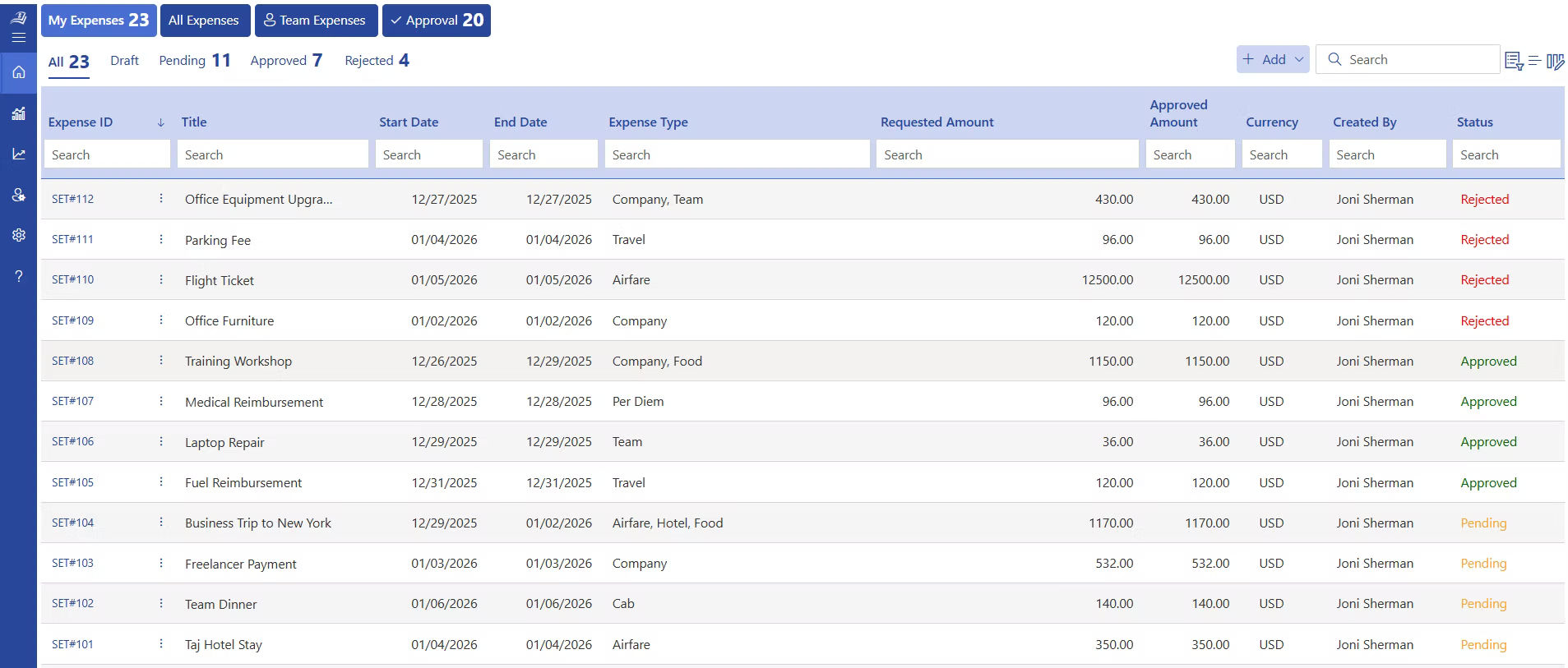
Expense 365 can be easily integrated with SharePoint to store receipts, record expenses, manage approvals and maintain a well-organized and collaborative place.

SharePoint integration

Track, Store and Manage Your Expenses through Microsoft SharePoint

The finance teams can be slowed down by managing receipts and expense records in various tools. Expense 365 connects with SharePoint ensures that all expense claims, receipts, and reports remain in SharePoint libraries and the teams can easily monitor and view expenses. 

share

SharePoint Integration for Organized Expense Records

All expense files, reports, and receipts are stored in SharePoint and the Expense 365 handles the process of submitting and approving expenses. 

share

Expense Storage

Expense 365 is integrated with SharePoint where expense records, receipts and reports are stored in well-organized lists and document libraries for better accessibility.

automated

Receipt Upload

Expense 365 allows users to upload receipts, invoices, and supporting documents, which are stored safely with the help of SharePoint integration.

automated

Approval Workflow

Expense 365 manages expense approvals through structured workflows, while records and documents remain stored through SharePoint integration.

Security

Access Control

SharePoint permissions determine the individuals who are allowed to submit expenses, review requests and manage financial records in the organization.

report

Audit Tracking

It is easier to review expense activities in the process of auditing because finance teams can monitor who submitted, edited or approved expenses.

report

Secure Records

The expense records, receipts, and financial documents are safely stored in SharePoint libraries and provide organizations with greater control over data.

Expense 365 – Simple Expense Management for Teams

Expense 365 is an expense management app that is used by built for companies looking for an secure and efficient workflows with Microsoft 365. It allows employees to submit expenses, upload receipts and monitor reimbursements as finance teams handle approvals and records using SharePoint. 

SharePoint helpdesk integration

Track, Approve, and Review Expenses Inside Teams

When teams work from different offices and locations, keeping expense updates in one place helps finance teams monitor spending.  

integrations

Frequently Asked Questions

Expense 365 is an expense management system built for Microsoft 365. It integrates with SharePoint to store receipts, expense records, and approval information in structured lists and document libraries. 

SharePoint is used in companies due to its ability to securely store documents, control permissions, and manage records of expenses in an orderly way. 

Yes. In Expense 365, employees can upload receipts and invoices when submitting expenses in the Expense 365. These files are automatically saved in SharePoint libraries. 

Expense 365 can initiate approval processes in which expense claims are reviewed by managers and approved as SharePoint archives all documents. 

Yes. SharePoint is a system that is controlled by permission settings, document libraries and activity tracking to regulate access and approving expense records. 

SharePoint maintains a record of submissions, revisions, and approvals. In the case of audit, finance teams can trace the person who made changes and examine the records. 

Schedule a free personalized 1:1 demo

By proceeding, you accept Cubic Logics’s terms and conditions and privacy policy

"Outstanding product that combines ease of use, robust security, and cut Expenses."
Try It Free, No Obligation
By proceeding, you accept Cubic Logics’s terms and conditions and privacy policy
"Exceptional tool that delivers seamless integration, powerful features, and unmatched reliability."

Please provide your contact details, we will connect with you soon!

Please provide your contact details, we will connect with you soon!

Request for the custom price​

By proceeding, you accept Cubic Logics Terms and Conditions and Privacy Policy

Schedule a free personalized 1:1 demo

By proceeding, you accept Cubic Logics’s terms and conditions and privacy policy

"Outstanding product that combines ease of use, robust security, and cut Expenses."
Request of the Free License

By proceeding, you accept Cubic Logics Terms and Conditions and Privacy Policy






















