


When looking for Spendesk alternatives, it is important to understand that not every spend management tool fits every business. Spendesk has built a strong reputation, especially among European companies.
Looking for an effective way to manage expenses? This blog walks through the key aspects of expense management, including why it matters, how it works, best practices to follow, and how it can be implemented within your existing business workflow.
But your team may have needs that call for something different whether that is better integrations, simpler pricing, or features built around how your business operates.
With so many choices available, businesses can find a expense management platform that fits their budget, size, and financial workflows without compromising on control or visibility.
Your priorities may include tighter budget controls, flexibility for global teams, or a closer fit with tools you already use. The right Spendesk alternative should work with your existing setup, not against it. Whether you need better reporting, smarter card controls, or a simpler approval process, there are plenty of platforms worth considering.
What Is Spendesk?
Spendesk is a spend management platform built for finance teams that want full visibility over company spending. It combines corporate cards, expense reimbursements, and invoice management in a single system. Teams can track who is spending what, set limits, approve requests, and generate reports all from one place.
The platform is especially popular among mid-sized European businesses that need structure around employee spending. It helps finance managers move away from manual spreadsheets and paper receipts by centralizing all spend data in real time.
Why Look for Spendesk Alternatives?
Spendesk works well for many teams, but it is not the right fit for every organization. Businesses often explore other options because of the following:
Pros
- Strong corporate card management
- Real-time spend visibility
- Solid approval workflow features
- Multi-currency support
- Invoice and reimbursement handling in one place
Limitations
- Some users find the onboarding process lengthy
- Limited customization for complex approval chains
- Integration options may not cover every accounting or ERP system
7 Spendesk Alternatives & Competitors
Here are the top 7 Spendesk alternatives and competitors that offer strong spend management, better flexibility, and features suited to different business needs.
Alternative | Integration | Free Trial |
Expense 365 | SharePoint, MS Teams, Outlook, MS Copilot, Power BI, Power Automate, QuickBooks, Xero | Yes (14-day free trial) |
Ramp | Sage Intacct, QuickBooks, Xero, NetSuite | Yes |
Brex | Deel, GEP, Okta, Slack | Yes |
Airbase | NetSuite, QuickBooks, Sage Intacct, Xero | Connect with sales team |
Payhawk | Exact, SAP S/4HANA, Deel, Oracle NetSuite | Yes |
Zoho Expense | Zoho Suite, QuickBooks, Slack | Yes |
Navan | Google, Gusto, Lyft, Oracle NetSuite | Yes |
1. Expense 365
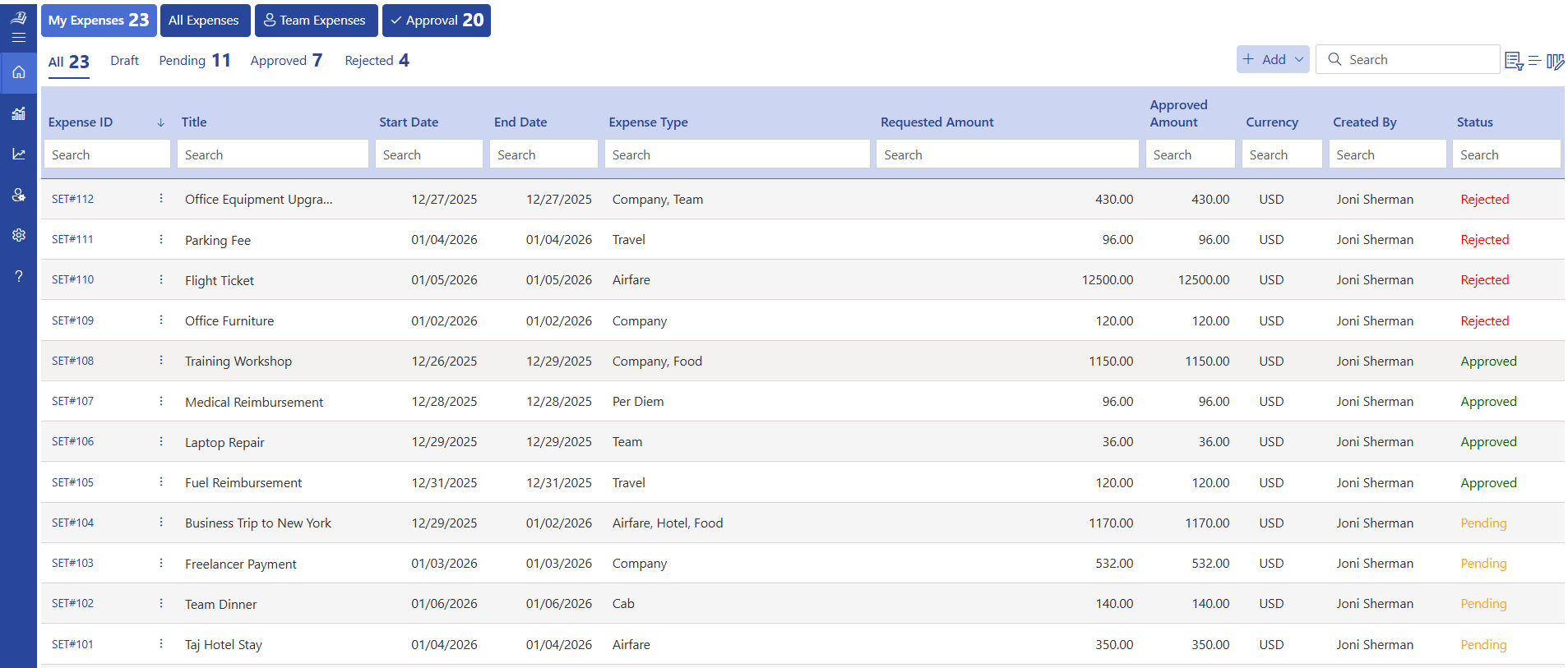
Expense 365, also known as Expense Tracker 365, is a spend and expense management solution built for businesses that rely on Microsoft tools. It runs entirely within the Microsoft 365 ecosystem, which means teams can manage expenses directly through SharePoint, MS Teams, Outlook, and Power BI tools most organizations already use daily.
The platform gives finance teams real-time visibility over all company spending. Employees can submit expenses, scan receipts, and track employee expense reimbursements from desktop or mobile devices. Managers can review and approve requests without switching between systems. All data stays in one place, making audits and reporting much easier.
Because it is built on Microsoft 365, there is no need for a separate login or a completely new tool. Teams get up and running quickly, and IT departments appreciate the familiar security and compliance framework.
Key Features
- AI-powered receipt scanning
- Automated expense approval workflows
- Role-based access control for secure data handling
- Customizable expense categories and fields
- Corporate card management
- Mileage tracker
- Budget tracking with overspending alerts
- Real-time expense reporting and analytics
- Bill tracking and management
- Integration with QuickBooks and Xero
- Power BI dashboards for spend insights
- Complete expense history for full visibility
Why Choose Expense 365 as a Spendesk Alternative
Expense 365 is the right choice for businesses that already use Microsoft 365 and want a spend management tool that fits naturally into that environment. It offers strong reporting, flexible workflows, and a straightforward setup that does not require a lengthy implementation process.
Best Known For
Clean integration with Microsoft 365 tools and strong expense reporting features that give finance teams full control without extra complexity.
Rating
G2: 4.8/5
Microsoft AppSource: 5.0/5 (36 ratings)
Pricing
Starts at $49/month. Business Plan pricing is available based on company size and needs.
Hear From Our Happy Client
“Expense Tracker 365 is a great app with excellent support. The advanced features make it a complete tool and has really improved our expense tracking and reporting workflow.”
— G2 Review
2. Ramp
Ramp is a financial operations platform that combines corporate cards with expense management and spend controls. It is built for companies that want more than just receipt tracking it helps businesses identify where they can cut costs and make smarter spending decisions.
The platform gives teams real-time data on every transaction, automatically categorizes expenses, and flags unusual spending. Finance leaders get a clear picture of company-wide spending without waiting for month-end reports.
Key Features
- Corporate card management
- Automated expense categorization
- Real-time spend tracking and reporting
- Vendor spend analysis
- Budget controls and limits
- Integration with major accounting platforms
- Approval workflows
- Detailed spend insights
Why Choose Ramp as a Spendesk Alternative
Ramp works well for companies that want active cost control alongside standard expense management. It is particularly strong for US-based businesses looking to reduce unnecessary spending.
Ratings
G2: 4.8/5
Capterra: 4.5/5
3. Brex
Brex is a spend management platform built for fast-growing companies. It combines corporate cards, expense management, and reimbursements in a single system. Brex is designed for startups and scaling businesses that need financial controls that can grow with them.
The platform offers automated expense categorization, real-time budget tracking, and direct integration with popular accounting tools. It also supports expenses for teams working across multiple countries.
Key Features
- Corporate card solutions (physical and virtual)
- Expense tracking and management
- Budget controls and spend limits
- Automated approval processes
- Integration with accounting tools
- Spend insights and analytics
- Mobile app for on-the-go expense management
- Multi-currency support
Why Choose Brex as a Spendesk Alternative
Brex is a strong pick for startups and growing companies that want a platform combining financial services and expense tracking without adding complexity.
Ratings
G2: 4.8/5
Capterra: 4.5/5
4. Paylocity
Paylocity is a spend management platform that brings expenses, bill payments, and approvals together in one system. It is designed for finance teams that need complete control over every type of company, from employee out-of-pocket costs to vendor invoices and manage corporate card transactions.
The platform offers a structured approach to spend management, with multi-level approvals, budget tracking, and real-time financial reporting built in.
Key Features
- Centralized spend management across categories
- Bill payments and invoice tracking
- Corporate card management
- Multi-level approval workflows
- Budget tracking and controls
- Vendor management tools
- Real-time financial reporting
- Integration with major accounting systems
Why Choose Airbase as a Spendesk Alternative
Airbase suits businesses that need a broader spend management system, not just expense tracking. It is a good fit for finance teams that manage multiple payment types and need everything under one roof.
Ratings
G2: 4.5/5
Capterra: 4.6/5
5. Payhawk
Payhawk is a spend management platform built for companies operating across multiple countries and currencies. It provides corporate cards, expense tracking, invoice management, and approvals in a single system designed for international finance teams.
The platform is strong on compliance and reporting, making it a good option for businesses that need detailed audit trails and multi-entity financial management.
Key Features
- Expense tracking across multiple entities
- Physical and virtual corporate cards
- Real-time reporting and dashboards
- Multi-currency support
- ERP and accounting integrations
- Approval workflows
- Budget controls
- Advanced spend analytics
Why Choose Payhawk as a Spendesk Alternative
Payhawk is ideal for businesses that need global spend management with strong controls and reporting built for finance teams working across different countries.
Ratings
G2: 4.6/5
Capterra: 4.5/5
6. Zoho Expense
Zoho Expense is a complete expense management solution that is part of the larger Zoho ecosystem. It is designed for businesses that want detailed control over employee spending, travel costs, and reimbursements. Teams already using Zoho products will find the integration easy and natural.
The platform supports automated reporting, policy enforcement, and multi-currency handling making it flexible for teams of different sizes.
Key Features
- Automated expense reporting
- Receipt scanning and data extraction
- Policy enforcement for spending rules
- Multi-currency expense handling
- Integration with Zoho apps and accounting tools
- Custom approval workflows
- Travel expense tracking
- Detailed expense analytics and reports
Why Choose Zoho Expense as a Spendesk Alternative
Zoho Expense is a great pick for businesses already in the Zoho ecosystem. It offers flexible customization and a connected system that brings expense data together with the rest of your financial operations.
Ratings
G2: 4.5/5
Capterra: 4.6/5
7. Navan (Formerly TripActions)
Navan is a platform that brings travel booking and expense management together in one system. It is built for companies that frequently handle business travel and want a single place to handle both travel expense and related expenditure. By connecting travel and spend data, it gives finance teams better visibility without asking employees to use multiple apps.
This improves compliance while making the overall experience smoother for both employees and finance teams.
Key Features
- Built-in travel booking system
- Expense tracking for trips and day-to-day spending
- Real-time reporting and spend visibility
- Policy enforcement for travel and expenses
- Mobile access for employees
- Integration with ERP and finance tools
- Automated approval workflows
- Multi-currency support
Why Choose Navan as a Spendesk Alternative
Navan is the right fit for companies with frequent travel needs. It removes the gap between travel booking and expense management, giving finance teams a complete picture of travel-related spending.
Ratings
G2: 4.7/5
Capterra: 4.5/5
Key Factors to Consider When Choosing a Spendesk Alternative
When searching for a Spendesk alternative, choosing the right platform depends on more than just features. Here are the key factors to evaluate before you decide.
1. Spend Visibility and Reporting
A strong platform should give your finance team a clear, real-time view of where money is going. Look for tools that offer dashboards, category-level breakdowns, and custom reports. Better visibility means faster decisions and fewer surprises at month-end. Good expense reporting also helps leadership understand spending trends across departments without waiting for manual summaries.
2. Corporate Card Management
If your business uses company cards, the platform should support both physical and virtual card issuance, real-time transaction tracking, and automatic matching of card payments with submitted expenses. This keeps expense reconciliation fast and accurate. It also gives finance teams the ability to set card limits and control spending before it happens, not after.
3. Approval Workflows
Different companies have different expense approval process. Choose a platform that lets you build workflows that match your organization, whether that means single-level approvals or multi-stage chains with department heads and finance sign-off. Flexible workflows reduce delays and help the right people review expenses at the right time.
4. Integration with Existing Tools
Your expense management system should connect smoothly with your current accounting software, ERP, payroll system, or HR tools. Good integration removes the need for manual data entry and keeps all financial records consistent across systems. It also saves time for finance teams who would otherwise need to re-enter data in multiple places.
5. Multi-Currency and Multi-Entity Support<
For businesses operating across countries, currency handling and multi-entity management are important. The platform should record expenses in different currencies, convert them accurately, and allow finance teams to manage multiple legal entities from one dashboard. This is especially useful for growing businesses expanding into new markets.
6. Budget Controls
A good expense management app should let you set budgets at the department, project, or team level. It should alert managers when spending gets close to limits and block transactions that exceed approved amounts. Proactive controls are far more useful than discovering overspending after the fact.
7. Data Security and Compliance
Financial data needs strong protection. Look for platforms that offer data encryption, role-based access control, and compliance with recognized standards such as SOC 2 or ISO 27001. This protects your company’s financial records and keeps sensitive data away from unauthorized users.
8. Ease of Use for Employees
Even the most feature-rich tool will fail if employees find it difficult to use. The best expense management tool are simple enough that anyone can submit an expense, scan a receipt, or check a reimbursement status without needing special training. A tool that employees use is far more valuable than one they avoid.
Best Practices Before Choosing a Spendesk Alternatives
Before settling on a Spendesk alternative, take time to evaluate the options carefully. Rushing into a new platform can lead to adoption problems, wasted budget, and disruption for your finance team.
- Define your core requirements clearly list the features your team needs, not just the ones that sound impressive
- Set a realistic budget and compare what each platform offers at different pricing tiers
- Check integration compatibility with your current accounting and ERP systems before making a commitment
- Request a demo or sign up for a free trial to test the platform with real use cases from your team
- Evaluate ease of use by involving both finance managers and everyday employees in the testing process
- Think about scalability the platform should handle your current size and support growth over the next few years
- Review the reporting capabilities to make sure the data you need is easy to access and export
- Check customer support quality, including response times, onboarding help, and documentation
Conclusion
Spendesk is a solid spend management platform, but it is not the right tool for every business. Many organizations find that their needs around pricing, integrations, or regional support are better served by a different platform.
Among the options covered in this guide, Expense 365 stands out as a particularly strong choice for businesses that already work within Microsoft 365. If you are looking for a Spendesk alternative that is easy to set up, simple for employees to use, and built to give finance teams full control, Expense 365 is worth exploring.
Start your 14-day free trial today and see the difference.
Frequently Asked Questions
Why is Expense 365 a good alternative to Spendesk?
Expense 365 offers real-time spend tracking, automated approval workflows, and strong reporting features all built within the Microsoft 365 environment. For businesses already using Microsoft tools, it fits naturally into existing workflows without requiring a separate system or complex setup. It also offers flexible pricing that works for teams of different sizes.
Does Expense 365 support corporate card management?
Yes. Expense 365 includes corporate card management features that allow finance teams to track card transactions, match them with submitted expenses, and maintain accurate records without manual reconciliation.
Does Expense 365 handle multi-currency expenses?
Yes. Expense 365 supports multi-currency expense recording, which makes it suitable for teams working across different countries or handling international vendor payments.
Which Spendesk alternatives are best for SMBs and enterprises?
Popular Spendesk alternatives include Expense 365, Zoho Expense, and Paylocity. Expense 365 and Zoho Expense are well-suited for SMBs due to their ease of use and quick setup.
Do Spendesk alternatives integrate with accounting tools like Xero or QuickBooks?
Yes, many Spendesk alternatives offer seamless integrations with accounting tools such as Xero and QuickBooks. Platforms like Expense 365, Zoho Expense, and Payhawk enable automatic syncing of expense data, helping businesses reduce manual work and improve financial accuracy


_JiluXJRGNl.svg)























