

Xero Expense Management: What It Does, and Who Actually Needs It

Tracking business expenses manually can often lead to missing receipts, delayed approvals, inaccurate financial records, and unnecessary administrative work.
If your team submits receipts on paper, sends photos over, or logs expenses in a spreadsheet that nobody fully trusts this guide is for you. We cover exactly what Xero expense management does, how an expense tracker with Xero integration connects to your books, and whether you should set it up today or look elsewhere.
As businesses grow, handling employee reimbursements, tracking company spending, and maintaining accurate bookkeeping becomes more challenging. This is where integrating expense management software with Xero becomes highly valuable.
A Xero expense management integration helps businesses automate expense tracking, streamline approval workflows, sync financial data in real time, and reduce manual accounting tasks.
What Is Xero Expense Management?
Xero expense management is the built-in system inside Xero that lets employees record, submit, and get reimbursed for business expenses all from one place that feeds directly into your accounting records.
Unlike a standalone app that stores data in its own silo, Xero expense management lives inside the same platform where your invoices, payroll, and bank feeds already run. Every approved expense automatically becomes a transaction in your books. No imports. No re-keying. No waiting for month-end to see where the money went.
At its core, the system handles three jobs:
- Capture: Employees photograph receipts on a phone. The app reads the amount, date, and merchant using OCR.
- Approve: Managers review claims and approve or reject them with a comment trail for accountability.
- Record: Once approved, the expense posts to the correct account in Xero automatically.
Key Benefits of Integrating Expense Management with Xero
Integrating expense management software with Xero helps businesses simplify financial operations, reduce manual work, and gain better control over company spending. Here are some of the major benefits of integrating expense management tools with Xero:
1. Automated Expense Tracking
A Xero expense management integration automatically records and syncs expenses with the accounting system in real time. Automatic expense tracking app reduces the need for manual data entry and helps businesses maintain accurate financial records without spending hours on bookkeeping tasks. It also minimizes the chances of missing or delayed expense entries that can impact financial reporting.
2. Real-Time Financial Visibility
Businesses can monitor expenses as they occur instead of waiting for monthly reports. Real-time visibility into company spending helps finance teams track budgets, identify unusual expenses, and make better financial decisions. It also enables business owners to respond quickly to overspending or budget-related issues.
3. Simplified Receipt Management
Modern expense management tools allow users to scan and manage receipts digitally. The integration stores receipts alongside expense records in Xero, making it easier to organize financial documents and prepare for audits. Digital storage also reduces the risk of losing important receipts and paperwork.
4. Better Cash Flow Management
Since expenses are tracked and updated automatically, businesses can get a clearer understanding of cash flow. This helps finance teams plan budgets more effectively and maintain healthy cash flow. Better visibility into spending patterns also supports long-term financial planning.
5. Reduced Administrative Work
Finance teams spend less time entering data, matching receipts, and correcting errors. Automation allows employees and accountants to focus on higher-value tasks instead of repetitive manual processes. This can significantly improve overall productivity within the finance department.
What Integration with Xero Gives You Out of the Box
Integrating an expense management solution with Xero provides businesses with built-in automation features that simplify expense tracking, approvals, reimbursements, and financial reporting while reducing manual accounting tasks.
1. Real-Time Expense Synchronization
Expense data is automatically synced with Xero as soon as claims are submitted or approved. This helps businesses maintain updated financial records without manual accounting work.
2. Smart Receipt Scanning
Employees can capture receipts using mobile apps, while OCR technology extracts important details like vendor name, amount, and transaction date automatically.
3. Automated Expense Categorization
The integration automatically assigns expenses to the correct categories, accounts, and tax codes in Xero, helping finance teams maintain organized and accurate books.
4. Custom Approval Controls
Businesses can create approval workflows based on departments, employee roles, project budgets, or spending thresholds to improve expense control and policy compliance.
5. Centralized Expense Reporting
All expense claims, receipts, approvals, and reimbursement records are stored in one connected system, making reporting, audits, and financial analysis much easier for finance teams.
Signs You Need an Expense Tracker with Xero Integration
The native Xero expense tool covers a lot of ground. But several situations show clearly that your team needs a purpose-built expense tracker with Xero integration.
- Your team spends time every month manually reconciling corporate card statements in Xero
- Employees submit expenses late because the process takes too long or too many steps
- You have no way to enforce spending limits before a purchase happens
- Finance spends days chasing receipts before closing the month
- You cannot see in real time how much is being spent by team, project, or cost centre
- Your team works across multiple countries and currencies
- Your current tool creates duplicate entries or sync failures in Xero
Ready to stop chasing receipts?
See how expense management with Xero integration works for businesses in one connected system.
How Expense Management with Xero Integration Works in Practice?
When you add a dedicated expense platform with Xero integration, the two systems connect via Xero’s API. Here is a typical flow for a business using expense management with Xero integration.
1. Employee Makes a Purchase
The employee pays for a business expense using a company card or personal money. The expense app quickly reminds them to record the expense right away. This helps businesses track expenses faster and avoid missing records.
2. Receipt is Captured Digitally<
The employee takes a photo of the receipt using the app. The system automatically reads details like the amount, store name, and date. This removes the need to keep paper receipts.
3. Expense Category is Selected
The app suggests the correct expense category based on the purchase. The employee can confirm or change it and add the expense to a project if needed. This helps keep financial records organized.
4. Expense Policy is Checked
The system checks whether the expense follows policy and spending limits. If there is any issue, it gets flagged before approval. This helps businesses control unnecessary spending.
5. Manager Approves the Expense
Managers can review and approve expense claims directly in the system. Everything is shown clearly in one place without emails or spreadsheets. This makes the approval process much faster.
6. Expense Automatically Syncs to Xero
After approval, the expense is automatically added to Xero with the correct account and tax details. This reduces manual accounting work and improves financial accuracy.
In the end, businesses get a simple and organized expense management process with accurate records stored directly in Xero.
Xero Expense Management for Different Types of Businesses
The way you use Xero expense management depends on your business model. Here is a quick breakdown of what matters most by industry.
1. Professional Services (Consulting, Legal, Accounting)
These businesses need to track expenses by client or matter code. A good expense tracker with Xero integration will let employees tag each expense to a project or client at the time of submission, which then maps to Xero tracking categories automatically. This makes it easy to invoice clients for reimbursable costs without any manual cross-checking between systems.
2. Retail and Hospitality
These teams deal with high volumes of small, frequent expenses cash purchases, supplier payments, and operational costs. Xero expense management works best here when paired with a tool that captures receipts at the point of purchase, before the paper gets lost at the end of a busy shift.
3. Construction and Trades
Site teams need mobile-first tools that work offline. An expense tracker with Xero integration that queues submissions when there is no signal and syncs when connected is critical for teams in the field. Job-code tracking is also essential for keeping project costs separate and billable to the right client.
4. Tech Startups and SaaS Companies
Fast-growing teams need spend visibility before it becomes a problem. Xero expense management with real-time dashboards lets finance leads see burn rate by department and compare actuals to budget without waiting for month-end reports that are already out of date.
Setting Up Expense Management with Xero Integration: Step by Step
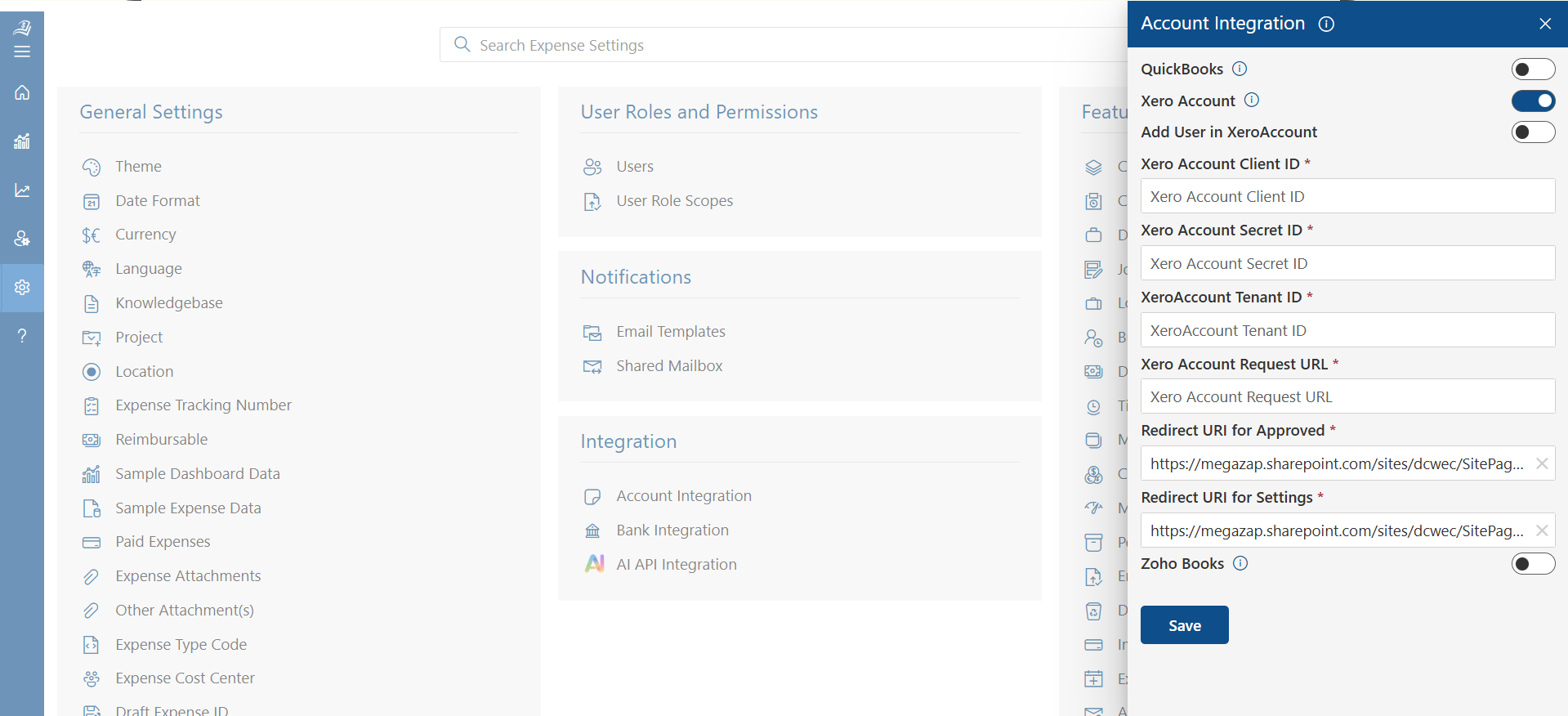
Expense Tracker 365 allows businesses to connect with Xero and automatically sync expense data for easier accounting and financial management. Follow this knowledge base guide to learn how to configure and enable the integration.
Step 1: Open Integration Settings
Go to Account Integration and select Xero Account to open the integration panel.
Step 2: Enable Xero Integration
Turn on the Enable XeroAccount option to activate the connection.
Step 3: Enter Xero Credentials
Fill in the required details such as:
- Client ID
- Secret ID
- Tenant ID
- Request URL
- Redirect URIs
These details help connect Expense 365 securely with Xero.
Step 4: Save Settings
Click Save to apply the integration settings.
How to Get Xero Credentials
- Log in to the Xero Developer Portal.
- Click New App and enter your application details.
- Add the Expense Tracker 365 URL in the Redirect URI field.
- Copy the generated Client ID and Secret ID into Expense 365.
Once completed, Expense 365 and Xero will sync expense and accounting data automatically.
How Expense 365 Helps with Xero Integration?
Expense 365 helps businesses automate expense tracking and accounting by connecting directly with Xero.
It automatically syncs expenses, receipts, approvals, and reimbursement data into Xero, reducing manual work and improving financial accuracy.
The integration also helps businesses manage expenses faster, maintain organized records, and simplify financial reporting in real time.
Conclusion
Integrating expense management software with Xero helps businesses simplify expense tracking, automate accounting tasks, and improve financial accuracy. From receipt capture and approval workflows to real-time expense syncing and reporting, the integration reduces manual work and saves valuable time for finance teams.
Simplify expense management with seamless Xero integration using Expense 365. Automate expense tracking, approvals, and reporting while reducing manual accounting work with a 14-day free trial.
Frequently Asked Questions
What is Xero?
Xero is a cloud-based accounting software used by businesses to manage invoicing, expense tracking, bank reconciliation, payroll, tax management, and financial reporting from a single platform. Xero helps businesses automate accounting processes, improve financial accuracy, and manage company finances in real time.
How Do I Link Xero to Expense 365?
To connect Xero with Expense 365, open the Account Integration section in Expense 365 and select Xero Account. Enable the integration and enter the required Xero credentials, including Client ID, Secret ID, and Tenant ID. After saving the settings, Expense 365 will automatically sync expenses, approvals, receipts, and accounting records with Xero.
How Do Employees Submit Expenses in Xero-Integrated Systems?
Employees can submit business expenses through mobile apps or web platforms by uploading receipts, entering expense details, and sending claims for approval. The expense data is then automatically synced with Xero after approval.
Can Xero Integrations Reduce Manual Accounting Work?
Yes, Xero integrations help automate expense entry, receipt capture, expense categorization, approval workflows, reimbursement tracking, and financial syncing. This reduces manual accounting work, saves time, and improves financial accuracy.
What are the other integrations available in Expense 365 apart from Xero?
Expense 365 integrates with Microsoft 365 apps like Microsoft SharePoint, Microsoft Teams, Microsoft Outlook, Microsoft Power BI, Microsoft Power Automate, and Microsoft Copilot, along with accounting software like QuickBooks.


_JiluXJRGNl.svg)























