
Best HR Software for Small Business to Support Your Growing Team

Running a small business is challenging enough without managing hiring, leave, onboarding, attendance, and employee records across multiple spreadsheets. As your business grows, these everyday HR tasks become more time-consuming and difficult to manage. Manual processes often lead to duplicate work, missed updates, and errors that can affect productivity and overall team experience.
Modern HR software does more than digitize records—it helps HR teams spend less time on repetitive administrative work and more time supporting business goals. According to a 2024 Gartner survey, only 24% of HR functions say they are maximizing the business value of their HR technology, while 35% of HR leaders are confident their current HR technology approach is helping achieve business objectives.
- Learn why small businesses are investing in HR software faster than ever.
- Understand the biggest challenges of managing HR manually.
- Discover the essential features every growing business should look for.
- Compare leading HR software solutions available in 2026.
- Learn how HR365 HRMS supports businesses using Microsoft 365 and SharePoint.
What Is HR Software for Small Business?
HR software for small business is a digital platform that helps organizations manage everyday HR activities from one central location. Instead of handling different tasks across spreadsheets, emails, and paper files, everything is organized in a single system.
A good HR solution supports the complete employee journey—from recruitment and onboarding to attendance tracking, leave management, performance reviews, learning, and daily HR administration.
Unlike enterprise HR systems that can be expensive and difficult to implement, small business HR software is designed to be affordable, easy to use, and quick to deploy. Many platforms also include automation features that reduce repetitive work and improve accuracy.
Some of the most valuable capabilities include:
- Employee directory with centralized records
- Digital onboarding checklists
- Leave and attendance management
- Performance review tracking
- Recruitment management
- Learning and training records
- Expense tracking
- HR dashboards and reporting
- Task management
- AI-powered reminders and automation
Having all these features in one platform helps business owners spend less time on administration and more time building their organization.
Why HR Software Has Become Essential for Small Businesses
Small businesses often believe HR software is only necessary after reaching a certain size. In reality, many HR challenges begin much earlier.
As new team members join, the number of documents, approvals, policies, and requests grows quickly. Without a structured process, simple tasks become difficult to manage.
Common challenges include:
- Employee information stored across multiple files
- Manual onboarding checklists
- Leave requests managed through email
- Attendance records updated by hand
- Missed document renewals
- Performance reviews completed inconsistently
- Difficulty finding important HR information
These issues may seem minor individually, but together they consume valuable time every week.
As HR responsibilities grow, spending hours on repetitive administrative tasks can limit a small business’s ability to focus on hiring, development, and business growth. Research from the Society for Human Resource Management (SHRM) found that 85% of organizations using HR automation or AI say it saves time and improves efficiency. By automating routine processes such as onboarding, leave approvals, and document management, businesses can reduce manual work, improve accuracy, and give HR teams more time to focus on strategic priorities.
For small businesses with limited HR resources, every saved hour matters. Instead of chasing approvals or updating spreadsheets, HR teams can focus on hiring better talent, supporting managers, and improving the overall employee experience.
The need becomes even greater for businesses using Microsoft 365. Integrating HR processes with familiar tools like SharePoint and Microsoft Teams helps users work within applications they already use every day. HR365 HRMS is built with this environment in mind, giving organizations a connected HR experience without introducing unnecessary complexity.
When Is the Right Time for a Small Business to Invest in HR Software?Are the Strengths of Namely?
Many small businesses begin with spreadsheets because they are easy to set up and cost very little. At first, this approach works well. However, as your organization grows, manual HR processes become harder to manage and increase the risk of mistakes.
If any of the following situations sound familiar, it may be time to invest in HR software for your small business.
1. Employee Information Is Stored in Different Places
Your HR records are spread across spreadsheets, emails, shared folders, and paper files. Finding a single document takes longer than it should, and keeping records updated becomes a daily challenge.
A centralized employee directory keeps all information in one secure location, making it easy to search, update, and manage personnel records.
2. Managers Spend Too Much Time Approving Requests
Leave requests, expense claims, onboarding tasks, and approvals often move through long email chains. Managers waste valuable time searching for requests or following up on missing approvals.
Modern HR software automates approval workflows and sends reminders automatically, helping requests move faster.
3. Hiring Takes Longer Than Expected
Recruitment becomes difficult when resumes arrive through multiple channels and interview feedback is stored in different documents.
A recruitment module organizes candidates, interview stages, and hiring progress in one dashboard, making it easier to fill positions quickly.
4. New Hires Have Different Onboarding Experiences
Without a standard onboarding process, every new hire receives different information. Important documents, policies, or training sessions may be missed.
Digital onboarding checklists create a consistent experience for every new team member while reducing manual follow-ups.
5. HR Reports Take Hours to Prepare
Business owners often need answers to questions like:
- How many people are on leave?
- Which departments are hiring?
- Who has pending performance reviews?
- How many onboarding tasks are incomplete?
When data is stored manually, preparing these reports can take hours.
HR software provides dashboards that display this information instantly, helping leaders make faster decisions.
Why HR Software Is a Smart Investment for Small Businesses
Choosing the right HR software helps small businesses save time, reduce manual work, and manage HR more efficiently as they grow. According to Deloitte’s Global Human Capital Trends report, more than 90% of business leaders believe digital HR technology is important for improving organizational performance.
Here are the biggest benefits small businesses can expect from the right HR software.
Save Valuable Time
Routine HR tasks often consume several hours every week. Automating leave requests, document collection, onboarding tasks, reminders, and approvals reduces repetitive work and gives HR professionals more time for strategic activities.
Reduce Human Errors
Manual data entry increases the chance of duplicate records, missing documents, incorrect leave balances, and outdated employee information.
A centralized HR platform keeps information consistent across the organization and reduces administrative errors.
Better Employee Experience
People expect workplace processes to be simple.
Whether requesting leave, updating personal information, submitting expenses, or completing onboarding tasks, employees appreciate having self-service options instead of waiting for HR responses.
This creates a better day-to-day experience while reducing administrative work for HR teams.
Faster Hiring and Onboarding
Hiring delays often mean lost productivity.
Recruitment tools help organize applicants, schedule interviews, and monitor hiring progress. Once someone accepts an offer, onboarding workflows ensure every required task is completed before the first day.
New hires become productive sooner because they receive a structured introduction to the organization.
Stronger Performance Management
Performance conversations should happen throughout the year instead of only during annual reviews.
Performance management tools make it easier to:
- Set goals
- Schedule reviews
- Track progress
- Record achievements
- Collect manager feedback
This creates more meaningful development conversations and supports continuous improvement.
Better Visibility Through Dashboards
Business owners need accurate information before making decisions.
Interactive dashboards provide quick insights into:
- Headcount
- Leave balances
- Hiring progress
- Attendance trends
- Training completion
- Performance review status
- Department activity
Instead of searching through spreadsheets, leaders can see important information in one place.
Easy Collaboration Across Microsoft 365
For businesses already using Microsoft 365, choosing software that fits naturally into their existing environment can reduce training time and improve adoption.
HR365 HRMS integrates with Microsoft 365, SharePoint, and Microsoft Teams, allowing HR teams and managers to complete everyday tasks without constantly switching between different applications. This familiar experience helps organizations adopt new HR processes more quickly while keeping information connected across the workplace.
Which Features Matter Most in HR Software for Small Business?
Not every HR platform offers the same value. Some focus only on payroll, while others cover just one or two HR functions. As your business grows, switching software can be expensive and time-consuming. That is why choosing a solution that supports your future needs is just as important as solving today’s challenges.
Here are the key features every small business should consider before making a decision.
1. Employee Directory
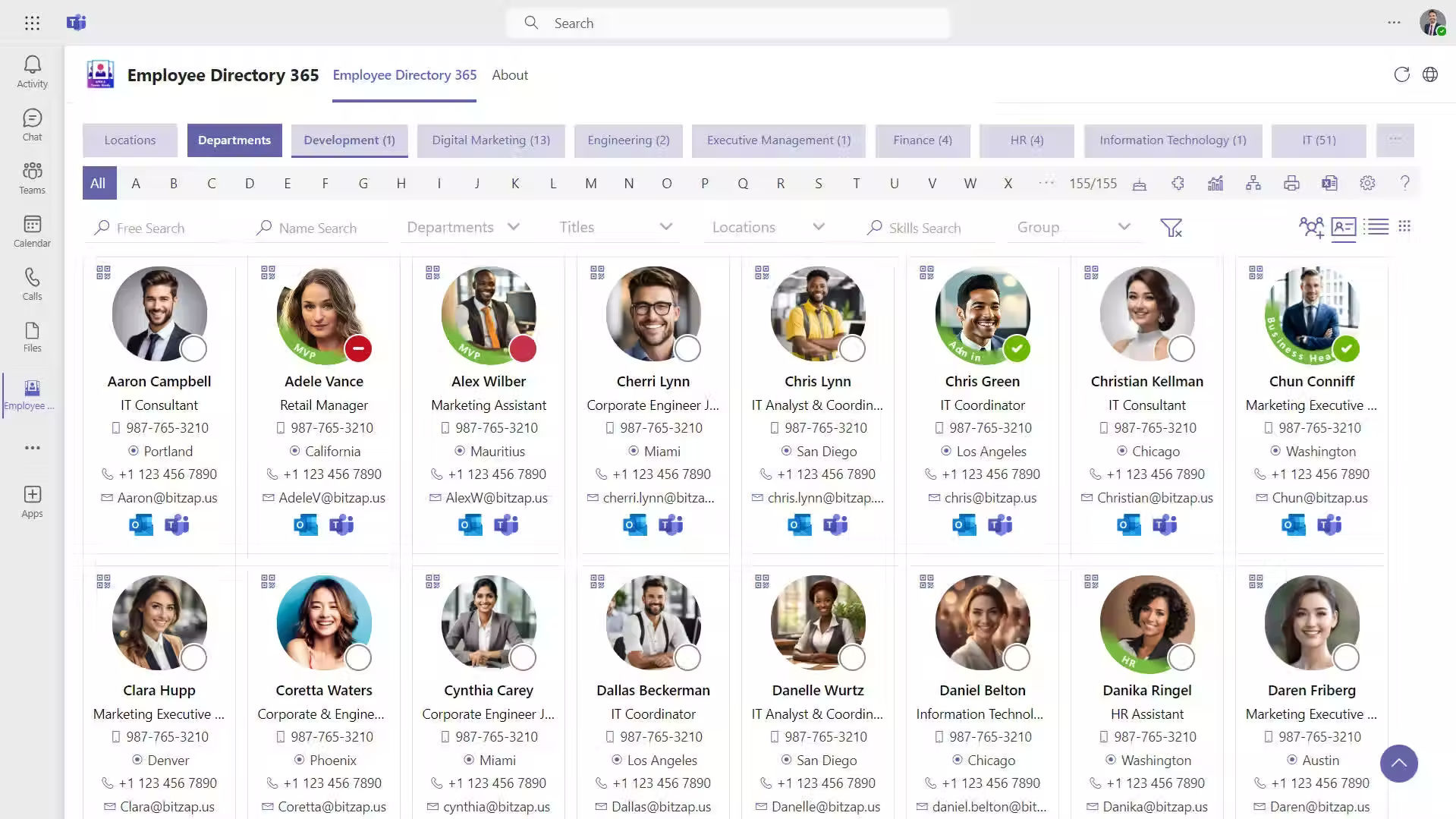
Every HR process starts with accurate employee information.
A centralized employee directory keeps contact details, job roles, departments, reporting managers, important documents, and employment history in one secure place. Instead of searching through folders or spreadsheets, HR teams can quickly access the information they need.
Look for software that also supports document storage, profile updates, and role-based access.
2. Digital Employee Onboarding
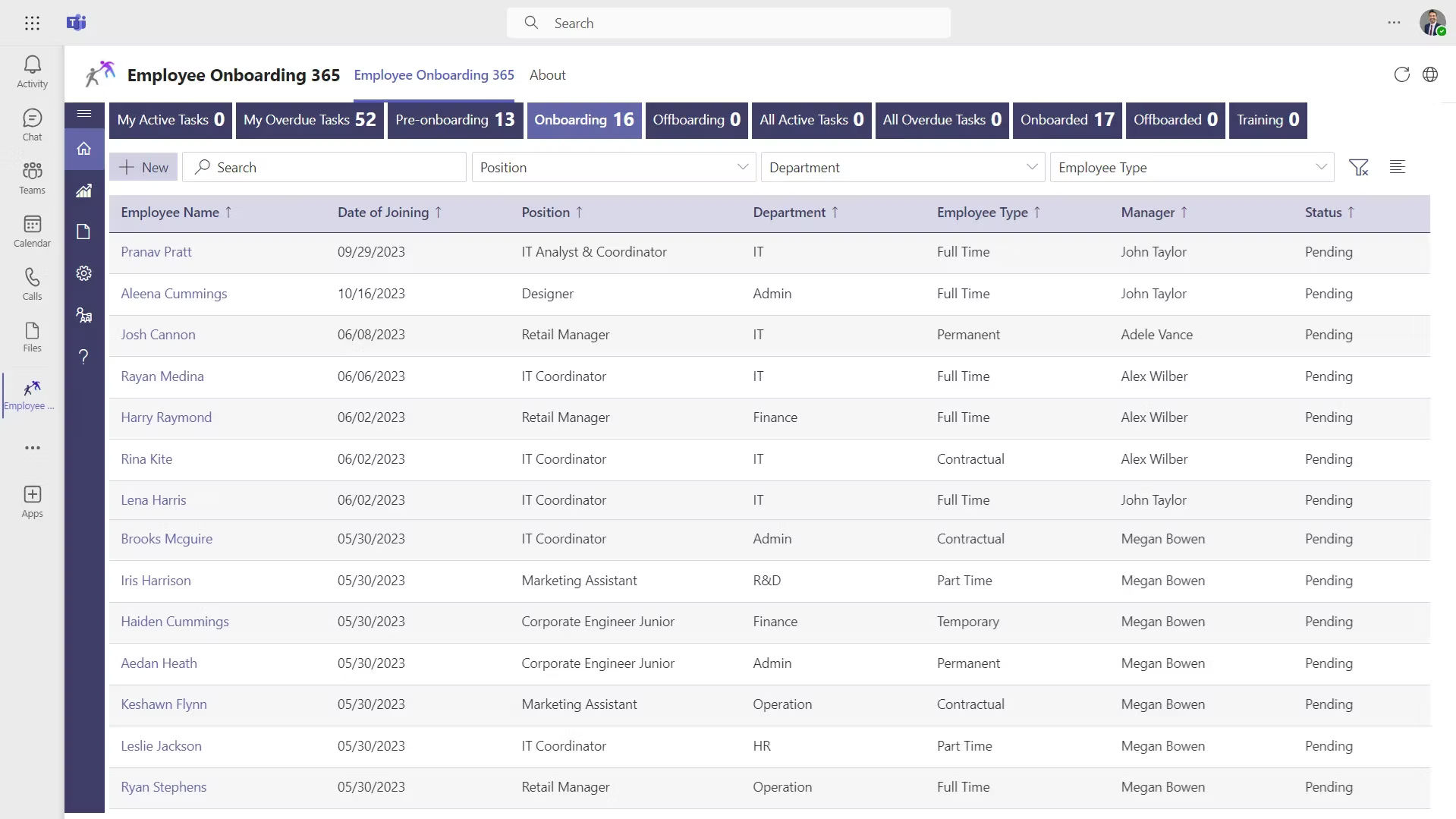
First impressions matter.
A structured onboarding process helps new hires complete paperwork, receive company policies, meet their teams, and start their responsibilities without unnecessary delays.
The best HR software includes:
- Digital onboarding checklists
- Document collection
- Task assignments
- Welcome workflows
- Progress tracking
A consistent onboarding experience helps new team members become productive faster.
3. Leave Management
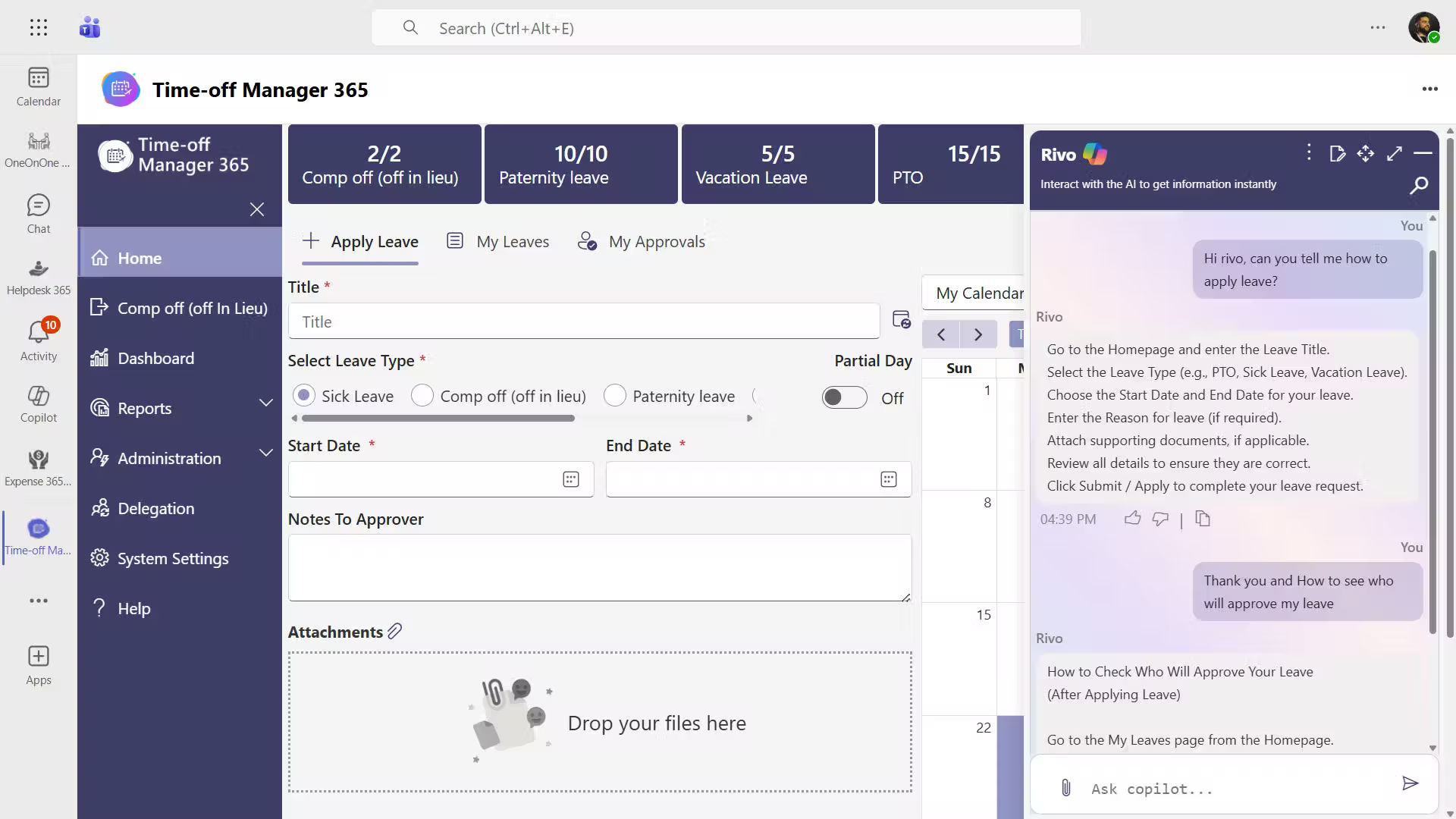
Managing leave manually often leads to confusion about balances, approvals, and holidays.
An effective leave management system should include:
- Online leave requests
- Multi-level approvals
- Leave balance tracking
- Holiday calendars
- Leave history
- Automated notifications
This reduces back-and-forth emails and provides better visibility for managers.
4. Attendance and Timesheet Management
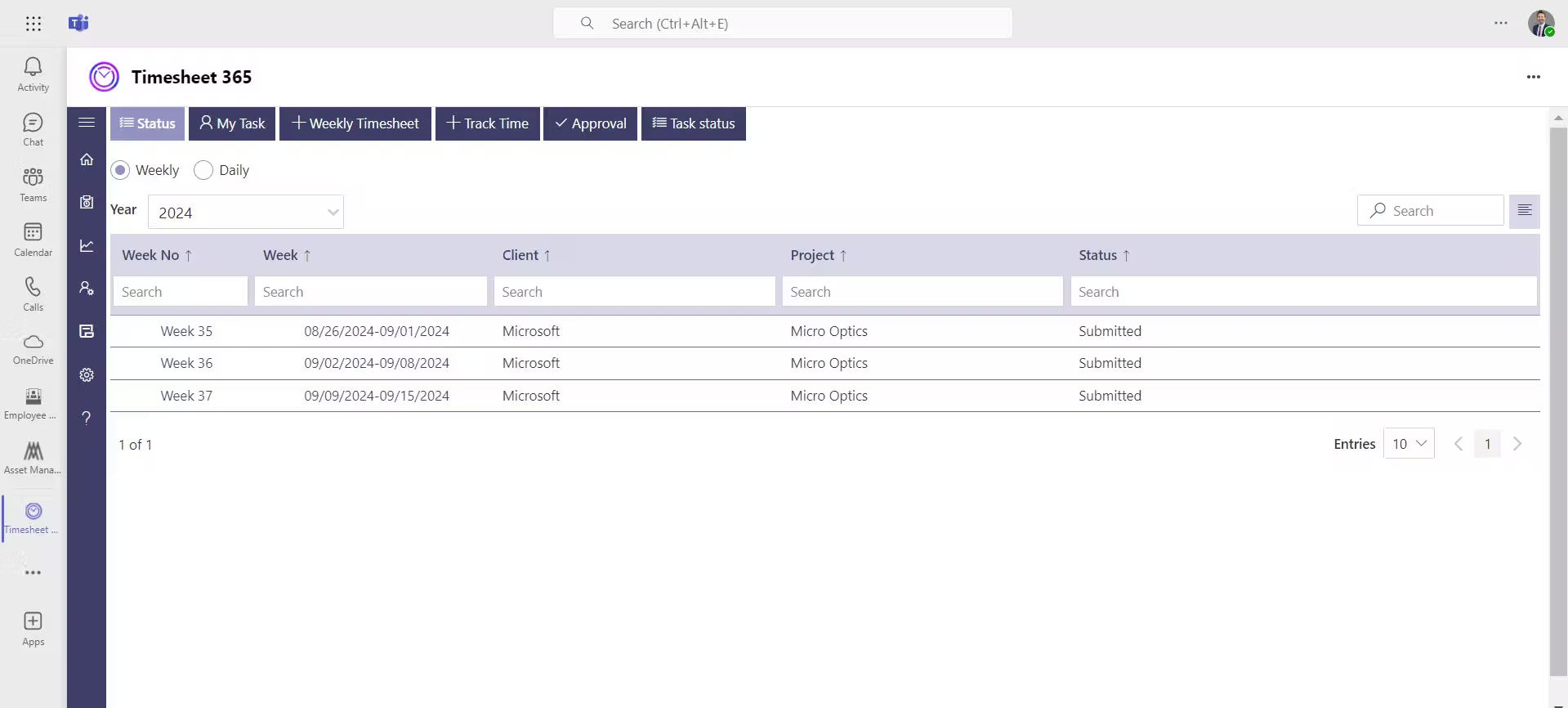
Tracking attendance accurately is important for planning workloads and monitoring productivity.
Look for features such as:
- Daily attendance records
- Work-hour tracking
- Timesheet submissions
- Manager approvals
- Attendance reports
Digital timesheets also help project-based businesses understand how time is being spent across different activities.
5. Recruitment Management
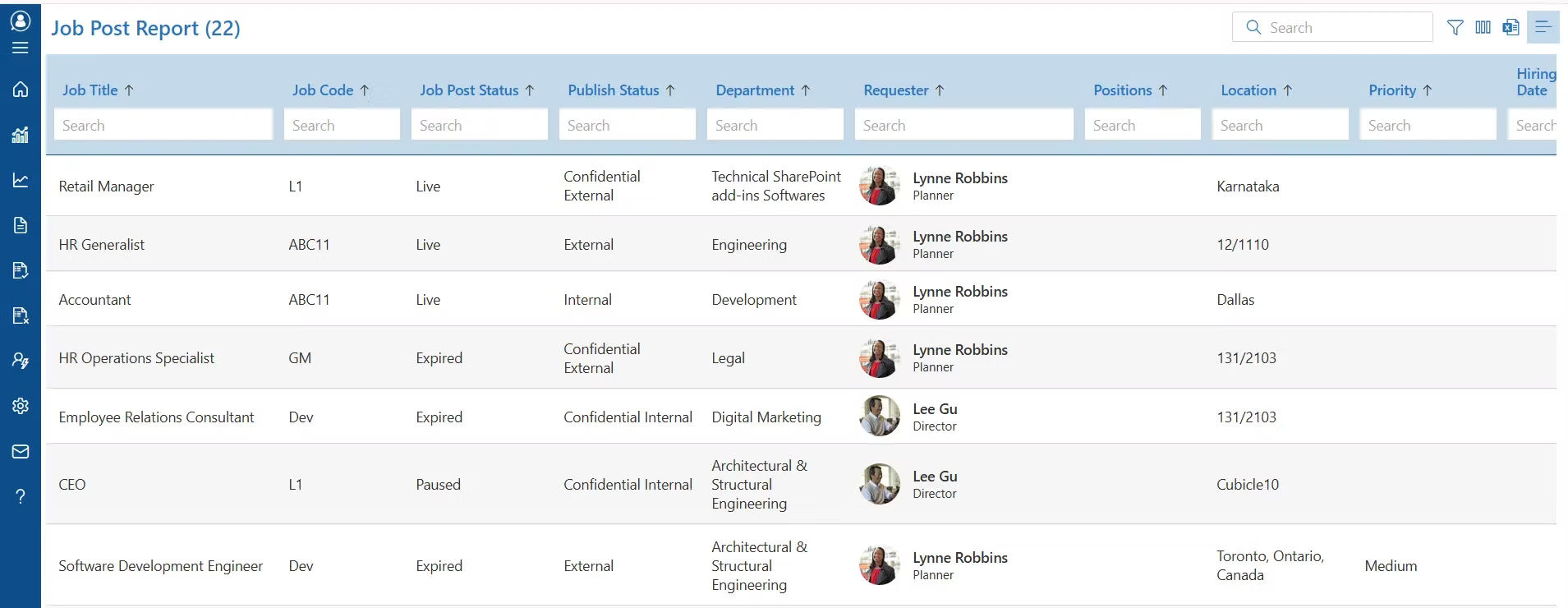
Hiring the right people quickly can make a significant difference for a growing business.
A recruitment module should help you:
- Post and manage job openings
- Track applicants
- Schedule interviews
- Collect interview feedback
- Monitor hiring progress
Having recruitment connected with onboarding creates a smoother hiring journey.
6. Performance Management
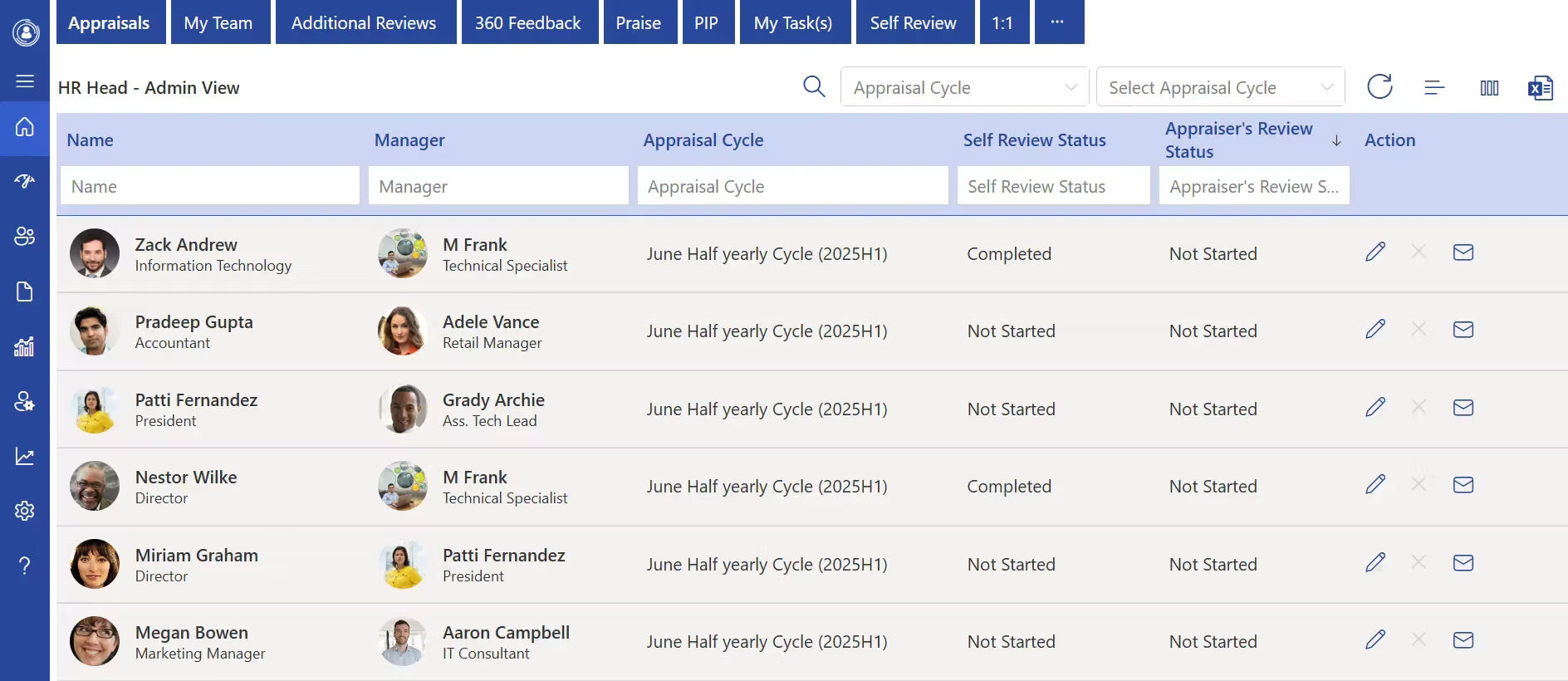
Performance reviews should encourage growth rather than becoming a yearly administrative task.
Modern HR software supports continuous performance management through:
- Goal setting
- Review cycles
- Feedback collection
- Performance history
- Development planning
Managers gain better visibility into team progress while helping individuals develop new skills.
7. Learning and Training
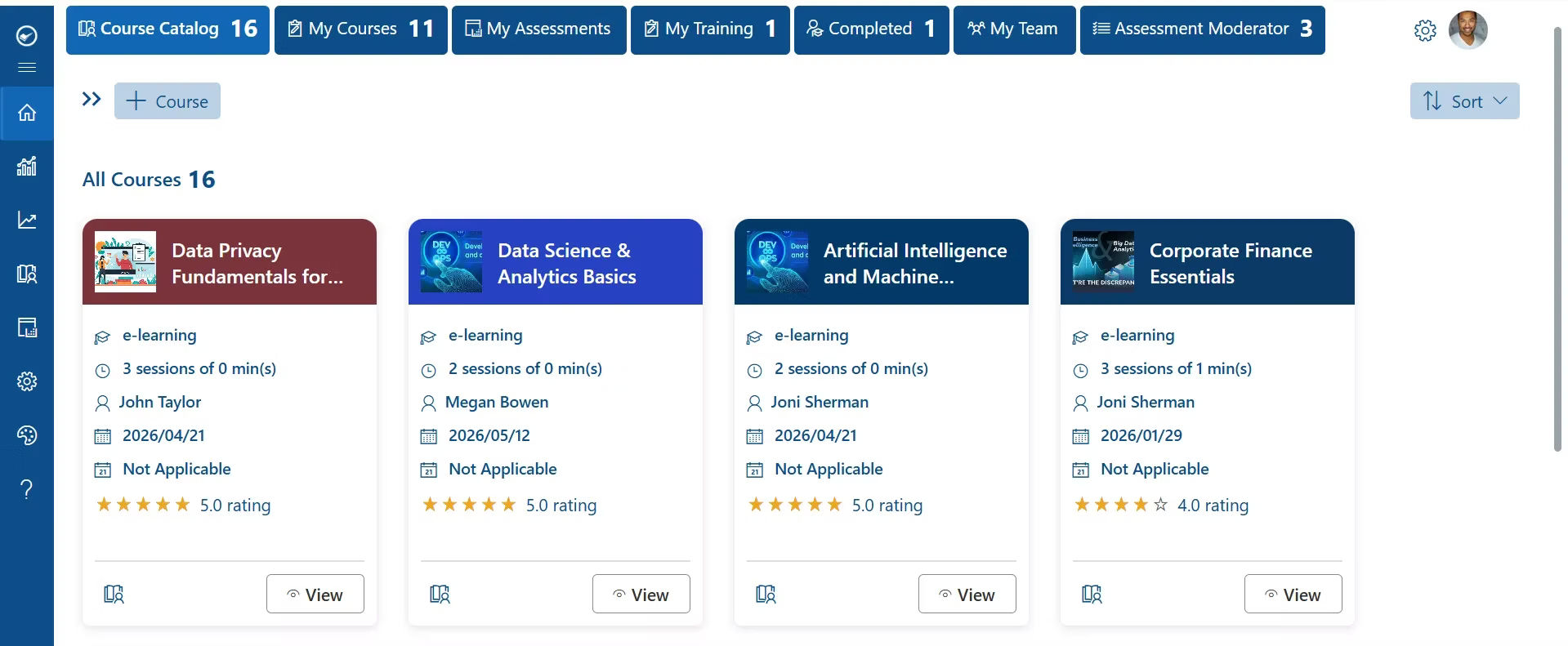
Continuous learning supports both individual growth and business success.
Learning management features help organizations assign training, monitor completion, and maintain development records without relying on manual spreadsheets.
This is especially valuable when onboarding new hires or introducing new company policies.
8. Expense Management
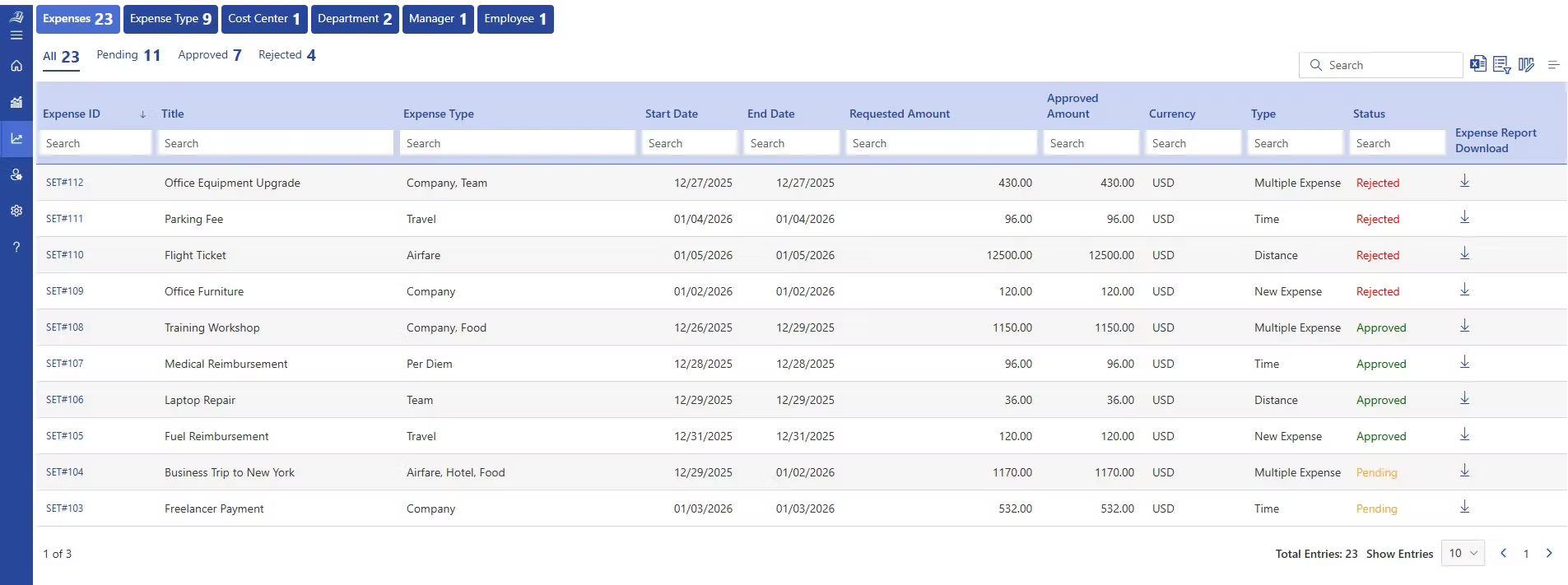
Expense claims can quickly become difficult to manage when handled through email.
A digital expense management system lets team members submit claims, upload receipts, and track approval status from one location.
Managers review requests faster, and finance teams receive organized records.
Expense claims can quickly become difficult to manage when handled through email.
A digital expense management system lets team members submit claims, upload receipts, and track approval status from one location.
Managers review requests faster, and finance teams receive organized records.
9. Task Management
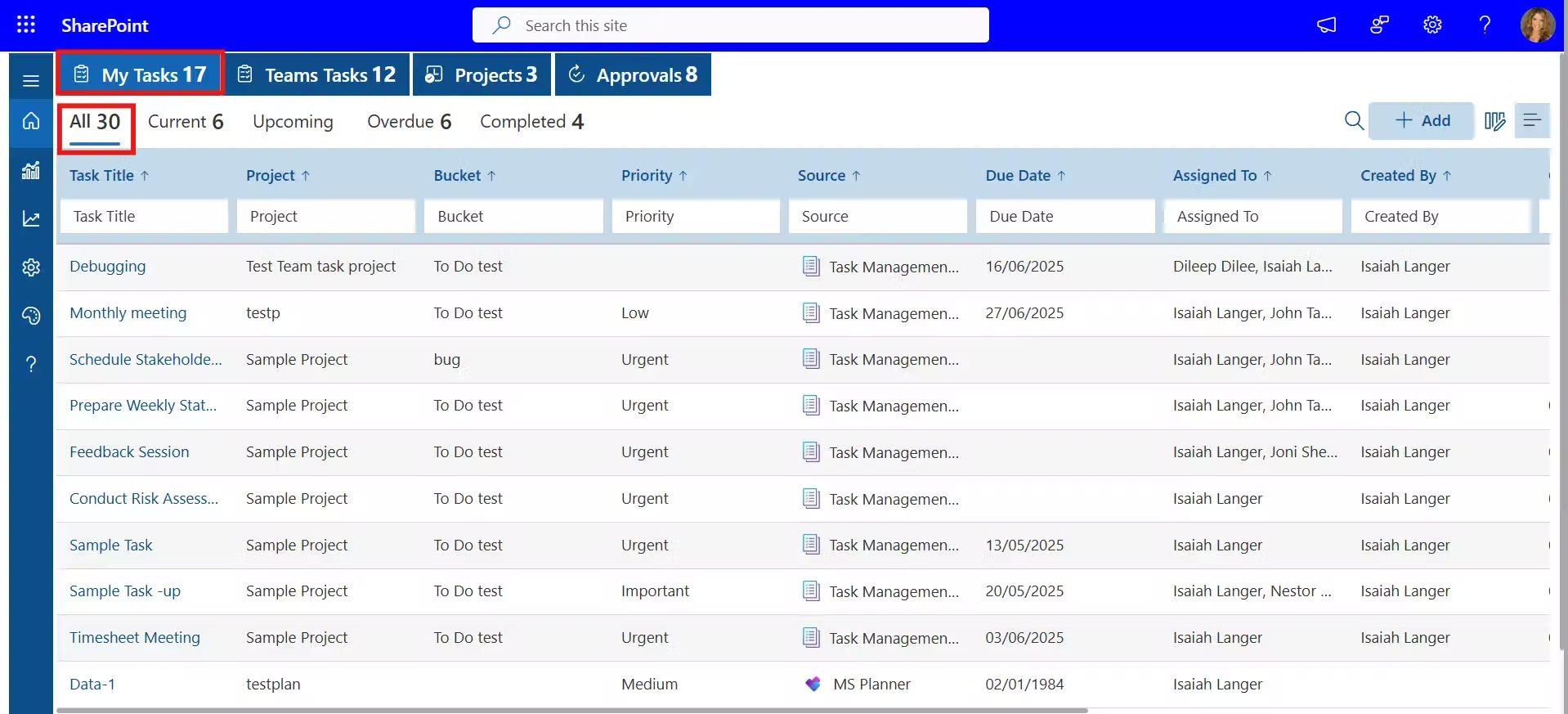
HR activities involve many recurring tasks.
Examples include:
- Completing onboarding
- Document renewals
- Policy acknowledgments
- Performance reviews
- Training assignments
Built-in task management keeps responsibilities visible and sends reminders before deadlines are missed.
10. Dashboard and Analytics
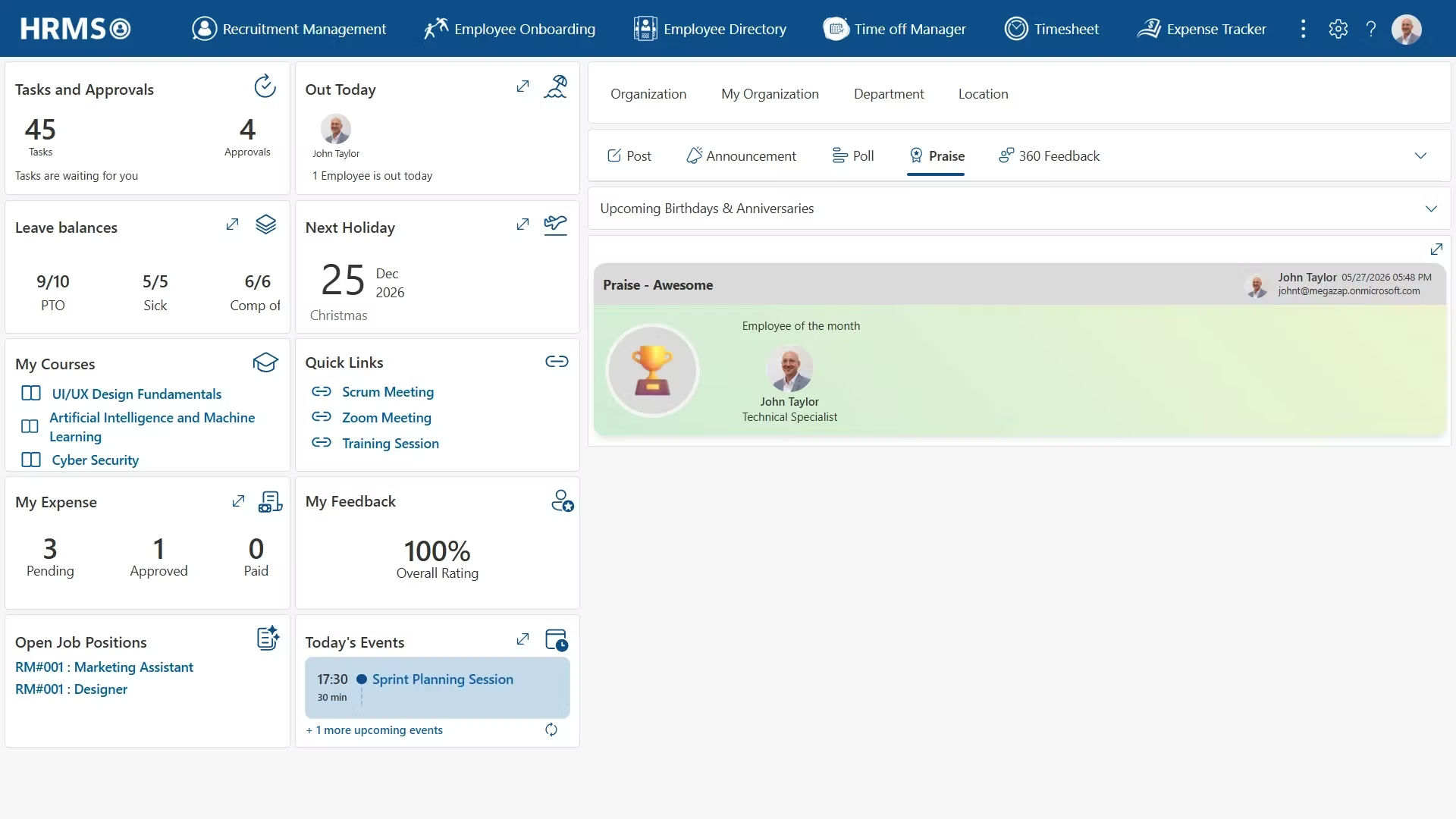
Good decisions depend on accurate information.
Real-time dashboards help business leaders understand trends without creating reports manually.
Useful dashboards include:
- Headcount overview
- Leave statistics
- Recruitment progress
- Attendance insights
- Performance completion
- Training status
- Department summaries
Instead of reacting to problems, leaders can identify them early and take action.
11. AI and Automation
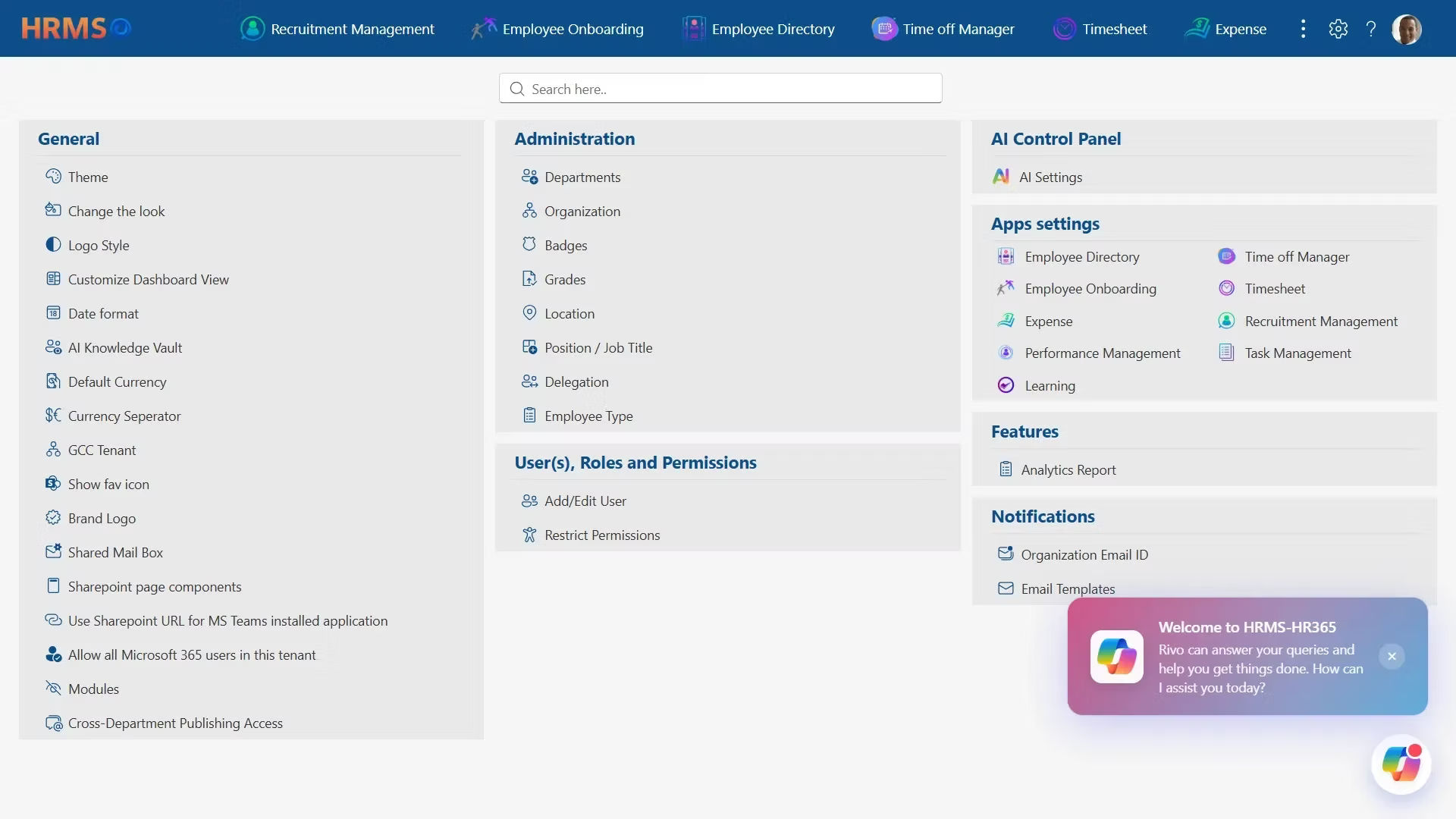
Automation is becoming one of the biggest advantages of modern HR software.
Instead of manually sending reminders, assigning tasks, or tracking approvals, AI-powered workflows handle repetitive activities automatically.
Examples include:
- Automated onboarding reminders
- Leave approval notifications
- Performance review alerts
- Training reminders
- Document expiration notifications
- Workflow automation
According to Gartner, organizations continue increasing investment in HR automation because it reduces administrative effort while improving consistency across HR processes.
Best HR Management Software for Small Businesses: Comparison Table
| HR Software | Best For | Key Strength | Microsoft 365 Integration | Free Trial |
| HR365 HRMS | Growing small businesses | Complete HR platform with employee lifecycle management | ✅ Native | ✅ Yes |
| BambooHR | Small and mid-sized businesses | Simple and user-friendly HR management | ❌ | ✅ Yes |
| Gusto | US small businesses | Payroll and benefits management | ❌ | ✅ Yes |
| Zoho People | Growing businesses | Flexible workflows and customization | Limited | ✅ Yes |
| Justworks | Compliance-focused businesses | Payroll, benefits, and HR support | ❌ | Demo Available |
| PeopleHum | Employee engagement | Engagement and performance management | ❌ | Demo Available |
| Lattice | Performance-focused teams | Continuous feedback and goal management | Limited | Demo Available |
| Beyond Intranet | Microsoft 365 organizations | SharePoint-based HR management | ✅ Native | Demo Available |
| Rippling | IT + HR management | Employee and device management | Limited | ✅ Yes |
| Workday | Large and scaling organizations | Workforce planning and analytics | Limited | Demo Available |
Why HR365 HRMS Is a Smart Choice for Small Businesses Using Microsoft 365
Many HR platforms work as standalone systems. While they offer useful features, they often require users to switch between multiple applications throughout the day. For businesses already using Microsoft 365, this can create unnecessary complexity and reduce user adoption.
HR365 HRMS is designed specifically for organizations that want to manage HR processes within their existing Microsoft environment. Built on SharePoint and integrated with Microsoft Teams, it brings everyday HR activities into a familiar workspace.
Instead of introducing another disconnected application, HR365 HRMS helps organizations manage HR from one connected platform.
A Complete HR Platform in One Place
Growing businesses need more than basic employee records. As HR responsibilities increase, using separate tools for onboarding, leave management, recruitment, and performance reviews can create duplicate work and inconsistent data.
HR365 HRMS combines essential HR functions in one solution, including:
- Employee Directory
- AI-Powered Automation
- Employee Onboarding
- Leave Management
- Attendance and Timesheets
- Recruitment Management
- Performance Management
- Learning and Training
- Expense Management
- Task Management
- HR Dashboard
Having these capabilities together gives HR teams a complete view of their organization while reducing the need for multiple software subscriptions.
Familiar Experience for Microsoft Users
One of the biggest challenges when introducing new software is user adoption.
If managers and team members need extensive training before using the system, implementation often takes longer than expected.
Because HR365 HRMS works within Microsoft 365, SharePoint, and Microsoft Teams, users interact with tools they already know. This familiarity reduces the learning curve and helps organizations start using the platform more confidently.
Better Visibility Across HR Operations
Business owners often need answers immediately.
Questions like these come up every day:
- Which departments are actively hiring?
- Who is currently on leave?
- How many onboarding tasks are pending?
- Which performance reviews are overdue?
- What training programs are incomplete?
Instead of collecting information from different systems, HR365 HRMS displays these insights through interactive dashboards that update in real time.
This helps managers make informed decisions without waiting for manual reports.
Automation That Saves Time
Small HR teams handle dozens of recurring activities every week.
Examples include:
- Sending onboarding reminders
- Assigning tasks
- Tracking document submissions
- Following up on approvals
- Scheduling performance reviews
- Monitoring training completion
HR365 HRMS automates many of these routine activities, helping HR professionals spend less time on administration and more time supporting business goals.
Designed to Grow with Your Business
The HR needs of a business with 20 people are very different from those of a business with 200.
Choosing software that can grow alongside your organization helps avoid expensive migrations later.
HR365 HRMS supports businesses through every stage of growth by providing flexible modules that adapt as your HR requirements expand.
How to Choose the Right HR Software for Your Small Business
With so many HR platforms available, choosing the right one can feel overwhelming. Rather than focusing only on price, evaluate each solution based on long-term business value.
Here are the most important questions to ask before making a decision.
Does It Solve Your Current Challenges?
Start by identifying the problems you want to fix.
For example:
- Manual onboarding
- Scattered employee records
- Slow leave approvals
- Difficult recruitment tracking
- Inconsistent performance reviews
- Time-consuming reporting
The right HR software should directly address these challenges instead of adding unnecessary complexity.
Can It Grow with Your Business?
Your HR software should continue supporting your organization as you hire more people.
Look for a platform that offers additional modules without requiring you to replace the entire system later.
Scalable software protects your investment and reduces future implementation costs.
Is It Easy to Use?
Even the most powerful software delivers little value if people avoid using it.
Choose a platform with:
- Simple navigation
- Clear dashboards
- Mobile accessibility
- Easy approval workflows
- Self-service features
Higher adoption leads to better data quality and smoother HR operations.
Does It Integrate with Your Existing Tools?
Many businesses already rely on Microsoft 365 for daily work.
Selecting HR software that integrates with SharePoint and Microsoft Teams helps reduce duplicate work while keeping HR activities connected to your existing business processes.
Does It Provide Useful Reporting?
Business decisions should be based on accurate information.
Look for software that provides dashboards and reports covering:
- Headcount
- Leave trends
- Recruitment progress
- Attendance
- Performance
- Training
- HR activity
Access to real-time insights helps leaders identify issues early and plan with confidence.
Is the Vendor Focused on Long-Term Support?
Software is only one part of the investment.
Before making a decision, evaluate the vendor’s:
- Product updates
- Customer support
- Training resources
- Implementation assistance
- Product roadmap
A reliable technology partner can make adoption much smoother and help your organization continue getting value from the platform for years to come.
Conclusion
Managing HR manually may work for a small team, but growing businesses need a better way to organize information, automate routine work, and support their people. The right HR software creates a stronger foundation for hiring, onboarding, performance management, attendance tracking, and everyday HR operations.
If your organization already uses Microsoft 365, choosing a solution built for that environment can make adoption easier and improve collaboration. HR365 HRMS combines essential HR capabilities in one platform, helping small businesses spend less time on administration and more time supporting business growth.
Frequently Asked Questions
What is the best HR software for small businesses?
The best HR software depends on your business size, budget, and operational needs. Look for a platform that includes employee management, onboarding, leave management, recruitment, performance tracking, reporting, and automation while supporting future growth.
Why do small businesses need HR software?
HR software helps reduce manual work, organize employee information, automate approvals, improve hiring, and provide better visibility into HR activities through dashboards and reports.
How much does HR software cost for small businesses?
Pricing varies depending on the number of users, available features, deployment model, and vendor. Many providers offer flexible pricing plans and free demonstrations to help businesses evaluate the platform before purchasing.
Is HR software suitable for businesses with fewer than 50 employees?
Yes. Many HR platforms are designed specifically for small businesses. Implementing HR software early helps establish consistent processes and reduces administrative work as the organization grows.
How long does it take to implement HR software?
Implementation timelines depend on company size, data quality, and business requirements. Small businesses can often complete implementation within a few weeks when planning, data preparation, and user training are completed in advance.


_JiluXJRGNl.svg)























