
Top 7 Contract Management Software for Small Businesses (2026)

Running a small business means handling sales, customers, finances, and daily operations. Managing contracts should not become another time-consuming task.
- CLM 365: A strong fit for small businesses already using Microsoft 365 and looking to manage the full contract lifecycle within their existing environment.
- ContractWorks & ContractSafe: Good options for businesses that mainly need simple contract storage, search, tracking, and deadline reminders.
- Zoho Contracts, Concord & PandaDoc: Useful for teams looking for contract creation, collaboration, approvals, and e-signatures, with PandaDoc particularly suited to sales-focused workflows.
- HyperStart: A suitable option for growing teams looking to use AI for contract drafting and review while managing approvals, renewals, and other lifecycle tasks.
Searching through emails and folders for agreements or missing an important renewal date can quickly add to the workload.
Having contracts organized in one place, with timely reminders for important dates, makes the process much easier.
That is where contract management software for small business can help. It gives teams a simple way to organize agreements, track deadlines, and stay on top of contract-related tasks.
Importance of Contract Management Software for Small Business
Contracts support sales, vendors, revenue, and growth. As they increase, the right software helps businesses reduce manual work, stay organized, and manage contracts efficiently.
Small teams often manage contracts alongside other responsibilities. A contract management software for small business makes it easier to store, find, and manage agreements without relying on scattered emails and folders.
Did you know? Poor contract management can cause an average 8.6% erosion in contract value, according to World Commerce & Contracting.
Organizations using AI-powered CLM reported an average 36% efficiency gain across agreement workflows, according to Deloitte.
Reviews, approvals, reminders, and tracking can take valuable time. Small business contract software automates routine tasks so teams can focus more on customers and growth.
Missed renewals and deadlines can affect recurring revenue. The small business contract software tracks renewal dates, notice periods, and milestones and sends reminders when action is required.
This gives teams enough time to review agreements, negotiate changes, or renew contracts before important dates pass.
As contract volumes increase, manual processes become harder to manage. A contract management system for small businesses creates structured workflows that can scale with the organization.
42% of legal departments surveyed by Wolters Kluwer reported using CLM software in 2025, highlighting the growing adoption of technology for contract management.
Best 7 Contract Management Software for Small Business
Now, that we have discussed the indicators that show that your business requires contract management software, we will discuss the most suitable small business contract software.
Keywords | Integrations | Free Trial | G2 Ratings |
SharePoint, MS 365 Apps, DocuSign and Adobe Acrobat | ✅14-day free trial | ||
ContractWorks | Salesforce and Pipedrive | Custom Setup | 4.6/5 |
Zoho Contracts | Integrates with Zoho apps and Leegality | ✅ | 4.6/5 |
Concord | Salesforce, HubSpot, and Slack | ✅ | 4.2/5 |
HyperStart | Salesforce, Pipedrive, Slack and Adobe Acrobat Sign | ✅ | 4.5/5 |
PandaDoc | Monday.com, Salesforce, and Dropbox | ✅ | 4.7/5 |
ContractSafe | Okta, Salesforce, Zapier and DocuSign | ✅ | 4.7/5 |
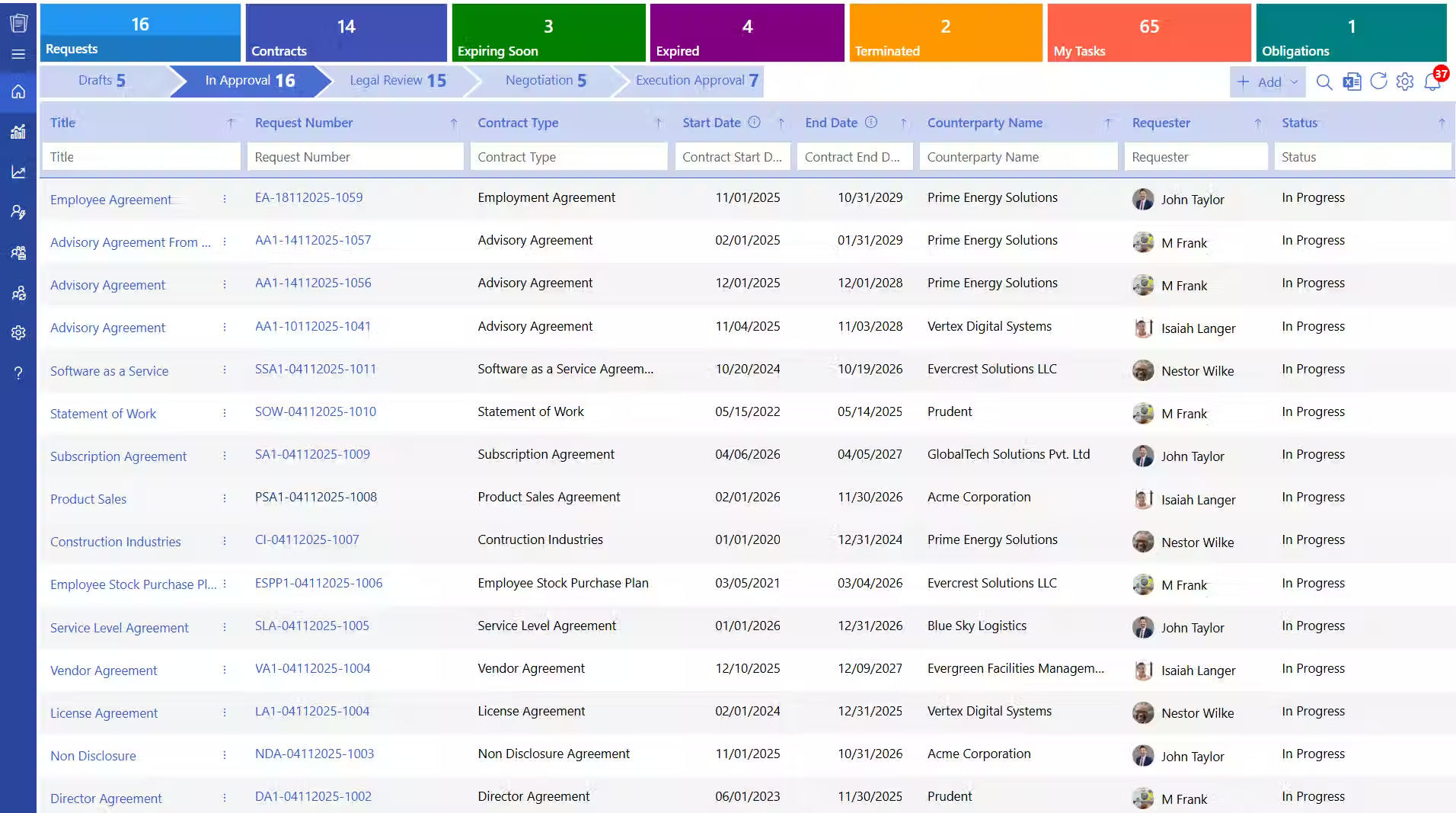
CLM 365 is designed for small businesses that want to manage contracts within the Microsoft 365 environment. As a contract management software for small businesses, it connects with Microsoft 365 apps such as SharePoint and Outlook, allowing teams to create, review, approve, store, and track agreements without moving between multiple systems.
It covers the contract lifecycle from initial requests and drafting to approvals, renewals, and reporting. For SMBs already working with Microsoft 365, it provides a familiar environment for managing contracts while keeping contract information within the Microsoft ecosystem.
Key Features
- Microsoft 365 and SharePoint integration
- AI-powered contract review
- Central contract repository
- Contract search and filtering
- Draft comparison
- Version history and audit trails
- Multi-level approval workflows
- Role-based access controls
- Obligation and milestone tracking
- Renewal and deadline reminders
Reporting and analytics
Pros
- Works directly with Microsoft 365
- Familiar environment for existing Microsoft users
- Keeps contracts and related documents organized
- Covers the full contract lifecycle
- Useful for businesses that want contract data within their Microsoft environment
Cons
- Some features may require additional configuration to match specific business workflows.
- Setting up customized workflows and permissions may take some initial time.
Supported Browsers: CLM 365 supports modern browsers, including Google Chrome, Microsoft Edge, Mozilla Firefox, and Safari.
Pricing Plans
- Plus: $49.99 per user / month, billed yearly
- Premium: $69.99 per user / month, billed yearly
- Enterprise Plan: Get a custom quote
Lite User
- Plus lite user: $19.99 per lite user / month, billed yearly
- Premium: $39.99 per lite user / month, billed yearly
Hear from Our Delighted Clients
CLM 365 has made contract reviews faster and more efficient with AI-powered contract summaries. It helps teams quickly understand key terms, obligations, and potential risks, reducing manual review and enabling faster, more informed decision-making.
ContractWorks focuses on making agreements easier for small teams to organize, search, and track. Its contract management for SMBs provides a centralized repository where businesses can store contracts and quickly access them when needed.
Automated notifications help teams stay aware of renewal and expiration dates, while permissions give businesses control over who can view or change contracts.
Key Features
- Central contract repository
- Contract search and filtering
- Renewal and expiration reminders
- Role-based permissions
- E-signatures
- Contract activity tracking
- Reporting
- Document organization
Pros
- Simple approach to contract management
- Easy to organize agreements in one place
- Helpful renewal and deadline reminders
- Useful search capabilities
- Suitable for small teams with straightforward workflows
Cons
- Less focused on Microsoft 365 integration
- Complex contract processes may require more advanced functionality
Zoho Contracts gives growing businesses a structured way to create, approve, sign, and monitor agreements. The platform works particularly well for companies already using Zoho applications, making it easier to connect contract processes with other business activities.
For small business contract management, features such as contract templates, automated approvals, digital signatures, and renewal tracking can reduce repetitive administrative work.
Key Features
- Customizable contract templates
- Automated approval workflows
- Digital signatures
- Renewal and extension tracking
- Version history and activity logs
- Clause library
- Contract dashboards
- Zoho ecosystem integrations
Pros
- Templates make contract creation faster
- Strong fit for businesses using Zoho
- Supports approvals and digital signing
- Helps track renewals and contract progress
- Suitable for growing teams
Cons
- Most useful when paired with other Zoho products
- Businesses outside the Zoho ecosystem may need additional integrations
Concord takes a straightforward approach to small business contract management, bringing contract creation, collaboration, negotiation, approval, and signing into one platform.
Teams can use templates to create agreements, collaborate on changes, sign contracts, and receive reminders for important dates. This can reduce the need to manage contract discussions across separate email threads and tools.
Key Features
- Contract templates
- Contract creation and editing
- Collaboration and negotiation
- Electronic signatures
- Contract storage
- Automated reminders
- Contract tracking
- Approval workflows
Pros
- Combines contract creation and signing
- Useful for collaborative contract work
- Straightforward for smaller teams
- Templates help with recurring agreements
- Keeps contract activity in one place
Cons
- May not suit businesses requiring highly customized workflows
- Larger organizations may need broader CLM capabilities
HyperStart combines AI capabilities with contract workflows to help growing companies manage agreements from creation through execution and tracking. The contract management software for small business reduces repetitive work while giving teams visibility into their agreements.
Businesses can use templates, AI contract analysis, approval workflows, and renewal tracking without needing a large legal team to manage everyday contract tasks.
Key Features
- AI-assisted contract drafting
- Contract templates
- Contract review
- Collaboration
- Approval workflows
- Contract tracking
- Renewal reminders
- Analytics and reporting
- Custom workflows
Pros
- AI can reduce repetitive contract work
- Covers several stages of the contract lifecycle
- Useful for growing teams
- Provides tracking and reporting
- Supports structured approval processes
Cons
- Some businesses may not need its broader AI capabilities
- Very small teams looking only for basic storage may need fewer features
PandaDoc combines document creation, approvals, e-signatures, and tracking in one platform. For small businesses, the small business contract software can be useful when contracts are closely connected to sales proposals, quotes, and other customer-facing documents.
Its templates and document editor help teams create contracts, while approval workflows and electronic signatures support the later stages of the process. CRM integrations can also connect contract activity with existing sales workflows.
Key Features
- Contract and document templates
- Drag-and-drop document editor
- Approval workflows
- Electronic signatures
- Document tracking
- Contract notifications
- Role-based permissions
- CRM integrations
- Contract data extraction
- Renewal tracking
Pros
- Combines document creation and e-signatures
- Easy-to-use document editor
- Useful for sales teams
- Supports automated approvals
- Tracks document activity
Cons
- More focused on documents and sales workflows than traditional CLM
- Businesses looking only for contract storage may not need all its features
ContractSafe focuses on helping smaller organizations organize agreements without adding unnecessary complexity. The contract management software for small business provides a central location for contracts, with search, contract reminders, permissions, and workflow features designed around everyday contract management for small businesses.
Teams can search agreements, track important dates, create contracts from templates, manage approvals, and collect signatures from the same platform.
Key Features
- Central contract repository
- Search across contracts and scanned PDFs
- AI-powered contract data extraction
- Renewal and expiration reminders
- Contract templates
- Approval workflows
- E-signatures
- Role-based permissions
- Contract reporting
- Lifecycle tracking
Pros
- Simple approach to contract management
- Strong search and organization features
- Useful automated reminders
- Supports templates, approvals, and e-signatures
- Suitable for small and growing businesses
Cons
- Some advanced lifecycle features may require higher plans
- Businesses needing deep Microsoft 365 functionality may prefer a Microsoft-focused solution
What are the Benefits of Using Contract Software for Small Businesses?
As a business grows, so does the number of contracts it needs to manage. Contract management software for small teams helps organize these processes, reduce operational work, and give teams more time to focus on growth.
Build a Process That Scales
Managing contracts through emails and spreadsheets may work initially but becomes harder as volumes increase. Small business contract software creates a consistent process for creating, reviewing, approving, signing, and tracking agreements.
Reduce Operational Work
Finding documents, chasing approvals, and tracking deadlines can take valuable time. A contract management technology for small business entities centralizes these tasks and automates routine activities such as reminders and approvals.
Focus More on Business Growth
Contract administration can take time away from customers, sales, and other priorities. Automating routine contract tasks gives teams more time to focus on activities that contribute to business growth.
Align Contracts With Business Growth
As the business expands, contract types, teams, and approval requirements can change. Contract software provides flexible workflows, templates, and permissions that can adapt as business needs evolve.
Reduce Contract Delays
Contracts often involve multiple people and departments. Defined workflows show who needs to review or approve contracts, reducing unnecessary follow-ups and delays.
Improve Contract Visibility
As the contract portfolio grows, finding information becomes harder. A centralized repository lets teams quickly access agreements, check their status, and identify upcoming actions.
Stay Ahead of Important Dates
Renewals, expirations, notice periods, and milestones can be easy to miss when tracked manually. Automated reminders help teams identify upcoming deadlines and take action on time.
Clarify Responsibilities
Different people may handle contracts at different stages. Structured workflows assign tasks to the right stakeholders, making it clear who needs to review, approve, sign, or manage an agreement.
How to Choose When You Have Many Choices?
Every small business has different requirements when choosing the software. Use this short checklist to identify the features and capabilities that matter most for your business.
- Choose CLM 365 if you already use Microsoft 365 and want a complete automated contract process and AI assisted reviewing, that fits into your existing tools and can grow with your business.
- Choose ContractWorks if you need a simple way to store, search, organize, and track contracts with renewal reminders.
- Choose Zoho Contracts if your business uses the Zoho ecosystem and you want templates, approvals, e-signatures, and renewal tracking in one place.
- Choose Concord if you want an easy way to create, collaborate on, negotiate, approve, and sign contracts from one platform.
- Choose HyperStart if you want AI-assisted drafting and review along with workflows for approvals, tracking, and renewals.
- Choose PandaDoc if your sales team regularly creates customer-facing documents and needs document creation, approvals, tracking, and e-signatures together.
- Choose ContractSafe if you want straightforward contract storage, powerful search, automated reminders, and essential workflows without a complicated setup.
Why Choose CLM 365 Among All?
Your contracts remain within your Microsoft 365 and SharePoint environment, allowing your business to use its existing Microsoft security, permissions, and access controls.
You have control over how AI interacts with your contract data. CLM 365 does not send contract information to public AI services such as ChatGPT unless you intentionally configure and approve an external provider.
CLM 365 brings together an intuitive user experience and enterprise-level security. It is SOC 2 compliant, Microsoft certified, and recognized as a Microsoft Solutions Partner, with support for Microsoft GCC and GCC High environments.
It offers special pricing for government-funded educational institutions and nonprofit organizations.
CLM 365 follows a transparent pricing model, giving businesses a clear view of their costs without unexpected or hidden charges.
Conclusion
Choosing software comes down to your business needs, existing tools, and growth plans. Look for a solution that reduces manual work, keeps contracts organized, and fits your workflow.
There is no one-size-fits-all option. Choose a solution based on your contract volume, required features, budget, integrations, and how easily it can adapt as your business grows.
A good choice should solve your current challenges without adding unnecessary complexity.
Frequently Asked Questions
Can email and shared folders be enough to manage contracts?
They can work when the number of contracts is small. As the business grows, however, finding the latest version, tracking approvals, and monitoring important dates can become harder.
Can contract management software for small business help save time?
Yes. Contract management software for small business features like centralized documents, automated reminders, AI contract analysis, E-signature, templates, and approval workflows can reduce repetitive administrative work.
Is contract management software difficult to set up?
The setup process depends on the platform and your business requirements. Solutions such as CLM 365 are designed for straightforward deployment.
Do I need technical skills to use the system?
You do not need advanced technical knowledge to get started with small business contract software. Most modern platforms are designed with simple navigation and familiar workflows, so employees with basic computer skills can create, manage, and track contracts.
Which features should I look for when choosing a contracting toool for small business?
Focus on small business contract management features that solve your everyday contract needs, such as centralized storage, access controls, approval workflows, renewal reminders, version history, reporting, and integrations with the tools your team already uses.

Trusted by the Best

_JiluXJRGNl.svg)























