

Contract Reminder: How it Saves Business Costly Renewals

You signed the contract, filed it somewhere, and moved on. Six months later, it auto-renewed at a rate 20% higher than before and you had no idea until the invoice arrived.
- Contract reminders help you stay ahead of critical deadlines, including renewals, expirations, payment due dates, and compliance milestones
- Automated reminders replace manual tracking, sending timely notifications to the right stakeholders so important contracts don’t get overlooked.
- Custom reminder schedules keep every contract on track, allowing you to set alerts days, weeks, or months before key dates.
- A centralized contract reminder system improves visibility and accountability, making it easier to manage multiple contracts and make informed decisions.
This is not a rare use case. It happens to small businesses, mid-sized companies, and large enterprises alike. And it is almost always preventable.
A contract reminder software, whether a standalone tool or part of a broader platform, exists for one purpose: make sure you know contract renewal is coming before it arrives.
This guide breaks down exactly what contract reminder software is, why manual tracking fails, what features matter, and how to choose the right setup for your team.
What Is a Contract Reminder?
A contract reminder is an automated alert sent before a key contract date typically a renewal, contract expiration, or compliance deadline. Instead of relying on someone to remember or check a spreadsheet, the software tracks the date and sends a notification to the right person at the right time.
At its most basic level, a reminder is just a scheduled alert. But modern contract reminder software goes further. It connects the alert to the actual contract, includes relevant context (who owns it, what the renewal terms are, how much it costs), and routes the notification to whoever needs to act on it.
What Contract Reminder Software Actually Does
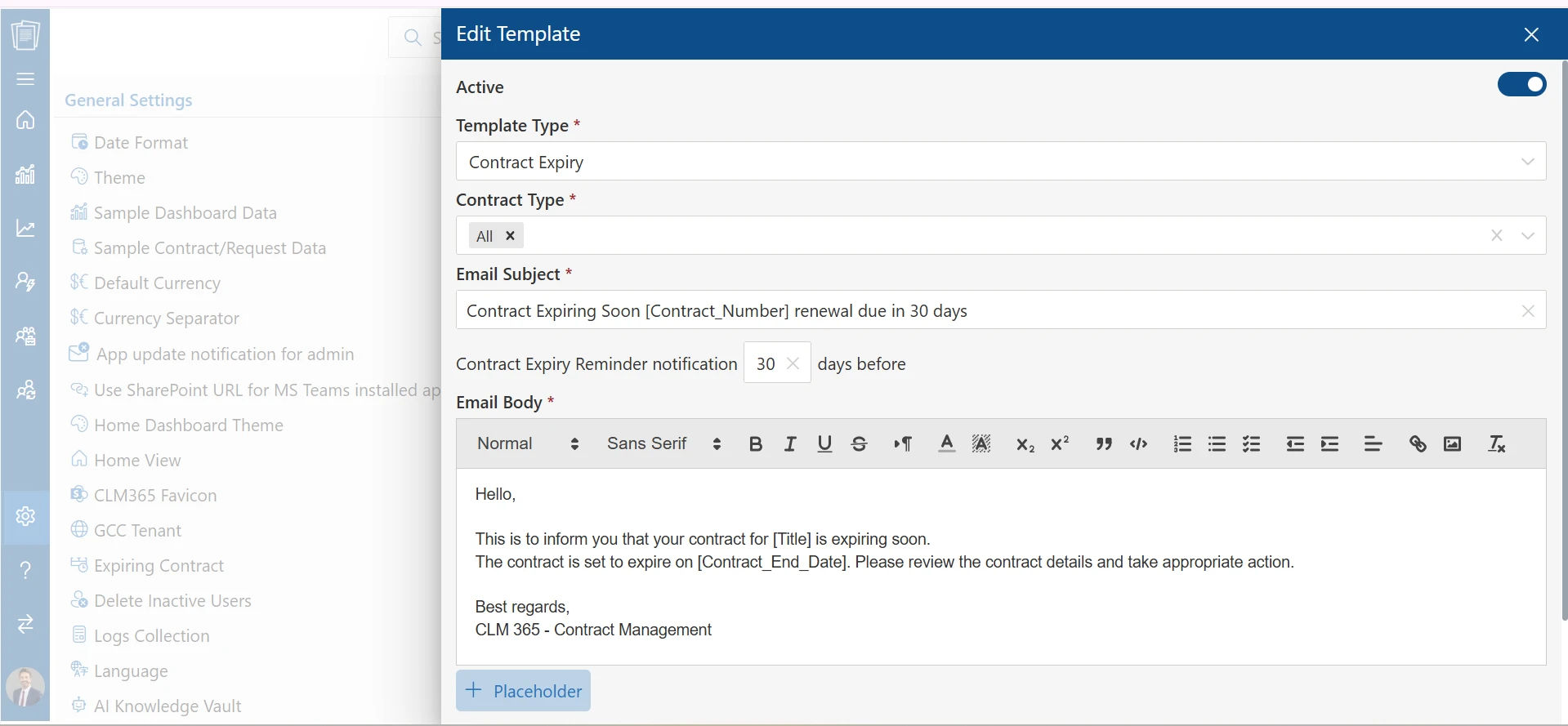
Here is a simplified version of how it works in practice:
Step 1: You upload a vendor agreement to the platform
Step 2: The software reads the document and pulls out the renewal date, notice period, and contract value
Step 3: You confirm or adjust those details
Step 4: The system schedules alerts typically 90, 60, 30, and 7 days before the renewal
Step 5: The right people on your team receive notifications with enough time to review, renegotiate, or cancel
The key word in that process is “enough time.” A 7-day alert for a contract that requires 30 days’ notice is useless. Good contract reminder software lets you set lead times that match the actual requirements of each agreement.
Why Manual Renewal Tracking Break Down?
Most teams start with a spreadsheet. It seems like enough a column for the vendor name, one for the contract deliverables, maybe a formula to flag rows turning red in 30 days.
The problem is not the spreadsheet itself. The problem is that spreadsheets require a human to keep them accurate. And humans are busy.
According to the Journal of Contract Management, 71% of companies cannot locate at least 10% of their contracts. That is not a data problem it is a process problem. And the financial cost is significant.
The categories of loss are predictable:
- Auto-renewals at inflated rates: Vendors are raising software prices by an average of 9% per year. If you do not flag the renewal window, you accept whatever rate they set.
- Missed cancellation windows: Most vendor agreements require 30 to 60 days’ notice to cancel. Miss that window and you are committed for another term.
- Compliance lapses: In regulated industries, missing a certification renewal or audit deadline does not just cost money. It can trigger fines, loss of licenses, or legal liability.
- Lost negotiation leverage: Showing up unprepared at a renewal with no data and no alternatives gives the other party all the power.
Know due dates in advance with automated alerts
What Does Contract Reminder Software Include?
It helps you stay on top of renewals, expirations, and other critical contract milestones with automated reminders and centralized contract tracking. Here’s how CLM 365 helps manage contract reminders.
Contract reminder renewal software helps you stay ahead of renewals, expirations, notice periods, and payment deadlines with configurable reminders sent automatically to the right stakeholders. Set multiple alerts for each contract based on your schedule and business needs, so your team can act before critical dates arrive.
If you must manually type in every renewal date from every contract, you have just traded one tedious task for another. AI extraction tools can read uploaded contracts and pull key contract metadata renewal dates, notice periods, payment terms, termination clauses with accuracy rates.
This matters especially when you are migrating an existing contract library. Manually entering data for 200 contracts is a multi-week project. With AI extraction, it takes days.
The alert is only useful if the person receiving it can immediately access the actual contract. If your contracts live in email threads, personal folders, or a shared drive nobody can navigate, the reminder just creates a new task: find the document. A central contract repository where every contract is stored alongside its metadata makes the entire reminder process functional.
Different people need different information. Procurement wants pricing context. Legal wants compliance terms. Finance wants budget impact. A good contract alerting software routes the right alert to the right person and escalates if no action is taken. If the primary contact ignores the 60-day reminder, the system should automatically loop in their manager.
Individual alerts are useful. A contract dashboard showing all upcoming renewals across your entire contract portfolio is strategic. It lets legal ops or procurement leadership see briefly what is coming in the next 90 days, prioritize by contract value, and allocate resources accordingly.
Never miss a renewal, avoid extra costs, and protect business relationships.
CLM 365 helps you track renewals, expirations, and key obligations with timely automated reminders, giving your team time to act before important dates arrive.
Benefits of Contract Reminder Software
Setting up reminders is only one part of managing contracts. To avoid missed deadlines and keep contracts up to date, it’s worth looking at how the software supports the entire contract lifecycle.
Contracts rarely stay the same after they’re signed. Amendments, renewals, extensions, and revised terms can change important dates throughout the contract lifecycle. Reviewing contract data regularly helps keep reminder schedules accurate and reduces the risk of relying on outdated information.
Receiving an alert is only the first step. Every reminder should trigger a clear follow-up process, whether that’s reviewing the agreement, contacting the vendor or deciding whether to renew or terminate the contract. Contract notification software is most effective when it results in timely action.
Many organizations already have years of active contracts stored across folders, emails, shared drives, or filing cabinets. Trying to organize every contract at once can quickly become overwhelming. A more practical approach is to prioritize high-value, high-risk, or soon-to-expire contracts first, then gradually expand to the remaining agreements.
Not every contract follows the same timeline. Some agreements include multiple renewal dates, notice periods or several stakeholders across different departments. A reminder system should be flexible enough to track these milestones individually, helping teams manage complex agreements.
Who Needs Contract Reminder Software?
The short answer is any business managing more than 10 to 15 active contracts.
But the specific use cases vary by team:
- Legal and legal ops teams use software to track compliance deadlines, regulatory review cycles, and obligation milestones across large portfolios. The goal is staying ahead of risk, not just renewal dates.
- Procurement teams use it to avoid auto-renewals at unfavorable rates, maintain leverage with vendors, and consolidate overlapping agreements when possible.
- Finance teams use it to forecast upcoming contract spend, flag unexpected renewals before they hit budgets, and track payment milestones tied to contract obligations.
- IT and SaaS operations teams manage subscriptions, software licenses, and SLA compliance. The average company now uses 110 different software applications, many with annual renewal dates scattered across the calendar. Without a reminder system, someone will miss one.
- HR and compliance teams track employment agreements, certifications, insurance renewals, and regulatory filing deadlines dates where missing a window has legal consequences.
Common Mistakes to Avoid While Renewing Contracts
Even teams that adopt contract reminder software sometimes undercut their own success. Here are the most common mistakes:
Setting one reminder per contract: A single alert 30 days out is almost never enough. By the time it fires, you may not have the notice period required to cancel. Always set multi-stage sequences.
Not assigning ownership: Reminders sent to a group email or a generic inbox get ignored. Every contract needs a named owner who receives the alert and is accountable for acting on it.
Ignoring contract amendments: When a contract is amended, the renewal date sometimes changes. If nobody updates the system, your reminder fires for the wrong date. Build in a process to update records whenever a contract is modified.
Skipping the repository: Some teams use reminder software without centralizing their contracts. The alert arrives, the recipient cannot find the contract, and the whole process stalls. The reminder and the document need to live in the same place.
Role of CLM 365 in Managing Renewals
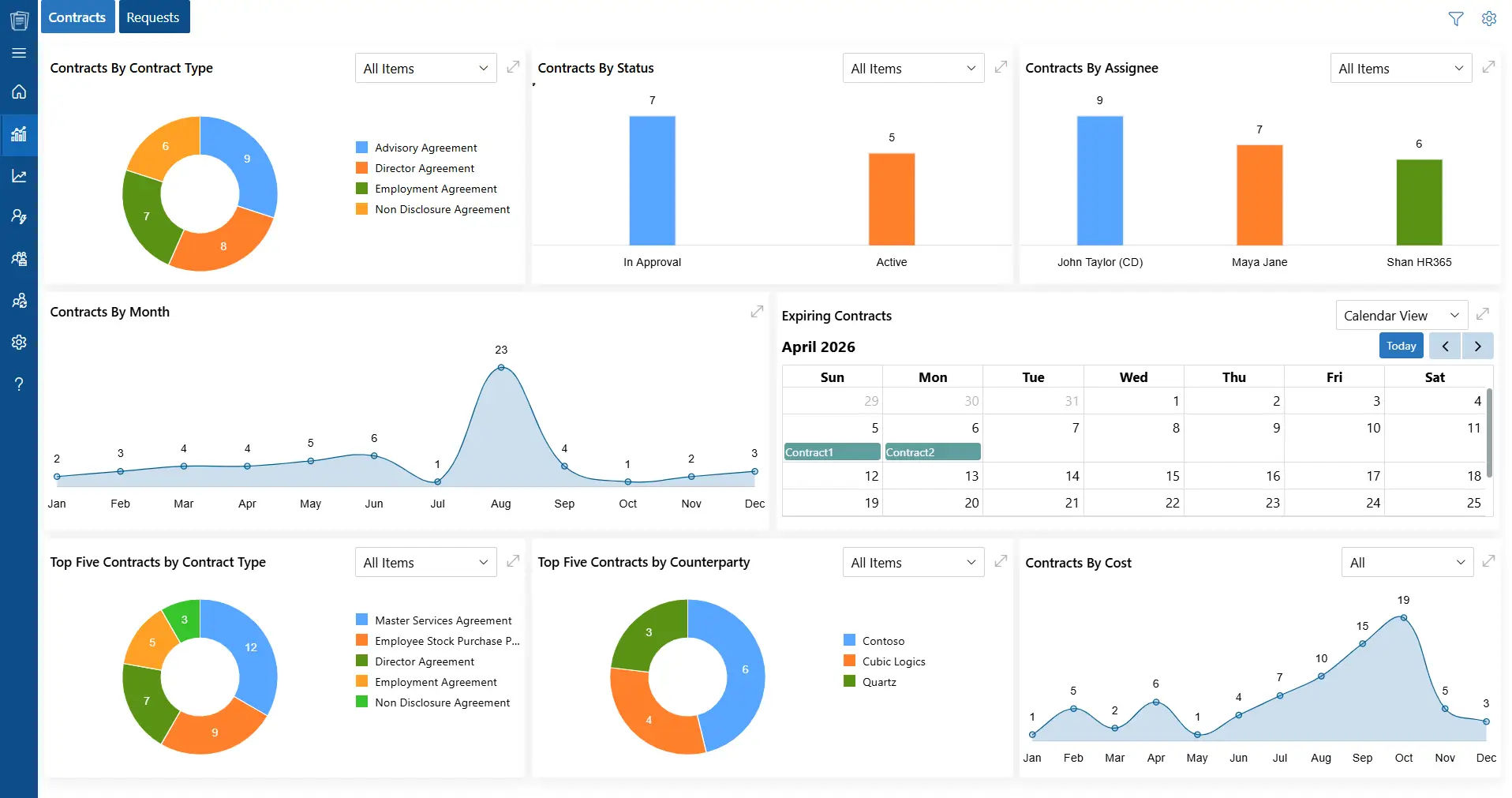
Renewals get messy when contract dates are buried across emails, spreadsheets, and different systems.
CLM 365 puts your contracts and renewal activity in one place. Since it works with Microsoft 365, your team can manage contracts using tools they already know.
Get timely alerts for upcoming renewals and important contract dates. See the status of your contracts from one dashboard, so you know what’s due, what’s active, and what needs attention.
And because CLM 365 works with Microsoft Teams and Outlook, your teams can collaborate without constantly switching between tools.
CLM 365 is SOC 2 compliant, ISO certified, Microsoft certified, and recognized as a Microsoft Solutions Partner. giving businesses a trusted environment for managing contracts.
CLM 365 applications are also available on Microsoft GCC and GCC High, helping organizations meet stringent government security and compliance requirements.
The result? Fewer missed dates. Less last-minute chasing. And a clearer view of every contract renewal.
Conclusion
A good contract reminder system does more than send alerts. It helps your team catch renewals, avoid missed deadlines, and stay on top of every contract.
CLM 365 brings reminders, renewals, expirations, approvals, and contract documents into one place—so you know what’s due and when.
Ready to stop chasing contract dates? Schedule a demo of CLM 365.
Frequently Asked Questions
Can contract reminder software notify multiple people for the same contract?
Yes. Most contract reminder solutions allow reminders to be sent to multiple stakeholders, such as legal, procurement, finance, department heads, and contract owners. This reduces the risk of missed notifications if one person is unavailable and improves accountability across teams.
Can I create different reminder schedules for different contract types?
Yes. Organizations often use different reminder timelines based on contract value or complexity. For example, a vendor agreement may require reminders 90, 60, and 30 days before renewal, while software subscriptions may only need a 30-day reminder. Custom reminder schedules allow each contract to follow its own review process.
Can contract reminders be triggered before the notice period instead of the expiry date?
Yes. Many organizations configure reminders based on the notice period rather than the contract end date. For example, if a contract requires a 60-day notice before termination, the reminder is triggered before the notice deadline, ensuring there is still time to act without breaching contractual terms.
What information should a contract reminder include?
A useful contract reminder should include more than just the expiry date. It should provide the contract name, vendor or customer, renewal date, notice period, contract owner, renewal value, status, and a direct link to the agreement. Including this context helps stakeholders make faster decisions without.
Table of Contents

Trusted by the Best

_JiluXJRGNl.svg)























