

Contract Change Management: Best Practices to Implement

A signed contract is not the end of negotiation; it is the start of managing what happens when reality changes.
- Contract change Management controls how post-signature changes are requested, reviewed, approved, and tracked so the operative agreement always reflects current business terms.
- Weak change control creates version confusion, unauthorized commitments, missed downstream updates, pricing disputes, and obligations that teams may not realize have changed.
- Every proposed amendment should be assessed for legal, financial, operational, compliance, and dependency impacts before approval, not after execution.
- A centralized CLM process improves visibility by connecting amendments, approvals, versions, obligations, and audit history to the original contract.
Contract change management gives teams a controlled way to update terms, scope, pricing, timelines, obligations, and responsibilities without losing track of what was originally agreed.
When those contract amendment stay in emails or verbal approvals, the signed contract can stop matching the real commercial relationship.
That gap is expensive. World Commerce & Contracting reports average contract value erosion of 8.6%.
This guide explains why signed agreements change, common amendment types, major risks, an eight-step process, best practices, and how CLM 365 supports controlled updates.
What Is Contract Change Management?
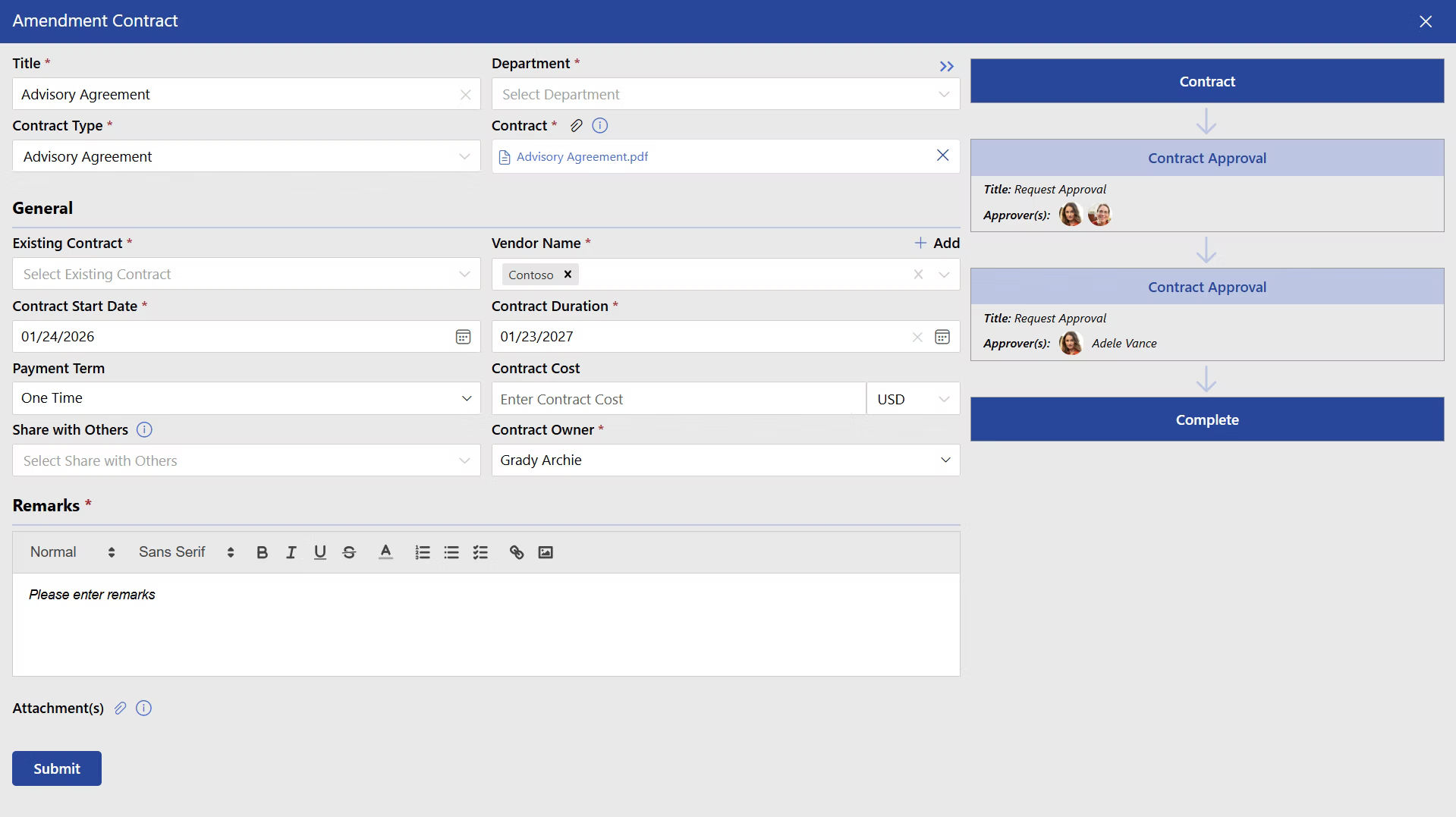
Contract change management is the structured process used to control modifications to an agreement after it has been signed. It covers the full path from identifying a needed change to assessing its impact, obtaining approvals, negotiating business contracts, executing the amendment, and updating the contract record.
Example:
Consider a software services agreement with a $200,000 annual fee. Six months later, the customer adds 400 users. Sales agrees a new price by email, finance invoices the old amount, and legal never updates the agreement. Everyone believes the commercial change is understood, yet the signed contract says something different. That is exactly the type of failure Contract Change Management is designed to prevent.
How Does Contract Change Management Work?
Contract change management process follows a structured process to ensure every modification is reviewed, approved, documented, and reflected across business operations.
Step 1: Submit a Change Request
A business user submits a contract request describing the proposed contract change and the reason for making it.
Step 2: Review the Existing Contract
The contract owner checks whether the requested change is permitted under the existing agreement and determines whether an amendment, change order, or Statement of Work update is required.
Step 3: Assess the Impact
Relevant teams evaluate how the change could affect the business. Legal reviews risk and enforceability, Finance assesses pricing and budget implications, Procurement evaluates supplier impact, Security reviews data obligations, and Operations confirms delivery requirements.
Step 4: Route for Approval
The proposed change moves through the required contract approval workflow. Stakeholders review the request and provide their approval or feedback.
Step 5: Negotiate and Finalize the Change
Once approved, the parties negotiate the revised terms, finalize the wording, and execute the amendment or other change document.
Step 6: Link the Change to the Original Contract
The executed contract change management process is connected to the original contract so teams can easily understand what was changed and which terms are currently applicable.
Step 7: Update Downstream Systems and Records
Relevant information is updated across billing, renewal reminders, operational processes, reporting, and other systems. This prevents outdated contract terms from being used after a change is approved.
Step 8: Track the Updated Obligations
Teams monitor the revised terms, deadlines, pricing, SLAs, and other obligations throughout the remaining contract lifecycle.
This makes contract change management both a legal review process and an operational process, ensuring approved changes are reflected across the business.
Why Contracts are Changed After Getting Signed?
Signed contracts change because business conditions rarely remain fixed for the full contract term. Longer, more complex agreements are more likely to have their assumptions tested. Common reasons include.
- Scope changes: A customer requests additional products, locations, users, deliverables, or services that were not included in the original scope.
- Price adjustments: Inflation, volume changes, index-based pricing, currency movement, material costs, or renegotiated discounts can require commercial updates.
- Timeline changes: Delays, dependency failures, implementation issues, or revised business priorities may move delivery dates and milestones.
- Regulatory requirements: New privacy, cybersecurity, tax, industry, or reporting rules may require existing terms to be amended.
- Performance issues: Repeated SLA failures may lead to revised service levels, credits, remediation plans, or termination rights.
- Organizational changes: Acquisitions, restructuring, entity changes, new contacts, or assignment to another company can affect contractual responsibilities.
- Risk reallocation: Parties may renegotiate indemnities, liability caps, insurance requirements, warranties, or security obligations when the original risk profile changes.
- Relationship extensions: Renewals, term extensions, added statements of work, and expanded partnerships often change the commercial framework.
Different Types of Contract Changes
Contract change management process can take different forms depending on the terms being modified and the reason for the change. Here are the common types of contract changes businesses manage:
Contract Amendments
An amendment formally changes one or more provisions of an existing contract. It may revise pricing, liability, term length, notice periods, responsibilities, or another negotiated clause.
Change Orders
Change orders are common in construction, professional services, implementation, and project-based agreements. They usually modify scope, cost, resources, schedule, or contract deliverables while leaving the main contract in place.
Statements of Work Updates
A master agreement may remain unchanged while an SOW is revised to reflect new deliverables, milestones, staffing, assumptions, or acceptance criteria.
Renewals and Extensions
A renewal can do more than extend an expiry date. Parties may also renegotiate fees, service levels, notice periods, or volume commitments.
Administrative Changes
Some updates are low risk, such as changing an address, owner, billing contact, or notice recipient. They still need documentation because small errors can affect notices and invoices.
Regulatory or Compliance Changes
New laws or customer requirements can trigger amendments to privacy, security, data processing, audit, accessibility, or record-retention terms. Contract change management should classify these changes by risk so routine updates do not face the same approval burden as amendments.
Need a simpler way to manage contract changes?
CLM 365 helps your team handle change requests, approvals, amendments, and updated contract terms in one place.
Challenges Involved During Contract Change
The biggest problems appear when an organization treats a contract change management as document editing instead of a controlled business decision.
No clear ownership: Sales assumes legal owns the amendment. Legal assumes procurement is coordinating it. Finance hears about the new price only after an invoice is challenged.
Version confusion: A team saves “final_amendment_v7” in email while another person edits “final_v6_signed.” Nobody is certain which wording was approved.
Unauthorized changes: A project manager may promise extra work or a new deadline without authority to change contractual commitments.
Incomplete impact analysis: Teams revise one clause without checking linked provisions. Extending a delivery date, for example, may also affect payment milestones, acceptance testing, service credits, warranties, and renewal dates.
Slow approvals: Changes wait in inboxes because no one knows who must approve a financial, legal, or operational exception.
Poor auditability: Months later, the company cannot explain why a term changed, who approved the exception, or when the counterparty accepted it.
8 Steps to Manage Contract Changes Effectively
Managing contract changes effectively requires a clear process to review, approve, document, and track every update. Here are eight steps to follow:
Step 1: Submit a Formal Change Request
Start with a written request that clearly explains what needs to change and why. Include the contract ID, requester, urgency, affected clauses, and required date.
Step 2: Review the Existing Contract
Review the signed agreement, previous amendments, SOWs, and change-control terms. The contract management solution helps confirm whether the requested change follows the existing agreement.
Step 3: Assess Business and Legal Impact
Consider how the change may affect pricing, costs, liability, compliance, security, deadlines, and service delivery before moving forward.
Step 4: Assign the Right Reviewers
Route the request to the right teams based on the type of change. Legal, Finance, Procurement, Security, and Operations may need to review different changes.
Step 5: Draft and Negotiate the Change
Prepare the amendment with clear language showing what is being added, removed, or replaced. Record important decisions made during negotiations.
Step 6: Obtain Internal Approval
Get approval from the required stakeholders before signing. Review the final version to make sure it matches the terms that were approved.
Step 7: Execute and Link the Amendment
Collect the required signatures, confirm the effective date, and store the signed amendment with the original contract. Maintain the version history for future reference.
Step 8: Update Contract Records
Update pricing, deadlines, renewal dates, obligations, and other relevant records to reflect the new terms. This helps teams work with the latest contract information.
Best Practices for Contract Change Management
Effective contract change management requires discipline before, during, and after every amendment.
- Define change authority in advance: Document who can request, review, approve, negotiate, and sign each category of change. Set thresholds for financial value, liability, term extensions, and nonstandard clauses.
- Use risk-based workflows. A contact-address update should not require the same approval chain as a major price increase. Classify changes as low, medium, or high risk and route them accordingly.
- Keep amendments connected to the parent contract. Never store a signed amendment as an isolated file. Users should see the base agreement, all later modifications, and the current controlling terms together.
- Maintain a complete audit trail. Record request dates, comments, approvals, redlines, decisions, signatures, and effective dates. This protects the organization during disputes, audits, and staff turnover.
- Check dependencies before approval. Build a checklist for connected clauses and systems. A price change may affect invoices and purchase orders. A term extension may affect insurance certificates and renewal reminders.
- Use approved amendment language where possible. Templates for common changes reduce drafting time and prevent teams from reinventing legal wording.
Role of CLM 365 in Managing Contract Changes
Contract change management process becomes harder when amendments are spread across inboxes, shared drives, spreadsheets, and local folders. CLM 365 brings contract records and change activity into the Microsoft 365 environment.
CLM 365 supports amendments, version control, multi-level approvals, audit trails, activity logs, role-based security, redlining, and contract repositories across Microsoft Teams, SharePoint, and Outlook.
Teams can keep amendments tied to contract records, preserve versions, route revised terms for approval, and maintain visible action history. Version control reduces the “which file is final?” problem, while audit trails show who changed or approved an item.
CLM 365 also supports obligation management, reminders, dashboards, and AI-based contract review features. Those capabilities matter after an amendment is signed because revised obligations, dates, and risks still need to be tracked.
Conclusion
Contracts should create control without preventing the business from adapting. The problem is not that agreements change; the problem is allowing changes to happen outside a governed process.
If your organization still manages contract change management through email chains, disconnected files, and manual reminders.
Explore CLM 365 or book a demo to see how controlled contract changes can fit into your existing Microsoft environment.
Frequently Asked Questions
What happens when a contract scope changes after signing?
The new scope should be documented through an amendment, change order, or updated SOW that clearly defines the revised deliverables, responsibilities, timelines, and costs.
What happens when two amendments change the same clause?
The later amendment may control if it clearly supersedes the earlier language, but ambiguity can create serious interpretation problems. Each new amendment should identify the exact section being changed, reference prior modifications where relevant, and state which wording remains effective.
How do you track who approved a contract change?
Approval records should capture the approver, approval date, decision, and version of the contract that was reviewed.
How do you manage changes to contract deliverables?
Update the relevant SOW or amendment with the new deliverables, responsibilities, deadlines, acceptance criteria, and pricing before the revised work begins.
How does an amendment differ from a new contract?
An amendment modifies an existing agreement, while a new contract creates a separate agreement with its own terms and effective dates.


_JiluXJRGNl.svg)























