

What Is a Contract Template & How It Helps While Drafting

A sales manager copies last year’s agreement, changes the customer name, and misses an old contract clause.
- A contract template is a controlled starting document, not a finished agreement or a substitute for legal judgment.
- Strong templates combine approved clauses, required business fields, optional wording, and clear drafting instructions.
- Ownership, version control, scheduled reviews, and exception approvals keep reusable agreements accurate.
- CLM 365 connects templates with a clause library, Word drafting, approvals, and SharePoint-based control.
A reliable contract template prevents that error from becoming an expensive dispute.
World Commerce & Contracting reports average contract-related value erosion of 8.6%, while almost 90% of business users find contracts difficult or impossible to understand.
This guide explains contract templates, required content, safe customization, and how CLM 365 supports controlled drafting.
What Is a Contract Template?
A contract template is a reusable framework for agreements of the same general type. It contains a standard structure, approved legal language, required fields, and instructions showing what must change for each deal.
Think of it as a clause library, not an autopilot system. The route covers parties, scope, payment, risk allocation, termination, and signatures. The drafter must still enter correct facts, choose suitable options, and identify unusual risk.
A useful contract template separates three content types:
- Fixed wording that requires approval before editing.
- Variable fields, such as names, dates, prices, and addresses.
- Optional clauses selected by value, location, data use, service model, or risk.
A contract downloaded online is not automatically an approved template. It may follow different laws, contain outdated terms, or favor the other party. Approved templates should have a clear owner, purpose, legal review, and regular updates.
Why Businesses Use Contract Templates?
Repeated drafting creates repeated opportunities for error. Without a controlled source, employees copy old files, search email attachments, or reuse the last agreement that closed quickly. That document may contain concessions intended for one customer.
Consider a procurement manager who copies a supplier agreement with 60-day payment terms when company policy requires 30 days. Finance discovers the mismatch only after invoices arrive. The problem is not effort; it is an uncontrolled starting point.
A contract template helps teams:
- Start with approved language instead of memory.
- Collect required deal information before review.
- Reduce routine corrections and negotiation loops.
- Apply consistent risk positions across departments.
- Explain fallback terms when counterparties object.
- Train new employees through visible guidance.
- Preserve institutional knowledge when experienced staff leave.
The main benefit is controlled speed. Sending a contract draft one day earlier has little value if it names the wrong entity, promises an impossible service level, or accepts liability the business cannot carry.
What Should a Contract Template Include?
Content varies by agreement, but every contract template should lead the drafter from business facts to legal terms and signature.
Template Identity and Use Rules
Include the name, contract family, owner, version, approval date, review date, and permitted use. A precise rule might say: “Use for United States software subscriptions below $100,000 annually where no regulated health data is processed.”
This rule prevents a low-risk sales form from being used for a high-risk project. Any internal control information should be removed before the contract is signed.
Add escalation notes beside sensitive fields. A pricing threshold might require contract approval, while a transfer of customer data may require privacy and security review. The drafter should know both the preferred answer and who can approve another one.
Parties, Dates, and Definitions
Provide fields for each party’s legal name, address, effective date, and notice details. Avoid “Company” when several affiliates could perform.
Define repeated or specialized contract terms. Delete unused definitions after editing; leaving an orphaned term creates confusion.
Scope, Deliverables, and Responsibilities
State each party’s tasks, owners, deadlines, and acceptance process. Put detailed contract deliverables, milestones, dependencies, and criteria in a statement of work.
“Provide implementation support” hides hours, travel costs, integration ownership, dependencies, and completion tests. Require measurable details.
Pricing, Payment, and Taxes
Cover price, invoicing triggers, payment deadline, currency, taxes, expenses, late-payment rights, and disputes. Match the order form or schedule.
Flag choices clearly. Subscriptions may use advance billing; consulting projects may use milestones. Combining both invites contradiction.
Term, Renewal, Suspension, and Termination
State start, duration, renewal, nonrenewal notice, suspension, contract termination, and exit duties. Teams often ignore the exit.
Operations may discover too late that data return is due in ten days or nonrenewal notice required 90 days. Make duties trackable.
Confidentiality, and Intellectual Property
Cover protected information, permitted use, exceptions, security, incident notice, retention, deletion, and lawful disclosure. Link the correct contract addendum.
Clarify ownership of existing intellectual property, new work, feedback, configurations, and licensed materials. Broad wording can accidentally transfer reusable tools.
Warranties, Indemnities, and Liability
State warranties, claim responsibilities, covered losses, the liability cap, exclusions, and exceptions.
A practical risk matrix can pair deal tiers with approved caps and fallbacks. For example, standard subscriptions may use fees paid during the prior 12 months, while a strategic customer request above that level moves to legal and finance.
Build a faster, more consistent contract process.
CLM 365 brings approved clause libraries, contract templates and drafting workflows, helping teams create accurate, compliant contracts with less manual work.
Types of Contract Templates for Businesses
Most organizations need a template family. Each form should match a repeatable transaction and risk.
Non-Disclosure Agreement Template
An NDA covers confidential information shared for a defined purpose. Choose one-way or mutual duties, duration, recipients, disclosure, and return or destruction. Do not use one NDA blindly. Source-code evaluation needs different controls from hiring discussions involving personal data.
Master Services Agreement Template
An MSA frames an ongoing relationship, covering payment, intellectual property, confidentiality, warranties, liability, disputes, and future SOWs. Keep changing project details in the SOW; mixing them with framework terms weakens reuse.
Statement of Work Template
A SOW defines one project. Include scope, deliverables, schedule, fees, assumptions, dependencies, acceptance, change control, and contacts. Replace “assist with migration” with systems, data volume, responsible parties, completion tests, and excluded work.
Sales, SaaS, and Service Agreement Templates
These documents support sales, subscriptions, maintenance, consulting, or managed services, with order forms, service levels, support, limits, and renewals. A SaaS contract template should address access, acceptable use, data handling, availability, support, and subscription metrics. A services form needs stronger scope and change-control detail.
Vendor and Procurement Agreement Templates
Procurement forms cover pricing, delivery, quality, security, audits, compliance, insurance, continuity, and supplier performance. Risk should follow the purchase. A caterer does not need the same security schedule as a provider accessing payroll records.
Employment and Independent Contractor Templates
Employment agreements cover role, pay, confidentiality, inventions, restrictions, and termination. Contractor forms address services, fees, taxes, ownership, and status. Wording cannot fix a misclassified relationship. The document must match how the person works.
Licensing, Partnership, and Specialized Templates
Other needs include licenses, reseller agreements, distribution agreements, referral arrangements, partnership contracts, leases, data addenda, amendments, renewals, and termination notices. Unusual or heavily negotiated transactions need closer legal review. A template can organize the first draft, but it should not force a novel deal into routine terms.
How Contract Templates Simplify Contract Creation?
Contract creation is harder when the drafter must invent structure and language together. A contract template removes the blank-page problem, prompts for missing facts, and supplies approved wording for common positions.
The first draft improves immediately. Legal receives the correct entity, pricing model, data classification, service description, and clause set. Review can focus on exceptions rather than rebuilding the document.
Templates also support automation. Intake answers can populate names, dates, fees, renewal periods, and addresses. Rules can add a security schedule when personal data is involved or require senior approval when liability exceeds policy.
In a 2024 Thomson Reuters survey of more than 2,200 legal, tax, risk, and compliance professionals, respondents expected AI to save about four hours weekly within one year and 12 hours weekly within five years.
Such gains still require approved source language, reliable data, and human review. Faster drafting from a poor template spreads mistakes sooner.
How to Customize a Contract Template?
Customization should fit the deal without destroying trusted controls. Before changing a contract template, make a working copy and preserve the source identifier. That link lets reviewers trace which approved version started the negotiation.
1. Confirm the Transaction
Identify parties, services, geography, value, term, data, intellectual property, subcontractors, dependencies, and deadline. Do not edit while facts remain uncertain. A “standard NDA” request may later involve source code, changing access, security, and review needs.
2. Choose the Correct Version
Select the matching agreement. Check owner, status, approval date, jurisdiction, and version. Never trust a desktop copy. A reseller and referral agreement may both mention commission, but only one authorizes resale and direct customer contracting.
3. Complete Every Variable Field
Replace names, dates, amounts, addresses, notices, service levels, and placeholders. Use legal entities, not brands. Match signature blocks. Before sending, search for brackets, “insert,” “select,” “TBD,” questions, and highlights.
4. Select Approved Clause Options
Choose language matching contract risk, mutual or one-way confidentiality, fixed or automatic renewal, and the correct liability cap. Do not splice alternatives. A high-risk exception paired with a low standard cap creates an unintended position.
5. Align Schedules and References
Check exhibits, order forms, policies, service levels, data addenda, and SOWs. Confirm titles, versions, dates, and precedence. A main agreement promising 99.9% availability cannot quietly conflict with a schedule stating 99.5%.
6. Test Operational Fit
Test every promise. Security confirms incident timelines, finance approves billing and credits, and operations validates service levels. A contract template cannot rescue inaccurate commitments. Drafting tests promises instead of merely describing them.
7. Approve and Record Exceptions
Mark deviations, route each exception by subject and risk, then record the decision. The record prevents repeated debate and reveals clauses that regularly fail.
After approval, produce a clean comparison against the starting contract version. This final check catches accidental edits outside the negotiated points and creates a useful audit record.
How to Create a Contract From a Built-In Template?
A built-in template may sit in Microsoft Word, a document portal, or contract lifecycle management software. Use this controlled process.
- Open the approved library, not a recent-deals folder.
- Select contract type, region, business unit, and risk tier.
- Read the use rule and confirm the transaction fits.
- Enter party, scope, price, date, renewal, and contact data.
- Generate the document with approved fields and clauses.
- Review prompts, definitions, cross-references, and attachments.
- Ask operational owners to confirm their commitments.
- Route deviations through required approvals.
- Send the controlled draft for review and redlining.
- Resolve changes and create a clean execution copy.
- Obtain signatures from authorized representatives.
- Store the signed agreement with metadata, obligations, dates, and history.
In Word, begin with File, New, then the company template. In a CLM system, a guided form may assemble the agreement. The tool changes; governance does not. Never overwrite the master contract template. Generate a copy, protect approved sections where practical, and preserve the source version used.
How to Manage and Reuse Contract Templates?
A template library needs governance after launch. Without ownership, teams create local copies and circulate files named “FINAL_v7_updated_USE_THIS_NOW.”
Keep one approved source for every active contract template. Assign an owner, administrator, and subject reviewers. Record version, jurisdiction, approved use, effective date, and next review.
Apply these rules:
- Limit editing rights for master files.
- Let users generate copies without changing the source.
- Archive retired versions and block new use.
- Review after legal, product, policy, dispute, or audit changes.
- Tag by type, region, language, business unit, data risk, and value.
- Track the source template and clause versions.
- Measure turnaround, deviations, approval delay, fallback use, and post-signature issues.
A successful negotiated contract is not automatically a new standard. It may contain a discount or concession approved for one deal. Promote wording only after review.
A good contracting process starts with good templates
Start with approved templates and clauses to draft contracts faster and keep every agreement consistent.
Common Mistakes When Using Contract Templates
Templates reduce risk only when used correctly. The issue is false confidence. People see familiar headings and assume the document is safe, even when deal facts, schedules, or copied edits have changed the risk.
Using One Form for Every Deal
A domestic service form may not fit a global data arrangement. Create separate paths for distinct risks.
Copying an Executed Contract
Signed agreements contain concessions. A salesperson may copy one liability exception for every prospect. Start from the master.
Leaving Placeholders or Notes
Blank fields, brackets, comments, and highlights may change meaning. “Termination notice: [30/60/90] days” is incomplete.
Breaking Defined Terms
Changing “Services” to “Platform” unevenly damages cross-references. Check defined terms and capitalization after major edits.
Ignoring Conflicting Documents
Order forms, policies, schedules, and SOWs often disagree. Check precedence, price, dates, service levels, and responsibilities.
Dismissing Boilerplate
Assignment, waiver, notices, and governing law affect real events. Acquisitions may need consent; termination may fail after misdirected notice.
Using Outdated Terms
Privacy rules, sanctions, products, insurance, and policies change. Update the contract template when service, law, or risk changes.
Accepting Unapproved Concessions
Under quarter-end pressure, a negotiator may accept unlimited liability. Route protected clauses to named approvers.
Trusting Automation Without Verification
Tools can insert wrong data, while AI may conflict with policy. Require human review for liability, regulated data, intellectual property, and execution.
Forgetting Post-Signature Duties
Signed agreements create renewals, reporting, price changes, credits, and notice windows. Capture obligations immediately.
Contract Templates vs. Creating Contracts from Scratch
Contract templates and custom contracts serve different purposes. Templates provide a faster and more consistent way to handle routine agreements, while contracts created from scratch offer greater flexibility for complex or unique transactions.
Contract Templates | Creating Contracts From Scratch |
Best for repeatable and routine transactions. | Best for complex or one-off transactions. |
Most terms are predictable and risks are already understood. | Terms, risks, or requirements may be unusual or uncertain. |
Common examples include NDAs, subscriptions, purchases, and recurring SOWs. | Common examples include joint ventures, acquisitions, major outsourcing, and unique data partnerships. |
Provides speed, consistency, and standardization. | Provides greater flexibility and customization. |
Uses pre-approved clauses and business terms. | Requires more extensive legal review and drafting. |
Best when: the transaction is low-risk and follows an established pattern. | Best when: the transaction is strategic, regulated, cross-border, or high-risk. |
Templates provide speed, consistency, and institutional knowledge. Fresh drafting provides flexibility. Let complexity and consequence drive the choice.
How CLM 365 Clause Library Helps While Drafting Contracts?
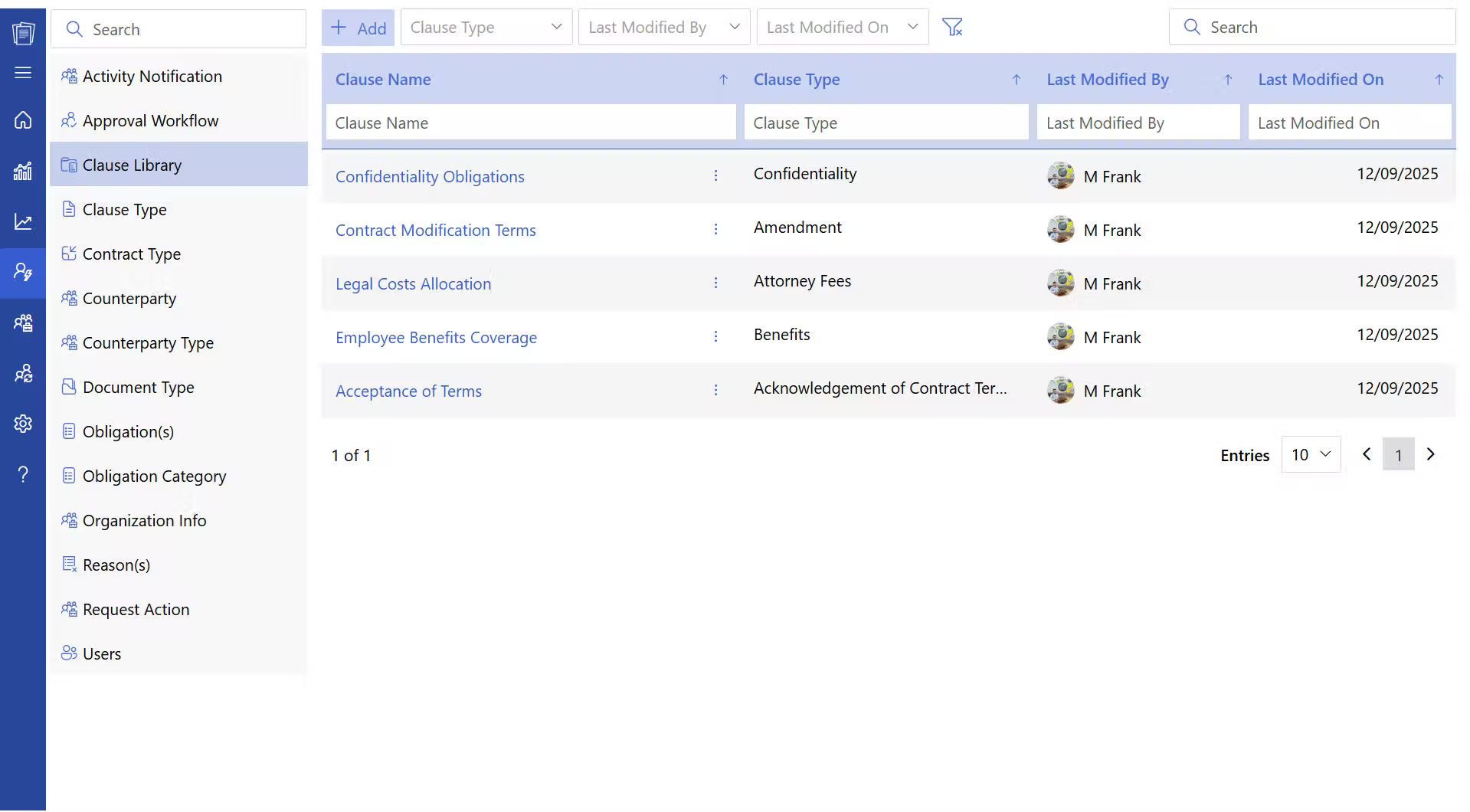
The hardest problem is not creating the first approved template. It is keeping every drafter on current language after months of negotiations, policy changes, and local copies.
CLM 365 addresses that problem within Microsoft 365. Its clause library provides organized, ready-to-use, pre-approved clauses that teams can tag, search, adapt, and reuse across contract types. It also supports template control, Microsoft Word redlining, approval workflows, and a SharePoint-based repository.
A practical flow looks like this:
- The requester selects an approved contract template.
- Required business information is captured before drafting.
- The drafter inserts the approved clause for the risk.
- Legal reviews exceptions instead of standard paragraphs.
- Counterparty edits remain visible in Word.
- Approvals follow the agreed route.
- The executed agreement and history stay in the repository.
Suppose a customer rejects the standard liability cap. Without a clause library, sales may copy language from an old enterprise deal. With CLM 365, the team can find the approved fallback and send a true exception to legal.
This is not robotic contracting. The system manages approved building blocks and records; people decide facts, tradeoffs, and risk.
Conclusion
Start with your most common agreements. Give each template an owner, use rule, clause set, approval path, and review schedule. Retire uncontrolled copies, then track errors, negotiation loops, and missed duties.
CLM 365 brings that model into Microsoft 365 through controlled templates, a reusable clause library, Word-based review, approvals, and centralized SharePoint records. Give employees one trusted place to draft, negotiate, approve, and retain agreements instead of rebuilding them from old email attachments.
Book a CLM 365 demo to see how stronger contract creation can reduce avoidable surprises from request through signature.
Frequently Asked Questions
When should a business use a contract template?
A business should use a template when the transaction is repeatable, the risks are understood, and the terms are largely predictable. Common examples include NDAs, standard subscriptions, routine purchases, and recurring SOWs.
Should every contract use the same template?
No. Different transactions may require different templates based on the parties involved, transaction type, risk level, jurisdiction, and commercial terms.
How can templates reduce contract negotiation time?
Templates establish approved starting positions, reduce repetitive drafting, and give counterparties a consistent set of standard terms to review.
How do contract templates improve consistency?
They ensure that similar transactions start with the same approved clauses, definitions, commercial structures, and risk positions.
Can a contract template be used as the first draft?
Yes. An approved template can provide the initial structure and standard language, which can then be adapted to the specific transaction.


_JiluXJRGNl.svg)























