
What Is Contract Drafting | Complete Guide for Businesses (2026)

Whether you are a freelancer writing your first service agreement or a legal team managing hundreds of deals, drafting a contract is one of the most important skills you can have. A poorly drafted contract can cost you money, damage relationships, and land you in court. A well-written one protects everyone involved.
- Learn how contract drafting helps businesses create clear and legally strong agreements
- Identify the essential elements you should include in every professional contract
- Avoid common contract drafting mistakes that often create disputes and confusion
- Follow proven best practices to draft accurate and enforceable agreements
Yet most people still approach contract drafting the same way they always have copying old templates, guessing at legal language, and hoping nothing goes wrong.
That approach no longer holds up in a business world where contract volumes are rising fast and the stakes of getting it wrong are higher than ever.
What Is Contract Drafting?
Contract drafting involves creating a legal agreement that clearly defines the terms, responsibilities, and obligations between two or more parties. It puts the terms of a deal into a formal written document who does what, by when, for how much, and what happens if something goes wrong.
Contract drafting covers a wide range of document types:
- Service agreements between businesses and contractors
- Employment contracts between companies and workers
- Vendor and supplier agreements
- Non-disclosure agreements (NDAs)
- Partnership and shareholder agreements
- Lease and licensing agreements
- Sales and purchase contracts
Each of these has its own structure and risks. But the fundamentals of good contract creation apply across all of them.
From NDAs to vendor agreements, draft every contract with clarity.
What are the Key Elements of a Contract?
Good contract drafting is about more than using formal language. Every solid contract draft needs to include specific elements that make it both clear and enforceable.
- Identification of the Parties
This section mentions who is involved in the agreement. It usually includes the full legal names of individuals or registered business names of companies so there is no confusion about who the contract applies to. - Scope of Work or Services
The scope of work explains what services, tasks, or deliverables are included in the agreement. In contract drafting, this section helps define project boundaries, timelines, and expectations clearly for both parties. - Payment Terms
Payment terms cover how much needs to be paid, when payments should be made, accepted payment methods, and other financial details related to the agreement. - Term and Termination
This part explains when the contract starts, how long it remains active, and under what conditions either party can end the agreement. - Intellectual Property Rights
Intellectual property clauses define who owns the work, designs, software, content, or other assets created during the contract period. - Confidentiality Clauses
Confidentiality clauses explain how both parties should handle private or sensitive information shared during the agreement. - Dispute Resolution
This section outlines how both parties will handle disagreements or legal disputes, including rules related to mediation, arbitration, orjurisdiction. - Signatures and Date
The signatures section confirms that both parties officially agree to the contract terms. It usually includes signatures, names, dates, and authorization details.
A well-drafted contract should clearly define the rights, responsibilities, and contract obligations of each party. While the clauses required depend on the type of agreement, most business contracts include several core provisions.
What Clauses Should a Contract Include?
A well-drafted contract should clearly define the rights, responsibilities, and obligations of each party. While the clauses required depend on the type of agreement, most commercial contracts include several core provisions.
- Parties and Definitions: Identify the parties entering the agreement and define important terms used throughout the contract.
- Scope of Work: Clearly describe the products, services, deliverables, responsibilities, and expectations of each party.
- Payment Terms: Specify pricing, invoicing requirements, payment deadlines, taxes, late-payment terms, and any applicable expenses.
- Term and Termination: State when the contract begins, how long it remains effective, and the circumstances under which either party can terminate it.
- Confidentiality: Define what information is considered confidential and how each party must protect and use that information.
- Intellectual Property: Establish who owns intellectual property created before or during the contractual relationship and what rights each party receives.
- Representations and Warranties: Set out the promises and assurances each party makes about its authority, performance, products, or services.
- Indemnification: Define when one party must compensate the other for specified losses, claims, damages, or third-party liabilities.
- Limitation of Liability: Establish limits on the types or amount of damages a party may be responsible for.
- Data Protection and Security: Address how personal, confidential, or business data will be collected, processed, stored, and protected where applicable.
- Dispute Resolution: Specify how disagreements will be handled, such as through negotiation, mediation, arbitration, or litigation.
- Governing Law: Identify the jurisdiction and laws that will govern the interpretation and enforcement of the agreement.
- Amendments and Notices: Explain how the contract can be changed and how formal notices must be delivered.
- Signatures: Include the necessary signature blocks and execution details to formally establish the parties’ acceptance of the agreement.
Not every contract requires every contract clause. The appropriate provisions depend on the agreement’s purpose, the parties involved, the industry, jurisdiction, and the risks associated with the relationship. Using an approved contract template can help teams start with a consistent set of relevant clauses and then customize them for each transaction.
Simplify contract drafting with ready-to-use contract templates
How Contract Templates Simplify the Drafting Process
Automated contract drafting helps businesses create agreements faster and manage contracts more efficiently as operations grow. Here is how it benefits businesses.
1. Create Contracts Faster
At the same time, legal teams are facing a 26% year-over-year rise in contract volume. More deals, more vendors, more complexity. Automated contract drafting helps businesses create agreements much faster by using ready-made templates and reusable clauses. Instead of writing every contract from the beginning, teams can generate documents with important details already included. This makes the contract drafting process quicker and easier for legal, sales, HR, and procurement teams.
2. Save Time on Repetitive Work
Many companies create similar agreements for vendors, clients, employees, and service providers. A good contract drafting workflow reduces repetitive manual work by allowing teams to reuse approved templates. This helps businesses spend less time editing the same information repeatedly.
3. Keep Contract Language Consistent
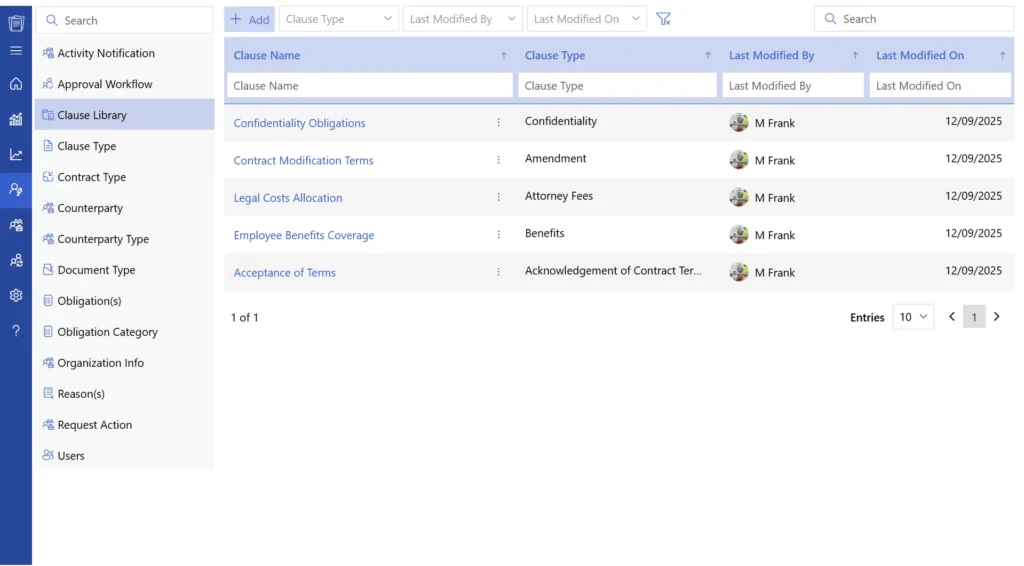
Contract drafting becomes more organized when teams use standardized templates and approved clauses. Automated contract management help businesses maintain consistent wording, formatting, and terms across all agreements. This creates a more professional contract drafting process throughout the company. Consistent contracts also improve communication and make agreements easier for everyone to understand.
4. Speed Up Reviews and Approvals
Automated contract drafting helps teams review and approve agreements more efficiently. Teams can access the latest contract versions, track edits, and move approvals through a structured workflow. This helps in faster contract approvals help businesses respond quickly to clients, vendors, and new opportunities.
5. Organize Contracts in One Place
Businesses often manage hundreds of agreements across different departments. Automated contract drafting software stores templates, drafts, signed agreements, and updated versions in one centralized location. This system helps teams access contracts in one secure place.
Draft, Store, Negotiate, and Sign Contracts in One Place
Common Contract Drafting Mistakes to Avoid
These are the problems that come up again on Reddit threads, in legal forums, and in real business disputes. If you are drafting a contract without a lawyer, these are the traps to watch out for.
1. Writing in Vague Language
Legal documents do not need to be full of jargon, but they do need to be precise. Words like “reasonable,” “timely,” “as needed,” or “best efforts” sound fine but mean different things to different people. Where possible, replace them with specific numbers, dates, and actions.
Instead of: “Payment will be made in a timely manner.” Write: “Payment will be made within 14 calendar days of invoice receipt.”
2. Ignoring Scope Creep
One of the most common complaints from freelancers on forums and communities is scope creep clients keep adding work without agreeing to pay more. The fix is a clear change request clause in your original contract drafting. Define what falls outside the contract terms and how new work will be priced and approved.
3. Using Templates Without Customizing Them
Downloadable contract templates are a good starting point. But using them without customizing for your specific situation is risky. A contract made for a US-based software company does not automatically work for a UK-based creative studio.
4. Skipping Termination Details
Many people write contracts that cover everything except how to end the relationship. Without a clear exit contract clause, you may be legally tied to a contract even when things go wrong. Always include notice periods and the conditions under which either party can exit.
5. Not Addressing What Happens When Things Go Wrong
This one is easy to skip because nobody wants to imagine the relationship failing. But a contract that does not cover disputes, delays, or failures leaves everyone exposed. At minimum, include a contract dispute resolution clause and a limitation of liability section.
Draft contracts directly from Outlook without switching between multiple tools
How to Draft a Contract Step by Step
Modern contract drafting software helps businesses create agreements faster by automating repetitive tasks like filling templates and storing contracts. Here are some best practices to implement.
Step 1: Define the Deal Before You Write Anything
Before you open a contract, have a clear picture of the agreement in plain language.
- What is each party giving?
- What are they getting?
- When does the work start and end?
- What are the payment terms?
Writing a contract draft is much easier when you have already answered these questions in plain terms. If you cannot explain the deal in two or three sentences, you are not ready to write it yet.
Step 2: Choose the Right Contract Template
Most contract drafting platforms offer ready-made templates for different business needs such as service agreements and software contracts. Using the right template helps businesses create contracts faster while keeping the agreement structure aligned with the type of relationship involved.
Step 3: Auto-Fill Contract Information
Automated contract drafting software can automatically populate business information, project details, dates, pricing terms, and approved clauses into the agreement. This reduces repetitive manual work and helps teams generate professional contracts more quickly.
Step 4: Review and Customize Important Clauses
Teams should review important contract sections carefully. Businesses may need to customize payment terms, project scope, approval timelines, intellectual property rights, or renewal conditions depending on the agreement.
Step 5: Approve and Sign Digitally
Once the contract is ready, businesses can send it through digital approval for review by legal, finance, HR, procurement, or management teams. This help businesses manage contract drafting, approvals, and contract signing.
Step 6: Store and Track Contracts
After signing, businesses can securely store contracts, amendments, and track contracts in one place. As businesses grow, centralized contract management makes it easier to manage larger contract volumes without slowing down operations.
Best Practices to Draft Contracts
Good contract drafting focuses on clarity, consistency, and risk management. These best practices can help teams create accurate, effective, and easier-to-manage agreements:
- Use clear and precise language: Avoid vague terms, unnecessary legal jargon, and ambiguous wording that could lead to different interpretations.
- Start with an approved template: Use standardized contract templates and pre-approved clauses to maintain consistency and reduce drafting time.
- Define roles and obligations clearly: Specify what each party must deliver, when it must be delivered, and the standards or conditions that apply.
- Address potential risks: Include appropriate provisions for liability, indemnification, confidentiality, intellectual property, termination, and dispute resolution.
- Maintain consistency throughout the contract: Use defined terms, numbering, dates, names, and cross-references consistently to prevent errors and contradictions.
- Review and validate every provision: Check the contract for missing information, conflicting clauses, incorrect references, and terms that do not reflect the intended business arrangement.
- Maintain version control: Track revisions, approvals, and changes throughout negotiation to ensure everyone is working from the correct version of the contract.
Difference Between Contract Templates vs. Drafting From Scratch
Businesses can create contracts using standardized templates or draft each agreement from the ground up. The right approach depends on the complexity, frequency, and specific requirements of the contract.
Contract Templates | Drafting From Scratch |
Start with a pre-approved structure and standard clauses. | Requires building the contract structure and clauses from the beginning. |
Faster for commonly used agreements. | Usually takes more time and effort. |
Promotes consistency across contracts. | Greater risk of inconsistent language and formatting. |
Can be customized for specific business requirements. | Provides maximum flexibility for unique agreements. |
Helps reduce repetitive drafting work. | Requires more manual drafting and review. |
Easier to standardize approved terms and clauses. | Requires teams to identify and validate appropriate clauses each time. |
Best suited for recurring or standard agreements. | Better suited for highly complex or unusual arrangements. |
For most recurring business agreements, templates offer a faster and more consistent approach, while drafting from scratch may be better suited to unique or highly complex contracts.
When Should a Lawyer Review a Contract?
Not every contract requires dedicated legal support. A simple freelance agreement for a small project may be manageable with a standard template or high-risk business deals often require professional legal review.
Here are situations where legal team assistance is worth considering:
- High-value deals where a drafting mistake could lead to significant financial risk
- Complex arrangements involving multiple parties, international jurisdictions, or unique business structures
- Employment agreements that must comply with location-specific labour regulations
- Intellectual property-focused deals involving ownership of software, creative assets, trademarks, or patents
- Mergers, acquisitions, or investment agreements that involve deeper legal and financial considerations
For everything in between, a well-structured template reviewed by a legal professional can provide a reliable foundation without the need to draft every agreement from scratch.
Why Choose CLM 365 for Drafting a Contract?
CLM 365 is built to work closely with Microsoft 365 apps like SharePoint, MS Teams, Outlook, MS Word, and MS Copilot. This makes it easy for teams to create, review, and manage contracts within the tools they already use every day.
The platform uses automation features to help speed up the contract drafting process and reduce manual work. With CLM 365 teams can also use ready-made templates and in-built clause libraries to create contracts with consistent language and fewer errors.
With agentic AI, teams can quickly review contracts, create summaries, and find important information using simple prompts or questions.
Conclusion
Contract drafting is not just a legal formality. It is the written record of what two parties agreed to and the thing that protects both if things go sideways.
The good news is that drafting a contract does not have to be expensive, slow, or intimidating. With CLM 365 and a clear understanding of what every strong contract needs, anyone can write agreements that hold up.
Start with clarity about the deal. Use specific language. Cover the uncomfortable scenarios. And store your signed contracts somewhere organized.
Frequently Asked Questions
What is the difference between contract drafting and contract review?
Contract drafting is the process of creating a contract from the beginning by adding clauses, terms, conditions, timelines, and responsibilities. Contract review happens after drafting, where teams check the agreement for risks, errors.
How do I draft an NDA contract properly?
To draft an NDA properly, clearly mention what information is confidential, who can access it, how the information can be used, and how long the confidentiality obligations will remain active. A good NDA should also include clauses related to data protection, exclusions, and actions in case of unauthorized sharing.
Can I draft contracts directly inside Outlook?
Yes. Many modern contract drafting and CLM platforms integrate with Outlook, allowing users to create, review, send, and manage contracts directly within their email workflow without switching between multiple applications
How do businesses store and search contracts easily?
Businesses use CLM to store contracts in a centralized repository. These platforms provide filters, keyword search, tagging, folder organization, and AI-powered search features to quickly find agreements.
Can multiple teams work on the same contract draft together?
Yes, Contract drafting software allows multiple teams to collaborate on the same contract through structured approval workflows, where contracts move from one approver to the next with proper tracking and version control.
Table of Contents

Trusted by the Best

_JiluXJRGNl.svg)























