

Contract Creation Software| Create, Sign, and Manage Contracts
Contract creation software uses automation to help businesses draft clear, accurate contracts while reducing manual effort and maintaining consistent language across all agreements.

Legal teams often handle large volumes of contracts, working through many rounds of revisions and multiple copies of the same document.
Keeping language consistent takes significant time and attention especially when a large portion of the work is done manually.
A good contract creation software supports legal teams by giving them a clause library, guided drafting steps, and a single location to manage all contracts.
Importance of Contract Creation Software
Contract creation software plays an important role in helping businesses produce correct, consistent contracts while reducing the time and effort that goes into writing them. Below are some of the key reasons this tool matters for modern legal and business teams.
1. Smooth Agreement Drafting
The contract creation software gives teams access to structured templates and pre-defined clauses. It supports legal departments in preparing contracts using approved language and consistent formatting.
Guided contract drafting steps let teams focus on important terms rather than spending time on document layout.
All contracts follow a similar structure, which makes reviews faster and more predictable.
2. Increased Efficiency and Speed
DocuSign reports that the cost of a contract may increase by 40% when contract management is handled poorly often because of delays in closing deals.
Contract creation software reduces time spent on drafting by offering ready-made templates and clauses to choose from, enabling teams to build contracts in less time. Faster drafting helps businesses cut down idle time in both the sales and legal cycle.
3. Better Collaboration
Legal, sales, procurement, and finance teams all play a role in building contracts, yet they often work without a shared system.
Contract creation software gives teams a common document workspace, where all stakeholders can manage and view contracts from one location.
The contract drafting software supports collaborative contract management and reduces communication gaps that often arise during contract creation.
4. Managing Obligations with Ease
Contracts frequently contain deliverables, renewal dates, payment terms, and assigned responsibilities. Manually tracking these details is time-consuming and easy to get wrong.
Contract creation software records obligations directly in the contract record so teams can review them without searching through old files.
This helps organizations stay aware of what every active contract requires from them.
5. Enhanced Visibility and Control
According to DocuSign, 42% of respondents say they are unable to locate a specific contract when they need it.
Contracts stored across emails and shared folders are difficult to find on demand. A contract creation software stores all agreements in a central contract repository, and document tracking tools help teams retrieve contracts quickly.
Legal teams gain better control over who can access contracts, which version is current, and where each agreement stands in the process.
Signs that Your Business Needs Contract Creation Software
There are clear signals that your organization may benefit from adopting a contract creation system. Here are the key signs to watch for when reviewing how your team currently handles contracts.
1. Slow Drafting Process
When teams spend too much time preparing each contract, overall business operations can fall behind. This not only affects productivity but also makes it harder to meet deadlines. A contract creation software helps organizations work at a better pace and avoid spending time on tasks that repeat themselves.
2. Lack of Contract Templates
Without pre-built templates, teams are often forced to build each contract from the beginning adding extra work each time. This can lead to differences between documents and wasted time that could be used elsewhere. A library of industry-relevant templates allows professional contract clause to be generated.
3. Version Drift
Contracts typically go through several rounds of edits, and tracking changes manually is difficult. Working across multiple contract versions can lead to teams working on different copies without realizing it. A structured contract creation software keeps everyone on the most up-to-date document, which makes working together much more effective.
4. Layout Inconsistency
Contracts that use different styles and layouts can appear unprofessional and may be harder to read and understand. Teams may also spend extra time adjusting layouts to match internal standards, which slows the overall process down. A well-designed contract creation software helps make sure every agreement is clean, polished, and consistent from one document to the next.
5. Centralized Storage
When contract files are scattered across local folders, email threads, or individual devices, finding the right version takes a long time. This kind of disorganization can disrupt the work process and hold up important approvals. Storing all contracts in contract creation software makes it easier and faster to share, review, and retrieve documents when needed.
Key Elements of Contract Creation
Below are the core elements involved in contract creation covering every stage from identifying the right counterparty to drafting, reviewing, and formally approving the agreement.
1. Requesting a Contract
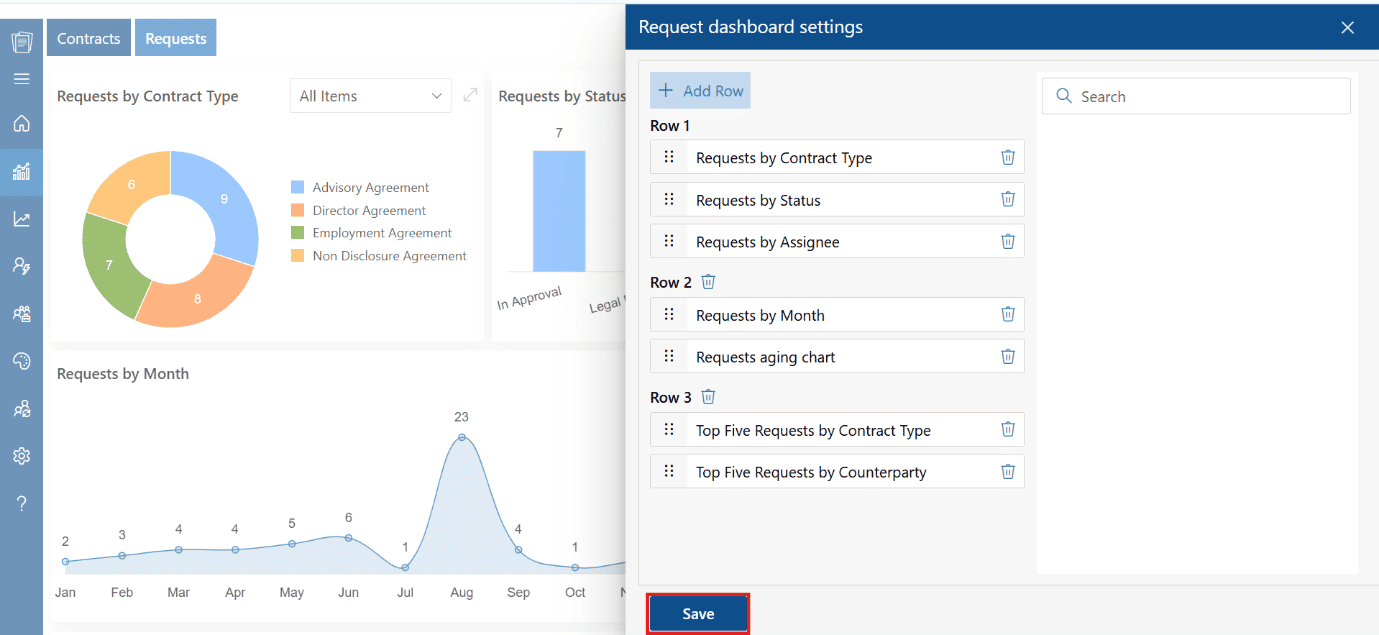
The contract creation process starts with a request that identifies the need for an agreement and gathers all the relevant information. At this point, the right counterparty is assigned to handle contractual obligations. Collecting all relevant details with contract creation software at the start helps guide the drafting process in the right direction.
2. Drafting the Contract
Drafting means turning the collected information into formal language that spells out the rights and responsibilities of all parties. The contract begins with identifying the parties involved, assigning the counterparty, and using the contract creation software to highlight important clauses. A well-written draft makes sure that obligations are clearly stated and practical to follow.
3. Review of the Contract
Internal teams including legal, finance, or management examine the document to check that it reflects the intended agreement. The assigned counterparty also studies the terms, and AI tools can assist in summarizing contract, identifying omissions, and flagging possible risks. This step brings all parties into alignment before moving forward.
Example: For example, Company A wants to review contracts from the past 3 years, an AI agent scans all documents instantly, identifies repeated clauses like payment terms, renewals, and liabilities, highlights inconsistencies or outdated terms, and helps standardize clauses to improve future contracts quickly.
4. Approval of the Contract
Approval is the final step. After all changes are accepted, the contract is formally approved through signatures from the relevant parties. A good contract creation software confirms that everyone including the counterparty understands their responsibilities and the agreement is ready to be executed. The approved contract must be stored properly so that it can serve as a reference point for future compliance reviews or audits.
Features of Contract Creation Software
A strong contract creation software offers a wide range of capabilities that keep the drafting process organized, efficient, and easy to manage. Here are some key features to consider.
1. Clause Library
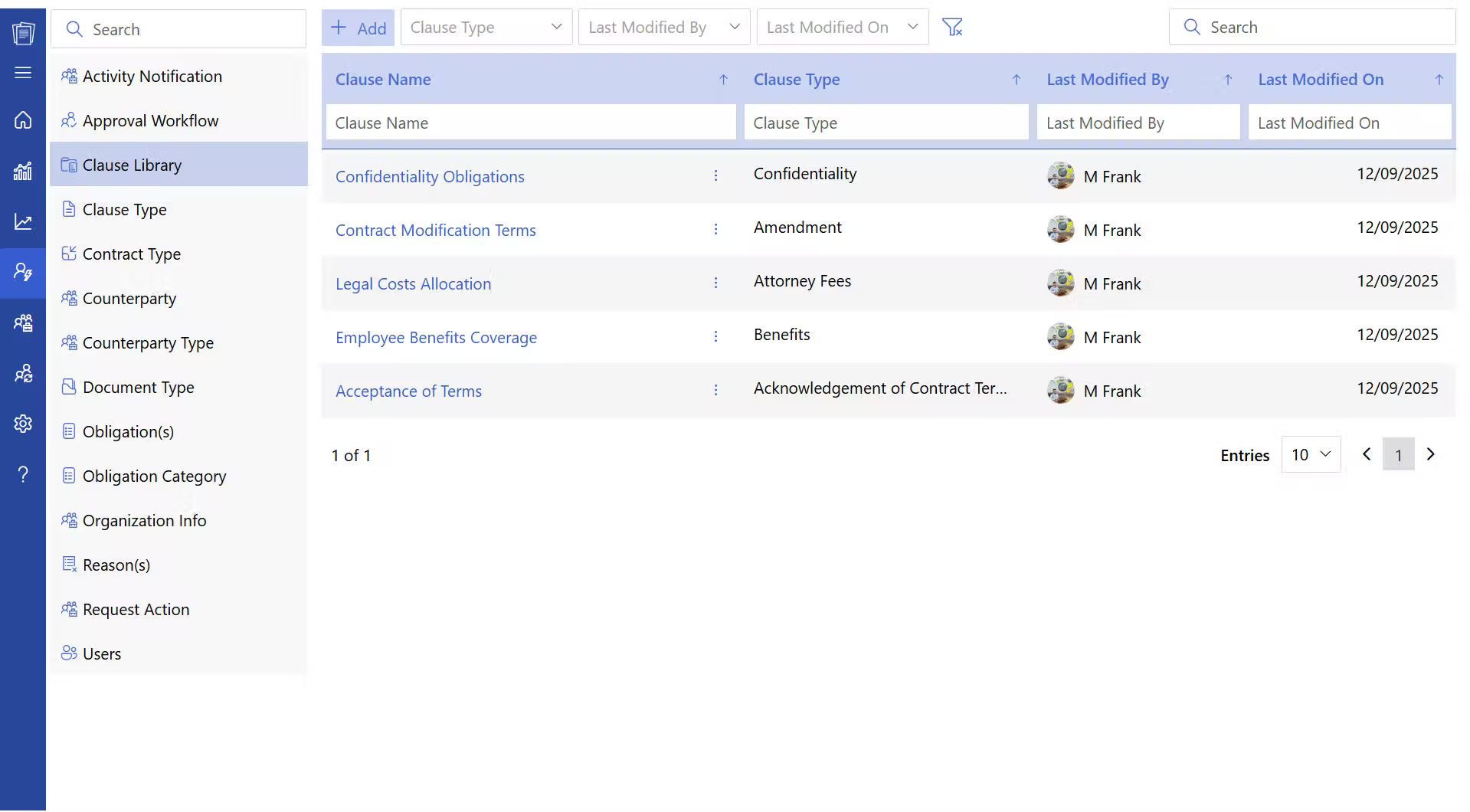
The contract creation software provides a library of standardized, pre-approved clauses that teams can reuse across different contracts. This allows users to add the right legal language quickly without writing it from scratch each time, saving effort and keeping wording consistent. Contract clauses can also be adjusted to fit specific agreements so that each contract covers the needs of the situation it addresses.
2. Contract Templates
The software provides pre-built clause templates for a wide range of agreements, including vendor contracts, service agreements, and NDAs. Users can choose the right template using contract making software for their needs and make targeted changes to align with the specific terms of the deal at hand. Templates provide a structured starting point, reducing the chance of missing important sections or clauses and saving time for every team involved.
3. Contract Creation
The contract creation software allows teams to build agreements from blank documents or to build on existing templates. Users can add, remove, or amend contract, sections, and terms directly within the system to record obligations clearly. The platform supports both simple and complex contracts, giving teams flexibility without sacrificing structure or accuracy.
4. AI-Powered System
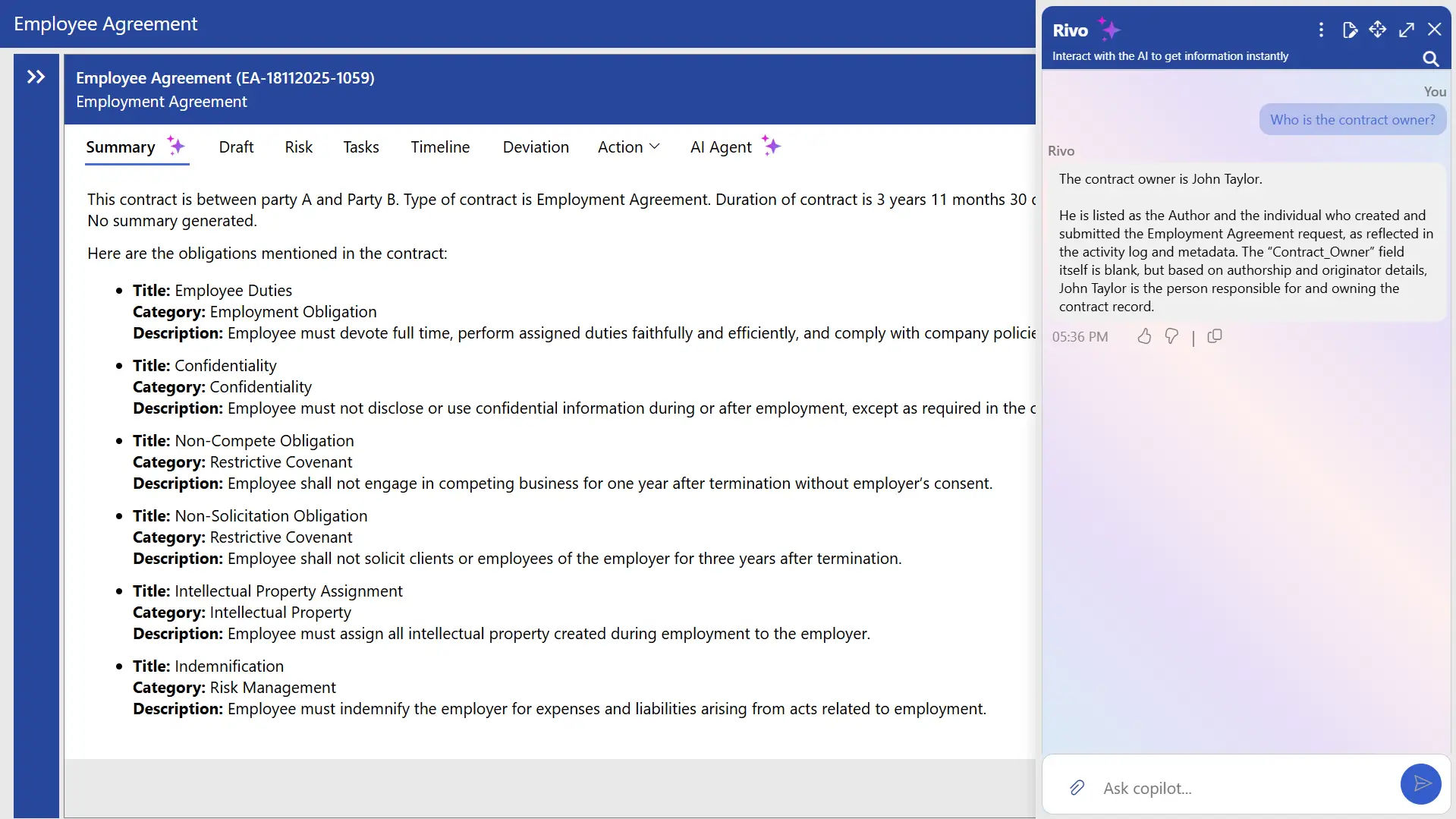
AI-powered contract lifecycle management reviews contract language, spots potential issues, and suggests improvements. A contract creation software can flag missing clauses, terms that conflict with each other, or language that carries risk giving teams time to address these issues before the contract moves forward. While AI provides direction and speeds up the process, human oversight is still needed to verify that contracts are legally sound and properly aligned with the business intent.
5. Approval Workflows
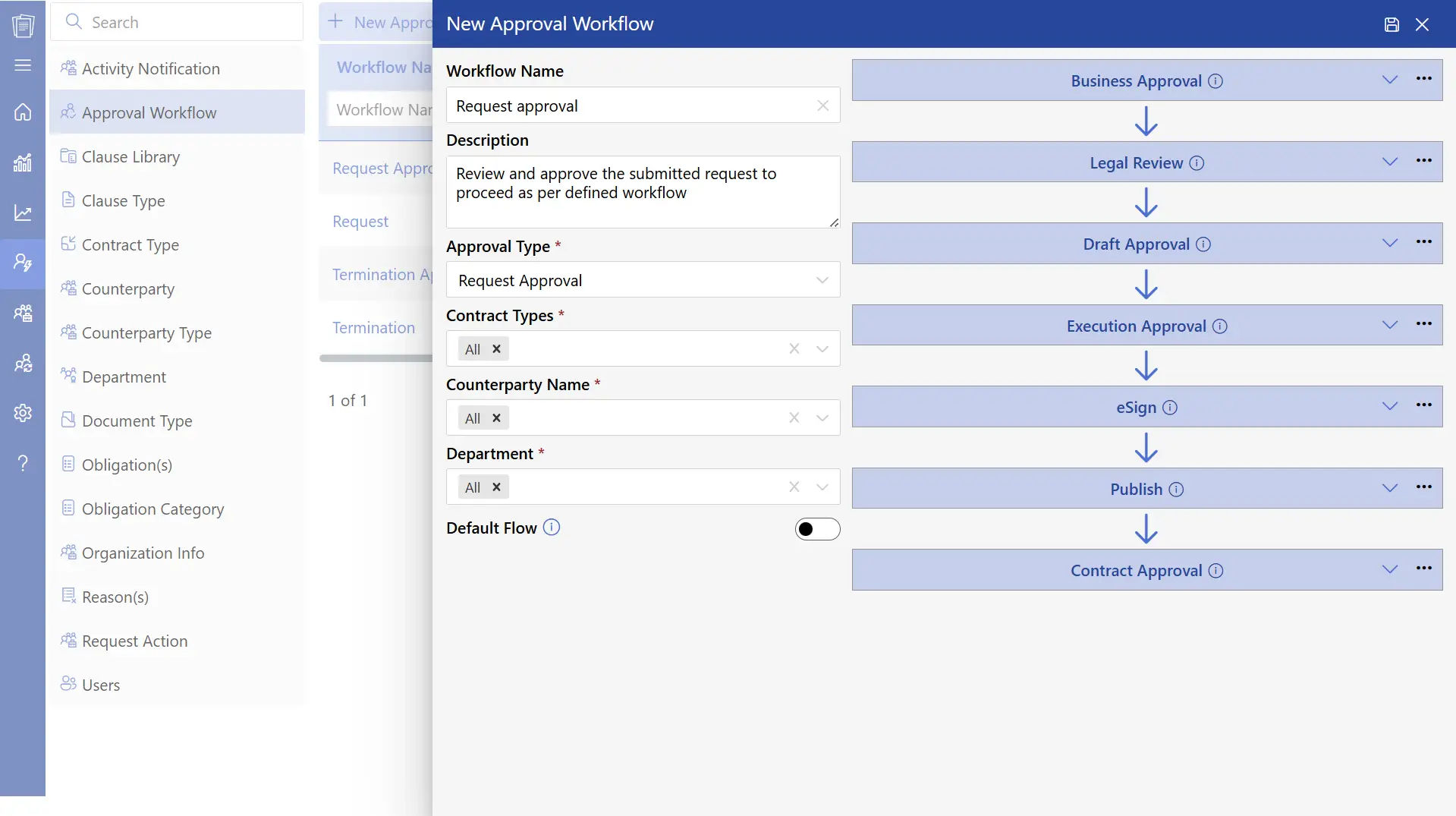
Approval workflows direct contracts through a defined review and approval process step by step. Research shows that up to 40% of a contract’s value can be lost due to poorly managed processes, which highlights the importance of having the right workflows in place. A contract creation software makes sure contracts pass through the relevant people in the right order before being finalized.
6. Contract Authoring
Contract authoring allows users to write detailed contracts directly within the platform. Clauses, terms, and sections can be arranged in a logical order that clearly defines responsibilities, deliverables, and timelines. This gives teams the ability to produce contracts that are thorough, easy to navigate, and ready for review or execution.
7. Contract Repository
Research by EY found that 90% of contracting professionals have difficulty locating contracts efficiently. All agreements are kept in a centralized, secure, and searchable contract Repository. The repository contract creation software allows users to pull up past contracts quickly, track changes, and access a full audit trail whenever it is needed for review, compliance, or reporting purposes.
8. Role-Based Security
Role-based security controls who can view or edit contracts based on each user’s responsibilities within the organization. Only authorized staff can access specific agreements, which keeps sensitive contract data, protected. Roles and permissions can be customized so that teams can work together effectively without giving broad access to documents that should remain restricted.
How Contract Creation Works in CLM 365
Building and managing contracts involves several moving parts, but CLM 365 guides legal teams through each step while keeping all relevant details organized and accessible in one place.
Step 1: Send a Contract Request
A user can start the contract creation process directly from Outlook by sending a request. All activity tied to that request is captured within the CLM 365 application, so that contracts can be tracked from a single location without switching between tools.
Step 2: Upload the Document
Once the request is in place, the contract document can be uploaded to the CLM 365 portal. This central storage point gives teams easy access to all documents without needing to search through separate folders or inboxes.
Step 3: Enter Contract Details
The contract creation software allows users to enter key information such as the contract title, type, start date, end date, duration, and owner. Having all of this information in one record keeps the contract well-documented from the very beginning.
Step 4: AI-Powered Information Extraction
Contract making software can produce a contract summary and pull out key details from the uploaded contract including start and end dates automatically. This reduces manual data entry and allows teams to direct their attention toward more strategic work.
Step 5: Add Parties and Remarks
Teams can add counterparty information, assign an owner, and include any relevant notes or remarks. This step makes sure that all stakeholders are clearly identified and that important context is captured within the contract record.
Step 6: Review and Manage Contracts
With all fields completed, contracts are ready for review and management. Teams can monitor deadlines, track obligations, and have full visibility into the entire contract lifecycle from creation through to execution.
Benefits of Contract Creation Software
A contract creation software brings a wide range of practical advantages to businesses of all sizes. Understanding these benefits can help teams see why investing in the right contract creation software pays off at every stage of the agreement process. Here are the key benefits worth considering.
1. Faster Contract Development
The contract creation software speeds up drafting by providing pre-approved clauses and templates that are ready to use. Users do not have to build each contract from scratch, which cuts out repetitive work and saves a considerable amount of time. This allows businesses to respond more quickly to clients and partners, so that projects can move forward without unnecessary delays.
2. Reduced Risk
The software helps identify missing clauses, terms that don’t align, and areas of potential risk before contracts are signed. By putting contracts through a structured review process, it brings attention to areas that may need clarification or adjustment. Catching these issues early lowers the chance of legal or operational problems later and improves the overall quality of every agreement.
3. Better Collaboration
Teams can work together within the contract creation software, sharing drafts and contributing feedback in a secure and controlled workspace. Stakeholders from legal, finance, and management can review contracts without relying on long email threads. Contract creation software keeps everyone aligned, improves focus, and allows teams to address questions or suggestions much more efficiently.
4. Organized Storage
Research by EY shows that 90% of contracting professionals struggle to locate contracts efficiently a central repository resolves this by keeping all documents structured and easy to find. A central repository stores all contracts in one secure location, making it easy to access and manage documents. Users can search for agreements, track updates, and retrieve contracts for audits or compliance checks without difficulty.
5. Clear Approval Process
Approval workflows move contracts through the right review and authorization steps without delays or missed stakeholders. Research indicates that weak management processes can cause businesses to lose up to 40% of a contract’s value. By setting up a defined approval path, organizations protect time, accountability, and the value of each agreement they put in place.
6. Time and Cost Savings
Contract creation software reduces time and cost by cutting out manual work, repetitive drafting tasks, and avoidable delays at every stage. Teams can focus on higher-priority work rather than managing documents, which increases overall productivity. Lowering contract risk, removing common mistakes, and reducing the need for follow-up actions all contribute to meaningful cost savings over time.
7. Enhanced Security
Role-based access makes sure that only authorized users can view or edit specific contracts. Permissions can be set based on what each user needs to do, keeping sensitive data protected while still allowing collaboration where it is appropriate. This feature within the contract creation system lowers the risk of unauthorized changes and gives organizations better control over who has access to critical agreements.
8. Improved Reporting and Insights
Contract creation software includes reporting tools that provide a clear picture of contract activity including pending approvals, upcoming expirations, and renewal timelines. Management can monitor how contracts are performing and make decisions based on accurate, up-to-date information. This level of visibility helps organizations stay ahead of issues, plan more effectively, and get more out of how contracts are used across departments.
Best Practices to Implement During the Process
Following the right approach when building contracts helps teams work more effectively and produce well-organized, reliable agreements.
1. Use Standardized Templates
Having a shared base for all contracts helps teams work faster and with less effort. A well-organized contract creation software reduces repetitive work and supports better cooperation within the team.
- Build templates for the agreements that come up most often
- Include standard conventions and formatting to reduce manual adjustments
- Review and update templates regularly to reflect current business practices
2. Define Team Roles
Clarifying who does what in the contract process helps teams operate with clarity and avoid unnecessary hold-ups. When everyone knows their part, the overall workflow becomes more predictable and organized.
- Assign specific individuals for drafting, reviewing, and approving
- Write down responsibilities clearly so the team can follow them
- Reassign tasks when team structure or workload changes
3. Track Contract Versions
Contracts go through many edits, and a well-managed process keeps teams aligned throughout the drafting stage. Clear version tracking also improves the quality of the contract review process overall.
- Label each version with a date and revision number
- Keep older versions in one accessible place for comparison
- Maintain a version log to document what changed and when
4. Maintain Layout Consistency
A well-formatted contract looks professional and is easier for all parties to read and understand. Consistent formatting also saves time that would otherwise go toward adjusting layouts.
- Standardize headings, spacing, and text styles across all documents
- Use numbered clauses so that sections are easy to reference and navigate
- Format tables, signature sections, and attachments the same way each time
5. Centralize Document Storage
Keeping all contract-related files in a single place allows teams to find what they need quickly. A central system also makes tracking and working together far more manageable.
- Store all drafts and final copies in a secure shared location
- Organize documents by type, client, or project for easy retrieval
- Set access permissions based on role and document sensitivity
6. Assign the Right Counterparty
Matching each contract with the appropriate counterparty helps maintain accuracy throughout the process. Clear assignment also makes coordination between teams and external partners more straightforward.
- Confirm the right counterparty before drafting begins
- Keep updated counterparty information in a shared directory
- Verify all details during the review stage before moving to approval
7. Include Clear Remarks
Adding meaningful comments gives teams the context they need throughout the contract creation process. Well-written remarks help reviewers move faster without needing long explanations.
- Add comments that explain specific changes or special circumstances
- Use consistent formatting for all comments across documents
- Keep remarks brief so reviewers can work through them quickly and precisely
How CLM 365 Helps Businesses Manage Contracts
CLM 365 helps businesses handle their contracts more effectively by operating within the Microsoft ecosystem. The platform is integrated with MS Teams, Outlook, SharePoint, MS Word, and MS Copilot.
Its AI-driven features and smart automation support legal teams in creating, reviewing, and managing contracts with greater ease.
Its AI-based capabilities and intelligent automation assist legal teams to develop, revise, and handle contracts with even more simplicity. The solution is now available on the Microsoft Azure Marketplace.
Built with enterprise-grade security and an intuitive user experience, making contract management simple and secure for organizations of all sizes.
Backed by SOC 2 compliance, Microsoft certification, and Microsoft Solutions Partner status, the platform provides a trusted foundation for managing contracts, obligations, and sensitive business information.
It also fully supports GCC and GCC High environments, offering enhanced security, compliance, and data protection capabilities for government agencies and highly regulated industries.
Conclusion
A well-structured contract creation process helps businesses operate smoothly while maintaining consistency across every agreement. With the right contract management software in place, teams can draft, edit, and manage documents with greater accuracy and transparency.
Explore how the SharePoint contract management system can streamline your workflow and bring better visibility and control to your entire contract lifecycle.


Frequently Asked Questions
How do I create a contract?
- Begin by summarizing the main points of the deal
- Specify commitments, deadlines, payment terms, and conditions
- Choose a template that matches your contract type
- Use a contract creation software with guided entries to build the document
- Review the draft to check that it aligns with your business and legal requirements
- Complete the document and prepare it for approval and signing
Can anyone create a contract?
Yes, anyone who plays an active part in the agreement can create a contract. In most cases, the process is handled by those responsible for drafting and approving business terms, though the right software makes it accessible to a broader range of team members.
What should we look for in contract creation software?
Look for features including customizable templates, a well-organized clause library, version control, team collaboration tools, a defined approval process, electronic signatures, and integration with your existing systems and tools.
What happens after the contract has been created?
After a contract is created, it goes through reading, review, redlining, negotiation, and possible amendments before all parties sign it. After signing, it moves to execution, secure storage, and ongoing tracking of renewals or obligations tied to the agreement.
What are the steps in drafting a contract?
- Define the goal of the agreement
- Gather required documents and relevant information
- Choose a suitable template from the contract creation system
- Add clauses, terms, and conditions that reflect the deal
- Review and refine the language until it is clear and accurate
- Share it with internal and external teams for feedback
- Finalize the draft for approval and signing
Does the platform support electronic signatures?
Yes, digital signature functionality is fully built in, allowing contracts to be signed securely and conveniently without needing a separate tool or third-party service.
Try It Free, No Obligation










Schedule a free personalized 1:1 demo
By proceeding, you accept Cubic Logics’s terms and conditions and privacy policy





Please provide your contact details, we will connect with you soon!
Please provide your contact details, we will connect with you soon!
By proceeding, you accept Cubic Logics Terms and Conditions and Privacy Policy
Schedule a free personalized 1:1 demo
By proceeding, you accept Cubic Logics’s terms and conditions and privacy policy







