


Managing contract renewals manually can quickly become difficult, especially for businesses that handle hundreds or even thousands of agreements.
Research indicates that 40% of a contract’s value may be lost due to ineffective management processes, highlighting the importance of having the right workflows in place.
- Reliable software reduces drafting errors with approved clauses, templates, and version control.
- Makes it easier to collaborate, review, approve, and track contract changes.
- Improves drafting speed, consistency, and visibility across contract workflows.
- Uses clear, simple language so both parties understand their rights and obligations.
This is where contract drafting software becomes valuable. It helps businesses organize contracts, track renewal deadlines, and manage large volumes of agreements more efficiently without the risk of missing critical details.
What is Contract Drafting Software?
Contract drafting software helps businesses create, review, and manage contracts efficiently, allowing teams to draft accurate and legally binding agreements faster.
This type of software typically comes with contract templates, customizable clauses, and automatic text suggestions, which can save a significant amount of time.
When dealing with high volumes of contracts, this contract drafting is invaluable in keeping things organized.
How Contract Drafting Software Works?
Contract drafting software helps businesses create and manage agreements using a simple step-by-step process.
Step 1: Choose a Template
Users start by selecting a template in the clause library based on the type of contract, such as a supplier or service agreement.
Step 2: Enter Contract Details
Important details like company names, payment terms, dates, and responsibilities are added to the document.
Step 3: Add Required Clauses
Teams can include standard clauses from a clause library to keep contract terms consistent.
Step 4: Review the Contract
Managers or legal teams review the agreement and make necessary updates before approval.
Step 5: Save and Store the Contract
Once finalized, the contract is saved in one place so teams can access it later when needed.
Why Businesses Needs a Smooth Agreement Drafting Process?
A well-structured agreement drafting process helps businesses create clear contracts, save time, and manage contracts more effectively.
- Keeps contract terms clear and consistent across all agreements
- Helps teams create contracts faster without spending too much time on drafting
- Reduces the chances of missing important clauses or details
- Makes it easier for teams to review and approve contracts
- Helps businesses follow legal and company policies properly
- Saves time when handling large numbers of contracts
- Makes it easier to track updates and changes in agreements
- Helps businesses maintain proper records for future reference
A good example why it’s important,
A manufacturing company signs a contract with a supplier to deliver 1,000 units of raw material every month for 12 months. If the agreement clearly states the quantity, delivery dates, price per unit, and quality standards, both sides know their responsibilities.
But if these details are not written clearly, the supplier might deliver 700 units instead of 1,000 or delay shipments, which can slow down production and lead to losses.
Still drafting contracts from scratch?
CLM 365 helps you start with the right templates, simplify drafting, and get contracts ready for review faster.
Key Features of Contract Drafting Software
The right contract drafting software goes beyond templates. It helps teams use approved language, draft consistently, collaborate, and manage versions from first draft to final approval.
1. Contract Templates
Why start from a blank page every time? Use ready-to-use templates for common agreements and give your team a consistent starting point. This also reduces repetitive drafting work and helps maintain a standard contract structure. It gives everyone a reliable place to start.
2. Clause Library
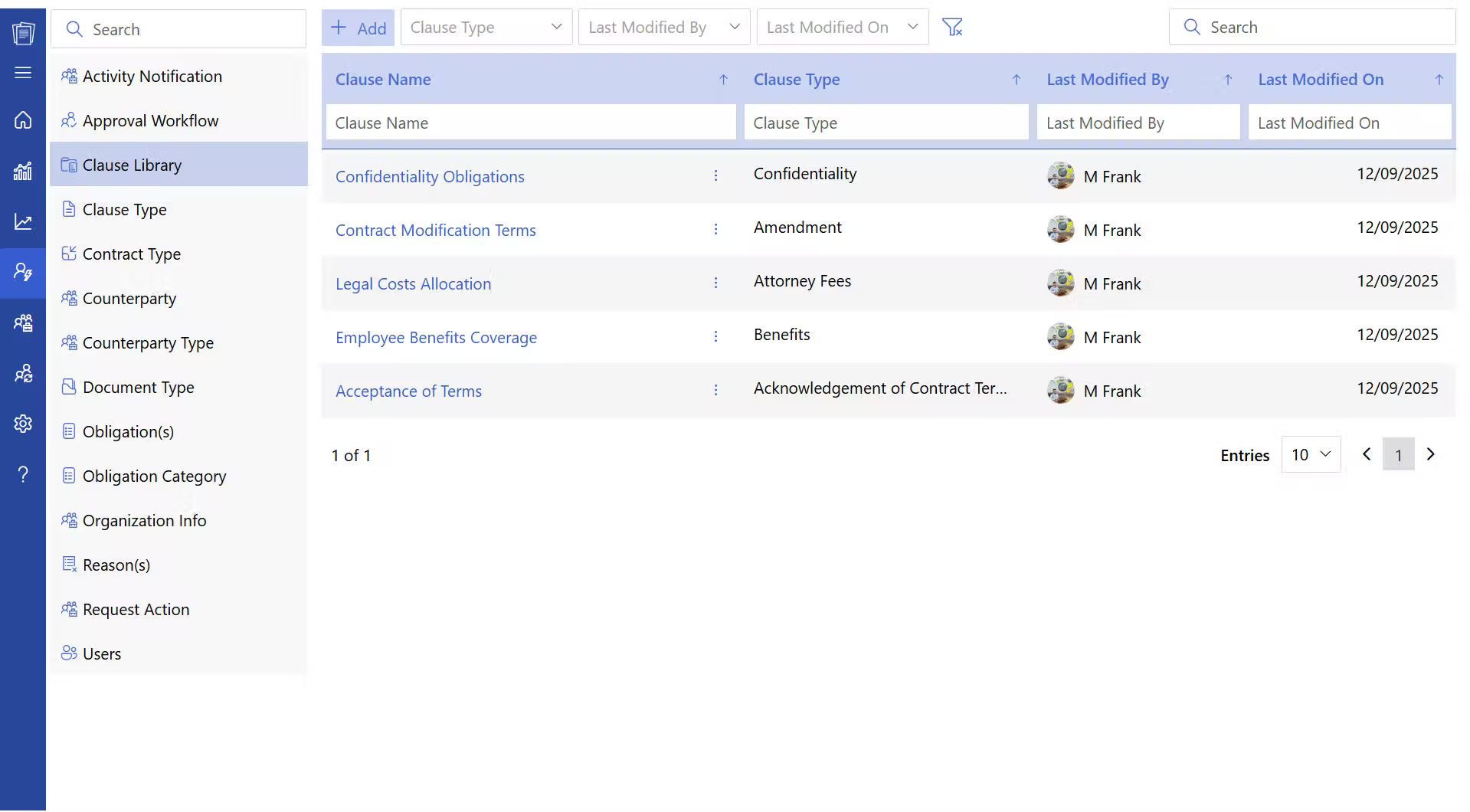
Instead of searching through old contracts for the right wording, teams can access approved contract clauses from one place. This makes it easier to find commonly used provisions and maintain consistent language across agreements. It also reduces the risk of using outdated clauses.
3. Template Customization
Every deal is a little different. Contract drafting software lets teams adapt approved templates to match specific business requirements without having to rebuild the contract from scratch. Teams can make necessary changes while retaining the standard structure. This keeps flexibility without losing consistency.
4. Microsoft Word Integration
If your team already works in Word, there is no need to change the way you draft. Work with contracts in Word while accessing the templates and clauses your team uses regularly. This also makes it easier to continue using familiar editing and formatting tools. The drafting process stays within a familiar workspace.
5. Version Control
Contracts can go through several rounds of edits before they are finalized. Contract version control helps you see what changed, compare drafts, and make sure everyone is working on the latest version. It also provides a record of how the document evolved during review. This makes it easier to trace changes when questions come up.
6. Collaborative Review
A contract rarely stays with the legal team alone. Sales, finance, procurement, and other stakeholders may need to review it. Contract drafting software gives everyone a structured way to add comments, suggest contract changes, and address feedback without losing track of the draft. Everyone can work from the same version of the agreement.
7. Approval Workflows
Once the draft is ready, it may need approval from several people. Automated workflows send the contract to the right stakeholders based on the required approval process. Teams can also see which approvals are complete and where the contract is waiting. This makes the approval path easier to follow.
Common Challenges Businesses Face While Drafting Contracts
As per research by Thomson Reuters, Lawyers spend 40–60% of their time drafting legal documents and reviewing contracts. Contract drafting problems rarely start with the document itself. These are the areas that teams should watch closely.
- Unclear business requirements: Drafting before scope, pricing, and responsibilities are agreed leads to repeated revisions.
- Overreliance on old contracts: Previous agreements can contain outdated terms that may not fit the new deal.
- Unclear ownership: Vague responsibilities make it difficult to hold the right party accountable.
- Poor version control: Redlines, comments, and email changes can easily result in missed updates.
- One-size-fits-all templates: Standard clauses provide consistency, but deal-specific risks still need review.
- Risk viewed in isolation: Liability and indemnity terms should be assessed against the actual deal and business exposure.
- Ignoring post-signature obligations: A contract is not finished at signing; teams must track the commitments created by it.
What if your next contract was ready in minutes, not hours?
Opportunities Your Business Will Get While Drafting Contracts Effectively
Renewing contracts provides more than just an opportunity to continue a business relationship; it’s a chance to strengthen partnerships, improve terms, and unlock new opportunities for growth.
1. Faster Deal Closures
When contracts are drafted clearly and quickly, businesses can negotiate contracts faster. The contract drafting software for lawyers helps companies move ahead with projects, partnerships, or supplier arrangements without long delays. Faster contract preparation also helps sales and business teams close deals within shorter timelines.
2. Better Vendor and Partner Selection
A good legal drafting software helps businesses clearly define the roles, responsibilities, and expectations of vendors or partners. When terms are written clearly, companies can evaluate suppliers and partners more carefully before finalizing a vendor contract. Contract drafting software for lawyers supports better decision-making and stronger business partnerships.
3. Clear Scope for Business Agreements
A well-drafted contract clearly explains the scope of work, deliverables, timelines, and payment terms. Contract drafting software helps both parties understand what is expected from the agreement. When the scope is defined properly, businesses can manage projects more effectively and reduce misunderstandings during the contract period.
4. Stronger Legal Position
Properly drafted contracts include important clauses that protect the interests of the business. These clauses may cover contractual obligations, payment conditions, termination terms, and dispute handling. When agreements are written carefully, businesses are better prepared to handle legal or operational issues that may arise.
5. Better Planning for Long-Term Contracts
Many business agreements run for several months or years. Effective contract drafting helps companies define renewal terms, pricing structures, and long-term responsibilities clearly. Contract drafting software makes it easier for businesses to plan future operations, budgets, and partnerships based on the contract terms.
Best Practices to Implement While Drafting a Contract
A practical contract drafting process helps teams create agreements that are clear, complete, and aligned with the business relationship.
- Start with the business goal. Understand what both parties need to deliver before opening a template.
- Write for clarity. Use simple language so business teams can understand their obligations without legal explanations.
- Confirm commercial terms early. Finalize pricing, payments, deliverables, and timelines before lengthy reviews.
- Assign clear ownership. Specify who is responsible for each key obligation and deadline.
- Plan the exit. Cover termination, notice periods, pending payments, and unfinished work.
- Address potential risks. Clearly define liability, indemnification, confidentiality, compliance, and dispute terms.
- Review contracts regularly. Update outdated terms, record amendments, and ensure teams use the latest version.
Why Choose CLM 365 for Drafting a Contract?
CLM 365 is developed within the Microsoft ecosystem, allowing it to work smoothly with tools such as MS Teams, Outlook, SharePoint, MS Word, and MS Copilot. This integration allows teams to work on contracts directly from the platforms they already use in their daily workflow.
With AI-supported capabilities and built-in automation, CLM 365 helps legal and business teams prepare contracts more efficiently. The platform also provides access to pre-approved templates and a clause library, making it easier to draft agreements with consistent terms.
Users can start creating and managing contracts directly from MS Teams, Outlook, or SharePoint, which helps teams handle contract drafting without switching between multiple systems.
CLM 365 allows users to initiate a contract drafting request through a structured process. This helps teams capture the required details and move the request to the legal team for review and drafting.
- Create a New Request
Click the “New Request” button to start a contract request. This opens a form where users can enter the required contract details. - Enter Contract Information
Fill in the necessary information such as contract title, payment terms, contract cost, and other required details. These details help the legal team understand the purpose and scope of the agreement. - Submit the Request
After completing the form, submit the request. Once submitted, the request will be created in the system. - Open the Request Workspace
Click on the request title to open its workspace. This area displays the request details and available actions related to the contract. - Send for Legal Review
From the Actions menu, select “Send for Legal Review.” This step creates a task for the legal team to review and begin the contract drafting process. - Add Remarks or Attachments
A dialog box will appear where you can add comments or upload supporting documents if the legal team needs additional information.
- Legal Review Task Assignment
Once submitted, a legal review task is created and assigned to a legal user. If no legal user is available, the task is automatically assigned to the Admin Guide. The assigned person must review and approve the request before the contract drafting process moves forward.
Conclusion
Contract drafting software helps businesses create and manage agreements more efficiently as contract volumes grow. Instead of handling contracts manually, organizations can draft, review, and track agreements in a more organized way.
CLM 365 supports this process by helping teams prepare contracts, manage requests, and track contract activities within the Microsoft ecosystem. Businesses can explore its features and experience the platform with a 14-day free trial.
Frequently Asked Questions
Who usually drafts contracts in a company?
Contracts are usually drafted by legal teams, contract managers, procurement teams, or business managers depending on the type of agreement.
What types of contracts can businesses draft?
Businesses commonly draft vendor contracts, service agreements, partnership agreements, employment contracts, NDAs, and purchase agreements.
Can contract drafting software reduce the time needed to create contracts?
Yes. Templates and pre-approved clauses help teams prepare contracts much faster.
What is a clause library in contract drafting software?
A clause library stores approved legal clauses that users can insert into contracts when drafting agreements.
Can non-legal teams draft contracts using software?
Yes. With templates and structured forms, business teams can create contracts while legal teams review them later.
Table of Contents

Trusted by the Best

























