
Electronic Signature: Meaning, Benefits & Best Practices

Getting contracts signed shouldn’t mean printing, scanning, and chasing people for signatures. With an electronic signature, you can send contracts digitally, get them signed faster, and keep everything in one place.
Traditional contracts come with hidden costs: printing, courier delays, endless back-and-forth. As per a stats by Adobe, Organizations that rely only on manual documentation put themselves at risk of losing 44% of their customers and 51% of their revenue.
- Electronic signatures help businesses sign contracts faster without the need for printing, scanning, or physical paperwork.
- They streamline the contract process by reducing delays and allowing stakeholders to review and sign agreements from anywhere.
- It improve contract tracking by providing a clear record of who signed, when they signed, and the status of each agreement.
- When combined with a contract management solution like CLM 365, digital signatures help businesses manage contracts more efficiently from creation to execution.
But here’s the good news: Electronic Signature turn contracts into opportunities. With just a few clicks, agreements are signed, secured, and stored anytime, anywhere.
Faster contracts mean faster deals. Seamless signing builds trust. And when your clients feel it’s easy to do business with you, they stay longer, buy more, and recommend you to others.
What Is Electronic Signature?
An electronic signature is a digital mark or symbol used to confirm that a person agrees to the terms of a contract or document.
Unlike a traditional wet signature, which requires physically signing with a pen on paper, e-signatures are completed on devices such as computers, tablets, or smartphones.
Contract signing software provides the same legal validity while making the entire signing process faster, more secure, and far more convenient. Beyond efficiency, they also help organizations reduce paperwork costs and move towards a more sustainable, paperless future.
How Does E-Signing Process Works?
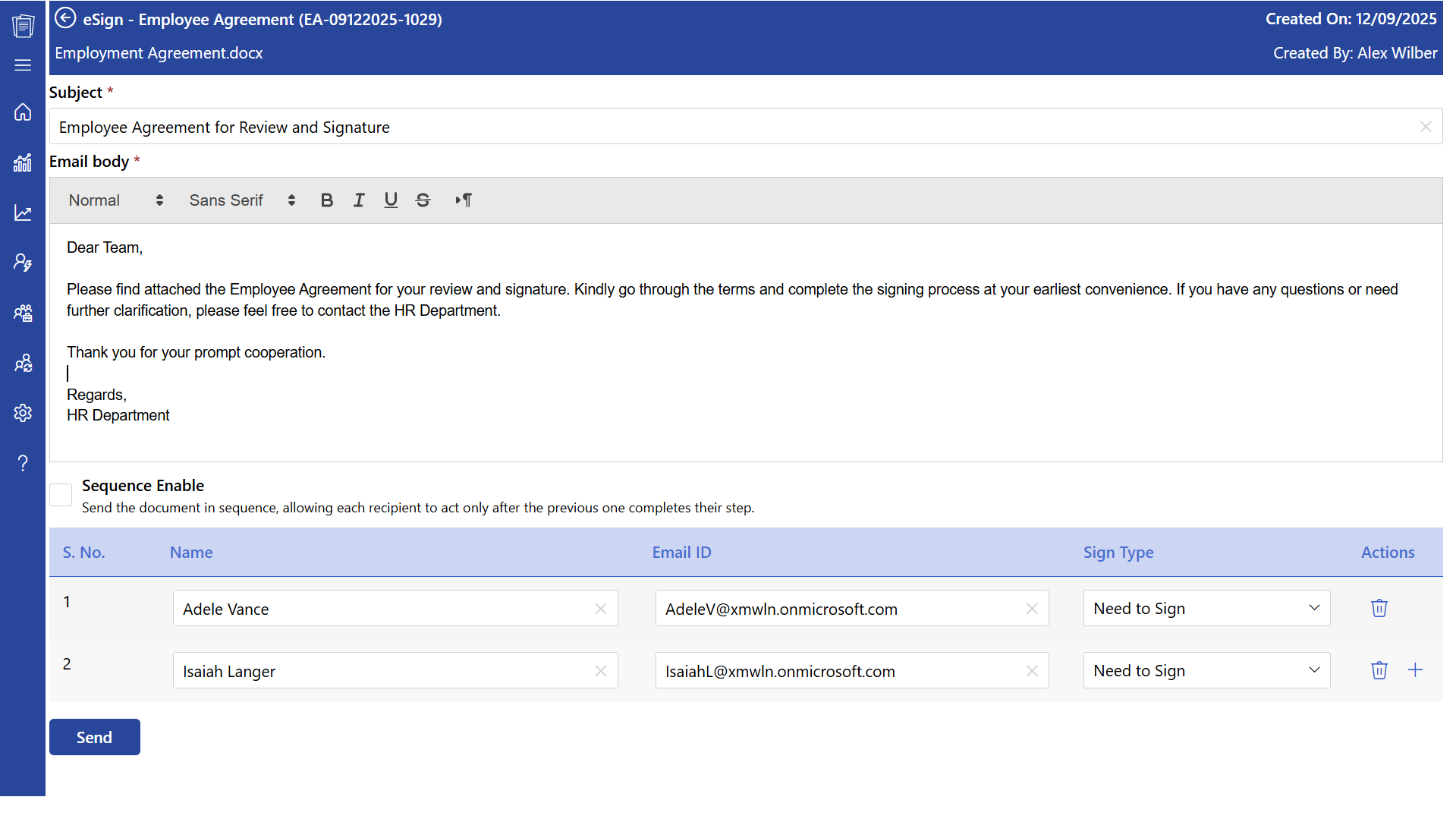
The e-signing process makes contract signing fast, secure, and hassle-free, replacing traditional paperwork with a few simple digital steps.
- Prepare the contract – Upload your agreement or contract in digital format, ready for signing.
- Share for review – Send the contract securely to the intended signer via email or e-signature platform.
- Sign electronically – The recipient reviews the contract and adds their signature using a computer, tablet, or phone typing, drawing, or clicking to confirm.
- Secure and verify – The e-signature is encrypted, ensuring the contract cannot be altered, and the process is fully trackable.
- Complete the process – Once signed, all parties receive an instant copy, and the contract is safely stored for easy access whenever needed.
Difference Between Paper Documentation and Electronic Signature
Switching from paper-based documentation to contract signature not only speeds up the signing process but also delivers significant cost savings on average, businesses save around $28 per agreement signed.
| Aspects | Traditional Documentation | E-Signature |
| Format | Paper-based documents that require printing. | Digital documents signed electronically. |
| Signing Method | Requires manual signing using pen (wet signature). | Uses digital tools/software to sign electronically. |
| Speed | Time-consuming due to printing, mailing, and manual collection. | Instant signing and sharing; can be done remotely. |
| Accessibility | Limited to physical presence or courier delivery. | Accessible from anywhere with internet access. |
| Security | Prone to loss and hard to track changes. | Encrypted, traceable, and tamper-evident; audit trails available. |
| Storage & Space | Requires physical storage space; difficult to manage large volumes. | Stored digitally; easy to organize, search, and retrieve. |
Unlike paper documents that require printing, signing, scanning, and physical storage, digital signatures make signing faster, easier, and accessible from anywhere.
What Contracts Can Be Signed with Electronic Signature
With help of this system all contracts can be handles it has transformed the way businesses handle agreements process. Here are ten types of contracts that can be signed using digital signatures, explained in detail:
Employment contracts define the terms of employment, including roles, responsibilities, compensation, benefits, and other key conditions between employers and employees.
When a business shares private information such as product ideas, strategies, or client data, it needs to protect that information. NDAs can be signed online so that both parties quickly agree not to disclose confidential information. This ensures sensitive details are protected without delays caused by mailing documents.
Businesses can send sales agreements to customers or other companies digitally. Customers can review the contracts and sign them immediately. This allows companies to close deals faster, avoids delays caused by postal services, and keeps a digital record of signed contracts for future reference.
Companies that hire contractors or provide services to clients can have service agreements signed electronically. Once signed, the work can start quickly because all the legal requirements are completed online. This is especially helpful for businesses working with clients in different cities or countries.
Landlords and tenants can sign rental or lease agreements online. People don’t have to meet in person to complete paperwork, which saves time and travel costs. The digital record also makes it easy to access the contract later if needed. This method works for residential, commercial, or temporary property rentals.
Businesses can approve and confirm orders for products, raw materials, or supplies using e-signatures. Digital signature speeds up the procurement process and ensures both sides have a signed agreement quickly. Digital purchase orders are easy to store and reference later, reducing the risk of lost paperwork.
Companies can hire consultants for advice, projects, or short-term services by sending agreements online. Consultants can review the terms and sign the contract from anywhere, allowing the project to begin quickly. It also eliminates the need for printing and scanning documents
When two or more businesses decide to work together, they can sign partnership agreements electronically. This allows all parties to confirm the deal quickly, start collaborating with the team, and maintain a secure digital record. This is helpful for joint ventures, business collaborations, or co-branded projects.
Businesses often need agreements with suppliers or vendors for products, services, or deliveries. Electronic signatures allow these vendor contracts to be signed quickly, enabling work to start immediately. Digital records also make it easy to track agreements and manage renewals.
When two parties agree to resolve a legal dispute, settlement agreements can be signed online. This speeds up the legal process, reduces paperwork, and allows both parties to have easy access to the signed documents. It also helps lawyers and courts maintain organized digital records for reference.
Get Contracts Signed Faster
Send, sign, and complete agreements without the back-and-forth.
Who Uses Electronic Signature?
Electronic signatures are widely adopted across industries, with 95% of organizations either using them, evaluating e-signature providers, or planning to implement a solution soon. The technology is used by many sectors, and here are a few examples of who benefits from it:
Businesses of all sizes rely on digital signature to speed up their operations. Human resources departments use them for employment contracts, offer letters, and onboarding documents, making the joining process seamless for new employees.
It helps with managing small business contracts, freelancers, and consultants, electronic signatures simplify client interactions. Agreements, proposals, and service contracts can be signed instantly, allowing businesses to operate remotely or work with clients across the globe.
Real estate agents, brokers, and property managers frequently use electronic signatures to manage lease agreements, purchase contracts, and disclosure forms. This helps in real estate contracts and its ability to have clients sign documents remotely speeds up the closing process and ensures that transactions move smoothly without unnecessary delays.
Hospitals, clinics, and telehealth services use digital signatures to streamline patient consent forms, medical records, insurance documentation, and healthcare contract management.
Many government offices now accept this technology for applications, permits, licenses, and official forms. This modernization helps reduce queues, minimize paperwork, and accelerate administrative processes, making it easier for citizens to access services efficiently.
Schools, colleges, and online learning platforms use electronic signatures for admissions, staff contracts, and parental consent forms. By enabling students, parents, and staff to sign documents electronically, institutions simplify processes and enhance communication
Manufacturing companies use digital signing to simplify and speed up their operational processes. From vendor agreements and purchase orders to quality assurance documents and safety compliance forms, e-signatures help manufacturers handle paperwork efficiently, including manufacturing contract management.
Benefits of Electronic Signature
Electronic signatures make this process faster, safer, and more convenient. Here are some benefit to consider.
Switching to electronic signatures can greatly reduce business expenses. Organizations that have adopted eSignatures have seen up to an 80% drop in costs related to managing and processing documents.
Businesses spend a lot on paper, ink, printers, and courier services for signing contracts.
Users don’t have to pay for printing or sending documents back and forth, which saves hundreds or even thousands of rupees every month.
With electronic signatures, all your contracts and agreements are stored in centralized repository. They are protected with passwords and digital records, so only the right people can access them.
Waiting for signatures slows down your business. When clients or partners sign electronically, deals happen faster. Faster deals mean you can start projects sooner, deliver products quickly, and increase your profits. With contract signature users get more clients satisfied in less time, which helps your business grow steadily.
It let vendors review and sign contracts in just a few clicks, without printing, scanning, or mailing documents. It simplifies and speeds up the signing process, helping businesses increase customer loyalty by up to 500%. A smooth signing experience can also make vendor interactions easier.
Digital signatures give you the freedom to work from anywhere. Whether at home, traveling, or meeting a client, you can sign contracts immediately. Businesses no longer have to wait for someone to reach the office or send a paper copy.
Traditional signing can slow down business, especially when multiple people need to approve a document. With electronic signatures, business agreements are completed in minutes, letting you start projects faster, serve clients sooner, and grow your business without unnecessary delays.
Eliminate the inefficiencies of printing, scanning, mailing, and physical filing. It allow you to execute and manage all agreements digitally, securely store them in a centralized repository, and retrieve them instantly when needed.
Are Electronic Signatures Legally Binding?
Yes, electronic signatures are generally legally recognized and can be used to sign many types of business agreements. However, their legal validity depends on factors such as the signer’s intent.
For an electronic signature to be reliable, businesses should:
- Capture signer intent: The signer should clearly agree to sign the document electronically.
- Verify the signer: Use appropriate authentication methods to confirm who is signing.
- Maintain an audit trail: Keep records of signing activity, timestamps, and other relevant events.
- Protect document integrity: Ensure the signed document cannot be altered without detection.
- Follow applicable laws: Requirements can vary by country, industry, and type of contract.
For businesses using electronic signatures, choosing a solution with strong authentication, audit trails, and secure document management can help support a reliable signing process.
Best Practices to Implement During Electronic Signatures
Implementing an e-signature apps effectively requires following best practices that ensure security, efficiency, and a smooth workflow for all parties involved.
- Keep documents secure: Use tamper-proof documents, access controls, and tracking to protect agreements.
- Define the signing order: Set a clear sequence when multiple parties need to sign to avoid delays.
- Use standard templates: Use approved templates and clause libraries to reduce errors and speed up contract preparation.
- Enable real-time notifications: Notify parties when documents are ready for review or signature to keep things moving.
- Maintain an audit trail: Record document views, edits, approvals, and signatures for better tracking and compliance.
- Make signing accessible: Let authorized users securely review and sign documents from any device.
- Review and improve regularly: Update templates and signing workflows as your contract needs evolve.
Keep Every Signature on Track
Track signing progress in real time, see who has signed, and know exactly what needs attention at every step.
ROI on Investing Contract Management with Electronic Signature
81% of digital signature users achieve ROI within 12 months; 25% see results in three months or less (AIIM). Here is how it reflects on your ROI.
- Save valuable time by automating contract workflows and reducing manual processing.
- Accelerate contract approvals and close deals faster.
- Securely store all agreements in a centralized, easily accessible repository.
- Ensure compliance with tamper-proof digital records and automated version tracking.
- Boost team productivity by minimizing administrative burdens.
- Scale operations efficiently as contract volumes grow, maintaining seamless workflows.
How CLM 365 Improves Signing Process?
CLM 365 simplifies the contract signing process by integrating seamlessly with leading e-signature providers such as Adobe Acrobat Sign and DocuSign. Users can send, track, and complete contract signatures directly within their contract workflow without switching between multiple applications.
Built on the Microsoft ecosystem, CLM 365 works seamlessly with SharePoint, Microsoft Teams, Outlook, Power BI, and Microsoft Copilot, ensuring contracts move smoothly from drafting and approval to execution. Automated workflows, real-time status tracking, and secure document management help businesses accelerate contract signing while maintaining complete visibility throughout the process.
manual effort, and deliver a better signing experience for both internal teams and external stakeholders. With enterprise-grade security, centralized contract storage, and seamless e-signature integrations, CLM 365 enables organizations to execute contracts faster, reduce
Conclusion
With CLM 365, signing and managing contracts is effortless, secure, and completely digital.
Streamline your workflow, reduce turnaround time, and eliminate the hassle of printing, scanning, or chasing signatures.
Experience faster approvals, enhanced security, and full control over your agreements get started with CLM 365 today with a 14-day free trial; no credit details card required!
Frequently Asked Questions
How do I know if someone signed the document and not someone else?
Most electronic signature solutions include authentication methods, audit trails, timestamps, and signer verification features that help confirm who signed the document
My team sends hundreds of contracts every month. Is there a faster way to collect signatures?
Yes, It automate the signing process, allowing businesses to send, track, and collect signatures at scale without manual follow-ups.
How long does it usually take to get a contract signed electronically?
Many contracts can be signed within minutes. The exact time depends on how quickly the recipients review and approve the document.
How can I store all signed contracts in one place?
CLM 365 provide a centralized repository where signed contracts can be securely stored, searched, and accessed.
Can I search for signed contracts later?
Yes, Contract management systems make it easy to search contracts by customer name, contract type, date, or keywords
Are digital signature secure enough for confidential contracts?
Yes, Electronic signature platforms use security features such as encryption, authentication, and audit trails to help protect sensitive documents.
Table of Contents

Trusted by the Best

_JiluXJRGNl.svg)























