


· An expense monitoring app helps track spending and gives a clear view of business expenses
· Keep all expense records in one place for better control and visibility.
· Set spending limits and get alerts before costs go beyond plan.
· Reduce manual work with faster approvals, reminders, and expense tracking.
Managing business expenses has never been critical or more complex. As organizations grow and workforces become increasingly mobile, the traditional methods of tracking spend are no longer adequate. Finance teams are overwhelmed with paper receipts, spreadsheet reconciliations, and manual approval chains that create bottlenecks, errors, and compliance risks.
The market for Expense manager application is projected to grow by more than US$4.7 billion by 2027, with 40% of that growth concentrated in North America alone a clear signal that businesses worldwide are making the shift to smarter, automated solutions.
This explosive growth reflects a fundamental change in how businesses perceive expense tracking not as an administrative burden, but as a strategic lever for financial control, employee satisfaction, and operational efficiency.
What Is Expense Management?
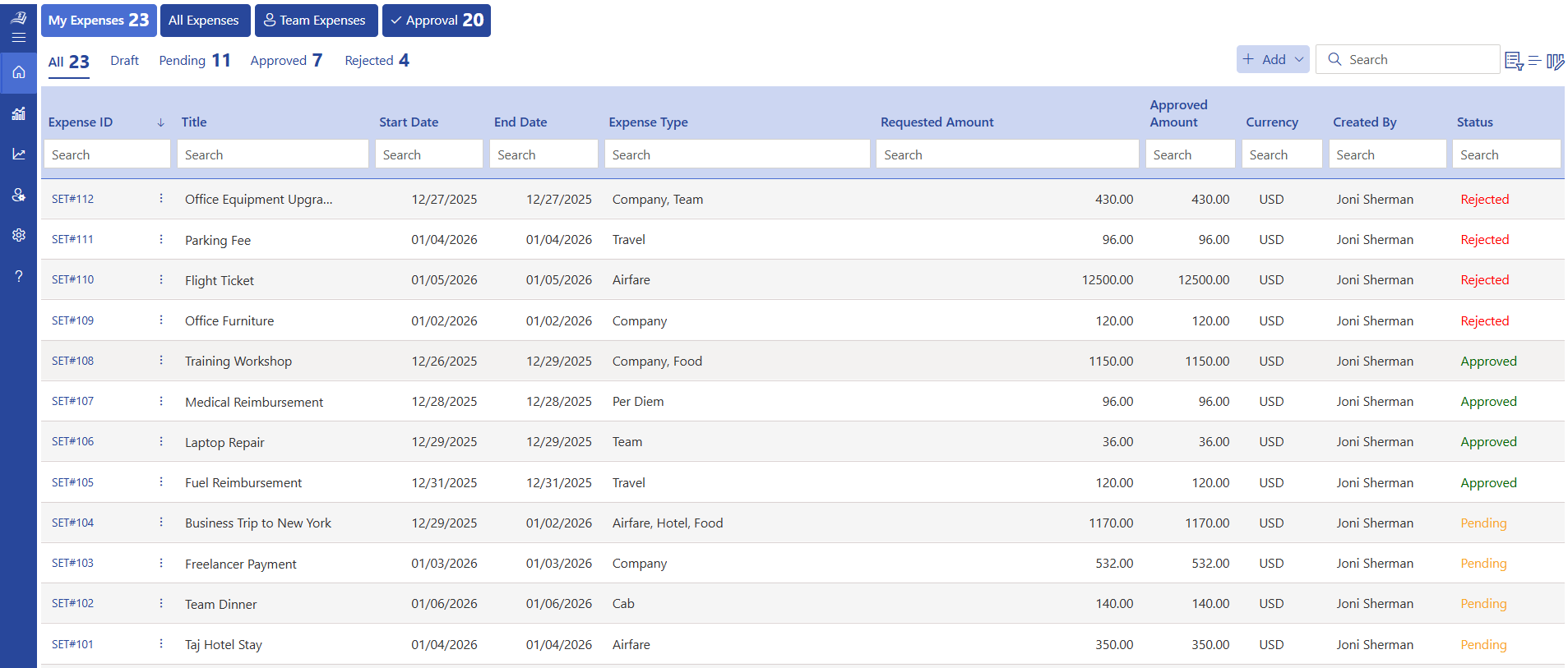
Expense management is the end-to-end process by which a business records, tracks, verifies, approves, and reimburses expenditures incurred by employees in the course of their work duties. This encompasses everything from a $12 client lunch receipt to a $4,200 international conference trip and every transaction in between.
Why Should Business Need Expense Manager Application?
Consider this: processing a single expense claim can take 15–25 minutes, especially when you factor in receipt of verification, manual entry, and approvals. Errors like missing details or duplicates add even more time and cost.
Now imagine a team of 20 employees submitting just two claims each month. That’s 40 claims, consuming over 13 hours monthly. If you estimate even $25/hour in admin costs, that’s $325+ every month spent just on processing.
Scale that to 100 employees, and you’re looking at $1,200+ and 50+ hours lost every month on manual work.
Expense management software eliminates these inefficiencies:
- Instant receipt capture via mobile or AI tools
- Automated data entry to reduce errors
- Faster approvals with streamlined workflows
- Real-time tracking for easy reconciliation
What once drained hours and dollars can now be handled in minutes saving money, improving accuracy, and freeing up your team for more valuable work.
Still tracking business expenses in spreadsheets? Try Expense 365
Key Difference Between Manual and Expense Manager Application
| Aspects | Manual Expense Management | Expense Manager Application |
| Receipt Handling | Physical receipts stored in folders or spreadsheets; easy to lose or damage | Digital capture via mobile scan; stored securely in the cloud |
| Submission Process | Paper forms or email chains that often cause delays and confusion | Employees submit expenses instantly via mobile app from anywhere |
| Approval Workflow | Relies on manager availability; approvals can take days or weeks | Automated multi-level approval with real-time notifications and SLA tracking |
| Reimbursement Time | Typically 7–30 days depending on finance team bandwidth | Streamlined process reduces reimbursement cycles to 2–5 business days |
| Audit Readiness | Incomplete paper trails make audits time-consuming | Complete digital audit trail with timestamps, approvals, and receipts attached |
| Reporting & Analytics | Manual spreadsheet consolidation; outdated by the time it is ready | Real-time dashboards with category breakdowns, trends, and budget alerts |
Key Features of Expense Manager Application
Not all expense manager applications are built equally. The following features represent the gold standard in modern expense tracking.
1. AI-Powered Receipt Scanning
The receipt is the foundation of every expense claim, and it has been the most error-prone, time-consuming part of the process. An AI-powered expense management solution fundamentally changes this dynamic by converting physical receipts into structured digital data in seconds.
Using optical character recognition (OCR) combined with machine learning, modern scanning engines automatically extract key data fields from a photograph taken with a smartphone camera.
For employees, this means submitting a receipt takes less than 30 seconds. For finance teams, it means arriving at month-end close with clean, verified data rather than a backlog of manual corrections.
2. Expense Automation
Manual expense management is inherently reactive problems are discovered after th fact, corrections happen long after the damage is done.
Studies show that 75% of businesses report increased fraud risk due to manual expense tracking limitations, while automated solutions reduce error rates by over 60% a compelling case for automation at every stage of the expense lifecycle.
Expense automation flips this equation by enforcing rules, routing approvals, and flagging anomalies proactively, before erroneous or fraudulent claims reach the finance team.
3. Multi-Level Approval Workflows
Every organization has a unique approval hierarchy, and expense approval should reflect that structure precisely. Multi-level expense approval workflows allow finance and HR teams to configure routing rules that match their organizational reality whether that means a straightforward two-step approval.
Configurable approval chains can be built around any combination of variables, expense amount thresholds (e.g., claims above $1,000 require CFO approval), cost center ownership, project codes, or expense categories (e.g., international travel always requires senior director authorization).
Keep approvals moving, even when teams are busy.
4. Integration with Accounting System
Integration with expense management with Xero and QuickBooks to automate data sync, reduce manual work, and maintain accurate financial records. Improve productivity with seamless data flow between your expense and accounting systems. Make faster financial decisions with up-to-date records and a clearer view of business spending. Streamline expense processes and help your team focus on more valuable work.
5. Global Expense Management
For businesses operating across borders, expense management complexity grows exponentially. Employees incur costs in local currencies; exchange rates fluctuate daily, tax regulations vary by jurisdiction, and per-diem policies must account for cost-of-living differences between cities.
Without a purpose-built multi-currency expense management capability, the reconciliation nightmare can consume weeks of finance team time.
A modern expense manager application supports real-time currency conversion using live exchange rate feeds, allowing employees to submit expenses in any currency.
6. Corporate Card Management
Corporate card programs represent one of the largest sources of unmanaged spend in organizations and one of the greatest opportunities for control and visibility.
Integrated corporate card management within your expense manager application creates a direct feed between card transactions and expense reports.
When a corporate card transaction occurs, it appears in the employee’s expense queue automatically, pre-populated with the merchant, amount, date, and category.
7. Employee Reimbursement
Slow reimbursement is a significant source of employee dissatisfaction and in competitive talent markets, it has real retention implications.
Employees who regularly wait 3–4 weeks to be reimbursed for out-of-pocket expenses bear a financial burden that erodes trust in the organization. A modern expense manager application compresses the reimbursement cycle from weeks to days.
Clear communication at every stage employee expense reimbursement , approval notification and deposit confirmation creates a transparent experience.
One reimbursement request. Everything moves automatically
8. Per Diem Management
Per diem policies simplify travel expense administration by setting fixed daily allowances for meals, incidental costs during a business trip. However, managing per diem manually across a diverse, globally mobile workforce introduces its own set of complications.
A dedicated expense manager app module within an expense application automates the calculation of allowances based on destination city, trip duration, and organizational policy.
9. Mileage Tracker
Vehicle mileage tracker is one of the most common and most used expense categories in any organization with a field-based or frequently traveling workforce.
Relying on employees to self-report mileage using memory or odometer readings is a trust-based system that is easily exploited, even unintentionally. 83% of employees who travel for work struggle to reconcile their travel expenses accurately.
A good expense manager app with GPS-powered mileage tracker eliminates the guesswork entirely.
10. Advanced Reporting & Analytics
Data becomes powerful when it turns into clear, actionable insights. Advanced reporting and analytics capabilities transform the raw transaction data flowing through your expense manager application.
Modern expense report management software provide real-time visibility into spending by category, department, project, cost center, employee, and geography.
Predictive analytics can model future expense volumes based on historical patterns, enabling more accurate financial forecasting.
ROI on Implementing an Expense Management Application
The return on investment from implementing a purpose-built expense manager application is measurable, in many cases. Here are seven quantifiable benefits that directly contribute to ROI.
1. Lower Costs
Automating expense processes removes the need for manual work like entering data, checking receipts, and fixing errors. This reduces the chances of mistakes and avoids repeated work. Finance teams no longer must spend hours reviewing each expense report, which saves both time and effort.
Over time, this leads to lower operational costs because fewer resources are needed to manage expenses.
As your business grows and the number of expense reports increases, the expense manager application continues to handle everything smoothly.
2. Accelerate Financial Closure
With real-time expense tracking, all expense data is recorded and updated instantly.
Finance teams don’t have to wait for employees to submit reports at the end of the month or spend time correcting missing details. Everything is already organized and ready to use.
Expense management application makes the month-end closing process faster and more predictable.
3. Better Control & Visibility
Expense manager application come with built-in rules that automatically check whether each expense follows company policies. If something doesn’t meet the guidelines, it can be flagged or stopped before approval.
This helps prevent unnecessary spending and ensures that all expenses are valid and compliant.
Managers get better visibility into where money is being spent, making it easier to control budgets and act when needed.
See approved, pending, and processed expenses in one simple dashboard
4. Stronger Finance Team
When manual and repetitive tasks are reduced, finance teams can focus on more valuable work.
Instead of spending time on data entry or checking receipts, they can work on financial planning, analysing spending patterns, and improving business strategies.
This shift allows the finance team to play a bigger role in decision-making. Expense manager application can provide insights that help the company grow.
5. Higher Productivity
A simple and user-friendly expense process makes it easy for employees to submit their expenses quickly. They don’t have to keep track of paper receipts or follow up multiple times for approvals and reimbursements.
This saves time and reduces frustration. Employees can focus more on their main responsibilities instead of administrative tasks.
Faster reimbursements also improve employee satisfaction and create a better overall work experience.
6. Manage Expense Securely
Modern expense manager application use smart technology to track and monitor spending patterns. It can quickly identify expense fraud or suspicious activity, helping businesses act early.
With better visibility and control, businesses can ensure that their money is always being used properly and securely.
This improves transparency across all expense activities and reduces the risk of fraud or misuse.
7. Enhanced Strategic Spend Visibility
Real-time analytics and consolidated reporting give leadership an accurate, up-to-date view of organizational spend.
An expense management app enables better vendor negotiations, smarter budget allocations, and more precise financial forecasting.
The strategic value of this visibility is difficult to quantify precisely but is consistently cited by CFOs as one of the most valuable outcomes of implementing an expense management platform.
Common Mistakes Teams Make While Managing Spend
Small mistakes in spend management often lead to budget leaks, poor visibility, and rising costs. Here are common spend management mistakes you should avoid.
1. Relying on Outdated Policies
Many leaders continue using old expense policies that no longer match how teams work today. With remote work, digital tools, and changing travel needs, outdated rules create confusion and inconsistent decisions. Updating travel expense policies regularly helps leadership stay aligned with current business realities and keeps spending under control.
2. Approving Without Full Visibility
When managers approve expenses without a clear view of details, patterns, or context, it becomes easy to miss issues. Quick approvals may save time in the moment, but they often lead to hidden inefficiencies. Better visibility helps managers make informed decisions and maintain stronger financial discipline.
3. Focusing Only on Final Numbers
Looking only at total expense reports or monthly summaries can hide what’s really happening underneath. Small, repeated issues often go unnoticed until they grow into bigger problems. Paying attention to spending patterns and trends gives leaders better control and early insights.
4. Delaying Process Improvements
Many teams continue with manual or outdated processes simply because they are familiar. Over time, this slows down operations and creates unnecessary workload for both employees and finance teams. Being open to improving systems and workflows helps the organization move faster and work more efficiently.
5. Limited Real-Expense Tracking
Without real-time visibility into expenses, decisions are often based on past data. This makes it harder to control budgets and respond quickly when spending goes off track. Access to live data helps leaders stay proactive instead of reactive.
Best Practices to Implement During the Process
Implementing an expense management solution is just the beginning. Following these best practices helps improve accuracy, strengthen compliance, and maximize the value of your expense automation process.
- Define category-specific spending limits instead of a single company-wide cap. Different expense types such as travel, meals, mileage, and client entertainment require different approval thresholds.
- Make AI receipt scanning mandatory at the time of purchase. Capturing receipts immediately improves OCR accuracy and reduces rejected claims.
- Configure duplicate detection to compare receipt amount, merchant name, transaction date, and employee before an expense reaches the approver, preventing duplicate reimbursements automatically.
- Match receipts with corporate card transactions before reimbursement. This helps finance teams verify expenses quickly and identify missing receipts.
- Create approval workflows based on department, project, cost center, or expense amount so routine claims are approved faster while high-value expenses receive additional review.
- Use policy-based alerts to automatically flag out-of-policy expenses, weekend purchases, unusually high claims, or restricted merchants before they enter the reimbursement process.
- Track reimbursement cycle time, duplicate claim rate, policy violation rate, and average approval time every month.
- Archive every receipt, approval history, and audit trail in a centralized repository to simplify compliance audits, tax verification, and financial reporting.
Expense 365 - The Best App to Manage Business Expenses
In a market crowded with expense manager application, Expense 365 also known as Expense Tracker 365 distinguishes itself by delivering enterprise-grade secure functionality with the approachability and usability that employees embrace. It integrates with Microsoft 365 applications like SharePoint, MS Teams, Outlook, Power BI and Power Automate, also with accounting software like QuickBooks and Xero.
This native compatibility means expense change management and an accelerated time to value for Microsoft-centric organizations.
The platform provides organizations with a structured, end-to-end framework for recording, reviewing, and reporting on employee expenses, giving finance teams the visibility they need and giving employees the simplicity they deserve.
Expense 365 empowers businesses to maintain rigorous financial controls without sacrificing the agility and employee experience that define high-performing organizations.
Hear From Our Delighted Clients – G2 Platform
Expense Tracker 365 is a great app with excellent support. The advanced features make it a complete tool & has really improved our expense tracking and reporting workflow.
Secure AI Receipt Scanning Built for Microsoft 365
Managing business expenses often involves processing receipts that contain sensitive financial information, making data security an essential part of expense automation.
With Expense 365, AI-powered receipt scanning and expense processing take place within your existing Microsoft 365 environment, allowing your expense data to remain securely stored in your organization’s own Microsoft tenant.
By using Microsoft’s trusted security infrastructure, organizations can continue to benefit from their existing access controls, compliance policies, audit trails, and governance standards while automating expense management.
AI extracts receipt details, identifies duplicate expense submissions, matches receipts with transactions, and reduces manual data entry without moving your financial data outside your Microsoft ecosystem.
For organizations with strict compliance, security, or data residency requirements, keeping expense data within Microsoft 365 provides greater control and visibility.
Finance teams can process expenses faster, prevent duplicate claims, and improve accuracy while maintaining the security and governance standards their business depends on.
Conclusion
The way businesses manage expenses is undergoing a fundamental transformation and the organizations that embrace this shift will gain a measurable competitive edge in cost control, operational efficiency, and financial intelligence.
Ready to transform how your business manages expenses? Discover how Expense 365 can cut your processing costs, accelerate reimbursements, and give your finance team real-time visibility.
Book a 14-day free trial today and see the difference intelligent expense management can make.
Keep every expense moving smoothly with Expense 365
Expense 365 routes approvals, organizes receipts, and keeps reports ready automatically.
Frequently Asked Questions
Does the application support mobile expense submission with receipt capture?
Yes, employees can submit expenses through an expense manager application by capturing receipts, which are automatically processed and recorded.
How many approval levels can be configured in the system?
An expense manager application supports multiple approval levels that can be configured based on roles, teams, and policy rules, allowing businesses to create flexible and structured approval workflows tailored to their needs.
Does an expense manager application improve financial transparency?
Yes, an expense manager application helps improve financial transparency by providing clear visibility into all expense activities and supports smoother expense audits.
Can expense policies be customized in an expense manager application?
Yes, businesses can customize expense policies by setting rules for categories, limits, approvals, and compliance based on internal requirements.
Why switch from spreadsheets to an expense manager application?
Spreadsheets are manual and harder to manage, while an expense manager application offers automation, real-time tracking, and structured workflows for better visibility and control.


_JiluXJRGNl.svg)























