

Microsoft 365 Contract Management – Built for Microsoft Users

Managing contracts efficiently is no longer a choice but a necessity for businesses that want to handle compliance and enhance vendor relationships.
- Manage contracts securely in Microsoft 365 with centralized storage and easy access.
- Collaborate on contracts through SharePoint, Teams, and Outlook without switching tools.
- Automate approvals, reminders, notifications, and workflows with Power Automate.
- Gain better visibility into renewals, obligations, risks, and contract performance.
One of the most effective ways organizations are achieving this is by leveraging Microsoft 365 contract management. Renowned for its deep integration across Microsoft 365 applications, the platform. It has grown into a complete ecosystem that supports automation, security, and collaboration across the entire contract lifecycle.
Microsoft reported more than 450 million paid Microsoft 365 commercial seats in its FY2026 Q2 results. When such a significant portion of businesses already rely on Microsoft 365 for their daily workflows, extending its use to contract management becomes a natural next step.
In this article, we’ll break down what Microsoft 365 contract management entails, highlight its core features, explore the benefits it brings to businesses, and share best practices for setting it up effectively.
What Is Microsoft 365 Contract Management?
Microsoft 365 contract management is a contract lifecycle management tool designed to work inside the Microsoft 365 environment. Instead of being a separate platform, the contract management connects MS Teams, SharePoint, Outlook, and Power Automate.
This integration allows companies to manage the full lifecycle of a contract from drafting and collaboration to approval, signing, and storage without leaving Microsoft 365 contract management. Because it works within a familiar environment, employees can quickly adopt it and reduce the need for extra training.
For example:
- Contracts can be stored and organized in SharePoint with version control.
- Teams can review and approve and collaborate directly through Teams.
- Automated workflows in Power Automate ensure approvals and reminders happen on time.
- Create contracts through Outlook keeps everything in one place.
- MS Copilot can summarize contract clauses, helping teams quickly understand key terms and obligations.
In simple terms, SharePoint contract management is a smart way to handle contracts securely and efficiently by using the Microsoft apps organizations already trust.
How Microsoft 365 Contract Management Works?
Contract management does not end when an agreement is signed. It covers every stage from the initial request to archiving. Microsoft 365 provides the tools to connect these activities into a more structured contract lifecycle.
1. Request
The lifecycle begins when a business user needs a new contract. Instead of relying on emails or informal requests, teams can capture key information such as contract type, business owner, counterparty, department, contract value, and required date.
2. Draft
Once the contract request is submitted, the contract can be created using Microsoft Word and standardized templates. Teams can maintain approved templates and clauses to reduce repetitive drafting and promote consistency across agreements.
3. Review
Contracts often require input from Legal, Procurement, Finance, Security, or other stakeholders. Microsoft Word supports collaborative editing and document comparison, while Microsoft Teams can provide a shared space for discussions and feedback.
4. Approval
After review, contracts can be routed to the appropriate stakeholders for approval. Power Automate can automate contract approval workflows based on factors such as contract type, value, department, or risk level.
For example, a high-value agreement could require Legal, Finance, and executive approval, while a lower-risk standard agreement may follow a simpler approval path.
5. Negotiation
Negotiations may involve multiple revisions, comments, and exchanges between internal teams and external parties. Microsoft Word and Teams can support collaboration, while SharePoint provides controlled document storage and version history.
6. E-signature
Once all parties approve the final terms, the agreement can move to electronic signature. The signed document should then be connected back to the contract record so the executed version becomes the authoritative copy.
7. Repository
After execution, the contract should be stored in a centralized, searchable repository rather than remaining in individual inboxes or local folders.
Contract management with Microsoft 365 can provide a centralized repository with metadata, permissions, version history, search, and document organization.
8. Obligations
Signing a contract is only the beginning of the post-signature phase. Teams may need to track payment terms, deliverables, service levels, reporting requirements, compliance obligations, and other commitments.
9. Renewal or Expiration
Contracts should not be managed only when they are due to expire. Teams need sufficient visibility into upcoming renewals to evaluate performance, renegotiate terms, or terminate agreements when necessary.
10. Archive
When a contract expires or is terminated, it should be moved from active Microsoft 365 contract management into an appropriate archive while remaining accessible for audit, compliance, and historical reference.
Importance of Microsoft 365 Contract Management
Managing contracts effectively in Microsoft 365 allows organizations to keep agreements well-structured, easy to track, and simple to collaborate on. It supports teams in working together smoothly, staying organized, and ensuring compliance while improving overall productivity.
Collaboration Made Easy with Microsoft Teams
Collaboration is at the centre of contract management, and many organizations already rely on Microsoft Teams for their daily communication and teamwork.
In fact, Microsoft Teams has seen a 76% increase in file sharing, showing how widely it is used for collaborative tasks.
By connecting Microsoft 365 contract management directly within Teams, employees can discuss, review, and share contract files in the same space where they already work every day.
Microsoft 365 contract management makes contract related communication part of their regular workflow, instead of moving between different platforms.
Safe and Organized Storage in SharePoint
More than 250,000 organizations and nearly 190 million people worldwide use SharePoint, highlighting its role as a central hub for business documents.
Building on this foundation, contract management with Microsoft 365 provides a secure and structured space to store and manage contracts.
SharePoint’s tracking features also support compliance. Every edit and approval is logged, giving businesses a clear record of contract activity.
This improves accountability and strengthens confidence in how contracts are stored across the SharePoint.
Timely Contract Alerts with Outlook
Outlook plays an important role in contract management by keeping teams on top of critical dates such as renewals, reviews, and approvals. Through automatic reminders and notifications, no key deadline is missed.
When contracts are connected to Outlook calendars and emails, upcoming tasks are highlighted in the same tools employees already use daily. This ensures that contract-related actions receive timely attention and follow-up.
With Microsoft 365 contract management, Outlook becomes more than just an email platform it acts as a reliable alert system that keeps everyone involved informed and ready to respond.
Collaborative Document Editing Across Microsoft 365
With Microsoft 365 contract management, multiple team members, such as legal, sales, and procurement, can collaborate on the same contract at the same time using tools like Teams, SharePoint, and OneDrive.
Instead of sending contract drafts back and forth via email, all changes are visible in real time, ensuring everyone is aligned on clauses, terms, and approvals.
This collaborative approach keeps contract versions accurate, reduces errors, and helps finalize agreements faster. By working in one shared space, teams maintain clarity and smooth coordination throughout the contract lifecycle.
Clear Contract Data and Reporting
Microsoft 365 contract management brings all contract information into one centralized location, making it easier to track and review. Instead of searching through multiple systems, data is available in a single view.
Through integrations with Power BI, with use of contract analytics dashboards organizations can see the clear activity of the contracts and patterns which helps in decision making.
These reports not only support compliance checks but also give decision-makers clear insights to plan and manage contracts more effectively.
Security
Security is one of the main reasons organizations trust Microsoft 365 for handling sensitive documents. With millions of businesses worldwide relying on it daily, Microsoft has built advanced security standards into its environment.
When contracts are managed using Microsoft 365 contract management, they remain inside a platform already designed to protect confidential business data.
This makes it a natural choice for organizations that place high importance on safeguarding legal and financial agreements.
Ease of Use
Microsoft 365 is already a familiar workspace for most employees, with apps like Word, Teams, and Outlook used every day.
The importance of this familiarity is that contract management becomes part of tools people are comfortable with, rather than introducing a completely new system.
Since more than 345 million paid subscribers actively use Microsoft 365, adopting CLM software inside this ecosystem ensures smoother collaboration and faster acceptance across teams.
How Does Microsoft 365 Works?
Microsoft 365 is a cloud-based platform that brings together productivity, collaboration, and security tools in one environment. For Microsoft 365 contract management, it connects applications like SharePoint, Teams, Outlook, and Power BI, Word and MS Copilot to create a seamless workflow for managing contracts.
- Storage and Organization – Contracts are stored securely in SharePoint, where they can be tagged, categorized, and versioned for easy access.
- Collaboration – Teams can review, edit, redline and approve contracts in real time using Teams and Office apps, reducing the need for back-and-forth emails.
- Automation – Automated workflows can send reminders, trigger approval processes, and track contract deadlines, ensuring that no important task is missed.
- Tracking and Reporting – Integrations with Power BI and provide dashboards that display contract status, upcoming deadlines, and compliance records, making it easy to monitor the entire contract lifecycle.
- Security and Compliance – Microsoft 365’s built-in security features, access controls, and audit logs keep sensitive contract data protected while supporting organizational compliance requirements.
In short, Microsoft 365 contract management works by combining familiar productivity tools with contract-focused features, allowing organizations to manage contracts efficiently, securely, and collaboratively all in one platform.
Why Choose CLM 365 for Contract Management in the Microsoft Environment?
Efficient contract management is crucial for every organization, and Microsoft 365 contract management is built to seamlessly operate within the Microsoft 365 ecosystem, providing a comprehensive contract lifecycle management solution. Here are some key features to explore.
Deep Integration with Microsoft 365 Apps
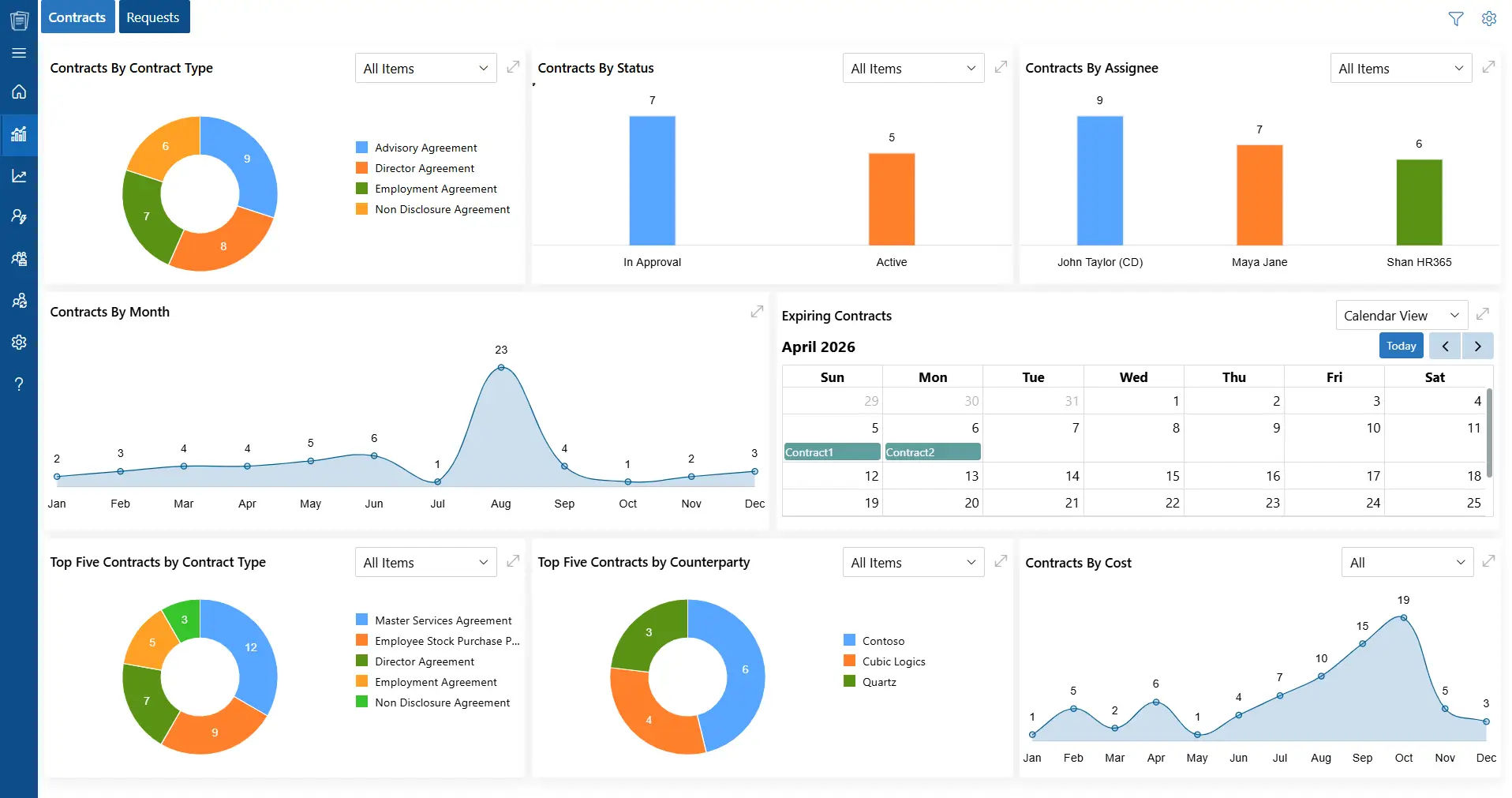
The Microsoft 365 contract management works directly with SharePoint, Teams, Outlook, Word, and Power BI, allowing contract creation, review, and storage to happen within the same environment employees already use daily.
Microsoft 365 contract management integration reduces the need to switch between multiple platforms and keeps contract activities organized.
It also enables team members to collaborate efficiently using tools they are already familiar with.
AI-Powered Platform
With Microsoft Copilot, CLM 365 brings AI into contract management. In fact, nearly 70% of Fortune 500 companies now rely on Microsoft 365 Copilot to enhance productivity and decision-making.
This shows the importance of AI powered system and AI helps summarize contract content, suggest alternative clauses, flag potential risks, and highlight key obligations, helping teams make better-informed decisions.
This AI-driven support also reduces manual errors and accelerates contract review cycles, allowing teams to focus on strategic tasks.
Automation
CLM 365 includes automated workflows that handle reminders, track contract deadlines, and trigger approval processes.
Contract automation helps teams keep up with tasks, avoid delays, and follow contract timelines without manually tracking each step.
Tasks like sending reminders for renewals or approvals run automatically, saving time and reducing the chance of missing critical deadlines.
Security
All contracts remain within the Microsoft 365 environment, benefiting from its robust security infrastructure.
Access controls allow organizations to restrict who can view or edit contracts, ensuring sensitive data is protected.
These security features make it easy to manage permissions and maintain control over confidential documents without needing a separate security system.
Compliance Management
Contract management solution tracks all actions taken on contracts, from edits to approvals, creating a detailed audit trail.
These records help organizations meet internal policies and regulatory requirements.
Teams can review activity logs to see who made changes, when approvals occurred, and how the contract evolved, which is essential for accountability.
Automated Multilevel Approvals
The system allows contracts to go through multiple levels of approval, ensuring that the right stakeholders review and authorize documents at each stage.
This structured approach helps organizations manage internal processes more efficiently and minimizing the risk of errors or overlooked details.
By providing clear visibility into each approval step, it ensures that every contract receives thorough oversight before it is finalized, supporting accountability and compliance across teams.
Clause Library
CLM 365 provides a pre-built library of templates and standard clauses.
Teams can quickly create contracts using clause library, saving time compared to creating documents from scratch.
The library also serves as a reference for frequently used clauses, making it easier to compare and select appropriate language.
Microsoft 365 contract management promotes uniformity across all contracts while ensuring adherence to both organizational policies and legal requirements.
Contract Negotiation
The platform streamlines negotiations by capturing comments, proposed changes, and discussions in one organized space.
Legal, sales, and procurement teams can collaborate effortlessly, staying fully aligned and up to date at every stage.
This centralized approach enhances transparency, accelerates decision-making, and ensures a smooth, efficient negotiation process.
Contract Redlining
Redlining empowers teams to track changes directly within the system, keeping all edits organized and easily accessible.
Users can highlight revisions, propose modifications, and compare different versions of a contract effortlessly.
A good contract redlining process enhances collaboration, improves clarity, and minimizes the risk of miscommunication, ensuring that every update is accurately captured and understood.
It also accelerates the review process, helping teams finalize contracts more efficiently and confidently.
Contract Amendment
It simplifies managing amendments and addendums, making contract updates seamless and organized.
Changes are logged and linked to the original contract, providing a clear history of modifications.
This helps teams maintain a complete record of contractual agreements over time without confusion.
It also enhances contract traceability and version control, ensuring that users can quickly access the latest updates a feature highly searched by professionals looking for efficient contract amendment management.
Benefits of Using Microsoft 365 for Contract Process
By connecting everyday Microsoft tools with contract workflows, organizations can reduce manual effort, improve visibility, and manage agreements more efficiently.
Cost Savings
Managing contracts through Microsoft 365 can reduce the need for several separate applications.
Instead of paying for and maintaining multiple tools for different stages of the contract lifecycle, organizations can bring key activities together within their existing Microsoft environment.
Fewer systems also mean less administrative work and less time spent moving information between applications, helping teams use their resources more effectively.
Work With Tools Your Teams Already Know
Microsoft 365 contract management works with familiar applications such as Teams, Outlook, SharePoint, and Word.
Employees do not have to learn an entirely new ecosystem to manage contracts.
Working within tools they already use every day can shorten the learning curve, encourage adoption, and make it easier for teams to incorporate contract management into their existing processes.
Simpler Implementation
Because Microsoft 365 contract management builds on an existing Microsoft environment, organizations can introduce contract workflows.
Teams can start creating, reviewing, sharing, and approving agreements within familiar applications.
This helps reduce implementation effort and get new processes running faster.
Connected Collaboration Across Departments
Contracts often involve multiple stakeholders, from legal and procurement to sales and management.
Microsoft 365 makes it easier for these teams to work together while keeping contract information accessible within a shared environment.
With CLM 365, users can collaborate on documents, review changes, add comments, and work from the latest version of an agreement.
Easy for Employees to Use
Contract management with Microsoft 365 is only effective when employees can use it without unnecessary complexity.
A Microsoft 365-based approach provides a familiar experience, making it easier for users to navigate contracts, and complete assigned tasks.
The familiar interface can reduce the learning curve and help employees adopt contract processes with less disruption to their daily work.
One Central Location for Contract Information
Keeping contracts scattered across email inboxes, personal folders, and different applications can make information difficult to locate.
Microsoft 365 provides a centralized environment where agreements and related documents are stored.
Microsoft 365 contract management makes it easier to locate contracts, review previous versions, and work from current information.
Accelerate the Contract Lifecycle
Bringing drafting, review, collaboration, approval, and storage into a connected workflow can help reduce unnecessary delays.
Instead of relying on repeated email exchanges or manual document handoffs, teams can manage contract activities within their Microsoft 365 environment.
This helps agreements move from draft to approval faster, allowing businesses to respond to opportunities.
Steps to Create Contract Workflow in Microsoft 365 with CLM 365
Building an efficient contract management workflow in the Microsoft environment with CLM 365 helps organizations save time, reduce errors, and ensure smooth collaboration across teams from drafting to approval and renewal.
Step 1: Map Your Entire Contract Workflow
Begin by documenting every stage of your contract process, from initial drafting to final approval and renewal. By clearly outlining each step, you ensure your workflow aligns perfectly with your organization’s operational needs, reducing bottlenecks and creating a structured process that everyone can follow confidently.
Step 2: Develop Standardized Contract Templates
Create consistent, easy-to-use contract templates within Microsoft 365 contract management. Standardization not only speeds up the drafting process but also minimizes errors.
Step 3: Centralize Contracts with SharePoint Integration
Connect your contract workflow to SharePoint for secure, organized storage. With version control and easy access, teams can quickly locate contracts in one place.
Step 4: Enable Real-Time Collaboration via Teams
Incorporate Teams channels or chats to facilitate instant discussions and collaboration on contract drafts and approvals. This keeps communication centralized, reduces delays, and ensures all stakeholders remain aligned throughout the contract lifecycle.
Step 5: Automate Approval Processes with Power Automate
Set up automated approval routing using Power Automate to deliver contracts to the right stakeholders immediately. Microsoft 365 contract management eliminates manual follow-ups, accelerates decision-making, and ensures no critical contract gets delayed.
Step 6: Stay on Track with Outlook Alerts
Leverage Outlook to schedule timely reminders for contract owners and approvers about important deadlines, renewals, or pending tasks. These proactive notifications help prevent missed deadlines and maintain compliance, giving teams peace of mind.
Step 7: Gain Insights with Power BI Dashboards
Use Power BI dashboards integrated with Microsoft 365 contract management monitor the status of contracts immediately. Track approvals, identify issues, and access actionable insights that enable better strategic decisions and overall process optimization.
Step 8: Continuously Improve Your Workflow
Regularly review your workflow’s performance and adjust within Microsoft 365 contract management to address changing business requirements. Continuous optimization ensures your contract management process remains efficient.
Step 8: Continuously Improve Your Workflow
Regularly review your workflow’s performance and adjust within Microsoft 365 contract management to address changing business requirements. Continuous optimization ensures your contract management process remains efficient.
Simplify Contract Lifecycle with CLM 365
CLM 365 is a contract lifecycle management solution designed to work natively with the Microsoft ecosystem. It connects with SharePoint, Microsoft Teams, Outlook, Microsoft Copilot, Power BI, and Power Automate, allowing teams to handle contract-related tasks without moving away from the tools they already use.
Key capabilities include:
- Automated contract workflows: Streamline approvals, monitor contractual obligations, and support compliance through AI-powered workflows that reduce repetitive manual work and follow-ups.
- Enterprise-ready usability: Combines robust security controls with an intuitive interface, making contract management accessible to both growing companies and large organizations.
- Trusted security and compliance: CLM 365 is backed by SOC 2 compliance, Microsoft certification, and Microsoft Solutions Partner status, providing an enterprise-focused foundation for managing sensitive contract information.
- Support for regulated environments: The platform supports GCC and GCC High, helping organizations with strict security and data protection requirements manage contracts within controlled Microsoft environments.
What makes CLM 365 different?
Its combination of a Zero Trust security model, AI-powered capabilities, and user-focused design sets it apart. By keeping contract data within the organization’s own SharePoint environment.
Ready to experience smarter contract management? Start your 14-day free trial of CLM 365 today and take control of your contracts with ease.
Frequently Asked Questions
How do I organize contracts in SharePoint?
Use contract metadata such as contract type, counterparty, contract owner, department, status, contract value, effective date, expiration date, and renewal date rather than relying only on folders.
How can Power Automate improve contract management?
Power Automate can automate contract intake, approvals, notifications, escalations, renewal reminders, task assignments, status updates, and other repetitive contract management processes.
How does Microsoft Teams contract management help users?
Microsoft Teams contract management enables users to collaborate on contracts directly within Microsoft Teams, keeping conversations, documents, approvals, and updates connected in one workspace.
Does CLM 365 require on-premises servers?
No. CLM 365’s SharePoint contract management solution is fully cloud-based and runs on Microsoft 365 and Azure, eliminating the need for on-premises servers or hardware maintenance.
Can Microsoft 365 contract management automatically track contract expiration dates?
Yes. Contract expiration dates can be stored as SharePoint metadata and used with Power Automate to trigger reminders, notifications, tasks, or escalation workflows before a contract expires.


_JiluXJRGNl.svg)























