
What Is Contract Analytics: Importance & Key Metrics to Track

Your contracts may contain some of your company’s most valuable contract data, but can your team actually use it when a decision needs to be made?
- Contract analytics turns agreement data into useful insights for legal, finance, procurement, sales, and leadership teams.
- Dashboards can track status, cycle time, renewals, obligations, risks, value, and approvals.
- Focus on metrics that support specific business goals, rather than tracking everything.
- Analytics software reduces manual reporting and provides a current view of contract activity and risk.
Contracts hold pricing terms, renewal dates, obligations, liabilities, payment conditions, service levels, termination rights, and many other details that affect contract performance.
This is why contract analytics has become an important part of modern contract management.
In this blog, we will explain what contract analytic software is, what data businesses can extract, and which contract statuses and metrics matter.
What Is Contract Analytics?
Contract analytics is the process of collecting, organizing, measuring, and analysing data from contracts to identify patterns, risks, opportunities, and performance trends.
For example, a company with 3,000 vendor contracts may want to know:
- Which contracts expire in the next 90 days?
- Which have auto-renewal clauses?
- What contracts include price increases?
- What is the value of upcoming renewals?
- Which suppliers have missed obligations?
Instead of reviewing hundreds of documents manually, contract analytics software organizes this information into searchable reports, filters, and dashboards.
This turns a contract repository from a place to store agreements into a source of business insights.
What Data Can Be Extracted From Contracts?
Contracts contain legal, financial, and operational information. The contract analytics platform organizes this information into structured data that teams can search, compare, and analyse contracts.
- Contract Information: Contract name, ID, type, business unit, owner, counterparty, effective date, expiration date, and status.
- Financial Data: Contract value, payment terms, discounts, pricing, rate changes, penalties, service credits, and minimum commitments.
- Renewal & Termination Data: Renewal dates, auto-renewal terms, notice periods, termination rights, and early termination fees.
- Clause & Risk Data: Liability limits, indemnification, confidentiality, data protection, insurance, governing law, audit rights, and non-standard clauses.
- Obligation Data: Deliverables, milestones, payment obligations, compliance requirements, service commitments, owners, and due dates.
Why Is Contract Analytics Important for Businesses?
Important contract terms can get overlooked after signing. World Commerce & Contracting reports 8.6% average value erosion from poor contract management. It helps businesses turn contract data into actionable insights.
A contract may say that a supplier must maintain a certain service level. Another may include a discount after a spending threshold. A third may require termination notice 90 days before renewal.
Those terms have little business value if nobody knows they exist.
Analytics brings important information into reports and contract dashboards, where teams can see it.
Businesses can use analytics to find agreements with unusual clauses, missing information, high liability exposure, expired terms, overdue obligations, or upcoming deadlines.
Legal teams can then prioritize agreements based on contract risk instead of reviewing every contract with the same level of attention.
Finance and procurement teams can examine contract values, supplier costs, renewals, payment commitments, and pricing changes.
For example, a company could identify all agreements with annual price escalation clauses before preparing next year’s budget.
When obligations and contract activities have owners and deadlines, managers can see where work is pending.
Instead of asking different departments for updates, teams can use contract analytics to see current progress.
Historical contract data can also help during future negotiations.
Teams can compare previous terms, common clauses, and pricing arrangements and create better contract negotiation strategies and exceptions. This gives negotiators useful context before discussing a new agreement.
See what’s happening across your contracts
CLM 365 helps teams track contract status, renewals, obligations, and approvals from one place.
What Contract Statuses Can Be Analyzed?
A advanced contract analytics can show where agreements stand across the lifecycle. Instead of opening individual contracts, teams can quickly see which agreements need action and where delays are occurring.
- Draft: Contracts still being prepared. Tracking them shows the volume of agreements entering the contracting process.
- Under Review: Contracts being reviewed by legal or other stakeholders. Long review times can highlight process bottlenecks.
- Pending Approval: Reviewed contracts waiting for internal approval. Teams can track pending approvals and how long they have been open.
- Negotiation: Contracts being discussed with counterparties. Teams can analyze negotiation time, revisions, and frequently disputed terms.
- Pending Signature: Contracts awaiting signatures after completing internal reviews. Tracking them helps identify agreements that have stalled before execution.
- Active: Signed contracts currently in force. Teams can monitor their obligations, payments, contract milestones, and renewal dates.
- Expiring: Contracts approaching their expiration dates. Grouping them by 30, 60, 90, or 180 days helps teams plan their next steps.
- Expired: Contracts that have passed their expiration date. Analytics can help determine which agreements require renewal, replacement, or closure.
- Terminated: Contracts ended before their planned expiration. Reviewing termination patterns can reveal recurring business or performance issues.
- Renewed: Contracts that have entered a new term. Teams can compare renewal rates, pricing, and changes in contract terms.
12 Key Metrics to Track on a Contract Analytics Dashboard
A useful contract analytics dashboard should focus on contract KPIs that answer important business questions. The goal is to help teams see what needs attention, where delays occur, and what decisions may be required.
-
Contract Volume
Track the number of contracts by type, department, region, owner, counterparty, or status to understand overall contract activity. -
Contract Cycle Time
Measure the time from contract request to execution, including drafting, review, negotiation, and approval stages, to identify delays. -
Contracts by Status
Monitor contracts across stages such as draft, review, negotiation, approval, active, expired, and terminated to understand the current workload. -
Contract Value
Track the financial value of agreements by customer, supplier, department, contract type, or status to understand commercial exposure. -
Upcoming Renewals
Monitor contracts due for renewal in the next 30, 60, 90, or 180 days so teams have time to review performance and decide what happens next. -
Expiring Contracts
Track agreements approaching expiration and combine this data with contract value, owner, and business importance to prioritize action. -
Obligation Completion Rate
Monitor completed, pending, and overdue obligations to understand whether contractual commitments are being fulfilled. -
Approval Time
Measure how long contracts remain at each approval stage to identify bottlenecks and understand where the process slows down. -
Contract Request Aging
Track how long open contract requests have remained unresolved to identify requests that may require attention. -
Risk & Clause Exceptions
Identify contracts containing non-standard clauses, missing provisions, unusual liability terms, or other deviations from approved standards. -
Counterparty Concentration
Analyze contract volume and value by counterparty to identify major commercial relationships and potential dependencies.
- Renewal & Termination Rates
Compare renewed, terminated, and expired agreements to understand relationship trends and support future contracting decisions.
How Does Contract Analytics Improve Business Decision-Making?
contract analytical becomes valuable when data leads to action. Knowing 47 contracts expire next quarter is useful, but knowing that 12 represent $2M in spending and four auto-renew makes the insight actionable.
Legal teams often manage more agreements than they can review manually on a regular basis.
Contract analytics software can help group agreements based on terms, dates, contract values, exceptions, and risk indicators.
Legal professionals can then focus their attention on agreements that require deeper review.
Procurement teams can compare supplier contracts before negotiations begin.
They might discover that one supplier has higher annual price increases than similar vendors or that several agreements with the same supplier renew at different times.
That information creates opportunities for better commercial discussions.
Contract commitments affect future spending and revenue.
Analytics can help finance teams see upcoming payments, renewal costs, pricing changes, minimum commitments, and contract termination.
Instead of relying only on historical spending, teams can include contractual commitments in financial planning.
Sales and account teams can use contract information to understand renewal dates, pricing terms, commitments, and customer-specific conditions.
That can support better preparation before renewal discussions.
Executives usually do not need to read individual contracts. They need answers to broader questions.
- Are contract cycle times increasing?
- How much contract value renews next quarter?
- Where are the largest risks?
- Which departments have the most overdue obligations?
Contract analytics turns thousands of agreement details into answers leaders can use.
How to Build a Contract Analytics Dashboard Around Business Goals
Before customizing a contract analytics dashboard, define what your business needs to track and why. Here are some key aspects to consider.
Step 1: Start With the Problem, Not the Dashboard
Don’t begin with charts. Start with the issue you want to solve, contract delays, missed renewals, overdue obligations, or rising risk.
Step 2: Track What You Will Act On
Don’t measure everything available. Choose metrics that lead to decisions, such as renewal dates, contract value, cycle time, or risk exposure.
Step 3: Get Your Contract Data in Order
Use consistent contract types, statuses, dates, owners, and naming conventions. Poor data will only produce unreliable insights.
Step 4: Make Someone Accountable
Every renewal, approval, or overdue obligation should have someone responsible for taking action.
Step 5: Use Timeframes That Match the Work
Choose timeframes based on how your team works. Renewals may need 30-, 60-, and 90-day views, while financial metrics may need quarterly views.
Step 6: Don’t Give Everyone the Same Dashboard
Legal, finance, procurement, and leadership need different information. Customize dashboard views around their responsibilities.
Step 7: Review What the Dashboard Is Actually Telling You
Ask whether each metric leads to a decision. Remove metrics that don’t add value and focus the dashboard on actionable information.
What are your contracts costing you?
Analyze contract values, pricing terms, renewals, and obligations to understand your commercial commitments.
CLM 365: A Better Way to Analyze Agreements
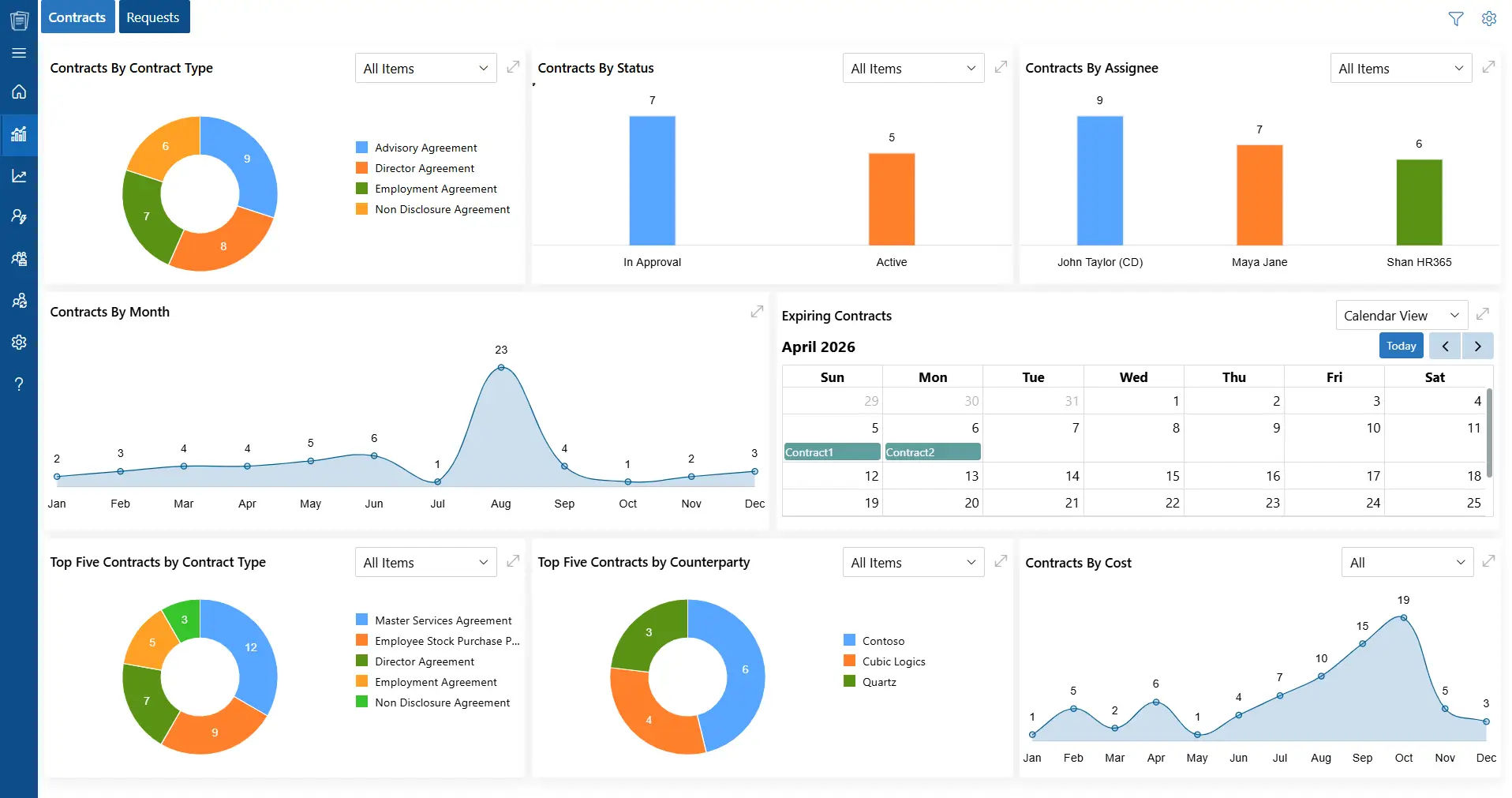
Built within the Microsoft 365 ecosystem, CLM 365 brings contract data into a centralized dashboard, helping teams track contract activity, status, renewals, deadlines, requests, costs, and obligations.
Teams can analyze:
- Contracts by status and type
- Contract requests and aging
- Expiring agreements and renewals
- Contract costs and performance
- Obligations and key counterparties
- Priority contracts
With a centralized repository, contract metadata, search, reporting, activity logs, audit trails, and role-based access, teams can work with data more consistently.
CLM 365 works with familiar Microsoft tools such as SharePoint, Teams, Outlook, and Word, giving teams a connected way to manage and analyze agreements without relying on scattered spreadsheets and folders.
Hear What Our Clients Say About CLM 365
Conclusion
Contracts contain valuable information about money, risk, obligations, deadlines, and business relationships. Contract analytics turns this information into structured insights teams can search, compare, and act on.
The best approach starts with a business question, not a long list of metrics. With the right contract analytics software and a focused dashboard, businesses can move from simply storing contracts to using contract data for better decisions.
Turn your contract data into useful business insights with CLM 365. No credit card details required.
Frequently Asked Questions
Can contract analytics show contracts waiting for signatures?
Yes. A dashboard can identify contracts that have completed internal review but are still waiting for one or more signatures.
How can I identify bottlenecks in the contract lifecycle?
Compare the average time spent at each stage. If contracts consistently spend longer in one stage, that stage may require closer investigation.
How to track active contracts?
A contract analytics dashboard can filter active agreements by department, owner, contract type, value, counterparty, renewal date, or other relevant fields.
How are expired contracts identified?
Contracts with an expiration date in the past can be automatically categorized as expired, making it easier to review them for renewal, replacement, or closure.
What happens to a contract when it gets renewed?
A renewed contract can be recorded as a new term or renewal event while retaining its previous contract history.
Table of Contents

Trusted by the Best

























