

How Contract Automation Drives Efficiency and Growth In 2027

Most businesses lose an average of 3.4 weeks waiting for a single contract to be approved. That delay costs deals, strains vendor relationships, and ties up legal teams in repetitive manual work.
- Contract automation saves time by reducing repetitive work and speeding up everyday contract tasks.
- Gartner study shows that 66% of legal leaders already intend to hasten their investments in legal technology.
- Automation supports better control by making it easier to track contracts, deadlines, and approvals.
- Automated reminders help prevent missed renewals, while streamlined approvals keep contracts moving.
Contract automation changes this. By replacing manual drafting, chasing approvals, and tracking deadlines with structured digital workflows, businesses move faster, make fewer errors, and gain complete visibility into every agreement
Today, businesses see contracts differently. With contract automation workflow companies can handle contracts faster, with greater accuracy and control.
This guide covers how contract automation works, who benefits from it, and how to implement it effectively.
What Is Contract Automation?
Contract automation is the process of using software to handle the repetitive, rule-based parts of contract management so your team focuses on decisions.
Instead of writing each agreement from scratch, your teams work from pre-approved templates with built-in clause libraries. Approvals route automatically to the right people. Signatures happen digitally. Renewal dates trigger reminders. Nothing falls through the cracks.
Think of it this way: a contract isn’t just a document it’s a moving process with many stages. Contract automation gives each stage structure, visibility, and speed.
How Does Contract Automation Actually Work?
The process is straightforward once it’s set up. Here’s what happens from start to finish:
- A team member starts a contract using a pre-built template no legal consultation needed for standard agreements
- Dynamic fields auto-populate based on the deal type, client data, or internal rules
- The draft routes to the right reviewers in a defined order (sales → legal → finance, for example)
- Stakeholders mark-up, comment on, or approve the contract in one shared space
- Once approved, the contract goes for e-signature in minutes, not days
- The signed document is stored and indexed automatically, with key dates tracked
- Alerts fire before renewal dates, expiry deadlines, or compliance checkpoints
The Core Shift
Before automation: your team manages the process. After automation: the system manages the process, your team manages the exceptions.
What Can Be Automated in Contract Management?
Contract automation can handle many repetitive tasks across the contract lifecycle, helping teams reduce manual work and keep contracts moving.
- Contract creation: Generate contracts from approved templates and automatically add relevant business details.
- Data entry: Populate names, dates, pricing, terms, and other contract fields without repetitive manual entry.
- Clause selection: Select approved clauses based on contract type, requirements, or predefined rules.
- Review and approvals: Automatically route contracts to the right reviewers and approvers based on defined workflows.
- Version control: Track contract changes and maintain a clear record of the latest version.
- Notifications and reminders: Send automatic reminders for pending reviews, approvals, signatures, deadlines, and renewals.
- E-signatures: Send approved contracts for electronic signatures and track signing progress.
- Contract storage: Automatically organize executed contracts in a centralized, searchable repository.
- Metadata extraction: Capture important details such as contract value, parties, effective dates, and renewal terms.
- Obligation tracking: Track contractual commitments, deliverables, payment terms, and other obligations.
- Renewal management: Identify upcoming expirations and send timely renewal reminders to responsible teams.
- Reporting and analytics: Track contract volumes, turnaround times, approval delays, renewals, and other key metrics.
Why Are Contracts Still So Slow in Most Businesses?
Despite how critical contracts are to every business deal, most organizations still treat them like a manual task. And the cost is real.
Average time to get a contract approved without automation (Procurement research)
Legal leaders who plan to speed up investment in legal technology (Gartner)
Legal managers who want better efficiency but lack the tools to automate key tasks
The problem isn’t just speed. It’s the ripple effect. A delayed vendor contract stalls procurement. A slow sales agreement means a competitor closes the deal first. A missed renewal puts the business at legal or financial risk.
Manual contract processes rely on email chains, shared drives, and informal follow-ups. There’s no single source of truth. No one knows exactly where a contract is stuck. Deadlines get missed not because people don’t care but because the system doesn’t surface them.
Contract automation solves this at the system level. It’s not about working harder. It’s about building a contract lifecycle management process that works even when no one is actively managing it.
Still chasing approvals over email? Switch to CLM 365
Who Benefits from Automating Contracts?
Contract automation isn’t just a legal team upgrade. Every department that touches contracts which is most of them works faster when contracts are automated.
1. Legal Teams
Gartner data shows lawyers in corporate departments spend 25–40% of their working hours on drafting, approval follow-ups, and deadline tracking. That’s skilled time going into administrative overhead.
With legal contract management software, legal teams offload the routine. Standard NDAs, employment agreements, and vendor contracts go through without needing legal sign-off at every step. The team focuses on complex negotiations, risk reviews, and strategic matters.
2. Sales Teams
Every day a deal waits for a contract to be prepared and signed is a day revenue isn’t recognized. Sales teams using automated contract workflows can generate a contract from a pre-approved template, customize it for the deal, and send it for signature all without waiting on legal.
Faster contracts mean faster closes. For competitive deals, this matters enormously.
3. Procurement Teams
Procurement departments typically manage a large volume of supplier and vendor agreements. Tracking renewal dates, compliance obligations, and pricing terms manually is unsustainable at scale.
Automated contract management gives procurement teams a single dashboard to track all active agreements, flag upcoming renewals, and compare vendor performance against contract obligations.
4. Business Owners and Executives
Senior leaders often become unintentional delays in the approval process. They’re chased for signoffs, copied on threads, and left waiting for status updates on deals that should have closed weeks ago.
Automation gives leadership real-time visibility into every contract stage without needing to be in every email chain. Approvals are structured, tracked, and visible.
5. HR Teams
Employment contracts, offer letters, contractor agreements, and policy acknowledgments are all part of the HR workflow. Contract automation means each of these follows a consistent, compliant process and every signed document is filed automatically.
Manual Process Integrated Contract Automation Software What’s Actually Different?
The difference between manual contract handling and integrated automation lies in how efficiently contracts are created, tracked, and completed across the entire process.
| Aspect | Manual Contract Management | Contract Automation |
| Approvals | Approvals get delayed due to back-and-forth emails, unclear ownership, and constant follow-ups | Routes automatically to the right person; average cycle cut in half |
| Tracking Status | No clear view of where a contract is stuck, leading to confusion and missed deadlines | Real-time dashboard shows every contract’s stage and next action |
| Clause Consistency | Different versions of clauses used across contracts, increasing compliance risk | Pre-approved clause libraries used across all agreements |
| Missed Deadlines | Renewal dates and obligations are often overlooked, causing penalties or lost opportunities | Automated alerts sent to the right people before deadlines hit |
| Collaboration | Teams work in silos, leading to miscommunication between legal, sales, and procurement | Single platform; all edits, comments, and approvals in one place |
Features of Contract Automation Software
Studies show that more than 82% of contract professionals believe a large part of their daily work over 20% can be handled by AI. This shows how important automation has become in modern contract management. Below are some key features every organization should look for:
1) Contract Approval Process
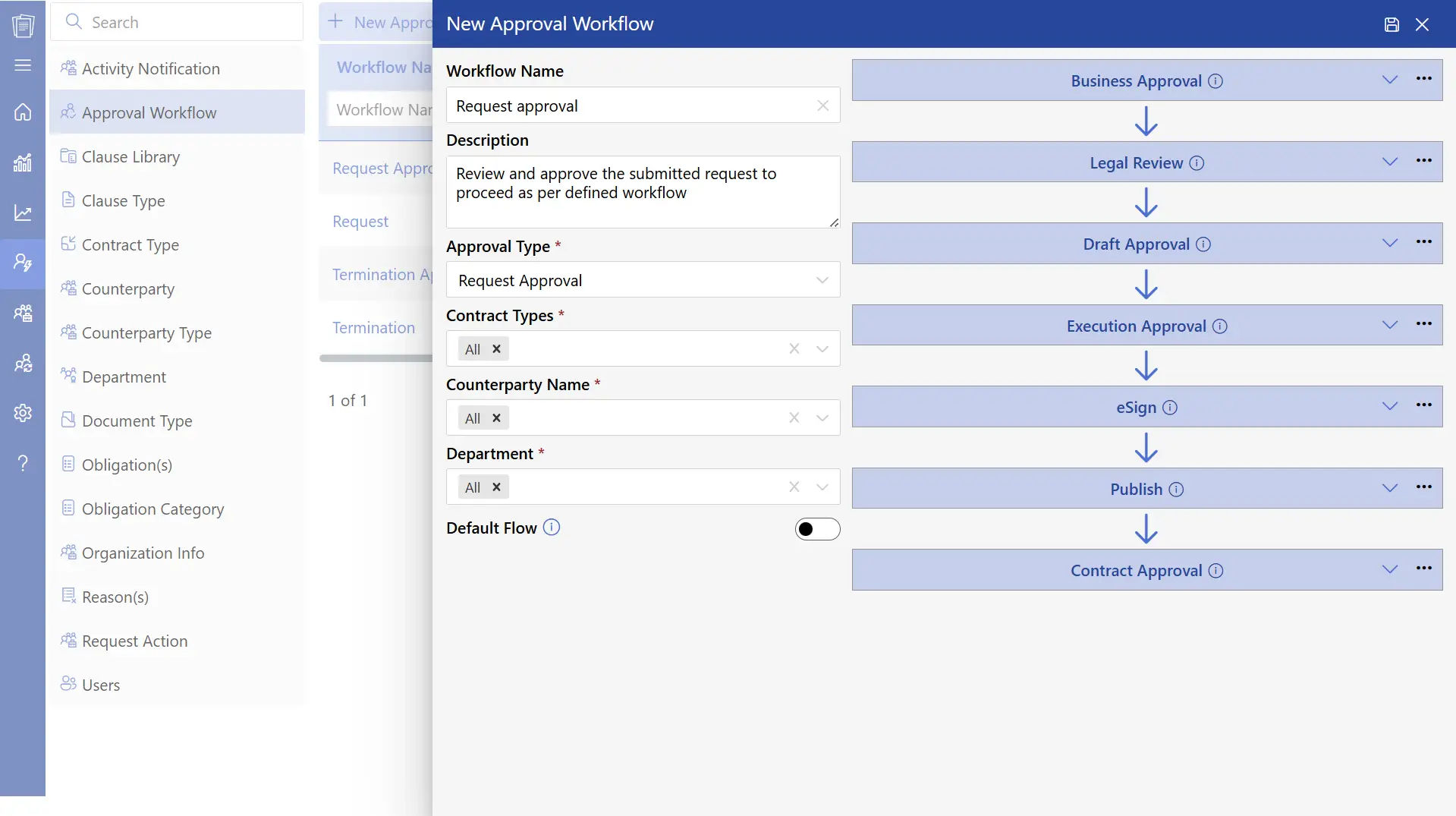
An automated contract approval process removes the need to follow up manually for sign-offs.
Contracts are automatically sent to the right person at the right time, based on a defined flow. This reduces waiting time and keeps things moving smoothly.
Teams can clearly see who has approved, who is pending, and what step comes next. The result is quicker turnaround, fewer delays, and better accountability.
2) Contract Redlining
Contract redlining allows different teams to review and suggest changes to a contract at the same time.
It improves collaboration by keeping all edits and feedback in one place. Legal and business teams can review terms faster without confusion.
This leads to quicker negotiations and helps avoid misunderstandings.
3) Contract Reminders and Alerts
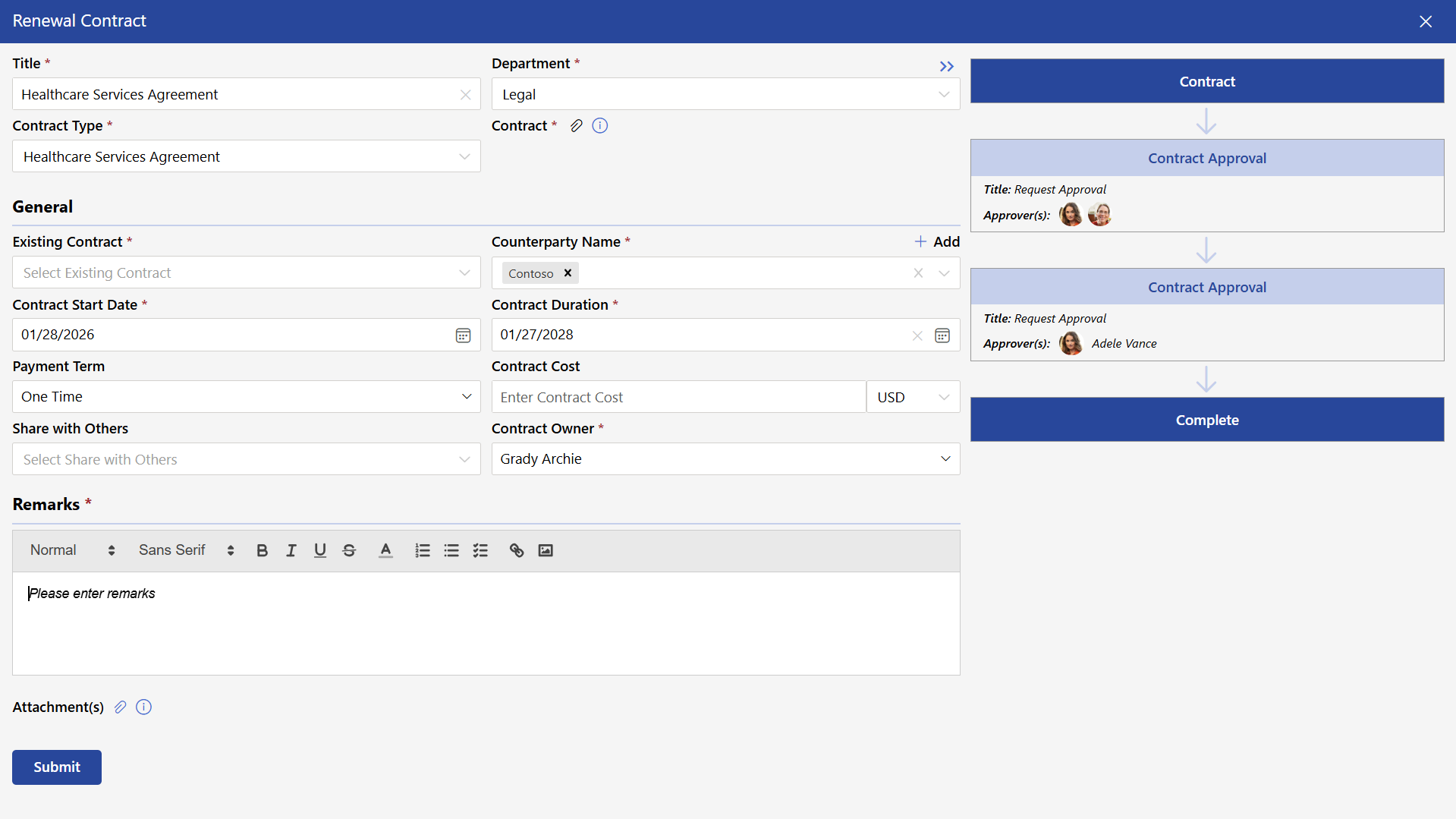
Keeping track of deadlines, renewals, and compliance dates can be difficult when done manually.
With automated reminders, the system notifies users before any important date. There is no need to rely on calendars or memory.
This ensures that deadlines are not missed and contracts are renewed on time.
4) Contract Routing
Smart routing creates a smooth and structured flow for every contract.
Each document is automatically directed to the right team such as sales, finance, and legal at the right stage.
This enables a streamlined process, faster movement, and clear coordination across teams.
5) E-Signature
Signing contracts becomes fast and simple with e-signature.
Instead of printing, signing, and scanning documents, users can sign digitally within seconds.
This improves the overall experience, reduces paperwork, and helps close deals faster, no matter where the parties are located.
6) Contract Version Control
Version control keeps all contract drafts and updates in one place.
Teams always have access to the latest version, avoiding confusion and duplicate files.
This improves accuracy, builds trust, and ensures everyone is working on the correct document.
7) Contract Management Software Integration
The integration of contract management software with the existing systems is a requirement of the modern-day businesses.
Rather than changing platforms all the time, contracts may be integrated with tools teams are already system such as SharePoint, MS Teams, Outlook, Power BI and Power Automate.
Contracts are a part of a connected ecosystem by living within known platforms, which minimizes duplication.
Want to see these features in action?
Key Benefits of Using Contract Automation
Contract automation helps businesses work faster, stay accurate, and manage agreements with ease. It supports better decision-making and improves the overall contract process. Here are the key benefits:
1. Saves Time and Costs
Automation handles repetitive tasks quickly, allowing contracts to be completed in minutes instead of hours.
According to WeShare, legal professionals have saved up to 82% of their time by using automation. This allows teams to focus more on strategy and high-value work.
For businesses, this means better productivity and long-term cost efficiency.
2. Simplified Contract Creation
Automation makes contract creation quick and consistent with ready-to-use templates.
Users can generate contracts in seconds by filling in key details, ensuring accuracy every time.
This also enables teams like sales, HR, and procurement to manage contracts easily and independently.
3. Improved Compliance
Automation ensures every contract follows company policies and required standards.
Built-in rules guide users to include the right terms, helping maintain consistency across agreements.
This creates confidence that all contracts are aligned, accurate, and ready for review.
4. Minimized Risks
Automation brings clarity and consistency to every contract, reducing manual errors and confusion across teams.
Key clauses are added accurately every time, ensuring compliance and standardization in all agreements.
At the same time, obligations, deadlines, and responsibilities become much easier to track through a centralized system.
5. Stronger Collaboration
Automation creates a shared space where teams can work together smoothly.
Legal, finance, operations, and other teams can review, update, and approve contracts in one place.
This improves coordination and supports faster decision-making.
6. Faster Contract Lifecycle
Automation speeds up the entire contract journey from creation to final signing.
According to WeShare, negotiation cycles can be reduced by up to 50% with automation.
This helps businesses close deals faster, respond quickly to opportunities, and improve overall performance.
7. Greater Accuracy
Automation ensures contracts are consistent and well-structured every time.
Teams can rely on standardized content and accurate information across all agreements.
This builds trust and reflects professionalism in every contract.
8. Smooth Contract Execution
With automation, approvals and signatures happen digitally and instantly.
Contracts can be completed quickly, supporting faster deal closure and better business flow.
This allows organizations to move forward with confidence and capture opportunities without delay.
From Startups to Enterprises: Contract Automation in Action
Contract automation supports businesses at every stage of growth. Whether it’s a small business, a growing startup, or a large enterprise, the goal remains the same manage contracts faster, stay organized, and maintain clarity across every step.
1. Small Businesses: Keep It Simple and Efficient
Small businesses often manage contracts with limited time and resources. Contract automation makes it easy to create, send, and track agreements without complexity. Simple templates and guided workflows help handle everyday contracts smoothly. This allows business owners to focus more on operations and growth.
2. Startups: Move Fast and Stay Flexible
Startups need speed and adaptability. With growing demands, contract automation helps teams handle agreements quickly without slowing down progress. Quick contract creation and easy approvals support faster deal closures and smoother onboarding. This helps startups stay agile and growth focused.
3. SMBs: Build Structure and Visibility
As businesses expand, contracts involve more teams and steps. Contract automation brings structure to this process. Defined workflows and real-time tracking help teams stay aligned and informed. This improves coordination, speeds up decisions, and keeps everything on track.
4. Integrate with Existing Business Systems
Enterprises manage contracts at a large scale across multiple departments and regions. Contract automation provides the control needed to handle this efficiently. Standardized processes, advanced workflows, and integrations help maintain consistency and compliance while managing high volumes.
Bring clarity, speed, and control to every contract
CLM 365 automates routine tasks so your team can focus on priorities.
How to Implement Contract Automation in Your Business?
Getting started doesn’t require a complete overhaul. The most successful implementations follow a structured approach that builds momentum without disruption.
Define Your Goals: Identify contract bottlenecks and set measurable targets for improvement.
Build Templates: Create legally approved templates and a reusable clause library.
Map Approval Workflows: Define approval steps, routing rules, and access permissions.
Integrate Existing Tools: Connect contract automation software with your current business applications.
- Train and Measure: Train employees, track performance, and collect feedback to improve adoption.
Best Practices That Make Contract Automation Actually Work
Implementing automation is step one. Getting lasting results requires these practices.
Use AI-Powered Summaries: Use AI to highlight key contract details, including payment terms, liability limits, renewal dates, and termination clauses, helping legal teams review agreements more efficiently.
Define Lifecycle Stages: Assign clear statuses to contracts, such as draft, under review, approved, and completed, so teams can track progress and identify the next steps.
Set Role-Based Access: Give employees access to contract information based on their roles and responsibilities to protect sensitive data and maintain secure workflows.
Track Performance with KPIs: Monitor contract cycle times, approval speed, renewal rates, and clause usage to measure performance and identify areas for improvement.
Use Analytics: Use dashboards and reports to monitor contract status, obligations, and upcoming renewals, helping teams make informed decisions and take timely action.
Why Choose CLM 365?
CLM 365 is built within the Microsoft ecosystem, allowing it to work seamlessly with tools like SharePoint, Microsoft Teams, Microsoft Outlook, Microsoft Copilot, Power BI, and Power Automate.
This means teams can manage contracts directly within the tools they already use, making the process more natural and efficient.
CLM 365 helps speed up contract workflows by automating approvals, tracking key dates, and ensuring policies are followed consistently. AI-powered features support smoother workflows, reduce manual effort, and improve overall accuracy.
The platform is designed with strong security standards and an easy-to-use interface, making it suitable for both growing businesses and large organizations.
It is supported by SOC 2 compliance, Microsoft Certification, and Microsoft Solutions Partner recognition, offering a secure and reliable contract management experience.
CLM 365 also supports GCC and GCC High environments, making it a suitable choice for organizations that require advanced data protection, including government and regulated sectors.
Best suited for: Small to mid-sized businesses and enterprises looking to simplify and improve their contract processes.
What sets CLM 365 apart:
CLM 365 combines AI-driven capabilities, a user-friendly design, and a zero-trust security model. It also keeps your data within your own SharePoint environment, giving you greater control and confidence over your information.
Common Misconceptions About Automation and AI in Contract Management
There are several misunderstandings around automation and AI in contract management. One of the most common is the idea that these tools replace legal professionals. They are designed to support their work, not replace it.
Another misconception is that AI can handle every type of contract. While it works well for standard and repetitive agreements like NDAs or vendor contracts, complex agreements still benefit from human expertise and judgment.
Some believe automation removes the need for review. In practice, it supports teams by handling initial tasks such as identifying key terms, highlighting unusual clauses, and checking for missing information allowing professionals to focus on more critical decisions.
It is also often assumed that AI delivers perfect outcomes. While it improves speed and consistency, it still depends on proper setup, rules, and ongoing monitoring.
In simple terms, automation and AI enhance contract management by making it more efficient and organized, while still working best alongside human oversight.
Conclusion
Automating contract workflows has become an important step for businesses aiming to improve efficiency, reduce risks, and save time. It allows organizations to manage agreements more effectively and build stronger, more reliable partnerships.
CLM 365 brings these benefits together in one platform, helping teams handle contracts with greater ease and confidence.
Start your 14-day free trial with SharePoint contract management and experience a simpler way to manage contracts.
Join Our Creative Community
Frequently Asked Questions
What’s the real ROI companies see after implementing contract automation?
How does contract automation reduce approval delays?
The system automatically routes contracts to the right people, sends reminders, and tracks pending approvals in real time.
Can contract automation work for startups and small teams?
Yes. Even small teams save time by automating repetitive agreements and reducing manual admin work.
Can contract automation improve collaboration between finance, legal, and procurement?
Yes. Shared workflows and centralized visibility reduce communication gaps between departments.
How does automation reduce human error in contract management?
Automation reduces human error in contract management by standardizing the entire contract process. Instead of manually creating, editing, or reviewing every document, teams use predefined templates and validate checks to ensure consistency.


_JiluXJRGNl.svg)























