
12 Benefits of LMS for Modern Workplace Training

94% of employees say they would stay longer at a company that invested in their learning and development. Most companies have seen that number. Most companies agree with it. And most companies are still running training the same way they did fifteen years ago spreadsheets, one-off sessions, PDF manuals sent by email, and a calendar invite that half the team ignores.
- An LMS centralizes all training in one place, cutting costs and ensuring every employee gets the same quality experience regardless of location.
- Real-time tracking and analytics replace guesswork, giving leaders clear visibility into who completed what and whether training is actually working.
- Compliance and onboarding become automated and audit-ready, eliminating manual follow-ups and inconsistent new hire experiences.
- Consistent learning and development directly reduces employee turnover by giving people a visible, structured path to grow within the company.
That gap between what companies know and what they actually do is costing them people, time, and money every quarter.
The L&D managers and HR leaders reading this already feel it. You know training is important. The problem is not motivation it is infrastructure. The tools most companies use to deliver training were not built for the way work actually happens today: distributed teams, packed schedules, employees who expect their workplace tools to be as easy to use as their personal apps.
A Learning Management System an LMS is the infrastructure that closes that gap. It is software that lets you plan, build, deliver, and track all employee training in one place. Whether you are onboarding ten new hires or rolling out a compliance update to five thousand employees across multiple countries, an LMS makes it repeatable, measurable, and scalable without adding headcount or rebuilding your process from scratch each time.
In this blog, we cover 12 specific, measurable benefits of using LMS for workplace training. We also look at who gets the most value from these platforms, what to check before you choose one, and the mistakes that cause even good LMS investments to underperform.
What Is an LMS?
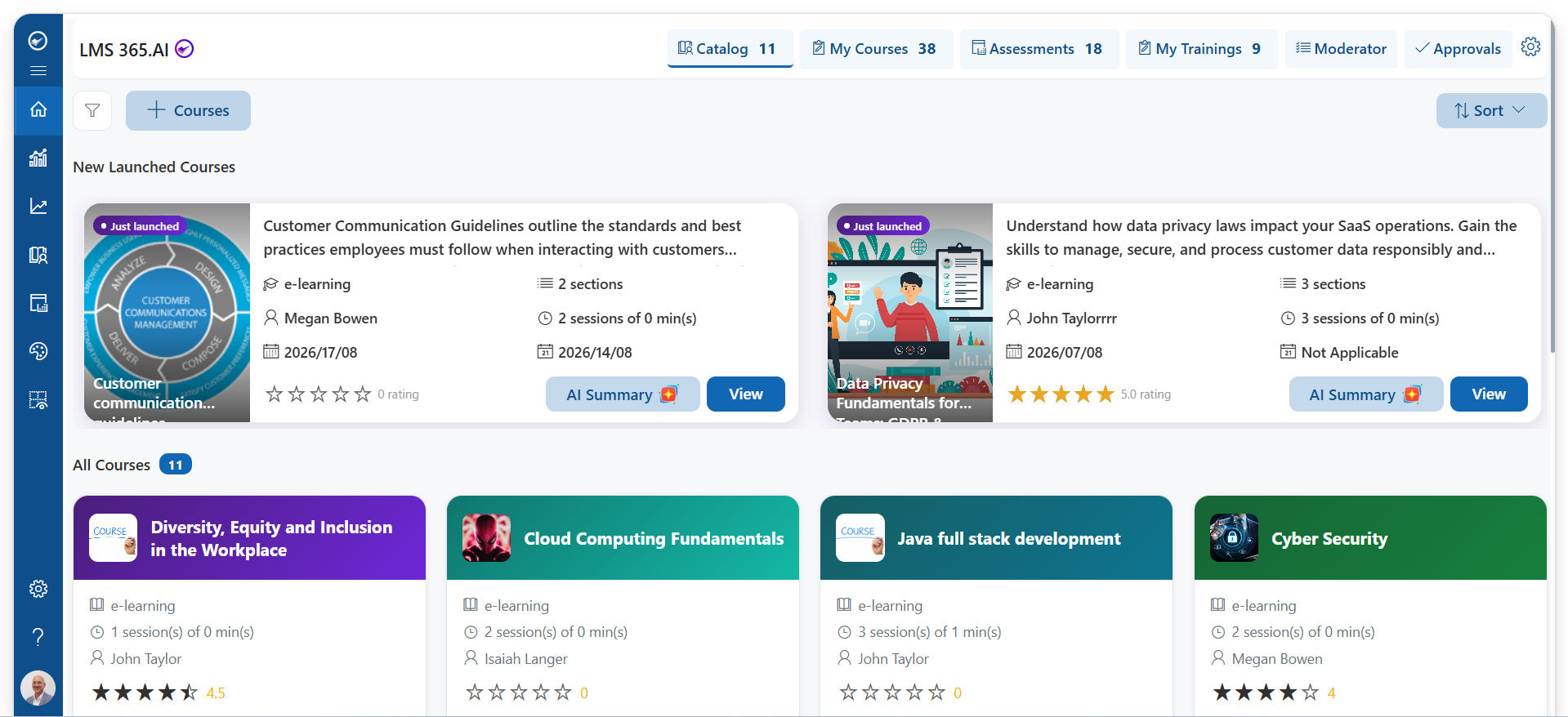
A Learning Management System is a digital platform that centralizes all of your training operations. It is where you build courses, assign them to the right people, track progress in real time, manage certifications, and measure whether training is changing behavior or just filling boxes on a checklist.
Modern LMS platforms support a wide range of content formats video lessons, SCORM-based interactive modules, quizzes, live virtual sessions, documents, and scenario-based simulations. They also handle the administrative work that used to fall on someone’s to-do list: sending reminders, issuing certificates, re-enrolling employees when a certification expires, and generating reports that show completion and performance data across the whole organization.
The global LMS market was valued at over $16 billion in 2023 and is projected to exceed $40 billion by 2030. That growth is not hype it reflects the reality that companies across every industry have realized informal, manual training approaches do not scale, do not produce consistent results, and do not give leadership the visibility they need to make good decisions about their workforce.
LMS 365: For organizations already running on Microsoft 365, LMS 365 is worth a specific look. It runs natively inside Microsoft Teams and SharePoint meaning employees access training in the same environment where they do their daily work, with no separate login or new interface to adopt.
12 Benefits of LMS for Modern Workplace Training
As workplace learning evolves, businesses need systems that make training consistent, flexible, and measurable. These 12 benefits of using lms show why its become essential.
1. All Training Content Lives in One Central Place
Ask a training manager where their content lives and you will usually get a complicated answer. Some videos are on a shared drive. Quizzes were emailed last quarter. The compliance module was updated but nobody is sure which version is current. The onboarding guide exists in three slightly different variations across three departments.
This is not a content problem. It is a systems problem. And it creates real consequences: employees access outdated materials, managers waste time tracking down the right files, and nobody has a clear picture of what training actually exists.
An LMS solves this at the foundation. Everything lives in one place courses, videos, assessments, completion records, certificates. Admins update content in minutes and publish it immediately. Employees always access the current version. There is no ambiguity about where to go or what to use.
This centralization also makes audits and reporting significantly easier. Instead of pulling data from five different sources, you run one report. Instead of wondering if someone received the updated compliance training, you check the system and know immediately.
2. Employees Learn on Their Own Schedule, at Their Own Pace
Traditional training runs on the trainer’s schedule, not the learner’s. If you miss the session, you miss the content. If the material moves faster than you can absorb it, you fall behind and rarely get a chance to catch up. If you already know 60% of what is being covered, you still sit through all of it.
Self-paced learning in an LMS changes the dynamic entirely. Employees access training when it fits their workday early morning, between meetings, or in focused blocks when their schedule opens up. They can pause, revisit sections they found difficult, and move quickly through what they already understand.
Research from the American Psychological Association consistently shows that spaced learning returning to material over multiple shorter sessions rather than one long sitting leads to significantly better long-term retention. An LMS makes spaced learning practical for the first time at scale.
For remote and hybrid teams, this flexibility moves from convenient to essential. Employees spread across time zones or working non-standard hours cannot all attend the same live session. Self-paced training in an LMS means no one falls behind because of when or where they work which matters both for learning outcomes and for equity across the team.
3. Training Costs Go Down Often Significantly
In-person training carries a stack of costs that most organizations undercount: trainer fees, venue rental, travel reimbursements, printed materials, catering for full-day sessions, and the productivity cost of pulling people away from their actual work. When the same session needs to run again for new hires three weeks later, those costs repeat.
IBM calculated that moving to online learning saved the company approximately $200 million. That is an enterprise-scale number, but the underlying math applies at every company size. When you build a course once and deliver it indefinitely, the cost per learner drops dramatically with every additional person who takes it.
Brandon Hall Group research found that e-learning requires 40 to 60 percent less employee time to cover the same material as traditional classroom training. That time savings, multiplied across your workforce, is real money even before you account for the cost of the training itself.
Beyond direct cost reduction, an LMS also reduces the indirect cost of inconsistent training. When employees learn the wrong process or miss a critical compliance detail because of a trainer who rushed through the material, the downstream cost errors, rework, regulatory risk is rarely traced back to the training session but it is there.
4. Real-Time Data Shows You Exactly What Is Working
One of the most overlooked problems with traditional training is that there is almost no feedback loop. You run a session, employees attend, and then… nothing. Weeks later, a manager might notice that someone is applying a new skill, or they might not notice at all. There is no systematic way to know whether the training changed behavior or simply consumed time.
An LMS records every meaningful interaction a learner has with training content. Who started a course and when. Who completed it. How long each section took. Which quiz questions were answered incorrectly and how many attempts it took to pass. Which lms modules have the highest dropout rate. All of this data is available in real time, not in a quarterly report prepared by hand.
This visibility changes how training decisions get made. Instead of guessing which content is effective, you look at completion rates and assessment scores and find out. Instead of assuming everyone has finished their compliance training before the deadline, you check the dashboard and send targeted reminders only to the people who are behind.
For L&D leaders trying to demonstrate the value of their programs to executives, this data is essential. It connects training activity to measurable outcomes and supports continued investment with clear evidence.
5. Every Employee Gets the Same Quality of Training
When training quality depends on who delivers it, it varies sometimes significantly. One manager covers compliance requirements thoroughly and checks for understanding at every step. Another rushes through the same material in half the time. A third adds their own interpretation that drifts from the official policy. All three employees pass, but they walk away with different levels of understanding.
This inconsistency creates real risk. In regulated industries, it creates legal and compliance exposure. In customer-facing roles, it creates service quality gaps. In safety-critical environments, it creates physical risk. And across the board, it creates confusion when employees from different teams or locations try to work together and discover they were taught different things.
An LMS eliminates this variation. Every employee receives the exact same material, in the same sequence, with the same assessments and the same passing standards regardless of which office they work in, which manager trained them, or whether they started on a Monday or a Friday. The standard does not drift.
This consistency also supports a stronger company culture. When everyone goes through the same foundational training on values, expectations, and ways of working, it creates a shared baseline that makes alignment easier and miscommunication less common especially as teams grow and become more distributed.
6. Compliance Training Stops Being a Fire Drill
In industries like healthcare, financial services, manufacturing, and legal services, compliance training is not optional. Missing a required certification or failing to document that employees completed mandatory training can trigger audits, regulatory fines, or liability that far exceeds the cost of the training itself.
Managing this manually tracking who completed what through spreadsheets, chasing people by email before deadlines, and scrambling to produce documentation when an auditor asks is slow, error-prone, and stressful for everyone involved. And the larger the organization, the worse the problem gets.
An LMS automates the entire lifecycle. Assign required courses to specific roles or departments. Set deadlines. The system sends reminders automatically as deadlines approach without anyone needing to remember to send them. Certificates are issued digitally upon completion. Every completion event is logged with a timestamp. When an audit comes, the records are already organized and exportable.
Re-certification is equally straightforward. When a certification expires or a regulation updates, you revise the course and re-assign it. The system tracks who has completed the new version and who has not and keeps following up until they do.
One of the clearest ROI cases for an LMS is compliance: the cost of a missed regulatory deadline almost always exceeds the annual platform cost by a significant margin.
7. Onboarding Becomes Structured, Not Improvised
Research from the Society for Human Resource Management shows that structured onboarding programs improve new hire retention by 82 percent and productivity by over 70 percent. Those are large numbers but they make sense when you think about what unstructured onboarding looks like in practice.
In most companies without a defined onboarding system, new hires spend their first weeks asking whoever is available the questions they need answered. Some managers run thoroughly onboarding. Others barely have time for a 30-minute intro call. The quality of a new employee’s first experience depends heavily on luck who their manager is, how busy that person happens to be, and whether someone remembered to send the right documents.
An LMS replaces that improvisation with a repeatable, consistent process. Before a new hire’s first day, their onboarding path is already assigned company policies, role-specific training, tools walkthroughs, culture content, and any required compliance modules. They arrive knowing exactly where to start and what is expected of them in the first 30, 60, and 90 days.
Managers spend less time on repetitive explanations and more time on conversations that actually require human judgment. New hires feel more confident and get up to speed faster which means they start contributing sooner and feel a sense of progress from the beginning, rather than uncertainty.
8. Your Training Scales as Fast as Your Business Does
Growing companies hit a training wall at a predictable point. When there are 20 employees, informal training works well enough someone sits with a new hire, walks them through the key things, and that is good enough. At 200 employees, that approach starts to strain. At 500 or 2,000 employees across multiple offices, it simply breaks.
Hiring more trainers is expensive. Rebuilding your training process every time you open a new office is slow. Running the same session repeatedly for each cohort of new hires consumes management time that could be spent elsewhere. None of these solutions actually solve the problem they just make it slightly more manageable while the company continues to grow past them.
An LMS scales without friction. The course you built for your first cohort delivers the same experience to your thousandth hire at no additional cost per person. When you open a new office, assign the existing onboarding program. When you launch a new product line, build one course and publish it to every relevant employee simultaneously.
LMS 365 is built to handle this growth within the Microsoft 365 environment which means as your organization grows, your training infrastructure grows with it inside the same platform your teams already use for communication, file sharing, and project management.
9. Personalized Learning Paths That Match Real Job Needs
Generic training is one of the most common reasons training programs fail to produce results. When a course is designed to be relevant to everyone, it is rarely truly useful for anyone. A first-year customer service representative and a senior product manager do not have the same knowledge gaps, the same performance challenges, or the same development goals. Treating them as if they do wastes their time and produces weaker outcomes for both.
An LMS lets you build learning paths tailored to specific roles, departments, seniority levels, or individual development goals. A new sales hire gets a path built around product knowledge, CRM usage, and objection handling. A newly promoted manager gets a path focused on giving feedback, running performance conversations, and managing team dynamics. The content is relevant because it was built for them specifically not for everyone generically.
Some LMS platforms also use assessment results and prior learning history to recommend what to study next, ensuring employees spend more time building skills they actually need and less time reviewing what they already know well.
Beyond role-based paths, personalized learning also supports long-term career development, which is increasingly important for retention. When employees can see a clear learning path from their current role toward the one they want next, they have a concrete reason to stay and grow within the company. That is a meaningful retention lever that does not require a salary increase.
10. Better Training Drives Better Retention Rates
Employee turnover is one of the most expensive problems a company can have and one of the least tracked. The Society for Human Resource Management estimates the cost of replacing an employee at between 50 and 200 percent of their annual salary, depending on seniority and role. Most exit interviews point to the same themes: employees left because they felt stuck, undervalued, or like there was no clear path forward.
Training is one of the most direct ways to address all three. When employees have access to structured learning and development, they feel more valued, more capable, and more connected to the company’s investment in their future. Gallup research shows that employees who strongly agree their organization cares about their development are 15 percent less likely to leave.
A good LMS makes training accessible enough that it actually happens not just in theory but in practice. Short, focused digital courses that employees can complete on their own schedule have significantly higher completion rates than full-day in-person workshops. And higher completion means more employees who feel genuinely developed, not just checked off a list.
The math is straightforward: if an LMS investment costs $50,000 per year and it helps retain even two or three mid-level employees who would otherwise leave, the platform pays for itself — often many times over.
11. Built for the Way Distributed Teams Actually Work
Hybrid and remote work is no longer a temporary accommodation it is the standard operating model for most knowledge-work organizations. And the training infrastructure most companies built over the past decade was designed for a world where everyone showed up to the same building on the same days.
In-person sessions require physical presence. Classroom-style training assumes a shared time zone. Printed materials do not travel well to a home office in a different country. When companies tried to solve this by converting in-person sessions into Zoom meetings, they found a new set of problems: scheduling conflicts across time zones, engagement challenges on video calls, and the difficulty of keeping a remote team’s attention through a three-hour virtual workshop.
An LMS is designed for distributed teams from the ground up. Training is available on any device laptop, tablet, or phone from any location, at any time. Completion is tracked automatically regardless of where the employee works. Content is the same whether someone is in the office or working from a different continent.
LMS 365 fits naturally into hybrid workflows because it lives inside Microsoft Teams the hub where most distributed teams already communicate, share files, and run meetings. A manager can share a course link directly in a Teams channel. An employee opens it in the same window where they read their messages. There is no separate system to log into, no context-switching required, and no reason for training to feel disconnected from the rest of how work gets done.
12. You Own Your Training Content and Keep Full Control
When your training program depends entirely on third-party content vendors, you give up a significant amount of control, and often do not realize it until something goes wrong. Vendors raise prices. Courses get discontinued or become outdated without notice. Licenses have restrictions on how content can be used or modified. And when you need training on your specific product, your specific internal process, or your specific company culture, the vendor’s library simply does not have it.
An LMS gives you ownership of your content. You build the courses your employees actually need, reflecting your specific standards, your specific language, and your specific way of doing things. When a product changes, a process updates, or a regulation shifts, you log in, make the change, and publish it. No waiting on a vendor. No workarounds. No outdated training still in circulation because nobody could track down the right file.
Most modern LMS platforms support SCORM and xAPI standards, which means you can also import content built in popular authoring tools like LMS 365, Articulate 360 or Adobe Captivate giving you the flexibility to combine custom-built content with high-quality external resources where they add genuine value.
This ownership also matters for institutional knowledge. The expertise inside your organization best practices, lessons learned, how the best performers actually do their jobs can be captured in courses and made available to everyone. That is not something any off-the-shelf content library can replicate.
Traditional Training vs. LMS: How They Compare
Here is a direct comparison across the dimensions that matter most to training managers and HR leaders making this decision:
| Area | Traditional Training | LMS 365 |
| Cost per delivery | Repeats every session | Build once, deliver indefinitely |
| Scheduling | Fixed dates, venues required | Available 24/7 on any device |
| Training consistency | Varies by trainer and location | Identical every time, everywhere |
| Scalability | Expensive and slow to scale | Scales instantly at no added cost |
| Progress tracking | Manual or nonexistent | Real-time dashboards and reports |
| Content updates | Reprint, rebook, retrain | Edit and publish in minutes |
| Remote team support | Very limited or not possible | Fully supported across all devices |
| Compliance records | Spreadsheets and email trails | Automated logs, audit-ready |
| Personalization | One-size-fits-all delivery | Role-based and individual paths |
| Learner experience | Passive, easy to disengage | Active, interactive, self-directed |
| Institutional knowledge | Lost when people leave | Captured in courses, always available |
Which Organizations Get the Most Value From an LMS?
An LMS is not exclusively for large enterprises. Here is a realistic look at which organizations see the strongest returns, and why:
- Fast-growing small and mid-sized businesses (50–500 employees): You are adding people quickly and do not have a large L&D team to run training manually. An LMS lets a one- or two-person team manage training for a growing organization without burning out.
- Enterprise organizations with multi-location compliance requirements: The larger the organization and the more complex the regulatory environment, the more an LMS saves in time, risk reduction, and audit preparation.
- Remote-first and hybrid companies: If your team works across multiple locations or time zones, in-person training is not a consistent option. An LMS is the infrastructure that makes distributed learning work.
- Regulated industries: Healthcare, financial services, legal, manufacturing, construction, and food safety all face mandatory training requirements with documentation standards that an LMS was built to handle.
- Companies using training as a retention strategy: Organizations that want learning and development to be a genuine reason employees stay not just a compliance checkbox benefit from the engagement features and personalization that a modern LMS provides.
- Product-led and high-change organizations: Companies that update products, processes, or procedures frequently need a fast, consistent way to bring employees up to speed. An LMS makes that possible without rebuilding the training process each time.
What to Look for When Evaluating an LMS
The platform you choose will shape your training program for years. Evaluate carefully based on these criteria not just on price or a features list:
- Content authoring capability: Can non-technical team members build and update courses without needing developer support? The easier this is, the more likely training stays current.
- Integration with tools your team already uses: An LMS that connects with your HRIS, SSO, Microsoft 365, or other daily tools reduces friction and dramatically improves adoption rates. If your team is Microsoft-first, LMS 365 is purpose-built for this it runs inside Teams and SharePoint with no separate login required.
- Mobile accessibility: Employees should be able to access and complete training on any device — including phones and tablets — without a degraded experience.
- Automated workflow management: Course assignments, deadline reminders, certificate issuance, re-enrollment, and manager notifications should all happen automatically. If these require manual action, they will eventually get missed.
- Reporting and analytics depth: You need to pull the data that matters completion rates, assessment performance, time-on-task, compliance status by team or role without needing IT or a data analyst to run the reports for you.
- Content format flexibility: The platform should support video, SCORM, xAPI, PDFs, live virtual sessions, and quizzes and let you combine formats within a single learning path.
- Scalability without complexity: The platform should handle 50 users or 5,000 without requiring a complete re-implementation. Check whether pricing and performance hold up as you grow.
- Implementation support: A platform is only as good as your ability to actually use it. Evaluate the quality of onboarding, documentation, and ongoing support not just the product demo.
Conclusion
An LMS does much more than deliver online courses. It helps organizations create a smarter and more structured approach to employee learning, onboarding, compliance, and skill development. With flexible learning, better tracking, and centralized training management, businesses can improve employee performance while saving time and training costs.
For organizations using Microsoft 365, LMS 365 brings learning directly into Microsoft Teams and the tools employees already use every day. This makes training easier to access, manage, and scale as your business grows.
Ready to improve workplace learning? Explore LMS 365, book a demo, or start a free trial to see how modern employee training can fit into your workflow.
Frequently Asked Questions
What is the most important benefit of using an LMS for employee training?
The most impactful benefit for most organizations is the combination of consistency and visibility. An LMS ensures every employee receives the same quality of training regardless of location or timing and gives managers and HR leaders real-time data on who has completed what, how well they performed, and where the gaps are. These two things together consistent delivery and measurable outcomes are what traditional training cannot provide at scale. For organizations in regulated industries, automated compliance management is often the single highest-value feature. For fast-growing companies, scalability and structured onboarding tend to deliver the clearest early return.
Is an LMS worth the investment for a company with fewer than 100 employees?
Yes often more so than for larger organizations. Small and mid-sized companies rarely have a dedicated L&D team, which means training either falls on managers who are already stretched, or it does not happen consistently. An LMS lets a small team manage training for a growing organization at a fraction of the cost of running manual sessions. The key is choosing a platform that does not require significant IT resources to implement and maintain. For Microsoft-first organizations of any size, LMS 365 is particularly accessible because it deploys within an environment the company already operates in reducing both setup time and ongoing administration burden.
How long does it take to implement an LMS and see results?
Implementation timelines vary significantly depending on the platform and how much content migration is involved. Some enterprise platforms require three to six months of configuration, IT involvement, and staged rollout. Platforms built on top of existing infrastructure like LMS 365, which runs inside Microsoft 365 deploy considerably faster because the underlying systems are already in place. Most organizations that approach implementation correctly starting with their highest-priority use cases rather than trying to build everything at once see measurable results within the first 60 to 90 days: improved onboarding completion rates, reduced time spent by managers on repetitive training, and clearer visibility into compliance status.
Can an LMS actually reduce employee turnover?
The research connection between learning investment and employee retention is consistent and well-documented. LinkedIn’s Workplace Learning Report found that 94% of employees would stay longer at a company that invested in their development. Gallup data shows employees who strongly agree their organization cares about their development are 15 percent less likely to leave. An LMS does not create retention on its own but it makes learning and development accessible enough to happen consistently, rather than being dependent on which manager happens to prioritize it. When employees see a defined path for growth with training that actually prepares them for the next step they have a concrete reason to stay rather than look elsewhere. For most organizations, retaining even one or two additional employees per year produces an ROI that exceeds the annual LMS cost.
What is the difference between an LMS and an LXP?
An LMS (Learning Management System) is primarily structured and organization-driven. The company defines learning paths, assigns courses to employees, sets deadlines, and tracks completion. It is well-suited for onboarding, compliance training, required certifications, and role-specific skill development where consistency and accountability matter. An LXP (Learning Experience Platform) is more learner-driven employees explore a content library, follow recommendations based on their interests and role, and curate their own learning experience. It works well for self-directed development and skills discovery. Many modern platforms blend both approaches: structured paths for mandatory training and compliance, alongside self-directed options for development. LMS 365 supports both structured assignment and learner-driven exploration within the Microsoft Teams environment.
What content formats does an LMS typically support?
Most LMS platforms support a broad range of formats to accommodate different types of training content and different learner preferences. These typically include video lessons, SCORM and xAPI interactive modules built in authoring tools like Articulate 360 or Adobe Captivate, PDF documents, slide-based presentations, multiple-choice and scenario-based assessments, live virtual classroom sessions, and discussion boards for social learning. The ability to combine these formats within a single learning path for example, a video introduction followed by a reading, then a quiz, then a live session is one of the features that makes modern LMS platforms more effective than any single content format alone.


_JiluXJRGNl.svg)























