

Contract Migration: What Is It & How to Simplify the Process

Moving to a new contract management software sounds simple until you realize how many agreements, documents, and records your business needs to move.
- Review existing agreements, remove duplicates, and identify missing records before contract migration.
- Move active agreements along with key dates, ownership details, supporting documents, and version history where available.
- Start with a small group of contracts, check the results, and correct errors before moving the remaining files.
- Assign clear roles, check transferred records, and train employees so teams can continue managing agreements without confusion.
During contract migration, businesses may find contracts scattered across shared folders, emails, spreadsheets, and legacy systems. Moving these files without a proper plan can lead to missing information, overlooked renewal dates, and duplicate records.
According to World Commerce & Contracting (WCC), only 39% believe contracts support successful business outcomes. This shows why businesses need better ways to organize and manage their agreements.
But how can organizations move hundreds or thousands of agreements without disrupting daily work? We’ll discuss in this blog.
What Is Contract Migration?
It is the process of moving existing contracts from one storage location or management system to another. It includes transferring documents, organizing records, and checking whether important information remains accurate after the move.
For example, a company may store 5,000 agreements across multiple folders and spreadsheets. Finding specific vendor contracts could take several minutes because employees must search different locations.
By migrating contracts to a new platform, the company can bring those files into one organized library.
Why Is Contract Migration Important When Switching Platforms?
Businesses invest in new software to gain better control over their agreements. Here is why moving existing contracts matters when adopting a new platform.
Older systems may contain agreements that employees rarely access but still need for legal or business reasons.
For example, a five-year service agreement may remain active even though the employee who originally managed it has left the company.
Migrating a contract helps teams maintain access to such documents without depending on outdated storage locations.
When contracts sit across different systems, employees spend unnecessary time searching for the right file.
A contract repository system allows authorized teams to locate agreements using common search fields.
Legal, finance, sales, and purchasing teams can work from the same collection instead of maintaining separate copies.
Contract migration provides an opportunity to capture important contract duration that older systems may not actively track.
For example, a business may discover that several supplier contracts require cancellation notices 60 days before renewal.
Adding those dates to a new platform helps teams identify upcoming actions and avoid unwanted extensions.
A modern system can provide useful information about active agreements, contract value, upcoming expirations, and department workloads.
However, reports are only as useful as the records entered into the system.
A well-planned move gives businesses a more complete view of their existing portfolio.
Some companies continue using older systems because employees worry about losing access to historical agreements.
A planned transfer allows businesses to move relevant records, confirm their availability, and gradually retire older tools when appropriate.
This contract migration process reduces the need to maintain multiple storage locations for the same documents.
How Does the Contract Migration Process Work?
Migrating a contract involves several steps to transfer agreements to a new platform while preserving important information.
Step 1: Identify Contract Sources
Locate contracts stored in shared drives, email attachments, document libraries, local computers, and legacy systems.
Step 2: Review and Organize Contracts
Separate active, contracts expired, cancelled, and duplicate agreements. Identify which records need to be migrated and which must remain archived for legal or business purposes.
Step 3: Prepare Contract Data
Review agreement titles, dates, owners, and counterparty details. Correct errors, standardize naming conventions, and flag missing information during contract migration.
Step 4: Map Fields to the New Platform
Match fields in the existing system with their equivalents in the new platform. For example, map “End Date” to “Expiration Date” to preserve the meaning of contract records.
Step 5: Test the Migration
Transfer a small sample of contracts to check document accessibility, contract metadata accuracy, attachments, and file compatibility before proceeding.
Step 6: Migrate the Remaining Contracts
Use bulk uploads or supported migration tools to transfer the remaining agreements in batches. Track failed uploads and resolve issues during contract migration.
Step 7: Validate and Go Live
Compare migrated contracts against the original inventory. Verify document counts, key dates, attachments, and access permissions.
What Gets Migrated When Moving Contracts to a New Platform?
Migrating a contract involves more than moving signed files. Businesses may also need to transfer important contract details, supporting documents, and historical records.
- Contract Name and ID: Contract titles, reference numbers, and categories used to identify each agreement.
- Contract Dates: Start dates, expiration dates, renewal dates, and signing dates.
- Party Details: Customer, supplier, vendor, and partner names associated with each agreement.
- Signed Contracts: Original signed agreements stored in shared folders, emails, or older systems.
- Supporting Documents: Amendments, appendices, attachments, and related files linked to each contract.
- Contract Ownership: Names of responsible employees, contract owners, and associated departments.
- Financial Information: Deal values, payment terms, billing schedules, and agreed pricing.
- Contract Status and History: Active or expired status, previous document versions, comments, and available change records.
Not every platform supports the same fields or historical records. Before moving contracts, confirm which items the new system can accept and which need a separate storage plan.
Looking for a reliable contract platform?
CLM 365 is easy to use and can be deployed within minutes in your SharePoint environment, helping your team get started quickly.
Who Should Be Involved in Contract Migration?
Migrating an agreement is not only an IT project. Several departments use agreements for different reasons, so their involvement helps the business make better decisions during the move.
Legal Team
The legal team identifies important agreements, reviews document requirements, and determines which historical records must be retained.
IT Team
The IT team handles system access, file compatibility, data transfer methods, and technical issues. They also help resolve failed uploads and integration problems.
Contract Managers
Contract managers understand how agreements are organized and used. They can identify active contracts, verify ownership details, and check whether important dates.
Finance Team
The finance team reviews contract values, payment terms, billing schedules, and other financial commitments. Their involvement helps confirm that essential commercial contracts.
Department Heads
Leaders from sales, HR, operations, and procurement can identify the agreements their teams use regularly.
Project Manager
The project manager coordinates activities across departments, assigns responsibilities, tracks progress, and addresses delays.
Common Challenges in Contract Migration
Migrating contracts can become complicated when businesses deal with large document collections, inconsistent records, and older systems.
Missing or Incomplete Contract Records
Some agreements may lack expiration dates, assigned owners, or supporting documents, making it difficult to track obligations after contract migration.
Duplicate Agreements
The same contract may exist in multiple folders or departments, creating confusion about which version is current.
Different Document Formats
Contracts stored as PDFs, Word files, or scanned images may require different handling during migration, particularly when text is difficult to read.
Incorrect Field Mapping
Contract details may appear in the wrong fields after migration. For example, a contract renewal process could be mistaken for an end date.
Large Contract Volumes
Migrating thousands of agreements can make it difficult to monitor contracts, identify failed uploads, and verify record accuracy.
Continued Use of the Old System
Employees may continue storing agreements in familiar folders after the new platform is introduced, leaving contract records scattered across multiple locations.
What Should You Do Before and After Contract Migration?
Proper planning before migrating a contract and a few checks afterward help businesses prepare their records and get started with the new platform.
Before Migrating | After Migrating |
Identify the contracts, historical records, and attachments that need to move to the new platform. | Confirm that the required contract collection has been migrated. |
List the existing storage locations and identify the departments responsible for each set of agreements. | Ask relevant teams to confirm they can access the contracts they need for their daily work. |
Identify business-critical agreements, such as those with upcoming renewals or ongoing legal matters. | Check that employees understand how to access and manage their contracts on the new platform. |
Back up the original contract collection before starting the transfer. | Retain the backup until the migration is complete and the business’s retention requirements are met. |
Define the project’s scope, timeline, and responsibilities across departments. | Gather employee feedback on the new platform and clarify any questions about its use. |
This guide helps you build a structured contract migration process to move existing agreements into the system.
Why Businesses Migrate Their Contracts to CLM 365
Businesses migrate their contracts to the system to manage agreements in one place, improve access to contract information, and simplify everyday contract management within Microsoft 365.
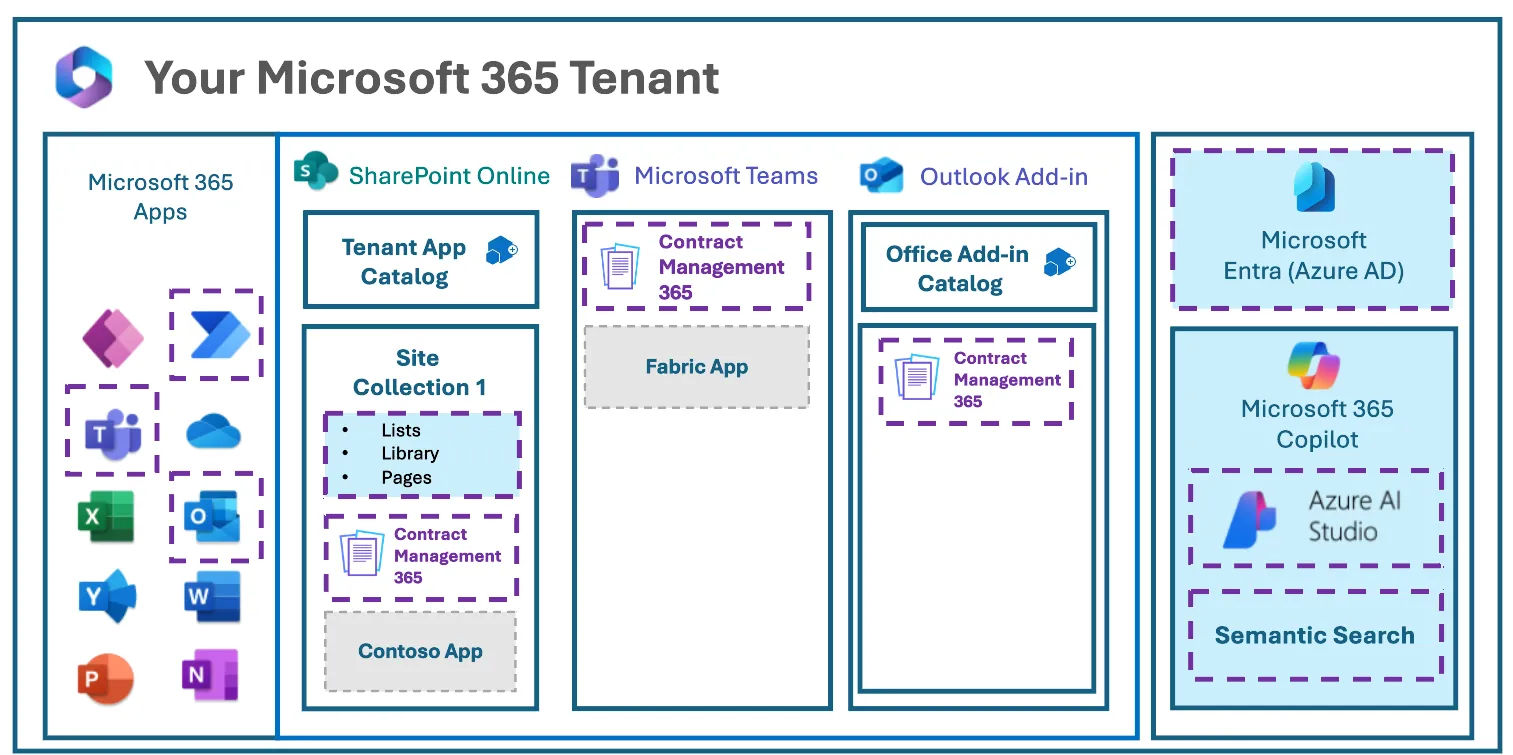
Businesses already using Microsoft 365 can benefit from it’s connections with tools such as SharePoint, Teams, and Outlook. Employees can work within familiar Microsoft applications while managing their contract-related activities.
Contracts contain sensitive business information, from pricing agreements to confidential terms. With CLM 365, your contract data stays within your Microsoft 365 tenant, giving your organization greater control over where its information resides. The platform also meets SOC 2 and ISO standards and is backed by Microsoft certification.
Switching contract management platforms shouldn’t mean forcing employees to learn an entirely unfamiliar system. It works within the Microsoft ecosystem, making it easier for teams to manage agreements alongside the tools they already use.
Organizations using specialized government cloud environments need contract management software that fits their existing setup. It supports GCC and GCC High tenants, making it a suitable option for organizations operating within these Microsoft environments.
The platform can be deployed directly into your SharePoint environment within minutes. The contract migration is simple, so your team can get started with the system without dealing with a lengthy implementation process.
Contracts contain valuable information, but finding specific terms, reviewing obligations, and tracking important details can take time. AI-native contract analysis that help teams access contract information and handle everyday contract management tasks more efficiently.
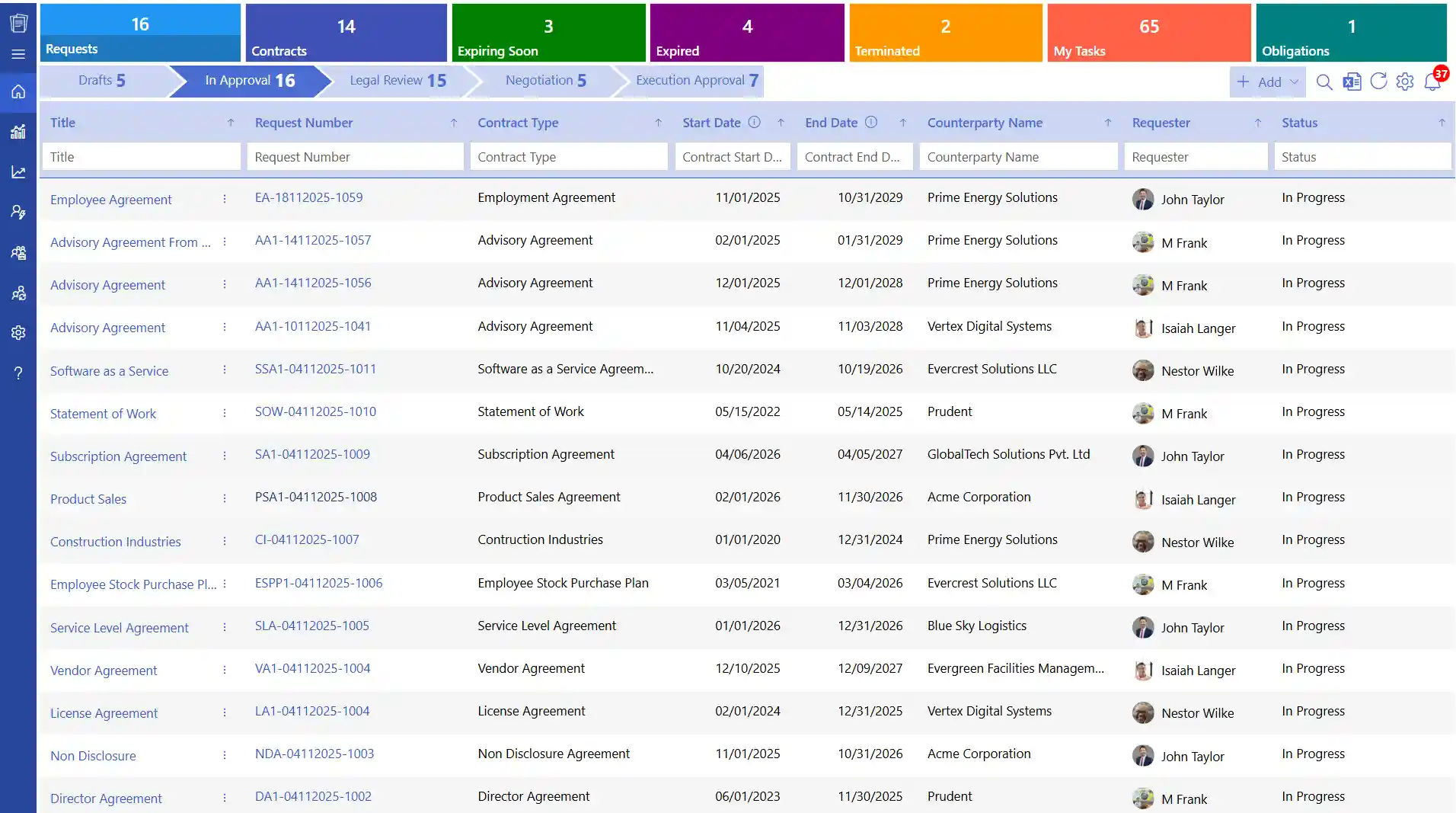
The platform supports bulk contract uploads, allowing businesses to bring multiple existing agreements into the platform rather than adding every file individually. This is useful for organizations making contract migration moving large collections from shared folders or older applications.
How to Migrate Contracts to CLM 365?
Migrating contracts to CLM 365 starts with preparing your existing documents and using the platform’s import capabilities. The following steps outline a practical approach. Exact screens and options may vary based on your setup
Step 1: Copy the SharePoint Library Link
Copy the link to the SharePoint document library containing the contracts you want to migrate.
Step 2: Paste the Link Into Bulk Upload
Open the bulk upload option in the system and paste the SharePoint library link to fetch the existing contracts.
Step 3: Fetch Contract Data and Metadata
Once the data is fetched, the system retrieves the available contract documents and associated metadata for migration.
Step 4: Map the Contract Fields
Use the drag-and-drop option to match the existing metadata fields with their corresponding fields.
Step 5: Start Managing Your Contracts
Once the migration is complete, your team can access and manage the migrated contracts within CLM 365.
Step 5: Start Managing Your Contracts
Once the contract migration is complete, your team can access and manage the migrated contracts within the platform.
Conclusion
Contract migration helps businesses move existing agreements to a modern platform while improving how they organize and manage contract information. Proper planning and reviewing the migrated records help teams avoid missing documents and maintain access to important details.
With bulk upload capabilities and Microsoft 365 integration, the system makes it easier to migrate contracts from SharePoint and manage them in one central location.
Ready to simplify contract management? Explore CLM 365 and make your contract migration easier.
Frequently Asked Questions
When should a business consider contract migration?
A business may migration when its current system is difficult to use, lacks important features, no longer meets its needs, or is being replaced by a new platform.
Can metadata be migrated along with contract files?
Yes. Metadata such as contract type, owner, counterparty, and expiration date can be migrated when it is available and mapped to the correct fields in the new system.
Is it necessary to clean contract data before migration?
Cleaning data before migration helps identify duplicates, missing details, and outdated records. This reduces the chance of carrying unnecessary problems into the new system.
How do you migrate contracts without disrupting daily operations?
Plan the migration in phases, prioritize important agreements, and schedule the transfer during a period of lower activity. Give employees access to the new platform once the required contracts are available.
What happens to contract attachments during migration?
Supporting documents and attachments can be transferred along with contracts, depending on the migration method and the source system’s capabilities.


























