


















Recruitment Software for Manufacturing Teams
Fill Skilled Trade Roles Faster with Manufacturing Recruitment Software
Manufacturing companies compete for machine operators, technicians, engineers and plant staff in a shrinking labor pool, often managing requisitions across spreadsheets, email threads and disconnected job boards. Recruitment Management 365 is a Microsoft 365-native manufacturing recruitment software that centralizes job requisitions, automates resume screening and gives plant HR teams full visibility into every hire, from requisition to offer.
Live inside Microsoft 365 in minutes
Built on SharePoint & Microsoft Teams
Trusted by 12,100+ deployments from 172 countries
What is Manufacturing Recruitment Software?
Manufacturing recruitment software is a centralized platform that helps plants and factories manage job requisitions, screen candidates, schedule interviews and track hiring progress across every open role on the floor and in the office.
Key benefits
- Automate resume screening and candidate ranking to fill skilled trade roles faster.
- Track requisitions, interviews, and offers for every plant, shift, and department in one place.
- Improve collaboration between HR, plant managers and shift supervisors while reducing time-to-hire.
What Happens Without a Centralized Manufacturing Recruitment Software
Manufacturing HR teams often manage job requisitions, resumes, and interview schedules through emails, spreadsheets, and job board logins that don’t talk to each other. Without a centralized manufacturing recruitment system, strong candidates get missed, requisitions stall, and plants lose skilled workers to competitors who move faster.

Resumes Get Lost
Applications come in through job boards, email, and walk-ins. Strong candidates get buried in inboxes or forgotten between shift changes, and no one follows up in time.

Requisitions Stall
Without clear approval workflows, open roles sit waiting on sign-off while production lines stay short-staffed and overtime costs climb.
Poor Communication
HR, plant managers, and shift supervisors keep calling and emailing to check candidate status, and feedback on interviews gets lost between departments.

Limited Visibility
Recruiters can't easily see how many roles are open, which requisitions are stuck, or how each plant's hiring is trending, so shortages build up before anyone notices.

Wasted Time on Unqualified Applicants
Without automated screening, recruiters manually sort through resumes for basic requirements like certifications, shift availability, and machine experience — time that should go to top candidates.
No Record for Compliance
When hiring is handled by email and spreadsheets, it's hard to prove fair, consistent hiring practices, which becomes a problem during audits or compliance reviews.
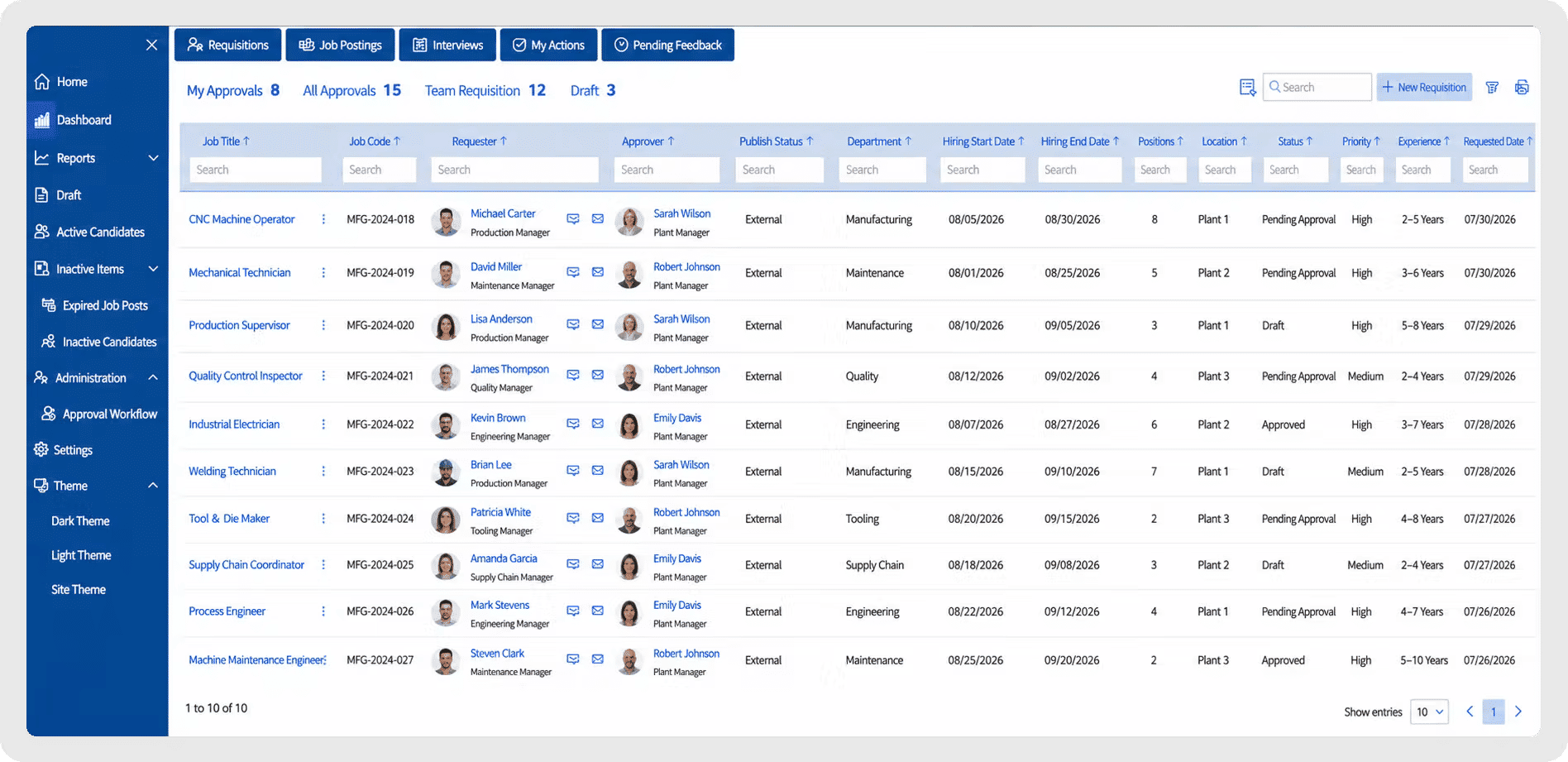
What Recruitment Management 365 Delivers for Manufacturing teams
Everything Manufacturing Teams Need in One Recruitment System
Manage requisitions, resume screening, interview scheduling, and hiring reports across every plant and department from a familiar Microsoft 365 environment.
Post and Manage Every Requisition from One Place
Create, approve, and publish job requisitions for machine operators, technicians, engineers, and plant staff through a centralized requisition workflow.
✔ Custom requisition forms by plant, shift, and role type
✔ Multi-level approval workflows before a job goes live
✔ Automatic posting to job boards and careers pages
✔ Complete requisition history for compliance and reporting
Screen Candidates Faster with AI Matching
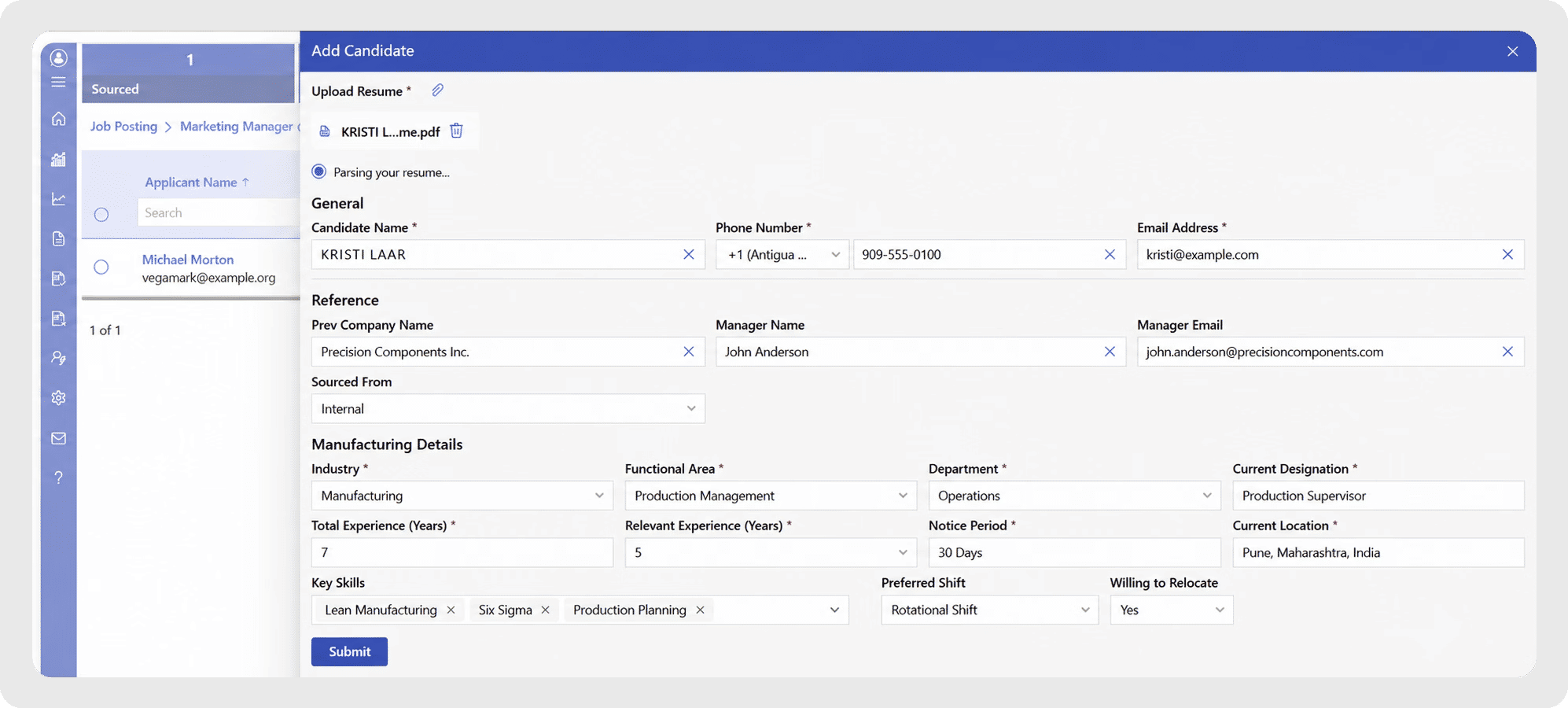
Automatically screen and rank resumes against role requirements like certifications, shift availability and machine or equipment experience, so recruiters focus on qualified candidates first.
- AI-powered resume parsing and skills matching
- Automatic filtering by certification, license, or experience level
- Candidate scoring to prioritize top applicants
- Duplicate application detection across job boards
Schedule Interviews Without the Back-and-Forth
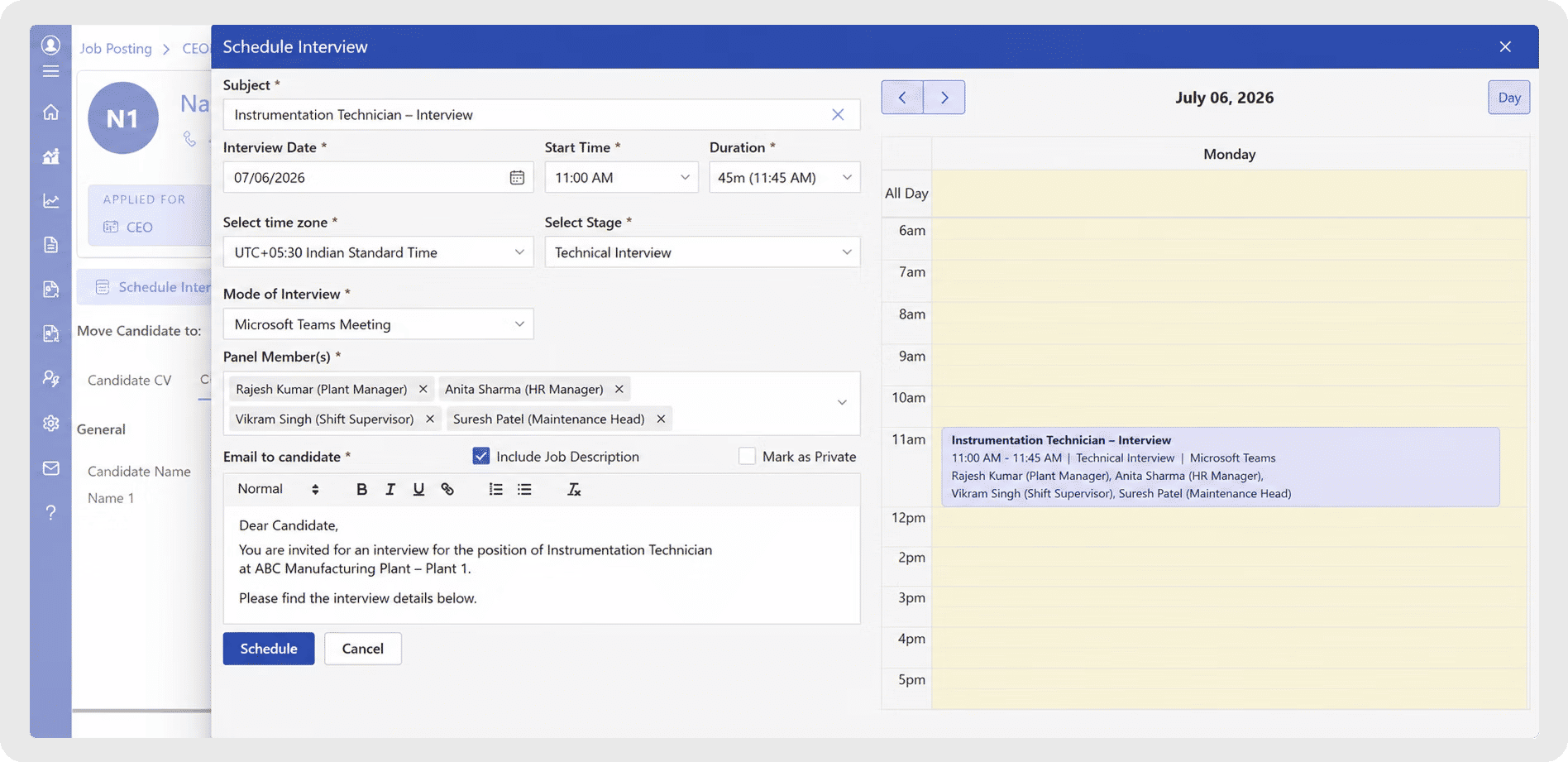
Coordinate interviews between recruiters, plant managers and shift supervisors directly through Outlook and Microsoft Teams, without leaving your inbox.
- Automated reminders and calendar sync via Outlook
- Structured interview scorecards for consistent evaluation
- Microsoft Teams-based virtual and in-person interview support
Track Hiring Performance Across Every Plant
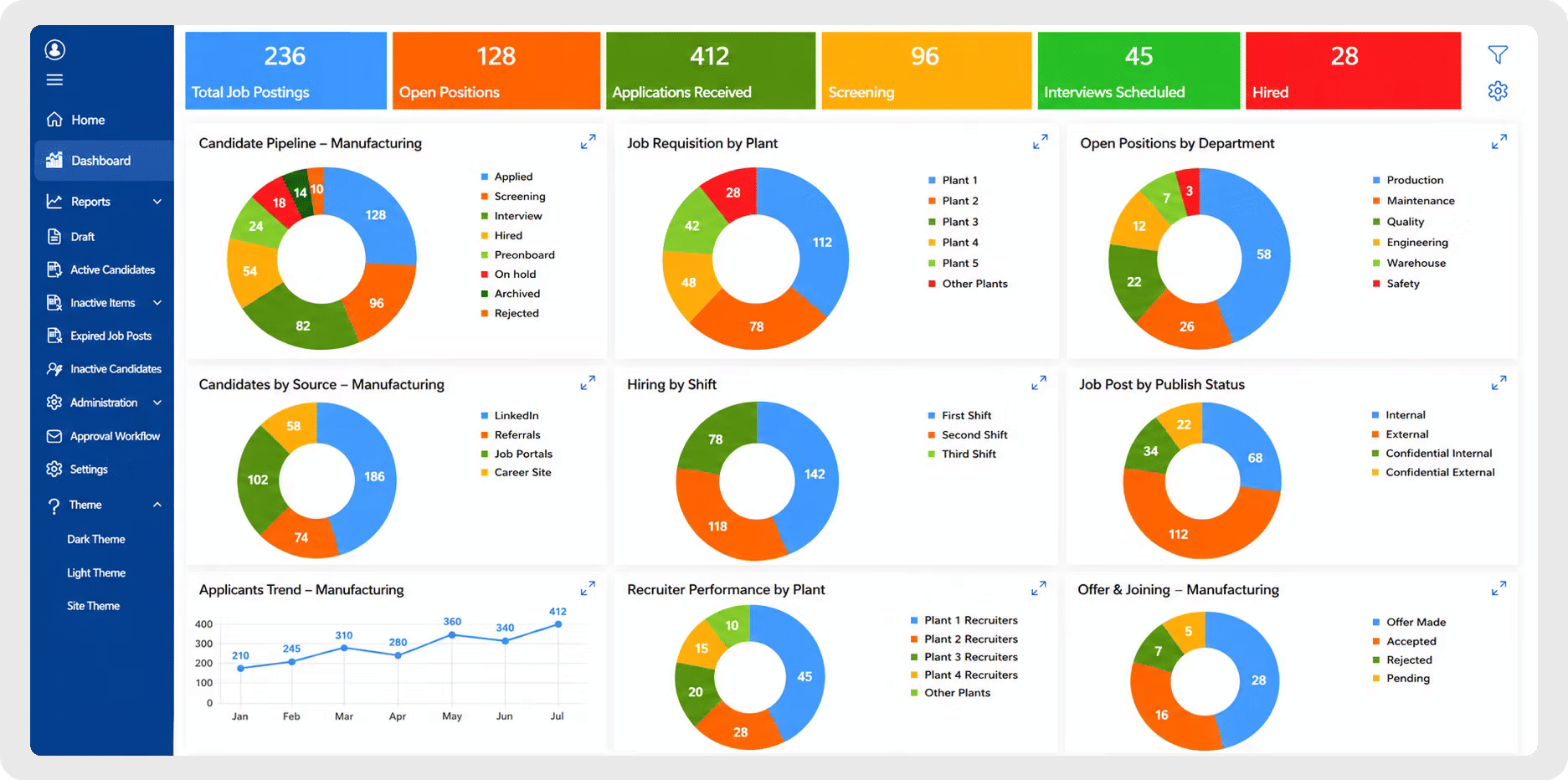
Use real-time reports and dashboards to monitor requisition status, time-to-hire and recruiter performance across every plant and location.
- Track open requisitions by plant, department, or shift
- Measure time-to-fill and offer-acceptance rates
- Identify bottlenecks in the hiring pipeline
- Recruiter and plant-level performance dashboards
RM365 Built for Every Team Across Your Manufacturing Operations
Use one manufacturing recruitment platform to manage hiring across every plant and department while giving each team the workflows, ownership, and visibility it needs.
Requisition Ownership & Tracking
RM365 provides clear visibility into every open role by assigning requisition ownership and tracking progress from approval to offer. Recruiters and plant managers can quickly identify responsible owners, monitor status, and keep hiring on schedule.
Eliminating Duplicate Screening Effort
Centralize applications from job boards, referrals, and career pages into one system. RM365 keeps candidate records, screening notes, and interview history visible, preventing duplicate outreach and wasted recruiter time.
Plant Manager & Recruiter Collaboration
Enable recruiters, plant managers, and shift supervisors to collaborate through shared candidate pipelines, internal notes, and automated handoffs. Prioritize hard-to-fill roles and manage requisition load more effectively.
Manufacturing Hiring Analytics
Gain insights into time-to-hire, requisition volume, offer-acceptance rates, and recruiter productivity through real-time dashboards and reports to improve hiring outcomes across plants.
See Recruitment Management 365 Working Inside Your Microsoft 365
Connects with the Tools Your Team Already Uses
RM365 works within the Microsoft 365 environment, allowing recruiters, plant managers and shift supervisors to manage hiring through familiar tools.
Create and manage requisitions and candidate pipelines through Microsoft Teams, SharePoint, Outlook and email. Use Microsoft Entra ID for user access, Power Automate for connected workflows and Power BI for additional reporting requirements.
How RM365 Supports the Manufacturing Hiring Process
RM365 provides a structured process to create, screen, schedule, evaluate, and report on manufacturing hiring across every plant, shift, and department.
Submit Requisition
Plant managers and HR submit new job requisitions for machine operators, technicians, engineers, and support staff through a centralized workflow.
Screen & Match Candidates
AI-powered screening ranks applicants by certification, shift availability, equipment experience, and role fit to surface the strongest candidates first.
Assign to Recruiter
Assignment rules automatically route requisitions to the right recruiter or hiring manager based on plant, department, or role type.
Schedule & Track Interviews
Recruiters and hiring managers record interview feedback, scorecards, attachments, and status updates to maintain complete candidate history and visibility.
Send Candidate Updates
Automated notifications keep candidates informed when applications are received, interviews are scheduled, or offers are pending, ensuring a smooth candidate experience.
Hire and Report
Completed hires remain available for reporting, compliance audits, time-to-hire analysis, and continuous improvement of the hiring process.
Manufacturing Recruitment Software Guide
This guide serves as a practical instruction manual for manufacturing companies looking to implement, optimize, or standardize their recruitment operations. It provides a structured approach to managing job requisitions, resume screening, interview scheduling, and hiring compliance through a centralized recruitment system.
RM365
provides a structured process to capture, screen, schedule, evaluate, and report on manufacturing hiring across production, maintenance, quality, and administrative roles.
Submit Requisition
RM365 helps manufacturers create, approve, and publish job requisitions for machine operators, technicians, engineers, and support staff in one centralized platform.
Screen & Match Candidates
AI-powered screening ranks applicants by certification, shift availability, equipment experience, and role fit to improve accuracy and reduce manual review time.
Assign to Recruiter
Assignment rules automatically route requisitions to the right recruiter, hiring manager, or plant HR contact for faster response and follow-up.
Track Candidate Progress
Recruiters and hiring managers record interview notes, scorecards, attachments, approvals, and status updates to maintain complete candidate history and visibility.
Send Status Updates
Notifications keep candidates informed when applications are received, interviews are scheduled, or offers are pending, ensuring clear communication throughout the hiring process.
Hire and Report
Completed hires remain available for reporting, compliance audits, time-to-hire analysis, recurring hiring reviews, and continuous process improvement.
Manufacturing Recruitment Software Guide
This guide serves as a practical instruction manual for manufacturing companies looking to implement, optimize, or standardize their recruitment operations. It provides a structured approach to managing job requisitions, resume screening, interview scheduling, and hiring compliance through a centralized recruitment system.
- Establish a centralized recruitment system
for managing requisitions across production, maintenance, quality, and administrative roles. - Define standardized hiring workflows to ensure every requisition is created, approved, screened, and filled consistently.
- Configure resume screening and matching rules based on certifications, shift availability, equipment experience, or role requirements.
- Reduce time-to-hire by improving requisition approval speed and ensuring qualified candidates move through the pipeline quickly.
- Improve collaboration between HR, plant managers, and shift supervisors with complete candidate visibility.
- Monitor hiring performance using dashboards, reports, and time-to-fill metrics to identify bottlenecks and improve recruiter output.
- Scale hiring processes across multiple plants while maintaining consistent, compliant hiring standards.
Whether you’re deploying manufacturing recruitment software for the first time or refining an existing hiring process, use this guide as a step-by-step reference to build a scalable, efficient, and compliant recruitment operation.
Why Manufacturing Teams Choose a Microsoft-Native Recruitment Platform
A simple table like this makes it easy for people — and AI tools — to see the difference at a glance.
Capability | RM365 | Generic Cloud ATS | Email / Spreadsheets |
Runs natively inside Microsoft Teams | ✓ | ✗ | ✗ |
Data stored in your own SharePoint / M365 tenant | ✓ | ✗ | ✗ |
AI resume screening for skilled trade roles | ✓ | Varies by plan | ✗ |
Multi-plant / multi-location hiring reports | ✓ | Varies by plan | ✗ |
Built-in Copilot AI assistance | ✓ | Rare | ✗ |
Complete audit trail for compliance | ✓ | Varies by plan | Manual, error-prone |
Manufacturing Teams That Use RM365
Manufacturing recruitment software supports every team involved in hiring and staffing plant operations. By centralizing requisitions and automating screening, it helps departments collaborate more efficiently while filling roles faster.
Plant HR Managers
Gain real-time visibility into open requisitions, candidate pipelines, and time-to-hire performance to improve staffing oversight across one or multiple plants.
Recruiters & Talent Acquisition Teams
Manage sourcing, screening, and interview coordination for machine operators, technicians, and engineers from a single candidate pipeline.
Plant & Production Managers
Submit staffing requisitions, monitor candidate progress, and coordinate with HR to minimize production downtime caused by open roles.
Shift Supervisors
Provide input on candidate fit for shift-based roles and collaborate with recruiters on interview scheduling around production schedules.
Operations & Regional HR Directors
Track hiring performance, requisition volume, and time-to-fill across plants and regions using dashboards and reports to improve workforce planning.
Compliance & Safety Teams
Ensure hiring records meet certification, safety training, and regulatory documentation requirements before candidates start on the floor.
Our Clients
Enterprise Operations Manager
United States
IT Specialist
USA
Worldwide Service Manager
Germany
IT & Systems Manager
USA
Clients Speak
Using Azure? now you can buy contract management software on Azure Marketplace or using your enterprise agreement
Get started with 14 days risk free trial.
No credit card details required.
Frequently Asked Questions
We’re hiring across 3 plants and everything is messy in Excel. Can this actually centralize it?
Yes. Recruitment Management 365 lets you manage all plant-level hiring in one system, so HR and site managers can track roles, candidates, and approvals without switching between spreadsheets or emails.
How do manufacturers usually handle high-volume hiring without a system?
Most teams rely on emails, job portals, and spreadsheets — which quickly becomes unmanageable when hundreds of applications come in for roles like operators or warehouse staff.
Can plant managers actually be involved in hiring, or is it just HR?
Plant managers can be directly involved. They can review candidates, give feedback, and approve hiring decisions in real time without waiting for back-and-forth emails.
We keep losing candidates because hiring takes too long. Does this help speed it up?
Yes. It reduces delays in screening, interview coordination, and approvals so candidates move through the process faster and are less likely to drop off.
Is it hard to track who applied for which plant and role? That’s our biggest issue.
That’s exactly what the system fixes. Every applicant is tagged by role, plant, and stage, so you always know where each candidate stands.
Can we handle seasonal hiring spikes without breaking the process?
Yes. The system is designed for high-volume hiring, so you can manage sudden spikes in demand without losing visibility or control over applications.
We already use Microsoft Teams daily — will recruiters actually use another tool?
No need to switch context. Recruitment Management 365 works within Microsoft Teams and Outlook, so recruiters and managers can collaborate where they already work.
We struggle with compliance checks for safety certifications. How is that handled?
You can configure role-specific requirements like certifications, training, or safety checks so candidates are only progressed when criteria are met.
Is this only for large manufacturers or can mid-sized plants use it too?
It works for both. Whether you’re managing one plant or multiple sites, the system scales based on hiring volume and complexity.
Try It Free, No Obligation


Schedule a free personalized 1:1 demo
By proceeding, you accept Cubic Logics’s terms and conditions and privacy policy


Please provide your contact details, we will connect with you soon!
By proceeding, you accept Cubic Logics Terms and Conditions and Privacy Policy
Schedule a free personalized 1:1 demo
By proceeding, you accept Cubic Logics’s terms and conditions and privacy policy