
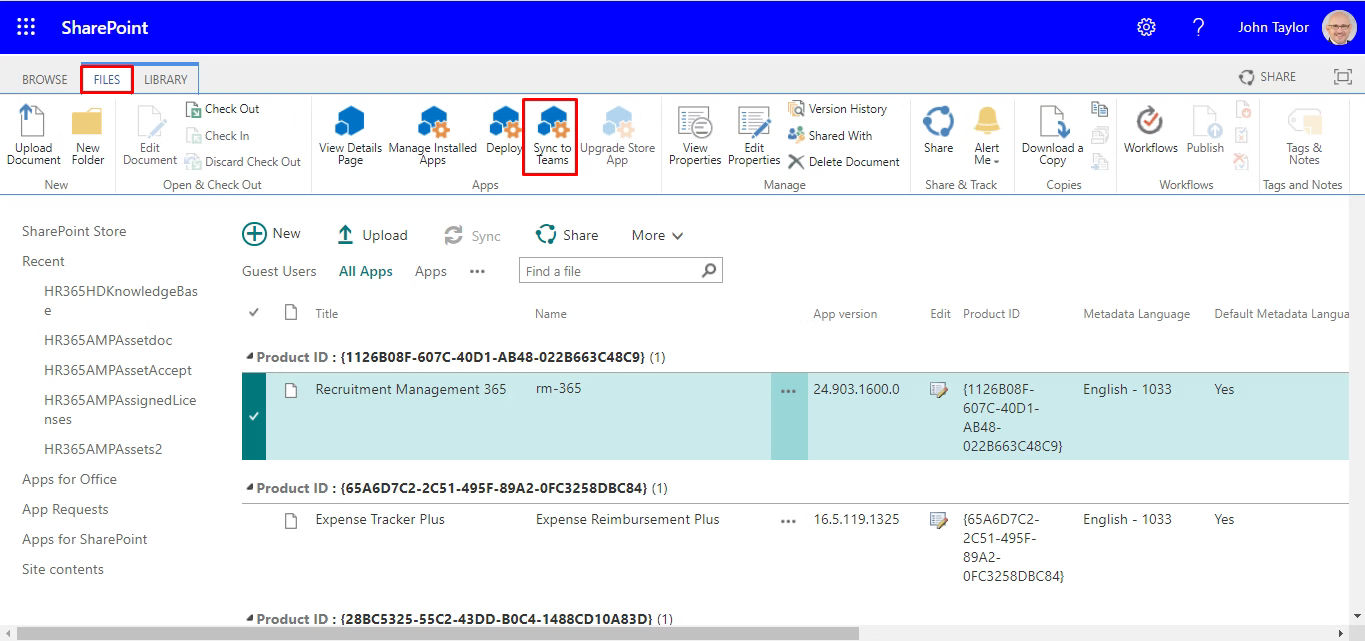
Requirements Management + Microsoft Teams One Simple Place for Every Requirement
Your team already chats, shares files, and gets work done inside Microsoft Teams. SharePoint Recruitment Management 365 brings your entire hiring process there too. Every candidate update, approval, and interview detail stays in one clear space so your team always knows what is happening and nothing ever gets missed.
Everything Your Hiring Team Needs in One Place
Imagine managing your entire hiring process without switching between apps all day. With SharePoint Recruitment Management 365 built directly inside Microsoft Teams, your job posts, candidate profiles, interview updates, and hiring decisions all stay in one place right where your team already works.
From a single Teams window, your recruiters can review candidates, send approvals, track applications and stay updated in real time whether they are in the office or working remotely. No extra tools. No wasted time. No confusion. Everything stays connected and updates automatically so your hiring team stays organised, focused, and always one step ahead.
Get More Done with Microsoft 365 Requirements Management
Create, assign, and track requirements with ease using the full power of microsoft 365 tools. Requirements Management 365 gives your team a smarter way to handle project needs right inside the Microsoft 365 applications your team already uses every day.
%20(1).webp)
Manage Requirements Without Effort
Add requirements, write clear descriptions and track their status from start to finish. Keep every project on track and make sure nothing important gets missed by your team.

Your Requirements Dashboard
See every requirement in one clean view. Set priorities, track progress and keep your workflow neat so your team always knows what to work on next all inside Microsoft Teams.

Built-In Templates
Start fast with ready to use templates built for microsoft 365 apps. Skip the setup, follow a clear format and make sure every project runs the same clean way from day one.

Automatic Approval Workflows
Set up approval steps that run on their own inside Microsoft Teams. No more chasing people for signoffs. Every requirement moves forward on time with zero extra effort from your team.
No Unauthorised Access
Built on Microsoft 365, all your requirements, files and project data stay fully protected. Only the right people see the right information backed by enterprise-level security you can trust.

Simplify Teamwork with Microsoft Teams Integration
Connecting Requirements Management software with Microsoft Teams and microsoft apps gives your team one clear place to work. No more jumping between tools. Team members can add requirements, send updates, get approvals, and share files all inside Teams. Because it connects with Microsoft SharePoint and your full office 365 setup, everyone always sees the same information. Less confusion. Fewer mistakes. More projects finished on time. Real-time alerts and shared dashboards keep the whole team moving in the same direction.
Centralize All Your Requirements Process with Microsoft Teams Integration
Microsoft Teams integration brings requirements, approvals and project updates into one clean workspace. Teams can track progress, manage requirements and work together faster all without leaving the microsoft 365 applications they already use.
Frequently Asked Questions
Requirements Management 365 connects directly with Microsoft Teams. Your team can add, update, and track requirements without leaving Teams. Everything stays inside your existing microsoft 365 applications no extra tools, no app switching, no confusion.
Yes. Requirements Management 365 connects with SharePoint Online so your requirements, documents and updates stay in one shared space. Teams can work together on the same files in real time without any version confusion.
Requirements Management 365 makes use of key microsoft 365 features like Teams channels, SharePoint Online document storage, Power Automate approval flows and Power BI reporting giving your team a complete and connected experience without leaving microsoft 365.
When a requirement is ready for review, the right person gets an alert directly inside Microsoft Teams. They can approve, comment or send it back all from one place. No emails, no follow-ups, no delays.
Yes. Requirements Management 365 works across both microsoft sharepoint and Microsoft Teams at the same time. Your team gets the full power of microsoft 365 sharepoint for storing files and Teams for communication all connected in one smooth workflow.
Yes. Since Requirements Management 365 is built on Microsoft 365, all your data is protected by Microsoft’s enterprise-level security. Your files, requirements and project details are private, backed up and only accessible by the right people.
Yes. Your whole team can view, add and update requirements at the same time inside Microsoft Teams. Everyone always sees the latest version no duplicate files, no outdated information.
Yes. Requirements Management 365 is available on Azure Marketplace. It is easy to set up inside your existing microsoft 365 subscription environment secure, verified and ready to use from day one.
Yes. Since Requirements Management 365 is built on Microsoft 365, all your data is protected by Microsoft’s enterprise-level security. Your files, requirements and project details are private, backed up and only accessible by the right people.
























