
Recruitment Management + SharePoint Integration
One Place for All Your Hiring
If Your team already works in SharePoint, then your hiring files should stay there too. With SharePoint Recruitment Management 365, resumes, job forms, offer letters and hiring documents are stored in one secure SharePoint workspace. No lost files. No email digging. Just the right document, ready when your team needs it.
Access Every Hiring File Without Switching Apps
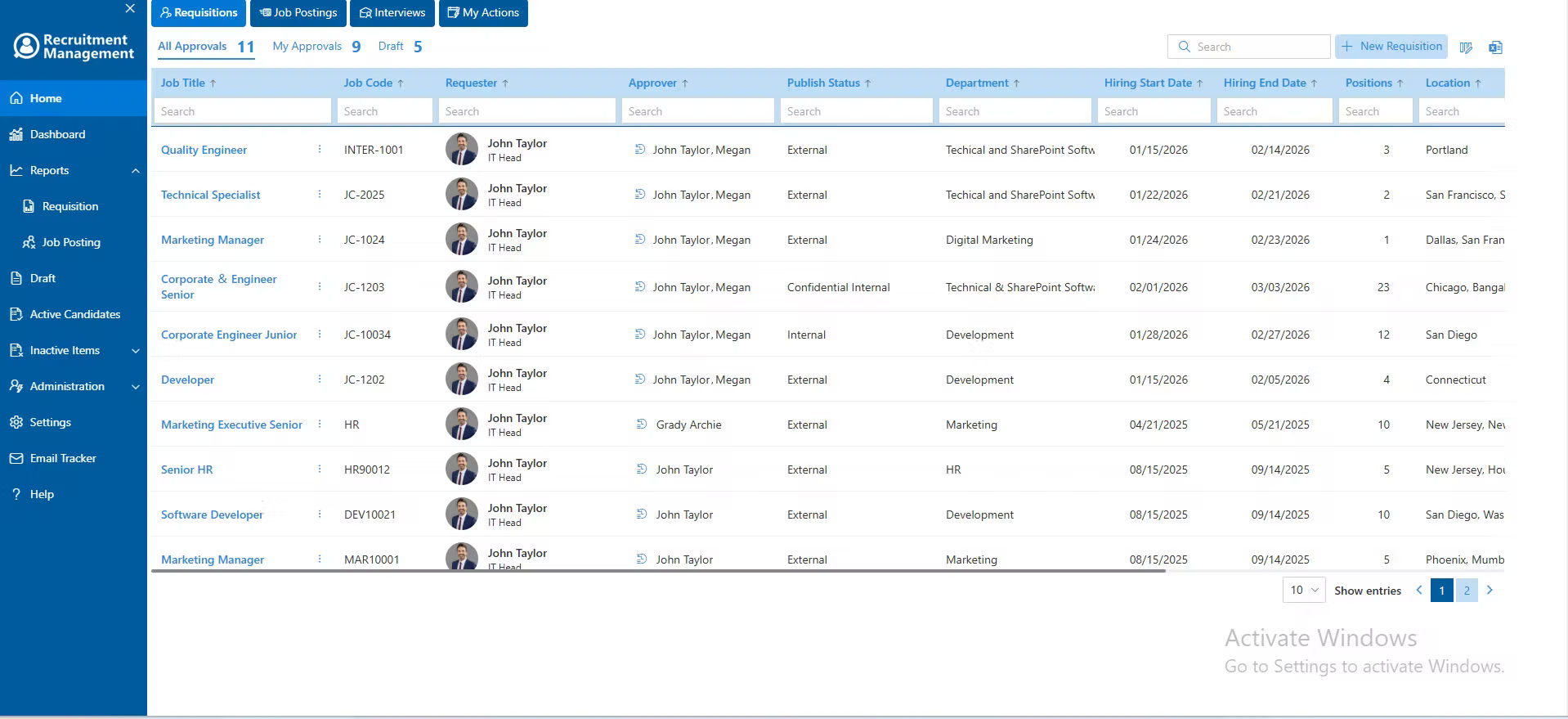
Recruitment Management connects directly to SharePoint so all your hiring documents, candidate profiles, and job templates are right where your team works. You can open a resume, check a job form, or pull up an offer letter without ever leaving the hiring tool. Everything is linked together, always up to date and easy to find in seconds. This keeps your hiring team moving fast.
Power Every Hiring Step With SharePoint
Build job forms, organize candidate files, control document access and manage hiring updates from one secure SharePoint space. With SharePoint Recruitment Management, your team can hire faster and smarter.
%20(1).webp)
Record Hub
Keep every resume, cover letter, assessment and offer letter in a single, secure SharePoint folder. Your whole team can find what they need in seconds, no more hunting through old emails or shared drives.
.webp)
Role-Based Access
Decide exactly who in your company can open, edit or share each hiring file. With role based permissions built into SharePoint, sensitive candidate information stays protected only the right people get access.

Create custom Job Forms
Create custom job application forms right inside SharePoint and save them as templates. Use them again for the next role in one click no rebuilding from scratch every time you open a new position.

Stay Updated
Get instant alerts when resumes, forms, or hiring documents are uploaded or updated in SharePoint. Your team stays informed, acts quickly and keeps every candidate file moving without delay.

Clear Digital Reports
View and generate reports for every stage of recruitment from job posts and candidate tracking to interviews and final offers. Keep your team informed with the right data at the right time.

Recruitment Management + SharePoint Integration Teamwork
With SharePoint Recruitment Management 365, your hiring team can work together in one shared SharePoint workspace. Recruiters can upload resumes, hiring managers can review candidates and HR leads can approve files without long email chains.
Real-time updates keep everyone on the latest candidate information, while secure file access ensures only the right people can view or edit documents. Everything stays organized, protected and easy to manage inside Microsoft 365 from the first job post to the final hire
Keep All Your Hiring Work in One Place
SharePoint brings all your candidate files, job forms and hiring updates into one clear space inside Recruitment Management 365. See who applied, review their documents and move them forward without jumping between tools. Less time looking for things. More time actually hiring.
Frequently Asked Questions
SharePoint recruitment software is a hiring system built around Microsoft 365 and SharePoint. It helps HR teams store candidate files, track applicants, manage hiring updates, and work together in one secure workspace.
A SharePoint-based hiring tool keeps your recruitment files, access rules and team updates inside Microsoft 365. This helps reduce tool switching, improve security, and keep hiring documents organized.
Yes. Recruitment Management 365 helps you manage multiple job openings, candidates and hiring stages at once. You can organize files by role, department, location, or hiring status.
Yes. SharePoint can support applicant tracking when combined with a recruitment solution like Recruitment Management 365. It helps store resumes, manage documents, and support hiring workflows.
No. If your company already uses Microsoft 365, SharePoint is usually included. SharePoint Recruitment Management 365 connects with your existing SharePoint workspace, so your team can manage hiring files without buying a separate SharePoint account.
























