

It’s Friday at 4:55 p.m. Payroll is due Monday, and three people still haven’t submitted their hours. One team member “thinks” they worked 42 hours. Another logged time on a sticky note that has since vanished. Sound familiar? Recording work hours seems simple until you try to do it consistently, accurately and in a way that holds up in an audit.
- Accuracy is a legal duty.S. employers must record hours worked each day and each workweek for non-exempt staff.
- Manual methods are cheap but costly. Paper and spreadsheets invite rounding, guesswork and payroll errors.
- Match the tool to the work. GPS suits field teams, biometrics suit shift work and digital timesheets suit knowledge workers.
- Automation is the 2027 standard. AI time capture and Microsoft 365 integrations cut admin and improve accuracy.
The good news is that you don’t need an enterprise budget or an IT department to fix it. Whether you run a five-person agency, a construction crew or a 500-seat hybrid company on Microsoft 365, there’s a method that fits. This guide walks through 10 easy ways to record work hours, with honest pros, cons and best-use advice, so you can choose the right one (or the right combination) for 2027.
Why Recording Work Hours Matters More Than Ever
Compliance. Under the Fair Labor Standards Act, employers must keep accurate records for non-exempt employees, including hours worked each workday and each workweek. The FLSA recordkeeping rules in 29 CFR Part 516 require payroll records to be kept for at least three years, and the time cards behind them for two years.
Work has moved. Gallup’s hybrid work indicator shows that roughly half of remote-capable U.S. employees now work hybrid. When people work across locations and time zones, a wall-mounted punch clock can’t capture the full picture.
The workday is stretching. Microsoft’s 2025 research on the “infinite workday” found that meetings after 8 p.m. rose 16% year over year. Untracked after-hours work creates hidden overtime liability and burnout risk.
You need a method that’s accurate, easy for employees and built for how your team really works. Here are your 10 options.
10 Easy Methods to Record Work Hours
1. Paper Timesheets
The classic: employees write start time, end time and breaks on a printed form, sign it and hand it to a supervisor. Paper is allowed, but the U.S. Department of Labor’s Fact Sheet #21 on recordkeeping makes clear the records must still be complete and accurate.
Pros:
- Costs almost nothing and needs no training
- Works anywhere, even without power or internet
Cons:
- Prone to rounding, “buddy” entries and illegible handwriting
- Payroll must re-key every entry, which doubles the chance of errors
- Hard to store, search and produce during an audit
Best for: Very small teams, temporary projects or a backup when systems are down. Scan and file forms right away to meet retention rules.
2. Spreadsheets (Excel or Google Sheets)
A spreadsheet is the natural upgrade from paper. Employees or managers enter daily hours, and formulas total regular and overtime hours. You can start fast with free Microsoft Excel timesheet templates.
Pros:
- Familiar, flexible and essentially free
- Formulas cut arithmetic errors
- Easy to customise by project, client or department
Cons:
- Still relies on memory and manual entry
- Version-control chaos (“Timesheet_FINAL_v3.xlsx”)
- No built-in approvals or audit trail
Best for: Freelancers and businesses with fewer than 10 employees. Lock formula cells and keep one shared master file.
3. Punch Clocks and Digital Time Clocks
From mechanical card punchers to PIN-pad or badge terminals, time clocks record exactly when employees arrive and leave. If your clock rounds punches, follow the federal rounding rule in 29 CFR 785.48, which requires rounding that averages out fairly over time.
Pros:
- Objective timestamps that are hard to dispute
- Simple for employees: tap, swipe or punch
- Digital clocks export straight to payroll
Cons:
- Only works for on-site staff
- Badges and PINs can be shared (“buddy punching”)
- Hardware and maintenance costs
Best for: Retail stores, warehouses and single-location shift work.
4. Biometric Time Clocks
Biometric terminals verify identity by fingerprint, face or palm before recording a punch. They come with legal duties, though: the Illinois Biometric Information Privacy Act (BIPA), amended in 2024, requires written notice, consent and a retention policy.
Pros:
- Effectively eliminates buddy punching
- Fast, contactless options available
- High-integrity data for payroll and compliance
Cons:
- Higher upfront cost
- State privacy laws require notice, consent and data-retention policies
- Still tied to a physical location
Best for: High-volume hourly workforces in manufacturing, healthcare and hospitality. Talk to legal counsel before rollout.
Tired of chasing timesheets every Friday
Be honest: how many hours did your team spend last month fixing missing punches and re-typing paper forms?
Timesheet 365 lets your people log time right inside Microsoft Teams, with no extra app and no lost sticky notes.
5. Mobile Time Tracking Apps
Employees clock in and out from their smartphones with a single tap. It works because nearly everyone carries one: Pew Research Center’s mobile fact sheet reports that about nine in ten U.S. adults own a smartphone.
Pros:
- Works anywhere: office, home or job site
- Real-time visibility for managers
- Most apps sync with payroll and accounting tools
Cons:
- Depends on employees remembering to tap
- Needs a company or BYOD device policy
- Without location controls, it’s easier to clock in from the couch
Best for: Distributed, hybrid and mobile teams that need flexibility without paperwork.
6. GPS and Geofencing Time Tracking
Geofencing sets a virtual boundary around a job site, so employees can clock in only inside it or get a reminder when they arrive. Accuracy is good outdoors but drops near buildings, as the official GPS.gov accuracy guide explains.
Pros:
- Confirms employees are where they say they are
- Automatic arrival and departure reminders reduce missed punches
- Strong evidence for client billing and disputes
Cons:
- Raises privacy concerns, so track only during work hours and disclose it clearly
- Drains phone batteries
- Less reliable indoors or in remote areas
Best for: Construction, field service, landscaping, home healthcare and delivery teams.
7. Desktop Timers and Browser Extensions
Start/stop timers on a computer or browser let knowledge workers log time against tasks and clients as they work. The payoff is real for billing: the Clio Legal Trends Report has repeatedly found that professionals bill only a fraction of their working day, and missed time entries are a big reason why.
Pros:
- Granular, task-level data that’s ideal for billable hours
- Low friction for people who work at a computer all day
- Reveals where time really goes
Cons:
- Easy to forget to start or stop the timer
- Can feel like micromanagement if positioned poorly
- Less useful for meetings, calls and off-screen work
Best for: Agencies, consultants, developers and anyone who bills by the hour.
8. Project Management Tool Integrations
Many teams already live in Microsoft Planner, Jira, Asana or Trello. Logging time inside these tools ties effort to budgets, which matters: PMI’s Pulse of the Profession research consistently links weak tracking and planning to budget overruns and missed deadlines.
Pros:
- No context switching, because time is logged against the task itself
- Connects effort to budgets, estimates and project profitability
- Better data for future planning
Cons:
- Native time features are often basic
- Data can end up scattered across several tools
- May not meet payroll-grade attendance needs on its own
Best for: Project-driven teams that need estimated vs actual hours and accurate billing.
9. Automatic and AI-Based Time Capture
The fastest-growing category. AI tools passively capture signals such as calendar events, meetings, emails and documents, then turn them into suggested timesheet entries that employees review and submit. Microsoft’s 2025 Work Trend Index describes AI agents taking on this kind of routine admin as a defining shift for 2025-26.
Pros:
- Dramatically reduces manual entry and end-of-week guesswork
- Captures meetings and after-hours work that would go unrecorded
- Gives employees a draft to confirm, so humans stay in control
Cons:
- Needs clear policies on what data is captured and why
- AI suggestions still need human review
- Some tools require desktop agents or broad permissions
Best for: Knowledge workers and hybrid teams whose days are split across meetings, chats and documents.
10. Microsoft 365, Teams and SharePoint-Based Timesheets
For organisations already on Microsoft 365, timesheet software built on SharePoint and Teams let employees log hours inside the tools they use every day. Data stays in your own tenant, under the security and compliance controls described in Microsoft’s SharePoint documentation.
Pros:
- No new logins: employees submit time directly in Teams or SharePoint
- Data stays in your Microsoft 365 environment, which simplifies governance
- Connects with Outlook calendars, Power BI reports and approval workflows
- Scales from small teams to enterprises
Cons:
- Best value only if you already use Microsoft 365
- Initial setup of projects, approvers and policies takes some planning
Best for: Mid-size and enterprise organisations, professional services firms and IT teams standardised on Microsoft 365.
What if your timesheet filled itself in?
Picture this: it’s Friday, and your week is already drafted from your meetings, tasks and calendar. You just review and hit submit. That’s what Timesheet 365’s AI agent does.
How to Choose the Right Method
Most organisations combine two or three methods. Use this quick guide:
If your team is… | Start with… | Add… |
Small and office-based | Spreadsheets | Desktop timers |
Hourly and on-site | Digital or biometric clocks | Mobile app for exceptions |
Field-based | GPS/geofencing app | Project integrations |
Hybrid knowledge workers | Microsoft 365 timesheets | AI time capture |
Client-billing agency | Desktop timers | Project management integration |
Whatever you choose, build in three essentials: an approval workflow, an audit trail and a retention policy that meets the FLSA’s two- and three-year requirements.
Simplify Time Tracking with Timesheet 365
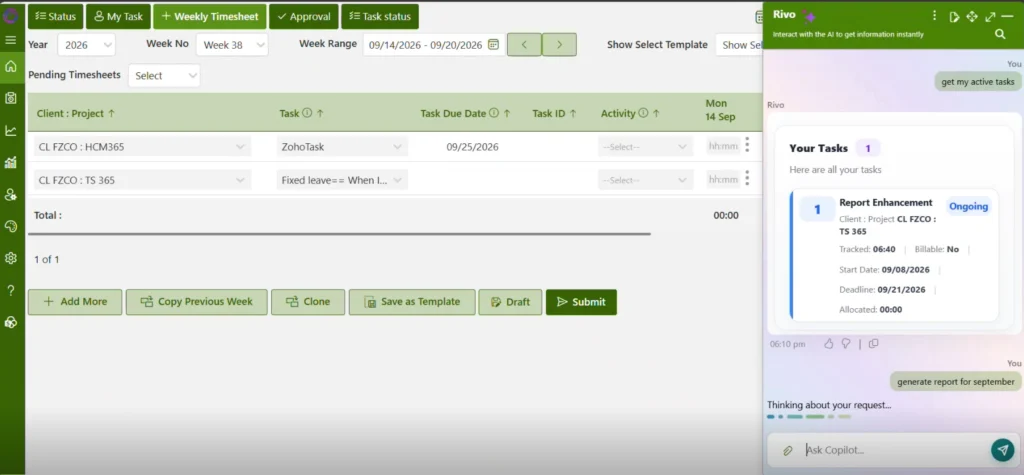
The best time tracking happens where your people already work, with as little manual effort as possible. Timesheet 365 is a Microsoft 365-native timesheet solution that brings the strongest methods in this guide together.
- AI agent time capture (Method 9): The AI agent turns everyday Microsoft 365 activity, such as meetings, calendar events and tasks, into suggested time entries. Employees review and submit instead of rebuilding their week from memory.
- Workforce and team monitoring: Managers see who’s working on what, utilisation, billable vs non-billable hours and pending approvals in real-time dashboards.
- SharePoint and Microsoft 365 integration (Method 10): Timesheet 365 runs on SharePoint and inside Microsoft Teams, so your data stays in your own tenant. No new logins and no extra infrastructure.
- Built-in approvals and audit trails: Multi-level approvals and complete records help you meet recordkeeping requirements.
- Project and billable hours tracking (Method 8): Log time against projects, clients and tasks to see real project profitability.
Whether you’re moving off paper and spreadsheets or replacing a patchwork of standalone apps, Timesheet 365 gives you accurate, automatic, compliant time records inside the Microsoft 365 environment you already trust.
Join Our Creative Community
Frequently Asked Questions
What is the easiest way to record work hours?
For most teams, a mobile or Microsoft 365-based timesheet app is easiest because employees log time in tools they already use. AI time capture is even easier, since it drafts entries for employees to review.
How long must employers keep time records?
Under the FLSA, payroll records must be kept for at least three years. Time cards and records used to calculate wages must be kept for at least two years.
Do salaried employees need to track their hours?
Exempt salaried employees aren’t required to record hours under the FLSA, but many companies still track time for projects and billing. Non-exempt salaried employees must have their hours recorded, because overtime still applies.
Is GPS time tracking legal?
Generally yes, when employees are informed and tracking is limited to work time and work apps. Some states have specific notice or consent rules, so check local laws first.
Can AI really track work hours accurately?
AI captures meetings, documents and app activity far more completely than memory-based entry. Best practice is to treat AI entries as drafts that employees review and approve.


























