

_mVFFaHUZhS.webp)
Every minute of untracked overtime costs your business real money — and puts you at serious legal risk. Choosing the right overtime tracking software in 2026 is no longer optional; it is the smartest investment an HR Manager can make to protect payroll accuracy, boost employee trust, and stay fully compliant with labor laws.
- Overtime tracking software automates calculations, approvals, and payroll, reducing errors and compliance risks.
- Real-time alerts, reports, self-service, and mobile tracking improve visibility and workforce control.
- The right solution helps reduce payroll costs, save HR time, and improve employee trust.
- Timesheet 365 offers Microsoft 365 integration, automated workflows, flexible OT rules, and compliance support.
Why Overtime Tracking Is a Serious Business Problem in 2026
Think about the last time a payroll error caused a complaint from your team. Chances are, it was tied to overtime. Untracked or miscalculated overtime is one of the top reasons employees lose trust in HR and it is one of the fastest ways a business ends up in a wage dispute.
What Is Overtime Tracking Software?
Overtime tracking software is a digital tool that records, calculates, and reports the extra hours an employee works beyond their standard shift. A modern overtime tracking system does more than just count hours — it connects time data to payroll, compliance rules, and manager approvals in real time.
For HR Managers, this means:
- No more manual spreadsheet calculations
- Automatic alerts when an employee is approaching overtime limits
- Audit-ready reports for labor law compliance
- Clear visibility across teams, departments, and locations
- Faster, more accurate payroll runs every single period
Think of it as your always-on compliance partner — quietly running in the background so you can focus on people, not paperwork.
7 Best Overtime Tracking Software Tools in 2026
We researched the top tools HR Managers are using and comparing right now — from Reddit threads to Spiceworks community discussions. Here is our honest breakdown of the best overtime tracking systems available today.
1. Timesheet 365 — Best Overall OT Tracking Software for Microsoft 365 Users
⭐ Top Pick for HR Managers | Built for Microsoft 365 | FLSA & Labor Law Ready
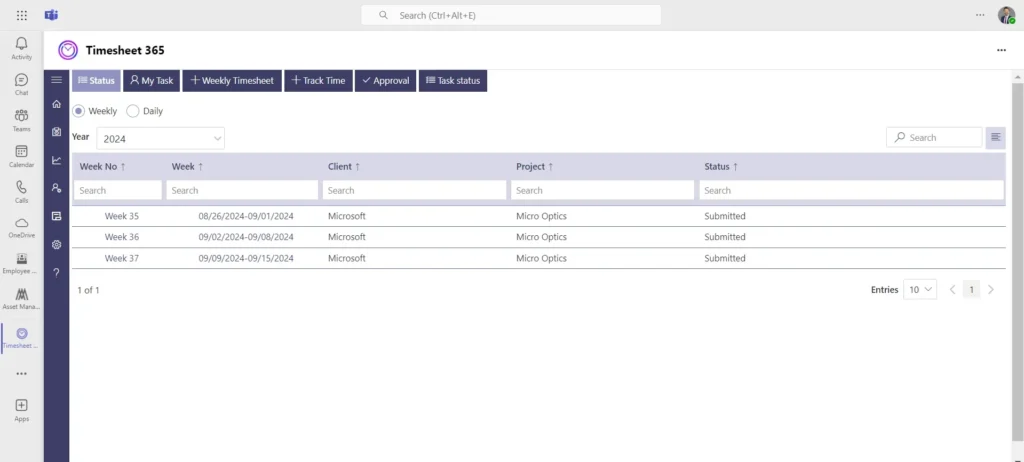
Timesheet 365 is the most seamlessly integrated overtime tracking software for organizations already using Microsoft 365. Unlike standalone tools that require switching platforms, Timesheet 365 lives inside the Microsoft ecosystem your team already knows — Microsoft Teams, SharePoint, and Outlook. This means zero learning curve and instant adoption.
What makes Timesheet 365 stand out for HR Managers?
- Real-Time OT Alerts: Managers get instant notifications the moment an employee approaches or crosses overtime thresholds — no surprises at payroll time.
- Automated Overtime Calculation: The system applies your company’s OT rules automatically — daily, weekly, or based on custom pay policies.
- Microsoft Teams Integration: Employees log hours directly inside Teams. No separate logins. No forgotten clock-ins. Participation rates skyrocket.
- Approval Workflows: Every overtime request goes through a digital approval chain — giving HR full control and a complete audit trail.
- Compliance-Ready Reports: Generate FLSA-ready reports, payroll exports, and overtime summaries in seconds — not hours.
- Flexible Policy Setup: Configure different OT rules for different departments, shifts, or employee types without touching a single spreadsheet.
- Timesheet Locking & Audit Logs: Once approved, timesheets are locked and logged — protecting both the employer and the employee.
Best For: Mid-size to enterprise organizations running Microsoft 365 who want a compliant, low-maintenance overtime tracking system with strong HR oversight.
2. QuickBooks Time (formerly TSheets) — Best for Small Businesses with QuickBooks Payroll
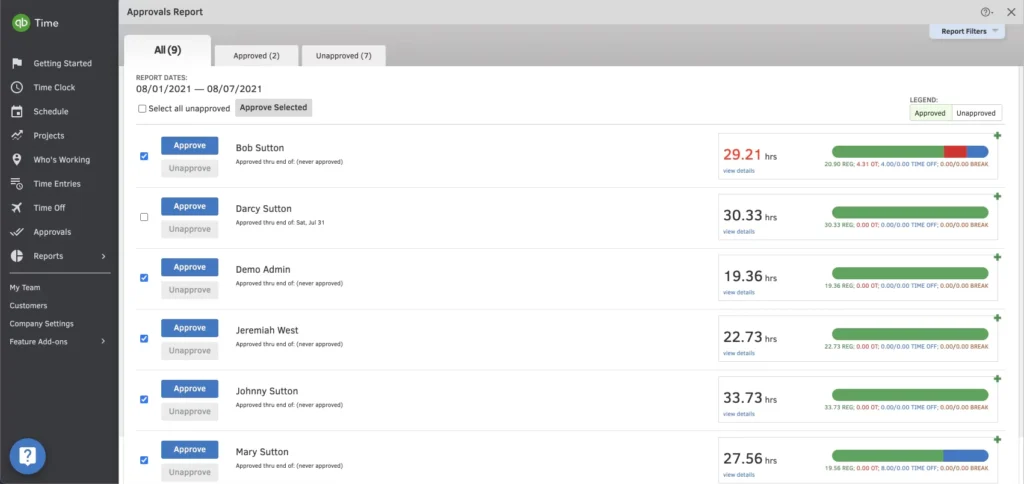
QuickBooks Time is one of the most recognized names in OT tracking software — and for good reason. It has been around long enough to build a solid reputation for small businesses that already live inside the Intuit ecosystem. If your payroll runs through QuickBooks, the integration is clean and saves real time.
The mobile app is genuinely good. Employees can clock in from job sites, and managers get a live view of who is working and how close they are to overtime thresholds. GPS tracking adds a layer of accountability that field-heavy businesses appreciate.
That said, QuickBooks Time starts to show its limits the moment your HR needs grow beyond the basics. Overtime policy customization is fairly rigid — you cannot easily configure different OT rules for different departments or employment types without workarounds. Pricing also climbs fast once your headcount grows past 10 or 15 users. And if your business runs on Microsoft 365 rather than the Intuit suite, the integration gaps become a daily frustration.
- Key Features: GPS clock-in, mobile app, basic OT alerts, QuickBooks Payroll sync, crew scheduling
- Pricing: Starts at $20/month base + $10 per user (Elite plan adds more OT controls)
- Strengths: Tight QuickBooks integration, reliable mobile app, good for hourly field workers
- Limitations: Rigid OT policy engine, expensive at scale, no native Microsoft 365 support, compliance reports are basic
- Best For: Small businesses (under 25 employees) already running QuickBooks for accounting and payroll
3. Clockify — Best Free OT Tracking Tool for Budget-Conscious Teams
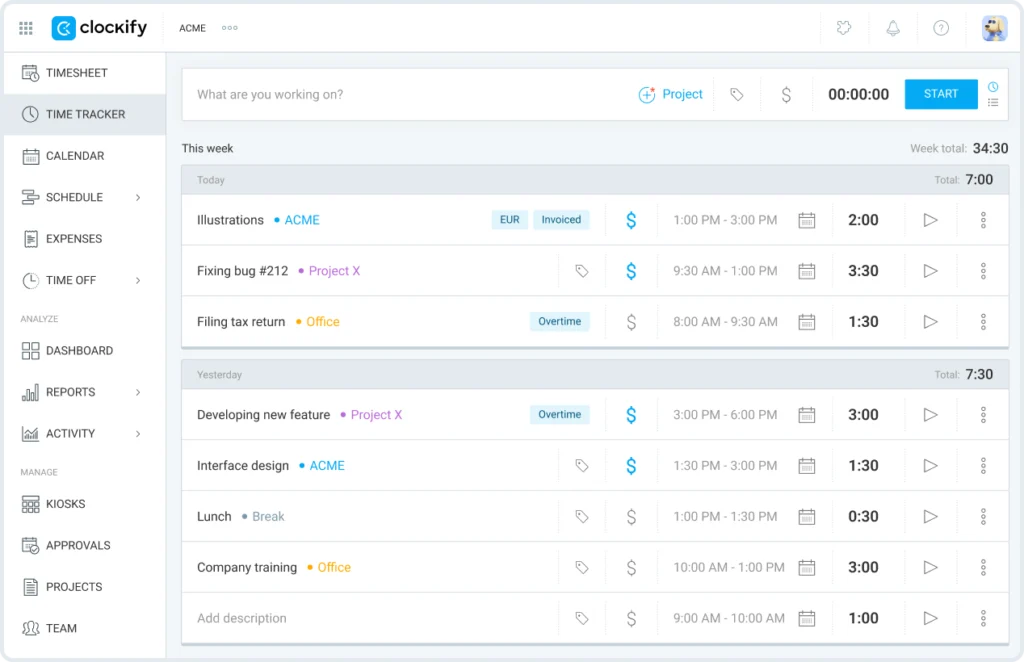
Clockify’s biggest selling point is impossible to ignore: it is completely free for unlimited users. For a startup or a very small team that just needs basic hour logging, that value proposition is hard to argue with. It is also one of the cleanest interfaces in the time tracking space — simple, fast, and easy to learn in minutes.
But here is the honest truth for HR Managers: Clockify was designed for freelancers and small creative teams, not for HR compliance. Overtime calculations are not automatic — you have to set them up manually, and even then they require additional paid add-ons. There are no built-in approval workflows, meaning any overtime request lives in an email chain or a separate system. Compliance reporting is essentially non-existent on the free plan.
As soon as you need anything beyond basic time logging — real overtime controls, manager approvals, audit-ready reports — you are looking at paid upgrades that quickly make Clockify less of a bargain. And even on paid plans, it is not built to handle multi-jurisdiction overtime rules or enterprise-level compliance needs.
- Key Features: Timer-based tracking, project categories, basic reporting, browser extension, limited OT summary
- Pricing: Free for unlimited users; paid plans from $3.99/user/month (OT features require Pro or above)
- Strengths: Genuinely free tier, clean UI, good for project-based time logging, wide integration support
- Limitations: No automatic OT calculation on free plan, zero approval workflows, compliance reporting is very basic, not built for HR
- Best For: Freelancers, startups, and small creative agencies tracking billable hours — not payroll compliance
4. Hubstaff — Best for Remote & Field Teams with GPS Oversight
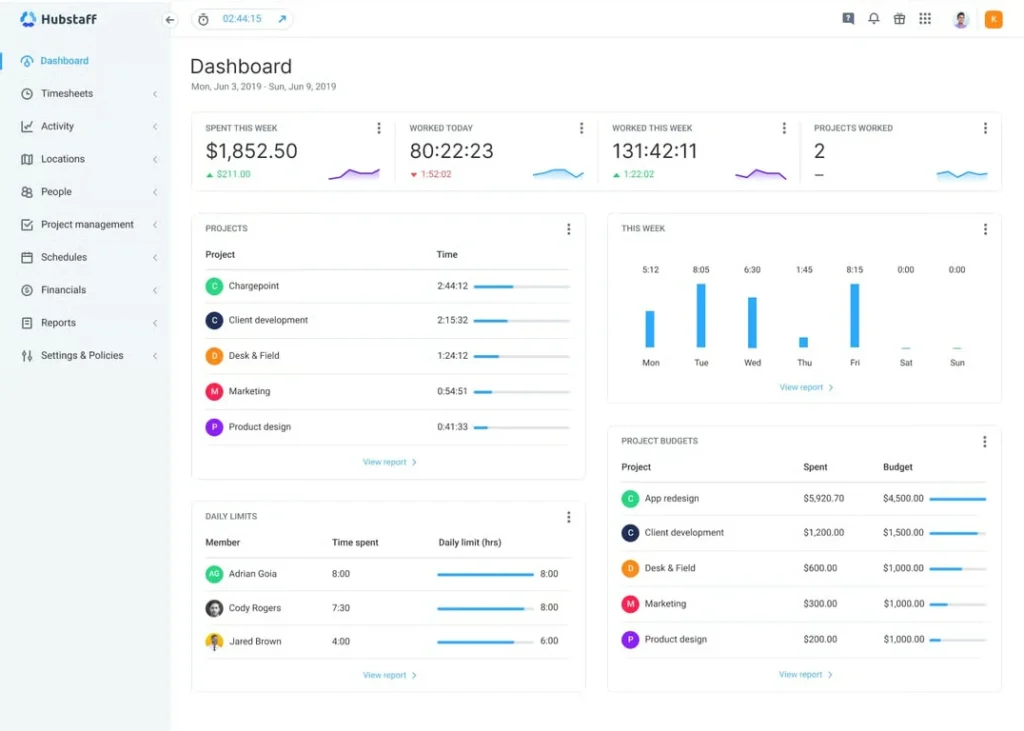
Hubstaff built its reputation on one core strength: keeping tabs on remote workers. If your workforce is scattered across job sites, home offices, or multiple cities, Hubstaff gives managers a level of visibility that few other overtime tracking systems match. GPS tracking, automated screenshots, keyboard and mouse activity monitoring — it is all there.
From an overtime tracking standpoint, Hubstaff does the job. It logs hours, triggers OT alerts when employees hit thresholds, and generates decent reports. Payroll integrations with tools like Gusto, ADP, and PayPal are solid for small-to-mid teams.
Here is where it gets complicated for HR Managers, though. The employee monitoring features — screenshots, activity percentages, mouse movement tracking — can create serious trust and morale issues in your organization. Many HR professionals report pushback from employees and even legal complications in states with strong employee privacy laws. If your culture depends on trust and autonomy, Hubstaff’s surveillance-first design can undermine your best HR efforts. It also carries one of the higher per-user costs in this category once you include the features needed for proper OT management.
- Key Features: GPS tracking, activity monitoring, OT threshold alerts, shift scheduling, payroll integrations
- Pricing: Starts at $7/user/month; OT features available on Grow plan ($9/user/month) and above
- Strengths: Best-in-class GPS and location tracking, solid remote worker oversight, good mobile app
- Limitations: Surveillance features can damage employee trust, higher cost for full OT functionality, weak Microsoft 365 native support
- Best For: Construction, logistics, cleaning services, and field service companies with hourly remote workers
5. Deputy — Best for Shift-Based Scheduling & OT Management
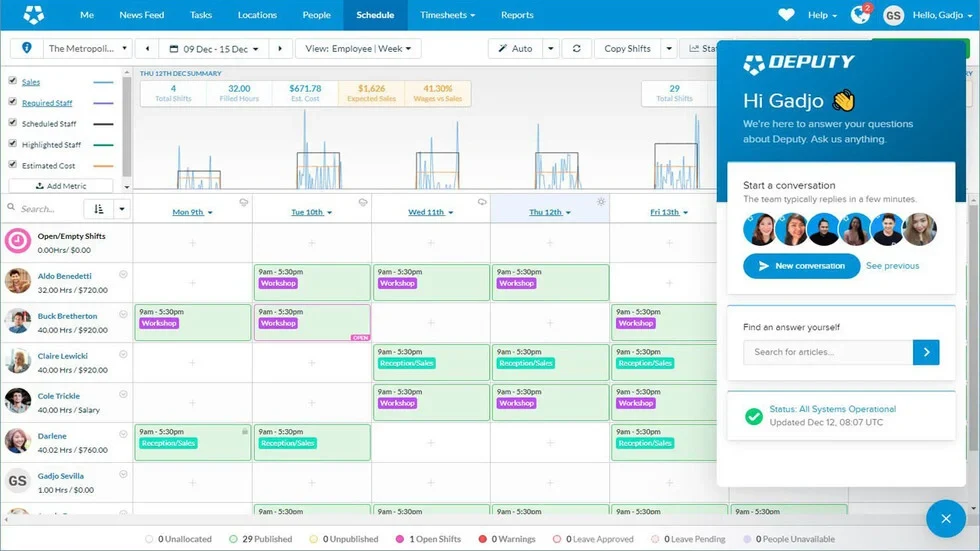
Deputy was built with one specific use case in mind: managing shift workers in industries like retail, hospitality, and healthcare. And at that job, it genuinely excels. The scheduling interface is visual and intuitive, demand-based scheduling uses historical data to predict staffing needs, and overtime alerts fire before a shift goes over budget.
For HR Managers running operations with rotating shifts, Deputy’s auto-scheduling combined with OT controls can save meaningful time each week. Employees can view schedules, swap shifts, and check their hours from the mobile app — which reduces HR inbox noise considerably.
The limitations appear when your needs go beyond scheduling. Deputy’s compliance reporting is decent but not deep enough for complex labor law audits. Payroll exports often require a third-party integration rather than a direct connection, which adds friction and occasional data sync issues. For organizations running Microsoft 365, Deputy sits outside that ecosystem entirely — meaning your team is logging into yet another separate platform.
- Key Features: Drag-and-drop shift scheduling, OT threshold alerts, demand forecasting, leave management, mobile app
- Pricing: Starts at $4.50/user/month (Scheduling only); full OT and HR features on Premium at $6/user/month
- Strengths: Excellent shift scheduling, strong for industry-specific OT rules, good employee self-service
- Limitations: Payroll integration requires third-party connectors, weak Microsoft 365 support, compliance reports need improvement
- Best For: Retail chains, restaurants, hotels, and healthcare facilities managing large numbers of shift workers
6. Toggl Track — Best for Project-Based OT Tracking
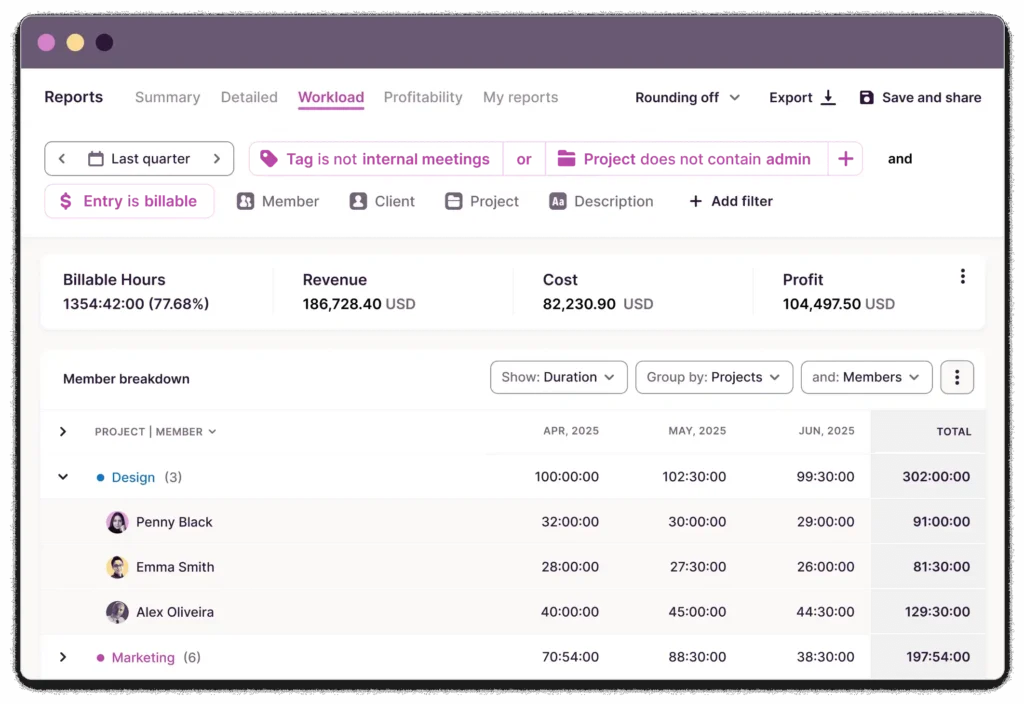
Toggl Track is one of the most polished time tracking tools available — and it has earned genuine loyalty from design agencies, software development teams, and consultancies who need to track time by project and client. The interface is a joy to use, the browser extension is fast, and the reporting gives teams clear insight into where hours actually go.
Where does Toggl fall short? Almost everywhere that HR Managers need it most. Toggl Track was designed as a productivity and billing tool, not an HR compliance system. There are no built-in overtime approval workflows. Overtime rules cannot be enforced automatically — managers have to review raw data and make manual judgments. Payroll export features are limited, and compliance reporting simply does not exist in any meaningful form.
For an HR Manager who needs to defend overtime decisions in an audit or ensure FLSA compliance across a team of 50+ employees, Toggl Track will leave you exposed. It is a great tool used in the wrong context.
- Key Features: One-click timer, project and client tagging, team dashboards, browser extension, basic summaries
- Pricing: Free for up to 5 users; Starter at $10/user/month; Premium at $20/user/month
- Strengths: Beautifully simple UI, strong project-level insights, excellent for billable hour tracking
- Limitations: No automated OT calculation, no approval workflows, no compliance reporting, not suitable for payroll or HR audits
- Best For: Creative agencies, consultants, and software teams tracking project time for billing — not for HR or payroll compliance
7. BambooHR Time Tracking — Best for HR-First Organizations
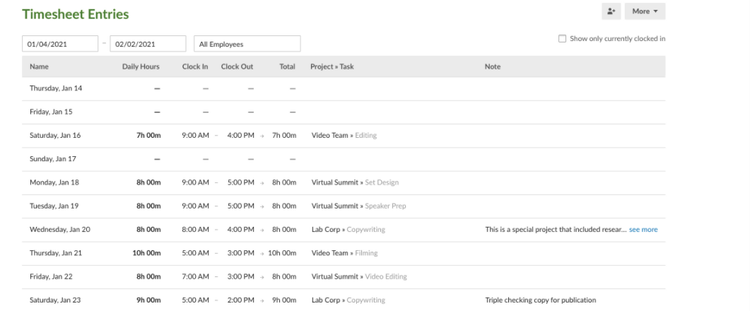
BambooHR takes a different approach from every other tool on this list. Instead of building a standalone time tracking product, it baked time tracking into a full HR information system. That means overtime data sits right next to employee records, PTO balances, performance reviews, and onboarding checklists — all in one place.
For HR Managers who want a single system of record for all people data, BambooHR is genuinely compelling. The overtime visibility is solid for standard use cases, and the employee self-service experience is one of the best in the industry. Employees can check their hours, request time off, and see their OT status without ever emailing HR.
The challenges? BambooHR’s time tracking module is not its primary strength — it is an add-on to an HRIS platform. Overtime policy flexibility is limited compared to dedicated OT tracking software. Complex OT rules — like split-rate calculations, union rules, or multi-state compliance — require customization that BambooHR does not always handle cleanly. Pricing is also notably higher than dedicated overtime tracking systems, particularly for smaller organizations that only need time tracking rather than the full HR suite.
- Key Features: Integrated HRIS, time tracking module, OT summaries, PTO management, employee self-service, onboarding tools
- Pricing: Custom pricing (typically $6–$12/employee/month depending on modules selected)
- Strengths: All-in-one HR data platform, excellent employee experience, clean interface, strong reporting for general HR
- Limitations: Time tracking is an add-on, not a core feature; limited OT rule flexibility; higher cost; weak Microsoft 365 native integration
- Best For: Growing businesses (50–500 employees) that want all HR functions unified and are willing to pay for the full platform
Side-by-Side Comparison: Best Overtime Tracking Systems (2026)
| Software | Microsoft 365 | OT Auto-Calc | Approval Workflow | Compliance Reports | Pricing From | Best For |
| Timesheet 365 | [+] Native | [+] Yes | [+] Yes | [+] Yes | Contact Sales | Enterprise HR |
| QuickBooks Time | [-] Limited | [+] Yes | [~] Basic | [~] Basic | $10/user/mo | Small Biz / QB |
| Clockify | [-] No | [~] Manual | [-] No | [-] No | Free / $3.99 | Freelancers |
| Hubstaff | [~] Partial | [+] Yes | [~] Basic | [~] Basic | $7/user/mo | Field Teams |
| Deputy | [~] Partial | [+] Yes | [+] Yes | [~] Basic | $4.50/user/mo | Shift Workers |
| Toggl Track | [~] Partial | [-] No | [-] No | [-] No | Free / $10 | Agencies |
| BambooHR | [~] Partial | [~] Basic | [+] Yes | [~] Basic | $6+/user/mo | HR-First Orgs |
Features in Any OT Tracking Software
Not all overtime tracking systems are built the same. Before you commit to any platform, make sure it checks every box below. Skipping even one of these can lead to compliance issues, payroll errors, or frustrated employees.
1. Automatic Overtime Calculation
Your software should calculate overtime automatically based on your jurisdiction and company policy. Whether it is daily OT (after 8 hours), weekly OT (after 40 hours), or double-time rules — the system should handle it without manual input. This single feature eliminates the most common source of payroll errors.
2. Real-Time Overtime Alerts
Do not wait until payday to discover a problem. The best OT tracking software sends instant alerts to managers when an employee is approaching their overtime limit. This lets HR intervene before the overage happens — saving budget and reducing compliance exposure.
3. Manager Approval Workflows
Overtime should never be a surprise. A proper overtime tracking system routes all extra-hours requests through a documented approval process. This protects the business legally, gives employees clear expectations, and keeps payroll predictable.
4. Payroll Integration
The best overtime tracking software connects directly to your payroll system. Data flows automatically — no re-entry, no rounding errors, no Friday afternoon scrambles. Look for native integrations with tools like Microsoft Payroll, ADP, Gusto, or QuickBooks.
5. Compliance & Audit-Ready Reporting
FLSA compliance, state-level labor laws, and internal audits all require accurate, accessible records. Your OT tracking software must generate ready-to-use reports at any time — not just at year-end. Look for customizable reporting by department, employee, period, or project.
6. Employee Self-Service Portal
When employees can view their own overtime records, request corrections, and see their approval status — trust goes up and HR ticket volume goes down. Self-service is not a luxury feature. It is a time-saver for your entire HR team.
7. Mobile Clock-In & Geolocation
Field employees, remote workers, and multi-site teams need to log overtime on the go. Mobile-first OT tracking software with optional geolocation ensures that time records are accurate, wherever work happens.
Ready to stop guessing and start tracking? See Timesheet 365 in action.
Key Benefits of Using the Right Overtime Tracking System
The impact of switching to a purpose-built overtime tracking software goes far beyond saving time. Here is what HR Managers consistently report after making the move
- Payroll Cost Control: Automated OT tracking identifies unnecessary overtime patterns. Many companies reduce overtime costs by 15–30% within the first quarter of using proper OT tracking software — simply by having visibility they never had before.
- Fewer Legal Risks: The U.S. Department of Labor reports that wage theft and OT violations are among the most common labor complaints. A compliant overtime tracking system creates the documentation you need to defend any audit or employee dispute.
- Higher Employee Trust: When workers see that their extra hours are tracked fairly and paid correctly, satisfaction rises. Gallup research shows that fair pay is directly tied to engagement — and engagement drives productivity.
- HR Time Savings: Manual overtime tracking can consume 3–5 hours per payroll cycle per HR manager. The right OT tracking software cuts this to minutes — freeing your team for higher-value work.
- Scalability: As your business grows, your overtime tracking system grows with it. No more rebuilding spreadsheets every time you add a department or a new shift pattern.
How to Choose the Right OT Tracking Software for Your Business
With so many options available, the decision can feel overwhelming. Use this simple checklist to find the right fit:
- Define your overtime rules first: Do you operate under daily OT rules, weekly OT rules, or both? Different states and countries have different requirements. Your software must support your specific rules.
- Check your existing tech stack: If your business runs on Microsoft 365, choose a solution that integrates natively — like Timesheet 365 — rather than one that requires additional software bridges.
- Prioritize compliance reporting: Do not settle for software that gives you raw data but not ready-to-use compliance reports. Audit readiness should be built in, not bolted on.
- Think about employee adoption: The best overtime tracking system in the world fails if employees do not use it. Choose tools with familiar interfaces, mobile access, and minimal friction.
- Plan for scale: Buy for where you are headed, not just where you are. The cost of switching platforms later — in data migration, retraining, and downtime — is always higher than choosing a scalable solution today.
Why Timesheet 365 Leads the Pack
HR Managers working in Microsoft 365 environments have a clear frontrunner: Timesheet 365. Here is a quick look at why it earns the top spot in our list of the best overtime tracking systems:
- It lives inside Microsoft Teams — zero new software to install or learn
- Overtime rules are fully configurable per department, shift, and employee type
- Approval workflows are built in and documented for audit purposes
- Real-time dashboards give HR managers a single view of all overtime activity
- Payroll exports save hours of manual data entry every pay period
- Compliant with FLSA, EU Working Time Directive, and major labor standards
- Scales from 10 employees to 10,000 without complexity creep
Unlike competitors that were built for freelancers or billing and then adapted for HR, Timesheet 365 was built from the ground up for the needs of HR Managers and operations teams in mid-to-large organizations.
What Real HR Managers Are Saying Online
We analyzed discussions from Reddit’s r/TimeTrackingSoftware and Spiceworks community forums to understand what HR professionals actually struggle with when tracking overtime. Here are the themes that came up again and again:
- “I need a system that alerts me before overtime happens, not after.”: Real-time alerts are the number one requested feature in online communities. Timesheet 365 delivers this natively.
- “Our payroll team spends hours every week reconciling OT hours manually.”: Manual reconciliation is the most common pain point. Automated payroll export in Timesheet 365 solves this entirely.
- “We need something that works with Microsoft Teams. Our employees won’t use a separate app.”: Microsoft Teams integration is consistently cited as a dealbreaker. Timesheet 365 is the only purpose-built OT tracking software with native Teams support.
- “Our current tool can’t handle different overtime rules for different states.”: Multi-jurisdiction OT rules are a growing need for businesses with distributed teams. Timesheet 365’s flexible policy engine handles this with ease.
Conclusion
Overtime tracking is not just a payroll task — it is a strategic HR function that affects employee trust, legal compliance, and your company’s bottom line. The right overtime tracking software transforms a slow, error-prone process into a fast, accurate, and fully documented workflow.
For organizations running Microsoft 365, Timesheet 365 is the clear choice — combining deep integration, powerful overtime automation, and audit-ready compliance in one platform your team will actually use.
Stop leaving overtime to guesswork. Start tracking it the smart way.
Book a Free Demo of Timesheet 365 Today — See how it handles your overtime challenges in real time.
Join Our Creative Community
Frequently Asked Questions
What is overtime tracking software?
It is a digital tool that automatically records, calculates, and reports employee hours worked beyond the standard shift — connecting this data to payroll, approvals, and compliance reporting.
How is Timesheet 365 different from other OT tracking software?
Timesheet 365 is built natively inside Microsoft 365 and Teams, meaning employees track time in an app they already use — delivering higher adoption, automatic OT calculation, and seamless payroll exports without any new software to install
Can overtime tracking software help with labor law compliance?
Yes — the best overtime tracking systems generate audit-ready reports, enforce configurable OT rules per jurisdiction, and maintain a full digital record of all approvals, keeping your business compliant with FLSA and other labor laws.
Is it possible to track overtime for remote or field employees?
Absolutely — modern OT tracking software includes mobile clock-in, geolocation support, and Microsoft Teams integration so remote and field workers can log hours accurately from any device, anywhe
How quickly can a business see ROI from overtime tracking software?
Most businesses report measurable payroll savings and reduced HR admin time within the first payroll cycle — with many cutting unnecessary overtime costs by 15–30% within the first quarter of consistent use.


_JiluXJRGNl.svg)























