

Collaborative Hiring Software for Microsoft Teams: The Complete Guide to Better Team Hiring

- Collaborative hiring software gives recruiters, hiring managers, and interviewers one shared view of a candidate instead of separate emails, spreadsheets, and chat threads.
- Delayed interviewer feedback is one of the most common reasons hiring decisions stall, based on recurring complaints across recruiter and candidate forums.
- Structured interview rounds and shared scorecards can cut weeks off time-to-hire compared to loosely run, opinion-based processes.
- Recruitment Management 365 builds collaborative hiring directly into Microsoft Teams, so hiring teams work from a tool they already use every day instead of learning a new one.
Most hiring teams already live inside Microsoft Teams. They chat there, they meet there, they share files there. What many teams don’t have is a way to turn that same space into a shared hiring workspace — one where candidate notes, interview feedback, and scorecards stay together instead of scattering across five different inboxes.
That gap is what collaborative hiring software is built to close. This guide covers what it is, why it matters, how the process works, and how to set it up inside Microsoft Teams using Recruitment Management 365.
What Is Collaborative Hiring Software?
Collaborative hiring software is a type of recruitment software that lets recruiters, hiring managers, and interviewers share candidate information, feedback, and decisions in one place instead of separate emails and spreadsheets. Everyone involved in a hire — not just the recruiter — works from the same candidate record.
Collaborative Hiring Definition
Collaborative hiring is a recruitment approach where the whole hiring team — recruiter, hiring manager, and interview panel — takes part in sourcing, interviewing, and deciding on a candidate, rather than leaving the decision to one or two people. This coordinated involvement of multiple stakeholders across every stage of hiring is sometimes called hiring team collaboration, and it goes beyond just adding more people to interviews — it’s a structured way of working that improves time to hire and candidate experience. Join
How Collaborative Hiring Differs from Traditional Hiring
Traditional Hiring | Collaborative Hiring |
Recruiter and hiring manager make most decisions alone | The full interview panel takes part in evaluation |
Feedback lives in email threads or verbal check-ins | Feedback lives in shared, structured scorecards |
Candidate status is tracked in spreadsheets | Candidate status is visible to everyone with access |
Decisions rely on memory and opinion | Decisions rely on documented, comparable evaluations |
Why More Organizations Are Choosing Collaborative Hiring
Traditional recruitment usually involves only a hiring manager and recruiter, while collaborative hiring brings in a wider team — any colleague who will eventually work with the new hire can take part, from writing the job description to reviewing resumes to giving interview feedback. This spreads out the workload and pulls in expertise a recruiter alone doesn’t have. Simplicant
Why Collaborative Hiring Matters
Hiring the wrong person, or losing a good candidate to a slow process, costs more than most teams realize. Anyone who has posted a role on Reddit’s r/recruiting or watched a hiring thread on a workplace forum has seen the same complaint repeat: interviewers agree to give feedback fast, then feedback sits untouched for a week. Candidates wait. Good ones take other offers.
A few numbers show the scale of the problem:
- The overall U.S. average time to hire in 2026 is close to 44 days, according to SHRM benchmarking data.
- Mitratech’s 2025 data shows 44% of mid-level roles take 31 to 60 days to fill, and 17% take longer than 90 days.
- Cutting interview rounds from four-plus down to two structured rounds can shorten time-to-hire by 20 to 30 days without a real drop in placement quality, according to Ashby’s talent trends analysis.
- Interview volume itself has grown too — teams now run about 20 interviews per hire, up from 14 in 2021, a jump that adds calendar days without adding much signal. Treegarden
- The average cost per hire sits around $4,700, according to SHRM, once job postings, interview time, and onboarding are factored in. The Interview Guys
Put together, these numbers point to the same root cause: too many steps depend on one person remembering to do something, and no shared system to catch it when they don’t.
Collaborative hiring software addresses this directly. When feedback, scorecards, and candidate records sit in one shared place, nothing depends on a single person’s inbox. Hiring managers see status without chasing recruiters. Recruiters see feedback without chasing interviewers.
Still chasing interviewers for feedback a week later?
See how Recruitment Management 365 keeps every scorecard in one place, so no hire waits on a missing email.
How the Collaborative Hiring Process Works
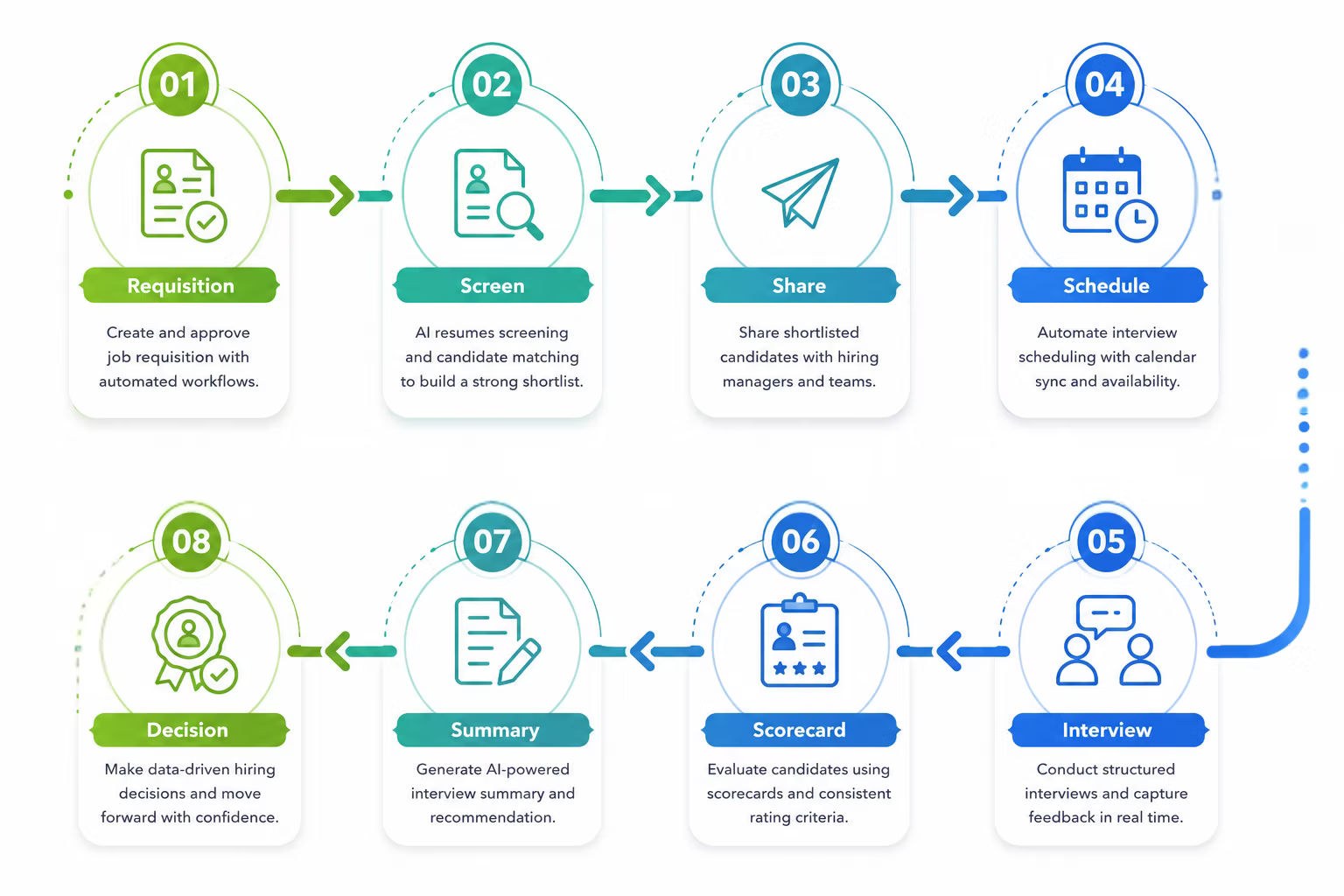
A collaborative hiring process generally moves through eight stages:
- Create Job Requisition — The hiring manager and recruiter agree on role requirements as part of a clear job requisition process and get approval before posting.
- Screen Candidates — Resumes are reviewed and shortlisted, often with resume parsing to speed up the first pass.
- Share Candidate Profiles — Recruiters share shortlisted profiles with the hiring manager and panel in one shared view.
- Schedule Interviews — Interviews get booked directly against interviewer calendars.
- Interview Panel Evaluation — Each interviewer evaluates the candidate against agreed criteria.
- Candidate Scorecards — Feedback is entered into a standard scorecard instead of a free-text email.
- Final Interview Summary — Feedback from every round is pulled into one summary for review.
- Hiring Decision — The hiring manager makes the call based on the full picture, not a single conversation.
This eight-stage recruitment life cycle is the exact workflow Recruitment Management 365 is built around, and it’s covered in more detail below.
This is the exact workflow Recruitment Management 365 is built around, and it’s covered in more detail below.
What Is Collaborative Recruitment Software?
Collaborative recruitment software is the platform that supports this process — it gives recruiters, hiring managers, and interviewers a shared system for tracking candidates, collecting feedback, and making decisions together.
Spreadsheets and email work when one person owns the whole process. They stop working once multiple interviewers, a hiring manager, and sometimes a department head all need visibility. Feedback gets lost in reply chains. No one has a full picture without pinging three people first.
Collaborative recruitment software vs. a standard ATS: A standard applicant tracking system focuses on posting jobs and tracking applications through a pipeline. Collaborative recruitment software adds the layer on top — shared scorecards, panel feedback, and role-based visibility for everyone involved in the decision, not just the recruiter.
Businesses typically need to invest in this type of recruitment management software once hiring involves more than two or three people per role, once interview panels become standard, or once feedback delays start pushing out offer dates.
Essential Features of Collaborative Recruitment Software
Here’s what to look for, and why each feature actually matters:
Shared Candidate Profiles — Recruiters and hiring managers view the same information at the same time, so no one is working off an outdated version of a resume or note.
Candidate Scorecards — Standard evaluation criteria across every interviewer, built with candidate assessment tools, means candidates get compared on the same measures, not gut feel.
Multi-Interviewer Feedback — Structured feedback from every panel member, collected in one place instead of scattered in separate emails.
AI Interview Summaries — A single summary pulled from every interview round using AI recruitment software, so the hiring manager isn’t reading five separate write-ups before deciding.
Resume Parsing — Candidate details are pulled from resumes automatically instead of manually re-typed into a system.
Resume Ranking — Candidates are ranked by relevance to the role, so recruiters spend time on the strongest matches first.
Internal Notes — Recruiter-only comments stay private from candidates while still being visible to the hiring team.
Automated Notifications — Stakeholders get notified the moment a candidate moves to the next stage, without anyone having to send a manual update.
Audit Logs — A full record of hiring activity, useful for compliance and for reviewing how a decision was reached.
Role-Based Permissions — Access is scoped by role, so interviewers see what they need without exposing sensitive salary or offer data.
Delegation Support — Approvals can continue when someone is on leave, instead of stalling until they’re back.
Recruitment Dashboards — Real-time visibility into open roles, pipeline stage, and time-to-hire, powered by hiring dashboards, all in one view.
Tired of comparing candidates from memory instead of data?
Get a live walkthrough of shared scorecards and AI resume ranking inside your own Teams setup.
Why Microsoft Teams Is the Best Platform for Collaborative Hiring
Most collaborative hiring tools ask a hiring team to log into yet another platform. That’s one more login, one more tab, one more thing to check. Building collaborative hiring inside Microsoft Teams removes that step entirely, because the hiring team is already there.
Here’s what that looks like in practice, running on the same Microsoft recruitment software foundation your team already uses for email and calendars:
- One place for recruiters and hiring managers — Candidate profiles, feedback, and scorecards live where the team already chats and meets.
- Teams meeting creation for interviews — Interviews are scheduled as Teams meetings directly from the candidate record.
- Teams notifications — Stage changes and feedback requests show up as Teams alerts, not a separate app’s notification.
- Outlook interview scheduling — Calendars sync with Outlook, so interviewers see hiring events alongside their regular meetings.
- Bulk interview emails using templates — Candidate communication goes out through templates instead of writing the same email repeatedly.
- Calendar synchronization — Interview slots reflect real-time interviewer availability.
- Real-time collaboration — Multiple people can review a candidate profile or leave feedback at the same time.
- Microsoft 365 security — Hiring data is protected under the same security model as the rest of the organization’s Microsoft 365 environment.
- Candidate data stored in the customer’s own Microsoft tenant — Data doesn’t leave the organization’s Microsoft environment to sit on a third-party server.
That last point is worth pausing on. Most collaborative hiring platforms store candidate data on their own servers. A Teams-native approach, often built on SharePoint recruitment software architecture, keeps that data inside the company’s tenant, which matters for organizations with strict data residency or compliance requirements.
Already running your team on Microsoft 365? Don’t add another login.
Try collaborative hiring built natively into Teams — no new platform to train your panel on.
How Recruitment Management 365 Enables Collaborative Hiring
Recruitment Management 365 is built directly into Microsoft Teams, and its workflow maps to the collaborative hiring process step for step.
Recruit Together
Shared candidate profiles and internal collaboration mean recruiters and hiring managers work from the same record — all inside one recruitment management system — from the first screen onward.
Interview Together
Candidate scorecards and feedback from multiple interviewers roll up into one place, with AI-generated interview summaries pulling every round together for the hiring manager.
Schedule Faster
Outlook integration, Teams meetings, email templates, and interview reminders take manual scheduling work off the recruiter’s plate.
Stay Updated
Automated notifications, an activity timeline, and audit logs mean stakeholders always know where a candidate stands without asking.
Make Better Decisions
AI resume ranking and parsing surface the strongest matches, while hiring dashboards give a live view of pipeline health.
Secure Every Hiring Decision
Role-based permissions, a client-owned Microsoft tenant, and compliance audit logs keep hiring data secure and traceable.
Best Practices for Successful Collaborative Hiring
Following a few consistent recruitment strategies keeps hiring fast without losing quality:
- Define interviewer roles before the panel is scheduled, so everyone knows what they’re evaluating.
- Use structured scorecards instead of free-text feedback, so evaluations can be compared side by side.
- Centralize candidate information in one system rather than splitting it across email and spreadsheets.
- Set a clear deadline for feedback submission, and follow up automatically instead of chasing manually.
- Standardize evaluation criteria across interviewers for the same role.
- Review hiring analytics regularly to catch bottlenecks before they become a pattern.
- Automate repetitive tasks like scheduling and status updates through recruitment process automation so recruiters can focus on candidates.
Common Collaborative Hiring Challenges (and How to Solve Them)
Challenge | Solution |
Delayed feedback from interviewers | Automated notifications and deadline reminders |
Interview scheduling conflicts | Outlook and Teams calendar sync for interview scheduling |
Interviewers disagreeing on a candidate | Shared, structured candidate scorecards |
Manual resume review taking too long | AI resume parsing and ranking |
Approvals stalling when someone is out | Approval workflow with delegation support |
Communication spread across tools | Centralized collaboration inside Microsoft Teams |
Delayed feedback deserves a closer look, since it’s one of the most common recruitment challenges that shows up in hiring discussions. Candidates on recruitment forums regularly describe waiting one to two weeks — sometimes longer — for interview feedback, with recruiters explaining that one or two panel members simply hadn’t submitted their notes yet. That delay isn’t usually a sign anything is wrong with the candidate. It’s a process gap: nothing forces feedback to happen on a schedule. A shared scorecard with a deadline and an automatic reminder closes that gap without adding a new step for anyone.
One slow interviewer shouldn’t cost you a good candidate.
Automated feedback reminders keep your hiring pipeline moving on its own.
Why Organizations Choose Recruitment Management 365
Recruitment Management 365 is built inside Microsoft 365, with native Microsoft Teams integration and a SharePoint-based architecture. That means:
- No separate login or platform for hiring managers and interviewers to learn
- Copilot and AI capabilities built into the resume and interview workflow
- Power Automate workflows for approvals and notifications
- Power BI reporting for hiring metrics and dashboards
- Candidate data stored securely inside the customer’s own Microsoft tenant
- End-to-end recruitment management, from requisition to offer, without switching between tools
If you’re evaluating alternatives to BambooHR, compare RM365 and BambooHR to see how RM365 delivers a truly Microsoft Teams–native HR experience.
For teams already running their business on Microsoft 365, Recruitment Management 365 removes the adoption barrier that stops most collaborative hiring software from actually getting used day to day.
What's Next: Getting Your Team Started
If your hiring team is spread across email, spreadsheets, and Teams chats today, the first step isn’t a full software rollout — it’s mapping your current process into a clear recruitment plan against the eight-stage workflow above and noting where feedback tends to stall. From there, a Teams-native tool like Recruitment Management 365 can be introduced one role at a time, starting with the position that has the most interviewers or the longest time-to-hire.
Want to see how real hiring teams put this into practice?
Browse recruitment case studies for a look at shared candidate workflows in action.
Conclusion
Collaborative hiring isn’t about adding more people to the process for the sake of it — it’s about making sure the people already involved in a hire aren’t working from five different versions of the truth. When feedback, scorecards, and candidate profiles live in one shared place, hiring moves faster and decisions hold up better under review. Recruitment Management 365 puts that entire workflow where hiring teams already work: inside Microsoft Teams.
Ready to stop rebuilding your hiring process in five different tools?
Bring your recruiters, hiring managers, and interview panel into one Teams-native workspace.
Frequently Asked Questions
What Is Collaborative Hiring Software?
Collaborative hiring software is a recruitment tool that lets recruiters, hiring managers, and interviewers share candidate profiles, feedback, and decisions in one shared system instead of separate emails and spreadsheets.
How Is Collaborative Hiring Different From Traditional Hiring?
Traditional hiring usually limits decisions to a recruiter and hiring manager. Collaborative hiring brings the full interview panel into evaluation, with feedback captured in structured scorecards instead of informal notes.
Why Does Collaborative Hiring Matter for Hiring Quality?
It spreads evaluation across more people with direct knowledge of the role, which reduces reliance on one person’s opinion and catches gaps a single interviewer might miss.
What Features Should Collaborative Recruitment Software Have?
Look for shared candidate profiles, structured scorecards, multi-interviewer feedback, resume parsing and ranking, automated notifications, audit logs, and role-based permissions.
How Does Recruitment Management 365 Support Collaborative Hiring in Teams?
It runs the full hiring workflow — profiles, scorecards, scheduling, notifications, and reporting — natively inside Microsoft Teams and Microsoft 365, with candidate data staying in the customer’s own tenant.
What Are the Best Practices for Successful Collaborative Hiring?
Define interviewer roles early, use structured scorecards, centralize candidate data, set feedback deadlines, and automate repetitive scheduling and status updates.
What Common Problems Come Up in Collaborative Hiring and How Are They Fixed?
The most common issue is delayed interviewer feedback, usually solved with automated deadline reminders and shared scorecards. Scheduling conflicts and scattered communication are solved with calendar sync and centralizing everything inside one collaboration tool.
Is Collaborative Hiring Software Worth It for SmallTeams?
Yes, once more than two or three people are involved in a hiring decision. Even small teams benefit from a dedicated recruitment platform for small business once interview panels become standard practice.
Table of Contents
- How the Collaborative Hiring Process Works


_JiluXJRGNl.svg)























