

10 Best Timesheet Invoicing & Billing Tools: Comparison 2026
_mVFFaHUZhS.webp)
Every hour your team works is revenue, but only if it reaches an invoice. Yet many firms still copy hours from spreadsheets into billing templates, chase managers for approvals, and discover missed billable time weeks after the month has closed. The result is slow cash flow, disputed invoices and hours that never get paid.
- Timesheet 365 leads for Microsoft 365 teams, with top billing, invoicing and SharePoint & Teams integration.
- Its Timesheet Agent AI builds Excel and Power BI reports on request, so you report and bill faster.
- Harvest, FreshBooks and Zoho Invoice suit small teams that want simple, invoice-first workflows.
- BigTime and Replicon fit larger firms needing project accounting, compliance and complex billing rules.
Timesheet billing closes that gap. It connects the time your people log to the rates, projects and clients you bill, so invoices are built from verified data instead of guesswork. In 2026, the leading tools go even further, with AI agents that answer reporting questions in seconds and push data straight into Excel and Power BI.
We studied the top-ranking comparison guides and reviewed the tools that appear most often, then evaluated each one against what matters most to service businesses: billing accuracy, invoicing speed, approvals, integrations and reporting. Whether you run an agency, a consultancy, an IT services firm or an internal project team, this guide will help you choose the right timesheet billing software with confidence.
Quick Comparison: Timesheet Billing Tools at a Glance
Tool | Best For | Billing & Invoicing | Key Integrations | AI & Reporting |
Microsoft 365 + Teams | Advanced billing, automated invoices, approvals | SharePoint, Teams, Excel, Power BI | Timesheet Agent AI; Excel & Power BI reports | |
Harvest | Small teams, freelancers | Invoices from time & expenses | QuickBooks, Xero, Asana, Slack | Standard reports, exports |
QuickBooks Time | QuickBooks users | Syncs hours to QuickBooks invoices | QuickBooks Online | Payroll & job-costing reports |
FreshBooks | Invoice-first accounting | Recurring invoices, online payments | Payment gateways, apps | Financial reports |
Clockify | Free option | Rates & invoicing on paid plans | Many project tools | Exports to Excel, CSV, PDF |
Toggl Track | Easy time capture | Billable reports; invoicing via integrations | Large integration library | Visual dashboards |
BigTime | Professional services | Hourly, fixed, retainer, milestone | QuickBooks, accounting tools | Utilization & profitability |
Zoho Invoice | Zoho ecosystem | Free invoicing with timesheets | Zoho suite | Zoho Analytics |
TimeCamp | Automatic tracking | Invoicing from tracked hours | Project & accounting apps | Excel & Sheets exports |
Replicon | Enterprise compliance | Complex rate rules | ERP, payroll, PSA | Enterprise analytics |
10 Best Timesheet Billing and Timesheet Invoicing Tools
Choosing a timesheet invoicing tool is not just about logging hours. The right platform should capture billable time accurately, route it through approvals, apply the correct client rates and turn it into invoices without manual rework. To keep this comparison fair, every tool below is reviewed on the same criteria: billing and invoicing features, reporting and AI, ideal use case, and honest pros and cons. Here is the quick list:
1. Timesheet 365 – Best for Microsoft 365 Teams That Want Faster Billing
2. Harvest – Simple Invoicing for Small Teams
3. QuickBooks Time – Businesses Already on QuickBooks
4. FreshBooks – Invoice-First Accounting
5. Clockify – Free Option for Growing Teams
6. Toggl Track – Effortless Time Capture
7. BigTime – Professional Services Firms
8. Zoho Invoice – Zoho Ecosystem Users
9. TimeCamp – Automatic Time Tracking
10. Replicon – Enterprise Compliance Businesses
1. Timesheet 365 – Best for Billing & Invoicing Businesses
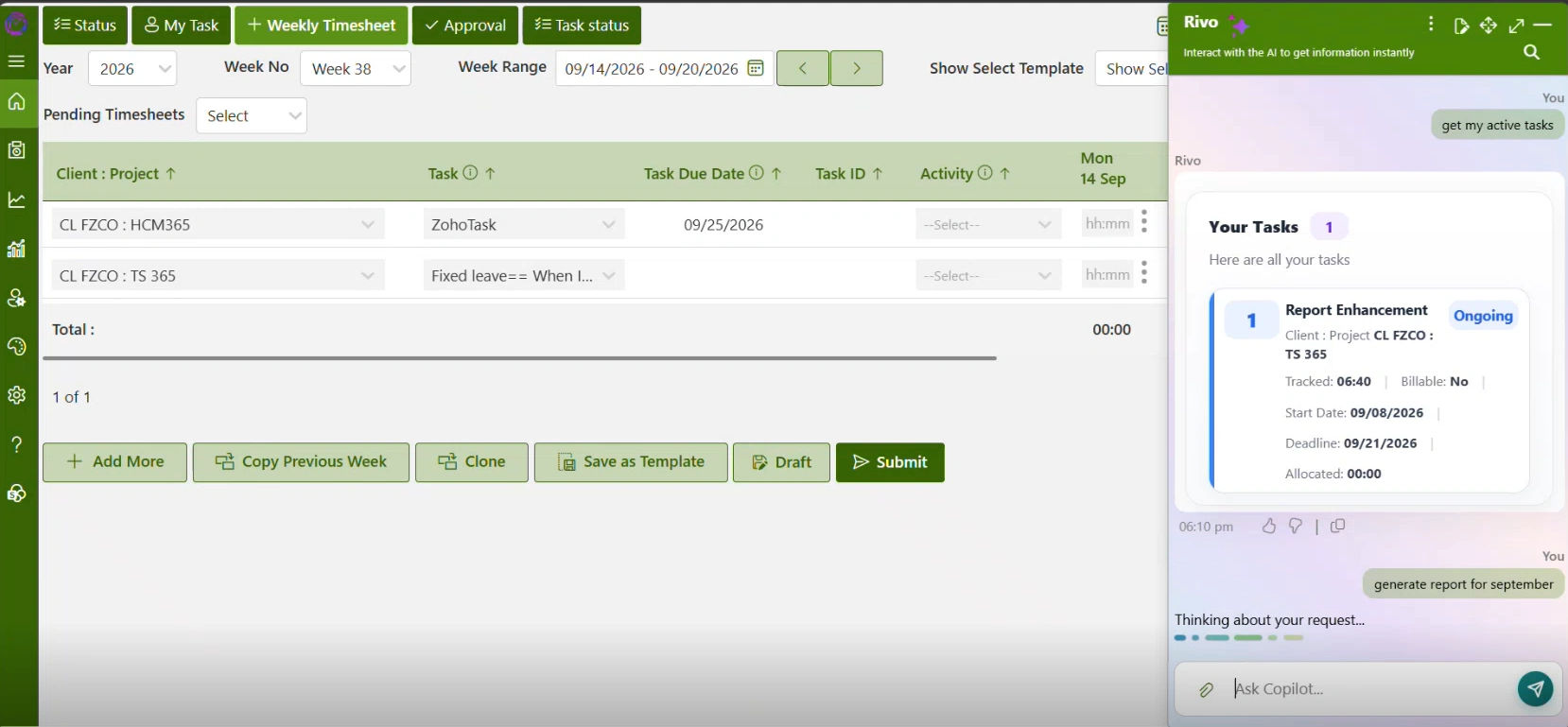
Timesheet 365 is a time tracking, billing and invoicing platform built natively for Microsoft 365. Employees log hours directly inside Microsoft Teams or SharePoint, managers approve them in the same place, and approved time flows straight into client billing and invoices. Because it lives where your team already works, adoption is quick and there is no extra login to manage.
- Billable and non-billable tracking with client, project and task-level rates.
- Automated invoice generation from approved timesheets, which removes manual errors.
- Multi-level approval workflows, so only verified hours ever reach an invoice.
- Native SharePoint and Microsoft Teams integration, with data kept inside your Microsoft 365 tenant.
Reporting and AI: The new Timesheet Agent is an AI agent that turns plain-language requests into ready-to-use reports. Ask for “billable hours by client last month” or “unbilled time for Project X” and it delivers the answer instantly, exportable to Excel or pushed into Power BI dashboards. Everything you ask for is given easily, so you report and bill faster.
Best for: Organizations on Microsoft 365 that want accurate timesheet billing, quick invoicing and AI-powered reporting in one place.
Pros: Best-in-class billing and invoicing, native Teams and SharePoint experience, AI agent reporting with Excel and Power BI.
Cons: Designed for Microsoft 365 environments, so teams outside that ecosystem benefit less.
Struggling to find which timesheet billing tool fits your team?
See how the Timesheet Agent builds Excel and Power BI billing reports in seconds, right inside Microsoft Teams.
2. Harvest – Simple Invoicing for Small Teams
Harvest is a well-known time tracker that pairs timers and weekly timesheets with straightforward invoicing. Teams track hours against projects, and Harvest turns that time and any logged expenses into professional invoices that clients can pay online. Its clean design makes it a favorite among freelancers and small creative teams.
- Create invoices from tracked time and expenses in a few clicks.
- Accept online payments through Stripe and PayPal.
- Project budgets with alerts when spending approaches the limit.
- Integrations with QuickBooks, Xero, Asana and Slack.
Reporting and AI: Built-in reports cover time, budgets and uninvoiced amounts, with Excel and CSV exports. There is no conversational AI agent for on-demand reporting.
Best for: Freelancers, agencies and small studios that want invoicing without complexity.
Pros: Clean interface, fast setup and reliable client payments.
Cons: Limited approval depth and fewer enterprise controls.
3. QuickBooks Time – Businesses Already on QuickBooks
Formerly known as TSheets, QuickBooks Time is Intuit’s time tracking app. It captures hours from mobile, web or kiosk devices and syncs them to QuickBooks Online, where invoices and payroll are processed. Its mobile features make it especially popular with field-based teams.
- Automatic sync of billable hours to QuickBooks invoices.
- GPS tracking and geofencing for field and mobile crews.
- Scheduling tools with overtime alerts.
- Job and customer codes for accurate client billing.
Reporting and AI: Offers payroll, project and job-costing reports with export options. Deeper financial analysis usually happens inside QuickBooks itself.
Best for: Construction, field services and small businesses that run their books in QuickBooks.
Pros: Tight accounting sync and a strong mobile app.
Cons: Invoicing depends on QuickBooks, and it is less suited to Microsoft-centric teams.
4. FreshBooks – Invoice-First Accounting
FreshBooks is accounting built around invoicing. Time tracking sits alongside invoices, expenses and payments, which makes it popular with service-based small businesses that want billing and bookkeeping together. Clients receive polished invoices and can pay in a click.
- Add tracked time directly to client invoices.
- Recurring invoices and automatic payment reminders.
- Online card and bank payments.
- Proposals and estimates that convert into invoices.
Reporting and AI: Financial reports such as profit and loss, invoice details and time entries, with exports available. No AI reporting agent is included.
Best for: Consultants, solo professionals and small service firms.
Pros: Beautiful invoices and easy client payments.
Cons: Time tracking is basic for larger or multi-level teams.
5. Clockify – Free Option for Growing Teams
Clockify is known for its generous free plan with unlimited users. Paid plans unlock billable rates, invoicing, approvals and more, making it a flexible entry point for teams that want to start small and scale up over time.
- Billable rates at workspace, project and member level.
- Invoice creation from tracked time on paid plans.
- Timesheet approvals and locking to protect billing data.
- Expense tracking linked to projects.
Reporting and AI: Summary, detailed and weekly reports export to Excel, CSV or PDF, which is useful for building your own dashboards.
Best for: Startups and budget-conscious teams.
Pros: Low cost and very easy adoption.
Cons: Advanced billing features require paid tiers.
6. Toggl Track – Best for Effortless Time Capture
Toggl Track focuses on making time tracking painless, with one-click timers, browser extensions and calendar-based tracking. Billable rates and visual reports help teams understand the real value of their time and spot unprofitable work early.
- Track Billable rates by project, client or team member.
- Billable amount reports that are ready for invoicing.
- A large library of integrations with project and accounting tools.
- Project profitability insights on higher plans.
Reporting and AI: Visual reports and dashboards with Excel, CSV and PDF exports. Invoices are usually completed through accounting integrations.
Best for: Creative teams, remote workers and hybrid teams.
Pros: Very easy to use with minimal training.
Cons: Native invoicing is limited compared with billing-focused tools.
Struggling to find which tool turns tracked time into client-ready reports?
Just ask the Timesheet Agent and get billable hours, unbilled time and project reports in Excel or Power BI instantly.
7. BigTime – Professional Services Firms
BigTime is a professional services time tracking software to automate platforms for accounting, engineering, architecture and consulting firms. It combines time, expenses, project management and sophisticated billing, giving firm leaders a clear view of utilization and revenue.
- Multiple billing types, including hourly, fixed fee, retainer and milestone.
- Work-in-progress (WIP) review before invoices go out.
- Custom invoice templates and batch invoicing.
- Integrations with QuickBooks and other accounting systems.
Reporting and AI: Strong reports and dashboards for utilization, realization and profitability across projects and staff.
Best for: Mid-size professional services firms with varied billing models.
Pros: Deep billing flexibility and firm-level insights.
Cons: Steeper learning curve and a higher price point.
8. Zoho Invoice – Zoho Ecosystem Users
Zoho Invoice is a free invoicing tool that includes project timesheets. It connects naturally with Zoho Books, Zoho Projects and the wider Zoho suite, so businesses already using Zoho can bill time without adding another vendor.
- Log time against projects and bill it on invoices.
- A customer portal for viewing and paying invoices.
- Recurring invoices and payment reminders.
- Multi-currency and multi-language invoicing.
Reporting and AI: Standard sales, time and receivables reports, with advanced analytics available through Zoho Analytics.
Best for: Small businesses already invested in Zoho apps.
Pros: Free core features and a familiar Zoho interface.
Cons: Timesheet features are lighter than dedicated trackers.
9. TimeCamp – Automatic Time Tracking
TimeCamp tracks time automatically in the background, capturing the apps and websites used during the day. This helps recover billable hours that manual entry often misses, especially for teams juggling many small client tasks.
- Automatic and manual time tracking options.
- Billable rates and project budgets.
- Invoicing from tracked hours.
- Attendance tracking and timesheet approvals.
Reporting and AI: Customizable reports with exports to Excel and Google Sheets for further analysis.
Best for: Agencies that lose billable time to manual entry.
Pros: Captures more billable time with less effort.
Cons: Automatic tracking can raise privacy concerns for some teams.
10. Replicon – Enterprise Compliance Businesses
Replicon offers time intelligence for large and global organizations, covering project time, client billing, labor compliance and workforce management. It is built for scale, with configurable rules for different regions and business units.
- Client billing with complex rate rules.
- Project costing and revenue tracking.
- Global labor compliance and audit trails.
- Integrations with ERP, payroll and PSA platforms.
Reporting and AI: Enterprise analytics and dashboards across projects, departments and regions.
Best for: Enterprises with complex, multi-country requirements.
Pros: Powerful, scalable and compliance-ready.
Cons: Longer implementation and a more complex setup.
How to Choose the Right Timesheet Invoicing Tool
The best choice depends on how your team works today and where you want to be in two to three years. Before you sign up for trials, score each option against these six factors:
- Billing flexibility: Look for support for hourly, fixed-fee and retainer billing, plus rates that vary by client, project, role or employee.
- Approval workflows: Multi-level approvals ensure that only verified hours reach invoices, reducing disputes and write-offs.
- Integration with where you work: If your team lives in Microsoft Teams and SharePoint, a native Microsoft 365 tool will drive far higher adoption than a separate app.
- Reporting and AI: AI agents that answer questions on demand and export to Excel or Power BI save hours of manual report building every month.
- Ease of adoption: A clean interface, mobile access and reminders keep timesheets complete and on time.
- Security and data control: Check where your data is stored and whether the tool meets your compliance and access-control requirements.
Struggling to find which tool ticks every box on this checklist?
Get flexible billing, multi-level approvals, SharePoint & Teams integration and AI reporting in one Microsoft 365-native platform.
Why Timesheet 365 Leads for Timesheet Billing in 2026

Most tools on this list do one or two things well. It brings the full billing cycle together inside Microsoft 365. Time is captured in Teams, stored securely in SharePoint, approved through configurable workflows and converted into accurate invoices without re-keying a single number.
The Timesheet Agent is the real differentiator. Instead of building pivot tables or waiting on an analyst, managers simply ask for what they need, such as billable hours by client, unbilled time for a project or utilization by team, and get an instant answer ready for Excel or Power BI. That means faster month-end close, fewer billing errors and clients who get invoiced on time, every time.
Final Thoughts
The right timesheet software pays for itself by capturing more billable hours, shortening the time from work to invoice and giving leaders clear visibility into profitability. Small teams may be happy with Harvest, Clockify or FreshBooks, while larger firms may lean toward BigTime or Replicon. For organizations running on Microsoft 365, It offers the strongest mix of billing, invoicing, SharePoint & Teams integration and AI-powered reporting through the Timesheet Agent.
Join Our Creative Community
Frequently Asked Questions
What is timesheet billing?
Timesheet billing converts approved employee hours into client charges using set rates. It ensures every billable hour is captured and invoiced accurately.
How does timesheet invoicing save time?
It generates invoices directly from tracked and approved hours. This removes manual data entry and helps you get paid faster.
Which tool is best for Microsoft 365 users?
Timesheet 365 is built natively for Microsoft 365 with SharePoint and Teams integration. It also includes advanced billing, invoicing and the AI-powered Timesheet Agent.
What does the Timesheet Agent do?
It is an AI agent that creates billing and time reports from simple, plain-language requests. Reports can be exported to Excel or shared through Power BI.
Can I try a timesheet billing tool before buying?
Most vendors, including Timesheet 365, offer a free trial or demo. Test approvals, invoicing and reporting with your own data before you commit.


_JiluXJRGNl.svg)























