

Steps to Store Contracts in SharePoint: The Complete Guide

- Store contracts in SharePoint gives teams a secure, centralized repository built on infrastructure most organizations already trust.
- Metadata, version history, and permission controls make SharePoint a solid foundation for organizing agreements.
- Manual folder structures and native SharePoint workflows tend to break down once contract volume grows, renewal dates multiply, and cross-functional teams.
- A dedicated CLM system that integrates with SharePoint and the wider Microsoft 365 tenant adds the automation, reporting, and lifecycle tracking.
Microsoft recently shared a number that puts things in perspective: “In total, we now have 48 million monthly active users of Power Platform, up 40 percent year-over-year.” That single line tells you where business operations are headed toward the Microsoft ecosystem, and toward tools that already sit inside it.
For legal, procurement, sales, and IT teams, this shift raises an obvious question: if the rest of the business is standardizing on Microsoft 365, should contracts live there too?
For thousands of organizations, the answer has already been yes. Store contracts in SharePoint has become the default starting point for companies that want a secure, familiar, and centralized repository to store contracts.
If you’re deciding whether store contracts in SharePoint is the right decision for your team, the sections below break down exactly what to expect at each stage of the contract lifecycle.
What Is SharePoint?
SharePoint is Microsoft’s web-based collaboration and document management platform, built to help organizations store, organize, share, and access files from any device.
It ties directly into the Microsoft 365 suite, so files created in Word, Excel, or Outlook can be saved, tagged, and retrieved from the same libraries that teams already use for daily collaboration.
The scale here is worth noting. More than 250,000 organizations and roughly 190 million people use SharePoint worldwide, spanning everything from small legal departments to global enterprises.
At its core, SharePoint offers document libraries, metadata columns, version history, granular permissions, and basic workflow automation through Power Automate.
Why Use SharePoint for Storing Agreements?
Organizations don’t choose SharePoint for contracts by accident. There are specific, structural reasons the platform holds up well as a starting repository, beyond the fact that it’s “already there.”
Metadata-driven retrieval instead of folder-guessing
Traditional file storage relies on people remembering which folder a contract sits in. SharePoint contract management let teams tag every agreement with counterparty name, contract type, effective date, expiry date, department, and owner. A legal team can then filter or search across an entire site instantly, instead of clicking through nested subfolders hoping the naming convention held up.
Version history that survives human error
Contracts often go through several revisions before they are signed. SharePoint keeps previous document versions, helping teams review earlier changes and recover an older version when needed. This contract version control makes it easier to track changes and maintain a clear record of the agreement’s history.
Granular, role-based permissions
SharePoint allows organizations to control permissions at the site, library, folder, or document level. This contract access control helps organizations protect sensitive agreements while giving the right users access to the documents they need.
Native integration with the tools people already use
Because SharePoint sits inside Microsoft 365, contracts stored there can be opened directly in MS Word for redlining, attached to Outlook emails without leaving the app, and referenced inside Teams can review documents, collaborate on changes, and discuss agreements while continuing to work within the Microsoft 365 environment.
Compliance and retention controls
Organizations can also use Microsoft compliance capabilities to support document retention, audit activity, and legal hold requirements. This makes SharePoint useful for organizations that need stronger control over how contract documents are stored and maintained, while supporting contract compliance and governance throughout the document lifecycle.
Already storing files in SharePoint?
CLM 365 works inside your SharePoint tenant, giving you a centralized, searchable contract repository without moving data outside your Microsoft 365 environment.
How are Contracts Managed in a SharePoint Environment?
A typical SharePoint contract management process includes these steps:
- Create a dedicated SharePoint site or document library for contracts.
- Add contract metadata such as contract type, owner, value, start date, renewal date, and status.
- Upload contract drafts and collaborate using SharePoint and Microsoft Word.
- Use version history to keep track of document changes.
- Route contracts for review and approval using configured workflows.
- Store the signed agreement and update its status.
- Set reminders for important renewal or expiry dates.
- Adjust permissions so only authorized users can edit completed contracts.
This approach can work well for organizations managing a smaller number of contracts. As contract volume and approval requirements grow, teams may need more advanced lifecycle management capabilities.
Why Is SharePoint Alone Not Enough for Managing Contracts?
SharePoint was built as a document management and collaboration platform, not as a contract management software. That distinction matters more as contract volume grows.
Contract Information Beyond Document Storage
SharePoint securely stores contract files, while contract management often requires visibility into the information inside each agreement.
Examples include:
- Renewal and expiration dates
- Payment milestones
- Key obligations
- Important clauses
- Compliance requirements
Approval Workflows That Scale
Power Automate enables contract approval workflows within SharePoint.
As organizations grow, approval processes often become more complex, involving:
- Different approval paths based on contract value
- Department-specific workflows
- Risk-based approvals
- Multiple review stages
Dedicated CLM solutions make these workflows easier to configure and maintain.
Faster Answers to Contract Questions
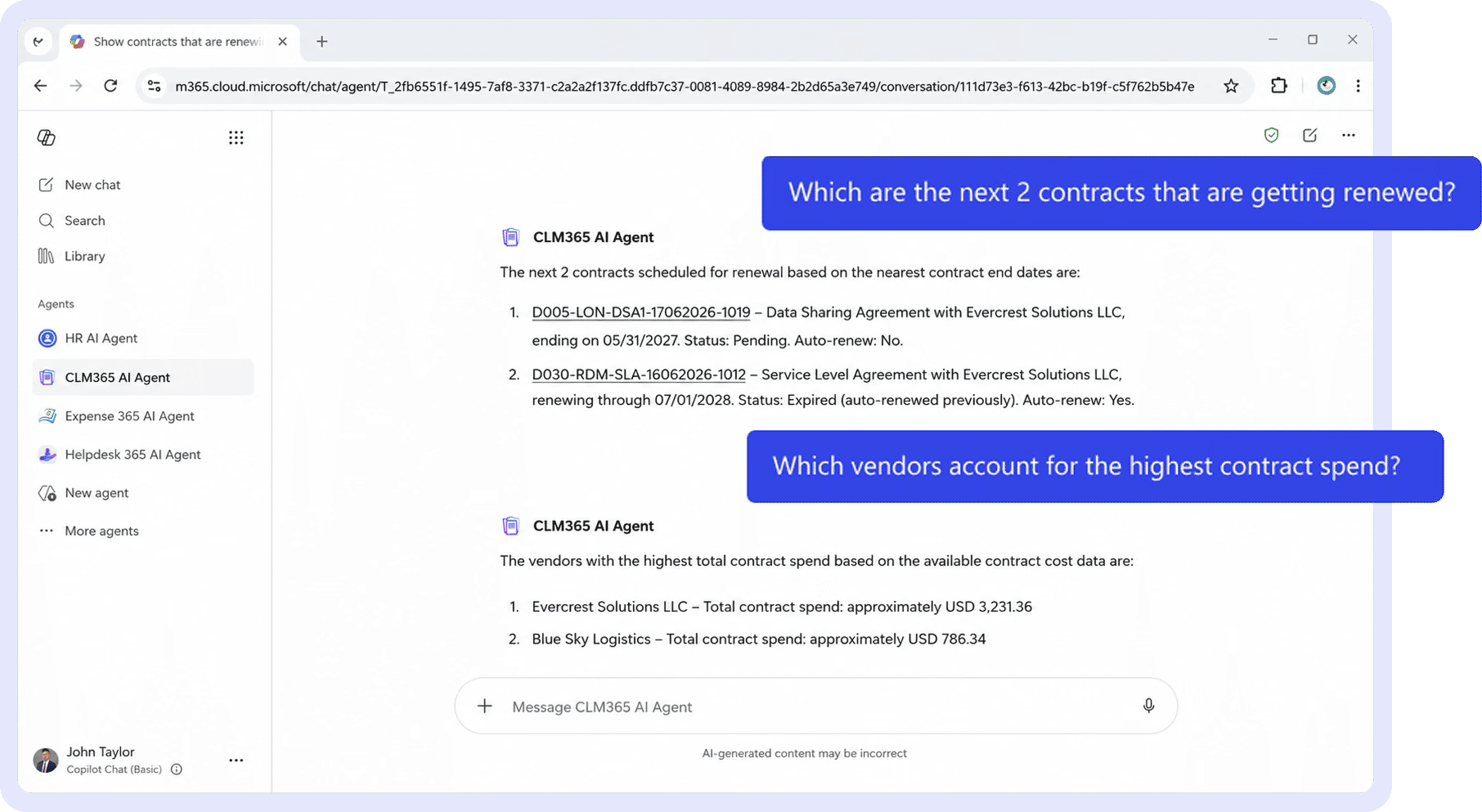
SharePoint search helps users find documents and metadata.
Many organizations also need to answer questions such as:
- Which contracts renew next quarter?
- Which vendor agreements include auto-renewal clauses?
- Which contracts contain specific payment terms?
- Which agreements have liability limits below a certain value?
Contract intelligence makes this information easier to locate without manually reviewing each document.
Portfolio-Wide Visibility
Beyond document storage, legal and finance teams often require broader reporting, including:
- Upcoming contract renewals
- Contract value by department
- Approval cycle times
- Active vs. expired contracts
- Outstanding obligations
These insights help teams prioritize work and make informed decisions.
Built on SharePoint
SharePoint remains an excellent platform for secure document management. Rather than replacing it, many organizations extend SharePoint with contract lifecycle management capabilities that add automation, reporting, contract intelligence, and lifecycle tracking, all while keeping contracts secure.
Ready to build a travel program that works?
Expense 365 brings policy management, approval workflows, expense tracking, and reimbursements into one place built natively for Microsoft 365.
Role of a Unified CLM System That Integrates With SharePoint
This is where a dedicated contract repository with SharePoint integrations earns its place, not by replacing it, but by sitting on top of it and layering in the capabilities the document library was never designed to provide.
- Centralized, searchable repository across every contract type: One governed location instead of scattered departmental libraries, with full-text search across the contract body, not just filenames.
- Automated metadata tagging at upload: Key fields like counterparty, value, and renewal date are extracted or applied automatically instead of requiring manual entry for every document.
- Clause-level indexing: The system understands what’s inside a contract, not just where the file sits, enabling searches like “show every agreement with an indemnification clause.”
- Automated renewal and obligation alerts: Notifications tied to actual contract terms, sent to the right owner well before a deadline, rather than relying on someone remembering to check a spreadsheet.
- Version and audit trail tied to lifecycle stage: Every redline, approval, and signature event is logged against the contract’s status, giving legal a complete record without piecing it together from email threads.
- Role-based access mapped to the Microsoft 365 org chart: Permissions that reflect real reporting lines and departments, pulled directly from the tenant’s existing directory rather than configured twice.
- Cross-repository reporting and dashboards: Portfolio-level views of contract value, risk exposure, and renewal pipeline, built from the same data stored in SharePoint rather than a duplicated data set.
Together, these capabilities turn a document library into an actual system of record, one where storage, search, and lifecycle tracking work from the same underlying data instead of living in separate tools.
Why Store Contract Data in a Microsoft 365 Tenant?
Data residency and security questions come up early in almost every contract management evaluation, and for good reason agreements often contain pricing, personal data, and terms. Keeping contract storage inside the organization’s own Microsoft 365 tenant addresses this directly.
When contracts and their metadata stay within the tenant, the data never leaves the security perimeter the organization has already built through Microsoft Entra ID, conditional access policies, and Microsoft Purview compliance tools.
There’s no separate vendor database holding a copy of every agreement, which means one fewer external system to vet, monitor, and trust with sensitive commercial terms.
Encryption at rest and in transit, multi-factor authentication, and access logging all apply automatically, because the contract data inherits the same controls the organization already applies to its email, files, and Teams conversations.
This also simplifies compliance conversations with auditors and regulators. Instead of explaining how contract data flows to and lives on a third-party server, the organization can point to a single, familiar governance model, its own tenant, its own retention policies, its own audit logs.
For industries like healthcare, financial services, and government contracting, where data sovereignty is often a contractual or regulatory requirement, this tenant-based approach can be the deciding factor in platform selection.
Challenges in Store Contracts Across Multiple Folders
Contracts often become scattered as different departments create their own folders and storage practices.
This can create several problems:
- Duplicate contracts: Teams may save multiple copies of the same agreement in different locations.
- Inconsistent file names: Different naming methods can make contracts harder to search.
- Missing ownership: Some contracts may have no clear person responsible for renewals or obligations.
- Different permission settings: Folder-level permissions can become difficult to manage over time.
- Limited portfolio visibility: Legal and finance teams may struggle to see total contract value, upcoming renewals, or contract status.
- More manual audit work: Employees may need to search several folders and sites to prepare contract information for audits.
These problems become more difficult to manage as the number of contracts increases.
A consistent storage structure, clear metadata, and defined ownership can help organizations maintain better control.
Best Practices to Store Contracts in a SharePoint Environment
Getting store contracts in SharePoint right isn’t about following a generic checklist, it’s about designing the library the way an information architect would, with the end state in mind before a single contract is uploaded.
- Define contract metadata before uploading or migrating documents.
- Use clear categories for vendor, customer, employment, and other contract types.
- Create retention rules based on legal and business requirements.
- Use consistent content types and metadata across contract libraries.
- Assign a responsible owner to every contract.
- Keep draft contracts separate from final signed agreements.
- Set renewal and expiry reminders when contracts are added.
- Review metadata, ownership, and contract records regularly.
These are the same principles applied by teams running large-scale SharePoint implementations in regulated industries, where poor structure doesn’t just cost time, it shows up directly in missed renewals and failed audits.
Role of CLM 365 in Managing Agreements
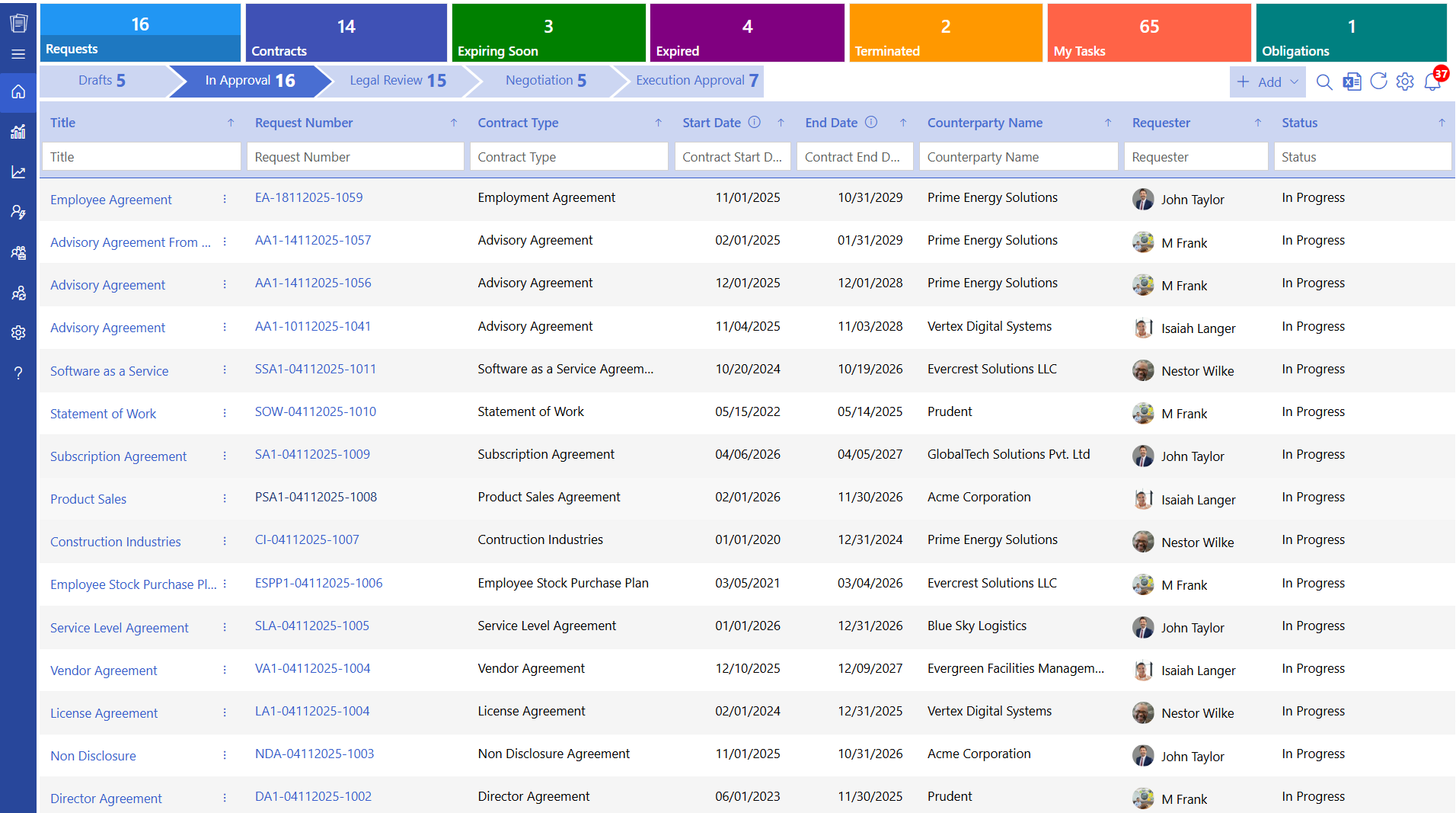
CLM 365 is built specifically to sit on top of SharePoint and the Microsoft 365 tenant, closing the gap between “storing a contract” and “managing its full lifecycle” without asking teams to abandon tools they already use every day.
Contracts continue living inside the organization’s own SharePoint libraries, but CLM 365 adds structured workflows for drafting, clause libraries for consistent language, automated approval routing based on contract value.
Because CLM 365 works natively within Microsoft 365, legal and business teams can draft, review, and approve agreements directly in Word and Outlook.
SharePoint-stored data, without a second copy of every document living on an external server. For organizations that have already invested in Microsoft 365 and want the benefits of a dedicated CLM system without a platform migration, this integration model is the practical middle ground.
Backed by SOC 2 compliance, Microsoft certification, and Microsoft Solutions Partner status, CLM 365 provides a trusted and secure contract management system.
It fully supports GCC and GCC High environments, delivering government-grade security and advanced data protection for highly regulated industries.
Curious how CLM 365 would map onto your existing SharePoint structure?
Conclusion
Storing contracts in SharePoint gives organizations a secure, familiar, and centralized starting point and for many teams, it’s genuinely the right first step.
But as contract volume, renewal complexity, and reporting expectations grow, a document library alone stops being able to keep up with the actual demands of contract lifecycle management.
That’s the gap a unified CLM system, integrated directly with SharePoint and Microsoft 365, is built to close.
Ready to see what that looks like for your own contract portfolio? Start a 14-day free trial of CLM 365 and manage your agreements without ever leaving the Microsoft 365 environment your team already knows.
Frequently Asked Questions
Is SharePoint good for store contracts?
Yes, storing contracts in SharePoint is a strong option for most organizations, particularly those already using Microsoft 365. It offers metadata tagging, version history, and role-based permissions that support a well-organized contract repository.
Can SharePoint handle the entire contract lifecycle, from drafting to renewal?
A corporate travel manager oversees the company’s travel program. This includes maintaining the travel policy, managing relationships with airlines, hotels, and booking platforms, supporting employees with travel issues, and reporting on travel spend to finance and leadership.
How do I organize contracts in SharePoint effectively?
Start by designing a metadata schema before uploading any files, separate major contract categories into their own sites, assign an owner to every record, and set up automated expiry notifications tied to the renewal date field rather than relying on manual reminders.
Is it safe to store sensitive contract data in a Microsoft 365 tenant?
Storing contract data within your own Microsoft 365 tenant keeps it inside the same security perimeter protected by Microsoft Entra ID and conditional access policies
What's the difference between a SharePoint document library and a CLM system?
A SharePoint document library stores and organizes files with metadata and permissions. A CLM system like CLM 365 integrates with that library to add clause-level intelligence, automated workflows, e-signature, renewal alerts, and portfolio-level reporting — turning stored documents into an actively managed contract program.


_JiluXJRGNl.svg)























