

What Is Contract Generation & Best Practices to Implement

Contracts are important for every business. But creating contracts manually can take a lot of time and often causes delays. Legal teams and businesses today do not have the time to deal with slow and repetitive processes.
- Contract generation software helps businesses create agreements quickly and with less manual work
- Using templates keeps contracts consistent and reduces common drafting errors
- Automated workflows make approvals and document sharing much easier
- A better contract process saves time and improves overall business efficiency
That is why many companies are now using smarter ways to create contracts faster without starting from scratch or copying old documents again. Automation helps make the process quicker, easier, and more organized.
In this blog, we will look at what contract generation is, how automation helps, and the benefits businesses can get from it.
What Is Contract Generation?
Contract generation is the process of creating contracts using templates, automation, or pre-approved clauses instead of drafting everything manually. It is one of the early steps in the contract lifecycle where agreements are prepared before they are shared with other parties for review, negotiation, and signing.
Compared to creating contracts manually in tools like Microsoft Word, it makes the process much faster, easier, and more consistent. It helps businesses save time, reduce errors, and create agreements more efficiently.
What Is Automated Contract Generation?
Automated contract generation is the process of creating contracts using predefined templates, approved clauses, and automated workflows.
Instead of drafting contracts from scratch, teams can enter key details such as parties, dates, pricing, and terms, and the system generates a contract based on the required information.
How Does Contract Generation Work?
It follows a step-by-step workflow that helps businesses create agreements faster, reduce manual work, and improve consistency. Here is how the process typically works.
Step 1: Submit a contract request
Submit a request with essential details such as the parties involved, contract purpose, and agreement type.
Step 2: Select the contract type
Choose the appropriate contract type based on the business requirement, such as an NDA, sales agreement, or vendor contract.
Step 3: Enter the required business information
Provide key details such as company names, dates, pricing, payment terms, and addresses.
Step 4: Populate the appropriate template
The system automatically inserts the provided information into the relevant fields of an approved contract template.
Step 5: Apply conditional rules
Rules determine which clauses, sections, or terms should be included based on specific contract requirements.
Step 6: Generate the first draft
The system combines the selected template, information, and applicable terms to generate a complete contract draft.
Step 7: Route the contract for review and approval
The draft is sent to the relevant stakeholders for review, revisions, and approval.
Step 8: Send the contract for signature
Once approved, the finalized contract is sent to the relevant parties for electronic signature.
Step 9: Store the executed contract
The signed contract is securely stored in a centralized repository for easy access, tracking, and future reference.
The legal team reviews the contract, the supplier requests a few changes, and both parties finalize the terms. After signing, the contract is stored securely so the company can track renewal dates and future obligations easily.
Features of Contract Generation Software
CLM 365 supports the entire contract lifecycle, from creation to renewal and management. Here are some key features that support efficient contract creation.
Contract templates provide a consistent starting point for different contract types. Dynamic templates can adjust fields, sections, and terms based on the type of agreement or information provided.
Conditional logic allows the contract to adapt based on specific inputs. For example, certain clauses or sections can appear only when particular business conditions are met.
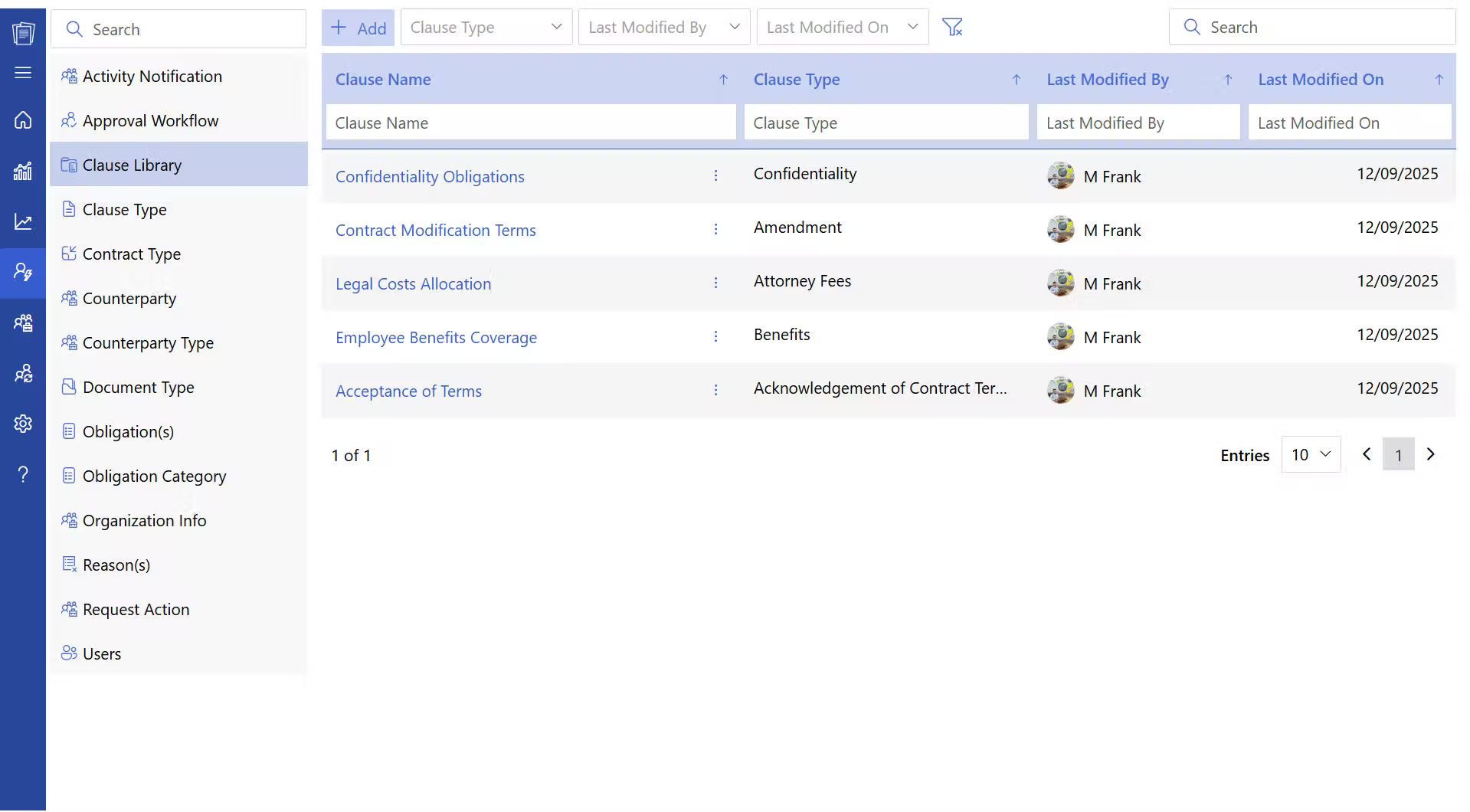
A centralized clause library gives teams access to pre-approved, standardized contract language while drafting agreements. Users can quickly find and insert the appropriate clauses, helping maintain consistency and reduce the time spent drafting contracts from scratch.
Intake forms collect the information needed to create a contract before drafting begins. This gives legal and business teams a structured way to submit contract requests without relying on scattered emails or messages.
Automated approval workflows route contracts to the appropriate stakeholders based on predefined rules. Teams can establish review and approval steps before a contract moves forward.
Contract version control keeps a record of changes made throughout the drafting process. Teams can review previous versions, identify what changed, and maintain greater visibility into contract revisions.
Role-based permissions control who can create, view, edit, approve, or manage contracts. This helps protect sensitive contract information and ensures users have access appropriate to their responsibilities.
Integration with e-signature platforms allows approved contracts to move directly from drafting to signing. This reduces manual handoffs and creates a smoother contracting process.
A centralized contract repository stores generated contracts in one searchable location. Teams can quickly find agreements, review contract details, and maintain an organized record of completed contracts.
CLM 365 integrates with SharePoint, Teams, Outlook, Power Automate, and Power BI, helping teams connect contract making with the tools they already use. This allows users to manage contract data, collaborate on agreements, automate workflows, and track contract-related information.
What Types of Contracts Can Be Generated Automatically?
Contract making can be applied to many agreements that follow a defined structure, use standardized terms, and require recurring information. Some common examples include.
- Sales contracts: Define the terms, pricing, obligations, and conditions of a sale between parties.
- Service agreements: Outline the services to be provided, deliverables, timelines, and payment terms.
- NDAs: Establish obligations for protecting confidential and sensitive business information.
- Employment contracts: Define employment terms, responsibilities, compensation, benefits, and other conditions.
- Vendor agreements: Set out the terms for purchasing goods or services from external vendors.
- Purchase agreements: Document the terms and conditions for the purchase of products, assets, or services.
- Statements of Work (SOWs): Specify project scope, deliverables, timelines, responsibilities, and costs.
- Lease agreements: Define the terms for leasing property, equipment, or other assets.
How much time does it take to create a contract from scratch?
With CLM 365, generate contracts using templates, approved clauses, and automated workflows, all from one place.
Difference Between Contract Authoring vs Contract Generation
Both contract authoring and contract generation are used to create legal agreements, but they work in very different ways. Here is the difference between authoring and agreement generation.
Aspect | Contract Authoring | Contract Generation |
Meaning | Creating and drafting the actual contract content | Creating contracts automatically using templates and pre-approved clauses |
Process | Legal teams write the agreement from scratch | The system generates contracts using existing templates |
Time Required | Usually takes more time | Much faster and more efficient |
Manual Work | Involves heavy manual drafting and editing | Reduces repetitive manual work |
Consistency | May vary depending on who drafts the contract | Keeps contracts consistent across teams |
While contract authoring focuses on writing the legal language of an agreement, contract generation focuses on speeding up the process using automation and ready-made templates.
Benefits of Using Contract Generation Software
Contract creation software helps businesses create contracts faster, improve teamwork, and manage agreements efficiently. Here are some benefits to consider.
This helps businesses create agreements much faster by using ready-to-use clause library and pre-approved clauses. Instead of spending hours drafting contracts manually, teams can generate professional agreements within minutes.
Legal, sales, finance, and procurement teams spend less time on repetitive tasks like copying content, formatting documents, and entering the same information repeatedly. Automation handles much of the routine work, allowing teams to focus more on business growth and strategic decisions.
It helps businesses maintain the same structure, language, and legal terms across all agreements. Using approved templates and clause libraries keeps every contract aligned with company policies, even when multiple departments or locations are involved. This creates a more professional and organized contract process.
Modern contract making software makes collaboration easier for teams working across different departments and locations. Through platforms like and, employees can review contracts, share updates, approve agreements, and communicate in real time. This helps businesses complete contracts faster while keeping every stakeholder informed throughout the process.
Contract making software stores agreements in a centralized system where businesses can easily search, access, and manage documents whenever needed. Teams can track approvals, monitor renewal dates, review contracts, and quickly find important agreements without spending time searching through folders.
Automate contract creation and keep every agreement on track
Best Practices for Effective Contract Generation
Effective contract generation is not just about creating agreements faster, but also about improving accuracy, consistency, compliance, and the overall experience for everyone involved in the contract process.
- Design for exceptions: Build workflows that account for non-standard terms, pricing, risks, and approval requirements.
- Keep templates flexible: Use adaptable templates rather than maintaining multiple versions for every contract variation.
- Protect standard legal language: Allow users to modify business details while restricting unauthorized changes to critical terms.
- Automate repetitive agreements first: Start with high-volume, standardized contracts where automation can deliver the most value.
- Route exceptions for review: Use predefined rules to identify contracts that require legal, financial, or management review.
- Maintain a complete audit trail: Record contract requests, changes, approvals, and final versions for accountability and traceability.
- Monitor and refine the process: Track turnaround time, errors, approval delays, and contract volume to continuously improve the workflow.
Ensure every contract reflects both legal accuracy and a positive user experience to encourage faster approvals and sign-offs.
Conclusion
Managing contracts manually often leads to delays, inconsistent terms, approval bottlenecks, and missed business opportunities. As contract volumes grow, relying on outdated processes can increase risks and slow down your entire workflow.
Start your 14-day free trial today with CLM 365 and experience a faster, more efficient way to create contracts.
Frequently Asked Questions
Can non-legal teams create contracts easily?
Yes, Teams like sales, HR, procurement, and finance can generate contracts using approved templates without depending on legal teams every time.
Does the software support multiple contract types?
Yes, users can create NDAs, vendor agreements, employee contracts, sales agreements, and many other document types.
Can we reuse approved clauses in future contracts?
Yes, Clause libraries help teams quickly insert approved terms into contracts.
How does contract generation improve consistency across departments?
Every team uses approved templates and clause libraries, ensuring consistent language, formatting, and terms across contracts.
Table of Contents

Trusted by the Best

_JiluXJRGNl.svg)























