

How to Manage Employee Expenses: A Complete Guide for Modern Businesses

- HRMS with employee expense management helps organizations digitize expense claims, automate approvals, and process reimbursements more efficiently.
- A clear expense policy and standardized workflows reduce manual work while improving accuracy and visibility into business spending.
- Real-time dashboards and centralized reporting help managers monitor expenses, track budgets, and make informed financial decisions.
- HR365 HRMS manages employee expenses within Microsoft 365, SharePoint, and Microsoft Teams, creating a connected HR experience.
Managing employee expenses has become more complex than collecting receipts and reimbursing team members at the end of the month. Today’s organizations operate across multiple locations, support hybrid and remote work, and manage a wide range of business expenses every day. Without a structured process, tracking reimbursements, approvals, and spending can quickly become difficult.
Many organizations are replacing spreadsheets, paper forms, and email approvals with an HRMS with employee expense management to simplify the entire reimbursement process. A modern HR and expense management platform centralizes expense submissions, approvals, receipt storage, and reporting in one place, helping HR and finance teams save time while giving managers better visibility into business spending.
In this guide, you’ll learn how to manage employee expenses effectively, understand the common challenges organizations face, explore best practices for building an efficient reimbursement process, and see how HR365 HRMS simplifies business expense management inside the Microsoft ecosystem.
What Is Employee Expense Management?
Employee expense management is the process of recording, reviewing, approving, reimbursing, and tracking business-related expenses incurred by team members while performing their work responsibilities.
Business expenses may include travel costs, client meetings, accommodation, training, office purchases, internet bills, project expenses, and other approved business expenditures. After employees submit their claims with supporting documents, managers review the requests before reimbursement is processed according to company policies.
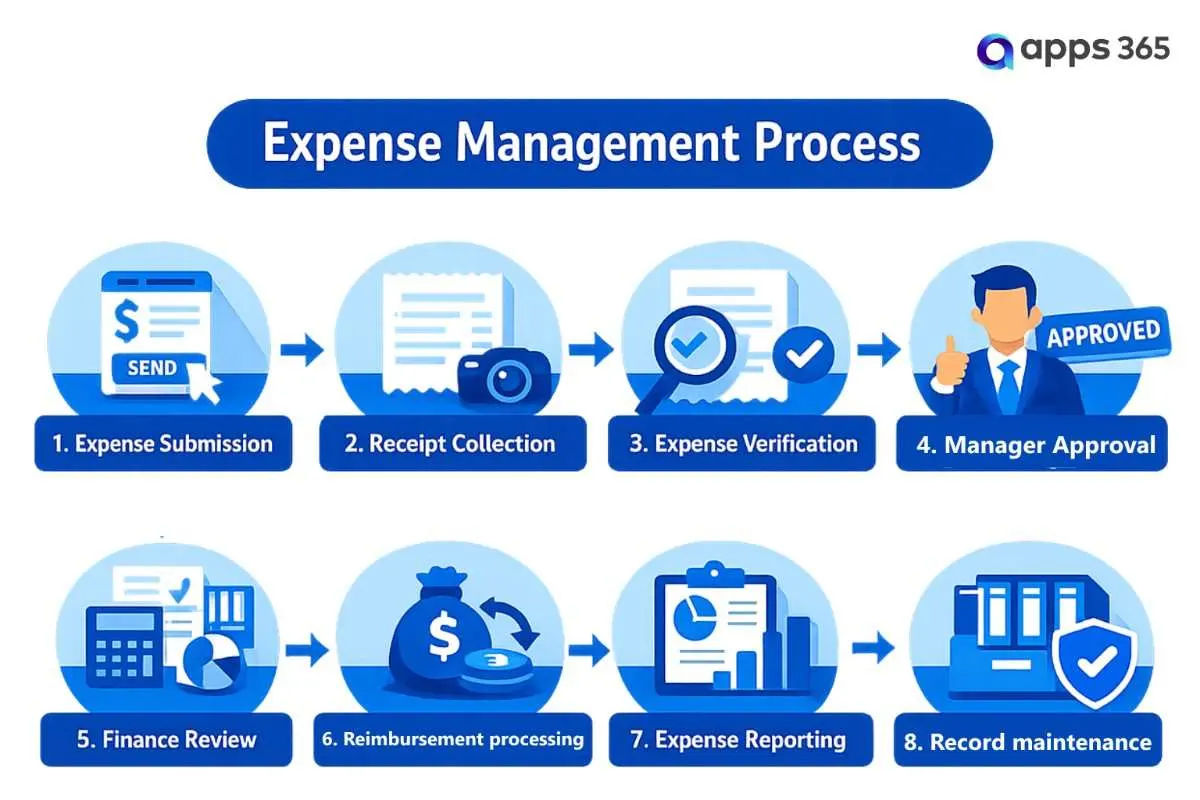
Instead of relying on spreadsheets, emails, and physical documents, many organizations now use automated expense management systems that centralize every stage into a single digital workflow.
Common Types of Employee Expenses
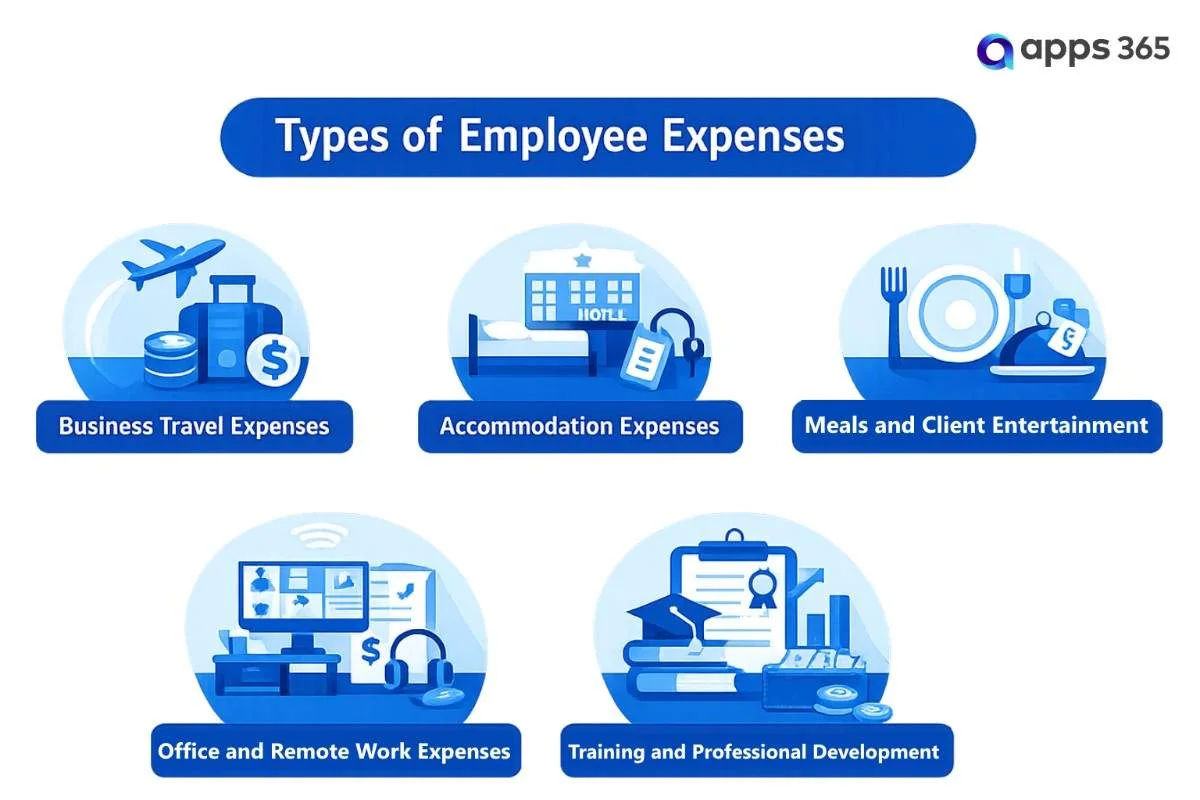
The types of employee expenses vary depending on the industry, job role, and business requirements. Defining eligible expenses helps organizations maintain consistency, process reimbursements faster, and manage business spending more effectively through an HRMS or employee expense management software.
Why Employee Expense Management Matters
Employee expense management is more than processing reimbursement requests. It helps organizations maintain better control over business spending, reduce administrative work, and give employees a consistent reimbursement experience. As organizations grow, manual processes often lead to delays, missing documents, and limited visibility into expenses.
Using an HRMS with employee expense management gives HR teams, managers, and finance departments a single place to manage every expense claim. When integrated with Microsoft 365, SharePoint, and Microsoft Teams, organizations can track expenses, approve claims, and access reports without switching between multiple applications.
Here are the key reasons why employee expense management is important.
1. Gain Better Visibility into Business Spending
Without a centralized process, it can be difficult to understand where company money is being spent. Expense claims stored across emails, spreadsheets, or paper forms make it challenging to identify spending patterns and prepare accurate reports.
A business expense tracking system provides real-time insights into business expenses by department, project, location, or expense category. Managers can monitor spending trends and make informed financial decisions using centralized dashboards.
1. Gain Better Visibility into Business Spending
Without a centralized process, it can be difficult to understand where company money is being spent. Expense claims stored across emails, spreadsheets, or paper forms make it challenging to identify spending patterns and prepare accurate reports.
A business expense tracking system provides real-time insights into business expenses by department, project, location, or expense category. Managers can monitor spending trends and make informed financial decisions using centralized dashboards.
2. Speed Up Employee Reimbursements
Employees expect reimbursements to be processed on time, especially after business travel or project-related purchases. Manual approvals often slow the process because claims move through several email conversations before reaching the finance team.
Using employee reimbursement software helps organizations automate claim submissions, approval routing, and reimbursement tracking. Employees can also monitor the status of their requests, reducing follow-up emails and improving transparency.
3. Reduce Manual Administrative Work
Managing expenses manually involves repetitive tasks that consume valuable time for HR and finance teams, including:
- Reviewing receipts
- Verifying expense details
- Updating spreadsheets
- Following up on pending approvals
- Maintaining reimbursement records
- Preparing expense reports
An HR and expense management platform automates many of these activities, allowing business users to focus on higher-value work instead of routine administration.
4. Standardize Expense Approval Workflows
Different departments often have different approval requirements based on expense type or claim amount. Without a structured process, approvals may become inconsistent and difficult to track.
An expense approval workflow software routes claims automatically to the right approvers based on predefined rules. This creates a consistent process across the organization while reducing approval delays.
5. Improve Accuracy of Expense Records
Manual data entry increases the chances of duplicate claims, incorrect amounts, and missing information. These errors can affect reimbursement accuracy and make reporting more difficult.
With HR365 HRMS, employees upload receipts, enter expense details, and submit claims through a centralized portal. All information is stored securely in SharePoint, helping organizations maintain complete and organized expense records.
6. Support Better Budget Planning
Business leaders need accurate expense data to plan budgets and control operational costs. Without reliable reporting, identifying high-spending departments or recurring expenses becomes difficult.
A centralized business expense tracking software provides reports that help organizations:
- Monitor department-wise spending
- Compare monthly expense trends
- Review project costs
- Track pending reimbursements
- Analyze budget utilization
- Identify high-value expense categories
These insights support better financial planning and more informed business decisions.
7. Improve the Employee Experience
A simple reimbursement process creates a better experience for employees. Instead of completing paper forms or sending multiple follow-up emails, they can submit claims digitally, upload receipts, and receive updates throughout the approval process.
With HR365 HRMS, employees can submit expenses, check claim status, and receive notifications through a familiar interface built for Microsoft 365 users. Managers can review and approve requests quickly, helping organizations reduce reimbursement delays.
8. Keep Everything in One HR Platform
Using separate tools for HR processes and expense management often creates duplicate work and disconnected records. A single HRMS with employee expense management brings expense claims together with employee profiles, approvals, leave records, tasks, and other HR activities.
As an integrated HR software built for Microsoft 365, HR365 HRMS combines expense management with core HR features, giving organizations a connected and efficient way to manage daily operations.
Common Challenges in Managing Employee Expenses
Managing employee expenses becomes more difficult as organizations grow. More team members, business travel, hybrid work, and project-based spending all increase the number of reimbursement requests. Without a structured process, HR and finance teams often spend unnecessary time reviewing claims, following up on missing information, and correcting manual errors.
Many businesses still rely on spreadsheets, email approvals, and paper receipts. While these methods may work for a small number of claims, they become inefficient as expense volumes increase.
Here are some of the most common challenges organizations face when managing employee expenses.
Lost or Missing Receipts
Paper receipts are easy to lose, especially when employees travel frequently or work remotely. Missing receipts often delay claim verification and require additional communication between employees, managers, and finance teams.
A digital expense management process allows employees to upload receipts as soon as an expense is incurred. Documents are stored securely in one location, making them easy to access whenever needed.
Manual Data Entry Errors
Entering expense details manually can lead to mistakes that affect reimbursement accuracy and reporting.
Common issues include:
- Incorrect claim amounts
- Duplicate expense entries
- Wrong expense categories
- Missing supporting documents
- Calculation errors
- Incomplete claim information
Reducing manual data entry improves data accuracy and minimizes the need for repeated corrections.
Slow Approval Processes
Many organizations still depend on email chains or printed forms for expense approvals. When managers are unavailable or approvals are unclear, reimbursement requests remain pending for days or even weeks.
A structured approval process automatically routes expense claims to the appropriate manager based on predefined rules, helping organizations process reimbursements faster while maintaining visibility throughout the approval journey.
Limited Visibility into Business Spending
Without centralized reporting, it becomes difficult to answer important business questions, such as:
- Which department has the highest expenses?
- How much has been spent on business travel this quarter?
- Which projects are exceeding their allocated budgets?
- How many expense claims are still waiting for approval?
- What categories generate the highest reimbursement costs?
When expense information is scattered across different systems, decision-makers lack the insights needed for effective budgeting and financial planning.
Inconsistent Policy Enforcement
Expense policies are only effective when they are applied consistently across the organization. Manual reviews can lead to different approval decisions for similar claims, creating confusion and unnecessary disputes.
Organizations need a structured process that checks reimbursement requests against company policies before approvals are completed. This promotes consistency while reducing the chances of unauthorized or duplicate claims.
Delayed Employee Reimbursements
One of the biggest frustrations for employees is waiting too long to receive reimbursement for business-related expenses.
Common reasons for delays include:
- Missing receipts
- Incomplete expense claims
- Manual verification
- Multiple approval levels
- Lack of visibility into claim status
A faster reimbursement process improves the employee experience and reduces the number of follow-up requests received by HR and finance teams.
Disconnected HR and Finance Processes
Many organizations manage employee information in one system while tracking expenses in another. This creates duplicate work, inconsistent records, and additional administrative effort.
When employee profiles, approval workflows, and expense claims are managed separately, teams often need to switch between multiple applications to complete a single reimbursement request.
Difficulty Maintaining Expense Records
Keeping expense records organized is essential for reporting, future reference, and business audits. Paper files and scattered email attachments make it difficult to locate historical claims when they are needed.
A centralized digital repository stores:
- Expense claims
- Receipts
- Approval history
- Supporting documents
- Reimbursement records
- Expense reports
With SharePoint integration, HR365 HRMS securely stores expense-related documents alongside employee information, making record management more organized and accessible.
Growing Administrative Work
As organizations expand, the number of expense claims increases significantly. Without automation, HR and finance teams spend more time on repetitive administrative tasks than on strategic business initiatives.
These tasks often include:
- Reviewing receipts
- Validating expenses
- Following up on pending approvals
- Updating spreadsheets
- Preparing monthly reports
- Maintaining reimbursement records
Automating these activities helps organizations reduce administrative effort, improve processing speed, and create a more efficient expense management process.
How to Manage Employee Expenses with HRMS
Managing employee expenses successfully requires more than processing reimbursement requests. Organizations need clear policies, standardized workflows, real-time visibility, and the right HR software to keep every expense organized from submission to reimbursement.
A modern HRMS helps businesses replace manual processes with digital workflows that reduce administrative work, improve accuracy, and provide better control over business spending. For organizations using Microsoft 365, SharePoint, and Microsoft Teams, managing expenses within the same ecosystem creates a more connected experience for employees, managers, HR, and finance teams.
Here are the essential steps to build an efficient employee expense management process.
1. Create a Clear Expense Reimbursement Policy
Every successful expense management process starts with a well-defined reimbursement policy. Employees should understand what they can claim, how to submit expenses, and what documents are required before requesting reimbursement.
A comprehensive expense policy should include:
- Eligible expense categories
- Spending limits
- Required receipts and supporting documents
- Submission deadlines
- Approval hierarchy
- Reimbursement timelines
- Exceptions and special approvals
Publishing these guidelines through your HRMS or employee self-service portal gives everyone easy access to the latest policies and reduces confusion.
2. Replace Manual Claims with Digital Expense Submission
Paper forms, spreadsheets, and email attachments slow down the reimbursement process and increase the risk of missing information.
A digital expense submission process enables employees to submit claims anytime, whether they are in the office, working remotely, or travelling for business.
Employees should be able to:
- Submit expense claims online
- Upload receipts and invoices
- Select expense categories
- Add business purpose and comments
- Track claim status
- View reimbursement history
With HR365 HRMS, expense claims can be submitted through a centralized employee portal built on SharePoint, giving employees a simple and consistent experience while reducing paperwork for HR and finance teams.
3. Configure Multi-Level Approval Workflows
Every organization has different approval requirements. Small purchases may only require a manager’s approval, while larger expenses often need additional reviews from department heads or finance managers.
A standardized approval workflow keeps every reimbursement request moving through the correct approval path.
Approval rules can be configured based on:
- Department
- Business unit
- Expense category
- Cost center
- Project
- Employee role
- Claim amount
Using configurable workflows in HR365 HRMS, organizations can automate approvals and eliminate the delays commonly associated with manual email-based processes. Managers can also review and approve requests directly through Microsoft Teams or the HR365 HRMS portal.
4. Verify Every Expense Before Approval
Before approving any reimbursement request, organizations should confirm that every expense follows company guidelines.
The verification process should confirm that:
- The expense is business-related.
- Spending limits have not been exceeded.
- Supporting documents are attached.
- Expense categories are accurate.
- Duplicate claims are prevented.
- Required approvals have been completed.
Automating these validation steps helps reduce errors and creates a more consistent reimbursement process across every department.
5. Track Business Expenses in Real Time
Having access to real-time expense information helps managers make faster and better business decisions.
Instead of waiting for monthly reports, organizations can monitor expenses as they are submitted and approved.
A centralized dashboard should provide visibility into:
- Total business expenses
- Department-wise spending
- Pending approvals
- Approved reimbursements
- Rejected claims
- Budget utilization
- Expense trends
- High-value reimbursement requests
The interactive dashboards in HR365 HRMS provide HR and business leaders with up-to-date insights, making it easier to monitor spending and identify trends before they impact budgets.
6. Keep Employees Updated Throughout the Process
Employees appreciate transparency when submitting reimbursement requests. They should know exactly where their expense claim stands without having to contact HR or finance for updates.
Automatic notifications can keep employees informed when:
- A claim is submitted
- Additional information is requested
- A manager approves the claim
- Finance completes the review
- Reimbursement has been processed
With HR365 HRMS, notifications and workflow updates help reduce follow-up emails while creating a smoother reimbursement experience for everyone involved.
7. Store Receipts and Expense Records Securely
Expense documentation should remain organized and easy to retrieve whenever required.
A centralized document repository should maintain:
- Expense claims
- Receipts
- Invoices
- Approval history
- Supporting documents
- Reimbursement records
- Audit history
Because HR365 HRMS is built on SharePoint, organizations can securely store expense-related documents within their existing Microsoft 365 environment while maintaining a complete history of every reimbursement request.
8. Monitor Spending with Reports and Dashboards
Expense management does not end after reimbursements are completed. Organizations should regularly review reports to understand spending patterns and identify opportunities to manage costs more effectively.
Useful reports include:
- Department expense reports
- Travel expense summaries
- Project-wise spending
- Monthly reimbursement reports
- Pending approval reports
- Expense category analysis
- Budget comparison reports
With centralized reporting in HR365 HRMS, decision-makers can access meaningful insights without manually collecting data from multiple spreadsheets or systems.
9. Connect Expense Management with Your HR Processes
Expense management works best when it is part of a complete HR and expense management platform rather than a standalone application.
When expense tracking connects with employee records, onboarding, organizational structure, task management, and reporting, organizations eliminate duplicate work and improve operational efficiency.
How HR365 HRMS Supports Employee Expense Management
Managing business expenses becomes much easier when expense claims, employee records, approvals, and reporting are all managed in one place. Instead of relying on spreadsheets, emails, or disconnected applications, organizations can handle the entire reimbursement process through a single HR and expense management platform.
HR365 HRMS includes a powerful Expense Management module designed for organizations that use Microsoft 365, SharePoint, and Microsoft Teams. It helps HR teams, managers, and finance departments manage employee expenses more efficiently while giving employees a simple way to submit and track reimbursement requests.
✔ Submit Expense Claims with Ease
Employees can submit expense claims through a centralized self-service portal, upload receipts, track request status, and view reimbursement history from anywhere.
✔ Configure Multi-Level Approval Workflows
Create approval workflows based on departments, expense categories, projects, employee roles, or claim amounts to keep every reimbursement request moving through the right approval process.
✔ Track Business Expenses in Real Time
Monitor pending claims, approved reimbursements, department spending, budget utilization, and expense trends through interactive dashboards for better financial visibility.
✔ Store Expense Records Securely
Keep expense claims, receipts, invoices, approval history, and supporting documents securely stored in SharePoint, making records easy to access whenever needed.
✔ Keep Employees Informed
Automatically notify employees about claim submissions, approval updates, reimbursement status, and completed requests to improve transparency throughout the process.
✔ Connect Expense Management with HR Operations
Manage employee expenses alongside Employee Directory, Onboarding, Leave Management, Attendance, Performance Management, Recruitment, Learning & Training and Task Management, from a single HR365 HRMS platform.
✔ Built for the Microsoft Ecosystem
Integrates with Microsoft Teams, SharePoint, Outlook , Microsoft Entra ID, Power Automate, and Power BI to manage employee expenses using the Microsoft tools your organization already uses every day.
Conclusion
Managing employee expenses effectively is essential for maintaining financial visibility, improving reimbursement accuracy, and creating a better experience for employees. As organizations grow, manual processes based on spreadsheets, emails, and paper receipts become increasingly difficult to manage and often lead to delays, errors, and limited insight into business spending.
By adopting a modern HRMS with employee expense management, organizations can digitize expense submissions, automate approval workflows, centralize business expense records, and monitor spending in real time. HR365 HRMS brings all of these capabilities together in a single platform built for Microsoft 365, SharePoint, and Microsoft Teams, helping organizations manage employee expenses alongside their core HR operations.
Automate Employee Expense Management with HRMS
Book a personalized demo today and discover how HR365 HRMS can help your organization manage employee expenses more efficiently.
Frequently Asked Questions
What is employee expense management?
Employee expense management is the process of recording, reviewing, approving, reimbursing, and tracking business-related expenses incurred by employees. A structured process helps organizations maintain accurate records, improve visibility into spending, and process reimbursements more efficiently.
Why is employee expense management important?
Effective employee expense management helps organizations control business spending, reduce manual work, improve reimbursement accuracy, speed up approvals, and provide better visibility into organizational expenses.
What are the most common employee expenses?
Common reimbursable expenses include:
- Business travel
- Accommodation
- Meals and client meetings
- Fuel and transportation
- Office supplies
- Internet expenses
- Training and certification programs
- Professional memberships
- Project-related purchases
How can businesses improve their expense management process?
Organizations can improve expense management by:
- Creating clear reimbursement policies
- Using digital expense submissions
- Automating approval workflows
- Tracking expenses in real time
- Maintaining centralized expense records
- Reviewing expense reports regularly
Using an HRMS with employee expense management further simplifies these activities by bringing everything into one platform.
How does HR365 HRMS help manage employee expenses?
HR365 HRMS simplifies expense management by enabling organizations to:
- Submit digital expense claims
- Configure multi-level approval workflows
- Upload and store receipts securely
- Track reimbursement requests in real time
- Generate expense reports and dashboards
- Manage expenses within Microsoft 365, SharePoint, and Microsoft Teams
Can HR365 HRMS integrate with Microsoft Teams and SharePoint?
Yes. HR365 HRMS is built for the Microsoft ecosystem and integrates with Microsoft Teams, SharePoint, Outlook, Microsoft Entra ID, Power Automate, and Power BI, allowing organizations to manage HR processes and employee expenses without switching between multiple applications.


_JiluXJRGNl.svg)























