

ConvergePoint vs CLM 365: Which Contract Management Software is Better?

In 2026, contract management is no longer just about storing agreements in folders or tracking them in spreadsheets.
- CLM 365 and ConvergePoint are both built for Microsoft 365, but they cater to different business needs.
- CLM 365 stands out with AI capabilities, including contract summaries, clause explanations, risk detection, and deep integration with Microsoft Teams, Outlook, SharePoint, and Copilot to simplify contract management.
- ConvergePoint is ideal for compliance-driven organizations, offering multi-level approval workflows, detailed audit trails, centralized contract storage, and standardized processes for regulated industries.
- The best choice depends on your priorities: choose CLM 365 for faster adoption, compliance, approval workflows AI, and automation, or ConvergePoint for enterprise governance.
Two widely used solutions in the Microsoft ecosystem are CLM 365 and ConvergePoint contract management. Both platforms are built to work within Microsoft 365 and SharePoint environments, making them strong choices for organizations already relying on tools like Teams, Outlook, and Word. However, while they may appear similar at first, they are designed with very different priorities in mind.
Why Choosing the Right CLM Matters for Microsoft 365 Users?
Managing contracts inside Microsoft 365 sounds simple, but many teams still struggle to keep everything organized. Even when using tools like SharePoint, Outlook, and Teams, contract management often becomes messy without a proper system in place.
- Contracts are scattered across SharePoint libraries and email inboxes
- Important files are hard to locate in Teams or folders
- Renewal dates are missed because there is no proper tracking system
- Approvals in Outlook or Teams take longer without automation
- Manual follow-ups increase workload for teams
- No single view to track contract status across Microsoft tools
- Risk of version confusion when multiple people edit documents
- Compliance becomes difficult without proper audit and control
That’s why many Microsoft 365 users are moving to dedicated contract lifecycle management solutions like CLM 365 and ConvergePoint Contract Management.
Both are built within the Microsoft ecosystem, but they solve these problems in very different ways.
So, which one fits better into your workflow? Let’s compare.
A Quick Comparison Table to Decide
Not sure which one to choose? This table makes it easy to compare both solutions based on what matters most to you.
| Need / Goal | CLM 365 | ConvergePoint |
| Easy setup | Yes | Yes (with setup support) |
| Quick onboarding | Fast | Structured onboarding |
| Microsoft 365 experience | Seamless across tools | Strong SharePoint integration |
| User adoption | Easier for most teams | Good with training |
| AI & automation | Advanced features | Workflow-driven automation |
| Workflow style | Flexible and simple | Structured and process-driven |
| Compliance needs | Good | Strong |
| Reporting | Customized | Detailed |
| Best for | SMBs & Enterprise | Growing business |
Platform Comparison and Core Capabilities
This section highlights the key features, overall structure, and core differences between CLM 365 and ConvergePoint. It helps organizations clearly understand how each platform manages contracts within the Microsoft 365 ecosystem and which approach aligns best with their business needs.
What is CLM 365?
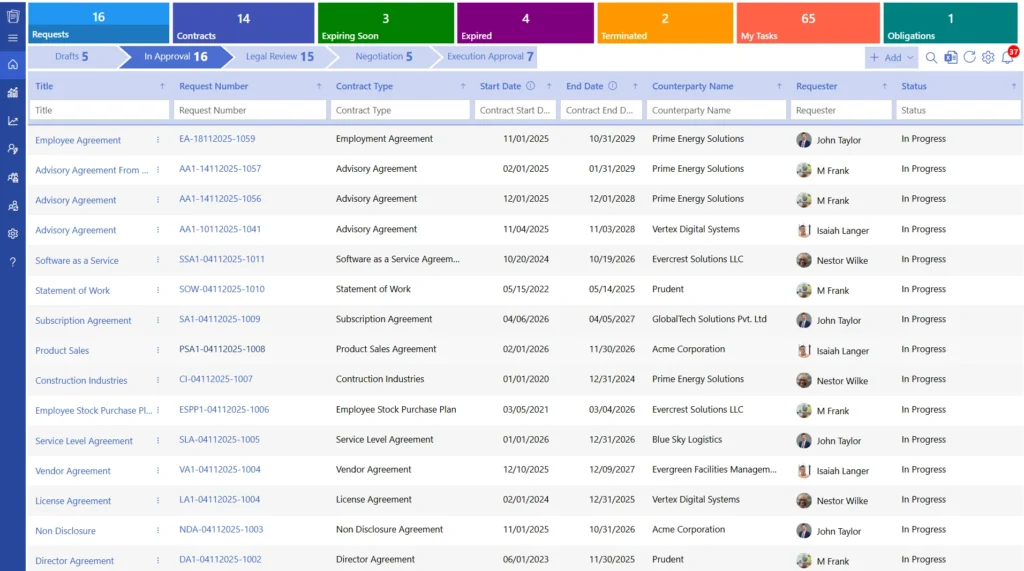
CLM 365 is a modern contract lifecycle management solution built entirely within the Microsoft ecosystem. It is designed for organizations that want a seamless, secure, and intelligent way to manage contracts without leaving their existing Microsoft environment.
Unlike traditional systems, CLM 365 focuses on combining simplicity, automation, and advanced AI capabilities to streamline contract processes while maintaining high levels of security and compliance.
What makes CLM 365 stand out is its deep integration with MS 365 apps and AI-driven approach. It enables teams to manage contracts directly within familiar tools like SharePoint, Teams, and Outlook, eliminating the need to switch between multiple platforms.
Key highlights:
- Built natively within Microsoft 365, ensuring a seamless user experience
- Deep integrations with SharePoint, Microsoft Teams, Outlook, Power BI, Power Automate, and Microsoft Copilot
- Automated workflows for contract approvals, reminders, and obligation tracking
- Centralized contract management within your existing SharePoint environment
- Enterprise-grade security with SOC 2 compliance and Microsoft certifications
- Supports GCC and GCC High environments for government-level security needs
- User-friendly interface designed for both technical and non-technical users
Another major advantage of CLM 365 is its ability to enhance your existing Microsoft infrastructure without requiring data migration to external systems. Organizations can keep their contract data within their own environment while benefiting from intelligent automation, advanced analytics, and streamlined workflows.
What makes CLM 365 unique is its Zero Trust Security Model, combined with AI-driven automation and a user-first design. CLM 365 does not send your contract data to public AI services like ChatGPT unless you explicitly configure an approved AI provider, with all AI requests governed by your organization’s security policies
Best for:
SMBs and enterprises looking for an easy, secure, and AI-powered contract management system built to work within the Microsoft 365 environment.
Hear from Our Delighted Clients
CLM 365’s simple, intuitive interface made setup easy, enabled fast and structured legal workflow design, and gave us confidence through its flexibility to support custom integrations as our needs evolve.
Contract management is easier when it works where your team already works
CLM 365 works inside your SharePoint tenant, keeping your contracts secure within your Microsoft 365 environment.
What is ConvergePoint Contract Management?
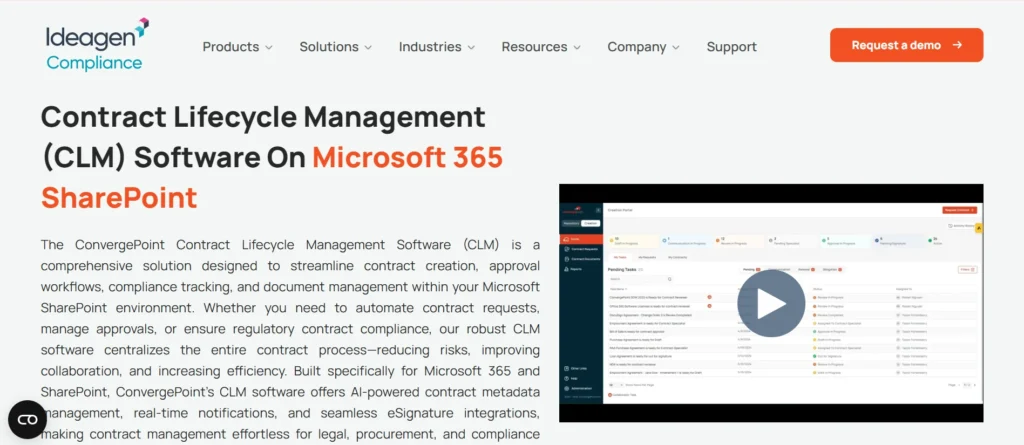
ConvergePoint Contract Management is a SharePoint-based contract lifecycle management solution designed for organizations that need strong control, compliance, and structured processes. It is built directly on Microsoft 365 SharePoint, allowing businesses to manage contracts within a familiar and secure environment.
What makes ConvergePoint stand out is its focus on compliance, governance, and process standardization. Instead of just simplifying contract management, it ensures that every contract follows a defined workflow, meets regulatory requirements, and is fully traceable from start to finish.
Key highlight
- Built directly on Microsoft 365 SharePoint for a familiar environment
- End-to-end contract lifecycle management from request to renewal
- Strong workflow automation with multi-level approvals
- Centralized contract repository with advanced search and reporting
- Detailed audit trails for full visibility and compliance tracking
- Custom forms and workflows tailored to business processes
Organizations can use their existing Microsoft setup while adding advanced capabilities like approval routing, obligation tracking, and audit-ready reporting without moving data outside their environment.
Key Feature Comparison: CLM 365 vs ConvergePoint 365
Choosing the right CLM platform depends on how well it handles core areas like lifecycle management, AI, workflows, reporting, integrations, and overall user experience. This comparison helps you understand how each solution performs across these critical areas.
1. Contract Creation and Authoring
Contract creation should be fast and simple, as it directly impacts business speed and productivity.
The CLM 365 Advantage
CLM 365 focuses on ease of use with ready-to-use templates and a clean interface that allows users to quickly draft contracts. It reduces complexity, making it easy for non-technical teams to create contracts without delays. This helps teams close deals faster and improve overall operational efficiency.
The ConvergePoint Approach
ConvergePoint takes a more structured, process-driven approach with predefined templates and standardized workflows. While this ensures consistency, it can feel slightly complex for new users and may require more time to get started. A pre-approved clause library ensures better compliance and consistency across all contracts.
2. Workflow Automation and Approvals
Approval workflows are essential to ensure contracts move smoothly through different stages without delays.
The CLM 365 Advantage
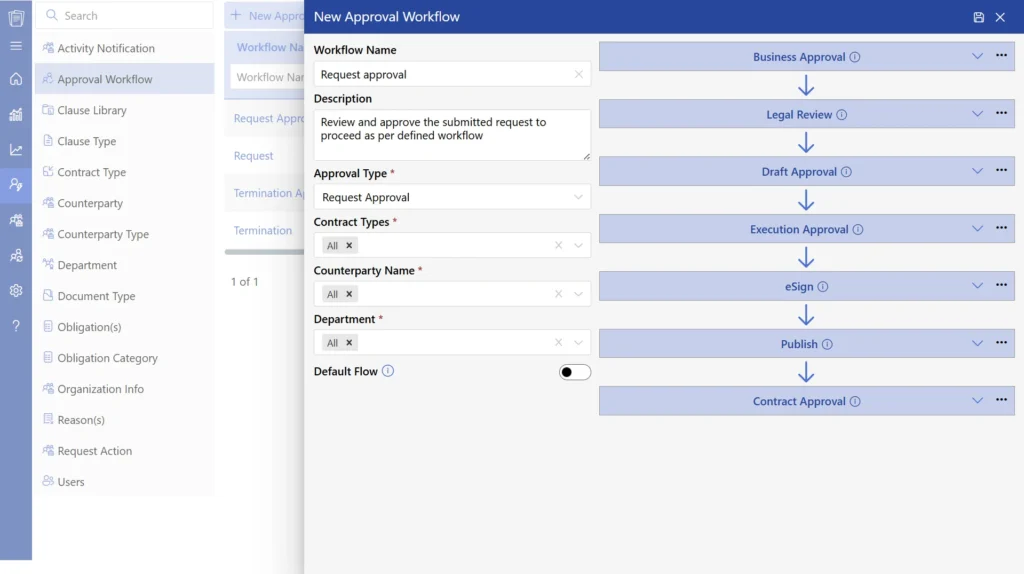
CLM 365 offers simple contract approval workflow setups with automated notifications and easy approval tracking. Teams can quickly configure workflows without technical dependency, ensuring faster execution and smoother collaboration. This improves turnaround time and reduces manual follow-ups.
The ConvergePoint Approach
ConvergePoint provides multi-level approval workflows with strong process control. It is designed for organizations that require strict approval hierarchies and structured governance. However, its rigid setup may require more effort to configure and manage.
3. Microsoft 365 Integration
Integration with Microsoft 365 plays a major role in user productivity and adoption.
The CLM 365 Advantage
CLM 365 integrates deeply with tools like Microsoft Teams, Outlook, and Word, allowing users to manage contracts within their daily workflow. It feels like a natural extension of the Microsoft ecosystem. SharePoint contract management system improves collaboration and eliminates the need to switch between platforms.
The ConvergePoint Approach
ConvergePoint is built on SharePoint and relies heavily on it for functionality. While it works well within SharePoint environments, the overall experience depends on how effectively SharePoint is used within the organization. This may limit flexibility for teams expecting broader integration.
4. AI and Smart Automation
AI is becoming increasingly important for improving contract efficiency, reducing manual effort, and enabling faster decision-making.
AI Capability | CLM 365 | ConvergePoint |
AI Experience | Simply ask AI in natural language using prompts | AI-assisted contract management tools |
Contract Summaries | Generates quick contract summaries and key highlights | Provides AI-assisted contract summaries |
Contract Analysis | Analyzes clauses, obligations, and potential risks | Helps review and analyze contract content |
AI-Powered Insights | Delivers actionable insights for faster decision-making | Supports contract intelligence and analysis |
AI Clause Explanation | Ask AI to explain complex clauses in plain language | AI supports contract review and analysis |
Risk Detection | AI identifies risks, obligations, and critical terms on demand | AI assists with contract analysis |
The CLM 365 Advantage
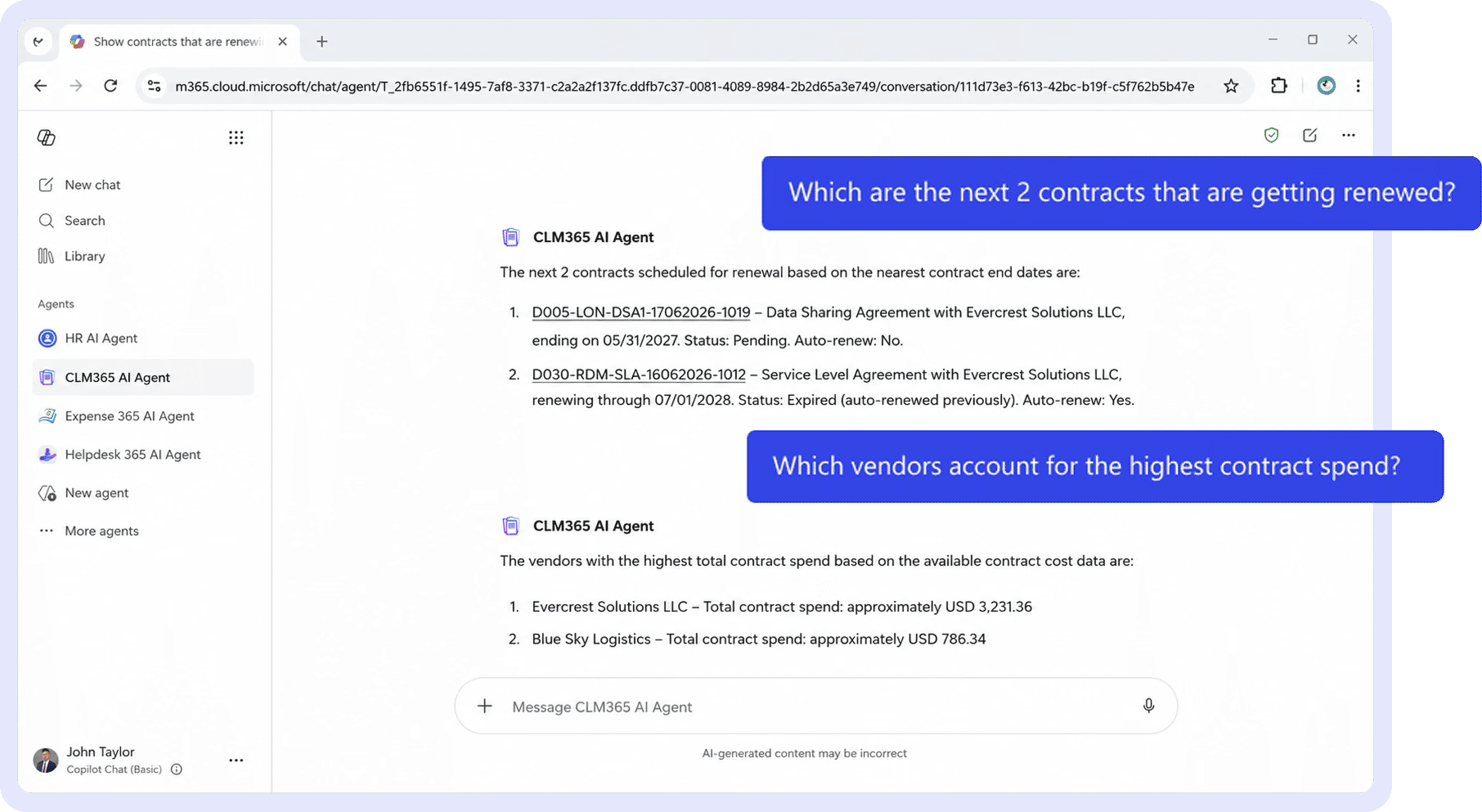
CLM 365 leverages AI to deliver contract summaries, actionable insights, and smart automation that simplify complex processes. It helps teams quickly understand key contract terms, automate repetitive tasks, and reduce dependency on manual follow-ups. This not only improves productivity but also enhances accuracy and minimizes risks across the contract lifecycle.
Hear from Our Delighted Clients
CLM 365 has made contract reviews faster and more efficient with AI-powered contract summaries. It helps teams quickly understand key terms, obligations, and potential risks, reducing manual review and enabling faster, more informed decision-making.
The ConvergePoint Approach
ConvergePoint primarily relies on rule-based automation to manage workflows and approvals. While it ensures consistency and structured execution, its AI capabilities are limited. This makes it reliable for standard processes but less effective for organizations looking to adopt intelligent, data-driven automation.
5. Contract Repository and Search
A centralized repository is essential for storing, organizing, and quickly retrieving contracts without delays.
The CLM 365 Advantage
CLM 365 provides well-organized storage with intuitive search functionality and secure place store contracts. Users can easily locate documents without navigating complex folder structures, making daily operations smoother. This improves efficiency, reduces time spent searching, and enhances overall user experience.
The ConvergePoint Approach
ConvergePoint uses SharePoint-based storage with advanced filtering and structured data organization. It is particularly effective for organizations handling large volumes of contracts that require controlled categorization. This approach ensures better governance and precise document retrieval.
6. Reporting and Analytics
Insights play a critical role in improving contract performance and enabling better business decisions.
The CLM 365 Advantage
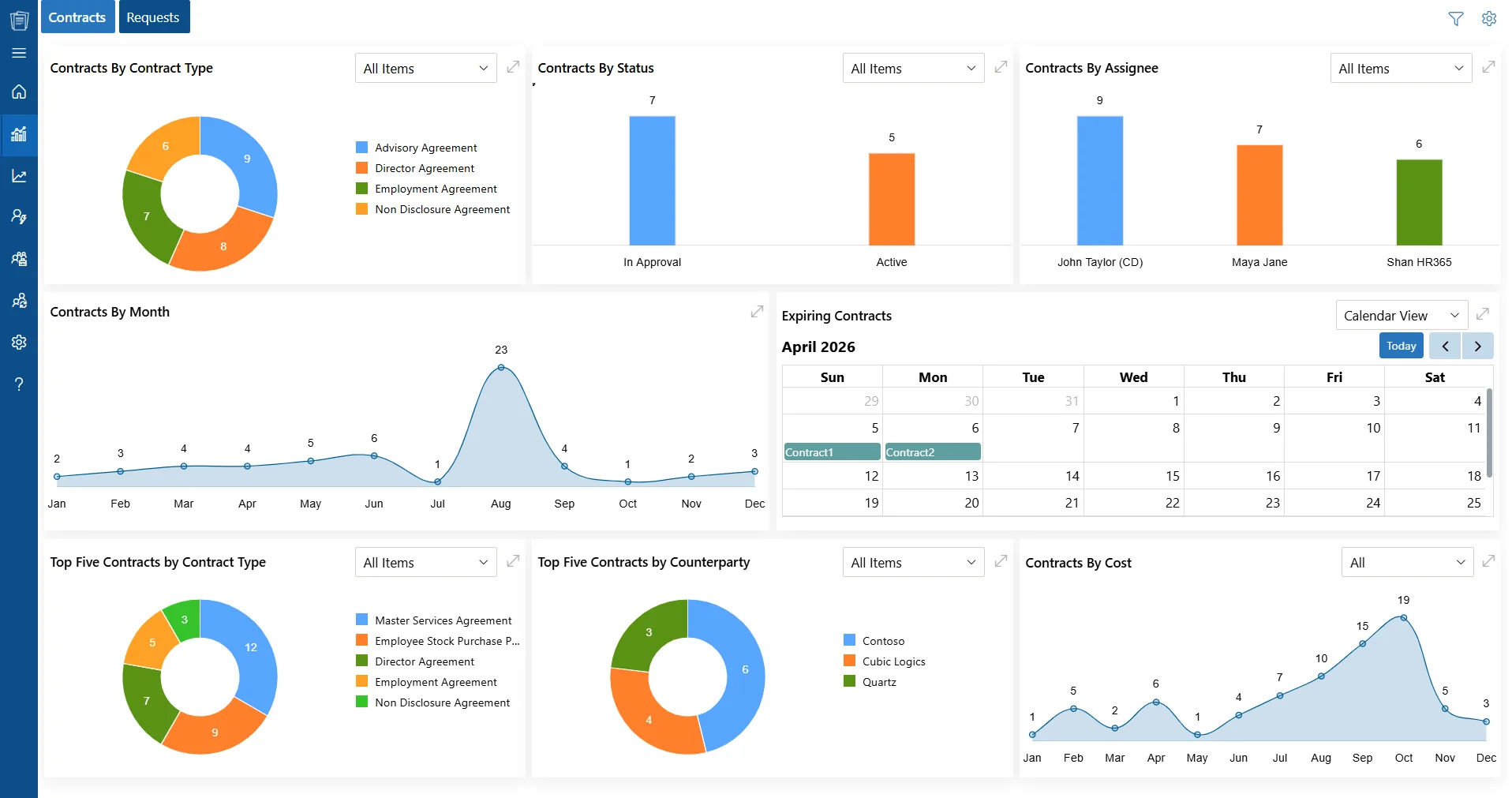
CLM 365 offers a contract dashboard with visual insights and easy-to-understand reports. Users can quickly analyse contract data, identify trends, and make informed decisions without requiring technical expertise. This empowers teams to act faster and optimize contract performance.
The ConvergePoint Approach
ConvergePoint focuses on structured, compliance-driven reporting with detailed data outputs. It is designed to support governance, audits, and regulatory requirements. This makes it a strong choice for organizations that prioritize compliance visibility and detailed tracking.
7. Security and Compliance
Security is a critical factor in contract management, especially for organizations operating in regulated environments.
The CLM 365 Advantage
CLM 365 provides role-based access within a secure Microsoft environment, ensuring that sensitive data is accessible only to authorized users. It balances strong security with ease of use, allowing teams to work efficiently without compromising data protection. This helps organizations maintain security while keeping workflows smooth.
The ConvergePoint Approach
ConvergePoint places a strong emphasis on contract compliance, offering detailed audit trails, governance controls, and full visibility into contract activities. It is designed for organizations that require strict regulatory adherence and complete accountability. This ensures every action is traceable and audit-ready.
8. Ease of Use and Adoption
User adoption is one of the biggest challenges when implementing contract management systems.
The CLM 365 Advantage
CLM 365 is built with a simple interface, easy onboarding, and minimal training requirements. Teams can start using the platform quickly without heavy technical support, which improves adoption across departments. This leads to faster implementation and quicker return on investment.
The ConvergePoint Approach
ConvergePoint has a more structured and process-driven design, which can result in a steeper learning curve. Users may require additional training to fully understand and utilize its features. This can slow down initial adoption, especially for non-technical teams.
Pros and Cons Overview
To make the decision easier, here is a clear breakdown of the key strengths and limitations of both platforms based on real business needs and usage.
CLM 365
Pros
CLM 365 is designed for simplicity, making it easy for teams to adopt without extensive training. It offers fast implementation, allowing businesses to get started quickly without long deployment cycles. Being fully Microsoft-native, it integrates seamlessly with existing tools, improving productivity. It is also cost-effective, making it suitable for both growing and large organizations. Additionally, its AI capabilities help automate tasks and improve decision-making.
Cons
For organizations with highly complex or deeply customized enterprise workflows, additional configuration or customization may be required to fully meet specific process needs.
ConvergePoint
Pros
ConvergePoint is built with a strong focus on compliance and governance, making it ideal for regulated industries. It is enterprise-ready and supports structured workflows that ensure consistency and control across contract processes. This makes it a reliable choice for organizations that prioritize standardization and audit readiness.
Cons
The platform can involve a more complex setup process, which may require additional time and technical support. Its structured nature can also lead to slower user adoption, especially for non-technical teams.
Which Platform Should You Choose?
Choosing the right platform depends on your business priorities, workflow complexity, and how you want to manage contracts within your organization.
Choose CLM 365
CLM 365 is a great fit for organizations looking to leverage AI and automation to streamline contract processes and achieve faster time-to-value. It works especially well for teams already using Microsoft 365 daily, as it fits naturally into existing workflows. With AI-driven insights, automated approvals, and smart contract reminders, it reduces manual effort and speeds up operations. Its simple interface and predictable pricing make it ideal for businesses that want efficiency, scalability, and a faster return on investment.
Choose ConvergePoint
ConvergePoint is better suited for organizations that require strict compliance and highly structured workflows. It is a strong choice for large enterprises managing complex contracts and needing detailed audit control. Its process-driven approach ensures governance, consistency, and regulatory alignment.
Conclusion
Both CLM 365 and Contracts 365 integrate well with Microsoft 365 and support contract management needs.
Contracts 365 is suitable for basic storage and tracking, while CLM 365 offers advanced lifecycle features like automated workflows, approvals, obligation tracking, and reporting, making it ideal for more complex requirements.
The right choice depends on your business needs and growth plans. CLM 365 also offers a 14-day free trial to explore its capabilities.
Frequently Asked Questions
How long does CLM 365 take to implement?
CLM 365 can be set up quickly, often within minutes, based on business requirements. Its Microsoft-native setup reduces complexity and speeds up deployment. This allows teams to start managing contracts without long delays.
Can I create contracts quickly in CLM 365?
Yes, CLM 365 offers ready-to-use templates and quick drafting features that make contract creation fast and simple. Users can generate contracts without going through complex steps. This helps teams save time and improve productivity.
Are ConvergePoint templates flexible?
ConvergePoint templates are structured and customizable to fit business processes. However, they may require more setup and configuration compared to simpler tools. This makes them better suited for organizations that need controlled and standardized templates.
How does AI in CLM 365 help in contract management?
AI in CLM 365 summarizes contracts, highlights key terms, and provides insights to speed up decision-making. It also automates reminders and tracking, reducing manual work. This helps teams save time and focus on high-value tasks.
Is CLM 365 pricing transparent?
Yes, CLM 365 offers clear and predictable pricing with no hidden costs. This makes budgeting easier and avoids surprises. It also speeds up purchase decisions.
What Does the Zero Trust Security Model Mean in CLM 365?
Zero Trust Security Model means CLM 365 keeps your contract data within your Microsoft 365 environment while verifying every user and access request. This gives organizations greater control, stronger security, and reduced risk when managing sensitive contracts.


_JiluXJRGNl.svg)























