


Contract management is a significant aspect of business management. It impacts your relationship with vendors, the safety of sensitive information, and your compliance. However, it is not enough to simply manage contracts but how you store them also counts.
Contracts begin to increase as organizations increase in size. Different versions, dates of renewal, approvals, and access rules may easily prove hard to keep track of without a reliable system in place.
This is why a lot of teams resort to SharePoint. Because it is already a part of the Microsoft ecosystem, a contract repository SharePoint can be most comfortable and least challenging choice to make.
A study by Thomson Reuters revealed that 42% of legal professionals surveyed in the Future of Professionals Report want to spend more of their valuable time on expertise-driven legal work in the next five years. The good news? These challenges are now easier than ever to overcome with the right contract management system software in place. In this blog, we will explore the 5 best contract management system tools that are helping legal teams work smarter.
What Is SharePoint?
SharePoint is an online collaboration and document management system that is utilized by more than 250 million people across the globe. SharePoint is used by organizations to store files, manage contents, work with teams, and maintain a structured information in a centralized system.
In its simplest form, SharePoint is an online secure workspace that allows teams to access documents, manage permissions, and collaborate effectively. Over the years, it has developed into an advanced file storage system that can support contract workflows, automation, reporting, and enterprise level security.
Since contracts are business-critical documents that need to be structured, access controlled, tracked, and stored over a long period, many organizations naturally consider SharePoint as a repository of contracts.
Can SharePoint Be Used for Contract Management?
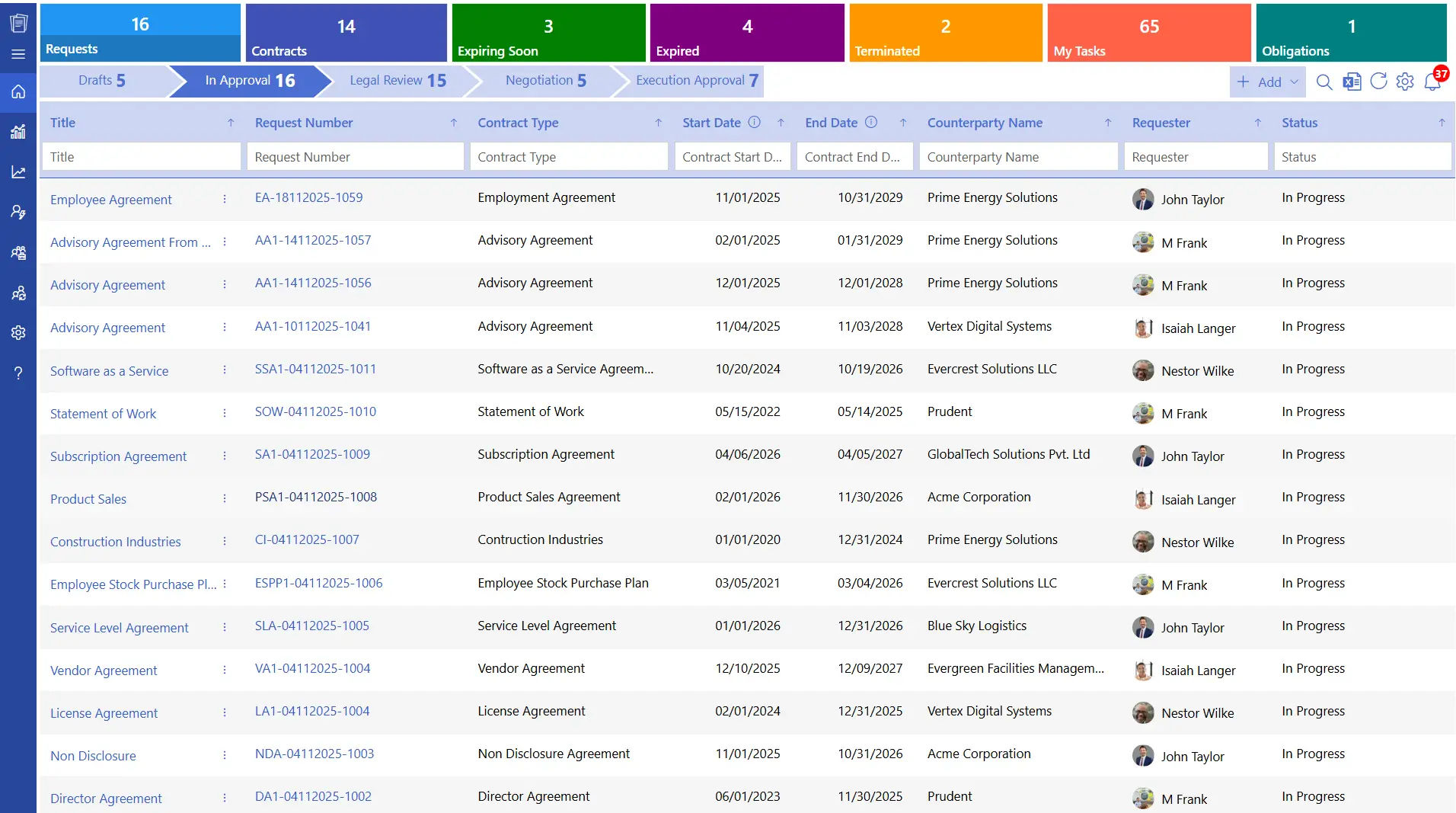
Yes, SharePoint may be used for managing contracts especially as a contract repository. SharePoint is also used by businesses to store agreements, versioning, approvals, and tracking activities involving contracts in a centralized place.
SharePoint is, however, mainly a document repository. To handle contracts, organizations often configure SharePoint libraries, metadata, workflows and permissions that are built on top of SharePoint.
A contract repository SharePoint structure can enable teams to:
- Store contracts in a single location
- Categorize contracts using metadata
- Control access based on roles
- Track contract changes and approvals
- Monitor renewals and obligations
Challenges Businesses Face in Daily Contract Workflows
The problem with contract storage and management is common in most businesses before they adopt a structured contract repository. Below are five common challenges directly linked to contract storage and handling.
- Contracts Scattered Across Multiple Locations
Contracts in most organizations are saved in email inboxes, shared drives, personal folders and local systems. Although this might be effective in the initial phases, it becomes challenging as time goes. Teams use more time in searching documents and this slows down the decision-making process and impacts productivity. - Limited Visibility into Contract Status
Teams often encounter difficulties in knowing the current phase of a contract be it under review, awaiting approval, active or under renewal. In cases where the contract visibility is not easily noticeable, critical follow-ups can be postponed, and the stakeholders will not receive the information in time to proceed with the next steps. - Inconsistent Naming and Organization
Without a standardized structure for storing contracts, documents are stored in various naming formats and in different folders. This inconsistency complicates the process of finding the appropriate agreement in the shortest possible time. - Weak Access Control
Access to contracts may be difficult to manage in cases where permission is not clearly defined Sensitive agreements can be made available to unneeded users, and the essential stakeholders might experience difficulties. This may bring about operational issues and add risks associated with compliance. - Manual Tracking of Renewals and Obligations
Most organizations use spread sheets or manual reminders to monitor the renewal, expiry, and obligations of contracts. This method is manageable at a smaller scale, but it becomes difficult to maintain as the contract volumes increase. Important dates may be overlooked, leading to missed renewals or delayed actions that could have been avoided with better visibility.
These challenges highlight why businesses actively search for structured solutions like a Contract repository SharePoint setup.
Traditional Contract Storage vs SharePoint Contract Repository
Understanding the difference between the conventional contract storage systems and a SharePoint contract repository assists organizations to consider the effectiveness of contract storage, access and management throughout the business.
Aspect | Traditional Contract Storage | Contract Repository SharePoint |
Storge Location | Local drives and emails | Centralized digital repository |
Search Capability | Manual browsing | Metadata-based search |
Version Tracking | Manual tracking | Built-in version history |
Access Control | Limited or manual | Role-based permissions |
Approval Tracking | Email-based | Workflow-driven |
Audit Readiness | Time-consuming | Easily traceable |
Scalability | Difficult to manage | Grows with business needs |
This comparison explains why companies are moving away to the old forms of storage to the SharePoint repositories.
How Do Businesses Benefit from SharePoint Contract Repository?
After comparing traditional methods with SharePoint-based storage, it’s easy to see why many organizations choose a SharePoint contract repository. Below are some key benefits to consider.
- Centralized Contract Access
Contract repository SharePoint brings all contracts in a centralized and easy to access place. There is no longer a need to search through several folders, email threads, or contract repository tools. The single source of all agreements assists teams to be on track and work more effectively, particularly in situations when contracts need to be audited.
Example:
A procurement team that is about to hold a meeting with a vendor can find the latest agreement within the repository without asking the various departments to send files by simply opening the repository, filtering contracts by vendor name.
- Faster Contract Retrieval
Having structured metadata, filters, and advanced search features, the user can find contracts according to the relevant information. This saves time on searching and enables teams to get on to the review and action of the contracts instead of searching. - Improved Collaboration
SharePoint enables legal, finance, sales and procurement departments to operate on the same platform with distinct access levels. Contracts can be viewed or updated by each team depending on their role, which assists in better contract collaboration and avoid the reliance on other tools.
Example:
In case a sales contract needs to be reviewed by a lawyer and approved by a financial institution, both teams will be able to view the same document in the repository. Clauses can be reviewed by legal, the terms of finance checks are priced, and files are not sent out of the system. - Stronger Document Control
An in-built version control maintains full history of modifications on contracts over time. Users can simply check past versions, know what has been changed and when contract was modified. This brings clarity and aids in making decisions better when reviewing contracts. It also assists teams to not use the old version of documents as the latest version is well pointed out. - Reduced Dependency on Email
Through direct management of contracts in SharePoint, the teams will not depend on email as much in sharing files, approvals, and updates. The comments, changes and approvals will be related to the contract itself and will help users to be organized. This makes communication contextual and relevant to the agreement under consideration. - Better Accountability
Every contract may be allocated to a definite owner in the SharePoint repository. The roles and responsibilities are assigned in such a way that all the stakeholders are aware of their role in the review and approval process. This transparency assists teams to act in time and minimizes delays due to lack of clarity of contractual obligations. - Business Continuity
Contracts that are stored on a SharePoint repository can be accessed even when the employees leave the organization or change roles. All the contract information and history remain in the system and not in the hands of individuals. The new members of the team can look at the previous agreements and know their present status.
Key Features of Contract Repository SharePoint
The following are the main features that businesses anticipate when utilizing SharePoint as a repository of contracts.
1) Contract Repository
SharePoint provides a centralized repository of contracts, in which all the agreements are stored in a centralized and well-organized library. The folders and meaningful methods like contract type vendor name status and key dates can be used to arrange contracts. This framework assists teams to find agreements fast and operate with a distinct perspective of contract data.
2) Multi-level Approval Process
Multi-level contract approval processes enable contracts to pass through specific review processes. Contracts can be reviewed in the correct order by legal finance and management teams according to internal policies. Every approver is provided with a clear visibility of his or her role that facilitates prompt reviews and decision making.
Example:
A high value vendor agreement can be sent to legal to check the clauses and then to finance to check the budget and then to the management. Every step is monitored in SharePoint without taking the document out of the system.
3) Data Security
SharePoint offers robust data protection in the form of role-based access. Contracts can be accessed depending on the roles and duties of the user. Managing sensitive contracts are only accessible to authorized users and other teams can be granted access as necessary. This helps in enhanced management of secret business data.
4) Integration with Microsoft 365 Apps
SharePoint works hand in hand with other Microsoft 365 applications like Outlook, MS Teams, PowerPoint, MS Copilot and Power Automate. Contracts can be managed and accessed by users through tools they already deal with daily. This minimizes the necessity of changing platforms and assists teams to remain productive when dealing with contract activities.
Recommended Reading: Advantages of Microsoft Teams Contract Management
5) Automated Contracting Process
SharePoint automation is used to support the workflow of contracts by routing documents that send alerts. The system manages routine operations and minimizes human effort and assists teams to concentrate on review and decision making. Contract automation also allows a superior view of the location of a contract at any one time.
6) Contract Routing
Contract routing enables agreements to be made to the appropriate stakeholders according to specific rules. Contracts can be routed by value department contract type or business unit. This is useful in assisting teams to adhere to internal processes and minimizing delays due to manual sharing.
Example:
A procurement contract with a set value can be automatically forwarded to top management and those with lower values to departmental heads. This ensures that reviews are in line with company policies.
7) Clause Library
A clause library is a collection of approved and commonly used clauses that are stored in a single place. These clauses can be reused by teams when writing new contracts and this facilitates uniformity in contracts. The access controls assist in ensuring quality by restricting the individuals who can update the standard clauses.
8) Renewal & Obligation Tracking
SharePoint helps in monitoring of contract renewal and expiry and obligations by use of alerts and reminders. Teams are notified of future dates in time so that they can plan the action beforehand. This is to prevent missed contract renewal and assist in improving vendor and customer relationships.
9) Version Control
The contract version control keeps all the updates that have been made to a contract and the timestamps and user information. Teams will be able to look at previous versions and see how an agreement has evolved. This gives transparency in audits reviews and internal deliberations.
10) Reporting & Analytics
Reporting and analytics give a clear insight into the contract data within the organization. Dashboards indicate data like the approval timelines of contract volume renewal status and ownership. These insights assist leadership teams to review performance and make informed decisions using real contract data.
Best Practices to Implement a Contract Repository SharePoint
Implementing a contract repository SharePoint is more than just posting documents in a library. The best practices that follow are specifically designed to suit SharePoint users who would wish to handle contracts in a more structured way.
1. Define a Clear Contract Structure
A good contract structure will make SharePoint users realize where the contracts are to be and the way they are supposed. Libraries should be designed in a clear manner, and teams can adopt the system quicker and work more consistently.
- Establish standard document libraries that have folders according to the type of contract
- Set up metadata columns, including contract category, department & status
- Each category of contract should have a responsible person to ensure that ownership
2. Use Metadata Instead of Deep Folders
SharePoint is most effective in the case when metadata is applied to structure documents instead of using several nested folders. This method enhances the search, filtering, and reporting of contracts.
- Identify important metadata fields like the date of renewal of the contract owner
- Important fields should be made mandatory to ensure that contracts are uploaded with all information.
- Train SharePoint users to rely on views and filters instead of navigating folders
3. Set Role-Based Access
Contract repository SharePoint assist in taking contracts through the review processes. This smart contract access control provides transparency of contract progress and keeps the stakeholders updated.
- Limit editing rights to users responsible for contract updates and reviews
- Provide view-only access to business users who need visibility without modification rights
- Review and update SharePoint permissions periodically as teams and roles change
4. Automate Approval Workflows
SharePoint approval workflows assist in taking contracts through the review processes without the need to use manual follow-ups. This enhances transparency of contract progress and keeps the stakeholders updated.
- Approve updates with the assistance of SharePoint workflows or Power Automate according to internal policies
- Assign approvers by role or department so contracts reach the right reviewers
- Allow automatic status change in SharePoint libraries to allow users to easily monitor progress
5. Track Renewals Proactively
One of the important components of contract repository SharePoint is renewal tracking. Establishing alerts and accountability will enable groups to work on schedule and prevent making decisions at the last moment.
- Set up SharePoint and Power Automate alerts and reminders on key contract dates
- Give renewal owners in SharePoint metadata to ensure that there is clarity of responsibility
- Develop SharePoint views or dashboards to track renewals and expirations
6. Maintain a Central Clause Library
A clause library within SharePoint supports consistency across contracts and reduces repetitive drafting work. This is particularly handy to legal and procurement departments.
- Store approved clauses in a dedicated SharePoint library with clear categorization
- Limit editing rights to authorized users in order to update standard clauses
- Review and update clauses on a regular basis to indicate policy or regulatory changes
7. Monitor Usage and Performance
Regular review assists companies to know the level of effectiveness with which SharePoint is being utilized as a contract repository. This is in favour of constant improvement and eventual success.
- Monitor adoption of users by checking document activity and usage reports in SharePoint
- Check approvals of reviews to find out any delays or bottlenecks in the workflow
- Enhance libraries operations and metadata based on the real usage patterns
Why CLM 365 – A Great Choice for Microsoft 365 Users?
CLM 365 is built on the Microsoft ecosystem, making it a natural fit for organizations already using Microsoft 365. It works closely with SharePoint, Microsoft Teams, Outlook, Power BI, Microsoft Copilot, and Power Automate, allowing users to manage contracts within tools they use every day.
With secure workflows in place, users can store, edit, review, approve, retrieve, negotiate, and sign contracts from a single platform. AI-powered capabilities and automation help teams manage contract activities more efficiently while maintaining full visibility across each stage.
CLM 365 also offers a clean and easy-to-navigate interface, making it simple for users to get started and stay productive without complex setup or training.
How to Implement CLM 365 In Existing Workflow?
The implementation of CLM 365 into the current business processes can be carried out in a realistic and systematic manner. The following steps can be used to start using the platform by teams.
- Analyse your current contract lifecycle to find out delays, gaps or manual processes
- Name the tools that are in use to draft, review, approvals and store contracts
- Install CLM 365 and integrate it with Microsoft 365 to become an integrated service
- Connect CLM 365 to Outlook, Teams, SharePoint, MS Copilot, and the Word add-in to handle contracts in applications one already knows
- Set approval process, role-based access and notifications of significant contract dates
- Provide train teams with real contract examples and easy usage instructions in order to facilitate quicker adoption
- Use of monitor systems, process improvements, and workflow refinements are monitored as the business requirements change
Tip: CLM 365 also has an AI-based assistant that reads through contracts, identifies the most important clauses, risks, and obligations, and allows teams to prioritize what is most important without having to read all the documents manually.
Conclusion
A contract repository SharePoint environment provides business with an organized and trustworthy method of managing and storing contracts at a single location. SharePoint facilitates improved team visibility and collaboration with the appropriate structure and workflow.
To go further, CLM 365 assists in extending SharePoint with custom-built contract management capabilities, and it becomes simpler to handle approvals, renewals, and contract insights in the Microsoft 365 environment.
Begin your 14-day free trial and see how CLM 365 can be used in your contract process.
Join Our Creative Community
Frequently Asked Questions
What types of contracts can be stored in a Contract Repository SharePoint?
Contract repository SharePoint supports all contracts, such as vendor contracts, customer contracts, employment contracts, NDAs, service contracts, procurement contracts, partnership contracts, and renewal-based contracts.
How to enable the full CLM 365 experience in SharePoint?
- Open the SharePoint Admin Center
- Select API access by going to the left panel and Advanced
- In the Pending requests section, check the permissions listed
- With API access, check the requests that are pending and allow each necessary permission individually, including Microsoft Graph
- Once all the necessary API permissions have been approved, visit the location of the SharePoint site where CLM 365 is to be installed
- Open the page and press the + (plus) icon
- Choose CLM 365 among the existing web parts and insert it on the page
- The first time the user visits CLM 365, a welcome popup is shown
The toggle option will load sample data in case you would like to have a preview of the application with prefilled examples
Does CLM 365 help provide notifications during contract renewals?
Yes. CLM 365 provides timely notifications and reminders about impending renewals, expirations and milestones. This assists teams to plan beforehand and eliminate last minute follow-ups.
Does the system support adding counterparties in bulk?
Yes. CLM 365 allows users to add and maintain counterparties in bulk and it is therefore easier to onboard vendors, customers or partners without having to manually enter each record.
How does Contract Repository SharePoint handle security?
Since the system is built on the Microsoft ecosystem, all contract data is stored within the organization’s Microsoft environment and managed through the admin portal. This provides controlled access, role-based permissions, and centralized oversight aligned with Microsoft security standards.
Table of Contents

Trusted by the Best

_JiluXJRGNl.svg)























