
AI in HR Analytics: How AI Is Changing HR Reporting and Decision-Making

- AI analyzes HR data faster, giving you real-time insights.
- Predictive analytics spots hiring trends and turnover risks early.
- AI supports recruitment, attendance, leave, performance, and learning from one platform.
- Centralizing data in HR365 HRMS creates more accurate, actionable business insights.
- Combining AI with human expertise leads to smarter HR decisions.
Human Resources has become more data-driven than ever before. From recruitment and onboarding to performance reviews and retention, every HR activity generates valuable information. The challenge is turning that information into meaningful insights that support better decisions. This is where AI in HR analytics is making a significant impact.
What is an AI in HR analytics?
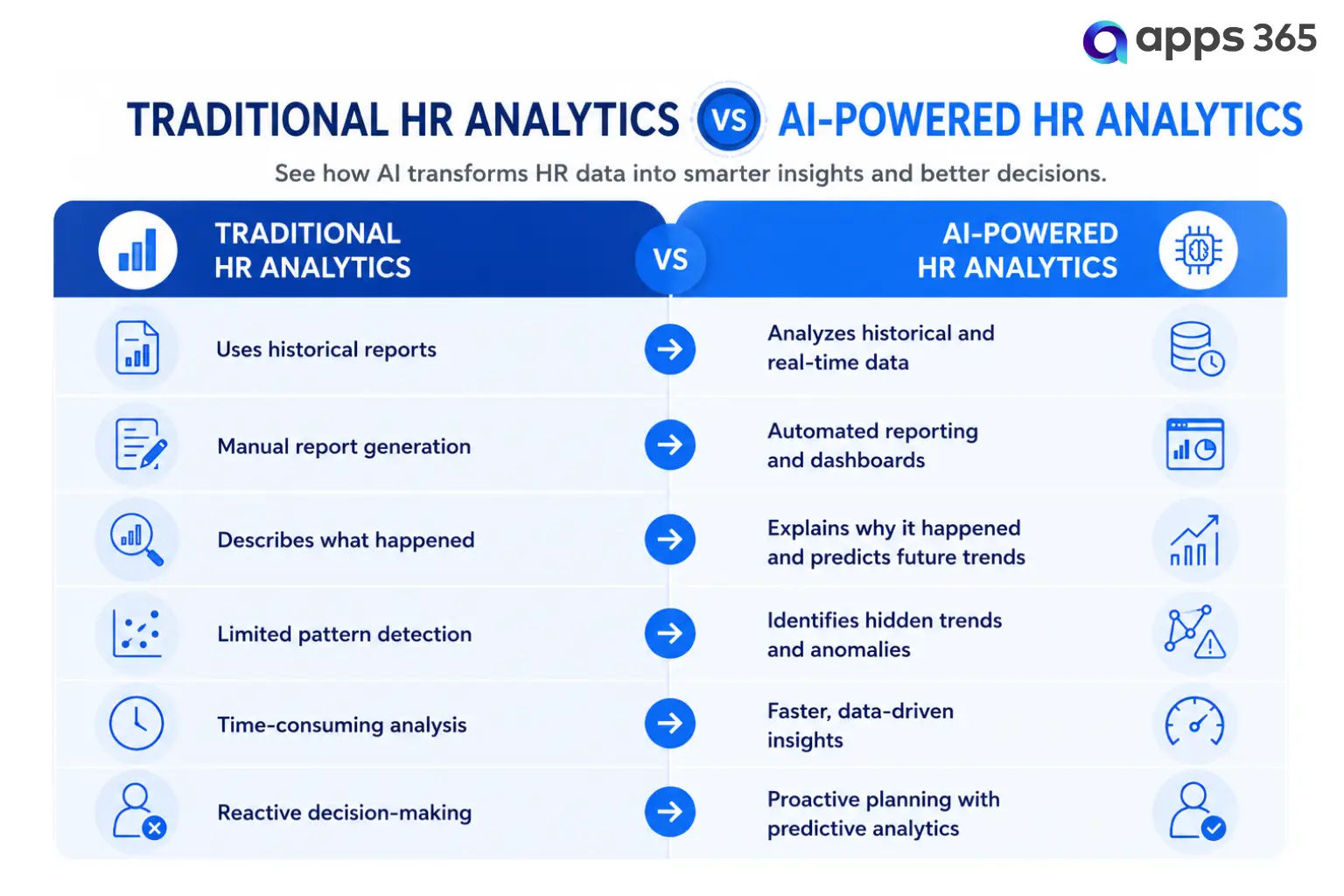
Every HR activity generates valuable data, from recruitment and onboarding to attendance, leave, performance reviews, learning, and employee feedback. AI in HR analytics helps organizations analyze this information faster, identify patterns, and turn raw data into actionable insights. Unlike traditional HR reporting, which mainly focuses on historical data, AI can process both historical and real-time information to uncover trends, detect anomalies, and support better business decisions.
According to Deloitte, 94% of business leaders say digital HR technology is important to their organization’s success, highlighting the growing role of AI and analytics in modern HR strategies.
For example, AI can identify recurring absenteeism trends, highlight departments with higher leave usage, or reveal hiring patterns that may otherwise go unnoticed. Organizations using HR365 HRMS can centralize recruitment, onboarding, employee records, attendance, leave, performance, learning, and task management within Microsoft 365. With all HR data available in one platform, HR teams can access meaningful dashboards, generate AI-powered insights, and make informed decisions without switching between multiple systems.
Types of HR Data AI Can Analyze
AI can process information from almost every stage of the employee lifecycle, including:
- Recruitment and hiring metrics
- Employee onboarding progress
- Attendance and timesheet records
- Leave management data
- Performance review results
- Learning and training completion
- Employee engagement surveys
- Task completion and productivity trends
- Expense management records
- Employee demographics and organizational structure
By combining these datasets, AI creates a complete picture of organizational performance instead of analyzing each process separately.
According to IBM, organizations using AI-powered business analytics can reduce the time spent preparing reports by up to 80%, allowing HR teams to focus more on strategic initiatives rather than manual data analysis.
How AI Works in HR Analytics
AI in HR analytics follows a structured process that transforms raw HR data into meaningful business insights. Instead of manually reviewing spreadsheets or generating reports, AI continuously analyzes information, identifies patterns, and highlights opportunities that may otherwise go unnoticed.
When organizations use a centralized HR platform like HR365 HRMS, data from recruitment, onboarding, attendance, leave, performance, learning, and employee records is stored in one place. This provides AI with a complete and consistent dataset for more accurate analysis.
1. Collects HR Data from Multiple Sources
2. Organizes and Cleans the Data
3. Identifies Patterns and Trends
4. Generates Predictive Insights
According to McKinsey, organizations that effectively use AI and advanced analytics can improve decision-making speed by up to 40%, helping leaders respond more quickly to changing business needs.
5. Creates Interactive Dashboards
6. Supports Better HR Decision-Making
Why AI Is Becoming Essential for HR Analytics
- Handles Growing Data Volumes: As companies grow, HR data gets complex. HR365 HRMS keeps all information centralized within Microsoft 365, making it easy to organize and analyze.
- Delivers Faster Insights: AI automates data collection and presents real-time dashboards, helping teams respond to issues quickly.
- Supports Predictive Choices: AI helps forecast hiring needs, spot turnover risks, and plan future learning initiatives.
- Improves Accuracy: Manual reporting risks errors. AI applies consistent rules, improving the reliability of HR reports.
- Enables Data-Driven Strategies: Modern HR relies on measurable outcomes. AI makes it easy to track retention trends, training completion, and attendance patterns.
According to PwC, 77% of business leaders consider digital transformation a top business priority, highlighting the growing importance of technologies like AI in improving organizational operations and employee experiences.
Benefits of AI in HR Analytics
Smarter Recruitment Decisions
AI analyzes recruitment data to identify which hiring channels attract the best candidates, how long hiring takes, and where delays occur in the recruitment process.
Faster Performance Analysis
AI makes it easy to track performance trends, compare departments, and monitor goal completion through centralized dashboards.
Attendance and Leave Trend Analysis
AI identifies frequent absenteeism, seasonal leave patterns, and workforce availability. HR365 HRMS Timesheet and Leave Management tracks this in a single view.
Personalized Learning and Development
AI reviews training history to recommend relevant learning opportunities and identify skill gaps.
Automated HR Reporting
AI generates dashboards automatically and updates reports in real time, cutting down on manual calculations.
Improved Workforce Planning
Planning future hiring and resource allocation becomes easier when AI analyzes historical HR data alongside current workforce trends.
According to Deloitte, organizations that adopt data-driven HR practices are 2.4 times more likely to outperform their peers in achieving business outcomes, highlighting the growing value of HR analytics.
How to Implement AI in HR Analytics
Successfully implementing AI in HR analytics is not just about adopting new technology. It starts with building a strong data foundation, selecting the right HR platform, and using AI to support business goals. Organizations that take a structured approach can generate more accurate insights and make better workforce decisions.
With HR365 HRMS, organizations can centralize HR data across Microsoft 365, making it easier to introduce AI-driven analytics without managing information across multiple disconnected systems.
1. Define Your HR Objectives: Identify the challenges you want to solve, like reducing turnover or tracking learning progress.
2. Centralize Your HR Data: AI works best with complete data. HR365 HRMS brings employee records, recruitment, attendance, leave, and performance into one Microsoft 365 platform.
3. Choose the Right Platform: Look for a solution with interactive dashboards, real-time reporting, and secure SharePoint data management.
4. Maintain High-Quality Data: Regularly remove duplicate records and keep employee information current.
5. Train HR Teams: Ensure your team knows how to read dashboards and interpret AI-generated insights.
6. Monitor Results: Review analytics regularly and refine your HR strategies based on the data.
Best Practices for Using AI in HR Analytics
AI can deliver valuable insights, but its effectiveness depends on how organizations use it. Following best practices helps improve the accuracy of analytics, supports better decision-making, and ensures HR teams get meaningful value from their data.
- Keep HR Data Accurate and Up to Date: AI relies on high-quality data to generate reliable insights. Inaccurate or outdated information can lead to misleading reports and poor decisions.
- Centralize HR Information: Using multiple disconnected systems often creates duplicate records and inconsistent reporting. A centralized HR platform provides AI with a complete view of the employee lifecycle.
- Monitor Analytics Regularly: HR analytics should be reviewed consistently rather than only during annual planning. Interactive dashboards in HR365 HRMS make it easier to monitor these metrics in real time.
- Continuously Improve Your AI Strategy: Business priorities change over time, and HR analytics should evolve with them. Regularly evaluate your AI models, dashboards, and reporting processes to ensure they continue to provide relevant insights.
- Focus on Meaningful HR Metrics: Tracking every available metric can make reports difficult to interpret. Instead, focus on the KPIs that align with your business objectives.
- Combine AI Insights with Human Expertise: AI is a powerful decision-support tool, but it should complement human judgment rather than replace it.
Organizations using HR365 HRMS can strengthen these practices by maintaining centralized HR records, real-time dashboards, and connected data across Microsoft 365, SharePoint, and Microsoft Teams.
Future Trends of AI in HR Analytics
AI is changing how organizations analyze HR data, and its role will continue to grow in the coming years. As AI technologies become more advanced, HR analytics will move beyond reporting past events to providing real-time recommendations, predictive insights, and strategic guidance. Organizations that invest in modern HR analytics today will be better prepared to adapt to future workforce challenges.
Platforms like HR365 HRMS are already helping organizations build this foundation by centralizing HR data within Microsoft 365, making it easier to adopt advanced analytics as AI capabilities continue to evolve.
1. Predictive Workforce Planning
AI will get much better at forecasting skill shortages and department growth. Instead of just looking at past hiring, AI will review market trends and current employee skills. This helps HR leaders hire the right people before a busy season even starts.
2. Real-Time HR Dashboards
Static monthly reports will be fully replaced by live, auto-updating dashboards. Managers will not have to wait until the end of the month to see attendance or performance data. They will see exactly what is happening in their teams right now, allowing for faster action.
3. Smarter Recruitment Analytics
AI will continue to improve hiring by providing deeper insights throughout the recruitment process. Future tools will help organizations match candidates more accurately, track which hiring channels work best, and predict time-to-hire.
4. Conversational AI for HR Insights
HR professionals will ask natural language questions and get instant answers. Instead of digging through menus to build a report, a user can just type, “Which department had the highest leave rate this month?” The AI will pull the exact data and display it in seconds.
5. Integrated HR Analytics Across the Microsoft Ecosystem
Solutions like HR365 HRMS will continue to deepen integration with Microsoft 365, SharePoint, and Teams. This makes advanced analytics easier to access right where employees already work. When HR data lives inside the tools your team uses every day, daily usage and adoption naturally go up.
According to Fortune Business Insights, the global AI market is expected to grow at a compound annual growth rate (CAGR) of more than 26% through the next decade, reflecting rapid adoption of AI technologies across industries, including human resources.
Conclusion
HR365 HRMS provides the foundation needed for effective AI in HR analytics by centralizing HR data within Microsoft 365, SharePoint, and Microsoft Teams. HR365 HRMS helps organizations turn raw data into meaningful insights that support smarter business decisions.s.
Ready to Make Smarter HR Decisions with AI?
Book a free demo today and discover how HR365 HRMS can transform your HR analytics.
Frequently Asked Questions
What is AI in HR analytics?
AI in HR analytics uses artificial intelligence to analyze HR data, identify patterns, predict trends, and generate insights that support better decisions across recruitment, performance, attendance, learning, and workforce planning.
What are the benefits of AI in HR analytics?
AI helps organizations improve recruitment decisions, monitor employee performance, analyze attendance and leave trends, predict workforce needs, automate reporting, and make faster, data-driven HR decisions.
How does AI improve recruitment analytics?
AI analyzes recruitment metrics such as hiring sources, time-to-hire, candidate quality, and recruitment trends. These insights help organizations optimize hiring strategies and improve recruitment outcomes.
Can small and medium-sized businesses use AI in HR analytics?
Yes. Businesses of all sizes can benefit from AI-powered HR analytics. Solutions like HR365 HRMS provide centralized HR data, dashboards, and reporting tools that make analytics accessible for growing organizations without requiring complex systems.
What data is used in AI-powered HR analytics?
AI can analyze a wide range of HR data, including employee records, recruitment information, onboarding progress, attendance, leave management, performance reviews, learning and training records, task management, and expense data.
How does HR365 HRMS support AI in HR analytics?
HR365 HRMS centralizes HR data across recruitment, onboarding, employee management, attendance, leave, performance, learning, tasks, and expenses within Microsoft 365. This connected data enables organizations to use dashboards, reporting, and AI-powered automation to gain meaningful HR insights and make informed business decisions.


_JiluXJRGNl.svg)























